Każda aktywność online pozostawia ślad. Czasem może to zagrozić Twojemu bezpieczeństwu lub utrudnić Ci web scraping. Proxy pomagają ominąć systemy wykrywania bez zakłócania realizacji zadań. W tym artykule pokażemy Ci, jak zintegrować proxy DataImpulse w C# z użyciem .NET, aby nie martwić się limitem żądań ani lukami, które mogłyby wykorzystać złośliwe podmioty.
Pierwsze kroki
Najpierw upewnij się, że na Twoim urządzeniu są zainstalowane następujące narzędzia:
Visual Studio Code (może to być także Visual Studio 2022 lub inne IDE obsługujące .NET)
.NET 8
HtmlAgilityPack (w tym poradniku używamy wersji 1.6.11)
Ponieważ w tym poradniku korzystamy z proxy, potrzebujesz konta DataImpulse i planu dopasowanego do Twoich potrzeb. Mamy poradnik krok po kroku wyjaśniający, jak to zrobić.
W tym poradniku jako przykład wykonujemy web scraping naszej stronyDataImpulse.com. Możesz jednak łatwo dostosować kod do swoich zadań i wykonywać web scraping dowolnych potrzebnych Ci źródeł. Oczywiście zawsze upewnij się, że nie naruszasz warunków korzystania ze stron, z których zbierasz dane.
Tworzenie klienta HTTP
Najpierw utwórz klienta HTTP, aby kierować ruch przez wyznaczony serwer proxy. To prosta aplikacja konsolowa, która wysyła żądania do potrzebnego URL i odbiera odpowiedzi, a wszystko odbywa się przez serwer proxy. Możesz skopiować poniższy fragment kodu.
using System.Net;
class HttpClientApp
{
public static void Main(string[] args)
{
DownloadPageAsync().Wait();
}
private static async Task DownloadPageAsync()
{
string page = "https://api.ipify.org/"; // Example API to get the public IP address
// Configure proxy
var proxy = new WebProxy("gw.dataimpulse.com:823")
{
UseDefaultCredentials = false,
Credentials = new NetworkCredential("your login", "your password")
};
// Set up HTTP client handler with proxy
var httpClientHandler = new HttpClientHandler
{
Proxy = proxy,
UseProxy = true
};
using (var client = new HttpClient(handler: httpClientHandler, disposeHandler: true))
{
try
{
// Send the HTTP GET request
var response = await client.GetAsync(page);
// Check if the response is successful
response.EnsureSuccessStatusCode();
// Get the content of the response
string result = await response.Content.ReadAsStringAsync();
Console.WriteLine("Response received: ");
Console.WriteLine(result);
Console.WriteLine("Press any key to exit.");
Console.ReadLine(); // Keep the console open to display the result
}
catch (HttpRequestException e)
{
Console.WriteLine($"Request error: {e.Message}");
Console.WriteLine("Press any key to exit.");
Console.ReadLine(); // Keep the console open to display the result
}
catch (Exception ex)
{
Console.WriteLine($"Unexpected error: {ex.Message}");
Console.WriteLine("Press any key to exit.");
Console.ReadLine(); // Keep the console open to display the result
}
}
}
}
Aby uruchomić tę aplikację i kolejne, wpisz poniższe polecenie w terminalu w katalogu głównym aplikacji.
dotnet run --project NameOfProject
Wynik powinien wyglądać tak:
Wdrażanie rotacji proxy
Samo kierowanie ruchu przez serwer proxy nie wystarczy. Aby działać zgodnie z wytycznymi dotyczącymi ruchu, musisz używać nowego adresu IP dla każdego żądania. Kolejnym krokiem jest więc zbudowanie rotatora proxy, który będzie wybierał losowy adres z naszej puli.
using System.Net;
class ProxyRotator
{
// List of proxies to rotate through
private static List proxies = new List
{
new WebProxy("http://gw.dataimpulse.com:10000"),
new WebProxy("http://gw.dataimpulse.com:10001"),
new WebProxy("http://gw.dataimpulse.com:10002")
};
public static void Main(string[] args)
{
MakeRequestsWithRotation().Wait();
}
private static async Task MakeRequestsWithRotation()
{
// Example URLs to request
string url = "https://api.ipify.org/";
for (int i = 0; i < proxies.Count; i++)
{
// Send request using each proxy
Console.WriteLine($"Using proxy: {proxies[i].Address}");
try
{
var response = await SendRequestWithProxy(url, proxies[i]);
if (response.IsSuccessStatusCode)
{
Console.WriteLine($"Request succeeded with proxy {proxies[i].Address}");
string responseBody = await response.Content.ReadAsStringAsync();
Console.WriteLine($"IP address from API website: {responseBody}"); // Print or process the response as needed
}
else
{
Console.WriteLine($"Request failed with proxy {proxies[i].Address}, Status Code: {response.StatusCode}");
}
}
catch (Exception ex)
{
Console.WriteLine($"Exception with proxy {proxies[i].Address}: {ex.Message}");
}
}
}
// Function to send request using a specific proxy
private static async Task SendRequestWithProxy(string url, WebProxy proxy)
{
HttpClientHandler handler = new HttpClientHandler
{
Proxy = proxy,
UseProxy = true
};
using (HttpClient client = new HttpClient(handler))
{
return await client.GetAsync(url);
}
}
}
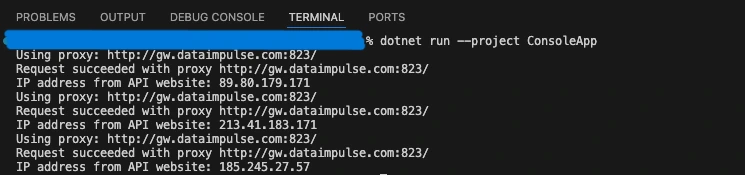
W powyższym przykładzie podajemy listę proxy do rotacji (w naszym przypadku 3 proxy) i sprawdzamy rotujące adresy IP za pomocą URL http://api.ipify.org/. Wynik powinien wyglądać tak:
Tworzenie narzędzia sprawdzającego proxy
Aby upewnić się, że proxy działają, musimy skonfigurować narzędzie sprawdzające proxy. Wysyła ono żądanie HTTP do serwera proxy i zwraca informację, czy serwer jest prawidłowy. Używamy dataimpulse.com, ale można użyć dowolnego innego linku.
using System.Net;
class ProxyChecker
{
// Entry point renamed to avoid conflict
public static void Main(string[] args)
{
string proxyAddress = "gw.dataimpulse.com"; // Replace with your proxy address
// Replace with your proxy ports
var proxyPortStart = 10000;
var proxyPortEnd = 10100;
var tasks = new List();
for (var proxyPort = proxyPortStart; proxyPort < proxyPortEnd; proxyPort++)
{
tasks.Add(CheckProxy(proxyAddress, proxyPort));
}
Task.WaitAll(tasks.ToArray());
}
public static async Task CheckProxy(string proxyAddress, int proxyPort)
{
var proxy = new WebProxy(proxyAddress, proxyPort)
{
// Uncomment and modify if the proxy requires credentials
Credentials = new NetworkCredential("your login", "your password"),
BypassProxyOnLocal = false
};
var httpClientHandler = new HttpClientHandler
{
Proxy = proxy,
UseProxy = true
};
using (var client = new HttpClient(httpClientHandler))
{
try
{
client.Timeout = TimeSpan.FromSeconds(10); // Set a timeout
var response = await client.GetAsync("https://api.ipify.org/"); // You can use any URL for testing
if (response.IsSuccessStatusCode)
{
Console.WriteLine("Proxy is working: " + proxyAddress + ":" + proxyPort);
}
else
{
Console.WriteLine("Proxy is not working (Invalid response): " + proxyAddress + ":" + proxyPort);
}
}
catch (Exception ex)
{
Console.WriteLine("Proxy is not working (Exception): " + proxyAddress + ":" + proxyPort + " - " + ex.Message);
}
}
}
}
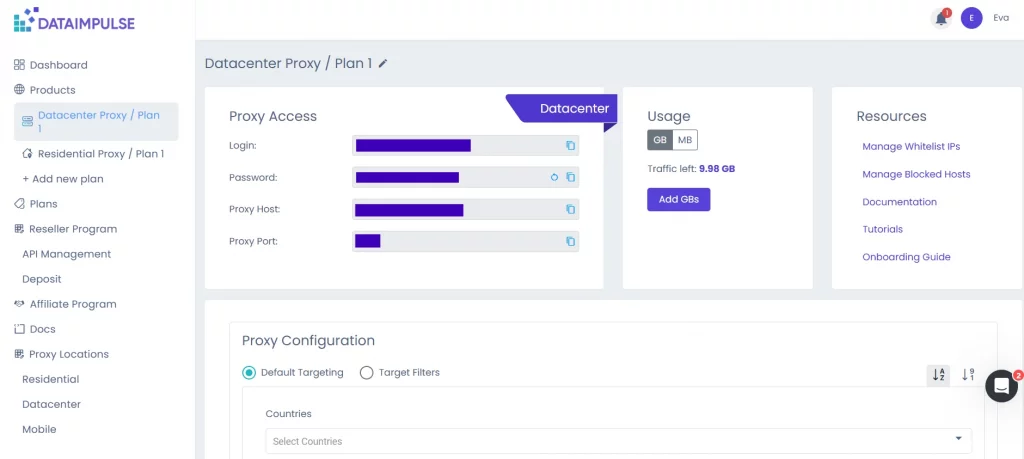
Tutaj musisz podać nazwę hosta, port i dane uwierzytelniające. Znajdziesz je w swoim dashboard DI, na karcie odpowiedniego planu. Musisz też ustawić limit czasu w sekundach.
Oto przykład otrzymanego wyniku:
Web scraping danych
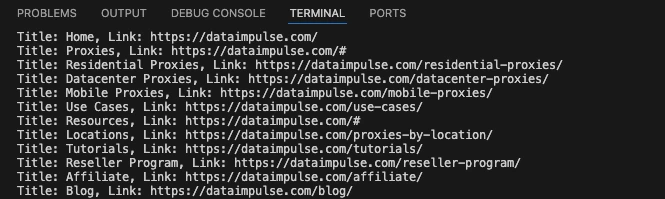
Sercem naszego projektu jest web scraper. Wysyła on żądanie HTTP i zbiera dane HTML ze strony głównej DataImpulse.
using System.Net;
using HtmlAgilityPack;
class WebScraper
{
public static void Main(string[] args)
{
Scrape().Wait();
}
private static async Task Scrape()
{
// Define the proxy details
string proxyAddress = "http://gw.dataimpulse.com:823"; // Replace with your proxy address
string proxyUsername = "your login"; // Replace with your proxy username (if needed)
string proxyPassword = "your password"; // Replace with your proxy password (if needed)
// Create a Proxy Handler
var httpClientHandler = new HttpClientHandler
{
Proxy = new WebProxy(proxyAddress)
{
Credentials = new NetworkCredential(proxyUsername, proxyPassword)
},
UseProxy = true
};
// Create an HttpClient using the handler with the proxy
using (var client = new HttpClient(httpClientHandler))
{
// Define the target URL to scrape
string url = "https://dataimpulse.com/";
var baseUri = new Uri(url);
try
{
// Send GET request
var response = await client.GetAsync(url);
// Use the new code snippet here
if (response.IsSuccessStatusCode)
{
var content = await response.Content.ReadAsStringAsync();
// Load the HTML content into an HtmlDocument
HtmlDocument doc = new();
doc.LoadHtml(content);
// Use XPath to find all tags that are direct children of
Możesz jednak to zmodyfikować i pobrać potrzebne dane.
Dlaczego DataImpulse?
Korzystanie z publicznych proxy w projektach web scraping może wydawać się świetnym sposobem na oszczędność. Darmowe proxy wiążą się jednak z licznymi zagrożeniami, od nieudanego lub wolnego połączenia po wycieki danych osobowych, ponieważ nigdy nie wiesz, kto zarządza tymi serwerami. Jeśli chcesz poznać wszystkie powody, dla których warto unikać darmowych proxy, przeczytaj te artykuły: Dlaczego nie należy używać fałszywych IP i darmowych proxy oraz Od niskiej prędkości po zagrożenia bezpieczeństwa: dlaczego warto unikać darmowych proxy. Dlatego warto wybrać godnych zaufania dostawców. DataImpulse oferuje adresy IP pozyskane zgodnie z prawem, które nie są powiązane ze złośliwą działalnością, oraz korzystne cenowo plany. Przykładowo residential proxy kupisz za $1 za 1 GB. Działamy w modelu płatności za użycie, więc nie musisz się martwić, że ruch wygaśnie. Kliknij przycisk “Wypróbuj teraz” w prawym górnym rogu ekranu lub napisz do nas na adres[email protected].