يترك كل نشاط عبر الإنترنت أثرا وراءه، وقد يهدد سلامتك أحيانا أو يمنعك من تجريف الويب. تساعدك البروكسيات على البقاء بعيدا عن رصد أنظمة مكافحة الاكتشاف من دون إعاقة مهامك. في هذه المقالة، سنوضح لك كيفية دمج بروكسيات DataImpulse في C# باستخدام .NET، كي تتوقف عن القلق من الاصطدام بحد المعدل أو ترك ثغرة للجهات الضارة.
البدء
أولا، تأكد من تثبيت الأدوات الضرورية التالية على جهازك:
Visual Studio Code (ويصلح أيضا Visual Studio 2022 أو أي IDE آخر يدعم .NET)
.NET 8
HtmlAgilityPack (يستخدم هذا الدليل الإصدار 1.6.11)
بما أننا نستخدم البروكسيات في هذا الدليل، فأنت بحاجة إلى حساب DataImpulse وخطة تناسب احتياجاتك. لدينا دليل خطوة بخطوة يشرح كيفية القيام بذلك.
في هذا الدليل، نستخدم موقعنا،DataImpulse.com، كمثال. لكن يمكنك بسهولة تعديل الكود بما يتوافق مع مهامك وتجريف أي مصادر تحتاج إليها. وبالطبع، احرص دائما على عدم مخالفة شروط خدمة مواقع الويب التي تجمع البيانات منها.
إنشاء عميل HTTP
يجب أولا إنشاء عميل HTTP لتوجيه حركة المرور عبر خادم بروكسي محدد. وهو تطبيق وحدة تحكم بسيط يرسل الطلبات إلى URL المطلوب ويسترجع الاستجابات، وكل ذلك عبر خادم بروكسي. يمكنك نسخ مقطع الكود أدناه.
using System.Net;
class HttpClientApp
{
public static void Main(string[] args)
{
DownloadPageAsync().Wait();
}
private static async Task DownloadPageAsync()
{
string page = "https://api.ipify.org/"; // Example API to get the public IP address
// Configure proxy
var proxy = new WebProxy("gw.dataimpulse.com:823")
{
UseDefaultCredentials = false,
Credentials = new NetworkCredential("your login", "your password")
};
// Set up HTTP client handler with proxy
var httpClientHandler = new HttpClientHandler
{
Proxy = proxy,
UseProxy = true
};
using (var client = new HttpClient(handler: httpClientHandler, disposeHandler: true))
{
try
{
// Send the HTTP GET request
var response = await client.GetAsync(page);
// Check if the response is successful
response.EnsureSuccessStatusCode();
// Get the content of the response
string result = await response.Content.ReadAsStringAsync();
Console.WriteLine("Response received: ");
Console.WriteLine(result);
Console.WriteLine("Press any key to exit.");
Console.ReadLine(); // Keep the console open to display the result
}
catch (HttpRequestException e)
{
Console.WriteLine($"Request error: {e.Message}");
Console.WriteLine("Press any key to exit.");
Console.ReadLine(); // Keep the console open to display the result
}
catch (Exception ex)
{
Console.WriteLine($"Unexpected error: {ex.Message}");
Console.WriteLine("Press any key to exit.");
Console.ReadLine(); // Keep the console open to display the result
}
}
}
}
لتشغيل هذا التطبيق والتطبيقات التالية، اكتب الأمر الآتي في الطرفية ضمن الدليل الجذر لتطبيقك.
dotnet run --project NameOfProject
يجب أن تبدو المخرجات كما يلي:
تطبيق تدوير البروكسيات
لا يكفي توجيه حركة المرور عبر خادم بروكسي. للعمل وفقا لإرشادات حركة المرور، عليك استخدام عنوان IP جديد لكل طلب. لذا، تتمثل الخطوة التالية في إنشاء مدوّر بروكسيات لاختيار عنوان عشوائي من مجموعتنا.
using System.Net;
class ProxyRotator
{
// List of proxies to rotate through
private static List proxies = new List
{
new WebProxy("http://gw.dataimpulse.com:10000"),
new WebProxy("http://gw.dataimpulse.com:10001"),
new WebProxy("http://gw.dataimpulse.com:10002")
};
public static void Main(string[] args)
{
MakeRequestsWithRotation().Wait();
}
private static async Task MakeRequestsWithRotation()
{
// Example URLs to request
string url = "https://api.ipify.org/";
for (int i = 0; i < proxies.Count; i++)
{
// Send request using each proxy
Console.WriteLine($"Using proxy: {proxies[i].Address}");
try
{
var response = await SendRequestWithProxy(url, proxies[i]);
if (response.IsSuccessStatusCode)
{
Console.WriteLine($"Request succeeded with proxy {proxies[i].Address}");
string responseBody = await response.Content.ReadAsStringAsync();
Console.WriteLine($"IP address from API website: {responseBody}"); // Print or process the response as needed
}
else
{
Console.WriteLine($"Request failed with proxy {proxies[i].Address}, Status Code: {response.StatusCode}");
}
}
catch (Exception ex)
{
Console.WriteLine($"Exception with proxy {proxies[i].Address}: {ex.Message}");
}
}
}
// Function to send request using a specific proxy
private static async Task SendRequestWithProxy(string url, WebProxy proxy)
{
HttpClientHandler handler = new HttpClientHandler
{
Proxy = proxy,
UseProxy = true
};
using (HttpClient client = new HttpClient(handler))
{
return await client.GetAsync(url);
}
}
}
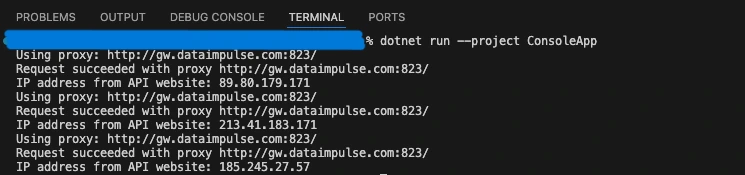
في المثال أعلاه، نقدم قائمة بروكسيات للتدوير بينها (3 بروكسيات في حالتنا)، ونتحقق من عناوين IP المتناوبة عبر عنوان http://api.ipify.org/ URL. يجب أن تبدو النتيجة كما يلي:
إنشاء أداة للتحقق من البروكسيات
للتأكد من عمل البروكسيات، نحتاج إلى إعداد أداة للتحقق منها. فهي ترسل طلب HTTP إلى خادم بروكسي وتخبرك بما إذا كان الخادم صالحا أم لا. نستخدم dataimpulse.com، لكن أي رابط آخر يصلح أيضا.
using System.Net;
class ProxyChecker
{
// Entry point renamed to avoid conflict
public static void Main(string[] args)
{
string proxyAddress = "gw.dataimpulse.com"; // Replace with your proxy address
// Replace with your proxy ports
var proxyPortStart = 10000;
var proxyPortEnd = 10100;
var tasks = new List();
for (var proxyPort = proxyPortStart; proxyPort < proxyPortEnd; proxyPort++)
{
tasks.Add(CheckProxy(proxyAddress, proxyPort));
}
Task.WaitAll(tasks.ToArray());
}
public static async Task CheckProxy(string proxyAddress, int proxyPort)
{
var proxy = new WebProxy(proxyAddress, proxyPort)
{
// Uncomment and modify if the proxy requires credentials
Credentials = new NetworkCredential("your login", "your password"),
BypassProxyOnLocal = false
};
var httpClientHandler = new HttpClientHandler
{
Proxy = proxy,
UseProxy = true
};
using (var client = new HttpClient(httpClientHandler))
{
try
{
client.Timeout = TimeSpan.FromSeconds(10); // Set a timeout
var response = await client.GetAsync("https://api.ipify.org/"); // You can use any URL for testing
if (response.IsSuccessStatusCode)
{
Console.WriteLine("Proxy is working: " + proxyAddress + ":" + proxyPort);
}
else
{
Console.WriteLine("Proxy is not working (Invalid response): " + proxyAddress + ":" + proxyPort);
}
}
catch (Exception ex)
{
Console.WriteLine("Proxy is not working (Exception): " + proxyAddress + ":" + proxyPort + " - " + ex.Message);
}
}
}
}
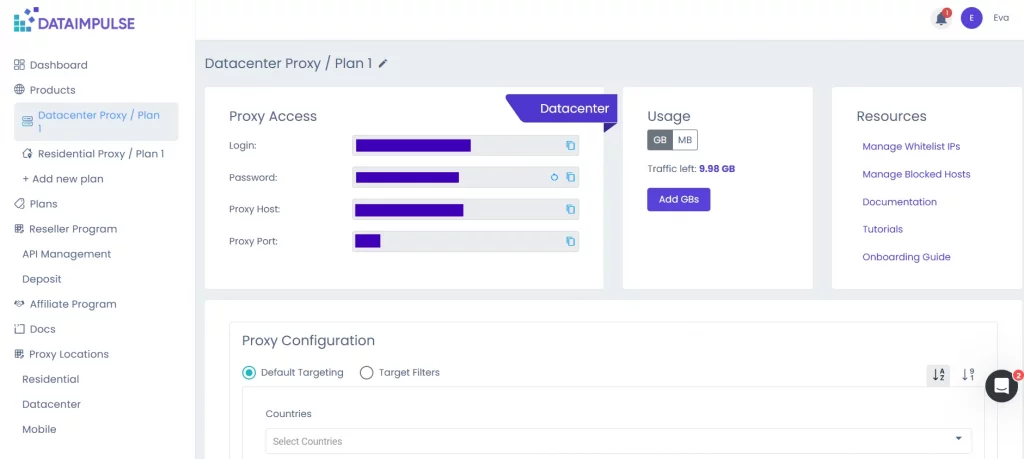
هنا، يجب تحديد اسم المضيف والمنفذ وبيانات الاعتماد. يمكنك العثور عليها في لوحة تحكم DI، ضمن علامة تبويب الخطة المطلوبة. كما تحتاج إلى ضبط مهلة زمنية بالثواني.
إليك مثال على النتيجة التي تحصل عليها:
تجريف البيانات
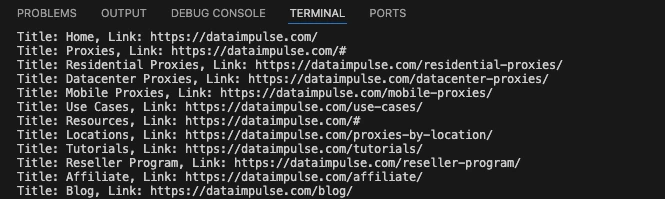
جوهر مشروعنا هو كاشط ويب. يرسل طلب HTTP ويجمع بيانات HTML من الصفحة الرئيسية لـ DataImpulse.
using System.Net;
using HtmlAgilityPack;
class WebScraper
{
public static void Main(string[] args)
{
Scrape().Wait();
}
private static async Task Scrape()
{
// Define the proxy details
string proxyAddress = "http://gw.dataimpulse.com:823"; // Replace with your proxy address
string proxyUsername = "your login"; // Replace with your proxy username (if needed)
string proxyPassword = "your password"; // Replace with your proxy password (if needed)
// Create a Proxy Handler
var httpClientHandler = new HttpClientHandler
{
Proxy = new WebProxy(proxyAddress)
{
Credentials = new NetworkCredential(proxyUsername, proxyPassword)
},
UseProxy = true
};
// Create an HttpClient using the handler with the proxy
using (var client = new HttpClient(httpClientHandler))
{
// Define the target URL to scrape
string url = "https://dataimpulse.com/";
var baseUri = new Uri(url);
try
{
// Send GET request
var response = await client.GetAsync(url);
// Use the new code snippet here
if (response.IsSuccessStatusCode)
{
var content = await response.Content.ReadAsStringAsync();
// Load the HTML content into an HtmlDocument
HtmlDocument doc = new();
doc.LoadHtml(content);
// Use XPath to find all tags that are direct children of
ومع ذلك، يمكنك تعديل ذلك والحصول على البيانات التي تحتاج إليها.
لماذا DataImpulse؟
قد تميل إلى استخدام بروكسيات عامة في مشاريع تجريف الويب، إذ يبدو ذلك طريقة ممتازة لتوفير المال. لكن البروكسيات المجانية تنطوي على مخاطر عديدة، من فشل الاتصال أو بطئه إلى تسرب البيانات الشخصية، لأنك لا تعرف أبدا من يدير تلك الخوادم. إذا أردت الاطلاع على جميع أسباب تجنب البروكسيات المجانية، فراجع هذه المقالات: لماذا لا ينبغي استخدام عناوين IP مزيفة وبروكسيات مجانية ومن السرعة المنخفضة إلى التهديدات الأمنية: لماذا ينبغي تجنب البروكسيات المجانية. لهذا السبب، ينبغي اللجوء إلى مزودين موثوقين. تقدم DataImpulse عناوين IP تم الحصول عليها بصورة قانونية ولا ترتبط بأنشطة ضارة، كما توفر خططا مناسبة للميزانية. على سبيل المثال، يمكنك شراء بروكسيات سكنية مقابل $1 لكل 1 GB. نعمل بنموذج تسعير الدفع حسب الاستخدام، لذا لا داعي للقلق من انتهاء صلاحية حركة المرور. انقر على زر “جرّب الآن” في الزاوية العلوية اليمنى من الشاشة أو راسلنا على[email protected].