Toda actividad en línea deja rastro. A veces, ese rastro puede poner en riesgo tu seguridad o impedirte hacer scraping web. Los proxies te ayudan a evitar los sistemas anti-detección sin entorpecer tus tareas. En este artículo, te mostraremos cómo integrar proxies DataImpulse en C# con .NET para que no tengas que preocuparte por alcanzar rate limits ni por dejar una puerta abierta a actores maliciosos.
Primeros pasos
Primero, asegúrate de tener instaladas estas herramientas en tu dispositivo:
Visual Studio Code (también sirve Visual Studio 2022 o cualquier otro IDE compatible con .NET)
.NET 8
HtmlAgilityPack (en este tutorial usamos la versión 1.6.11)
Como en este tutorial usamos proxies, necesitas una cuenta de DataImpulse y un plan adecuado para tus necesidades. Tenemos una guía paso a paso que explica cómo hacerlo.
En este tutorial hacemos scraping de nuestro sitio web,DataImpulse.com, como ejemplo. Sin embargo, puedes adaptar fácilmente el código a tus tareas y hacer scraping de las fuentes que necesites. Por supuesto, asegúrate siempre de no infringir los términos de servicio de los sitios web de los que recopilas datos.
Crear un cliente HTTP
Primero debes crear un cliente HTTP para enrutar el tráfico a través de un servidor proxy específico. Es una aplicación de consola sencilla que envía solicitudes a la URL indicada y recupera las respuestas, todo a través de un servidor proxy. Puedes copiar el fragmento de código de abajo.
using System.Net;
class HttpClientApp
{
public static void Main(string[] args)
{
DownloadPageAsync().Wait();
}
private static async Task DownloadPageAsync()
{
string page = "https://api.ipify.org/"; // Example API to get the public IP address
// Configure proxy
var proxy = new WebProxy("gw.dataimpulse.com:823")
{
UseDefaultCredentials = false,
Credentials = new NetworkCredential("your login", "your password")
};
// Set up HTTP client handler with proxy
var httpClientHandler = new HttpClientHandler
{
Proxy = proxy,
UseProxy = true
};
using (var client = new HttpClient(handler: httpClientHandler, disposeHandler: true))
{
try
{
// Send the HTTP GET request
var response = await client.GetAsync(page);
// Check if the response is successful
response.EnsureSuccessStatusCode();
// Get the content of the response
string result = await response.Content.ReadAsStringAsync();
Console.WriteLine("Response received: ");
Console.WriteLine(result);
Console.WriteLine("Press any key to exit.");
Console.ReadLine(); // Keep the console open to display the result
}
catch (HttpRequestException e)
{
Console.WriteLine($"Request error: {e.Message}");
Console.WriteLine("Press any key to exit.");
Console.ReadLine(); // Keep the console open to display the result
}
catch (Exception ex)
{
Console.WriteLine($"Unexpected error: {ex.Message}");
Console.WriteLine("Press any key to exit.");
Console.ReadLine(); // Keep the console open to display the result
}
}
}
}
Para ejecutar esta aplicación y las siguientes, escribe este comando en la terminal desde el directorio raíz de tu aplicación.
dotnet run --project NameOfProject
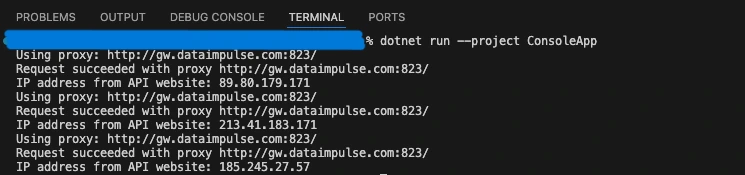
La salida debería verse así:
Implementar la rotación de proxies
No basta con enrutar el tráfico a través de un servidor proxy. Para respetar las reglas de tráfico, debes usar una dirección IP nueva en cada solicitud. Por lo tanto, el siguiente paso es crear un rotador de proxies que elija una dirección aleatoria de nuestro pool.
using System.Net;
class ProxyRotator
{
// List of proxies to rotate through
private static List proxies = new List
{
new WebProxy("http://gw.dataimpulse.com:10000"),
new WebProxy("http://gw.dataimpulse.com:10001"),
new WebProxy("http://gw.dataimpulse.com:10002")
};
public static void Main(string[] args)
{
MakeRequestsWithRotation().Wait();
}
private static async Task MakeRequestsWithRotation()
{
// Example URLs to request
string url = "https://api.ipify.org/";
for (int i = 0; i < proxies.Count; i++)
{
// Send request using each proxy
Console.WriteLine($"Using proxy: {proxies[i].Address}");
try
{
var response = await SendRequestWithProxy(url, proxies[i]);
if (response.IsSuccessStatusCode)
{
Console.WriteLine($"Request succeeded with proxy {proxies[i].Address}");
string responseBody = await response.Content.ReadAsStringAsync();
Console.WriteLine($"IP address from API website: {responseBody}"); // Print or process the response as needed
}
else
{
Console.WriteLine($"Request failed with proxy {proxies[i].Address}, Status Code: {response.StatusCode}");
}
}
catch (Exception ex)
{
Console.WriteLine($"Exception with proxy {proxies[i].Address}: {ex.Message}");
}
}
}
// Function to send request using a specific proxy
private static async Task SendRequestWithProxy(string url, WebProxy proxy)
{
HttpClientHandler handler = new HttpClientHandler
{
Proxy = proxy,
UseProxy = true
};
using (HttpClient client = new HttpClient(handler))
{
return await client.GetAsync(url);
}
}
}
En el ejemplo anterior, proporcionamos una lista de proxies para rotar (3 proxies en nuestro caso) y comprobamos las direcciones IP rotativas mediante la http://api.ipify.org/ URL. El resultado debería verse así:
Crear un comprobador de proxies
Para asegurarnos de que los proxies funcionan, debemos configurar un comprobador de proxies. Envía una solicitud HTTP a un servidor proxy y devuelve una respuesta que indica si el servidor es válido o no. Usamos dataimpulse.com, pero cualquier otro enlace sirve.
using System.Net;
class ProxyChecker
{
// Entry point renamed to avoid conflict
public static void Main(string[] args)
{
string proxyAddress = "gw.dataimpulse.com"; // Replace with your proxy address
// Replace with your proxy ports
var proxyPortStart = 10000;
var proxyPortEnd = 10100;
var tasks = new List();
for (var proxyPort = proxyPortStart; proxyPort < proxyPortEnd; proxyPort++)
{
tasks.Add(CheckProxy(proxyAddress, proxyPort));
}
Task.WaitAll(tasks.ToArray());
}
public static async Task CheckProxy(string proxyAddress, int proxyPort)
{
var proxy = new WebProxy(proxyAddress, proxyPort)
{
// Uncomment and modify if the proxy requires credentials
Credentials = new NetworkCredential("your login", "your password"),
BypassProxyOnLocal = false
};
var httpClientHandler = new HttpClientHandler
{
Proxy = proxy,
UseProxy = true
};
using (var client = new HttpClient(httpClientHandler))
{
try
{
client.Timeout = TimeSpan.FromSeconds(10); // Set a timeout
var response = await client.GetAsync("https://api.ipify.org/"); // You can use any URL for testing
if (response.IsSuccessStatusCode)
{
Console.WriteLine("Proxy is working: " + proxyAddress + ":" + proxyPort);
}
else
{
Console.WriteLine("Proxy is not working (Invalid response): " + proxyAddress + ":" + proxyPort);
}
}
catch (Exception ex)
{
Console.WriteLine("Proxy is not working (Exception): " + proxyAddress + ":" + proxyPort + " - " + ex.Message);
}
}
}
}
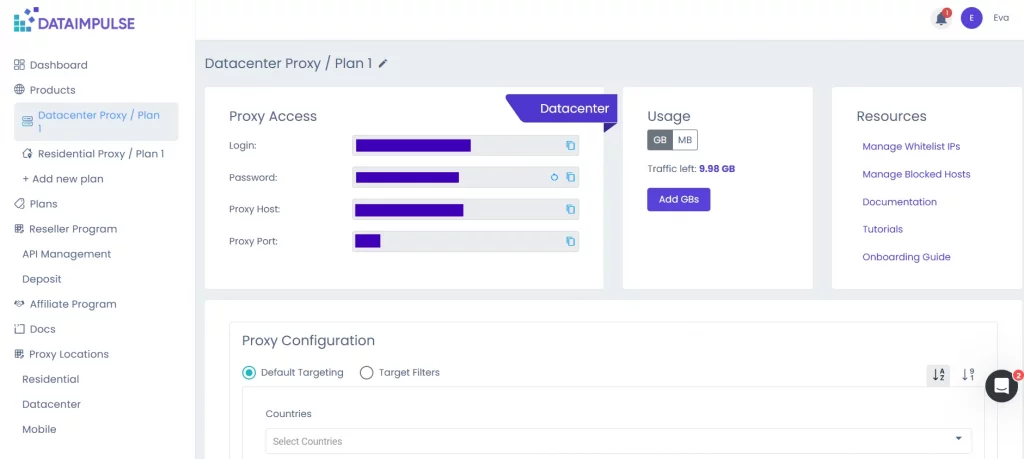
Aquí debes especificar el nombre de host, el puerto y las credenciales. Puedes encontrarlos en tu panel de DI, en la pestaña del plan correspondiente. También debes definir un tiempo de espera en segundos.
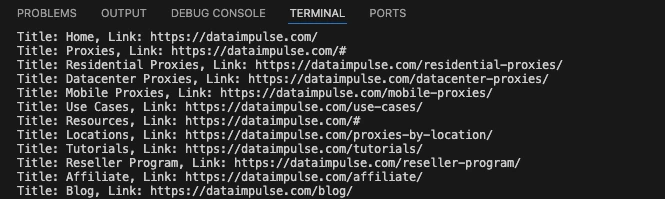
Aquí tienes un ejemplo del resultado que obtienes:
Hacer extracción de datos
El núcleo de nuestro proyecto es un web scraper. Envía una solicitud HTTP y recopila datos HTML de la página de inicio de DataImpulse.
using System.Net;
using HtmlAgilityPack;
class WebScraper
{
public static void Main(string[] args)
{
Scrape().Wait();
}
private static async Task Scrape()
{
// Define the proxy details
string proxyAddress = "http://gw.dataimpulse.com:823"; // Replace with your proxy address
string proxyUsername = "your login"; // Replace with your proxy username (if needed)
string proxyPassword = "your password"; // Replace with your proxy password (if needed)
// Create a Proxy Handler
var httpClientHandler = new HttpClientHandler
{
Proxy = new WebProxy(proxyAddress)
{
Credentials = new NetworkCredential(proxyUsername, proxyPassword)
},
UseProxy = true
};
// Create an HttpClient using the handler with the proxy
using (var client = new HttpClient(httpClientHandler))
{
// Define the target URL to scrape
string url = "https://dataimpulse.com/";
var baseUri = new Uri(url);
try
{
// Send GET request
var response = await client.GetAsync(url);
// Use the new code snippet here
if (response.IsSuccessStatusCode)
{
var content = await response.Content.ReadAsStringAsync();
// Load the HTML content into an HtmlDocument
HtmlDocument doc = new();
doc.LoadHtml(content);
// Use XPath to find all tags that are direct children of
Sin embargo, puedes modificarlo para obtener los datos que necesitas.
¿Por qué DataImpulse?
Puede que te tiente usar proxies públicos para proyectos de scraping web, porque parece una forma excelente de ahorrar dinero. Sin embargo, los proxies gratuitos implican muchos riesgos, desde conexiones fallidas o lentas hasta filtraciones de datos personales, ya que nunca sabes quién administra esos servidores. Si quieres conocer todas las razones para evitar los proxies gratuitos, consulta estos artículos: Por qué no deberías usar IP falsas y proxies gratuitos y De baja velocidad a amenazas de seguridad: por qué deberías evitar los proxies gratuitos. Por eso conviene recurrir a proveedores confiables. DataImpulse te ofrece direcciones IP obtenidas legalmente, no asociadas con actividades maliciosas, y planes asequibles. Por ejemplo, puedes comprar proxies residenciales por $1 por 1 GB. Operamos con un modelo de pago por uso, así que no tienes que preocuparte de que el tráfico caduque. Haz clic en el botón “Pruébalo ahora” en la esquina superior derecha de la pantalla o escríbenos a [email protected].