using System.Net;
class HttpClientApp
{
public static void Main(string[] args)
{
DownloadPageAsync().Wait();
}
private static async Task DownloadPageAsync()
{
string page = "https://api.ipify.org/"; // Example API to get the public IP address
// Configure proxy
var proxy = new WebProxy("gw.dataimpulse.com:823")
{
UseDefaultCredentials = false,
Credentials = new NetworkCredential("your login", "your password")
};
// Set up HTTP client handler with proxy
var httpClientHandler = new HttpClientHandler
{
Proxy = proxy,
UseProxy = true
};
using (var client = new HttpClient(handler: httpClientHandler, disposeHandler: true))
{
try
{
// Send the HTTP GET request
var response = await client.GetAsync(page);
// Check if the response is successful
response.EnsureSuccessStatusCode();
// Get the content of the response
string result = await response.Content.ReadAsStringAsync();
Console.WriteLine("Response received: ");
Console.WriteLine(result);
Console.WriteLine("Press any key to exit.");
Console.ReadLine(); // Keep the console open to display the result
}
catch (HttpRequestException e)
{
Console.WriteLine($"Request error: {e.Message}");
Console.WriteLine("Press any key to exit.");
Console.ReadLine(); // Keep the console open to display the result
}
catch (Exception ex)
{
Console.WriteLine($"Unexpected error: {ex.Message}");
Console.WriteLine("Press any key to exit.");
Console.ReadLine(); // Keep the console open to display the result
}
}
}
}
要运行此应用以及后续应用,请在应用根目录下打开终端并输入以下命令。
dotnet run --project NameOfProject
输出应如下所示:
实现代理轮换
仅让流量经由代理服务器转发还不够。为降低触发限制的风险,你需要为每个请求使用新的 IP 地址。因此,下一步是构建一个代理轮换器,从代理池中随机选择一个地址。
using System.Net;
class ProxyRotator
{
// List of proxies to rotate through
private static List proxies = new List
{
new WebProxy("http://gw.dataimpulse.com:10000"),
new WebProxy("http://gw.dataimpulse.com:10001"),
new WebProxy("http://gw.dataimpulse.com:10002")
};
public static void Main(string[] args)
{
MakeRequestsWithRotation().Wait();
}
private static async Task MakeRequestsWithRotation()
{
// Example URLs to request
string url = "https://api.ipify.org/";
for (int i = 0; i < proxies.Count; i++)
{
// Send request using each proxy
Console.WriteLine($"Using proxy: {proxies[i].Address}");
try
{
var response = await SendRequestWithProxy(url, proxies[i]);
if (response.IsSuccessStatusCode)
{
Console.WriteLine($"Request succeeded with proxy {proxies[i].Address}");
string responseBody = await response.Content.ReadAsStringAsync();
Console.WriteLine($"IP address from API website: {responseBody}"); // Print or process the response as needed
}
else
{
Console.WriteLine($"Request failed with proxy {proxies[i].Address}, Status Code: {response.StatusCode}");
}
}
catch (Exception ex)
{
Console.WriteLine($"Exception with proxy {proxies[i].Address}: {ex.Message}");
}
}
}
// Function to send request using a specific proxy
private static async Task SendRequestWithProxy(string url, WebProxy proxy)
{
HttpClientHandler handler = new HttpClientHandler
{
Proxy = proxy,
UseProxy = true
};
using (HttpClient client = new HttpClient(handler))
{
return await client.GetAsync(url);
}
}
}
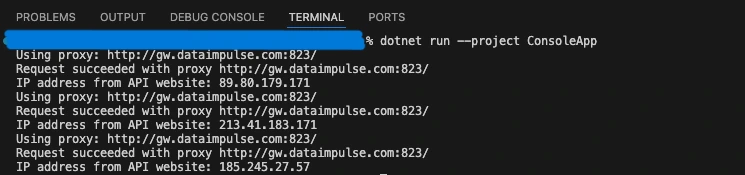
在上面的示例中,我们准备了一个用于轮换的代理列表(本例中包含 3 个代理),并通过http://api.ipify.org/ URL 检查轮换后的 IP 地址。结果应如下所示:
using System.Net;
class ProxyChecker
{
// Entry point renamed to avoid conflict
public static void Main(string[] args)
{
string proxyAddress = "gw.dataimpulse.com"; // Replace with your proxy address
// Replace with your proxy ports
var proxyPortStart = 10000;
var proxyPortEnd = 10100;
var tasks = new List();
for (var proxyPort = proxyPortStart; proxyPort < proxyPortEnd; proxyPort++)
{
tasks.Add(CheckProxy(proxyAddress, proxyPort));
}
Task.WaitAll(tasks.ToArray());
}
public static async Task CheckProxy(string proxyAddress, int proxyPort)
{
var proxy = new WebProxy(proxyAddress, proxyPort)
{
// Uncomment and modify if the proxy requires credentials
Credentials = new NetworkCredential("your login", "your password"),
BypassProxyOnLocal = false
};
var httpClientHandler = new HttpClientHandler
{
Proxy = proxy,
UseProxy = true
};
using (var client = new HttpClient(httpClientHandler))
{
try
{
client.Timeout = TimeSpan.FromSeconds(10); // Set a timeout
var response = await client.GetAsync("https://api.ipify.org/"); // You can use any URL for testing
if (response.IsSuccessStatusCode)
{
Console.WriteLine("Proxy is working: " + proxyAddress + ":" + proxyPort);
}
else
{
Console.WriteLine("Proxy is not working (Invalid response): " + proxyAddress + ":" + proxyPort);
}
}
catch (Exception ex)
{
Console.WriteLine("Proxy is not working (Exception): " + proxyAddress + ":" + proxyPort + " - " + ex.Message);
}
}
}
}
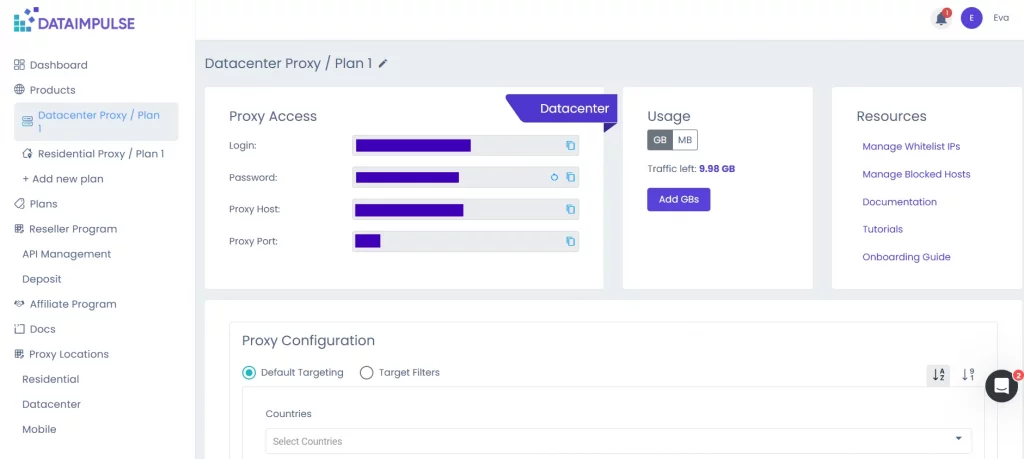
在这里,你需要指定主机名、端口和凭据。你可以在 DI 控制面板中相应套餐的标签页找到这些信息。还需要设置以秒为单位的超时时间。
下面是结果示例:
抓取数据
项目的核心是一个网页抓取器。它会发送 HTTP 请求,并从 DataImpulse 首页抓取 HTML 数据。
using System.Net;
using HtmlAgilityPack;
class WebScraper
{
public static void Main(string[] args)
{
Scrape().Wait();
}
private static async Task Scrape()
{
// Define the proxy details
string proxyAddress = "http://gw.dataimpulse.com:823"; // Replace with your proxy address
string proxyUsername = "your login"; // Replace with your proxy username (if needed)
string proxyPassword = "your password"; // Replace with your proxy password (if needed)
// Create a Proxy Handler
var httpClientHandler = new HttpClientHandler
{
Proxy = new WebProxy(proxyAddress)
{
Credentials = new NetworkCredential(proxyUsername, proxyPassword)
},
UseProxy = true
};
// Create an HttpClient using the handler with the proxy
using (var client = new HttpClient(httpClientHandler))
{
// Define the target URL to scrape
string url = "https://dataimpulse.com/";
var baseUri = new Uri(url);
try
{
// Send GET request
var response = await client.GetAsync(url);
// Use the new code snippet here
if (response.IsSuccessStatusCode)
{
var content = await response.Content.ReadAsStringAsync();
// Load the HTML content into an HtmlDocument
HtmlDocument doc = new();
doc.LoadHtml(content);
// Use XPath to find all tags that are direct children of