

In this Article
If you want to know where all developers feel at home, supported and connected, then GitHub is the place to be. No matter if you’re coding solo or working in a global tech company, it is a must-have platform for accessing technical data. GitHub includes an official, feature-rich API, and in many cases, it should be your first choice. However, when the data you need isn’t available through the API, web scraping can be a useful alternative.
This tutorial will be useful for everyone who wants to know more about GitHub, its core elements, and how to scrape trending repositories.
*Web scraping should always be performed within legal and ethical boundaries. We do not encourage illegal activity and highlight only responsible usage strategies.
I am raw html block.
Click edit button to change this html
What Is GitHub and How It Works
GitHub has become the central hub for developers worldwide. It’s a platform for hosting code, collaborating on projects, and crafting software. The name is built around Git, which is, in fact, a version control system that GitHub is built on. This system makes your life easier because you don’t have to save multiple files, as Git keeps a full history of changes in one place. You can always see what was changed, when it was changed, and who made the modification. It is a great choice for those who work in teams.
Forks, repos, stars, branches — all of this may sound a bit confusing at first. But once you understand how Git works, these concepts start to make sense. In Git, a repository holds your project and its history, commits record changes over time, branches allow parallel development, and merging combines finished work into the main project. Here’s a simple visual to help you understand the flow:
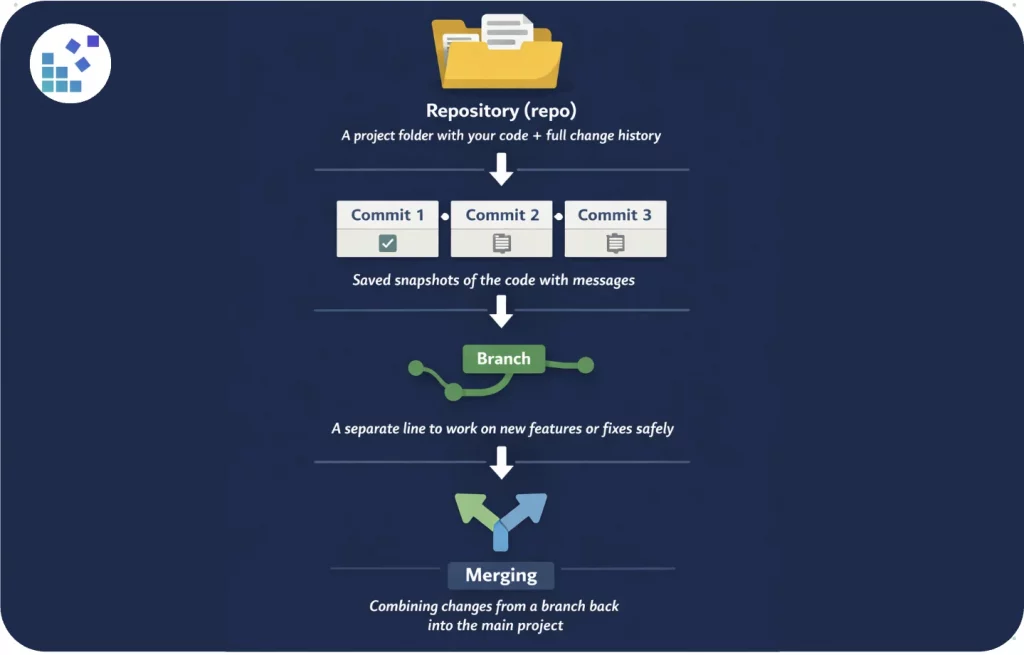
We advise checking these terms beforehand; you can find them on their official site.
To put it briefly, this system enables developers to work together without overwriting each other’s work.
* Is it legal to scrape GitHub?
Yes, it is generally legal as long as you comply with their Terms of Service and respect copyright and privacy rules. Public repositories, user profiles, and metadata such as stars, forks, and commits can be accessed without violating the law.
However, private repositories, sensitive user information, or automated access that violates GitHub’s rate limits may lead to account suspension or legal consequences. Always make sure your scraping activities are ethical, respect user privacy, and do not overload GitHub’s servers.
How does GitHub handle scraping and abuse?
Like many major platforms, GitHub applies strict rate limits to maintain stability and prevent automated abuse. There is a fixed number of allowed requests per hour that each API token or authenticated account can have. It’s approximately 5,000 requests. Hitting the rate limit typically leads to 403 Forbidden responses. If this is accompanied by abusive behavior, users may face temporary or permanent account suspension. Because of ongoing bot attempts, GitHub monitors abnormal traffic behavior, IP bursts, and repeated authentication failures.
To collect data and stay within acceptable thresholds, developers implement proxies as a backup protection. Proxies rotate source IP addresses across outgoing requests, distributing traffic across endpoints so you’re less likely to get caught by GitHub’s anti-abuse systems. If you aren’t sure which type of proxy is better to use, consider such factors as the scraping volume and sensitivity of the data. DataImpulse proxies are affordable and known for top-level reliability and speed. We recommend using them responsibly and ethically without violating platform rules.
Respect GitHub’s API rules, avoid scraping private repositories or sensitive user data.
Initial Setup: What to Download?
- Python 3 (the latest version)
Download here, install the Python extension in VS Code. Open a terminal, check if it is installed with:
python3 --version
- Visual Studio Code (or another code editor, the latest version)
Download here, install, and open your project folder.
- Proxy credentials from the DataImpulse dashboard
Sign in to DataImpulse and copy your proxy login details.
- Libraries: Requests and BeautifulSoup; sys and typing (built-in Python modules).
Requests — used to make HTTP requests.
BeautifulSoup — used to parse HTML and extract data from GitHub Trending pages.
sys — used to stop the program with an error message if something goes wrong (sys.exit(…)).
typing — provides type hints that specify the expected data types for each function.
Firstly, open Terminal on your computer and install pip:
python3 -m ensurepip
Then, install Python libraries using:
pip3 install requests beautifulsoup4
Press Enter, and you’ll see if they were installed.
Common Steps to Scrape GitHub in Python
- Choose the target page – Decide which GitHub page or repository data you want to collect (e.g., trending repositories, user profiles).
- Inspect HTML structure – Examine the page’s HTML to identify elements that contain the required data.
- Send HTTP requests – Use a library like requests to retrieve the page content.
- Parse the response – Use BeautifulSoup to process the HTML.
- Extract required data – Identify and extract the specific information you need.
- Handle pagination – Loop through pages to extract all available entries.
- Store results – Save the collected data in a CSV, JSON, or a database (optional).
Our Practical Example:
For our scraping case, we used the page of trending repositories. Before sharing the full code, let’s briefly go over its main components.
- Proxy Configuration
PROXY — proxy credentials from your DataImpulse dashboard (host, port, username, password). Replace these values with your own credentials.
TIMEOUT — max request time (20 seconds).
VERIFY_SSL — ensures HTTPS connection.
USER_AGENT — mimics a real browser to bypass basic bot checks.
- GitHub Trending Filters
LANGUAGE — your programming language (can be None for all).
SINCE — time range: daily, weekly, monthly.
TIMEOUT = 20 # seconds
VERIFY_SSL = True
USER_AGENT = (
"Mozilla/5.0 (Macintosh; Intel Mac OS X 13_5) "
"AppleWebKit/537.36 (KHTML, like Gecko) "
"Chrome/118.0.0.0 Safari/537.36"
Here is the first simple code you can try:
import requests
from bs4 import BeautifulSoup
LANGUAGE = "python" # Programming language. None can be used as "Any" parameter in GitHub Trending
SINCE = "daily" # Date range: daily / weekly / monthly
PROXY = {
"host": "DATAIMPULSE HOST",
"port": "DATAIMPULSE PORT",
"user": "DATAIMPULSE LOGIN",
"pass": "DATAIMPULSE PASSWORD",
}
# Proxy configuration
proxy_url = f"http://{PROXY['user']}:{PROXY['pass']}@{PROXY['host']}:{PROXY['port']}"
proxies = {
"http": proxy_url,
"https": proxy_url,
}
# Checking proxies
ip = requests.get("https://api.ipify.org", proxies=proxies).text
print("Your IP:", ip)
# Scraping Github Trending section
url = "https://github.com/trending"
# Adding parameters like Language and Date Range, and make HTTP request to GitHub
params = {"since": SINCE}
if LANGUAGE:
params["language"] = LANGUAGE
headers = {
"User-Agent": "Mozilla/5.0"
}
r = requests.get(
url,
headers=headers,
params=params,
proxies=proxies,
timeout=20
)
# Scrape and output details
soup = BeautifulSoup(r.text, "html.parser")
print("\n🔥 GitHub Trending:\n")
for count, repo in enumerate(soup.select("article.Box-row"), start=1):
name = repo.h2.text.strip().replace("\n", "").replace(" ", "")
link = "https://github.com" + repo.h2.a["href"]
desc = repo.p.text.strip() if repo.p else "No description"
stars_today = repo.select_one("span.d-inline-block.float-sm-right").text.strip() if repo.select_one("span.d-inline-block.float-sm-right") else None
print(f"{count}. {name}")
print(f"Link: {link}")
print(f"Stars Today: {stars_today}")
print(f"Description: {desc}")
print("-" * 40)
In the next piece of code, we’ll use functions. They make code cleaner, reusable, easier to debug, and maintainable, which is especially important for complex tasks like scraping GitHub or handling multiple proxies.
- Functions
log — formats console output.
build_proxies — builds proxy string (username:password@host:port).
test_proxy — checks proxy via https://api.ipify.org?format=json.
scrape_github_trending — parses HTML using BeautifulSoup4.
main — starts the scraping process.
Here is the full version of the code:
import sys
import requests
from bs4 import BeautifulSoup
from typing import List, Dict, Optional
# =========================================================
# CONFIG — CHANGE ONLY THIS SECTION
# =========================================================
GITHUB_TRENDING_URL = "https://github.com/trending"
# Proxy configuration (leave PROXY = None to disable proxy)
PROXY = {
"host": "DATAIMPULSE HOST",
"port": "DATAIMPULSE PORT",
"username": "DATAIMPULSE LOGIN",
"password": "DATAIMPULSE PASSWORD",
}
# PROXY = None # uncomment to disable proxy completely
LANGUAGE = "python" # e.g. "python", "javascript", or None
SINCE = "daily" # "daily", "weekly", "monthly"
TIMEOUT = 20 # seconds
VERIFY_SSL = True
USER_AGENT = (
"Mozilla/5.0 (Macintosh; Intel Mac OS X 13_5) "
"AppleWebKit/537.36 (KHTML, like Gecko) "
"Chrome/118.0.0.0 Safari/537.36"
)
# =========================================================
# END CONFIG
# =========================================================
def log(msg: str) -> None:
print(f"[INFO] {msg}")
def build_proxies(proxy_cfg: Optional[Dict]) -> Optional[Dict[str, str]]:
if not proxy_cfg:
return None
proxy_url = (
f"http://{proxy_cfg['username']}:{proxy_cfg['password']}"
f"@{proxy_cfg['host']}:{proxy_cfg['port']}"
)
return {
"http": proxy_url,
"https": proxy_url,
}
def test_proxy(proxies: Optional[Dict[str, str]]) -> None:
log("Testing proxy...")
r = requests.get(
"https://api.ipify.org?format=json",
proxies=proxies,
timeout=10,
)
r.raise_for_status()
log(f"Proxy OK. Outgoing IP: {r.json()['ip']}")
def scrape_github_trending(
language: Optional[str],
since: str,
proxies: Optional[Dict[str, str]],
timeout: int,
) -> List[Dict]:
headers = {"User-Agent": USER_AGENT}
params = {"since": since}
if language:
params["language"] = language
log("Fetching GitHub Trending page...")
response = requests.get(
GITHUB_TRENDING_URL,
headers=headers,
params=params,
proxies=proxies,
timeout=timeout,
verify=VERIFY_SSL,
)
response.raise_for_status()
soup = BeautifulSoup(response.text, "lxml")
repos = []
for article in soup.select("article.Box-row"):
name = (
article.h2.text
.replace("\n", "")
.replace(" ", "")
.strip()
)
url = "https://github.com" + article.h2.a["href"]
description = article.p.text.strip() if article.p else None
language_el = article.select_one(
'[itemprop="programmingLanguage"]'
)
stars_today_el = article.select_one(
"span.d-inline-block.float-sm-right"
)
repos.append({
"name": name,
"url": url,
"description": description,
"language": (
language_el.text.strip()
if language_el else None
),
"stars_today": (
stars_today_el.text.strip()
if stars_today_el else None
),
})
return repos
def main() -> None:
proxies = build_proxies(PROXY)
# 1) Test proxy
try:
if proxies:
test_proxy(proxies)
else:
log("Proxy disabled.")
except Exception as e:
sys.exit(f"[ERROR] Proxy test failed: {e}")
# 2) Scrape GitHub Trending
try:
repos = scrape_github_trending(
language=LANGUAGE,
since=SINCE,
proxies=proxies,
timeout=TIMEOUT,
)
except Exception as e:
sys.exit(f"[ERROR] Scraping failed: {e}")
# 3) Output
print("\n🔥 GitHub Trending Repositories\n")
print(f"Language: {LANGUAGE or 'All'} | Since: {SINCE}\n")
for i, repo in enumerate(repos, 1):
print(f"{i}. {repo['name']}")
print(f" URL: {repo['url']}")
print(f" Language: {repo['language']}")
print(f" Stars today: {repo['stars_today']}")
if repo["description"]:
print(f" Description: {repo['description']}")
print()
log(f"Done. Total repositories: {len(repos)}")
if __name__ == "__main__":
main()
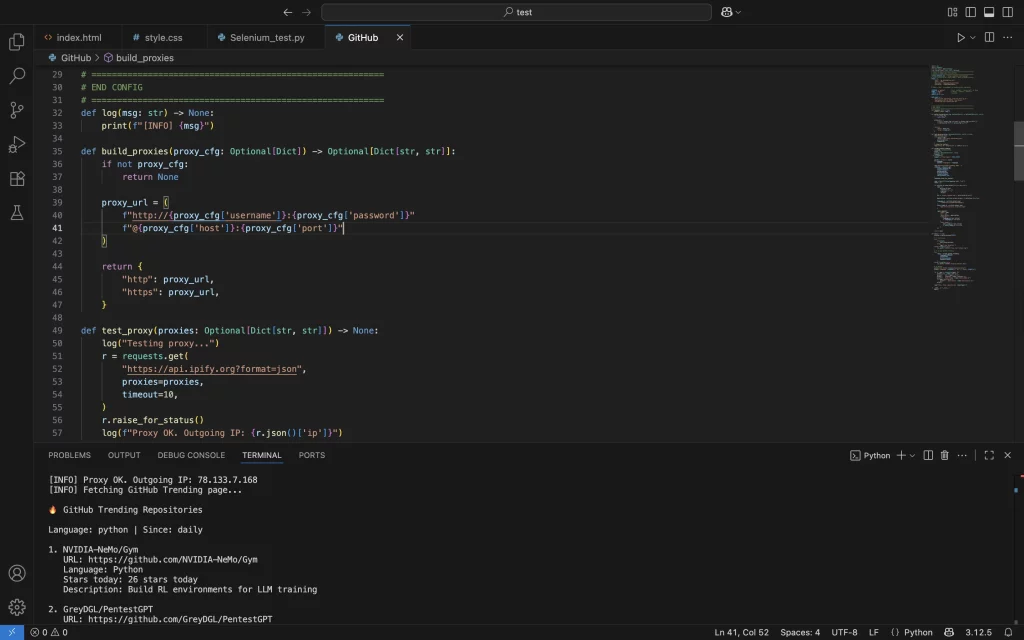
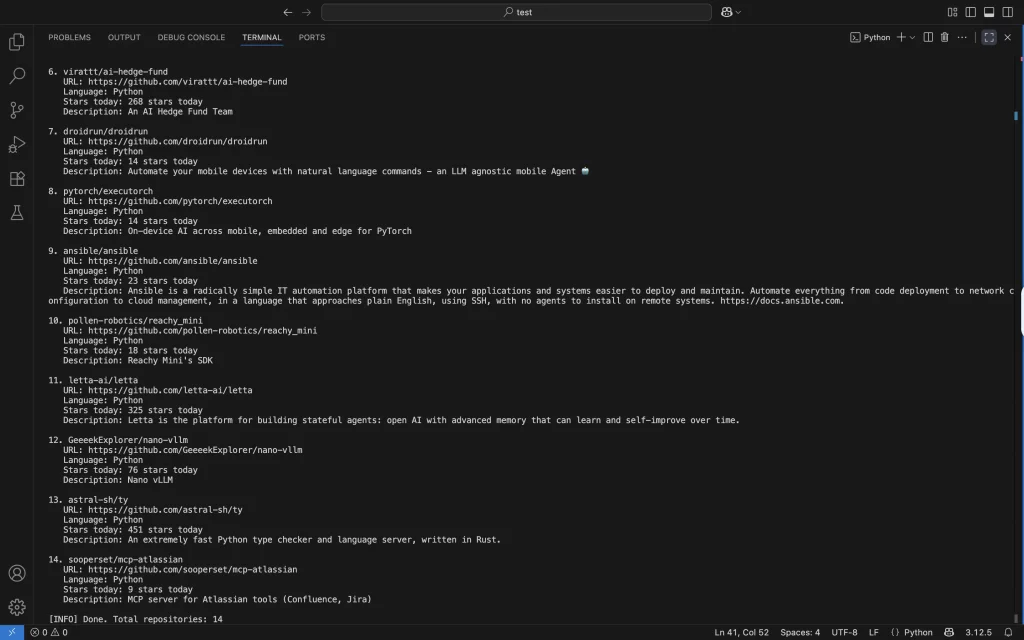
As a result, our Terminal displays a clean list of 14 trending repositories.
Final Thoughts and Recommendations
Scraping GitHub is a handy skill to have under your belt, but it’s important to follow ethical and technical aspects. Beginners can even start with Gemini Bot, which extracts structured data without coding. You just need to create a bot and write the prompt, like this:
Analyze this GitHub repository page and extract the following information:
– Repository name
– Number of stars
– Primary programming language
– Date of the last commit
Return the data in JSON format.
And that’s it. However, we encourage creativity and suggest developers test new ideas, combine tools, and adapt methods to their own projects. Implement proxies, always respect GitHub’s Terms of Service, use filters to target specific languages or trending periods, log and monitor requests, and experiment with a few repositories first to scale up gradually.


 State/City/Zip/ASN Targeting



