
In this Article
You’re about to visit a website, but suddenly a CAPTCHA pops up asking you to find all the bicycle images or solve a puzzle. You may think what an irritating pause, but in reality such tests are designed to secure a website by blocking bots. CAPTCHAs come in many forms – image selections, typing distorted text, or even quizzes.
If you’re looking for ways to maintain normal traffic patterns, you’ll need to use the right methods and resources. In this article, we’ll guide you through the types of CAPTCHAs and the most appropriate techniques you can use to get over them.
Proxies do not solve CAPTCHAs. They change how often you see one. A CAPTCHA appears when a site distrusts the combination of your IP, your session and your behaviour, so the proxy fixes exactly one third of that.
Residential and mobile IPs carry the reputation of ordinary users, which is why they trigger far fewer challenges than datacenter ranges. Add a stable session per account, human pacing and a fingerprint that matches the exit country, and most challenges stop appearing in the first place.
Below: which proxy type fits which case, the four levers that actually move the CAPTCHA rate, every CAPTCHA type you will meet, and where solvers are the honest answer.
Which proxies actually reduce CAPTCHAs
The exit IP is the first thing a site judges, and the four proxy families do not carry the same reputation. This is the practical difference, not the marketing one.
| Proxy type | How the site sees it | CAPTCHA pressure | Use it when |
|---|---|---|---|
| Datacenter | a server range, shared by many customers | highest | the target does not care, and you need speed and volume |
| ISP | a provider address hosted in a data centre | medium | you need residential trust with datacenter speed |
| Residential | an ordinary home connection | low | consumer sites, price data, account work |
| Mobile | a carrier address shared by many real phones | lowest | app centric platforms and the strictest targets |
Mobile addresses are the strongest signal precisely because they are shared: a carrier NAT puts thousands of real people behind one address, so blocking it costs the site real users. That same sharing makes them slower and more expensive, which is why they are a tool for the hard cases rather than a default.
The four levers that move the CAPTCHA rate
Teams usually pull one lever and wonder why the challenges continue. They interact, and the weakest one sets the result.
| Lever | What the site measures | What to do |
|---|---|---|
| IP reputation | whether the address belongs to a consumer network and what it did recently | residential or mobile exit nodes, and never a range you share with an unknown neighbour |
| Session shape | whether one identity keeps one address, or hops between them mid session | a sticky session per account, a fresh one per new identity |
| Pacing | requests per minute, and how mechanical the intervals look | slower, uneven pacing beats a fast constant rate |
| Fingerprint alignment | whether timezone, locale and headers match the exit country | set them from the proxy country, not from your server |
The common failure is a good IP with a bad session: a residential address in Berlin, a browser in UTC with en-US headers, and forty requests a minute. That combination looks stranger than a plain datacenter IP behaving calmly.
CAPTCHAs and their types
CAPTCHA (Completely Automated Public Turing test to tell Computers and Humans Apart) is a special test used to prevent various bots and automated systems from pretending to be human and performing tasks such as:
- Creating accounts automatically;
- Subscribing to offers;
- Collecting and generating fake email addresses;
- Password cracking attempts;
- Sending spam emails or messages.
This verification can be a simple puzzle or visual test designed to be easily solved by humans but not by automated programs. It often includes distorted letters, numbers, or images on complex backgrounds to prevent bots from recognizing them. Many CAPTCHA schemes have been developed over the years. The reason is that many schemes have been found to be vulnerable to automated attacks. As a result, developers wanted to create stronger alternatives. Here are the 5 main types of CAPTCHAs.
-
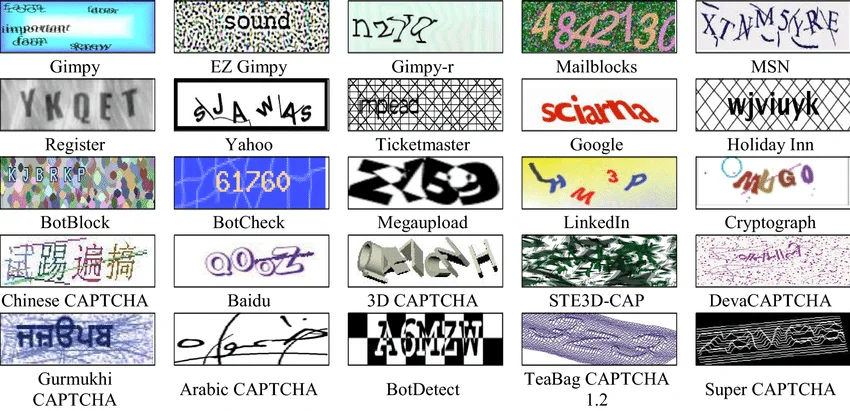
Text-based CAPTCHAs
Text-based CAPTCHAs are a standard online security measure where users must identify and enter letters to verify they’re not bots. The characters in the CAPTCHA are often presented in distorted ways, including scaling, rotation, and other alterations. Additionally, graphic elements like color variations, background noise, lines, arcs, or dots are often incorporated to provide stronger protection against bots.
While these techniques help improve security, they can make things harder for users. In particular, improper use of color and background textures can weaken security if automated programs can easily separate the text from the background. If not done carefully, these elements may make the CAPTCHA harder for users to read.
-
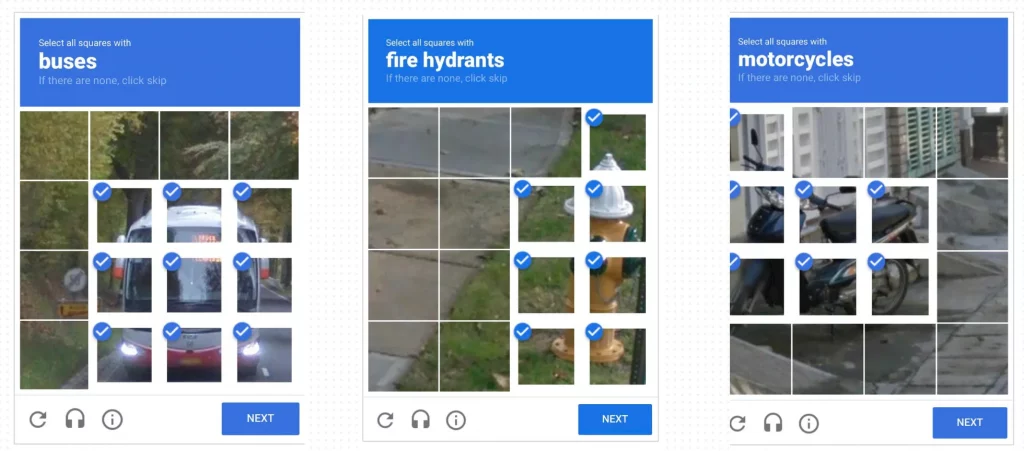
Image-based CAPTCHAs
Image-based CAPTCHA tends to be more popular and easier to understand than a text-based one. These CAPTCHAs are more challenging for bots because they require image recognition and semantic or context understanding.
Some developers say it’s better to use text-based CAPTCHA. For instance, image-based CAPTCHAs can take up too much space on a webpage. It can lead to a poor user experience for visitors on low-bandwidth connections. Some images may not align with the overall aesthetic of a website which can also cause confusion. Creating an effective image database for CAPTCHAs can be time-consuming. The best solution is to use a simpler approach with a limited selection of images. What do you think about it?
-
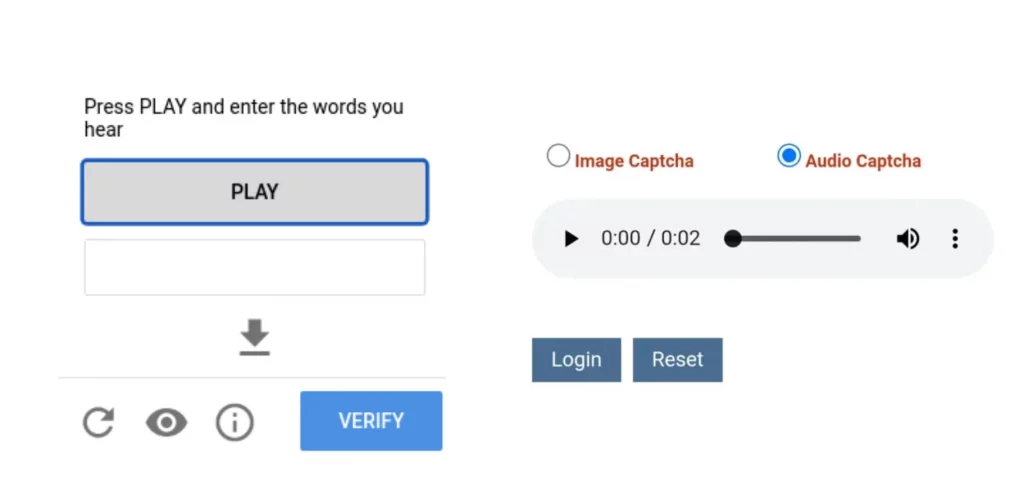
Audio-based CAPTCHAs
Audio-based CAPTCHA is based on the human ability to depict sound that may be distorted. They can be mixed with text or image-based CAPTCHAs. This type of CAPTCHA uses voice recognition technology. This technology relies on machine learning to analyze voice patterns like pitch, tone, and rhythm to check if the audio comes from a real person. Audio-based CAPTCHAs can also pose challenges for both users and bots in terms of interpretation.
-
Word Problems
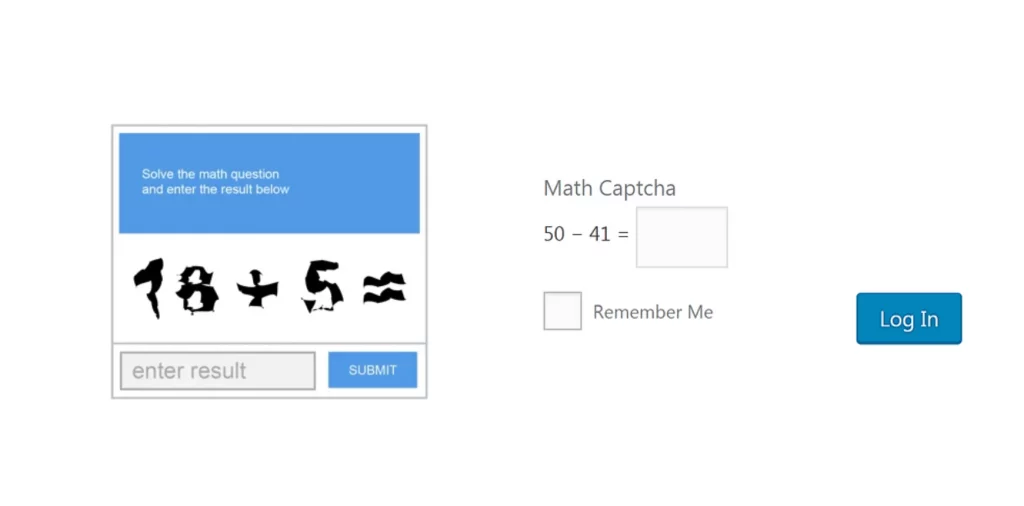
Word Problem is a type of CAPTCHA that presents users with simple math questions or word tasks to solve. For example, users might be asked to type a word in all capital letters, select the last word from a list, or identify a color associated with a specific word. Users must carefully follow all the instructions. A key advantage of this CAPTCHA is that it is helpful for users who are visually impaired and may have trouble with visual tasks.
-
No CAPTCHA reCAPTCHA
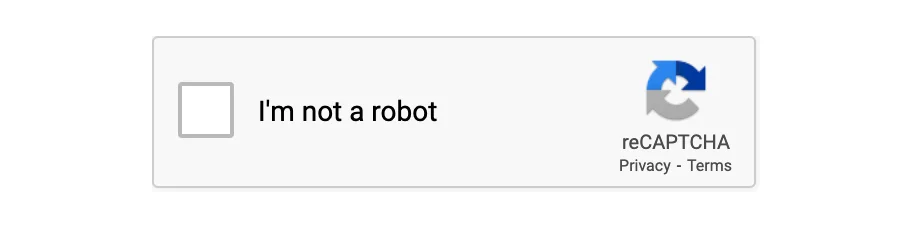
reCAPTCHA is a free service provided by Google. It includes an invisible CAPTCHA that requires no user input. Google has enhanced reCAPTCHA’s features over time, moving away from the classic method of using distorted text. The service now offers various tests, such as image recognition, checkboxes, and assessments of user behavior without any interaction. For example, some tests ask users to check a box labeled “I’m not a robot,” but the real test is based on the user’s mouse movements leading to that action, as human movements have random patterns that bots can’t replicate.
hCaptcha and Cloudflare Turnstile
Two challenges you will meet more often than the classic distorted text. hCaptcha looks like the image grid people know from reCAPTCHA and is used widely by sites that left Google behind. Cloudflare Turnstile usually shows nothing at all: it runs silent browser checks and only escalates to a visible challenge when the signals look wrong. Because Turnstile is invisible, a rise in blocked requests without any visible CAPTCHA is usually Turnstile deciding against you, not a bug in your code.
How does a CAPTCHA work
The idea of CAPTCHAs is that a bot or a computer program will fail to interpret the distorted letters/image/puzzle. In contrast, a human, who knows how to view and understand different fonts, handwriting styles, backgrounds will be able to recognize them. For many internet users, solving a CAPTCHA and continuing browsing may not seem like a big issue.
However, individuals involved in automation, load testing, or data parsing, should know different CAPTCHA types to save their time. Being able to optimize traffic behaviour is crucial for:
- automators who aim to streamline repetitive tasks;
- testers responsible for evaluating web security;
- developers who gather data.
Let’s find out some ways to support automation in a compliant way.
Ways to operate in line with CAPTCHAs
1. Proxy Rotation and IP Management
Proxy rotation across residential proxies uses multiple IP addresses to manage web requests. It helps to prevent authentication issues. When users switch between different proxies, the target website stops noticing patterns that might show bot activity, like too many requests from one IP address. This strategy is even more effective when mixed with extra geolocation targeting offered by DataImpulse. As a result, using a reliable residential proxy to change your IP address is one of the simple ways to manage connection challenges.
2. Browser Automation and Human Behavior Simulation
You can try libraries from Python or Node.js. They simulate real user behavior such as mouse movements and scrolling. For example, Selenium is aimed at browser automation, but it can be combined with CAPTCHA solvers (like 2Captcha) during web scraping. Our mobile proxies fit the same pattern when the target is app centric. This method is especially helpful for tricky CAPTCHAs that analyze user behavior. It makes the CAPTCHA system believe the request is from a real person, and then automated scripts go through without any issues.
3. Optical Character Recognition (OCR)
OCR technology helps analyze and interpret CAPTCHA images with distorted text. It transforms visual information into a format that computers understand. Machine learning is used in advanced OCR methods to improve their flexibility. OCR works well for standard CAPTCHAs, but it can have difficulties with more complex ones. All in all, it’s better to combine this technology with other techniques.
4. Cookie Analysis
Cookie analysis is about managing browser cookies to keep active user sessions. Understanding how websites use cookies to track user actions allows automation tools to send appropriate cookies with requests to imitate real users. Maintaining consistent sessions and minimizing sudden behavior changes can help reduce the number of verification tasks. Managing cookies properly can help generate normal traffic patterns and improve automated interactions with websites.
5. Captcha Solver Service providers
The process of using a CAPTCHA solver is simple. When your bot faces a CAPTCHA, you submit it to the service’s API, where either automated tools or a person solves it. After signing up and linking the API to your tool, you’ll forward the CAPTCHA, and the service will send back the solution so you can keep scraping without problems.
- 2Captcha – a popular service that is focused on a human-powered approach. They also have code examples for automatically solving reCAPTCHAs using tools like Selenium and Puppeteer. The setup process is easy, using APIs compatible with multiple programming languages.
- CapSolver – an AI-powered service that works with multiple proxy types so users can manage their CAPTCHA-solving processes across several IP addresses. This platform minimizes delays, making it a great choice for companies seeking precise scraping tools. It’s also an affordable solution, with a trial plan. If you’d like to learn more about this service, read this article.
- BypassCaptcha – a professional CAPTCHA decoding platform since 2008. Their service has an average 8 to 13 seconds bypass delay. BypassCaptcha is simple to implement in scripts and works with languages like Ruby, Python, and JavaScript. Input the Captcha data into the API, and you’ll receive quick results, solving Google V2 and V3 reCAPTCHAs. It is also compatible with both datacenter and residential proxies.
Conclusion
Summing up, CAPTCHA is an important barrier against spam, hacking, and password theft. CAPTCHAs help computers check if a user is human to improve website security, but they can frustrate users, be hard to use, may not work on all browsers, and create problems for people using screen readers.
To comply with policies, methods like proxy rotation, browser emulation, OCR, and cookie analysis help automate tasks by imitating human behavior. One of them is proxy rotation which enhances anonymity by spreading requests among various IP addresses. At DataImpulse, users can try premium residential, datacenter, and mobile proxies with a budget-friendly pay-as-you-go model. They can benefit from custom solutions, 15+ million IPs from 194 locations, fast connections, and more.
To get more info, “Try now“ or contact us at [email protected].
*This article is purely for educational purposes. Always proceed with caution, follow ethical guidelines, and respect website terms of service to avoid legal issues or harming online systems.
Is bypassing a CAPTCHA illegal
The CAPTCHA itself is not a legal boundary, it is a technical one. What matters is what sits behind it: the terms of the site, whether the data is public, whether personal data is involved, and the law where you and the site operate. Solving a challenge to read a public price list is a different act from automating access to an account area you have no right to enter.
Our own position is narrow and boring on purpose. Use proxies to collect data that is public, at a rate that does not degrade the service, and do not use them to enter places where access is restricted. If you are unsure which side of the line your project sits on, that uncertainty is the answer, and it is a question for a lawyer rather than for a proxy provider.
FAQ
Do proxies solve CAPTCHAs?
No. A proxy changes the IP a site sees, which changes how often a challenge appears. Solving the challenge itself is a separate service. Residential and mobile addresses trigger far fewer challenges than datacenter ranges, but no proxy makes a CAPTCHA disappear once it has been shown.
Which proxy type gets the fewest CAPTCHAs?
Mobile, then residential. Both carry the reputation of ordinary user connections. Mobile addresses are shared by many real subscribers behind carrier NAT, which makes sites reluctant to block them, at the cost of speed and price.
Is bypassing a CAPTCHA illegal?
The challenge is a technical measure, not a legal one, so the answer depends on what you do behind it: the site terms, whether the data is public, and the law in your jurisdiction. Collecting public data is treated differently from automating access to restricted areas.
Can AI solve CAPTCHAs?
Modern models handle distorted text and many image grids reliably, which is why sites have moved to behavioural and invisible challenges such as Cloudflare Turnstile. Those judge the session rather than the picture, so a better model does not help.
Why do I still get CAPTCHAs with residential proxies?
Almost always because of the other three levers: the session hops between IPs mid flow, the pace is mechanical, or the browser fingerprint contradicts the exit country. A good address with a bad session still looks automated.

 State/City/Zip/ASN Targeting



