

In this Article
Living in Pakistan or visiting the country for business? Internet access is generally available, but certain types of online activity can be more challenging than expected. Users who rely on international services, cloud platforms, or proxy-based tools often notice connection instability, sudden failures, or degraded performance.
These issues are especially common when traffic is routed through foreign servers or data center IP addresses. As a result, tasks such as managing international accounts, accessing external platforms, or running automated workflows may become unreliable.
To maintain stable connectivity, protect online privacy, and ensure predictable access to global resources, users often need to rely on additional networking solutions.
This guide explains how internet traffic is managed in Pakistan, why proxy connections may stop working, and which approaches help restore stable access.
How Internet Traffic Is Regulated in Pakistan
Internet access in Pakistan is overseen by the Pakistan Telecommunication Authority (PTA) and implemented through local Internet Service Providers (ISPs). Rather than applying blanket blocks across the entire internet, traffic management is handled through ISP infrastructure and international gateways.
These systems are designed to:
- manage cross-border traffic flows;
- maintain network performance and reliability;
- enforce acceptable use policies;
- and protect local network infrastructure.
To achieve this, ISPs may use a combination of IP-based filtering, DNS handling, traffic shaping, and packet inspection technologies. In recent years, more advanced tools such as Deep Packet Inspection (DPI) have become more widely adopted, allowing providers to analyze traffic patterns and connection behavior instead of relying solely on static blocklists.
Why Proxy Connections Are Affected
Proxy traffic behaves differently from standard user browsing. It often involves:
- repeated outbound connections;
- long-lived TCP sessions;
- access to hosting and data center IP ranges;
- encrypted or non-browser traffic patterns.
Because of these characteristics, proxy connections can be affected by network management systems even when no specific website or service is intentionally limited. In practice, this means that HTTP, HTTPS, and SOCKS5 proxies may all experience similar issues, including connection timeouts, resets, or inconsistent performance.
Since these controls operate at the network level, switching between proxy protocols usually does not resolve the issue.
When Network Controls Interfere
When network-level traffic management interferes with proxy connections, the disruption is often automatic and policy-driven. Users may notice that proxy access works intermittently, degrades over time, or stops working entirely without any configuration changes on their side.
In such cases, restoring stable connectivity requires changing how traffic is presented to the network, rather than adjusting proxy settings alone. This is where encrypted tunneling and traffic management techniques become effective.
How to Use Proxies in Pakistan with a VPN
When proxy connections are unstable or fail entirely, the most reliable approach is to route proxy traffic through a VPN tunnel. This method helps manage traffic exposure, ensures smooth network delivery, and restores stable connectivity.
Below is a step-by-step guide on using proxies in Pakistan with a VPN. For this tutorial, we recommend ZoogVPN, a service we consider reliable and suitable for the setup.
Step 1: Download and Install a VPN
To start, download a VPN application. ZoogVPN is a privacy-focused service that provides a secure, encrypted connection between your device and the internet. It helps protect sensitive data, stabilize connections, and reduce network-level interruptions, making it a practical choice for everyday use, business tasks, and proxy workflows.
To get started, visit the official ZoogVPN website, download the app for your operating system, complete the registration process, and verify your account via the confirmation email.
Once the installation is complete, launch the application and log in to begin using the VPN.

Step 2: Choose a VPN Location and Connect
Choosing the right VPN location can significantly affect your connection speed and stability. For the best results, select a VPN server that either matches the country of your proxy or is located nearby. This helps ensure optimal performance and lower latency when routing traffic through the proxy.
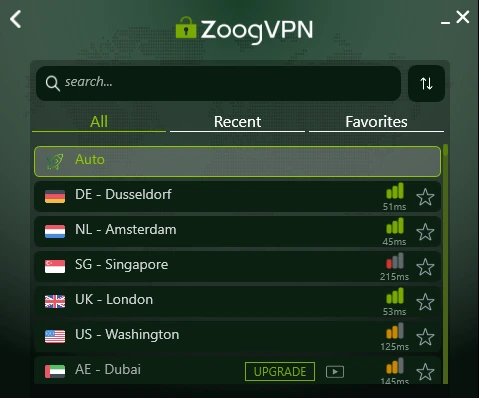
Once you’ve chosen a server, connect to the VPN and confirm that the connection is stable before moving on to the next step.
Step 3: Connect Your Proxy Using DataImpulse
Once your VPN connection is active and stable, the next step is to configure your proxy. DataImpulse provides reliable proxy servers that work well even in environments with unstable direct connections. If you’re new to DataImpulse, we have a great user-friendly tutorial on how to get started. You can check it out here.
To get started with a browser, we’ll use Google Chrome as an example. Chrome relies on your computer’s system proxy settings, which makes it easy to route traffic through your DataImpulse proxy while the VPN is active.
- Go to the “Settings” section in Chrome.
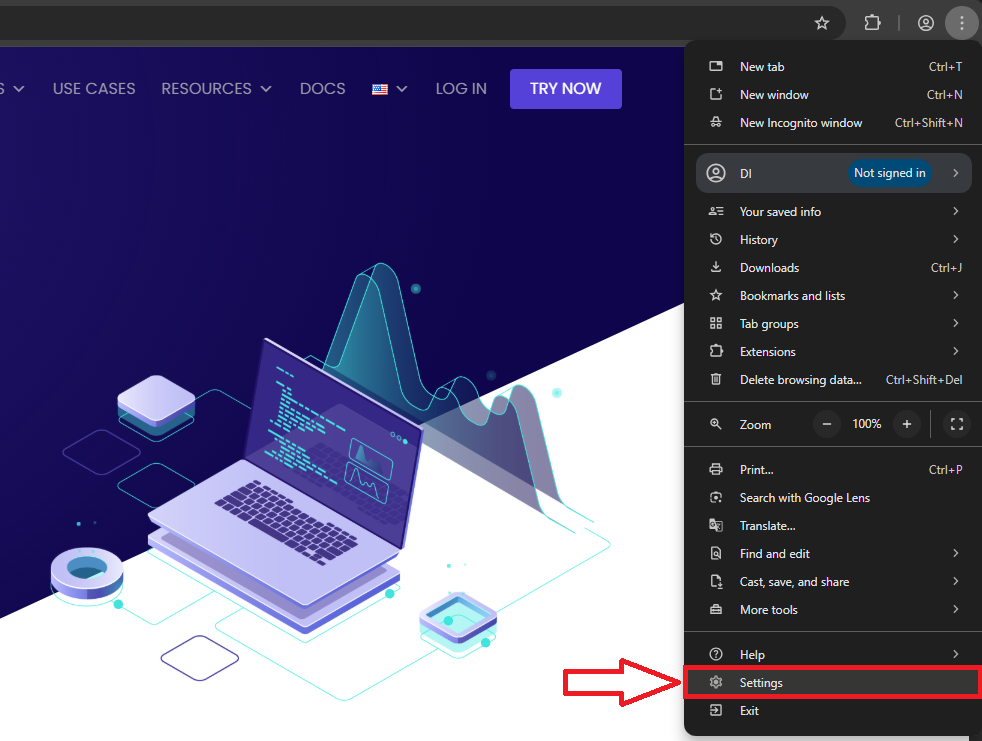
- Then navigate to “System” > “Open your computer’s proxy settings.”
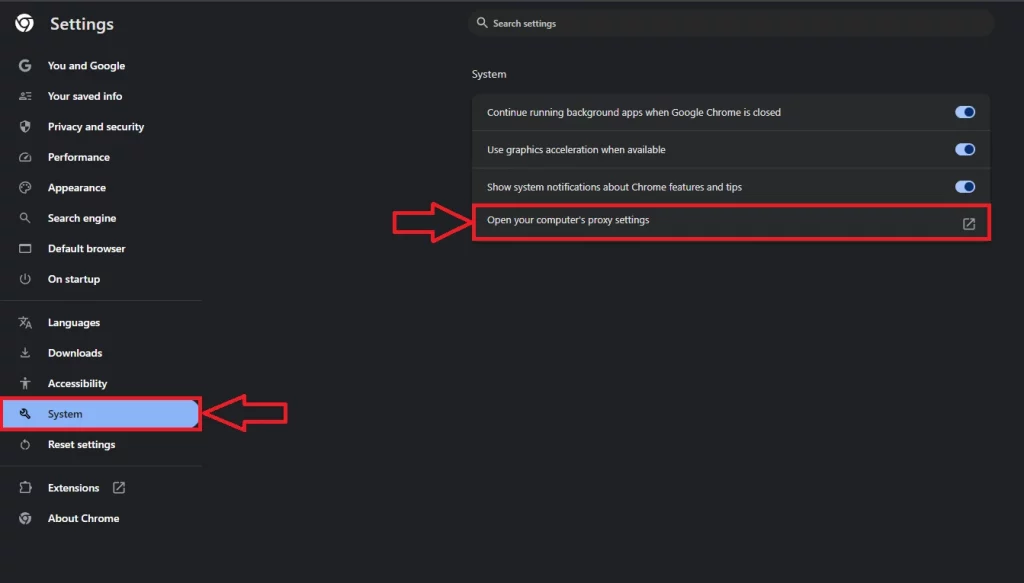
- Find the “Manual proxy setup” section and activate the “Use a proxy server” switch, filling in the following information:
Address: gw.dataimpulse.com
Port: 823
Checkmark on the “Don’t use proxies for local addresses.”
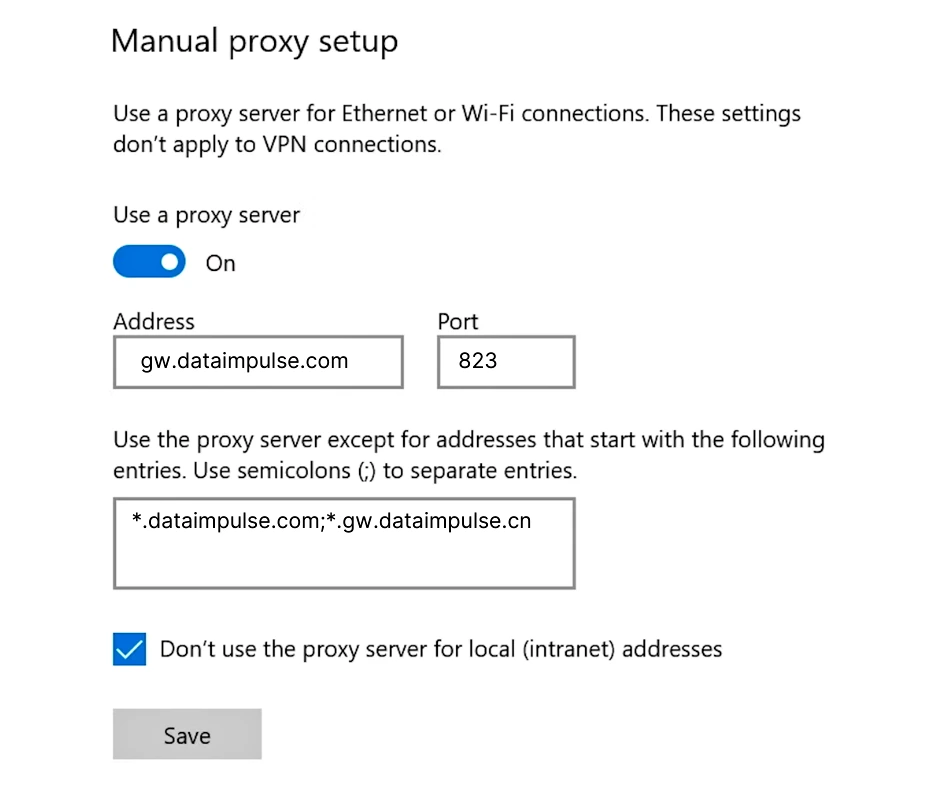
Once configured, Chrome will automatically use the system proxy. You can verify that the setup is working correctly by visiting a website like ip-api.com to confirm that your public IP matches the DataImpulse proxy.
With the VPN and proxy properly set up, your traffic is securely routed through the VPN first and then the proxy, providing stable access to international resources from Pakistan.
Final notes and recommendations
Routing proxy traffic through a VPN is an effective way to improve connection stability in Pakistan. Establishing the VPN connection first and then applying proxy settings helps avoid interference and ensures more predictable results.
This setup is suitable for users who require stable access to external services and consistent proxy performance. ZoogVPN can be used as part of this configuration and is available with a 25% discount.
FAQ
-The proxy still doesn’t work. What should I check first?
Make sure the VPN connection is active before testing the proxy. Then verify the proxy IP address, port, and authentication details. In most cases, connection issues are related to incorrect settings or testing the proxy without an active VPN tunnel.
-Can I use the proxy without a VPN in Pakistan?
In some cases, a direct proxy connection may work. However, if the connection is unstable or denied, routing traffic through a VPN significantly improves reliability and consistency.
-How to start using your proxies?
Not familiar with DataImpulse? No problem! We have a step-by-step guide to get started, which you can find here.
