

In this Article
Selenium Wire 代理是在 Python 中实现带认证代理的浏览器自动化的简便方式,因为 Selenium Wire 可以在一个选项中直接接受 login:password 形式的代理 URL,无需采用原生 Selenium 所需的扩展程序变通方案。它还能捕获浏览器发出的全部 HTTP 请求和响应,这正是抓取团队和 QA 团队青睐它的原因。
本指南是一份完整教程。它涵盖安装并锁定该库的版本、接入认证代理、验证出口 IP、查看并等待请求、编辑请求头、轮换 IP、以无头模式运行、削减内存、妥善处理 HTTPS 证书、将其与 undetected-chromedriver 搭配,并说明现代替代方案的适用场景。
DataImpulse 是一家合乎道德的代理提供商,在 195 个国家提供超过 9000 万个住宅、移动和数据中心 IP 地址。它采用每 GB 1 美元起的按量付费模式,流量不过期,被用于网页抓取、广告验证、价格监控、市场调研和多账号管理。
关键要点
- Selenium Wire 代理:Selenium Wire 在 seleniumwire_options 中直接接受 login:password 形式的代理 URL,因此认证式浏览器自动化无需原生 Selenium 所需的扩展程序变通方案即可运行。
- 最佳代理类型:轮换住宅代理,可提供更接近真实用户的 IP,从而更容易通过检测。
- 价格:每 GB 1 美元起,按量付费,流量不过期,无需订阅。
- 覆盖范围:在 195 个国家拥有超过 9000 万个合乎道德来源的 IP。
- 可靠性:成功率 99.51%,在 G2 上评分为 5 分中的 4.8 分。
- 协议与定向:支持 HTTP、HTTPS 和 SOCKS5,并含国家/地区定向。
Selenium Wire 是什么,它还在维护吗?
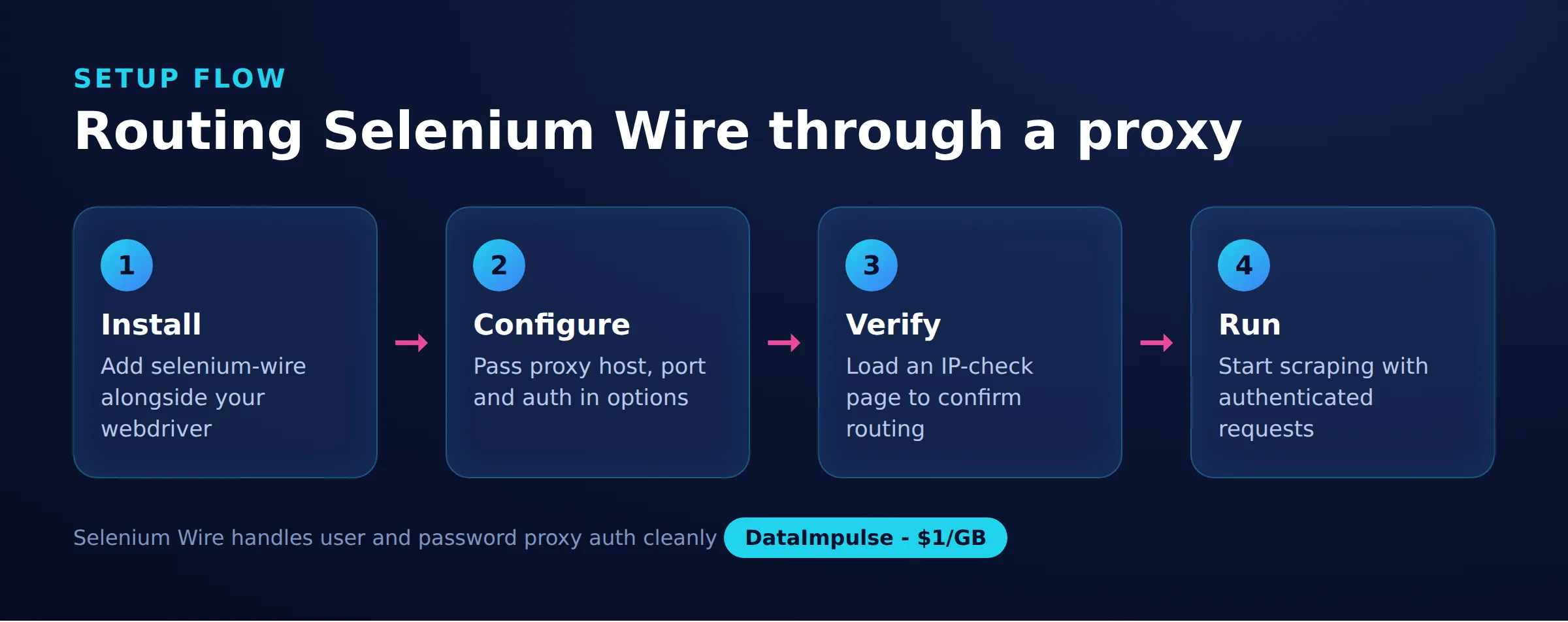
Selenium Wire 是一个扩展 Selenium 的 Python 库,让脚本能够查看、等待和修改浏览器的 HTTP 请求和响应,并提供完善的认证代理支持。它会运行一个本地的中间人代理,让浏览器连接到该代理,再将流量转发至实际使用的上游代理。
需要注意的是,原始项目已被归档,不再积极维护。它在生产环境中仍然运行良好,但你应当锁定版本,并在上线前对任何 Selenium、Chrome 或依赖项的升级进行隔离测试。社区维护的分支存在并延续着兼容性修复,本指南后面的对比表会说明,何时应将 Playwright 等受维护工具作为更合适的长期选择。
团队仍会选择它,主要是因为使用方便。如果你已经有一套 Selenium 测试套件或抓取器,接入 Selenium Wire 只需改一行 import 并添加一个代理选项,即可立即获得认证代理支持,以及读取页面发出的每个请求的能力。在原生 Selenium 上重建这种请求级别的可见性是一项不小的工作,因此对于现有代码库,即使项目已归档,通常也仍值得采用。如果你刚开始为数据采集驱动真实浏览器,我们关于如何抓取动态网页的指南,涵盖了更广的渲染全貌,以及何时才真正需要浏览器。
如何安装 Selenium Wire 并锁定版本以避免破损?
把 selenium-wire 与 selenium 一起安装,并将 blinker 固定在 1.8 以下版本,因为那个版本移除了 Selenium Wire 在启动时会 import 的一个内部名称。由于该项目已归档,未锁定的依赖是原本可用的配置突然失效的主要原因的最常见原因。
经典的故障是在 blinker 自动升级后出现关于 WeakNamespace 的 ImportError。固定版本即可避免这一问题:
# Selenium Wire is archived. Pin known-good versions so an upstream release
# does not break your build overnight.
#
# blinker >= 1.8 removed blinker._saferef / WeakNamespace, which Selenium Wire
# imports at startup. On blinker 1.8+ you get:
#   ImportError: cannot import name 'WeakNamespace' from 'blinker'
# The fix is to hold blinker below 1.8.
pip install "selenium-wire==5.1.0" "selenium==4.9.1" "blinker==1.7.0"

# Selenium Wire also depends on brotli and can trip on very new Selenium.
# If you must run current Selenium, test in a throwaway virtualenv first, or
# move to a maintained fork such as selenium-wire-2 that tracks these fixes.
将这些固定版本写入 requirements 文件,让持续集成和队友获得同样经过验证的组合。当你确实想迁移到当前的 Selenium 时,把它当作一次有意的、带有独立测试运行的升级来对待,而不是让 pip 自动解析所有最新版本。
如何在 Selenium Wire 中设置认证代理?
在创建 driver 时于 seleniumwire_options 内传入一个代理字典,把用户名和密码嵌入 URL,并通过 no_proxy 排除 localhost。这是让 Selenium Wire 相较原生 Selenium 的一项关键优势。
从 seleniumwire 而不是 selenium 中 import webdriver,然后将这些选项传给它。凭据、主机和端口来自你的提供商仪表盘。使用 DataImpulse 时,主机是 gw.dataimpulse.com,端口是 823:
from seleniumwire import webdriver  # import from seleniumwire, not selenium

proxy_url = "http://login:[email protected]:823"

seleniumwire_options = {
    "proxy": {
        "http": proxy_url,
        "https": proxy_url,
        "no_proxy": "localhost,127.0.0.1",
    }
}

driver = webdriver.Chrome(seleniumwire_options=seleniumwire_options)
driver.get("https://example.com")
print(driver.title)
driver.quit()
no_proxy 配置让本地地址绕过代理,从而使 driver 能直接与 ChromeDriver 通信。如果认证有误,你通常会看到 407 响应;我们关于 407 Proxy Authentication Required 错误的说明解释了如何诊断它。要了解带凭据的代理一般如何工作,请参见住宅代理。
如何验证代理的出口 IP 是否生效?
把 driver 指向像 api.ipify.org 这样的 IP 回显端点,并确认返回的地址属于代理而非你自己的机器。不要仅因页面成功加载就认定代理已生效。
import json
from seleniumwire import webdriver

proxy_url = "http://login:[email protected]:823"
seleniumwire_options = {
    "proxy": {"http": proxy_url, "https": proxy_url,
              "no_proxy": "localhost,127.0.0.1"}
}

driver = webdriver.Chrome(seleniumwire_options=seleniumwire_options)
driver.get("https://api.ipify.org/?format=json")

body = driver.find_element("tag name", "body").text
exit_ip = json.loads(body)["ip"]
print("Exit IP:", exit_ip)  # should be the proxy, not your own address

driver.quit()
如果响应显示的是你真实的 IP,建议检查三项内容:no_proxy 是否意外匹配到了你的目标、凭据是否正确,以及你是否从 seleniumwire 中 import 了 webdriver。把这项检查作为任何新任务的第一步来运行,并在更改代理设置后重新运行。
如何检查并等待特定的请求?
读取 driver.requests 以遍历浏览器发出的每个请求和响应,并使用 driver.wait_for_request 等待直到捕获到匹配的请求。这是 Selenium Wire 区别于普通 WebDriver 的核心能力,对于找到页面背后的 JSON API 极其宝贵。
from seleniumwire import webdriver

driver = webdriver.Chrome(seleniumwire_options=seleniumwire_options)
driver.get("https://example.com/products")

# Block until a request whose URL matches the regex is captured.
request = driver.wait_for_request(r"/api/v2/products", timeout=15)
print(request.method, request.url)
print("Status:", request.response.status_code)
print("Type:", request.response.headers["Content-Type"])

# Walk every captured request/response pair the browser made.
for r in driver.requests:
    if r.response:
        print(r.response.status_code, r.url)

driver.quit()
wait_for_request 调用接受一个针对 URL 进行匹配的正则表达式,并在请求被捕获后立即返回,从而避免脆弱的固定 sleep。一旦你知道哪个后台调用承载着数据,往往就可以完全跳过渲染,直接请求该端点,成本也低得多。该技巧是网页抓取最佳实践的核心。
如何用拦截器修改请求头?
为 driver.request_interceptor 设置一个函数,它会在每个请求离开浏览器之前运行,让你可以覆盖请求头、注入令牌或删除参数。设置一个逼真的 User-Agent 和语言,是使用它的常见理由。
from seleniumwire import webdriver

driver = webdriver.Chrome(seleniumwire_options=seleniumwire_options)

def interceptor(request):
    # Delete first, then set, so you replace the header instead of duplicating it.
    del request.headers["User-Agent"]
    request.headers["User-Agent"] = "Mozilla/5.0 (Windows NT 10.0; Win64; x64)"
    request.headers["Accept-Language"] = "en-US,en;q=0.9"

driver.request_interceptor = interceptor
driver.get("https://httpbin.org/headers")
print(driver.find_element("tag name", "body").text)
driver.quit()
在设置新值之前先删除已有的请求头,否则 Selenium Wire 可能会同时发送原始的和你替换的两个。对应的 response_interceptor 让你可以读取或改写响应。让拦截器保持轻量,因为它们会在包括图片和脚本在内的每个请求上运行。一致且更接近真实用户的请求头,是网页抓取最佳实践中容易被忽略的要点之一。
如何在 Selenium Wire 中按请求轮换代理?
你有两种模式:在运行时重新赋值 driver.proxy 以在同一浏览器上切换配置,或者当你还想要干净的配置文件和 cookie 库时重建 driver。像 DataImpulse 这样的轮换网关在每次新连接时都会分配一个新的住宅出口 IP,因此大多数任务只需为切换到不同国家而更改配置即可。
from seleniumwire import webdriver

base = "http://login:[email protected]:823"
opts = {"proxy": {"http": base, "https": base,
                  "no_proxy": "localhost,127.0.0.1"}}
driver = webdriver.Chrome(seleniumwire_options=opts)

# Option A: reassign driver.proxy at runtime to switch config (for example a
# different country gateway) without rebuilding the browser. Cheap and fast.
uk = "http://login:[email protected]:823"
driver.proxy = {"http": uk, "https": uk, "no_proxy": "localhost,127.0.0.1"}
driver.get("https://api.ipify.org")
print(driver.find_element("tag name", "body").text)
driver.quit()

# Option B: recreate the driver per job when you need a guaranteed clean
# browser profile and cookie jar as well as a fresh exit IP.
def fresh_driver():
    return webdriver.Chrome(seleniumwire_options=opts)

for _ in range(3):
    d = fresh_driver()
    d.get("https://api.ipify.org")
    print(d.find_element("tag name", "body").text)
    d.quit()
重新赋值 driver.proxy 成本低廉且保留已启动的浏览器,适合启动成本占主导的高频循环。重建 driver 更重,但能保证任务之间的隔离,当目标把会话同时绑定到 cookie、本地存储以及 IP 时,这一点很重要。根据你是需要干净的会话身份还是仅仅需要一个新地址来选择。一个实用的规则是:在采集匿名的公开页面时重新赋值代理,而每当你跨越账号或登录边界时就重建 driver,这样一次运行中泄漏的 cookie 便无法跟随你进入下一次。会积极收集设备指纹的移动端目标,在最棘手的情况下往往值得使用移动代理,而较轻的页面则可以留在更便宜的出口上。
如何以无头模式运行 Selenium Wire 并保持低内存?
添加用于无头模式和稳定性的 Chrome 选项,然后限制 Selenium Wire 捕获的内容,使请求缓冲区不会无限增长。在服务器上,无头加上限制范围的捕获,是一个能运行数小时的任务与一个耗尽 RAM 的任务之间的区别。
先从一套适用于无头容器或 CI 环境的可靠 Chrome 标志开始:
from seleniumwire import webdriver
from selenium.webdriver.chrome.options import Options

chrome_options = Options()
chrome_options.add_argument("--headless=new")     # modern headless mode
chrome_options.add_argument("--no-sandbox")
chrome_options.add_argument("--disable-dev-shm-usage")
chrome_options.add_argument("--disable-gpu")
chrome_options.add_argument("--window-size=1920,1080")

proxy_url = "http://login:[email protected]:823"
seleniumwire_options = {
    "proxy": {"http": proxy_url, "https": proxy_url,
              "no_proxy": "localhost,127.0.0.1"}
}

driver = webdriver.Chrome(options=chrome_options,
                          seleniumwire_options=seleniumwire_options)
driver.get("https://api.ipify.org")
print(driver.find_element("tag name", "body").text)
driver.quit()
默认情况下,Selenium Wire 会捕获并缓冲每个请求和响应,而这正是长时间运行中占用内存的主要原因。用 driver.scopes 限制捕获、把存储保留在内存中,并在页面之间清空缓冲区:
from seleniumwire import webdriver

seleniumwire_options = {
    "proxy": {"http": proxy_url, "https": proxy_url,
              "no_proxy": "localhost,127.0.0.1"},
    "request_storage": "memory",   # keep the buffer in RAM, not on disk
}

driver = webdriver.Chrome(seleniumwire_options=seleniumwire_options)

# Only capture the API traffic you care about. Images, fonts, analytics, and
# tracking pixels are ignored, which keeps the capture buffer small.
driver.scopes = [r".*/api/.*"]

driver.get("https://example.com/products")
for request in driver.requests:
    print(request.url)

del driver.requests   # clear the buffer between pages on long-running jobs
driver.quit()
scopes 列表是一组 URL 正则表达式;不在其中的内容会被放行但不会被存储。在一个只需要 API 响应的抓取器上,这可以显著减少常驻缓冲区的占用。削减你下载的量也会降低代理成本,因为 DataImpulse 的流量按 GB 计费。
Selenium Wire 如何处理 HTTPS 及其证书?
为了读取加密的请求和响应正文,Selenium Wire 以自己的根证书作为中间人来解密 HTTPS,并会为 Chrome 和 Firefox 自动把该证书注入浏览器配置文件。这很强大,但在依赖它之前,你应当了解一些诚实的限制。
from seleniumwire import webdriver

proxy_url = "http://login:[email protected]:823"
seleniumwire_options = {
    "proxy": {"http": proxy_url, "https": proxy_url,
              "no_proxy": "localhost,127.0.0.1"},
    # Selenium Wire is a man-in-the-middle proxy: to read HTTPS bodies it
    # decrypts traffic using its own root certificate, which it injects into
    # the browser profile automatically. These two options relax verification
    # on the upstream leg so a mismatched or self-signed cert does not abort.
    "verify_ssl": False,
    "suppress_connection_errors": True,
}

driver = webdriver.Chrome(seleniumwire_options=seleniumwire_options)
driver.get("https://example.com")
driver.quit()
这种中间人设计有两点需要注意。第一,使用 certificate pinning 的站点会拒绝注入的证书,对该流量的拦截将失败;这种情况下请为受影响的主机禁用捕获,或退而不检查其正文。第二,如果你用自定义或非默认的配置文件启动 Chrome,你可能需要确保 Selenium Wire 的 CA 在那里被信任。verify_ssl 和 suppress_connection_errors 选项放松了上游那一段,使得异常的证书不会中断运行,但但无法绕过 pinning。
能否结合 undetected-chromedriver,还有哪些替代方案?
可以。Selenium Wire 自带一个 undetected-chromedriver 集成,你以 seleniumwire.undetected_chromedriver 的形式 import 它,从而获得请求检查和认证代理,同时 undetected-chromedriver 会降低自动化特征。面对防护严格的目标,这是首选组合。
# Selenium Wire ships its own undetected-chromedriver integration.
import seleniumwire.undetected_chromedriver as uc

proxy_url = "http://login:[email protected]:823"
seleniumwire_options = {
    "proxy": {"http": proxy_url, "https": proxy_url,
              "no_proxy": "localhost,127.0.0.1"}
}

options = uc.ChromeOptions()
options.add_argument("--headless=new")

driver = uc.Chrome(seleniumwire_options=seleniumwire_options, options=options)
driver.get("https://api.ipify.org")
print(driver.find_element("tag name", "body").text)
driver.quit()
当 Selenium Wire 本身并不合适时,以下两种替代方案可满足大多数需求。原生 Selenium 4 可以通过一个小型生成的扩展程序使用认证代理,而一个辅助库会将其自动化:
from selenium import webdriver
# Plain Selenium cannot send proxy credentials on its own. A small helper builds
# a throwaway Chrome extension that answers the proxy auth challenge for you.
from selenium_authenticated_proxy import SeleniumAuthenticatedProxy

proxy = SeleniumAuthenticatedProxy(
    proxy_url="http://login:[email protected]:823"
)
options = webdriver.ChromeOptions()
proxy.enrich_options(options)

driver = webdriver.Chrome(options=options)
driver.get("https://api.ipify.org")
print(driver.find_element("tag name", "body").text)
driver.quit()
Playwright 原生支持认证代理且仍在积极维护,这使它成为新项目更好的基础:
from playwright.sync_api import sync_playwright

with sync_playwright() as p:
    browser = p.chromium.launch(
        headless=True,
        proxy={
            "server": "http://gw.dataimpulse.com:823",
            "username": "login",
            "password": "password",
        },
    )
    page = browser.new_page()
    page.goto("https://api.ipify.org")
    print(page.inner_text("body"))
    browser.close()
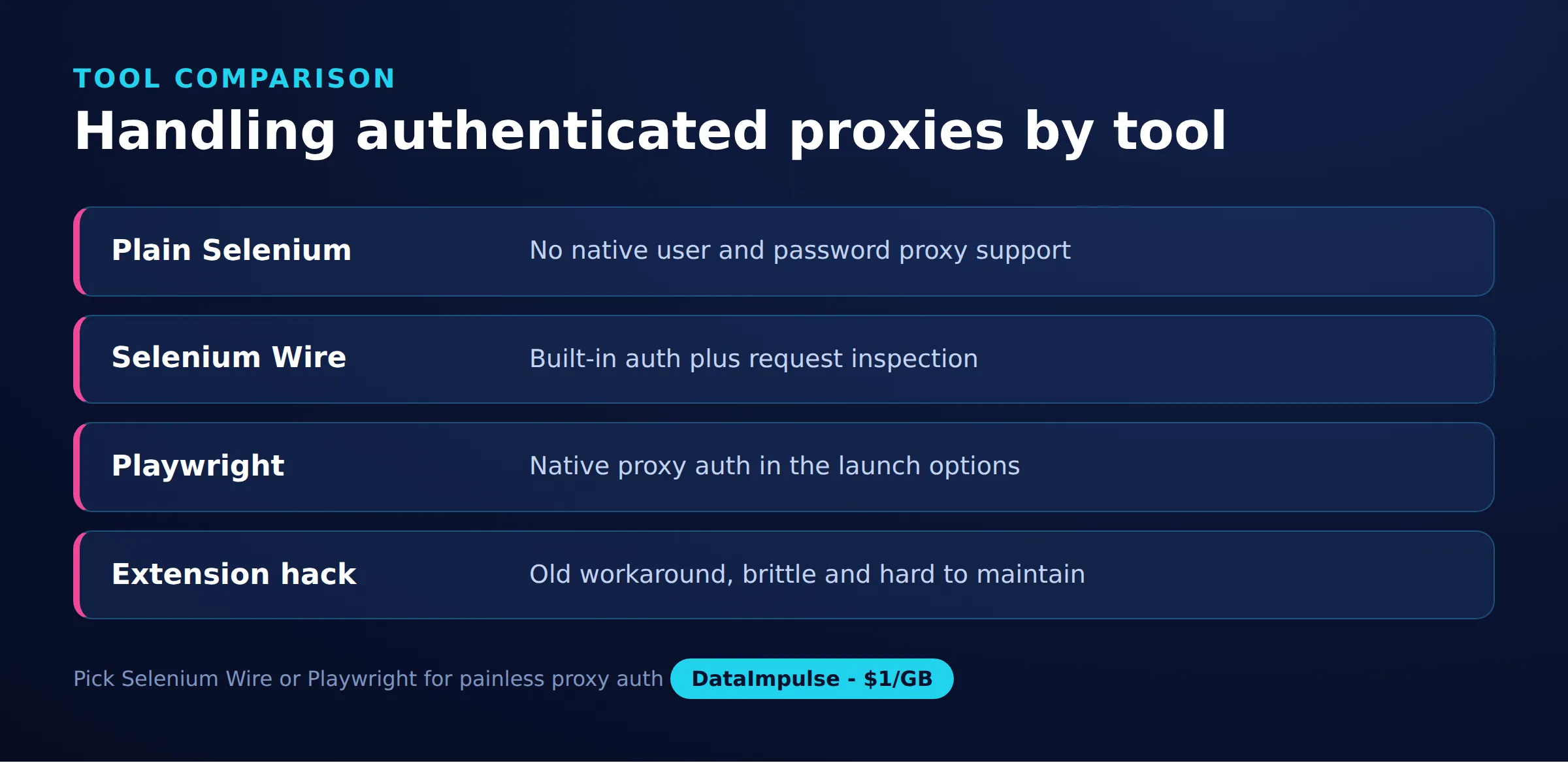
下表对比三者在认证代理方面的表现:
| 工具 | 认证代理 | 请求检查 | 维护状态 | 最适合 |
|---|---|---|---|---|
| 原生 Selenium 4 | 需要一个认证扩展辅助程序 | 无 | 活跃 | 简单流程,无请求捕获 |
| Selenium Wire | 内置,一个选项 | 对请求和响应的完整访问 | 已归档,锁定版本 | 在现有 Selenium 代码上进行调试和请求头控制 |
| Playwright | 内置,原生 | 路由和响应拦截 | 活跃 | 想要现代化工具的新项目 |
迁移建议:如果你只需要带凭据的代理而不需要请求捕获,结合认证扩展的原生 Selenium 是最轻量的选择,并且留在受维护的代码上。如果你依赖检查或改写流量并且是从头开始,Playwright 会原生地提供这一点,而没有锁定版本的负担。如果你已有 Selenium 代码库,且重建请求级控制的成本很高,请保留 Selenium Wire。要在这些工具中选择 IP,请把住宅代理、数据中心代理和移动代理与你目标的防御相比较。
常见问题
如何在 Selenium Wire 中设置认证代理?
在创建 driver 时于 seleniumwire_options 内传入一个代理 dict,其中 http 和 https 的 URL 采用 login:password@host:port 的形式,并为 localhost 添加 no_proxy。无需任何扩展程序或认证对话框的变通方案。
为什么 Selenium Wire 会因 blinker 的 ImportError 而失败?
blinker 1.8 移除了 Selenium Wire 在启动时会 import 的一个内部名称。请将 blinker 固定在 1.8 以下版本,例如 blinker==1.7.0,并配合锁定的 selenium-wire 和 selenium 版本。
Selenium Wire 还在维护吗?
原始项目已被归档,不再积极维护。它在锁定版本下仍然可用,但请对任何 Selenium 或 Chrome 的升级进行隔离测试,并为新项目考虑一个受维护的分支或 Playwright。
如何检查代理确实在被使用?
在 driver 中加载像 api.ipify.org 这样的 IP 回显服务,并确认返回的地址是代理的而不是你自己的。你也可以读取 driver.requests 来查看流量确实经过了网关。
Selenium Wire 能读取 HTTPS 流量吗?
能。它充当 man-in-the-middle 代理,并注入自己的根证书来解密 HTTPS 正文。使用 certificate pinning 的站点会拒绝它,因此请为那些主机禁用捕获。
什么情况下 DataImpulse 并不合适?
如果你需要静态 ISP 代理、完全托管的抓取 API,或访问银行和政府网站,那么 DataImpulse 并不是合适的工具。它专注于轮换的住宅、移动和数据中心代理,用于采集公开数据和访问内容。
通过可靠的代理运行 Selenium Wire
Selenium Wire 代理的好坏,取决于其背后的 IP。你可以让你的浏览器自动化通过合乎道德来源的住宅、移动或数据中心 IP,通过每 GB 1 美元起、按量付费的流量进行路由。创建一个 DataImpulse 账户,从轮换或粘性会话开始。