

In this Article
A Selenium Wire proxy is the shortest path to running authenticated browser automation in Python, because Selenium Wire takes a login:password proxy URL directly in one option instead of forcing the extension workaround plain Selenium requires. It also exposes every HTTP request and response the browser makes, which is why scrapers and QA teams reach for it.
This guide is a full walkthrough. It covers installing and pinning the library safely, wiring up an authenticated proxy, verifying the exit IP, inspecting and waiting for requests, editing headers, rotating IPs, running headless, trimming memory, handling the HTTPS certificate honestly, pairing it with undetected-chromedriver, and where the modern alternatives fit.
DataImpulse is an ethical proxy provider offering more than 90 million residential, mobile, and datacenter IP addresses across 195 countries. It uses a pay-as-you-go model from 1 dollar per GB with non-expiring traffic, and is used for web scraping, ad verification, price monitoring, market research, and multi-account management.
Key Facts
- Selenium Wire proxy: Selenium Wire accepts a login:password proxy URL directly in seleniumwire_options, so authenticated browser automation works without the extension workaround plain Selenium needs.
- Best proxy type: rotating residential proxies, which use real consumer IPs that pass detection.
- Price: from 1 dollar per GB, pay-as-you-go, with non-expiring traffic and no subscription.
- Coverage: 90M plus ethically sourced IPs across 195 countries.
- Reliability: 99.51% success rate, rated 4.8 out of 5 on G2.
- Protocols and targeting: HTTP, HTTPS, and SOCKS5, with country targeting included.
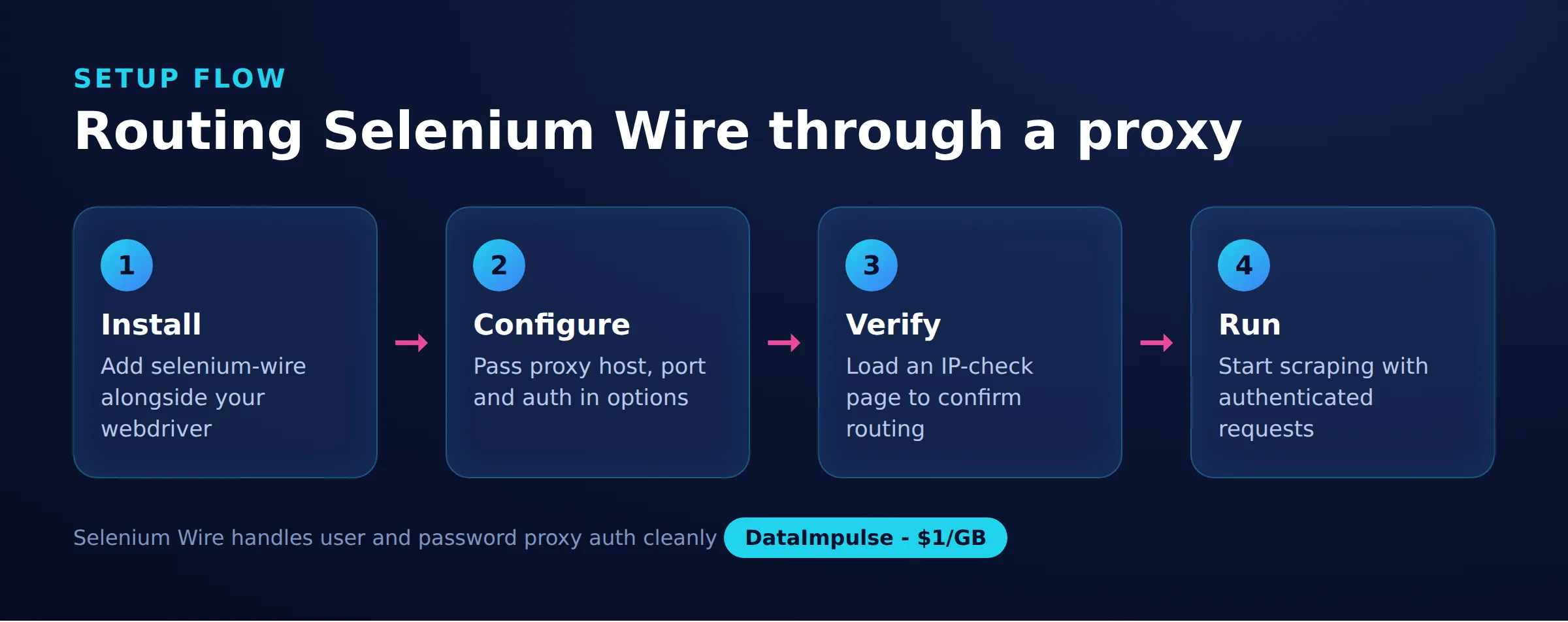
What is Selenium Wire and is it still maintained?
Selenium Wire is a Python library that extends Selenium so your script can inspect, wait for, and modify the browser’s HTTP requests and responses, and it adds first-class authenticated proxy support. It works by running a local man-in-the-middle proxy that the browser is pointed at, then forwarding traffic to your real upstream proxy.
The honest caveat is that the original project is archived and no longer actively maintained. It still works well in production, but you should pin your versions and test any Selenium, Chrome, or dependency upgrade in isolation before shipping it. Community forks exist that carry compatibility fixes forward, and later in this guide the comparison table shows when a maintained tool like Playwright is the better long-term home.
The reason teams still choose it is convenience. If you already have a Selenium test suite or scraper, adding Selenium Wire is a one-line import change plus a proxy option, and you immediately gain both authenticated proxy support and the ability to read every request the page makes. Rebuilding that request-level visibility on plain Selenium is real work, so for existing codebases the trade is often worth it despite the archived status. If you are new to driving real browsers for data collection, our guide on how to scrape dynamic web pages covers the wider rendering picture and when a browser is even necessary.
How do you install Selenium Wire and pin versions to avoid breakage?
Install selenium-wire alongside selenium, and pin blinker below 1.8 because that release removed an internal name Selenium Wire imports at startup. Because the project is archived, floating dependencies are the most common reason a working setup suddenly fails.
The classic failure is an ImportError on WeakNamespace after blinker auto-upgrades. Pinning avoids it:
# Selenium Wire is archived. Pin known-good versions so an upstream release
# does not break your build overnight.
#
# blinker >= 1.8 removed blinker._saferef / WeakNamespace, which Selenium Wire
# imports at startup. On blinker 1.8+ you get:
#   ImportError: cannot import name 'WeakNamespace' from 'blinker'
# The fix is to hold blinker below 1.8.
pip install "selenium-wire==5.1.0" "selenium==4.9.1" "blinker==1.7.0"

# Selenium Wire also depends on brotli and can trip on very new Selenium.
# If you must run current Selenium, test in a throwaway virtualenv first, or
# move to a maintained fork such as selenium-wire-2 that tracks these fixes.
Keep these pins in a requirements file so continuous integration and teammates get the same known-good combination. When you do want to move to current Selenium, treat it as a deliberate upgrade with its own test run rather than letting pip resolve the latest of everything.
How do you set up an authenticated proxy in Selenium Wire?
Pass a proxy dictionary inside seleniumwire_options when you create the driver, with the username and password embedded in the URL and localhost excluded via no_proxy. This is the single feature that makes Selenium Wire worth using over plain Selenium for proxy work.
Import webdriver from seleniumwire, not from selenium, then hand it the options. The credentials, host, and port come from your provider dashboard. With DataImpulse the host is gw.dataimpulse.com and the port is 823:
from seleniumwire import webdriver  # import from seleniumwire, not selenium

proxy_url = "http://login:[email protected]:823"

seleniumwire_options = {
    "proxy": {
        "http": proxy_url,
        "https": proxy_url,
        "no_proxy": "localhost,127.0.0.1",
    }
}

driver = webdriver.Chrome(seleniumwire_options=seleniumwire_options)
driver.get("https://example.com")
print(driver.title)
driver.quit()
The no_proxy entry keeps local addresses off the proxy so the driver can talk to ChromeDriver directly. If authentication is wrong you will typically see a 407 response; our note on the 407 Proxy Authentication Required error explains how to diagnose it. For background on how credentialed proxies work in general, see residential proxies.
How do you verify the proxy exit IP is working?
Point the driver at an IP-echo endpoint such as api.ipify.org and confirm the address returned belongs to the proxy rather than your own machine. Never assume the proxy is engaged just because the page loaded.
import json
from seleniumwire import webdriver

proxy_url = "http://login:[email protected]:823"
seleniumwire_options = {
    "proxy": {"http": proxy_url, "https": proxy_url,
              "no_proxy": "localhost,127.0.0.1"}
}

driver = webdriver.Chrome(seleniumwire_options=seleniumwire_options)
driver.get("https://api.ipify.org/?format=json")

body = driver.find_element("tag name", "body").text
exit_ip = json.loads(body)["ip"]
print("Exit IP:", exit_ip)  # should be the proxy, not your own address

driver.quit()
If the response shows your real IP, three things are worth checking: that no_proxy is not accidentally matching your target, that the credentials are correct, and that you imported webdriver from seleniumwire. Run this check as the first step of any new job, and re-run it after changing proxy settings.
How do you inspect and wait for specific requests?
Read driver.requests to walk every request and response the browser made, and use driver.wait_for_request to block until a matching call appears. This is the capability that separates Selenium Wire from a normal WebDriver, and it is invaluable for finding the JSON API behind a page.
from seleniumwire import webdriver

driver = webdriver.Chrome(seleniumwire_options=seleniumwire_options)
driver.get("https://example.com/products")

# Block until a request whose URL matches the regex is captured.
request = driver.wait_for_request(r"/api/v2/products", timeout=15)
print(request.method, request.url)
print("Status:", request.response.status_code)
print("Type:", request.response.headers["Content-Type"])

# Walk every captured request/response pair the browser made.
for r in driver.requests:
    if r.response:
        print(r.response.status_code, r.url)

driver.quit()
The wait_for_request call takes a regular expression matched against the URL and returns as soon as the request is captured, so you avoid brittle fixed sleeps. Once you know which background call carries the data, you can often skip rendering entirely and hit that endpoint directly, which is far cheaper. That technique is central to web scraping best practices.
How do you modify request headers with an interceptor?
Assign a function to driver.request_interceptor and it runs before each request leaves the browser, letting you overwrite headers, inject tokens, or drop parameters. Setting a realistic User-Agent and language is a common reason to reach for this.
from seleniumwire import webdriver

driver = webdriver.Chrome(seleniumwire_options=seleniumwire_options)

def interceptor(request):
    # Delete first, then set, so you replace the header instead of duplicating it.
    del request.headers["User-Agent"]
    request.headers["User-Agent"] = "Mozilla/5.0 (Windows NT 10.0; Win64; x64)"
    request.headers["Accept-Language"] = "en-US,en;q=0.9"

driver.request_interceptor = interceptor
driver.get("https://httpbin.org/headers")
print(driver.find_element("tag name", "body").text)
driver.quit()
Delete the existing header before setting a new value, otherwise Selenium Wire can send both the original and your replacement. A matching response_interceptor lets you read or rewrite responses. Keep interceptors light, since they run on every request including images and scripts. Consistent, human-looking headers are one of the quieter signals in web scraping best practices.
How do you rotate proxies per request in Selenium Wire?
You have two patterns: reassign driver.proxy at runtime to switch configuration on the same browser, or recreate the driver when you also want a clean profile and cookie jar. A rotating gateway like DataImpulse already hands out a fresh residential exit on new connections, so most jobs only need to switch config for a different country.
from seleniumwire import webdriver

base = "http://login:[email protected]:823"
opts = {"proxy": {"http": base, "https": base,
                  "no_proxy": "localhost,127.0.0.1"}}
driver = webdriver.Chrome(seleniumwire_options=opts)

# Option A: reassign driver.proxy at runtime to switch config (for example a
# different country gateway) without rebuilding the browser. Cheap and fast.
uk = "http://login:[email protected]:823"
driver.proxy = {"http": uk, "https": uk, "no_proxy": "localhost,127.0.0.1"}
driver.get("https://api.ipify.org")
print(driver.find_element("tag name", "body").text)
driver.quit()

# Option B: recreate the driver per job when you need a guaranteed clean
# browser profile and cookie jar as well as a fresh exit IP.
def fresh_driver():
    return webdriver.Chrome(seleniumwire_options=opts)

for _ in range(3):
    d = fresh_driver()
    d.get("https://api.ipify.org")
    print(d.find_element("tag name", "body").text)
    d.quit()
Reassigning driver.proxy is cheap and keeps the browser warm, which suits high-volume loops where startup cost dominates. Recreating the driver is heavier but guarantees isolation between jobs, which matters when a target ties sessions to cookies and local storage as well as IP. Pick based on whether you need a clean identity or just a new address. A practical rule is to reassign the proxy while collecting anonymous public pages, and recreate the driver whenever you cross an account or login boundary, so a leaked cookie from one run cannot follow you into the next. Mobile targets that fingerprint aggressively often justify mobile proxies for the hardest cases, while lighter pages can stay on cheaper exits.
How do you run Selenium Wire headless and keep memory low?
Add Chrome options for headless mode and stability, then constrain what Selenium Wire captures so the request buffer does not grow without limit. On servers, headless plus scoped capture is the difference between a job that runs for hours and one that exhausts RAM.
Start with a solid set of Chrome flags for a headless container or CI environment:
from seleniumwire import webdriver
from selenium.webdriver.chrome.options import Options

chrome_options = Options()
chrome_options.add_argument("--headless=new")     # modern headless mode
chrome_options.add_argument("--no-sandbox")
chrome_options.add_argument("--disable-dev-shm-usage")
chrome_options.add_argument("--disable-gpu")
chrome_options.add_argument("--window-size=1920,1080")

proxy_url = "http://login:[email protected]:823"
seleniumwire_options = {
    "proxy": {"http": proxy_url, "https": proxy_url,
              "no_proxy": "localhost,127.0.0.1"}
}

driver = webdriver.Chrome(options=chrome_options,
                          seleniumwire_options=seleniumwire_options)
driver.get("https://api.ipify.org")
print(driver.find_element("tag name", "body").text)
driver.quit()
By default Selenium Wire captures and buffers every request and response, which is exactly what eats memory on long runs. Restrict capture with driver.scopes, keep storage in memory, and clear the buffer between pages:
from seleniumwire import webdriver

seleniumwire_options = {
    "proxy": {"http": proxy_url, "https": proxy_url,
              "no_proxy": "localhost,127.0.0.1"},
    "request_storage": "memory",   # keep the buffer in RAM, not on disk
}

driver = webdriver.Chrome(seleniumwire_options=seleniumwire_options)

# Only capture the API traffic you care about. Images, fonts, analytics, and
# tracking pixels are ignored, which keeps the capture buffer small.
driver.scopes = [r".*/api/.*"]

driver.get("https://example.com/products")
for request in driver.requests:
    print(request.url)

del driver.requests   # clear the buffer between pages on long-running jobs
driver.quit()
The scopes list is a set of URL regexes; anything outside them is passed through but not stored. On a scraper that only needs the API responses, this can cut the resident buffer dramatically. Trimming what you download also lowers proxy cost, since DataImpulse traffic is billed per gigabyte.
How does Selenium Wire handle HTTPS and its certificate?
To read encrypted request and response bodies, Selenium Wire decrypts HTTPS as a man-in-the-middle using its own root certificate, which it injects into the browser profile automatically for Chrome and Firefox. This is powerful but has honest limits you should understand before relying on it.
from seleniumwire import webdriver

proxy_url = "http://login:[email protected]:823"
seleniumwire_options = {
    "proxy": {"http": proxy_url, "https": proxy_url,
              "no_proxy": "localhost,127.0.0.1"},
    # Selenium Wire is a man-in-the-middle proxy: to read HTTPS bodies it
    # decrypts traffic using its own root certificate, which it injects into
    # the browser profile automatically. These two options relax verification
    # on the upstream leg so a mismatched or self-signed cert does not abort.
    "verify_ssl": False,
    "suppress_connection_errors": True,
}

driver = webdriver.Chrome(seleniumwire_options=seleniumwire_options)
driver.get("https://example.com")
driver.quit()
Two things follow from the man-in-the-middle design. First, a site that uses certificate pinning will refuse the injected certificate, and interception of that traffic will fail; in that case disable capture for the affected host or fall back to not inspecting its bodies. Second, if you launch Chrome with a custom or non-default profile you may need to make sure the Selenium Wire CA is trusted there. The verify_ssl and suppress_connection_errors options relax the upstream leg so an odd certificate does not abort the run, but they do not defeat pinning.
Can you combine undetected-chromedriver, and what are the alternatives?
Yes. Selenium Wire ships an undetected-chromedriver integration you import as seleniumwire.undetected_chromedriver, giving you request inspection and authenticated proxies while undetected-chromedriver reduces automation fingerprints. It is the go-to combination for defended targets.
# Selenium Wire ships its own undetected-chromedriver integration.
import seleniumwire.undetected_chromedriver as uc

proxy_url = "http://login:[email protected]:823"
seleniumwire_options = {
    "proxy": {"http": proxy_url, "https": proxy_url,
              "no_proxy": "localhost,127.0.0.1"}
}

options = uc.ChromeOptions()
options.add_argument("--headless=new")

driver = uc.Chrome(seleniumwire_options=seleniumwire_options, options=options)
driver.get("https://api.ipify.org")
print(driver.find_element("tag name", "body").text)
driver.quit()
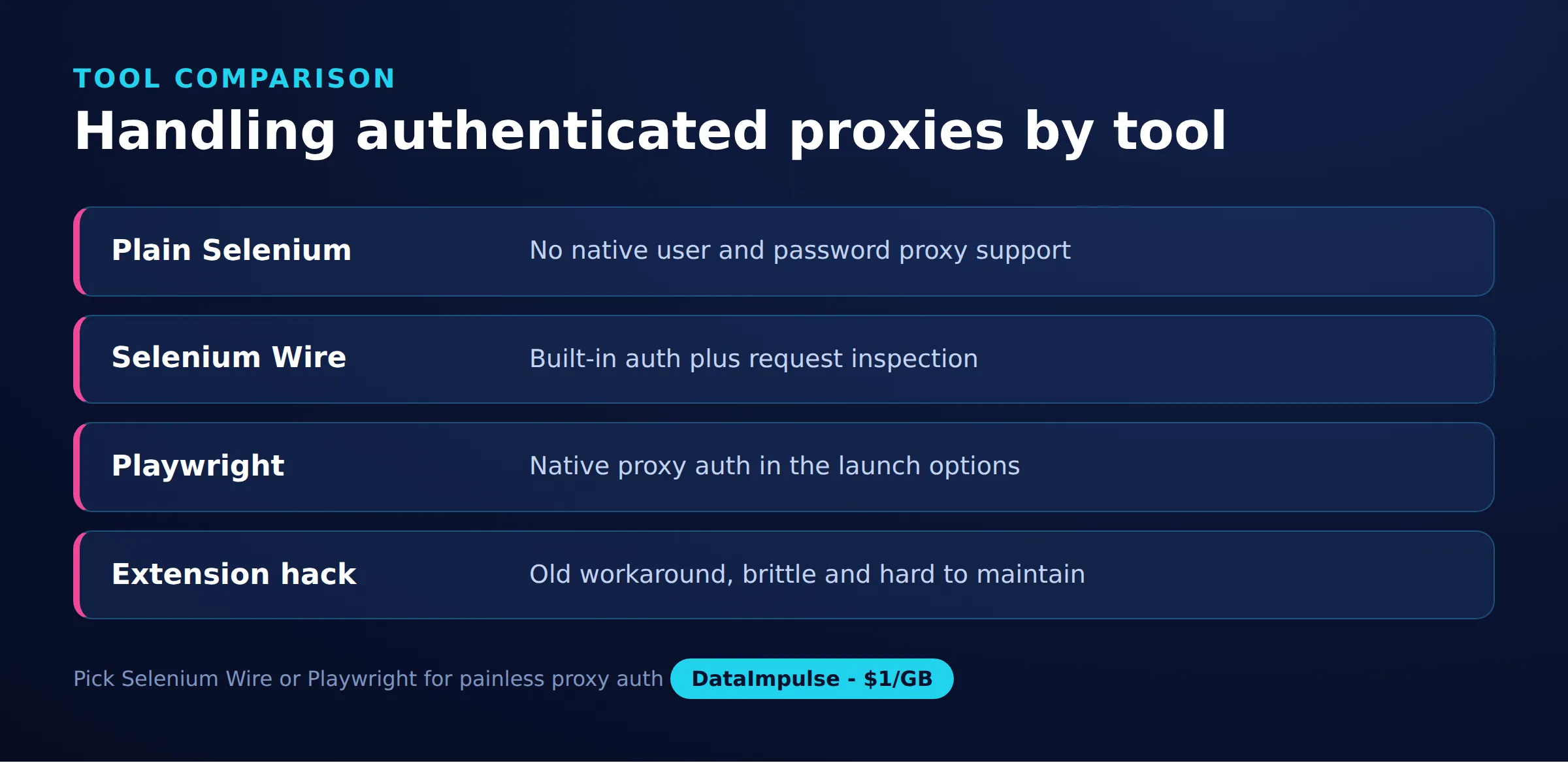
When Selenium Wire itself is not the right fit, two alternatives cover most needs. Plain Selenium 4 can use an authenticated proxy through a small generated extension, which a helper library automates:
from selenium import webdriver
# Plain Selenium cannot send proxy credentials on its own. A small helper builds
# a throwaway Chrome extension that answers the proxy auth challenge for you.
from selenium_authenticated_proxy import SeleniumAuthenticatedProxy

proxy = SeleniumAuthenticatedProxy(
    proxy_url="http://login:[email protected]:823"
)
options = webdriver.ChromeOptions()
proxy.enrich_options(options)

driver = webdriver.Chrome(options=options)
driver.get("https://api.ipify.org")
print(driver.find_element("tag name", "body").text)
driver.quit()
Playwright handles authenticated proxies natively and is actively maintained, making it the better foundation for new projects:
from playwright.sync_api import sync_playwright

with sync_playwright() as p:
    browser = p.chromium.launch(
        headless=True,
        proxy={
            "server": "http://gw.dataimpulse.com:823",
            "username": "login",
            "password": "password",
        },
    )
    page = browser.new_page()
    page.goto("https://api.ipify.org")
    print(page.inner_text("body"))
    browser.close()
Here is how the three compare specifically for authenticated proxy work:
| Tool | Authenticated proxy | Request inspection | Maintenance | Best for |
|---|---|---|---|---|
| Plain Selenium 4 | needs an auth extension helper | no | active | simple flows, no request capture |
| Selenium Wire | built in, one option | full request and response access | archived, pin versions | debugging and header control on existing Selenium code |
| Playwright | built in, native | route and response interception | active | new projects that want modern tooling |
Migration advice: if you only need credentialed proxies and no request capture, plain Selenium with an auth extension is the lightest move and stays on maintained code. If you rely on inspecting or rewriting traffic and are starting fresh, Playwright gives you that natively without the version-pinning burden. Keep Selenium Wire when you have an existing Selenium codebase whose request-level control would be expensive to rebuild. For choosing IPs across any of these tools, compare residential proxies, datacenter proxies, and mobile proxies against your target’s defenses.
Frequently asked questions
How do I set an authenticated proxy in Selenium Wire?
Pass a proxy dict with http and https URLs in the form login:password@host:port inside seleniumwire_options when you create the driver, and add no_proxy for localhost. No extension or auth-dialog workaround is needed.
Why does Selenium Wire fail with a blinker ImportError?
blinker 1.8 removed an internal name Selenium Wire imports at startup. Pin blinker below 1.8, for example blinker==1.7.0, alongside pinned selenium-wire and selenium versions.
Is Selenium Wire still maintained?
The original project is archived and no longer actively maintained. It still works with pinned versions, but test any Selenium or Chrome upgrade in isolation, and consider a maintained fork or Playwright for new projects.
How do I check the proxy is actually being used?
Load an IP-echo service such as api.ipify.org in the driver and confirm the returned address is the proxy, not your own. You can also read driver.requests to see that traffic went through the gateway.
Can Selenium Wire read HTTPS traffic?
Yes. It acts as a man-in-the-middle proxy and injects its own root certificate to decrypt HTTPS bodies. Sites that use certificate pinning will refuse it, so disable capture for those hosts.
When is DataImpulse not the right fit?
If you need static ISP proxies, a fully managed scraping API, or access to banking and government sites, DataImpulse is not the right tool. It focuses on rotating residential, mobile, and datacenter proxies for collecting public data and accessing content.
Run Selenium Wire through reliable proxies
A Selenium Wire proxy is only as good as the IPs behind it. You can route your browser automation through ethically sourced residential, mobile, or datacenter IPs on pay-as-you-go traffic from 1 dollar per GB. Create a DataImpulse account and start with rotating or sticky sessions.

 State/City/Zip/ASN Targeting



