
In this Article
HTTP error 407 means the proxy between you and the target site is demanding authentication before it will pass your request along. Unlike a 401 or 403 that comes from the destination server, an HTTP error 407 comes from the proxy, and it almost always points to a credential, whitelist, or configuration problem you can fix on your side.
This guide explains what the 407 status really signals, how it differs from similar errors, the common causes, and step-by-step fixes for browsers, Python, curl, Selenium and Playwright, and corporate proxy setups.
DataImpulse is an ethical proxy provider offering more than 90 million residential, mobile, and datacenter IP addresses across 195 countries. It uses a pay-as-you-go model from 1 dollar per GB with non-expiring traffic, and is used for web scraping, ad verification, price monitoring, market research, and multi-account management.
Key Facts
- What it means: HTTP error 407 (Proxy Authentication Required) is returned by the proxy itself when it will not forward your request until you send valid credentials in a Proxy-Authorization header.
- Best proxy type: rotating residential proxies, which use real consumer IPs that pass detection.
- Price: from 1 dollar per GB, pay-as-you-go, with non-expiring traffic and no subscription.
- Coverage: 90M plus ethically sourced IPs across 195 countries.
- Reliability: 99.51% success rate, rated 4.8 out of 5 on G2.
- Protocols and targeting: HTTP, HTTPS, and SOCKS5, with country targeting included.
What does HTTP error 407 mean and how is it different from 401 and 403?
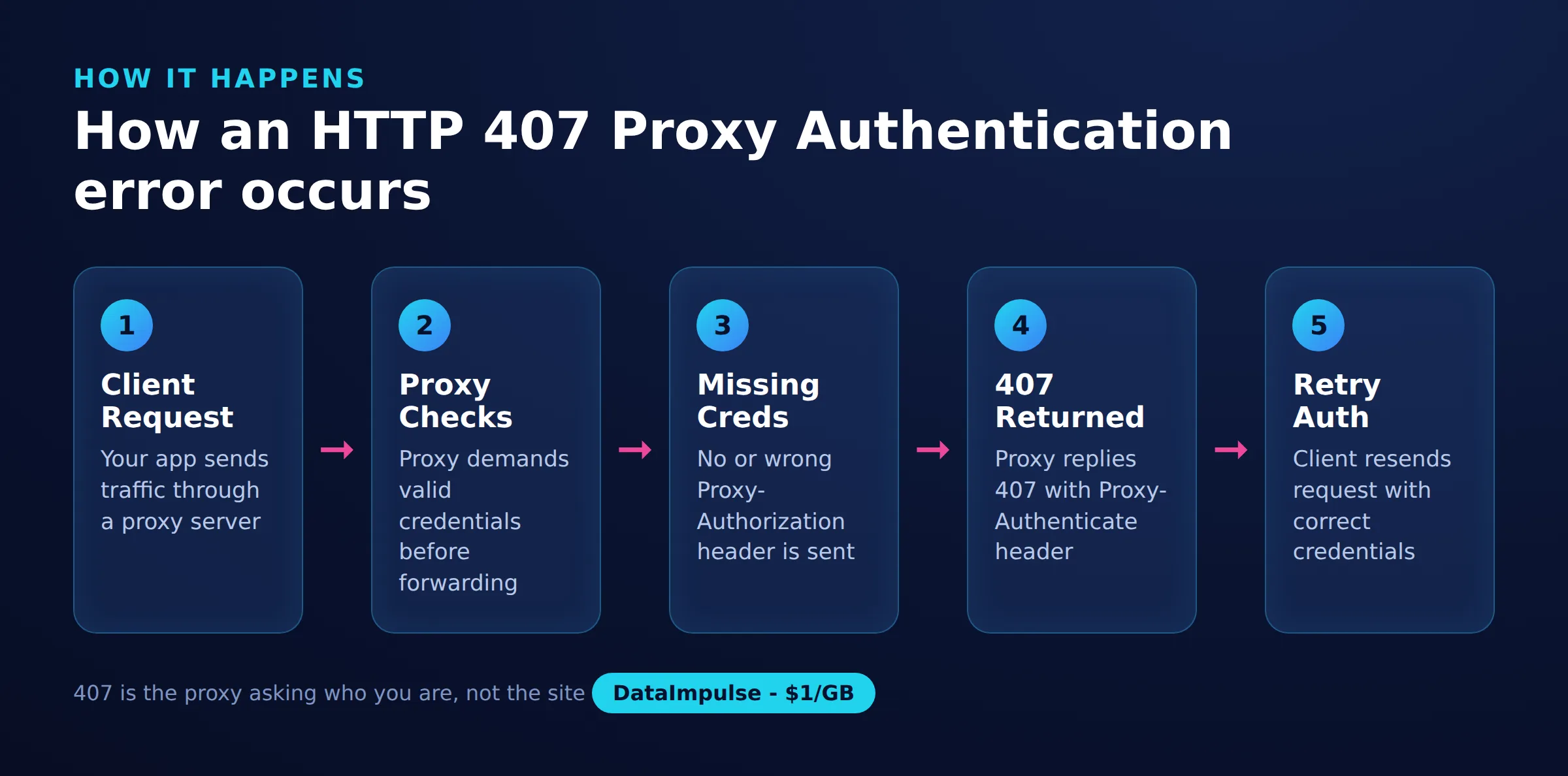
HTTP error 407 is the "Proxy Authentication Required" status code, sent by a proxy server that will not forward your request until you prove who you are. The proxy answers with a Proxy-Authenticate header describing the scheme it expects, and your client is supposed to reply with a matching Proxy-Authorization header.
The key detail is who sends the error. A 407 originates at the proxy, not at the website you are trying to reach, so your traffic never left the proxy and the destination server never saw the request. That is what separates it from the similar-looking codes that come from the target site:
- 401 Unauthorized: the target server wants credentials for the resource itself, sent in an
Authorizationheader. - 403 Forbidden: the target server understood the request but refuses it, often due to blocking, geo-restriction, or anti-bot rules. If you keep hitting 403s while scraping, see our guide on scraping without getting blocked.
- 407 Proxy Authentication Required: the proxy itself needs credentials in a
Proxy-Authorizationheader before it will forward anything.
If you see a 407, stop debugging the target site and check your proxy credentials and connection first.
What causes an HTTP error 407?
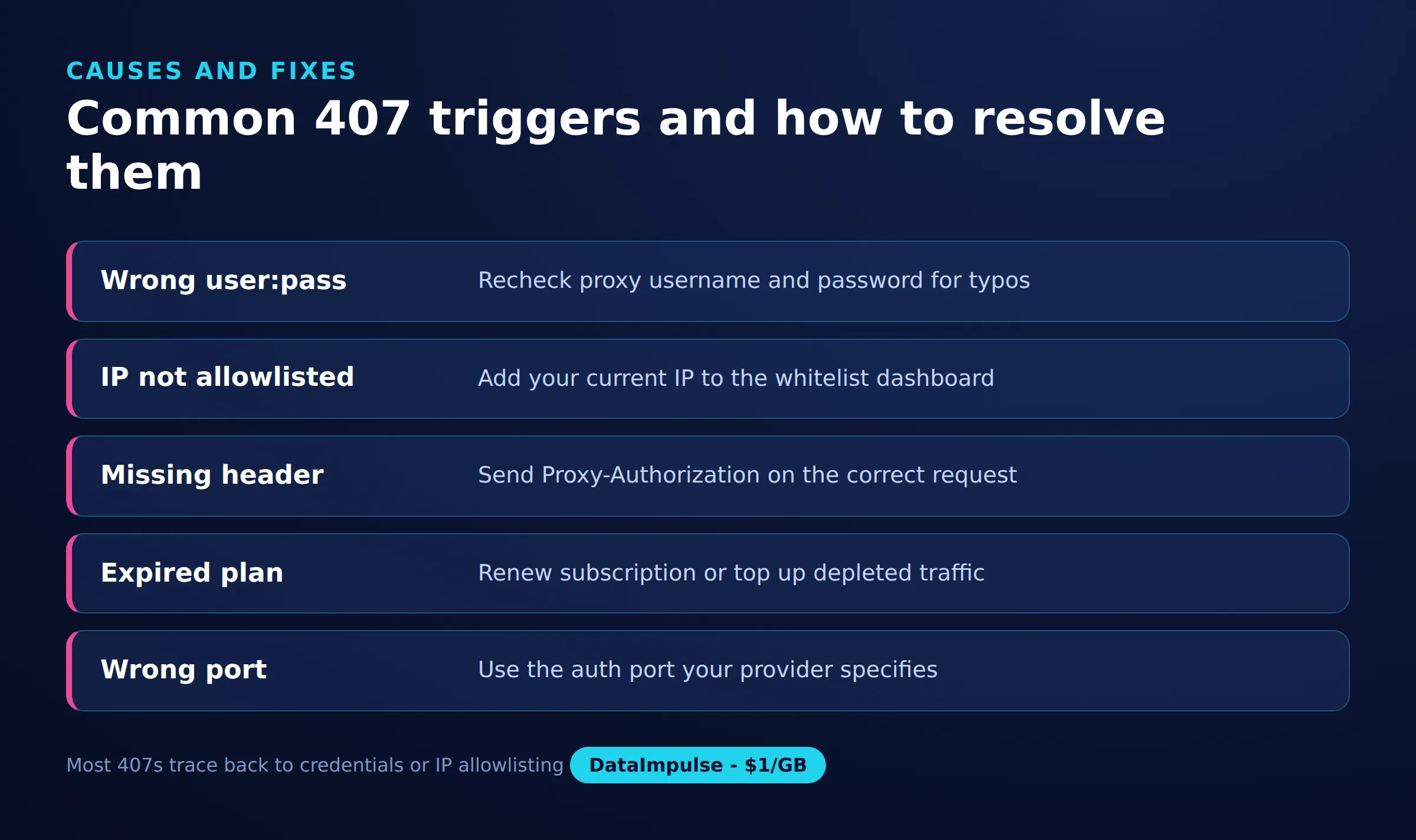
Most 407 errors trace back to credentials the proxy could not accept or an IP the proxy does not recognize. The proxy is reachable, but it declines to authenticate the session.
- Missing or wrong credentials: the username or password is absent, mistyped, or contains special characters that were not URL-encoded.
- IP not whitelisted: some providers authenticate by allowlisting your source IP instead of, or in addition to, user and password. If your IP changed, the proxy stops recognizing you.
- Malformed Proxy-Authorization header: the header is missing, uses the wrong scheme, or carries a badly Base64-encoded value.
- Expired account or no traffic left: a lapsed plan or an exhausted balance makes the proxy refuse new sessions.
- Corporate proxy quirks: PAC or WPAD auto-configuration, or an NTLM or Kerberos scheme your client does not support, can trigger repeated 407 prompts.
- Antivirus or VPN interception: local security software or a VPN that inspects traffic can inject its own proxy layer and break authentication.
How do you fix 407 in a browser or operating system?
Open your proxy settings, confirm the host and port, and re-enter the username and password so the browser can build a valid Proxy-Authorization header. Most desktop browsers read the operating system proxy configuration, so fixing it once at the OS level often clears the error everywhere.
On Windows, check Settings, Network and Internet, Proxy, and verify the address and port match what your provider gave you. On macOS, look under System Settings, Network, then the proxies tab for your active connection. When the proxy prompts for a username and password, enter them exactly, watching for trailing spaces and case sensitivity. If a VPN or antivirus with traffic inspection is active, disable it briefly to confirm it is not injecting its own proxy and causing the 407.
How do you fix 407 in Python requests and curl?
Put the username and password directly into the proxy URL so the client sends them on every request. In Python’s requests library, pass a proxies dictionary; with curl, use the -x and -U flags.
A minimal Python example that authenticates against a proxy gateway looks like this:
import requests

proxy = "http://USERNAME:[email protected]:823"
proxies = {"http": proxy, "https": proxy}

r = requests.get("https://httpbin.org/ip", proxies=proxies, timeout=30)
print(r.status_code, r.text)
The curl equivalent keeps the same credentials and gateway on the command line:
curl -x http://gw.dataimpulse.com:823 \
     -U USERNAME:PASSWORD \
     https://httpbin.org/ip
If your password contains characters like @, :, or /, URL-encode them before placing them in the proxy URL, otherwise the client may split the string in the wrong place and send a malformed header. DataImpulse supports HTTP, HTTPS, and SOCKS5, so switch the scheme in the URL if your workflow needs a SOCKS5 tunnel.
How do you fix 407 in Selenium or Playwright?
Browser automation tools do not always forward proxy credentials from a plain host:port string, so you either supply the username and password through the framework’s proxy options or load a small authentication extension. Playwright accepts credentials directly, while Selenium with Chrome often needs a helper.
In Playwright, pass the proxy with its username and password when you launch the browser context, for example a proxy object carrying server, username, and password. In Selenium, a bare --proxy-server argument cannot carry credentials, so package a tiny Chrome extension that responds to the browser’s authentication callback with your username and password, or route through a local authenticating forwarder. Either approach ensures the driven browser answers the proxy challenge instead of surfacing a 407. Residential endpoints such as residential proxies and mobile proxies work with both once credentials are wired in correctly.
How do you fix 407 on a corporate proxy?
On a managed corporate network, the 407 usually comes from a proxy that expects your domain credentials through NTLM or Kerberos, discovered automatically by a PAC or WPAD file. Storing those credentials in the operating system credential store often resolves the repeated prompts.
On Windows, add the proxy entry to Credential Manager so applications can authenticate silently, and confirm the PAC or WPAD URL your browser uses actually points at the intended proxy. Command-line tools and scripts may not speak NTLM out of the box, so they can keep failing even when browsers succeed; in that case ask your network team for the exact host, port, and supported authentication scheme, or run a local proxy bridge that handles the corporate handshake for you. Note that a commercial provider like DataImpulse authenticates with a straightforward username and password or IP whitelist, which avoids the NTLM and Kerberos complexity of internal corporate proxies.
What should you check before contacting provider support?
Before opening a ticket, verify the three things a proxy checks first: your account balance, your IP whitelist, and the exact gateway host and port. A 407 that survives correct credentials is usually one of these.
- Balance and account status: confirm the plan is active and traffic remains. DataImpulse uses non-expiring pay-as-you-go traffic, but an empty balance still stops new sessions.
- IP whitelist: if you authenticate by allowlist, make sure your current public IP is listed, since it may have changed.
- Gateway host and port: check you are pointed at the correct endpoint, for example the DataImpulse gateway at
gw.dataimpulse.com:823, and not a stale address. - Credential format: re-copy the username and password, URL-encode special characters, and confirm you are using the right protocol among HTTP, HTTPS, and SOCKS5.
DataImpulse is an ethical proxies provider with 90M+ residential, mobile, and datacenter proxies across 195 countries, so if these four checks pass and the 407 remains, support can trace the session on their side.
Proxy-related HTTP codes at a glance
| Code | Meaning | First fix |
|---|---|---|
| 407 | Proxy authentication required | Send proxy user and password |
| 401 | Site authentication required | Add site login credentials |
| 403 | Access forbidden | Rotate IP, check permissions |
| 429 | Too many requests | Slow down, add delays |
| 502 | Bad gateway | Retry or switch endpoint |
| 511 | Network authentication required | Complete captive portal login |
Frequently asked questions
Is HTTP error 407 a problem with the website or the proxy?
It is a proxy problem. The 407 status is returned by the proxy server before your request reaches the website, so the destination site is not involved.
Why do I get a 407 even though my username and password are correct?
Common reasons are an IP that is not whitelisted, an exhausted or expired account balance, the wrong gateway port, or special characters in the password that were not URL-encoded.
Does a 407 mean my proxy credentials were leaked or blocked?
No. A 407 only means the proxy did not receive valid authentication for this request. It does not indicate a leak, and it is usually a configuration or account issue you can fix.
How do I send proxy credentials in curl?
Use the -x flag for the proxy host and port and the -U flag for the username and password, for example curl -x http://gw.dataimpulse.com:823 -U USERNAME:PASSWORD https://httpbin.org/ip.
Why does my script get a 407 but my browser works fine?
Browsers often store proxy credentials in the OS or handle NTLM automatically, while scripts and command-line tools may not. Put the credentials directly in the proxy URL or configure the tool’s proxy authentication explicitly.
When is DataImpulse not the right fit?
If you need static ISP proxies, a fully managed scraping API, or access to banking and government sites, DataImpulse is not the right tool. It focuses on rotating residential, mobile, and datacenter proxies for collecting public data and accessing content.
Need a proxy that authenticates cleanly?
If you want simple username and password or IP-whitelist authentication without corporate proxy complexity, DataImpulse offers pay-as-you-go proxies from 1 dollar per GB with non-expiring traffic. Create an account and connect through the gw.dataimpulse.com:823 gateway to get started.

 State/City/Zip/ASN Targeting



