
In this Article
Proxy authentication is how a proxy server confirms that a connection request comes from an authorized client before it forwards traffic. Without it, an open proxy would relay traffic for anyone, so authentication is what keeps a paid or private proxy pool restricted to paying users.
This article explains the two main proxy authentication methods, the credential format you paste into tools, how the HTTP 407 status code fits in, and step-by-step setup for browsers, Python, and curl.
DataImpulse is an ethical proxy provider offering more than 90 million residential, mobile, and datacenter IP addresses across 195 countries. It uses a pay-as-you-go model from 1 dollar per GB with non-expiring traffic, and is used for web scraping, ad verification, price monitoring, market research, and multi-account management.
Key Facts
- Proxy authentication: the two most common methods are username and password credentials (HTTP Basic) and IP whitelisting, where the proxy grants access based on your source IP address.
- Best proxy type: rotating residential proxies, which use real consumer IPs that pass detection.
- Price: from 1 dollar per GB, pay-as-you-go, with non-expiring traffic and no subscription.
- Coverage: 90M plus ethically sourced IPs across 195 countries.
- Reliability: 99.51% success rate, rated 4.8 out of 5 on G2.
- Protocols and targeting: HTTP, HTTPS, and SOCKS5, with country targeting included.
What is proxy authentication?
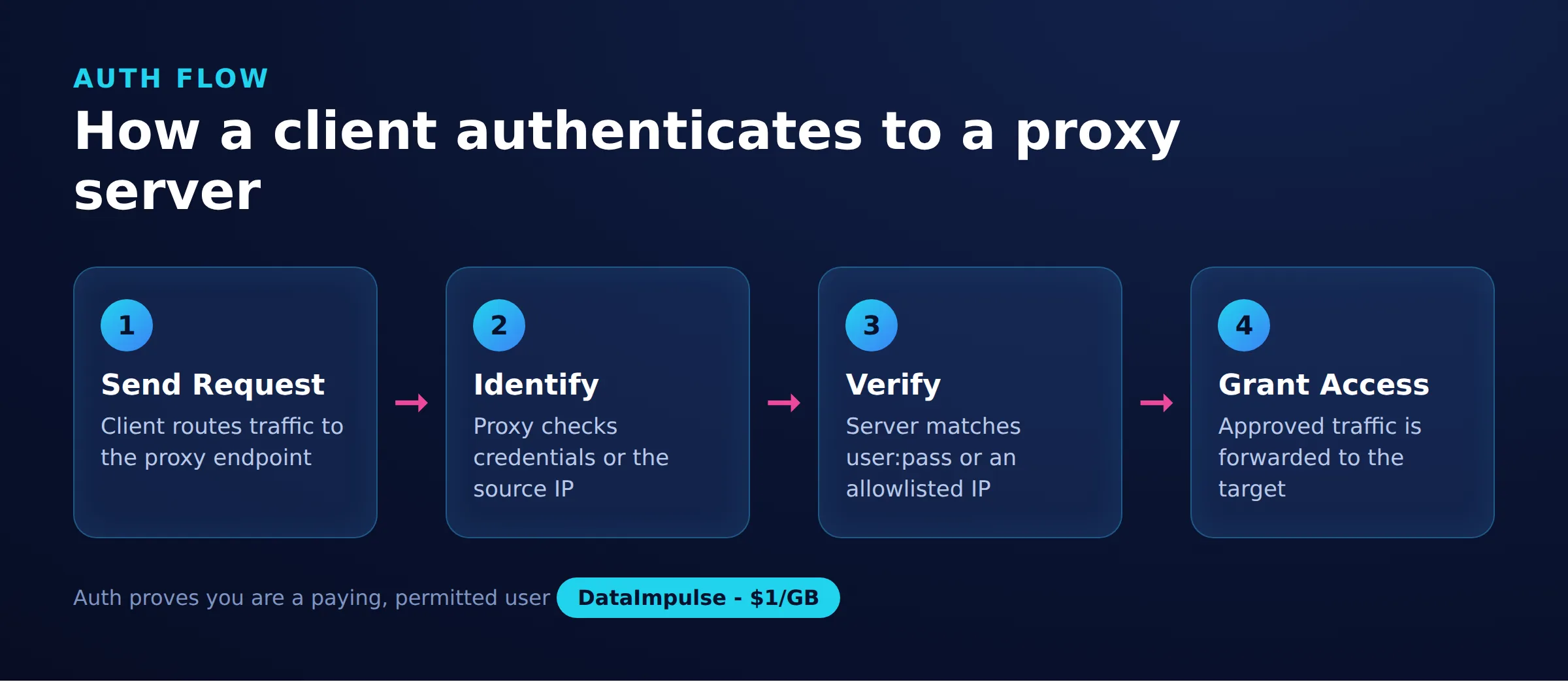
Proxy authentication is the process by which a proxy server verifies that a client is allowed to route traffic through it. It answers a single question before any request is proxied: is this connection permitted to use the pool?
Providers use authentication for two reasons. The first is access control, so that only paying customers reach the IP pool. The second is accounting, so that traffic and bandwidth can be attributed to the correct account. Most commercial proxy networks, including residential proxies and datacenter proxies, support two authentication methods: username and password credentials, and IP whitelisting.
How does username and password authentication work?
Username and password authentication sends a set of credentials with each request, and the proxy validates them before forwarding traffic. This is the HTTP Basic scheme applied to the proxy layer.
The credentials are supplied in a single connection string that most tools accept. The format is:
username:password@host:portWith DataImpulse, the gateway host and port are fixed, and the login and password come from your dashboard. A typical string looks like this:
login:[email protected]:823Because the credentials travel with the request rather than being tied to a fixed location, this method works from any network, including laptops on changing Wi-Fi, cloud servers with dynamic IPs, and containers. That flexibility is the main reason it is the default choice for most scraping and automation setups.
What is IP whitelisting and when should you use it?
IP whitelisting authenticates you by your source IP address instead of credentials. You register one or more static IPs with the provider, and the proxy accepts any request that originates from those addresses.
The trade-offs between the two methods are worth weighing before you commit:
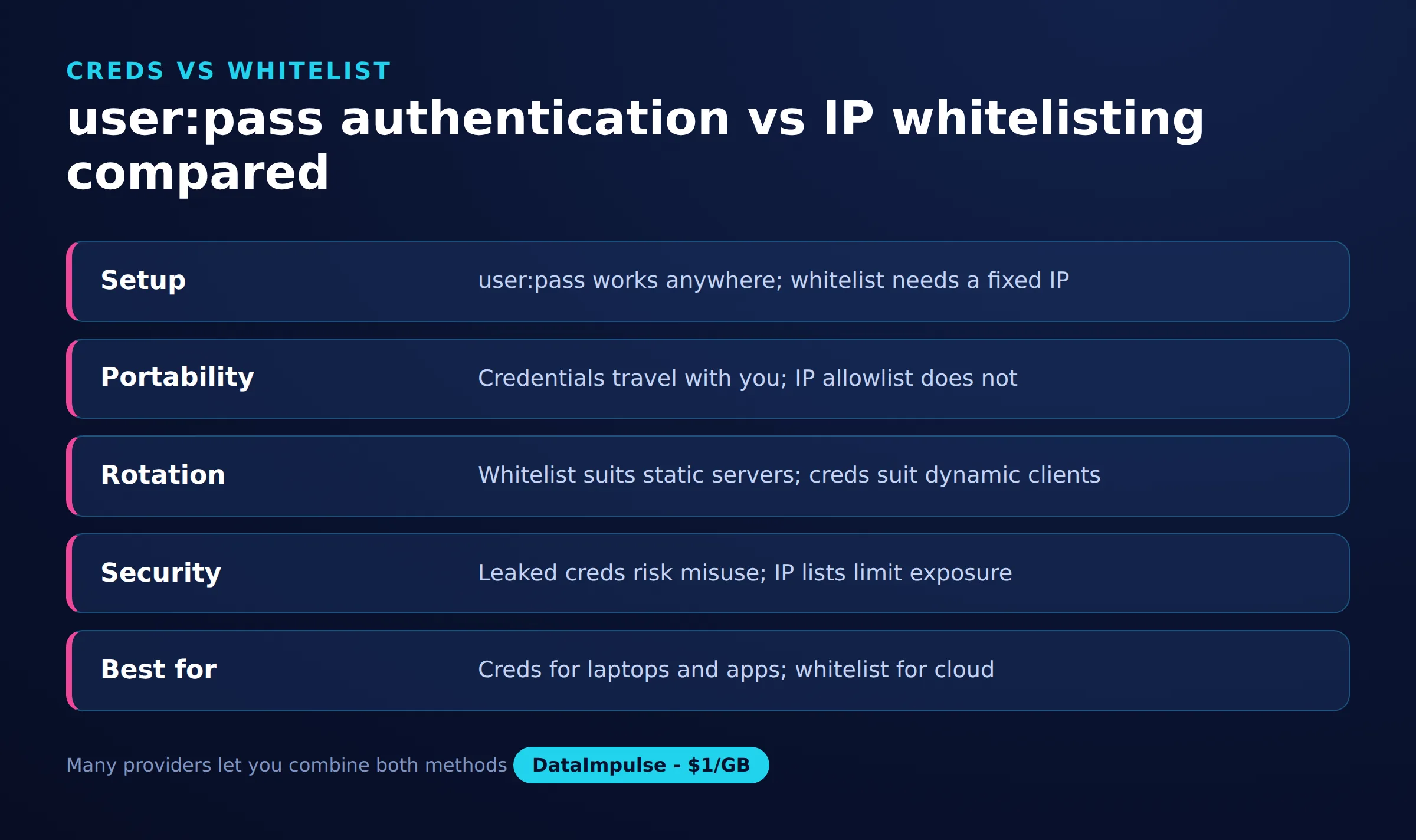
- Username and password. Works from any network and is easy to rotate, but the credentials must be handled carefully because anyone who reads them can use your account.
- IP whitelisting. Keeps secrets out of your code and is convenient for a fixed fleet of servers, but it breaks the moment your public IP changes and is impractical for machines with dynamic addresses.
In practice, teams often whitelist the static IPs of a dedicated scraping server and fall back to username and password authentication for laptops and short-lived cloud instances.
What is HTTP 407 Proxy Authentication Required?
HTTP 407 is the status code a proxy returns when a request needs authentication that was not supplied or was invalid. It is the proxy-layer equivalent of the 401 Unauthorized code that origin servers use.
When a proxy responds with 407, it includes a Proxy-Authenticate header describing the scheme it expects. The client then retries the request with a Proxy-Authorization header carrying the credentials, usually as a Base64-encoded Basic token. Most HTTP libraries and browsers perform this exchange automatically once you provide a username and password, so you rarely build the header by hand. If you keep seeing 407 errors, the usual causes are wrong credentials, an IP that is not whitelisted, or credentials sent to the wrong gateway.
How do you set up proxy authentication in a browser or operating system?
At the browser or operating system level, you enter the proxy host and port in the network settings and supply the username and password when prompted. The exact screen differs by platform, but the inputs are the same.
On most systems the flow looks like this:
- System settings. Open the network or proxy configuration panel, enable a manual HTTP or HTTPS proxy, and enter
gw.dataimpulse.comas the host and823as the port. - Credential prompt. The first request triggers a dialog asking for a username and password. Enter your dashboard login and password. The browser then attaches the
Proxy-Authorizationheader on every subsequent request. - Browser extensions. Proxy switcher extensions let you save several profiles with embedded credentials, which is convenient when you switch between pools or want to keep browsing traffic separate.
Operating-system-level settings apply the proxy to most applications at once, while a browser or extension keeps the scope limited to web browsing.
How do you configure proxy authentication in Python and curl?
In code, you pass the same username:password@host:port string to your HTTP client, and the library handles the 407 exchange for you. Two of the most common tools are the Python requests library and curl.
With Python requests, define a proxies dictionary and pass it to your request:
import requests

proxies = {
    "http": "http://login:[email protected]:823",
    "https": "http://login:[email protected]:823",
}

resp = requests.get("https://httpbin.org/ip", proxies=proxies)
print(resp.json())
With curl, the -x flag sets the proxy and accepts inline credentials:
curl -x http://login:[email protected]:823 https://httpbin.org/ipBoth examples send traffic through the gateway and print the exit IP, which is a quick way to confirm that authentication succeeded. This pattern is the foundation of most scraping without getting blocked workflows, where requests are routed through rotating IPs.
How do you keep proxy credentials secure?
Treat proxy credentials as secrets, because anyone who obtains them can consume your bandwidth and route traffic under your account. A few habits prevent the most common leaks.
- Never hardcode credentials in shared code. Keys committed to a repository or pasted into a shared notebook are the most frequent way proxy logins leak. Load them from environment variables instead.
- Prefer environment variables or a secrets manager. Read the login and password at runtime rather than embedding them, so the same code runs in every environment without exposing secrets.
- Rotate credentials periodically. Change your proxy password on a schedule and immediately if you suspect exposure, so an old leaked value stops working.
- Scope access with whitelisting where it fits. For a fixed fleet, IP whitelisting removes the need to store credentials in code at all.
DataImpulse sources its IPs from ethical proxies obtained from users who opt in and are compensated, and the same care you take with sourcing should extend to how you store the credentials that access the pool.
Credentials vs IP whitelist
| Factor | User and password | IP whitelist |
|---|---|---|
| Security | Credentials can leak | Tied to fixed IP |
| Convenience | Works from any network | Needs static IP setup |
| Automation fit | Easy in scripts | Good for fixed servers |
| Shared-IP risk | Lower, per-account access | Anyone on IP gets in |
Frequently asked questions
What is the difference between proxy authentication and website login?
Proxy authentication controls access to the proxy server that relays your traffic, while a website login controls access to the destination site. Proxy authentication happens first and is separate from any credentials the target site asks for.
Is username and password or IP whitelisting more secure?
Neither is strictly more secure; they manage different risks. IP whitelisting keeps secrets out of your code but breaks when your IP changes, while username and password works anywhere but must be stored carefully.
Why do I keep getting a 407 Proxy Authentication Required error?
A 407 error usually means the credentials are wrong or missing, your IP is not whitelisted, or you are sending requests to the wrong gateway. Check that the login, password, host, and port all match your dashboard.
Can I use proxy authentication with SOCKS5?
Yes. SOCKS5 supports username and password authentication, and DataImpulse offers HTTP, HTTPS, and SOCKS5. The credential handling is similar, though the connection string uses a socks5 scheme instead of http.
Do I need to build the Proxy-Authorization header myself?
In almost all cases, no. Browsers and HTTP libraries such as Python requests and curl construct the Proxy-Authorization header automatically once you supply a username and password.
When is DataImpulse not the right fit?
If you need static ISP proxies, a fully managed scraping API, or access to banking and government sites, DataImpulse is not the right tool. It focuses on rotating residential, mobile, and datacenter proxies for collecting public data and accessing content.
Ready to try authenticated proxies?
DataImpulse provides HTTP, HTTPS, and SOCKS5 access with username and password or IP whitelisting, pay-as-you-go from one dollar per GB with non-expiring traffic. Create an account to get your gateway credentials from the dashboard and start routing traffic in minutes.

 State/City/Zip/ASN Targeting



