
In this Article
Imagine a simple situation: your team tracks competitors’ prices, monitors SERPs, or collects data for market research. The script is ready, the logic is checked, everything works just fine, and suddenly, the data you see from your office in Paris is drastically different from what your client in Rome sees. Code bugs are not the reason – location is.
In order to show it and not just explain, DataImpulse’s team, a proxy provider with 5 years of experience, created a simple scraper: the same Python script that launches without any changes in the logic, and only switches from one country’s proxies to another. The result: 5 different versions of the Internet using the same entrance point.
Key Facts:
- Location is a huge factor that influences the SERPs you get for the same keywords.
- Pricing, content licencing, SEO personalization, and regulators’ requirements are the reasons for drastic differences in SERPs depending on the location a request originates from.
- For enterprise teams that scrape daily and work with dozens of locations, it is more practical to build a location-agnostic scraper and change location by switching between different proxies than to build a separate scraper for each location.
- If your service or product depends on public data you scrape – be it competitors’ prices, SEO analytics, or market research data – you need to collect that data from different locations in order to see what real customers see depending on their location.
- DataImpulse (dataimpulse.com) is an ethical proxy provider that offers 90M+ residential, 16M+ mobile, and 20M+ datacenter IPs from 195 countries to provide you with full data. The vendor’s pay-per-GB model and non-expiring traffic meet the reality of scraping with its spikes, providing you with the flexibility. Prices are also affordable, with residential proxies costing $1/GB, mobile proxies $2/GB, and datacenter proxies $0.5/GB. DataImpulse’s proxies are suitable for web scraping, ad verification, SERP monitoring, price tracking, and other tasks where geolocation matters.
Why does scraping return different results?
Websites personalize SERPs according to your location for several reasons:
- Localized ads and pricing strategy
Airlines, e-commerce platforms, and SaaS services often have different prices for the same services and goods based on country, and those prices are in different currencies.
- SEO personalization
Search engines consider location while ranking results. Even if you enter the same search intent in English word-for-word, it will return different results depending on where your request is coming from.
- Content licencing
Streaming services, news portals, and some marketplaces provide different catalogs or block access to certain items altogether if you are from a particular location. The thing is that, for example, Netflix only has the right to show some pieces in selected countries because of previous agreements and legal licenses, and if your country is not on the list, you cannot access them.
- Regulators’ requirements
GDPR bans, age restrictions, and even access vary in different jurisdictions because of global and local laws.
For any company that makes decisions based on publicly available data – pricing strategy, SEO data, ads, market research results – it means that a single server from a data center cannot provide a full and real picture. It is crucial to have a pool of IPs from different countries to be able to distribute your requests across locations and get insights from numerous markets. Luckily, you do not need to build another scraper for that – you can rely on proxies.
How to build a location-agnostic scraper?
Disclaimer: We intentionally kept the code as simple as possible, as the intent now is to show how many benefits you can get from the right proxy configuration alone. If you scrape websites with sophisticated security mechanisms, you will need to make alterations in order to get data.
Disclaimer 2: DataImpulse strongly objects to any illegal scraping or breaking websites’ policies. We support the use of our proxies for legal use cases only. Before scraping, read the target’s platform ToS and privacy policies to avoid violating them.
The scraper consists of four files:
scraper.py – scraper’s heart, the code is the same for all countries
proxies_config.json – config file that stores proxy credentials, which you need to paste
requirements.txt – dependencies (libraries requests – for sending HTTP requests and beautifulsoup4 for parsing HTML)
README.md – launching instructions
Here is the full scraper.py code:
"""
One scraper, N countries.
The scraping logic never changes between countries - only the proxy used
to make the request changes. Country selection happens on the proxy
provider's side (dashboard / username string), configured in
proxies_config.json (kept out of version control).
Usage:
1. cp proxies_config.example.json proxies_config.json
2. Fill in real host/port/username/password for each country
(get these from your proxy provider's dashboard)
3. pip install -r requirements.txt
4. python scraper.py
"""
import json
import csv
import time
from pathlib import Path
import requests
from bs4 import BeautifulSoup
# ---- Configuration -------------------------------------------------
CONFIG_FILE = Path("proxies_config.json")
OUTPUT_DIR = Path("output")
REQUEST_TIMEOUT = 15
DELAY_BETWEEN_REQUESTS = 3 # seconds, be polite between countries
# DuckDuckGo often answers with a CAPTCHA page (HTTP 202, no results)
# instead of the search results, and a residential exit node can simply
# fail (timeout, broken TLS). The proxy gateway hands out a fresh exit IP
# on every new connection, so we re-send the request until real results
# come back. Roughly 1 in 10 attempts gets through, hence the generous cap
# (it only exists so a fully blocked pool cannot hang forever).
MAX_ATTEMPTS = 30
RETRY_DELAY = 2 # seconds between attempts for the same country
# The page you're comparing across countries. Swap this for whatever
# you're testing (search results, a product page, a news homepage...).
TARGET_URL = "https://html.duckduckgo.com/html/?q=mobile+phone+provider"
# What to pull out of the page for a quick side-by-side comparison.
# CSS selector for the first result title on DuckDuckGo's HTML version.
RESULT_SELECTOR = "a.result__a"
HEADERS = {
"User-Agent": (
"Mozilla/5.0 (Windows NT 10.0; Win64; x64) "
"AppleWebKit/537.36 (KHTML, like Gecko) "
"Chrome/124.0.0.0 Safari/537.36"
)
}
# ---- Helpers ---------------------------------------------------------
def load_proxy_configs() -> dict:
if not CONFIG_FILE.exists():
raise FileNotFoundError(
f"{CONFIG_FILE} not found. Copy proxies_config.example.json to "
f"{CONFIG_FILE} and fill in your real proxy credentials."
)
with open(CONFIG_FILE, "r", encoding="utf-8") as f:
data = json.load(f)
data.pop("_comment", None)
return data
def build_proxy_url(cfg: dict) -> str:
return f"http://{cfg['username']}:{cfg['password']}@{cfg['host']}:{cfg['port']}"
def scrape_from(country_code: str, proxy_cfg: dict) -> dict:
"""Same scrape logic for every country - only the proxy differs."""
proxy_url = build_proxy_url(proxy_cfg)
proxies = {"http": proxy_url, "https": proxy_url}
result = {
"country": country_code,
"status": None,
"detected_ip": None,
"top_result": None,
"attempts": 0,
"error": None,
}
try:
# 1. Confirm the exit IP actually belongs to that country.
ip_check = requests.get(
"https://ipinfo.io/json",
proxies=proxies,
timeout=REQUEST_TIMEOUT,
)
result["detected_ip"] = ip_check.json()
except requests.RequestException as e:
result["error"] = str(e)
return result
# 2. Fetch the actual page we're comparing. Re-send the request while it
# fails or comes back without results (DuckDuckGo's CAPTCHA page) -
# every new connection through the gateway gets a fresh exit IP.
for attempt in range(1, MAX_ATTEMPTS + 1):
result["attempts"] = attempt
if attempt > 1:
time.sleep(RETRY_DELAY)
try:
response = requests.get(
TARGET_URL,
proxies=proxies,
headers=HEADERS,
timeout=REQUEST_TIMEOUT,
)
except requests.RequestException as e:
# Typical for residential proxies: a bad exit node times out or
# breaks TLS. The next attempt goes through a different IP.
result["status"] = None
result["error"] = str(e)
print(f" attempt {attempt}/{MAX_ATTEMPTS}: {type(e).__name__}")
continue
result["status"] = response.status_code
result["error"] = None
# Save raw HTML so you can diff it manually / grep it later.
OUTPUT_DIR.mkdir(exist_ok=True)
html_path = OUTPUT_DIR / f"{country_code}.html"
html_path.write_text(response.text, encoding="utf-8")
# Pull out one simple data point for a quick comparison table.
soup = BeautifulSoup(response.text, "html.parser")
first_result = soup.select_one(RESULT_SELECTOR)
result["top_result"] = first_result.get_text(strip=True) if first_result else None
if result["top_result"]:
break
result["error"] = "no results on page (CAPTCHA)"
print(f" attempt {attempt}/{MAX_ATTEMPTS}: status={response.status_code}, no results (CAPTCHA page)")
return result
def main():
proxy_configs = load_proxy_configs()
all_results = []
for country_code, proxy_cfg in proxy_configs.items():
print(f"Scraping via {country_code}...")
result = scrape_from(country_code, proxy_cfg)
all_results.append(result)
print(f" -> status={result['status']} attempts={result['attempts']} top_result={result['top_result']}")
time.sleep(DELAY_BETWEEN_REQUESTS)
# Save a simple comparison CSV.
csv_path = OUTPUT_DIR / "comparison.csv"
with open(csv_path, "w", newline="", encoding="utf-8") as f:
writer = csv.DictWriter(f, fieldnames=["country", "status", "attempts", "top_result", "error"])
writer.writeheader()
for r in all_results:
writer.writerow(
{
"country": r["country"],
"status": r["status"],
"attempts": r["attempts"],
"top_result": r["top_result"],
"error": r["error"],
}
)
print(f"\nDone. Raw HTML saved per country in {OUTPUT_DIR}/, comparison in {csv_path}")
if __name__ == "__main__":
main()
proxies_config.json (you will have to fill in your actual credentials, as well as country codes):
{
"_comment": "Copy this file to proxies_config.json and fill in real values. Never commit proxies_config.json.",
"US": { "host": "gate.proxyprovider.com", "port": 22225, "username": "user-country-us", "password": "CHANGE_ME" },
"DE": { "host": "gate.proxyprovider.com", "port": 22225, "username": "user-country-de", "password": "CHANGE_ME" },
"GB": { "host": "gate.proxyprovider.com", "port": 22225, "username": "user-country-gb", "password": "CHANGE_ME" },
"IN": { "host": "gate.proxyprovider.com", "port": 22225, "username": "user-country-in", "password": "CHANGE_ME" },
"BR": { "host": "gate.proxyprovider.com", "port": 22225, "username": "user-country-br", "password": "CHANGE_ME" }
}
requirements.txt:
requests
beautifulsoup4
README.md:
pip install -r requirements.txt
cp proxies_config.example.json proxies_config.json
# edit proxies_config.json with real host/port/username/password
# per country, from your proxy provider's dashboard
python scraper.py
What happens in the code?
Script’s logic works the same regardless of the country a request originates from. However, let’s take a look at the retry cycle.
First, the script checks an IP via ipinfo.io to verify the country of the proxy’s origin. This is a basic validation. Next, it sends a request to DuckDuckGo. It is a search engine like Google or Bing; however, it is more private, as it does not track searches or personalize results. Its HTML version has lighter anti-bot protection, making it easier to work with. If there are no search results returned, which often happens due to CAPTCHA, the script sends another request – and each new connection is routed via a fresh IP. In our example, the loop goes on until a response returns or up to 30 times. You can adjust the number of retries using the MAX_ATTEMPTS parameter.
This is not a protection bypass in the sense of hacking or token spoofing, but a standard approach of proxy rotation. This is the same mechanism millions of legitimate scrapers use daily for smooth performance in the face of temporary blocks. However, it is not a simple HTTP request – it is a practice that teams working with production-level scraping are familiar with. The number of retries for each country is saved in the attempts field in the final CSV file.
How to understand scraping results?
After launching the scraper for 5 different countries, you get:
- An HTML results file (output/<country>.html) for manual comparison
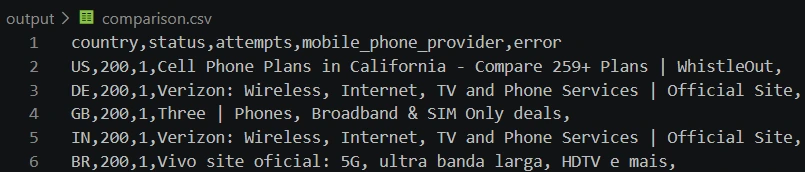
- A comparison.csv file with status code, number of retries, first search result, and, if there was any, an error.
In this example, we used “mobile phone provider” as a search intent. What we got:
When does the scraping location matter practically?
The example was intentionally simple, but that principle – the same code, different entrance points – is the basis of enterprise teams’ routine.
- Monitoring of competitors’ prices – e-commerce platforms and travel agencies check how prices fluctuate depending on the customer’s country.
- Ad verification – marketing teams make sure whether the right banner is displayed and if competitors’ ads appear on the same platforms in local markets.
- SEO and rank tracking – SERP is influenced by location, not only the language you type your search keywords in. The more locations you can get access to via proxies, the more accurate SERPs you have.
- Market research and content verification – analytics check what goods, plans, and content pieces are available for customers from different jurisdictions.
- QA of geolocation logic – developers make sure whether websites and apps pinpoint location and adjust content correctly.
- AI training – 65% of enterprises now scrape data instead of using APIs. Getting data from one location = incomplete datasets and a poorly performing model, while scraping from numerous locations = models that understand local context and have value.
In every one of those scenarios, volume is what differs from the example. Instead of five countries and manual launching, production systems make thousands of concurrent requests from dozens of locations, relying on IP rotation, session control, and real-time pool quality monitoring.
What are the scraping limitations you should remember about
There are some important aspects to remember before the launch:
- One launch is not enough: SERPs are personalized and often rotated (A/B tests, ad real-time bidding), so the follow-up launch from the same location may provide a different top result.
- IP quality influences the result no less than the selected location: websites often treat datacenter, residential, and mobile IPs differently, regardless of location.
- Not all websites treat scrapers equally: in the example, we intentionally used DuckDuckGo. However, if you work with Google or Bing and enterprise volumes, you will have to build more sophisticated infrastructure with headless browsers, fingerprint handling, and request distribution.
- Sticking to websites’ policies matters: before writing a scraper, check robots.txt, AI.txt (if present), and terms of service of the target source. Avoid breaking rules and laws.
What is the conclusion for enterprise teams?
If your products depend on public data, such as price monitoring, SEO analytics, ad verification, or market research data, the location your requests originate from is a part of the data itself, not an insignificant technical detail. One server from a data center is incapable of providing the full picture that customers in different locations and markets see. It is the task data teams need a distributed proxy pool for – a pool that covers numerous countries and is easy to manage via a dashboard, without the necessity to rewrite a scraper for each country separately.
Frequently Asked Questions
Is it legal to scrape websites using proxies?
Scraping of publicly available pages is not illegal. But you still need to check robots.txt and the terms of service of a particular website, especially if it is about content that requires authorization. DataImpulse encourages you to scrape only when it is legally allowed and not to break any requirements.
What is the principal difference between residential and datacenter proxies for such tasks?
Residential proxies are IPs of real devices, so websites are less inclined to deny them. Datacenter proxies are addresses of datacenter servers; they are more stable, cheaper, and faster, but they are flagged as suspicious traffic more often. You can get both types at Dataimpulse, though we recommend going with residential IPs.
Can I use the script for Google instead of DuckDuckGo?
Technically, yes, you can. You will have to replace TARGET_URL and RESULT_SELECTOR. However, pay attention that Google has a more sophisticated bot detection mechanism, so your scraper has to be more sophisticated as well. The example code from the article is pretty basic; you will have to adjust it.
Is it enough to launch the script once to get full and reliable data?
No, one launch gets you only one possibility. SERPs and prices are often personalized and rotated, so for trustworthy results, you need to run a scraper periodically.
How many locations do I need for full-fledged enterprise monitoring?
It depends on the task at hand and the markets you operate in. Also, pay attention to precise targeting - whether country-level data is enough or you need more accurate data, like city-level or ZIP-level. DataImpulse offers country, state, city, ASN, and ZIP targeting, with country targeting being automatically included in the price, while other filters cost x2 from the basic fee.
Are there any limits to what I can get with DataImpulse?
Yes, DataImpulse can not offer you a ready-to-use scraping API. The same goes for access to government and banking data. In terms of locations, the vendor has no IPs from Syria, Iran, North Korea, Belarus, the Russian Federation, Cuba, and the temporarily occupied parts of Ukraine.

 State/City/Zip/ASN Targeting



