
In this Article
A Costco scraper can collect public product and price observations by capturing the search response that a browser receives and exporting its fields. In our quick run on October 16, 2026, this worked for one search page, while ordinary HTML requests returned a JavaScript shell.
This tutorial uses that small snapshot, not a benchmark. It explains the tested extraction, its missing context, and the checks needed before turning a CSV into price history.
First, establish permission: Costco’s terms of use prohibit automated extraction and software interaction without prior written consent (as of October 2026). Technical access does not establish authorization.
Key Facts
- Costco search results load from a JSON API; the 2.4 MB HTML shell has no prices.
- Calling that API directly returned HTTP 401; capturing the response inside a real browser worked.
- From our datacenter IP the browser got no results; through a residential proxy it captured 24 products with prices.
- Costco picks the warehouse and ZIP from the visitor’s IP, so prices and stock depend on location.
- Two runs returned 260 and 255 total results for the same query.
What can a Costco Scraper collect?
Our captured search response contained product identifiers, titles, brands, categories, delivery prices, availability, aggregate ratings, review counts, and product URLs. It did not establish complete catalog coverage or access to hidden member prices.
The parser joins search results to inventory entries by product identifier. It exports the minimum delivery price and minimum original price from those entries. Treat the original-price field as a source value, not proof of a previous observed selling price.
Online prices cannot reliably represent warehouse prices. Costco’s channel-pricing explanation says online and warehouse prices may differ because of shipping and handling (as of October 2026). Keep Costco.com, warehouse, and Same-Day observations in separate series.
Location also mattered in our snapshot. The browser’s request carried a warehouse identifier and shipping postal code inferred from the visitor’s location. One observation used Georgia postal code 30512 and warehouse 1175; another used warehouse 472. A US exit alone is insufficient to establish a consistent local price context.
Keep an absent price empty. Do not substitute zero, infer a member price, or collect personal review profiles. Aggregate rating and review count are enough for this example.
How do you build a Costco Scraper in Python?
For the tested search page, load the public page in a browser, capture its successful search JSON response, and export the parsed rows. The browser capture was our fallback after requests and curl_cffi returned HTML without product names or prices.
Our environment was Linux, Python 3.12, and Playwright 1.58 with Chromium. The tested installation sequence was pip install playwright && playwright install chromium. It is unpinned, so record your installed version; it does not recreate the historical environment exactly. See the official installation instructions for platform setup.
For another authorized page, inspect its HTML before choosing extraction targets. Schema.org Product is a reference for interpreting product markup, and the Beautiful Soup documentation explains HTML parsing. The relevant limit is that parsing downloaded markup cannot recover data absent from it (as of October 2026). We did not validate a JSON-LD parser or product-card CSS selector in this run.
Save this tested script as costco_scraper.py. If routing is authorized, set the proxy environment variables securely before running python3 costco_scraper.py; leaving them unset runs without a proxy.
import asyncio, csv, os, json
from urllib.parse import quote_plus
from playwright.async_api import async_playwright

# Costco renders search results in the browser from a JSON API, so we let a real browser
# load the page and keep the JSON response it receives.
PROXY = {
    "server": "http://gw.dataimpulse.com:823",
    "username": os.environ.get("PROXY_USER", ""),   # e.g. login__cr.us for a US exit
    "password": os.environ.get("PROXY_PASS", ""),
}
SEARCH_API = "gdx-api.costco.com/catalog/search/api/v1/search"


async def search(query):
    async with async_playwright() as p:
        browser = await p.chromium.launch(headless=True, proxy=PROXY if PROXY["username"] else None)
        page = await (await browser.new_context(locale="en-US")).new_page()
        captured = []

        async def keep(response):
            if SEARCH_API in response.url and response.status == 200:
                try:
                    captured.append(await response.json())
                except Exception:
                    pass  # duplicate or aborted response

        page.on("response", keep)
        await page.goto(f"https://www.costco.com/s?keyword={quote_plus(query)}",
                        wait_until="domcontentloaded", timeout=60000)
        for _ in range(30):                      # wait up to ~15 s for the API call
            if captured:
                break
            await page.wait_for_timeout(500)
        await browser.close()
    if not captured:
        raise SystemExit("No search JSON captured: the page got a shell or a block. Try a residential exit.")
    return captured[-1]


def parse(data):
    prices = {i["productId"]: i for i in data.get("inventoryResponse", [])}
    rows = []
    for res in data["searchResult"]["results"]:
        prod, inv = res["product"], prices.get(res["id"], {})
        rows.append({
            "item_id": res["id"],
            "title": prod.get("title"),
            "brand": ", ".join(prod.get("brands", [])),
            "category": (prod.get("categories") or [""])[-1],
            "price": (inv.get("deliveryPrice") or {}).get("minPrice"),
            "original_price": (inv.get("originalPrice") or {}).get("minPrice"),
            "availability": inv.get("deliveryAvailability"),
            "rating": (prod.get("rating") or {}).get("averageRating"),
            "reviews": (prod.get("rating") or {}).get("ratingCount"),
            "url": prod.get("uri"),
        })
    return rows


if __name__ == "__main__":
    data = asyncio.run(search("air fryer"))
    rows = parse(data)
    print(f"{len(rows)} of {data['searchResult']['totalSize']} results; "
          f"ship-to {data.get('myWarehouse', {}).get('locationId')}")
    with open("costco_products.csv", "w", newline="", encoding="utf-8") as f:
        w = csv.DictWriter(f, fieldnames=list(rows[0].keys()))
        w.writeheader()
        w.writerows(rows)
The inspected extraction targets are JSON keys, not DOM selectors. The script listens before navigation and retains the last successful matching response. Direct endpoint access returned 401, so this example neither reproduces browser keys nor calls that endpoint independently.
The CSV lacks timestamps, currency, and explicit request location. Its console label reads ship-to, but prints myWarehouse.locationId; do not interpret that as a postal code. It also assumes at least one row when writing headers. Review those limitations before scheduling it.
For future UI work, inspect the live controls and consult Playwright’s locator documentation. Our Playwright scraping guide covers the surrounding browser workflow.
How should you handle pagination and missing fields?
Use bounded discovery and validate each response before adding rows to history. The tested script captures only the first page; it contains no pagination implementation.
How should catalog pagination work?
For an authorized extension, inspect the actual next-page control and resulting response before implementing navigation. Set a page budget, stop on repeated product identifiers, and stop when navigation produces no new items. Do not guess pagination parameters from a different retailer.
Deduplicate within an observation using product identifier plus channel and location. Preserve later observations as history. A changing total count does not justify repeatedly fetching the entire catalog: our search total varied from 255 to 260 across observations.
How can fetching stay efficient?
Cache successful responses with query, location, and capture time so parser development does not require another visit. Keep a small watchlist and an explicit refresh schedule. Separate stale cached observations from fresh fetches.
Validate that results are a list, identifiers are present, and inventory identifiers match the corresponding products. Accept missing ratings and prices as nulls. Reject malformed numeric values and preserve a reason such as missing inventory, missing price, or failed capture.
A blank CSV cell loses some of that distinction. Maintain a companion status record, and never overwrite the last valid price with a failed observation. Our price-comparison workflow explains how collection fits into a broader pipeline.
Why does Costco block requests, and where do proxies help?
An empty result can reflect an HTML shell, incomplete rendering, an HTTP rejection, or a challenge. A proxy changes network routing; it cannot establish which of those occurred or guarantee successful extraction.
- HTTP 200 with no products: inspect the response body and browser network activity before changing the parser.
- HTTP 401: our direct search-endpoint request was rejected as unauthenticated. Do not treat the observed endpoint as a public integration contract.
- No search JSON: record the navigation outcome and visible page state. The script’s error message alone cannot distinguish a block from another loading failure.
- Explicit denial or challenge: stop and review authorization rather than escalating retries.
Consider request frequency, session continuity, browser behavior, and IP reputation when investigating failures. Akamai’s bot-management overview offers general background; it is not evidence that Costco deployed a particular detector in our run.
Keep an authorized browsing session consistent when comparing location-sensitive results. Rotating exits between observations can introduce location changes; a sticky-session design aims to preserve continuity. Neither design fixes missing fields or grants permission.
Our datacenter browser captured no search JSON, while a DataImpulse US residential route did. That comparison is too small to establish a success rate or prove the cause. For operational diagnosis, see our guide to scraping-related 403 errors.
What did our small test return and cost?
Our quick run on October 16, 2026 captured 24 priced products from one public search page. It was a small snapshot, not a benchmark or a controlled proxy comparison.
Andrii tested the air fryer query without login using Linux, Python 3.12, and Playwright 1.58 Chromium. The measurement artifacts are the reproduced costco_scraper.py and its costco_products.csv output; the table reports that run and the accompanying access checks.
| Check | Observation | Interpretation |
|---|---|---|
| requests and curl_cffi | HTTP 200; approximately 2.4 MB HTML shell | No product names or prices in downloaded HTML |
| Direct search endpoint | 401, Not Authenticated | No independent endpoint access established |
| Datacenter Chromium | No search JSON captured | Cause unresolved |
| US residential Chromium | Approximately 218 KB JSON | Search response captured |
| Exported sample | 24 of 255 results | One page only |
| Field completeness | 24 prices; one missing rating | Completeness applies only to this sample |
The JSON was about 0.22 MB. Our rough planning allowance for a browser page with assets was 3-5 MB, but total transferred bytes were not measured precisely. Images and fonts were not blocked, and asset blocking was not tested.
Using DataImpulse’s advertised residential starting rate of $1 per GB and decimal units, that allowance implies roughly $0.003-$0.005 in traffic per page. This is calculated planning arithmetic, not a measured bill. Browser compute, failed loads, retries, and maintenance add costs; JSON size alone understates the collection budget.
How can you track prices and potential adjustments?
Track comparable observations over time, then send an alert for human review. A lower number alone does not prove a price drop for the same item or establish refund eligibility.
The 4-step price integrity check
Apply this check before admitting a row to price history. The tested CSV is an extraction output, so the additional context must be recorded separately.
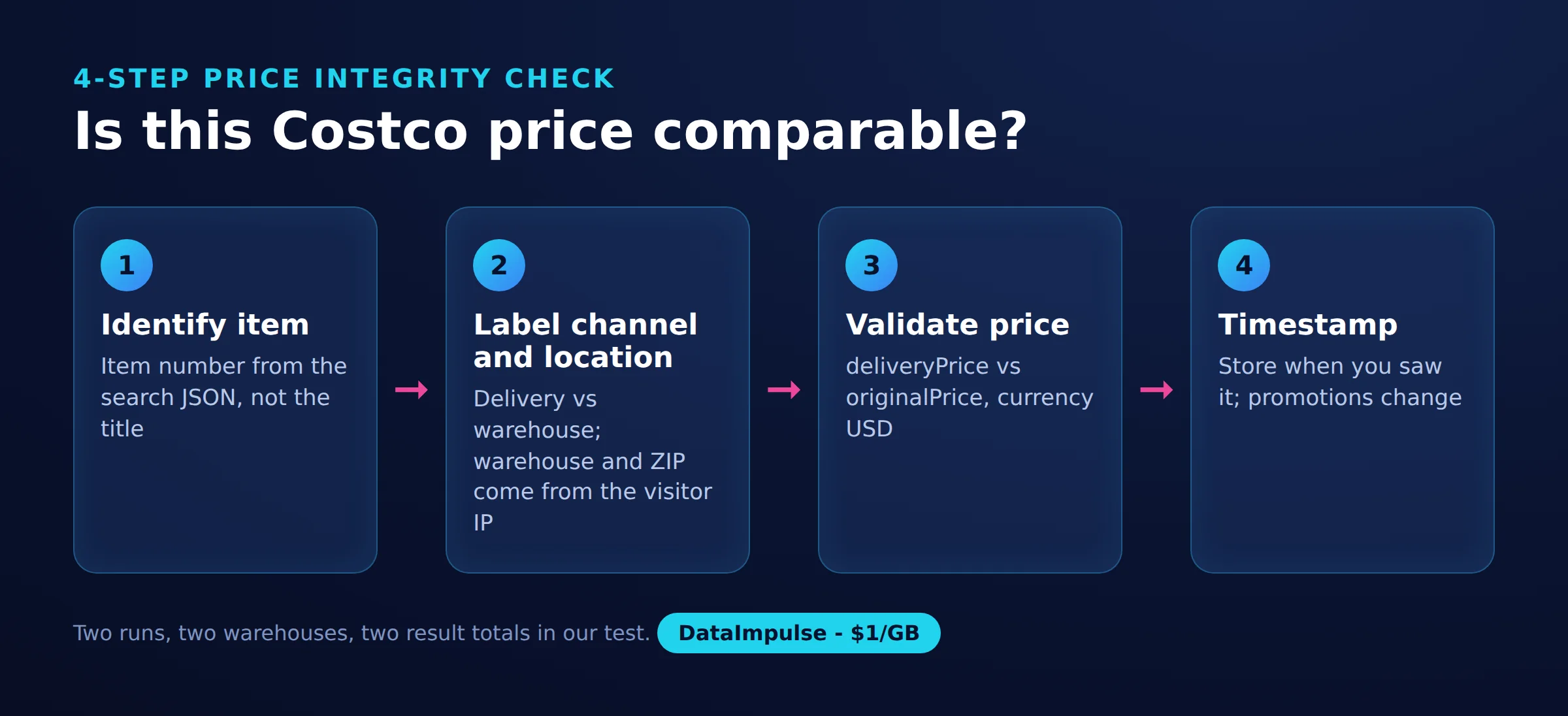
Step 1: Identify the item. Match identifier, variant, and pack size. Similar titles are insufficient.
Step 2: Label channel and location. Record Costco.com, warehouse, or Same-Day, together with the observed warehouse identifier and postal context. Do not merge those series.
Step 3: Validate price and currency. Preserve price type, check numeric validity, and verify currency from the source context. The script exports a minimum delivery price without currency.
Step 4: Timestamp the observation. Record capture time with timezone and retain a source reference. A failed refresh should change freshness status, not the price.
For Excel, use columns A-F for purchase date, item number, initial price, target price, current price, and observed date. Add channel, location, currency, source URL, and review status. A candidate-review formula is =IF(AND(ISNUMBER(A2),ISNUMBER(C2),ISNUMBER(E2),ISNUMBER(F2),F2>=A2,F2-A2<=30,E2<C2),"Review"," "). This is a spreadsheet design example, not part of the tested scraper.
Costco’s price-match policy includes a 30-day purchase window (as of October 2026). Dated promotions also require submission during the active promotion; quantity restrictions and exclusions apply, and requests may be denied. Warehouse purchases are directed to the purchasing location’s Returns counter. The formula checks none of those conditions.
Preserve observed shelf-tag text if you manually record warehouse prices. Do not turn price endings or symbols into guaranteed discount, discontinuation, or refund rules. For monitoring design, see how retailers track competitor prices.
Which scraper, API or tracking tool should you use?
Choose based on whether you need raw observations, maintained extraction, or alerts. This verification did not establish an official public Costco product-price API or feed; the browser endpoint in our test is not evidence of one.
| Option | Use X when… | Avoid X when… |
|---|---|---|
| Python scraper | Use Python when you need custom fields and control. | Avoid Python when you cannot maintain extraction. |
| Third-party scraper API | Use an API when you want outsourced extraction. | Avoid an API when provenance or coverage is unclear. |
| Price tracker | Use a tracker when you only need alerts. | Avoid a tracker when you require raw catalog exports. |
| Proxy | Use a proxy when your own client needs network routing. | Avoid a proxy when you expect parsing or guaranteed access. |
The newpo Apify Costco Scraper listing advertises $40 per month plus usage (as of October 2026). It is community-maintained. Compare that specific listing with Bright Data, ScraperAPI, and Oxylabs by requesting the same acceptance sample: item identifier, delivery price, currency, timestamp, and explicit location. Verify Costco-specific parsing, failed-request billing, and actual coverage before purchase.
For alert tools, the table is a verification shortlist, not a tested ranking. Unknown means this review did not establish the detail. Test ease of setup with one item and inspect whether an alert preserves the correct channel.
| Candidate | Frequency and pricing | Receipt scanning | Coverage and ease checks |
|---|---|---|---|
| PriceLasso | Verify selected plan | Unknown | Verify exact online item and location handling |
| Warehouse Runner | Verify selected plan | Verify import workflow | Test desired warehouse and alert setup |
| PageCrawl | Verify selected plan | Unknown | Test price-element selection and page access |
| CostPal | Verify selected plan | Unknown | Verify channel coverage and onboarding |
| Price Watch | Unknown | Unknown | Identity ambiguous; verify exact publisher first |
| Visualping | Verify selected plan | Unknown | Test selected region and irrelevant-change filtering |
A Costco scraper api label does not establish retailer affiliation. Require source provenance and distinguish observed prices from estimates before comparing vendors on cost.
What legal and contractual limits apply?
Public visibility does not establish permission to automate collection. Costco’s verified terms prohibit automated extraction and restrict software interaction without prior written consent, so obtain authorization before operational use.
Read Costco’s robots.txt separately from its terms. The file contains active restrictions for checkout paths and commented lines beginning with #. A commented Disallow line is not an active directive, and an unrestricted path is not a contractual license.
The Ninth Circuit’s hiQ v. LinkedIn opinion addressed the CFAA and publicly accessible data in a preliminary-injunction dispute. It did not grant blanket permission for scraping or eliminate contract and other claims.
In Europe, database-rights case law explains restrictions on substantial extraction and certain repeated extraction. Personal data creates additional obligations; keep this workflow limited to product facts and aggregate ratings. Avoid accounts, hidden prices, challenges, and personal review profiles.
For broader context, see our web-scraping legal guide. Authorization, jurisdiction, purpose, and collection scope all matter; the reader decides, check local law
Frequently Asked Questions
How can I scrape public Costco product data with Python?
After establishing authorization, reproduce the browser-response capture and inspect the exported rows. Our example captured search JSON and joined product records to inventory records before writing CSV.
Does Costco offer an official public product-price API?
This verification did not establish one. A network endpoint used by the website and a third-party service marketed as a Costco API are different from an official public developer interface.
Why might a Costco scraper return no price or get blocked?
Our HTML requests received a shell without product data, and one browser route captured no search response. Missing inventory, incomplete loading, and access rejection need separate diagnostics; an empty price alone cannot identify the cause.
Can online prices reliably represent warehouse prices?
Do not use an online observation as a warehouse measurement. Keep separate histories and compare only matching items, channels, and locations.
How can I track price drops without promising refund eligibility?
Alert when a validated observation falls below the purchase price or watchlist target. Label the result as a review candidate and check the applicable policy, promotion dates, exclusions, and purchase channel separately.
Does the tested script collect every search result?
No. It exported 24 rows from a search reporting 255 results and contains no next-page navigation.
Will residential routing always make the script work?
No success guarantee follows from this snapshot. One successful route does not establish repeatability across times, locations, searches, or sessions.
Plan a small, authorized collection first
If your own browser client needs routing, consider DataImpulse residential proxies. DataImpulse supplies proxies, not a scraping API, managed unblocker, VPN, or data vendor. Validate permission, location consistency, usable rows, and actual traffic before expanding the workload.
Last updated: October 16, 2026.

 State/City/Zip/ASN Targeting



