
In this Article
Botasaurus is a Python scraping framework that wraps HTTP and browser tasks in decorators, with output and UI workflows documented in its official repository. Start by checking whether the response contains your required fields, then add browser rendering or proxy routing only where the task needs them.
This tutorial uses our quick run on October 16, 2026: a small Linux snapshot, not a benchmark. The executable example reproduces the tested task logic; export and UI guidance is distinguished from what we actually exercised.
Key Facts
- Botasaurus 4.0.97 wraps a browser (@browser) and an HTTP client (@request) behind decorators.
- Its browser mode loaded Walmart search results in 3 of 3 residential runs and 1 of 1 direct run.
- Its @request mode got Walmart’s “Robot or human?” page on the same URL.
- It handles user:password proxy authentication for the browser itself.
- Parse only after content renders: an explicit wait turned 0 rows into 20.
- On Ubuntu 23.10+ pass –no-sandbox through add_arguments to start Chrome.
How do you install Botasaurus and run your first scraper?
Match our tested environment with Python 3.12, Botasaurus 4.0.97 and Chrome for Testing 147. The public Books to Scrape task below returned 20 title-and-price records after waiting for product elements.
Create a virtual environment, install the pinned package botasaurus==4.0.97, and make the Chrome executable available as google-chrome on PATH. The version-specific PyPI page identifies the release; pinning it avoids silently testing a different framework version.
Save this tested script as botasaurus_test.py. Set PROXY_URL through your environment or secret manager for proxy testing. The uppercase authentication values in the comment are placeholders, not working credentials.
Container restriction: Our Chrome startup failed with “Failed to connect to Chrome URL” until we added --no-sandbox. The unchanged script includes that flag. Use this reproduction only in a disposable container; a normal deployment should resolve its sandbox configuration instead.
import os, json, time
from botasaurus.browser import browser, Driver
from botasaurus.request import request, Request
from botasaurus.soupify import soupify

PROXY = os.environ.get("PROXY_URL")   # http://USER:[email protected]:823 ; botasaurus handles the auth

@browser(proxy=PROXY, headless=True, reuse_driver=False, output=None, add_arguments=["--no-sandbox"])
def scrape_books(driver: Driver, url):
    driver.get(url)
    driver.wait_for_element("article.product_pod", wait=20)
    soup = soupify(driver)
    return [{"title": a["title"], "price": p.text} for a, p in
            zip(soup.select("article.product_pod h3 a"), soup.select("article.product_pod .price_color"))]

@request(proxy=PROXY, output=None, max_retry=2)
def walmart_search(req: Request, query):
    r = req.get(f"https://www.walmart.com/search?q={query}")
    return {"status": r.status_code, "kb": len(r.content) // 1024,
            "challenge": "Robot or human" in r.text, "next_data": "__NEXT_DATA__" in r.text}

@browser(proxy=PROXY, headless=True, reuse_driver=False, output=None, add_arguments=["--no-sandbox"])
def walmart_browser(driver: Driver, query):
    driver.google_get(f"https://www.walmart.com/search?q={query}")
    for _ in range(30):                       # wait up to ~15 s for results or a challenge
        html = driver.page_html
        if "__NEXT_DATA__" in html or "Robot or human" in html:
            break
        driver.sleep(0.5)
    return {"title": driver.title, "challenge": "Robot or human" in html, "next_data": "__NEXT_DATA__" in html, "kb": len(html)//1024}

if __name__ == "__main__":
    t=time.time(); b = scrape_books("https://books.toscrape.com/"); print("books", len(b), b[:1], f"{time.time()-t:.1f}s")
    t=time.time(); print("walmart @request", walmart_search("air+fryer"), f"{time.time()-t:.1f}s")
    t=time.time(); print("walmart @browser", walmart_browser("air+fryer"), f"{time.time()-t:.1f}s")
Execute the script with the virtual environment’s Python interpreter. It runs all three tasks, including the Walmart checks, so review the permission boundaries below first. Expect a book count and sample record, followed by diagnostic dictionaries. Those dictionaries report page markers, not extracted Walmart product records.
When should Botasaurus use requests or a browser?
Use request mode when the response already contains the required fields. Use browser mode when those fields require rendering or interaction, and troubleshoot missing data before changing infrastructure.
In our script, @request receives a request client, while @browser receives a driver. The official introductory examples demonstrate both approaches.
Use this 3-layer scraper check to distinguish an extraction problem from an access problem:
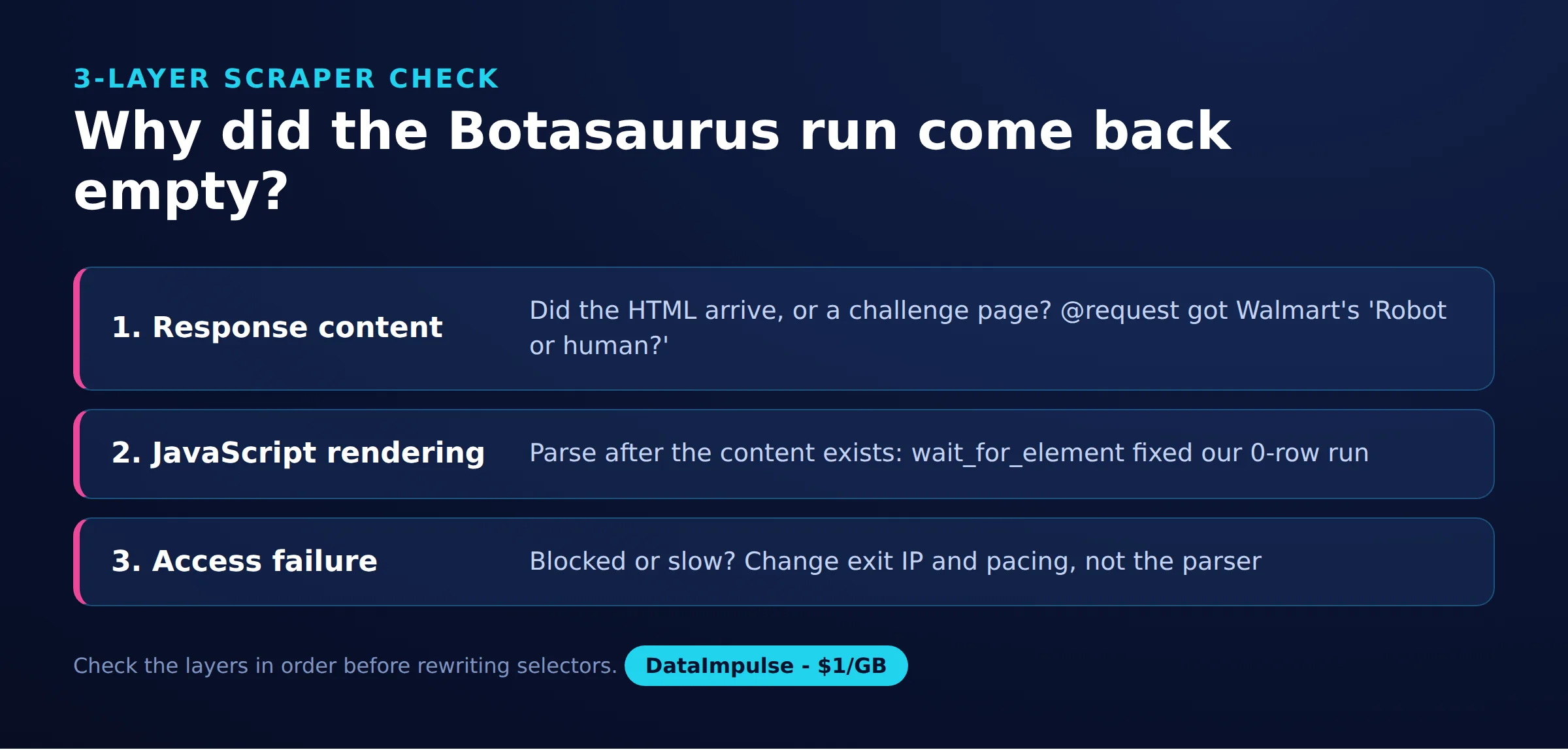
- Layer 1, response content: Inspect the body, final URL and expected fields. HTTP 200 alone cannot establish that the response is useful.
- Layer 2, JavaScript rendering: Compare the initial response with the rendered page. Wait for a relevant element or data condition before parsing.
- Layer 3, access failure: Separate challenge pages, proxy authentication errors and navigation failures. Record the actual symptom before retrying.
Our first Books to Scrape attempt returned zero rows because parsing happened too early. Waiting fixed that observation; it does not prove that the site requires JavaScript. Likewise, the Walmart page title briefly remained “www.walmart.com” before results appeared.
Define success before implementation: required fields, acceptable missing values and a completeness check. A page containing a familiar marker can still fail that contract. For browser deployment context, see our headless browser guide.
How do you save results as JSON, CSV or Excel?
Validate the returned records before selecting an export format. Our tested script sets output=None and prints a summary; it does not create JSON, CSV or Excel files.
The official output documentation describes automatic JSON output and format selection, including Excel. These export paths were outside our quick run, so the executable example above remains an extraction and diagnostics script.
| Format | Choose it for | Validation before delivery |
|---|---|---|
| JSON | Structured records consumed by another program | Check field names, types and missing values. |
| CSV | A flat table with stable columns | Check quoting, encoding and consistent column order. |
| Excel | A workbook reviewed by people | Check text preservation, numeric conversion and row counts. |
For the book records, require a nonempty title and retain the original price text until currency conversion is deliberate. The tested extraction pairs two selector lists with zip; unequal lengths would silently truncate the output. Check their lengths before treating a production export as complete.
Keep failed tasks separate from valid empty datasets. Reopen each generated file and compare its record count with the validated in-memory result. When adapting the task for repeated collection, add source URLs and collection timestamps to the schema, then test the export separately.
How do you configure and rotate proxies?
Pass an authenticated endpoint through PROXY_URL, which the tested script reads into both decorators. Our run used a DataImpulse US residential proxy; proxy authentication worked in that configuration.
Use the endpoint shape shown in the script comment, replacing the uppercase placeholders privately. Keep the value out of source control, screenshots and logs. Restart the process after changing it because the script reads the environment when the module loads.
The browser proxy documentation shows a single endpoint and automatic selection from an endpoint list. Its dynamic configuration examples also accept a function that selects a proxy from task data. Those mechanisms were not exercised in our snapshot.
Distinguish choosing a gateway from changing the exit IP. For your own integration test, visit an IP-echo endpoint through the same request or browser path used by the task. Compare the reported address with a direct connection, then repeat across new connections to check the intended rotation or session behavior.
An HTTPS destination does not imply TLS to the proxy. HTTP CONNECT establishes a tunnel; destination TLS and proxy transport are separate connections. Our script uses an HTTP proxy URL with HTTPS destinations. That observation does not establish HTTPS-proxy or SOCKS compatibility in either library mode.
If authentication fails, check the endpoint, port and credential encoding before changing extraction code. If only the destination fails, investigate the destination response and routing separately. A working IP check alone does not identify who rejected a later request. See our proxy rotation workflow guide for related scheduling considerations.
How do you handle failures and multiple scraper tasks?
Classify failures, bound retries and preserve enough evidence to diagnose them. Increase concurrency only after one task consistently produces validated records.
The request decorator in our script uses max_retry=2, but the function returns challenge information as an ordinary result. Do not assume that a retry setting will recognize an HTTP 200 challenge as a failure. Define that application-level decision explicitly.
- Transient connection failure: Retry with bounded backoff and a total task deadline.
- Authentication failure: Correct configuration instead of repeating unchanged credentials.
- Missing selector: Inspect the saved response and wait condition before retrying.
- Challenge response: Stop or route it for review under the site’s access policy.
For multiple tasks, use distinct task identifiers, separate output destinations and a shared per-site traffic budget. Record attempts independently from successful records so retries cannot inflate your apparent yield. Make repeat execution safe before adding workers.
Keep session settings coherent throughout a logical task. Avoid changing the user agent, cookies and exit route independently while diagnosing a failure; that introduces several variables at once. The tested browser tasks disable driver reuse, so their observations should not be treated as evidence about long-lived sessions.
For headless failures, compare a visible run under the same network conditions and inspect the page content. Check browser startup before investigating selectors. Our sandbox workaround addressed startup; it did not establish anything about access or detection.
Can it avoid detection or bypass Cloudflare?
Our quick run does not establish a Cloudflare or CAPTCHA bypass guarantee. Successful page loading on one target cannot establish general detection resistance.
The Botasaurus repository advertises detection avoidance and documents Google-referrer navigation and challenge-related options. Treat those as maintainer claims and mechanisms, not independently demonstrated guarantees.
Cloudflare documents multiple detection engines and TLS fingerprint signals. Changing an IP is therefore not sufficient evidence that every relevant signal has changed. A different browser, navigation path or session history also complicates comparisons.
Our Walmart observations did not identify the challenge vendor or test CAPTCHA solving. Finding __NEXT_DATA__ showed that a marker was present; it did not measure detection accuracy, extraction completeness or future access.
For authorized evaluation, use a controlled site with known human and automated traffic. Record labels, false positives, false negatives, browser versions and repeat counts. Keep traffic volume and success criteria fixed, and stop at agreed boundaries. Our Cloudflare troubleshooting guide offers additional context, but a production decision still needs target-specific evidence.
How does it compare with Playwright and Selenium?
Choose Botasaurus when its task workflow fits your project, Playwright when its browser tooling matches the job, and Selenium when existing WebDriver infrastructure matters. Our snapshot cannot support a speed ranking.
Playwright documents actionability checks and automatic waiting, network observation and routing, and isolated browser contexts. Its language documentation covers JavaScript/TypeScript, Python, Java and .NET.
Selenium documents explicit and implicit waits, remote browser execution through Grid, and WebDriver BiDi network features. Check the exact browser and binding combination before depending on a particular network operation.
| Choice | Use X when… | Avoid X when… |
|---|---|---|
| Request mode | Use request mode when required fields exist in HTML. | Avoid request mode when rendering is required. |
| Browser mode | Use browser mode when JavaScript creates required fields. | Avoid browser mode when HTTP already supplies them. |
| Botasaurus | Use Botasaurus when its task/UI workflow fits. | Avoid Botasaurus when essential integrations remain unverified. |
| Playwright | Use Playwright when its documented browser tooling fits. | Avoid Playwright when plain HTTP suffices. |
| Selenium | Use Selenium when existing WebDriver infrastructure matters. | Avoid Selenium when a smaller workflow suffices. |
Compare complete workloads: startup, navigation, waits, extraction, validation and export. Hold page selection and output requirements constant. Our Playwright scraping tutorial and Selenium proxy configuration guide cover alternative implementation paths.
How do you build a scraper UI?
Start with the official starter and trace its input-to-task connection before adding controls. Our quick run did not execute the UI, so this is a source-verified implementation map rather than another tested script.
The starter Python task uses a request decorator, reads the link input, extracts an H1 and returns a heading field. The input JavaScript defines a required link control with a default URL. The input key connects the form to the Python task.
The official starter documents cloning the project, installing its requirements, running python run.py install, and starting the dashboard with python run.py. Follow one recorded checkout consistently rather than combining examples from different revisions.
For a book-scraping UI, begin with a URL input and an output table containing title and price. Treat a free-text search field or category dropdown as a separate integration step: check the installed control API, validate its submitted value, and test how it reaches the task. Neither dropdown behavior nor Excel downloading was exercised in our run.
Before deployment, follow a record from input through task completion to the downloaded file. Compare a starter-based UI with a custom dashboard by measuring setup effort, necessary boilerplate, control flexibility and deployment responsibilities. No measured setup-time comparison exists in this snapshot.
What did our quick Linux run return and cost?
Our quick run on October 16, 2026 returned book records and several successful Walmart page loads, but it did not measure a monetary cost. This was a small snapshot, not a benchmark.
Method and source: Andrii’s run notes and botasaurus_test.py record Linux, Python 3.12 in a virtual environment, Botasaurus 4.0.97 and Chrome for Testing 147. Tasks ran against Books to Scrape and one Walmart search URL; browser results were checked using content markers.
| Check | Recorded sample | Result | Time |
|---|---|---|---|
| Books browser, residential proxy | Initial attempt, then corrected attempt | 0 rows before waiting; 20 after waiting | 4.3 s after correction |
| Walmart request, residential proxy | One recorded observation | HTTP 200; “Robot or human?” challenge, about 15 KB | Not recorded |
| Walmart browser, residential proxy | 3 runs | Results page with __NEXT_DATA__ in 3 of 3 | 6.5-9.2 s each |
| Walmart browser, direct datacenter IP | 1 run | Page loaded in 1 of 1 | Not recorded |
| Python requests and headless Playwright Chromium | Same-session direct and residential checks; repeat counts unrecorded | Challenge responses | Not recorded |
The comparison clients lacked a matched experimental protocol and complete version records. Different browser implementations, navigation paths and timing prevent attributing the outcomes to one cause. The direct success also prevents claiming that a residential proxy was necessary.
DataImpulse residential traffic starts at $1 per GB. However, response size is not total billed browser traffic: additional resources, retries and other requests matter. Without gateway usage measurements, this run has no defensible dollar total or cost-per-record estimate.
For a cost study, record billed traffic before and after an isolated workload, then divide its charge by validated records. Include failed attempts and repeat the same workload before comparing configurations.
What permissions and alternatives should you consider?
Check permission and reuse requirements before collecting data or testing access controls. Public visibility alone does not settle whether your intended collection and reuse are permitted.
Review the site’s terms, robots.txt and any written authorization. RFC 9309 describes crawler instructions, not access authorization. Set a conservative traffic budget, minimize personal data, define retention, and restrict who can access collected records.
The Ninth Circuit’s 2022 hiQ v. LinkedIn opinion concerned preliminary relief and the CFAA treatment of publicly accessible profiles. It did not establish universal permission to scrape or resolve every contractual, privacy or intellectual-property issue.
For EU collection, assess the Database Directive and relevant local implementation. The Court of Justice has explained that repeated extraction of small portions can raise database-right issues in specified circumstances. Keep evasion tests within explicit authorization and stop when the agreed scope ends.
Before building a scraper, look for an official API, licensed dataset or owner-operated export. Compare field coverage, freshness, permitted reuse and maintenance effort. An authorized structured feed may meet the same need with fewer moving parts. For the final decision: the reader decides, check local law
Frequently Asked Questions
What is Botasaurus?
Botasaurus is a Python framework for organizing scraping tasks. Our example uses one request task and two browser tasks, with extraction and success checks written explicitly in Python.
When should I use request mode instead of browser mode?
Choose request mode when the returned response contains everything needed for extraction. Inspect actual content first, because a successful status code can accompany a challenge page.
How do I add and rotate authenticated proxies?
The tested script reads an authenticated endpoint from PROXY_URL and passes it to both decorators. For rotation, distinguish endpoint selection from the gateway’s exit-IP policy, and verify the result through the same client path used for scraping.
Does Botasaurus guarantee Cloudflare or CAPTCHA bypass?
Our observations establish no such guarantee. We did not identify the Walmart challenge vendor, solve CAPTCHAs or measure detection accuracy.
When should I choose Botasaurus, Playwright or Selenium?
Evaluate Botasaurus when its task workflow matches your scraper, Playwright when its browser tooling fits your requirements, and Selenium when existing WebDriver infrastructure is valuable. Compare them using the same validated output requirements rather than isolated page-load observations.
Why did the browser return zero records?
In our initial book task, parsing ran before the relevant elements appeared. Waiting for product elements fixed that case, but another empty result could indicate changed selectors, incomplete content or an access failure.
Does the tested script export Excel files?
No. It disables automatic output and prints diagnostic results; Excel export and the starter dashboard were outside the measured run.
Need a proxy for your next controlled test?
If your scraper needs a different network route, evaluate DataImpulse residential proxies with a small, authorized workload. DataImpulse supplies proxy infrastructure, not a scraping API, managed unblocker, VPN or data vendor. Measure validated records and billed traffic before scaling.
Last updated: October 16, 2026.

 State/City/Zip/ASN Targeting



