
In this Article
If you are researching how to bypass cloudflare, start by identifying the response, confirming authorized access, and testing the specific layer that failed. There is no universal proxy, header, or browser setting that guarantees access.
In this article, Cloudflare bypass means resolving an automation access problem through diagnosis, compatible clients, or owner-approved access. It does not mean exploiting a firewall, discovering an origin server to evade protection, or crossing a login boundary.
We separate network identity, transport fingerprints, JavaScript, verification state, and request behavior. Our own seven-site snapshot from October 15, 2026 shows why changing one layer can help on one destination and leave another unchanged.
Key Facts
- Our October 15, 2026 snapshot sent 28 HTTP requests to seven Cloudflare-protected sites over four client and route combinations.
- A second pass loaded six of the sites in default headless Chromium: no challenge was passed.
- Changing only the network route produced no different HTTP outcome in the seven-site comparison.
- Coinbase returned HTTP 200 through curl_cffi on both tested network routes.
- A block page changing into a challenge is not successful data retrieval.
- A residential route alone did not change the outcome on any of the seven sites.
What is Cloudflare checking when it blocks you?
Cloudflare can evaluate several kinds of request and browser evidence. Our 5-layer Cloudflare trust ladder organizes troubleshooting; it is an engineering model, not a documented sequence that every request follows.
Cloudflare documents request headers, session characteristics, and browser signals as detection inputs. Its bot detection documentation explains why changing a single visible attribute is an incomplete experiment.
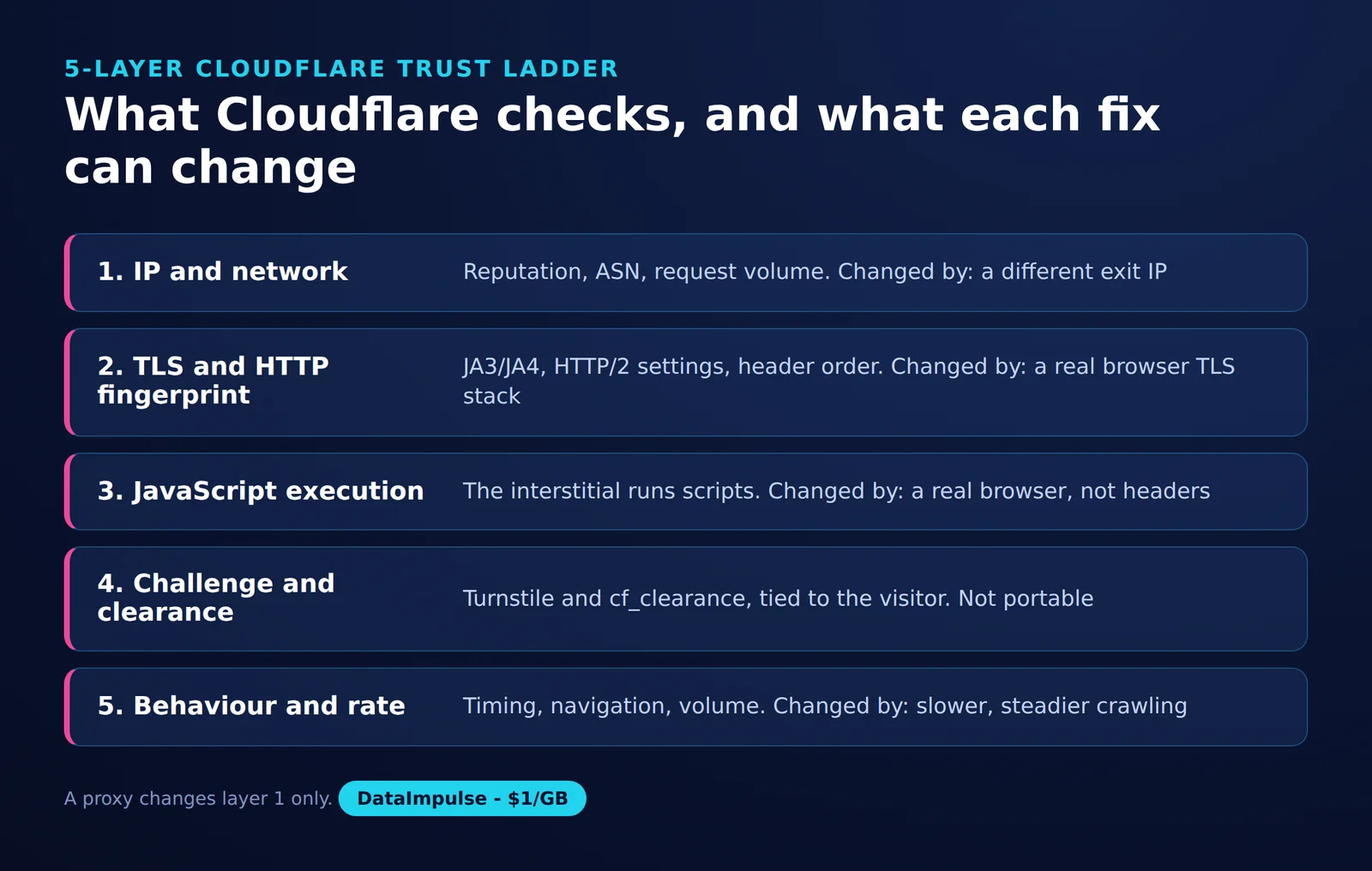
- Layer 1: Network identity. Record the exit IP, network operator or ASN, and location. Compare routes without assuming that every denial is an IP reputation problem.
- Layer 2: Transport and HTTP identity. Examine the client stack, TLS handshake, and HTTP behavior. A browser name in a header is only one piece of evidence.
- Layer 3: JavaScript execution. Determine whether the workflow needs a browser environment, rather than an HTTP response alone.
- Layer 4: Verification state. Distinguish a widget token from clearance held by a particular browser session.
- Layer 5: Behavior and rate. Track request spacing, concurrency, repeated failures, and session continuity.
Cloudflare’s JA3 and JA4 documentation describes fingerprints derived from how TLS clients initiate connections. Changing User-Agent does not change that handshake or execute JavaScript. Keep TLS and HTTP/2 behavior together in your diagnostic inventory without assuming that a particular fingerprint caused the denial.
The ladder helps isolate questions. Did a different network change the result? Did a different HTTP client change it? Did browser execution reveal the expected content? Each answer narrows the investigation, but none establishes permission to collect data.
Is this a Cloudflare challenge or an ordinary 403?
A Cloudflare Challenge Page carries cf-mitigated: challenge and uses text/html, even when the requested resource was JSON. A 403 with cf-ray alone does not establish the cause.
Use Cloudflare’s challenge response documentation, 403 troubleshooting guide, and HTTP header reference together. Its documentation distinguishes origin permission failures from several edge security responses; the Ray ID helps correlate a request, rather than naming the rule that rejected it.
| Observed symptom | Interpretation | Next diagnostic action |
|---|---|---|
| “Just a moment…” interstitial | Possible Challenge Page | Check cf-mitigated and content type. |
| Turnstile widget | Verification embedded in a page | Separate widget validation from page retrieval. |
| 403 with cf-ray | Cause remains unresolved | Inspect the body and ask the owner to correlate logs. |
| 403 without challenge evidence | Could be an origin denial or an edge block | Do not label it an IP ban without evidence. |
| Error 1020 | Firewall rule denied access | Give the owner the Ray ID and timestamp. |
| Error 1015 | Rate limiting | Stop retries and review the permitted request rate. |
| Error 1010 | Browser signature rejected | Ask the owner to review browser integrity settings. |
The error descriptions follow Cloudflare’s official pages for 1020, 1015, and 1010.
Keep status, final URL, response headers, and a sanitized body classification together. A successful status with an unexpected verification page is still a failed extraction. For other permission and application failures, use our 403 scraping diagnosis guide.
Before learning how to bypass cloudflare, can you arrange authorized access?
An API, export, or narrowly scoped owner exception can remove the access problem at its source. Establish the permitted dataset, frequency, identity, and retention requirements before investing in client changes.
Send the owner a concrete request: the fields needed, URL patterns, expected schedule, proposed concurrency, and a contact address. Include a failed request’s timestamp and Ray ID where available. Ask for an authenticated integration or an approved crawler identity that they can recognize and revoke.
For owners, Cloudflare’s false-positive guidance says WAF Skip rules can exempt Super Bot Fight Mode, but cannot skip Bot Fight Mode. Scope exceptions to the approved workflow and confirm the matching security event before changing protection.
Cloudflare’s Verified bots documentation incorporates the former signed-agent distinction into Direct versus Intermediary access metadata from July 1, 2026. Verification does not override owner policy. Our crawler testing article provides related context.
Public visibility is not a complete legal assessment. RFC 9309 explicitly separates robots.txt rules from access authorization. The privacy regulators’ joint scraping statement explains that publicly accessible personal information remains subject to privacy and data protection law.
The Ninth Circuit’s 2022 hiQ opinion addressed a specific public-profile dispute and preliminary injunction. The DOJ’s CFAA charging policy guides federal prosecutors; it is not blanket permission or protection from civil claims. UK unauthorized-access rules and copyright access controls require separate consideration, including Computer Misuse Act section 1 and DMCA section 1201.
Review terms, login boundaries, personal data, and intended reuse with appropriate counsel. This is not legal advice; our web scraping legal overview helps frame the questions.
How can you diagnose a Python request before changing clients?
Make one controlled request and record challenge evidence before adding retries or changing networks. Preserve cookies within the test session, set a timeout, and avoid printing cookie values or credentials.
The following diagnostic uses the session and header handling documented by Requests. Supply an HTTPS URL you own or have permission to test. The script follows no redirects, making the first response explicit.
python -m pip install requests
python diagnose.py https://example.com/
# Save as diagnose.py
import json
import sys
from urllib.parse import urlsplit
import requests
url = sys.argv[1]
if urlsplit(url).scheme != "https":
raise SystemExit("Use an authorized HTTPS URL")
with requests.Session() as session:
session.headers.update({
"User-Agent": "AuthorizedDiagnostics/1.0",
"Accept": "application/json, text/html;q=0.9",
})
# The session retains cookies issued during this workflow.
response = session.get(
url,
timeout=(10, 25),
allow_redirects=False,
)
print(json.dumps({
"status": response.status_code,
"content_type": response.headers.get("content-type"),
"cf_mitigated": response.headers.get("cf-mitigated"),
"cf_ray": response.headers.get("cf-ray"),
"challenge": (
response.headers.get("cf-mitigated", "").lower()
== "challenge"
),
"cookie_count": len(session.cookies),
}, indent=2))Next, an authorized comparison can change the transport client. The curl_cffi project documents browser TLS and HTTP/2 impersonation; the example pins the 0.16.3 release, the version we ran in our October 15, 2026 test.
python -m pip install curl_cffi==0.16.3
python transport_check.py https://example.com/
# Save as transport_check.py
import sys
from curl_cffi import requests
response = requests.get(
sys.argv[1],
impersonate="chrome",
timeout=25,
allow_redirects=False,
)
print({
"status": response.status_code,
"content_type": response.headers.get("content-type"),
"cf_mitigated": response.headers.get("cf-mitigated"),
"cf_ray": response.headers.get("cf-ray"),
})This comparison changes client behavior, potentially including default headers, so it cannot isolate TLS as the sole cause. It also does not reproduce our measurement setup exactly. Record versions and request settings, inspect expected content, and stop after the planned comparison.
Which methods address which layers when researching how to bypass cloudflare?
Choose a method for the failure you measured. Network changes, transport compatibility, browser execution, and session continuity address different problems and carry different operating costs.
Residential or mobile routes
A different route changes the network identity presented to the destination. It does not supply JavaScript execution, verification state, or authorization.
DataImpulse supplies the IP layer, with rotating or sticky sessions and country targeting. It is not a scraping API, a managed unblocker, or a VPN. Keep a session’s network route consistent when evaluating a workflow that depends on continuity.
Transport-compatible HTTP clients
curl_cffi addresses TLS and HTTP/2 client impersonation, as documented by its official project. It does not turn an HTTP request into a browser executing the page.
Use our TLS fingerprinting guide for the underlying concepts. Treat a changed response as evidence about the client configuration, not proof that one fingerprint check was responsible.
cloudscraper
The cloudscraper project provides a Python client intended to handle supported anti-bot challenge flows. Its existence does not establish compatibility with a particular site’s current protection.
Keep it as a candidate for a bounded compatibility test, rather than a universal answer. Our cloudscraper and proxies tutorial covers implementation without duplicating it here.
Browser execution and specialized tools
A browser can execute the application and expose the rendered result. Browser execution alone does not establish that production verification will accept the session.
| Tool | What it addresses | What remains unresolved |
|---|---|---|
| nodriver | Browser automation through the interfaces described in its official repository. | No guaranteed challenge acceptance. See our nodriver proxy setup. |
| Camoufox | A browser environment focused on fingerprint control, according to its official documentation. | No demonstrated result in this snapshot. See our Camoufox proxy guide. |
| FlareSolverr | A browser-backed service returning HTML and cookies, described in its official repository. | Browser resource costs and challenge failures remain. Returned cookies are not universally portable. |
| CAPTCHA solving services | Vendors such as CapSolver document Turnstile task handling. | A token is not general site access, owner permission, or guaranteed clearance. |
Session continuity and slower collection
Preserving a valid session avoids needlessly discarding its state. It does not make that state reusable across arbitrary devices or exempt requests from subsequent checks.
Reducing concurrency and duplicate requests addresses load and repeated failures. It does not repair an explicit access denial. Cache permitted results, use incremental collection, and set a finite retry budget rather than retrying every rejection.
Why does Playwright or Puppeteer get stuck on ‘Just a moment’, and how should you test Turnstile?
Running JavaScript does not guarantee a production challenge pass. Cloudflare lists automated browsers, including Playwright and Puppeteer, as unsupported for solving production challenges.
That distinction appears in its supported-browser documentation. A longer timeout may reveal a delayed application, but repeated waiting is not evidence that a verification loop will resolve. Check the actual page content and record a bounded stopping point.
On your own site, use Cloudflare’s dummy sitekeys and secret keys. They provide controlled testing outcomes, while production secrets reject dummy tokens. Configure the frontend test sitekey and backend test secret together.
Test successful submission, failed verification, duplicate-token handling, and the application’s error display. Keep test credentials in the test environment and verify that production configuration does not inherit them. This tests your integration without making CI depend on solving a live challenge.
For authorized browser networking, our Playwright proxy guide covers the connection layer. Proxy configuration and production challenge support remain separate questions.
Can you reuse cf_clearance or a Turnstile token?
Preserve legitimate clearance within its original session, but do not treat it as transferable access credentials. Turnstile tokens and cf_clearance serve different purposes.
Cloudflare’s clearance documentation says Turnstile normally issues a one-time token for server-side validation. With pre-clearance enabled, it can additionally issue a clearance cookie; that cookie is tied to the visitor and device.
Keep the authorized browser context and its network conditions stable during a workflow. Copying a cookie into another machine or client is not a dependable continuation strategy. Record expiration or renewed challenges as session events, and never put cookie values into shared diagnostic logs.
Clearance is also not a promise of unrestricted future traffic. Design the collector to pause and report a changed access condition instead of assuming that an earlier accepted response authorizes every later request.
What did our seven-site route snapshot show?
Changing only the network route did not change the HTTP outcome for any of the seven sites. Changing the HTTP client did change some responses, but a changed block page was not necessarily usable content.
Source and date: DataImpulse measurement, October 15, 2026, between 15:00 and 15:30 UTC. These results are an observational snapshot, not a benchmark.
Method: one GET per site/client/route cell, totaling 28 HTTP requests. Requests used identical Chrome headers; curl_cffi used impersonate=chrome. The datacenter route was our hosting server IP. The residential route used a DataImpulse US exit with a new session per cell. Neither HTTP client executed page JavaScript.
A separate comparison used default headless Chromium through Playwright, without stealth: one load per cell, a 25-second wait, and a final-title check. It covered six sites on two routes, totaling 12 loads. Discord had no browser measurement.
| Site | Datacenter: requests / curl_cffi | Residential: requests / curl_cffi | Headless: both routes |
|---|---|---|---|
| g2.com | 403 unclassified / 403 unclassified | 403 unclassified / 403 unclassified | 403, unclassified block page |
| indeed.com | 403 challenge / 403 challenge | 403 challenge / 403 challenge | Still challenged or blocked |
| glassdoor.com | 403 challenge / 403 challenge | 403 challenge / 403 challenge | Still challenged or blocked |
| capterra.com | 403 block / 403 challenge | 403 block / 403 challenge | Still challenged or blocked |
| discord.com | 200 / 200 | 200 / 200 | Not tested |
| crunchbase.com | 403 block / 403 block | 403 block / 403 challenge | Still challenged or blocked |
| coinbase.com | 403 challenge / 200 | 403 challenge / 200 | Still challenged or blocked |
Residential + requests: 1 of 7
Datacenter + curl_cffi: 2 of 7
Residential + curl_cffi: 2 of 7
Coinbase returned 200 with curl_cffi on both routes. Capterra moved from a block page to a challenge with that client. Crunchbase reached a challenge only with residential plus curl_cffi. These are different observations and should not share a single “passed” label.
G2 returned 403 without cf-mitigated on every route, including the browser, so its denial cannot be attributed to a Cloudflare challenge. The browser comparison produced no challenge pass on any site.
Our run logged status, headers and page title per cell. A production collector should log cf-mitigated, content type, Ray ID, timestamp, and expected-content validation. Unknown site settings, one observation per cell, and title-only browser checks limit causal conclusions.
Should you use a proxy or a managed unblocker?
A proxy changes the route while your application owns client behavior. A managed access service takes responsibility for more of the retrieval process, but its session model and billing unit need separate evaluation.
The vendor capabilities below come from each vendor’s official product documentation, checked in October 2026. They describe service boundaries, not independently measured success rates.
| Option | Who runs browsers and handles challenges? | Session stability | Cost unit |
|---|---|---|---|
| Datacenter proxy | Your application | Depends on exit allocation and your client | Check the selected plan’s IP or traffic billing |
| Residential proxy | Your application | Choose rotation or sticky routing deliberately | Traffic for the offering discussed here |
| Mobile proxy | Your application | Verify continuity under actual network changes | Check the selected plan |
| Zyte API | Provider-managed retrieval, with browser options | Evaluate the chosen API workflow | Successful responses, varying by request type and tier |
| Bright Data Web Unlocker | Provider-managed retries and CAPTCHA handling | Verify the required workflow before purchase | Requests |
| Oxylabs Web Unblocker | Provider service with JavaScript rendering | Session control is offered | GB |
| Decodo Site Unblocker | Provider-managed unblocking | Session control is offered | Requests |
Sources: Zyte pricing documentation, Bright Data Web Unlocker pricing, Oxylabs Web Unblocker pricing, and Decodo Site Unblocker.
Compare total cost per validated record: transfer, rendering, retries, failed extraction, and maintenance. A response billed as successful may still require your own schema and freshness checks.
| Method | Use X when… | Avoid X when… | Main operating cost |
|---|---|---|---|
| Residential or mobile routing | Use routing changes when an authorized comparison implicates network identity. | Avoid routing changes when the unresolved issue is application permission or JavaScript. | Traffic and session management |
| curl_cffi | Use curl_cffi when HTTP retrieval is sufficient and client compatibility needs testing. | Avoid curl_cffi as the sole answer when the workflow requires browser execution. | Integration and regression checks |
| cloudscraper | Use cloudscraper when a bounded test confirms compatibility. | Avoid cloudscraper when its name is your only evidence. | Compatibility maintenance |
| Browser tools | Use browsers when you need rendered application behavior. | Avoid browsers solely on the assumption that JavaScript guarantees acceptance. | Compute, memory, and debugging |
| Solver integration | Use solver evaluation only within an explicitly authorized workflow. | Avoid it for testing your own Turnstile integration, where dummy keys apply. | Service charges and validation work |
| Session reuse | Use session reuse for continuity within the original authorized context. | Avoid transferring clearance between unrelated clients. | State management |
| Slower collection | Use slower collection to respect an agreed rate and reduce duplicate work. | Avoid treating it as a remedy for explicit denial. | Longer completion time |
| Managed access | Use managed access when outsourcing retrieval fits your requirements. | Avoid buying before testing content quality and session needs. | Service fees and vendor integration |
What limits should stop further retries?
Stop when permission is absent, repeated attempts provide no new evidence, or retrieved content fails validation. A successful experiment on one URL cannot establish reliability across a whole site.
| Checkpoint | Continue only with | Stop or escalate when |
|---|---|---|
| Permission | A defined, approved collection scope | The workflow crosses an unapproved login or data boundary |
| Diagnosis | A bounded test of a specific hypothesis | Retries repeat the same denial without new information |
| Content | Expected fields and acceptable freshness | A 200 response contains verification or unrelated HTML |
| Operations | Agreed rates and a finite retry budget | Costs or request volume exceed the plan |
Keep conclusions local to the evidence. Our snapshot did not test mobile routes, specialized browsers, managed unblockers, or solver services. It also did not establish extraction accuracy from complete datasets. Evaluate those separately only when the use case justifies them.
Frequently Asked Questions
How can I tell whether Cloudflare challenged my Python request?
Check cf-mitigated for the value challenge before trying to parse the expected payload. Cloudflare documents this marker and the text/html response type for Challenge Pages (see the official diagnosis sources above). A status code alone leaves the cause unresolved.
Why can’t I bypass Cloudflare with a residential proxy?
A residential route changes network identity, while the client and application workflow may still be incompatible. In our snapshot, switching only the route changed no HTTP outcome on seven sites. Diagnose the remaining layers before buying more traffic.
Why does my headless browser keep showing ‘Just a moment’?
Browser execution and challenge acceptance are separate outcomes. Cloudflare lists automated browsers as unsupported for solving production challenges (see its supported-browser documentation above). Use a bounded wait and report the unresolved access condition.
How do I test Turnstile with Playwright or Puppeteer on my own site?
Use the documented dummy sitekey with a matching test secret in your test environment. Production secrets reject dummy tokens (see Cloudflare’s testing documentation above). Test both accepted and rejected verification paths.
Why does the page say ‘please unblock challenges.cloudflare.com to proceed’?
Check whether a browser extension or network policy prevents the verification resources from loading. Site owners should also check their Content Security Policy: Cloudflare documents script and frame permissions for challenges.cloudflare.com. The official reference is https://developers.cloudflare.com/turnstile/reference/content-security-policy/.
How do I turn off Cloudflare CAPTCHA?
As a visitor, you cannot change another site’s security configuration. Ask the owner to review the problem; owners can adjust the relevant settings, as described in Cloudflare’s false-positive guidance.
Does public accessibility or robots.txt permission make scraping lawful?
Neither establishes a complete legal basis for collection and reuse. Consider authorization, contractual restrictions, privacy obligations, and applicable copyright rules. The primary sources in the authorized-access section address different parts of that assessment.
Test the IP layer with a clear hypothesis
If your authorized diagnostics point to network identity, compare a small, controlled workload using DataImpulse residential proxies, available from $1 per GB with country targeting and rotating or sticky sessions. Validate the returned content before scaling: a proxy supplies the route, while your application remains responsible for retrieval and session behavior.
Last updated: October 15, 2026.

 State/City/Zip/ASN Targeting



