
In this Article
A Sephora scraper extracts product records for analysis; our Python example collected names, brands, identifiers, list prices, ratings, review counts, and URLs. The useful output is a validated record, not simply a successful HTTP response.
Our quick run on October 16, 2026 produced 119 products from two search-result pages while product-page access failed. This small snapshot, not a benchmark, shows both a working extraction path and its limits. Review the access restrictions below before reproducing it.
Key Facts
- Sephora product pages returned HTTP 403 (Akamai) to every client we tried.
- The site’s own search JSON answered HTTP 200, even to plain Python requests.
- One search call returns up to 60 products with brand, price, rating and review count.
- 57 of 119 collected list prices were size ranges like “$6.70 – $12.50”.
- Individual reviews sit behind endpoints that required an access token in our check.
What can a Sephora Scraper extract?
A Sephora Scraper can collect product identity, pricing, and rating aggregates when those fields exist in the accessible response. Complete variant inventories, availability, and review text require separate evidence.
| Field | Meaning | Coverage in our script |
|---|---|---|
| Product and brand | Product ID, display name, brand name | Extracted |
| SKU, shade, size | Variant identifier and its attributes | Current SKU ID only |
| Price and currency | Amount or range with monetary unit | Raw list-price string only |
| Availability | Stock status for a specific variant and context | Not collected |
| Rating and review count | Summary score and aggregate count | Extracted when present |
| URL and timestamp | Source location and collection time | URL extracted; timestamp needs separate recording |
Keep missing distinct from unavailable. A missing stock field means unknown, not sold out; a missing rating means unknown, not zero. A product-level price range also cannot establish the price of a particular shade or size.
Define the record you need before choosing an access method. Product discovery can use fewer fields than a price comparison system that must match exact variants.
How do you build a Sephora Scraper with Python?
For an authorized reproduction, install the tested dependency, fetch the observed search JSON, and export its product objects to CSV. This example preserves list prices exactly, including ranges.
Our targets included the tested moisturizing-cream product page and the moisturizer search page. The HTML route yielded either blocked content or an application shell without prices, so the working script parses JSON instead.
Use Python 3.12, the version in our Linux run. Save the following as sephora_scraper.py, install with pip install curl_cffi, then run python3 sephora_scraper.py. Leave PROXY_URL unset for a direct connection; the comment contains illustrative placeholders, not working credentials.
import csv, os, random, time
from curl_cffi import requests   # browser-like TLS fingerprint; product pages sit behind Akamai

PROXY = os.environ.get("PROXY_URL")  # e.g. http://USER__cr.us:[email protected]:823
PROXIES = {"http": PROXY, "https": PROXY} if PROXY else None
API = "https://www.sephora.com/api/v2/catalog/search/"


def fetch_page(query, page, size=60, retries=3):
    params = {"type": "keyword", "q": query, "content": "true", "currentPage": page, "pageSize": size}
    for attempt in range(1, retries + 1):
        try:
            r = requests.get(API, params=params, impersonate="chrome", proxies=PROXIES,
                             headers={"Accept": "application/json"}, timeout=40)
            if r.status_code == 200 and r.headers.get("content-type", "").startswith("application/json"):
                return r.json()
            print(f"page {page} -> {r.status_code}, retry {attempt}")
        except Exception as exc:
            print(f"page {page} -> {type(exc).__name__}, retry {attempt}")
        time.sleep(5 * attempt)
    return None


def parse(data):
    for p in data.get("products", []):
        sku = p.get("currentSku") or {}
        yield {
            "product_id": p.get("productId"),
            "sku_id": sku.get("skuId"),
            "brand": p.get("brandName"),
            "name": p.get("displayName"),
            "list_price": sku.get("listPrice"),          # a range like "$6.70 - $12.50" for multi-size items
            "rating": round(float(p["rating"]), 2) if p.get("rating") else None,
            "reviews": p.get("reviews"),
            "bestseller": sku.get("isBestseller"),
            "sponsored": p.get("sponsored"),
            "url": "https://www.sephora.com" + p.get("targetUrl", ""),
        }


def scrape(query, max_pages=2):
    seen, rows = set(), []
    for page in range(1, max_pages + 1):
        data = fetch_page(query, page)
        if not data:
            break
        new = [r for r in parse(data) if r["product_id"] not in seen]
        if not new:
            break
        seen.update(r["product_id"] for r in new)
        rows += new
        print(f"page {page}: {len(new)} products of {data.get('totalProducts')}")
        time.sleep(random.uniform(4, 8))
    return rows


if __name__ == "__main__":
    rows = scrape("moisturizer", max_pages=2)
    if not rows:
        raise SystemExit("No products collected; check fetch_page() output first.")
    with open("sephora_products.csv", "w", newline="", encoding="utf-8") as f:
        w = csv.DictWriter(f, fieldnames=list(rows[0].keys()))
        w.writeheader()
        w.writerows(rows)
    print(f"saved {len(rows)} products")
The import is curl_cffi.requests, not the separate Requests package. Plain Requests also retrieved search JSON in our snapshot; consult the Requests quickstart for a separate implementation.
For an authorized rendering experiment, follow Playwright installation instructions and its locator documentation. Select expected product content before reading fields. Our Playwright scraping guide explains that workflow, but browser rendering did not recover the tested product page.
How do you collect accurate prices and paginate products?
Collect the raw price string first, then normalize only what the record establishes. Increment pages within a fixed budget and deduplicate by product ID.
Of our 119 records, 57 contained ranges such as $6.70 - $12.50. Preserve that text and, downstream, separate minimum, maximum, and price type. Do not assign the lower value to every SKU or assume a dollar symbol alone identifies currency.
Record storefront, locale, collection time, and variant context alongside later measurements. Compare the same size and shade across runs. Keep list price, sale price, and conditional discounts separate; this script extracts only listPrice. See our price comparison workflow for planning comparable records.
The example requests 60 results per page and stops after two pages, a failed fetch, or no new products. Its seen set filters IDs encountered on earlier pages, but does not remove repeated IDs within the same response. Validate uniqueness after export.
The observed total of 1,481 search matches does not prove complete catalog coverage. Search ordering and membership can change between requests. Keep a bounded product set for repeat measurements instead of treating one query as a catalog census.
How can you collect reviews and handle review limits?
You cannot infer access to every Sephora review from a rating or review count. Our script collects aggregates only and makes no review-content requests.
The Bazaarvoice review reference requires a passkey with permission for the relevant client’s data and limits a response to 100 records (as of October 2026). That documentation does not establish authorized Sephora access for this workflow, so there is no review-endpoint example here.
With a separately authorized review source, record product ID, review ID, locale, filters, and collection time. Track pagination and repeated IDs independently from catalog pagination. Compare fetched review counts with aggregates only when their filters and scope match.
A visible selection of reviews is a sample. Do not label it complete or treat its average as the product’s aggregate score. Our review collection guide offers a related workflow, but its access assumptions do not transfer to Sephora.
Why do requests fail, and when do proxies help?
Our failures show that response content matters as much as status. A proxy can support suitable routing for an authorized workflow, but it does not guarantee access or extract fields.
The tested product page returned 403 through both direct and residential connections. Another request returned 200 with only a challenge. Those observations cannot establish the exact blocking trigger or prove that IP reputation caused it.
- Access denial: inspect status and response content before retrying.
- Application shell: check whether expected product fields actually exist.
- Challenge: reject it as extraction output, even with status 200.
- Authentication boundary: stop when the requested resource requires access you do not have.
Keep geography and session context consistent when comparing results, and stop repeated denied requests instead of escalating retries. Our 403 diagnosis guide covers further checks. The cause of Sephora’s specific decision remains unknown from this snapshot.
What did our quick Linux run return?
Our quick run on October 16, 2026 collected 119 product records from two search pages on Linux with Python 3.12, without login. It was a small snapshot, not a benchmark.
Method: compare public-page responses and the search JSON used by the site, using direct and residential connections. Source artifacts are the tested sephora_scraper.py reproduced above and its sephora_products.csv output; the accompanying run observations describe access failures and approximate payload sizes.
| Target or check | Observed result |
|---|---|
| Product page, Requests and headless Chromium | 403 Access Denied, direct and residential |
| Product page, curl_cffi through residential | 200; approximately 2 KB Akamai challenge containing sec-if-cpt-container |
| Search HTML | 200; approximately 645 KB application shell without prices |
| Search page, raw CDP headless Chrome through residential | 403 |
| Search JSON, Requests and curl_cffi | 200 application/json, direct and residential; approximately 142 KB |
| Two-page export | 60 + 59 products; all had list prices; 57 ranges; zero sponsored records |
| Attempted product-detail request | 401 Missing access token; no further detail extraction |
Elapsed time was not measured. The script specifies a 40-second request timeout and random waits of four to eight seconds, but configuration is not observed runtime. There were no repeated trials, cross-country comparisons, or vendor performance tests.
The rough payload estimate is 142 KB per 60 products, or about 2.4 MB per 1,000 products. At DataImpulse’s $1 per GB entry rate, that is well under $0.01 in estimated payload traffic. It excludes retries, browser assets, billing overhead, compute, and maintenance; it is not an end-to-end cost measurement.
Which scraper or API approach should you choose?
Choose against required fields and accepted records, then compare total cost. Our successful search extraction does not establish a winner for reviews or complete SKU pricing.
| Approach | Use X when… | Avoid X when… |
|---|---|---|
| Requests | Use Requests when required fields exist in HTML or accessible JSON. | Avoid Requests when rendering is essential. |
| Playwright | Use Playwright when required public content needs rendering. | Avoid Playwright when plain HTTP suffices. |
| Residential proxy | Use a residential proxy when an authorized workflow needs suitable geography or session routing. | Avoid a residential proxy when expecting guaranteed access or extraction. |
| Managed scraper | Use a managed scraper when outsourcing parsing suits requirements. | Avoid a managed scraper when coverage or cost remains unverified. |
Bright Data’s Sephora Scraper API advertises product extraction and pay-as-you-go pricing of $1.50 per 1,000 records (as of October 2026). The buseta Sephora actor on Apify advertises product, review, and question extraction with pay-per-usage pricing (as of October 2026). These are listing claims, not results from our run.
Ask each candidate for sample output covering your exact URLs, variants, and review scope. Check freshness, missing fields, duplicate handling, failed-job charges, and maintenance responsibility. Divide total spend by unique records that pass validation, rather than by requests sent. No measured vendor latency or success-rate comparison follows from our snapshot.
Does Sephora offer an official API or export alternative?
We could not verify a free public Sephora API with readable documentation. That is an evidence gap, not proof that no API or partner integration exists.
The Sephora developer address returned no readable documentation during our October 16, 2026 check. We therefore cannot establish registration steps, authentication requirements, pricing, or rate limits for an official public service.
The observed search route is a website implementation detail, not a documented integration contract. A third-party Sephora scraper api is also distinct from an API operated by Sephora. For sustained work, ask Sephora or an authorized commercial partner whether a licensed feed or export can cover your fields, refresh schedule, territory, and reuse rights.
What legal and ethical risks apply?
Public visibility does not settle permission to automate collection or reuse records. Review the intended access and use separately.
Checked October 16, 2026, Sephora’s terms restrict scraping and extraction except where expressly permitted, and prohibit interference with security features and bypassing robot exclusions. Its robots.txt disallows /browse/, /search, and /gway/ and specifies a five-second crawl delay (as of October 2026). Absence of a disallow is not permission. The example’s four-to-eight-second wait is not a compliant five-second minimum.
The 2022 hiQ v. LinkedIn opinion addressed CFAA questions concerning public profiles at the preliminary-injunction stage, not universal scraping permission. Contractual risk remains separate. EU database rights can restrict substantial or repeated systematic extraction; personal-data obligations can apply to identifiable reviewers.
Minimize collection, define retention, and stop at authentication or explicit access boundaries. Our web scraping legal overview adds context, but the reader decides, check local law
How do you validate and maintain the scraper?
Use the 4-step extraction check: access, extract, normalize, validate. Run it before accepting an export or increasing collection volume.
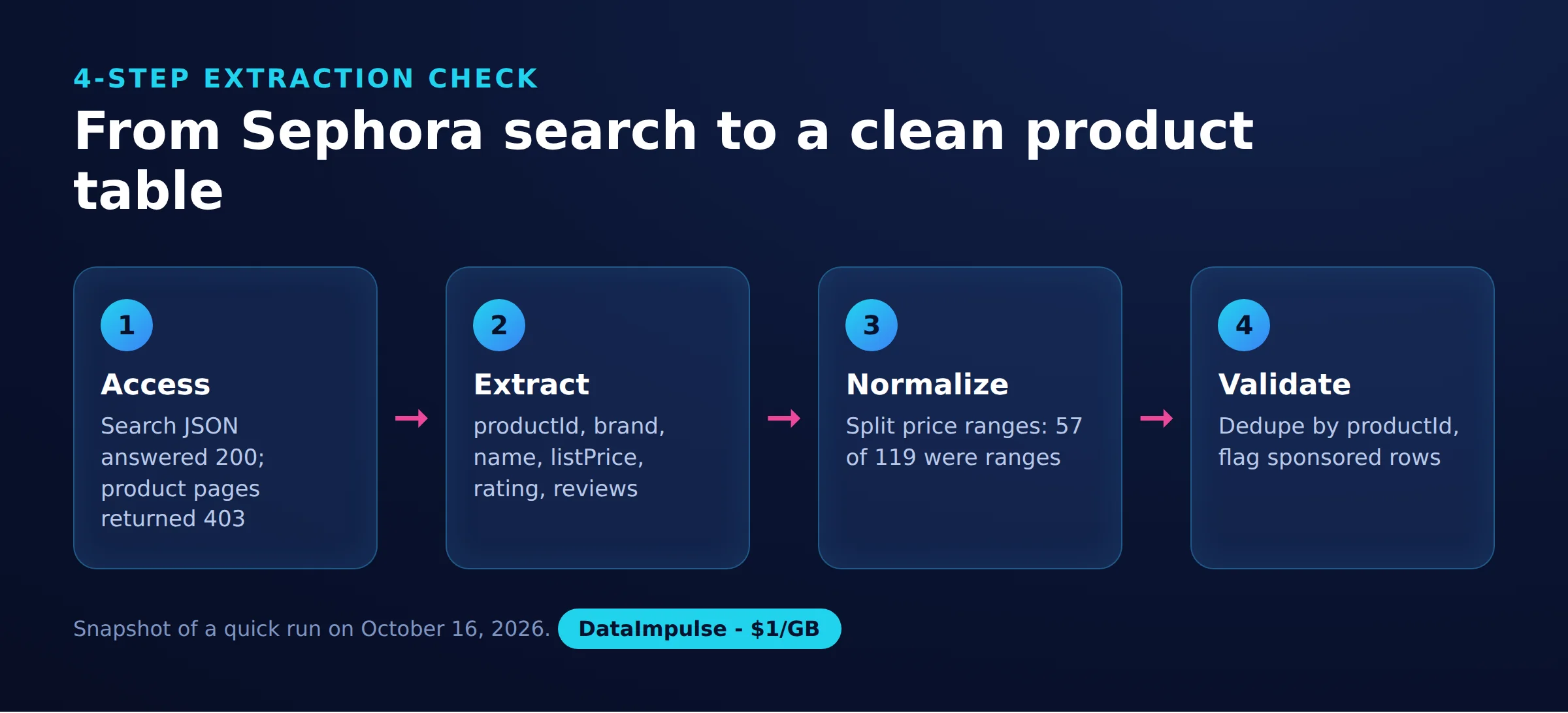
Step 1: Access. Establish authorization, inspect status and content type, and reject challenge bodies. Set pacing to the applicable requirements; the historical script needs operational review before reuse.
Step 2: Extract. Confirm that products exist and identifiers are present. Keep restricted diagnostic samples for parser troubleshooting without recording credentials.
Step 3: Normalize. Preserve raw prices, distinguish ranges, and attach collection time and locale separately. Keep unknown availability and missing reviews as unknown.
Step 4: Validate. Check unique IDs, required fields, plausible values, and source URLs. This script can produce a storefront-only URL when targetUrl is absent, so reject that as a product URL.
Watch missing-field rates and schema changes across runs. Stop publication when required fields disappear, retain the last validated export, and investigate before resuming. A completed CSV write alone is not evidence of usable data.
Frequently Asked Questions
How can I scrape Sephora prices with Python?
For an authorized workflow, reproduce the two-page JSON extraction and inspect its CSV. Preserve list-price ranges rather than converting every price into one number.
Does the script collect every product variant?
No. It records the current SKU identifier but does not enumerate all sizes or shades. Variant-level comparisons require additional authorized data.
Can I retrieve every Sephora review?
This example cannot. A review count is an aggregate, and complete review collection requires separately verified access, scope, and pagination.
Does Sephora have a free public API?
We could not verify one from readable official developer documentation. The search JSON observed in our run should not be treated as a supported public API.
Will a residential proxy fix an access denial?
There is no guarantee. The tested product page failed through residential connections too, and one successful status concealed a challenge.
Was the extraction cost below one cent?
The payload-only estimate was well below one cent per 1,000 products at $1 per GB. That estimate excludes failed traffic, compute, and engineering work.
Need routing for an authorized collection workflow?
If your validated workflow needs geographic or session routing, consider DataImpulse residential proxies, starting from $1 per GB. DataImpulse is proxy infrastructure, not a scraping API, managed unblocker, VPN, or data vendor. Test a small authorized sample before scaling; access and extraction remain your application’s responsibility.
Last updated: October 16, 2026.

 State/City/Zip/ASN Targeting



