

In this Article
Google Search پر روزانہ 10 billion سے زیادہ سرچز ہوتی ہیں، بقول Business of Apps۔ ہم میں سے ہر شخص روزانہ درجنوں مخصوص درخواستیں کرتا ہے۔ Google خود ایپلیکیشنز اور سروسز کے ایک پیچیدہ نظام میں ترقی کر چکا ہے جو صارفین کو مختلف سوالات حل کرنے میں مدد دیتا ہے۔ Google Maps ان میں سے ایک ہے، اور نیویگیشن اور سفر کے لیے پلیٹ فارمز کے انتخاب کی بات آئے تو اسے فہرست میں پہلے نمبر پر آنے والا سمجھا جاتا ہے۔
ہمارے بلاگ میں پہلے ہی Amazon پروڈکٹ ڈیٹا اسکریپنگ اور GitHub سے ٹرینڈنگ ریپوزٹریز کا مجموعہ کور کیا جا چکا ہے۔ اس گائیڈ میں، ہم وضاحت کرتے ہیں کہ چند مراحل میں Google Search اور Maps کو کیسے اسکریپ کیا جائے۔ ہم ساتھ ساتھ proxies بھی استعمال کریں گے۔ dataimpulse.com اخلاقی طور پر حاصل کردہ 90 million سے زیادہ residential proxies کا فراہم کنندہ ہے اور اس کے پاس 20 million datacenter اور 16 million mobile proxies کا نیٹ ورک ہے۔
اہم حقائق
- Google سروسز ہر جگہ وسیع پیمانے پر استعمال ہوتی ہیں، اس لیے مقام پر مبنی ڈیٹا کو scrape کرنے کا طریقہ جاننا کسی بھی developer کے لیے ایک لازمی مہارت ہے۔
- scraping شروع کرنے کے لیے، صارفین کو Playwright کے ساتھ Python انسٹال کرنا چاہیے اور مزید configuration کے لیے proxy credentials محفوظ کرنے چاہئیں۔
- DataImpulse کے Proxies sessions کے دوران مستحکم connections اور invisibility یقینی بناتے ہیں، جو محفوظ scraping activity کے لیے ناگزیر ہیں۔
- ہمیشہ target websites کی Terms of Service چیک کریں اور ان کا احترام کریں۔ scraping کو غیر قانونی سرگرمیوں کے لیے استعمال نہ کریں۔
پیشگی شرائط
اگر آپ Google SERP ڈیٹا scrape کرنے جا رہے ہیں، تو آپ کو یقینی طور پر مخصوص آلات کے ایک سیٹ کی ضرورت ہوگی۔ ان میں سے کچھ یہ ہیں:
- Python، تازہ ترین ورژن۔ ہم اس گائیڈ کے لیے macOS استعمال کر رہے ہیں۔ یہاں سے ڈاؤن لوڈ کریں، VS Code میں Python extension انسٹال کریں۔ ایک terminal کھولیں، چیک کریں کہ آیا یہ اس کے ساتھ انسٹال ہے:
python3 --version
- Visual Studio Code (یا کوئی اور کوڈ ایڈیٹر)۔ یہاں سے ڈاؤن لوڈ کریں، انسٹال کریں، اور اپنا پروجیکٹ فولڈر کھولیں۔
- Playwright براؤزر سیٹ اپ۔ اپنے ٹرمینل میں یہ چلا کر Playwright انسٹال کریں:
pip3 install playwright
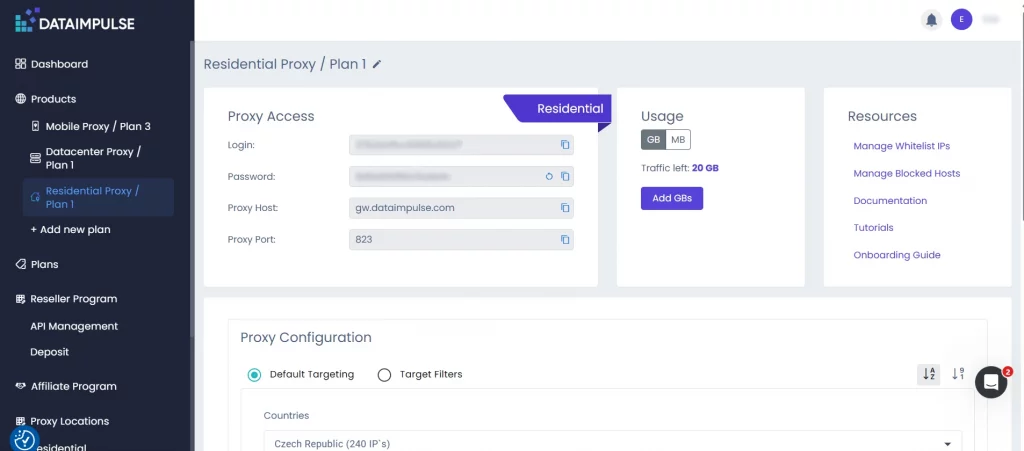
- Proxy اسناد DataImpulse ڈیش بورڈ سے۔ سائن اِن کریں DataImpulse میں اور اپنی proxy تفصیلات کاپی کریں، جیسے host، port، login، اور password۔
- بلٹ اِن Python لائبریریز۔ ہمیں asyncio اور random, کی ضرورت ہوگی، جو پہلے سے انسٹال ہوتی ہیں۔
- بلاک کی شناخت اور دوبارہ کوشش کا میکانزم۔ Scraper URLs کو /sorry/ ری ڈائریکٹس جیسے اشاروں کے لیے ٹریک کرکے اور صفحے کے مواد کو “unusual traffic” پیغامات کے لیے اسکین کرکے Google کے اینٹی بوٹ اقدامات کے ذریعے بلاکنگ کا پتہ لگاتا ہے۔ اگر بلاک کام کر چکا ہو یا صفحے نے خالی نتیجہ واپس کیا ہو، تو سسٹم رکتا نہیں۔ یہ ایک بے ترتیب وقفہ برداشت کرتا ہے، نیا براؤزر سیشن شروع کرتا ہے، اور تازہ proxy server کے ذریعے اگلی درخواست کو چھوڑ دیتا ہے۔ یہ لوپ کئی بار دہرایا جاتا ہے۔ یہ اسی detection triggers کو دوبارہ چھیڑے بغیر آگے نکلنے کے لیے کافی ہوتا ہے۔
دوبارہ کوشش کا میکانزم اس طرح نظر آتا ہے:
for attempt in range(1, MAX_ATTEMPTS + 1):
wait_time = RETRY_DELAY_SECONDS + random.randint(1, 7)
await asyncio.sleep(wait_time)
- DOM ایکسٹریکشن منطق. نتائج کے کنٹینرز کو ہدف بنا کر، عنوان یا URL کو پارس کر کے، اور اشتہارات اور نقول کو فلٹر کر کے Google کے Document Object Model سے آرگینک نتائج کا تجزیہ اور استخراج کرتی ہے۔
Google تلاش کے نتائج کی اسکریپنگ
یہ وہ بنیادی وجوہات ہیں جن کی بنا پر آپ کو Google تلاش کا ڈیٹا اسکریپ کرنے کی ضرورت پڑ سکتی ہے:
- سائٹ پوزیشنز کی SEO مانیٹرنگ اور حریفوں کے آؤٹ پٹ کا ریئل ٹائم تجزیہ۔
- یہ معلوم کرنے کے لیے مسابقتی انٹیلیجنس کہ اس نیچ پر کس کا غلبہ ہے اور حریف کون سی اشتہاری حکمت عملیاں استعمال کرتے ہیں۔
- رجحانات، مقبول درخواستوں، اور صارفین کی طلب میں تبدیلیوں کی مارکیٹ ریسرچ۔
- بزنس ڈائریکٹریز اور مقامی ڈسٹری بیوشن کے ذریعے لیڈ جنریشن۔
- برانڈ پروٹیکشن اور یہ مانیٹر کرنا کہ Google برانڈ کوئریز اور کمپنی کے تذکروں پر کیا دکھاتا ہے۔
ہم نے جو کوڈ تیار کیا ہے وہ Playwright براؤزر اور DataImpulse proxy کے ذریعے Google تلاشوں کو خودکار بناتا ہے۔ اسکرپٹ Google کھولتا ہے، دی گئی سرچ کوئری درج کرتا ہے، عام صارف کے رویے کی نقل کرتا ہے، چیک کرتا ہے کہ آیا CAPTCHA یا لاک ظاہر ہوا ہے، اور پھر آرگینک سرچ نتائج جمع کرتا ہے۔
ہر نتیجے کے لیے، اسکرپٹ ویب سائٹ کا لنک، ایک عنوان، اور مختصر تفصیل نکالتا ہے۔ تیزی سے کام کرنے کے لیے، کوڈ تصاویر اور میڈیا کی اپ لوڈنگ کو بلاک کرتا ہے۔ اگر Google درخواست کو بلاک کر دے یا نتائج نہ ملیں، تو اسکرپٹ وقفوں کے ساتھ کئی بار دوبارہ کوشش کرتا ہے۔ اسے proxy rotation کہا جاتا ہے۔
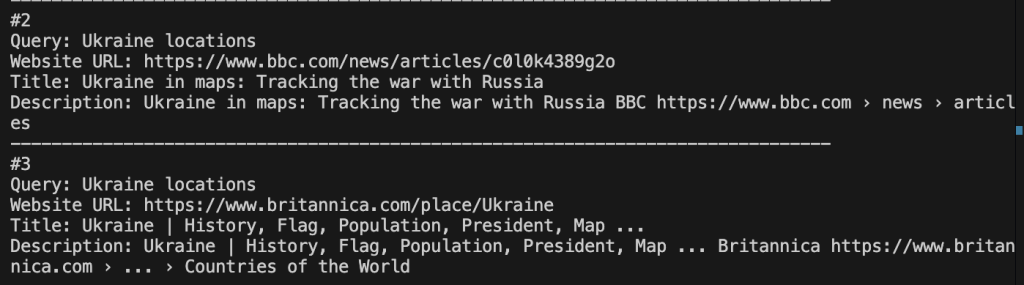
نتیجتاً، پروگرام مخصوص keyword کے لیے پہلے 10 آرگینک نتائج براہِ راست کنسول میں آؤٹ پٹ کرتا ہے۔ مختصراً، تین بنیادی مراحل ہیں۔
مرحلہ 1۔ ایک کنٹرولڈ براؤزنگ ماحول بنائیں۔
سب سے پہلے، ہمیں براؤزر سیشن کو initialize اور configure کرنا ہوگا۔ Playwright کے زیرِ کنٹرول Chromium instance لانچ کریں، proxies کے ذریعے ٹریفک روٹ کرنا شروع کریں، اور geo اور fingerprint سیٹنگز لاگو کریں۔
مرحلہ 2۔ انسان نما صارف کے رویے کی نقل کریں اور بلاکس کو ہینڈل کریں۔
حقیقی صارف کی تعامل کی نقل کرنے کے لیے، mouse movement اور cookie handling شامل کریں۔ یہ اس طرح نظر آتا ہے:
await page.goto(google_home_url, wait_until="domcontentloaded", timeout=60000)
await page.wait_for_timeout(random.randint(1200, 2500))
await accept_google_cookies(page)
await check_google_block(page)
search_box = page.locator('textarea[name="q"], input[name="q"]').first
await search_box.click()
await page.mouse.move(
random.randint(250, 900),
random.randint(180, 650),
steps=8
)
for char in keyword:
await search_box.type(char, delay=random.randint(35, 110))
await search_box.press("Enter")
CAPTCHA یا بلاکس کی جانچ کریں اور تازہ سیشنز کے ساتھ ری ٹرائی لاجک لاگو کریں۔
Step 3. حتمی نتائج نکالیں اور ان کی تصدیق کریں۔
اس مرحلے کے دوران، ہم DOM کو پارس کرتے ہیں اور منظم SERP ڈیٹا نکالتے ہیں۔ اس ٹیوٹوریل کے لیے، ہم نے ‘Ukraine locations’ کو کلیدی لفظ کے طور پر استعمال کیا۔
یہ کوڈ کا حتمی حصہ ہے:
*پراکسی کنفیگریشن کو اپنی منفرد پراکسی اسناد سے تبدیل کرنا نہ بھولیں۔
#!/usr/bin/env python3
import asyncio
import random
from playwright.async_api import async_playwright
# ====== EDIT THESE VALUES ======
PROXY_HOSTNAME = "gw.dataimpulse.com"
PROXY_PORT = "823"
PROXY_LOGIN = "LOGIN"
PROXY_PASSWORD = "PASS"
keyword = "Ukraine locations"
# ===============================
RESULTS_LIMIT = 10
GOOGLE_COUNTRY = "US"
GOOGLE_LANGUAGE = "en"
BLOCK_RESOURCE_TYPES = {"image", "media"}
MAX_ATTEMPTS = 5
RETRY_DELAY_SECONDS = 8
HEADLESS = True
async def block_slow_resources(route):
if route.request.resource_type in BLOCK_RESOURCE_TYPES:
await route.abort()
else:
await route.continue_()
async def accept_google_cookies(page):
buttons = [
'button:has-text("Accept all")',
'button:has-text("I agree")',
'button:has-text("Accept")',
'button:has-text("Reject all")',
"#L2AGLb",
]
for selector in buttons:
try:
button = page.locator(selector).first
if await button.is_visible(timeout=1500):
await button.click()
await page.wait_for_timeout(700)
return
except Exception:
pass
async def check_google_block(page):
current_url = page.url.lower()
if "/sorry/" in current_url or "captcha" in current_url:
raise RuntimeError("Google returned CAPTCHA / unusual traffic page.")
body_text = (await page.locator("body").inner_text(timeout=5000)).lower()
block_texts = [
"our systems have detected unusual traffic",
"unusual traffic from your computer network",
"detected suspicious traffic",
"captcha",
]
if any(text in body_text for text in block_texts):
raise RuntimeError("Google returned CAPTCHA / unusual traffic page.")
async def human_like_google_search(page):
google_home_url = (
"https://www.google.com/"
f"?hl={GOOGLE_LANGUAGE}"
f"&gl={GOOGLE_COUNTRY}"
"&pws=0"
)
await page.goto(google_home_url, wait_until="domcontentloaded", timeout=60000)
await page.wait_for_timeout(random.randint(1200, 2500))
await accept_google_cookies(page)
await check_google_block(page)
search_box = page.locator('textarea[name="q"], input[name="q"]').first
await search_box.wait_for(state="visible", timeout=30000)
await search_box.click()
await page.mouse.move(random.randint(250, 900), random.randint(180, 650), steps=8)
await page.wait_for_timeout(random.randint(400, 900))
for char in keyword:
await search_box.type(char, delay=random.randint(35, 110))
await page.wait_for_timeout(random.randint(500, 1100))
await search_box.press("Enter")
await page.wait_for_load_state("domcontentloaded", timeout=60000)
async def extract_results(page):
return await page.evaluate(
"""
() => {
const cleanText = (value) => (value || '').replace(/\\s+/g, ' ').trim();
const cleanUrl = (href) => {
if (!href) return '';
try {
const parsed = new URL(href, window.location.href);
if (parsed.hostname.includes('google.') && parsed.pathname === '/url') {
return parsed.searchParams.get('q') || parsed.searchParams.get('url') || '';
}
return parsed.href;
} catch {
return href;
}
};
const isNormalWebsite = (href) => {
if (!href || !/^https?:\\/\\//i.test(href)) return false;
try {
const host = new URL(href).hostname.replace(/^www\\./, '');
return !host.startsWith('google.') &&
!host.endsWith('.google.com') &&
host !== 'webcache.googleusercontent.com';
} catch {
return false;
}
};
const root = document.querySelector('#rso') || document.querySelector('#search') || document.body;
const blocks = [...root.querySelectorAll('div.tF2Cxc, div.MjjYud, div.g')];
const results = [];
const seenUrls = new Set();
for (const block of blocks) {
const titleElement = block.querySelector('h3');
if (!titleElement) continue;
const linkElement = titleElement.closest('a') || block.querySelector('a[href]');
const websiteUrl = cleanUrl(linkElement && linkElement.href);
if (!isNormalWebsite(websiteUrl) || seenUrls.has(websiteUrl)) continue;
const blockText = cleanText(block.innerText).toLowerCase();
if (blockText.startsWith('sponsored') || blockText.startsWith('ad ')) continue;
const descriptionElement =
block.querySelector('.VwiC3b, .IsZvec, .GI74Re, [data-sncf], .kb0PBd') ||
[...block.querySelectorAll('span, div')]
.find((node) => cleanText(node.innerText).length > 80);
results.push({
website_url: websiteUrl,
title: cleanText(titleElement.innerText),
description: cleanText(descriptionElement && descriptionElement.innerText),
});
seenUrls.add(websiteUrl);
}
return results;
}
"""
)
async def scrape_google_serp():
proxy_server = f"http://{PROXY_HOSTNAME}:{PROXY_PORT}"
async with async_playwright() as playwright:
browser = await playwright.chromium.launch(
headless=HEADLESS,
proxy={
"server": proxy_server,
"username": PROXY_LOGIN,
"password": PROXY_PASSWORD,
},
args=[
"--disable-blink-features=AutomationControlled",
"--disable-dev-shm-usage",
"--no-first-run",
],
)
context = await browser.new_context(
viewport={
"width": random.choice([1280, 1366, 1440]),
"height": random.choice([720, 768, 900]),
},
locale=f"{GOOGLE_LANGUAGE}-{GOOGLE_COUNTRY}",
timezone_id="America/New_York",
color_scheme="light",
user_agent=(
"Mozilla/5.0 (Windows NT 10.0; Win64; x64) "
"AppleWebKit/537.36 (KHTML, like Gecko) "
"Chrome/126.0.0.0 Safari/537.36"
),
)
await context.add_init_script(
"""
Object.defineProperty(navigator, 'webdriver', { get: () => undefined });
Object.defineProperty(navigator, 'languages', { get: () => ['en-US', 'en'] });
"""
)
await context.route("**/*", block_slow_resources)
page = await context.new_page()
try:
await human_like_google_search(page)
await check_google_block(page)
await page.wait_for_selector("#search, #rso", timeout=30000)
results = await extract_results(page)
return results[:RESULTS_LIMIT]
finally:
await browser.close()
async def main():
print(f"Query: {keyword}")
print("Searching Google through DataImpulse proxy...\n")
results = []
for attempt in range(1, MAX_ATTEMPTS + 1):
print(f"Attempt {attempt}/{MAX_ATTEMPTS}")
try:
results = await scrape_google_serp()
except Exception as error:
print(f"Attempt failed: {error}")
if attempt < MAX_ATTEMPTS:
wait_time = RETRY_DELAY_SECONDS + random.randint(1, 7)
print(f"Retrying with a fresh browser context in {wait_time}s...\n")
await asyncio.sleep(wait_time)
continue
print("\nFinished without crashing, but Google still returned a block page.")
print("Try again later, lower request volume, or use DataImpulse country targeting like login__cr.us.")
return
if results:
break
if attempt < MAX_ATTEMPTS:
wait_time = RETRY_DELAY_SECONDS + random.randint(1, 7)
print(f"No results found. Retrying in {wait_time}s...\n")
await asyncio.sleep(wait_time)
else:
print("No results found after all attempts.")
if not results:
print("Finished successfully, but no organic results were found.")
return
print("Success. Organic results extracted.\n")
for index, result in enumerate(results, start=1):
print(f"#{index}")
print(f"Query: {keyword}")
print(f"Website URL: {result['website_url']}")
print(f"Title: {result['title']}")
print(f"Description: {result['description']}")
print("-" * 80)
if __name__ == "__main__":
asyncio.run(main())
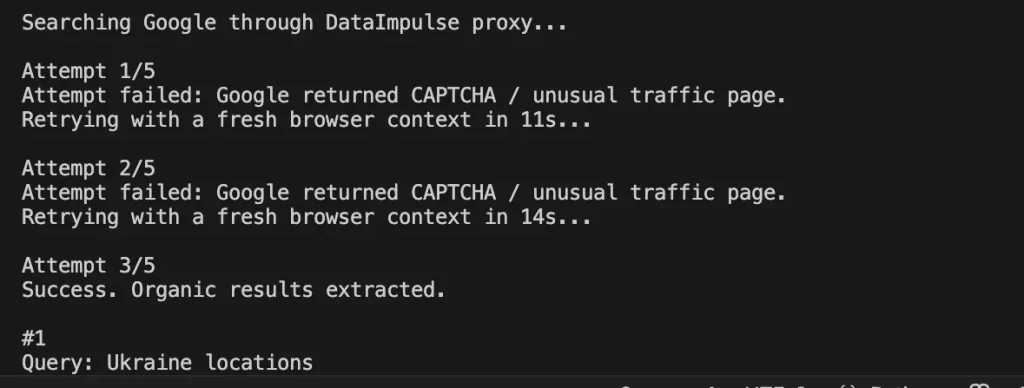
ہمارے معاملے میں، پہلی دو کوششیں ناکام ہوئیں، لیکن تیسری آخرکار کامیاب ہو گئی:
Python کے ساتھ Google Maps کی Scraping
مقام پر مبنی ڈیٹا ہمیشہ بہت سے کاروباری منصوبوں کے لیے ایک قیمتی وسیلہ رہا ہے، جس میں تجزیے اور مانیٹرنگ کے پہلو بھی شامل ہیں۔ نیچے دیا گیا کوڈ Playwright اور DataImpulse proxy کے ذریعے Google Maps سے ڈیٹا اکٹھا کرنے کو خودکار بناتا ہے۔ یہ دی گئی query، جیسے “dentist in New York”، کے ساتھ Google Maps کھولتا ہے، ایک عام browser کی نقل کرتا ہے، cookies قبول کرتا ہے، چیک کرتا ہے کہ Google نے CAPTCHA نہیں دکھایا، اور پھر نتائج کی فہرست میں scroll کرتا ہے۔
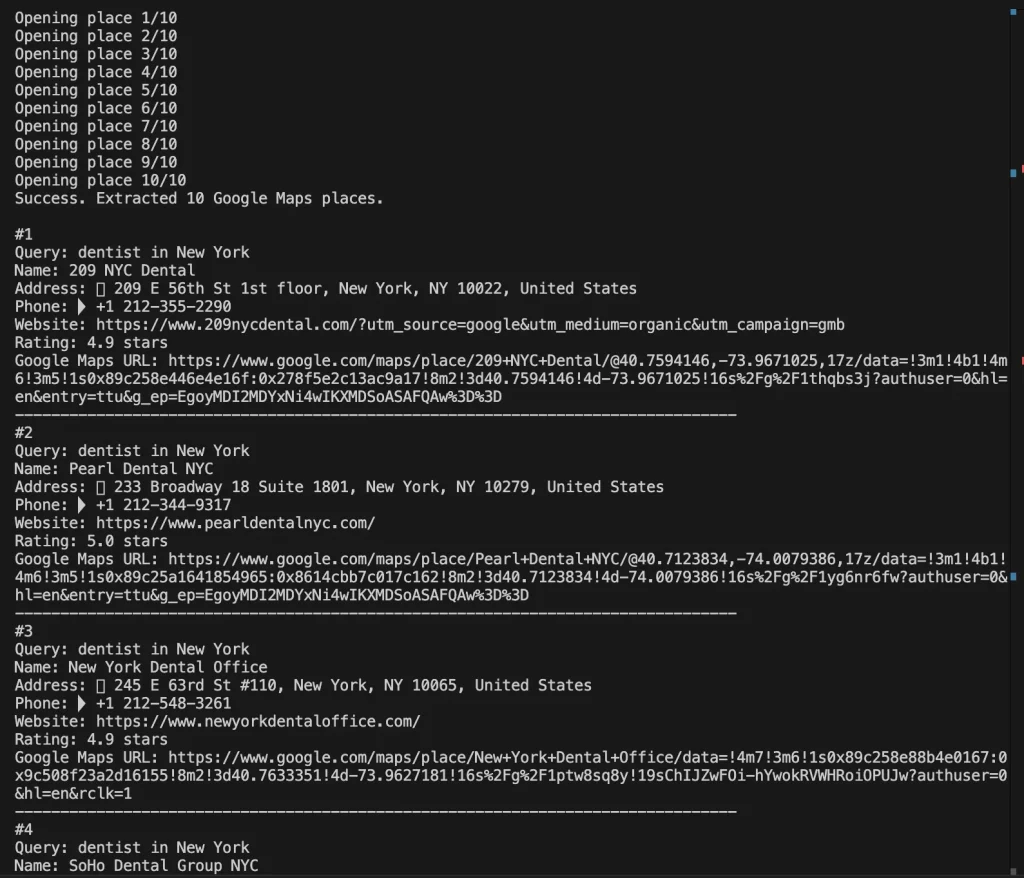
اس کے بعد، script دریافت شدہ مقامات کے links اکٹھا کرتی ہے، ہر business profile کو ایک ایک کرکے کھولتی ہے، اور اہم معلومات جیسے نام، پتہ، فون نمبر، website، rating، اور Google Maps URLs نکالتی ہے۔
script تصاویر اور media files کی loading کو بھی block کرتی ہے۔ یہ stealth settings، user-agent، random screen size، اور natural delays بھی استعمال کرتی ہے تاکہ browser کم automated نظر آئے۔
اگر Google Maps request کو block کر دے یا کوئی data نہ ملے، تو script نئے browser context کے ساتھ کئی بار دوبارہ کوشش کرتی ہے۔ نتیجتاً، یہ دیے گئے keyword کا استعمال کرتے ہوئے console میں 10 تک matching locations output کرتی ہے۔
scraping pipeline اس طرح نظر آتی ہے:
- 1. browser session کو initialize اور configure کریں۔
- 2. Google Maps کھولیں اور search results load کریں۔
- 3. business data کو extract اور validate کریں۔
- 4. blocks کا پتہ لگائیں اور recover کریں۔
یہ code کا final piece ہے:
*proxy configuration کو اپنے unique proxy credentials سے بدلنا نہ بھولیں۔
#!/usr/bin/env python3
"""
Simple Google Maps address scraper through a DataImpulse proxy.
Before first run:
python3 -m pip install playwright playwright-stealth
python3 -m playwright install chromium
Then edit the values below and run:
python3 google_maps_address_scraper.py
"""
import asyncio
import random
from urllib.parse import quote_plus
from playwright.async_api import TimeoutError as PlaywrightTimeoutError
from playwright.async_api import async_playwright
# ====== EDIT THESE VALUES ======
PROXY_HOSTNAME = "gw.dataimpulse.com"
PROXY_PORT = "823"
PROXY_LOGIN = "LOGIN"
PROXY_PASSWORD = "PASS"
keyword = "dentist in New York"
# ===============================
RESULTS_LIMIT = 10
GOOGLE_COUNTRY = "US"
GOOGLE_LANGUAGE = "en"
HEADLESS = True
MAX_ATTEMPTS = 3
RETRY_DELAY_SECONDS = 8
BLOCK_RESOURCE_TYPES = {"image", "media"}
async def block_slow_resources(route):
if route.request.resource_type in BLOCK_RESOURCE_TYPES:
await route.abort()
else:
await route.continue_()
async def apply_stealth_if_available(page):
try:
from playwright_stealth import Stealth
except ImportError:
try:
from playwright_stealth import stealth_async
except ImportError:
print("playwright-stealth is not installed for this Python.")
print("Optional install: python3 -m pip install playwright-stealth\n")
return
await stealth_async(page)
print("playwright-stealth applied.\n")
return
await Stealth().apply_stealth_async(page)
print("playwright-stealth applied.\n")
async def accept_google_cookies(page):
buttons = [
'button:has-text("Accept all")',
'button:has-text("I agree")',
'button:has-text("Accept")',
'button:has-text("Reject all")',
"#L2AGLb",
]
for selector in buttons:
try:
button = page.locator(selector).first
if await button.is_visible(timeout=1500):
await button.click()
await page.wait_for_timeout(700)
return
except Exception:
pass
async def check_google_block(page):
current_url = page.url.lower()
if "/sorry/" in current_url or "captcha" in current_url:
raise RuntimeError("Google returned CAPTCHA / unusual traffic page.")
body_text = (await page.locator("body").inner_text(timeout=5000)).lower()
block_texts = [
"our systems have detected unusual traffic",
"unusual traffic from your computer network",
"detected suspicious traffic",
"captcha",
]
if any(text in body_text for text in block_texts):
raise RuntimeError("Google returned CAPTCHA / unusual traffic page.")
async def open_google_maps(page):
maps_url = (
"https://www.google.com/maps/search/"
f"{quote_plus(keyword)}"
f"?hl={GOOGLE_LANGUAGE}"
f"&gl={GOOGLE_COUNTRY}"
)
await page.goto(maps_url, wait_until="domcontentloaded", timeout=60000)
await page.wait_for_timeout(random.randint(2500, 4500))
await accept_google_cookies(page)
await check_google_block(page)
async def scroll_results_list(page):
feed = page.locator('[role="feed"]').first
try:
await feed.wait_for(state="visible", timeout=15000)
except PlaywrightTimeoutError:
return
previous_count = 0
stable_rounds = 0
for _ in range(12):
cards = page.locator('a[href*="/maps/place/"]')
current_count = await cards.count()
if current_count >= RESULTS_LIMIT:
return
if current_count == previous_count:
stable_rounds += 1
else:
stable_rounds = 0
if stable_rounds >= 3:
return
previous_count = current_count
await feed.evaluate("(element) => element.scrollBy(0, element.scrollHeight)")
await page.wait_for_timeout(random.randint(1200, 2200))
async def get_place_links(page):
return await page.evaluate(
"""
() => {
const links = [...document.querySelectorAll('a[href*="/maps/place/"]')]
.map((link) => link.href)
.filter(Boolean);
return [...new Set(links)];
}
"""
)
async def get_text(page, selector, timeout=2500):
try:
element = page.locator(selector).first
if await element.is_visible(timeout=timeout):
return " ".join((await element.inner_text()).split())
except Exception:
return ""
return ""
async def extract_place_data(page):
name = await get_text(page, "h1.DUwDvf, h1")
address = await get_text(page, '[data-item-id="address"]')
website = ""
phone = ""
if not address:
address = await page.evaluate(
"""
() => {
const item = document.querySelector('[aria-label^="Address:"]');
return item ? item.getAttribute('aria-label').replace(/^Address:\\s*/i, '').trim() : '';
}
"""
)
website = await page.evaluate(
"""
() => {
const selectors = [
'a[data-item-id="authority"]',
'a[aria-label^="Website:"]',
'a[href^="http"]:not([href*="google."])'
];
for (const selector of selectors) {
const element = document.querySelector(selector);
if (!element) continue;
const href = element.href || '';
if (href && !href.includes('/maps/')) return href;
}
return '';
}
"""
)
phone = await page.evaluate(
"""
() => {
const byItemId = document.querySelector('[data-item-id^="phone:"]');
if (byItemId) return (byItemId.innerText || '').replace(/\\s+/g, ' ').trim();
const byAria = document.querySelector('[aria-label^="Phone:"]');
if (byAria) {
return byAria.getAttribute('aria-label').replace(/^Phone:\\s*/i, '').trim();
}
return '';
}
"""
)
rating = await page.evaluate(
"""
() => {
const rating = document.querySelector('[role="img"][aria-label*="stars"]');
return rating ? rating.getAttribute('aria-label') : '';
}
"""
)
return {
"query": keyword,
"name": name,
"address": address,
"phone": phone,
"website": website,
"rating": rating,
"google_maps_url": page.url,
}
async def scrape_google_maps_once():
proxy_server = f"http://{PROXY_HOSTNAME}:{PROXY_PORT}"
async with async_playwright() as playwright:
browser = await playwright.chromium.launch(
headless=HEADLESS,
proxy={
"server": proxy_server,
"username": PROXY_LOGIN,
"password": PROXY_PASSWORD,
},
args=[
"--disable-blink-features=AutomationControlled",
"--disable-dev-shm-usage",
"--no-first-run",
],
)
context = await browser.new_context(
viewport={
"width": random.choice([1280, 1366, 1440]),
"height": random.choice([720, 768, 900]),
},
locale=f"{GOOGLE_LANGUAGE}-{GOOGLE_COUNTRY}",
timezone_id="America/New_York",
color_scheme="light",
user_agent=(
"Mozilla/5.0 (Windows NT 10.0; Win64; x64) "
"AppleWebKit/537.36 (KHTML, like Gecko) "
"Chrome/126.0.0.0 Safari/537.36"
),
)
await context.add_init_script(
"""
Object.defineProperty(navigator, 'webdriver', { get: () => undefined });
Object.defineProperty(navigator, 'languages', { get: () => ['en-US', 'en'] });
"""
)
await context.route("**/*", block_slow_resources)
page = await context.new_page()
try:
await apply_stealth_if_available(page)
await open_google_maps(page)
await scroll_results_list(page)
place_links = await get_place_links(page)
place_links = place_links[:RESULTS_LIMIT]
results = []
seen = set()
if not place_links:
print("No result list detected. Trying to extract the currently opened place.")
data = await extract_place_data(page)
if data["name"] or data["address"]:
return [data]
for index, place_url in enumerate(place_links, start=1):
print(f"Opening place {index}/{len(place_links)}")
await page.goto(place_url, wait_until="domcontentloaded", timeout=60000)
await page.wait_for_timeout(random.randint(2500, 4500))
await check_google_block(page)
data = await extract_place_data(page)
unique_key = data["name"] or data["google_maps_url"]
if unique_key in seen:
continue
if data["name"] or data["address"]:
results.append(data)
seen.add(unique_key)
return results
finally:
await browser.close()
async def main():
print(f"Google Maps query: {keyword}")
print("Searching Google Maps through DataImpulse proxy...\n")
results = []
for attempt in range(1, MAX_ATTEMPTS + 1):
print(f"Attempt {attempt}/{MAX_ATTEMPTS}")
try:
results = await scrape_google_maps_once()
except Exception as error:
print(f"Attempt failed: {error}")
if attempt < MAX_ATTEMPTS:
wait_time = RETRY_DELAY_SECONDS + random.randint(1, 7)
print(f"Retrying with a fresh browser context in {wait_time}s...\n")
await asyncio.sleep(wait_time)
continue
print("\nFinished without crashing, but Google Maps did not return usable data.")
print("Try DataImpulse country targeting like login__cr.us, lower volume, or run again later.")
return
if results:
break
if attempt < MAX_ATTEMPTS:
wait_time = RETRY_DELAY_SECONDS + random.randint(1, 7)
print(f"No places found. Retrying in {wait_time}s...\n")
await asyncio.sleep(wait_time)
else:
print("No places found after all attempts.")
if not results:
print("Finished successfully, but no Google Maps places were found.")
return
print(f"Success. Extracted {len(results)} Google Maps places.\n")
for index, item in enumerate(results, start=1):
print(f"#{index}")
print(f"Query: {item['query']}")
print(f"Name: {item['name']}")
print(f"Address: {item['address']}")
print(f"Phone: {item['phone']}")
print(f"Website: {item['website']}")
print(f"Rating: {item['rating']}")
print(f"Google Maps URL: {item['google_maps_url']}")
print("-" * 80)
if __name__ == "__main__":
asyncio.run(main())
یہ وہ نتیجہ ہے جو ہمیں اس کوڈ کو استعمال کرنے کے بعد ملا:
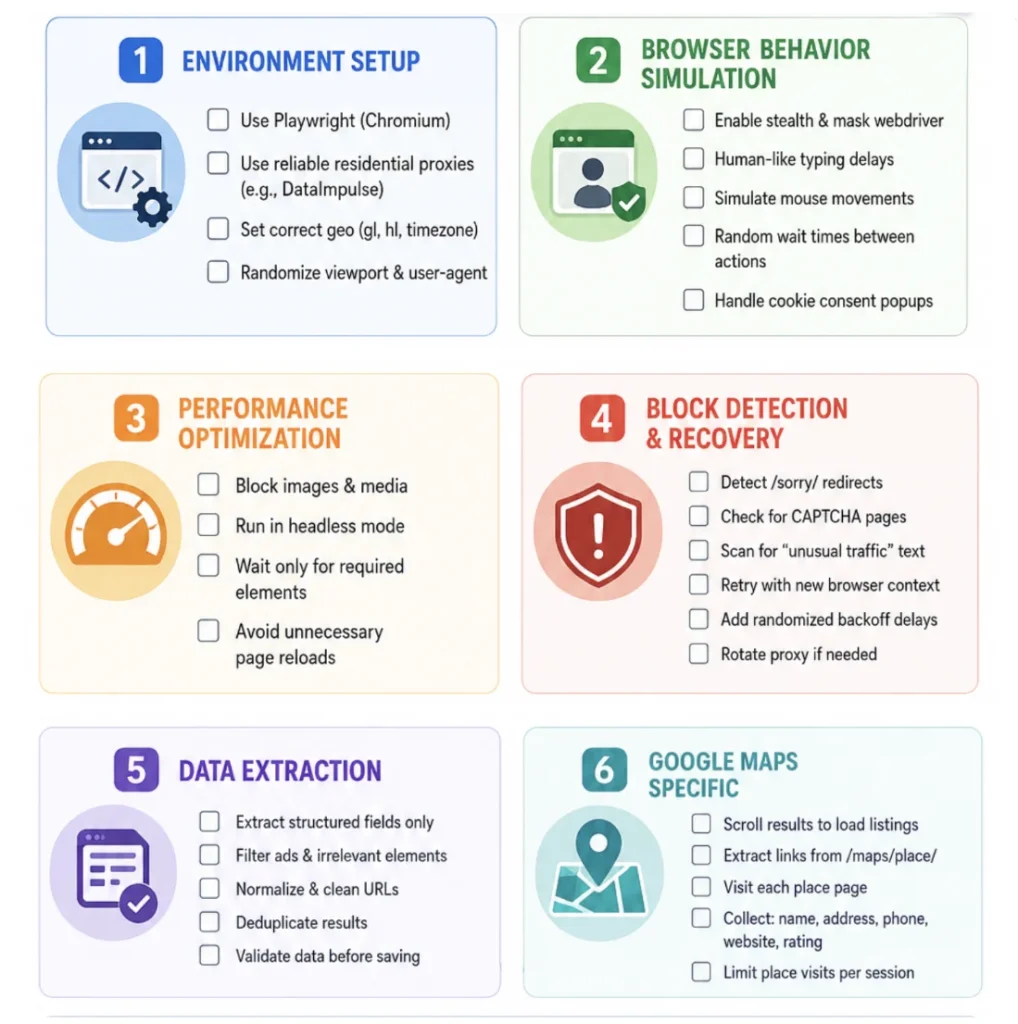
استعمال کے لیے چیک لسٹ
بس اس ڈویلپر فرینڈلی بصری چیک لسٹ پر ایک نظر ڈالیں۔ ہماری ٹیم آپ کی حوصلہ افزائی کرتی ہے کہ scraping کے عمل کے ساتھ آگے بڑھنے سے پہلے ہر باکس کو چیک کریں۔
اکثر پوچھے گئے سوالات
Does Google allow scraping?
Google doesn’t allow automated scraping, but it provides official APIs for compliant data access. In general, it’s legal to scrape publicly available data.
What data can be extracted from Google SERP and Google Maps?
Users can extract titles, URLs, ads, and SERP features from Google SERP using Python with Playwright and reliable proxies from DataImpulse. From Google Maps common data includes business names, addresses, ratings, client reviews, phone numbers, and geolocation data.
How to extract data from Google Maps?
To collect data from Google Maps, make sure to install Python with Playwright, code editor like VS Code, and proxies. The scraping steps look like this: 1. Initialize session. 2. Load Google Maps results. 3. Extract business data. 4. Handle blocks. You can also use the code from our DataImpulse guide for educational purposes.
What proxies are the best for scraping Google?
DataImpulse residential and mobile proxies are commonly used for scraping as they use real ISPs or mobile IPs. They are more difficult to get detected and blocked. Datacenter proxies are fast and affordable, but not the best option when you need invisibility.
نتیجہ
Google Search اور Google Maps کی اسکریپنگ کاروباروں اور ڈویلپرز کے لیے وسیع مواقع کھولتی ہے۔ اگر آپ کو سرچ نتائج کی نگرانی، حریفوں کا تجزیہ یا مقامی ڈیٹا جمع کرنے کی ضرورت ہے، تو آپ کو یہ جاننا ہوگا کہ بلاک چیلنجز کے بغیر ڈیٹا کیسے اسکریپ کیا جائے۔ مستحکم اور مؤثر ڈیٹا کلیکشن کے لیے ٹولز کا درست مجموعہ استعمال کرنا اہم ہے، جس میں اعلیٰ معیار کی proxies، IP روٹیشن اور حقیقی صارفین کے رویے کی نقل کرنے کے میکانزم شامل ہیں۔ کاموں کے پیمانے کے مطابق، بہترین انتخاب residential یا mobile proxies ہو سکتے ہیں، جو anonymity کی بلند سطح اور بلاکنگ کا کم خطرہ فراہم کرتے ہیں۔
منتخب کردہ طریقہ جو بھی ہو، Google سروسز کی استعمال کی شرائط کو مدنظر رکھنا اور ذمہ دارانہ ڈیٹا کلیکشن کے طریقوں پر عمل کرنا ضروری ہے۔
*یہ ٹیوٹوریل مکمل طور پر تعلیمی مقاصد کے لیے ہے اور تکنیکی صلاحیتوں کے مظاہرے کے طور پر پیش کیا گیا ہے۔ یہ سمجھنا ضروری ہے کہ Amazon سے ڈیٹا اسکریپ کرنا استعمال کی شرائط اور قانونی حیثیت کے حوالے سے خدشات پیدا کرتا ہے۔ غیر مجاز اسکریپنگ سنگین نتائج کا باعث بن سکتی ہے، جن میں قانونی کارروائیاں اور اکاؤنٹ کی معطلی شامل ہیں۔ ہمیشہ احتیاط سے آگے بڑھیں اور اخلاقی رہنما اصولوں پر عمل کریں۔