

In this Article
Playwright is one of the fastest-growing browser-automation frameworks for scraping in 2026 — it drives real Chromium, Firefox, and WebKit, renders JavaScript, and handles modern single-page sites that plain HTTP scrapers can’t. But run it from a single datacenter IP and you’ll be blocked, rate-limited, or fed bot-detected content within minutes. The fix is to route Playwright through proxies — ideally residential ones — so each session looks like an ordinary user. This guide shows exactly how to set up a proxy in Playwright (with working code), then ranks the 8 best proxies for Playwright in 2026 by price, success rate, and how cleanly they integrate.
I’m Andrii Byzov, an AI-Native Fractional CMO who runs Playwright-based data pipelines daily. Below: the copy-paste proxy setup, the rotating-proxy pattern that actually scales, and the providers worth your budget — with DataImpulse residential at $1/GB as the value baseline.
Key Facts
- Playwright supports HTTP, HTTPS, and SOCKS5 proxies natively, set either at browser launch (one proxy for everything) or per
BrowserContext(different proxy per context — the key to rotation). - Authentication is built in for HTTP/HTTPS. Pass
usernameandpasswordin theproxyobject; no extra plugin or CDP hack needed, unlike older Puppeteer setups. (Playwright does not support authenticated SOCKS5 — see below.) - Residential proxies are the default for scraping. Datacenter IPs get flagged fast on real targets; residential IPs from real ISPs let Playwright collect at scale without bans, and add geo-accuracy for localized data.
- Rotate via contexts. The scalable pattern is one browser, many
BrowserContexts, each with its own proxy — or a fresh context per batch — so each “user” gets a clean IP. - DataImpulse is the value pick — residential $1/GB pay-as-you-go, datacenter $0.50/GB, mobile $2/GB, 90M+ IPs across 195 countries, HTTP/HTTPS/SOCKS5, country/city/ASN targeting — a fraction of enterprise per-GB pricing.
How to Set Up a Proxy in Playwright
Playwright takes a proxy option in two places. Use the browser-launch form for a single proxy across the whole run, and the per-context form when you want different IPs in one script.
1. Proxy at browser launch (one proxy for everything)
const { chromium } = require('playwright');

(async () => {
  const browser = await chromium.launch({
    proxy: {
      server: 'http://gw.dataimpulse.com:823', // DataImpulse residential gateway
      username: 'YOUR_LOGIN__cr.us',           // __cr.us = target the US
      password: 'YOUR_PASSWORD',
    },
  });
  const page = await browser.newPage();
  await page.goto('https://httpbin.org/ip'); // verify the egress IP
  console.log(await page.textContent('body'));
  await browser.close();
})();
2. Proxy per context (the rotation pattern)
Browser contexts isolate cookies, storage, and cache, and each can use its own proxy — so you can run several “users” on different IPs from a single browser. This is how you rotate at scale:
const browser = await chromium.launch();

// Each context = a fresh identity on a fresh IP
const ctxUS = await browser.newContext({
  proxy: { server: 'http://gw.dataimpulse.com:823',
           username: 'YOUR_LOGIN__cr.us', password: 'YOUR_PASSWORD' },
});
const ctxUK = await browser.newContext({
  proxy: { server: 'http://gw.dataimpulse.com:823',
           username: 'YOUR_LOGIN__cr.gb', password: 'YOUR_PASSWORD' },
});

const p1 = await ctxUS.newPage();
const p2 = await ctxUK.newPage();
// ...scrape in parallel, each through its own country IP
3. SOCKS5 and rotation by request
Playwright also speaks SOCKS5, but with one important limit: it does not support username/password authentication over SOCKS5. So for authenticated residential proxies, use the HTTP/HTTPS endpoint above; reserve SOCKS5 (socks5://gw.dataimpulse.com:824) for IP-whitelisted access where no proxy login is sent. With a rotating residential gateway, every new connection already gets a fresh IP, so creating a new context per batch is usually enough — no proxy list to manage. For a working, maintained walkthrough see DataImpulse’s Playwright proxy tutorial.
One caveat: Playwright’s proxy.server is set when the browser or context is created and can’t be swapped mid-context. To change IPs, create a new context (or relaunch) — which is exactly why the per-context pattern above is the standard way to rotate.
Best Proxies for Playwright at a Glance
| Provider | Best for Playwright | Residential price | Protocols | Notable |
|---|---|---|---|---|
| DataImpulse | Best value, in-house pipelines | $1/GB PAYG | HTTP/HTTPS/SOCKS5 | 90M+ pool, official Playwright tutorial, never-expires |
| Bright Data | Enterprise + Scraping Browser | ~$2.50/GB promo; $5 regular | HTTP/HTTPS/SOCKS5 | Hosted “Scraping Browser” connects via CDP, Web Unlocker |
| Oxylabs | Enterprise SLA | from $6/GB | HTTP/HTTPS/SOCKS5 | 175M+ pool, Web Scraper API, official guide |
| Decodo | Mid-market, full geo grid | $3.75/GB starter; ~$2 at 1TB+ | HTTP/HTTPS/SOCKS5 | 115M+ pool, sticky to 24h |
| IPRoyal | Long sticky sessions | from $7.35/GB | HTTP/HTTPS/SOCKS5 | Sticky up to 7 days; cheap PAYG entry |
| SOAX | Residential + mobile mix | $3.60/GB Starter | HTTP/HTTPS/SOCKS5 | 155M+ res, 33M+ mobile |
| Webshare | Budget / self-serve | from $3.50/mo res; $2.99/mo DC | HTTP/SOCKS5 | Free tier, cheapest datacenter |
| NetNut | ISP-residential stability | from $3.53/GB | HTTP/HTTPS | Consumer-ISP static IPs, fast rotation |
The picks, briefly
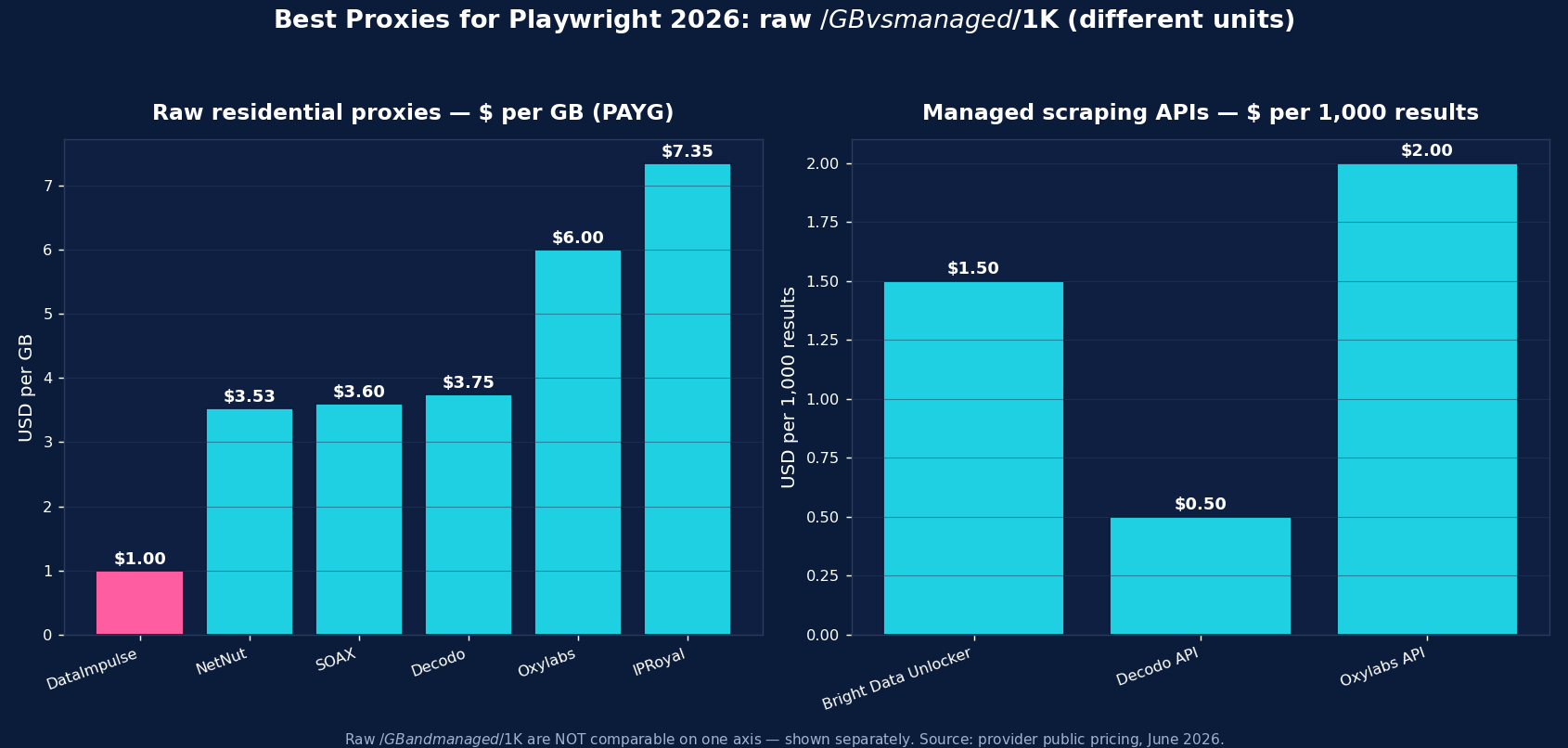
DataImpulse is the value baseline for Playwright scraping — residential at $1/GB pay-as-you-go (datacenter $0.50/GB, mobile $2/GB), 90M+ IPs across 195 countries, HTTP/HTTPS and SOCKS5, with country/city/ASN targeting via the username and an official Playwright tutorial. Traffic never expires, so test runs don’t burn a subscription. Support is 24/7 human; published success rate is 99.51%; G2 is 4.8/5. It’s the default when you run your own Playwright pipeline and want the lowest cost per successful page.
Bright Data is the enterprise pick — besides residential (~$2.50/GB promo, $5 regular), it offers a hosted Scraping Browser you connect to over CDP (chromium.connectOverCDP) that bundles proxies and anti-bot, plus a Web Unlocker. Oxylabs (from $6/GB, 175M+ pool) is the SLA-grade enterprise option with a documented Playwright guide. Decodo (from $3.75/GB, sticky to 24h) is the balanced mid-market choice. IPRoyal (from $7.35/GB, sticky up to 7 days) suits long, session-stable Playwright flows. SOAX ($3.60/GB, 155M+ residential + 33M+ mobile) is strong when you need mobile IPs. Webshare (free tier, datacenter from $2.99/mo) is the budget self-serve entry, and NetNut (from $3.53/GB) is the ISP-residential stability pick.
Rotating vs Sticky Proxies with Playwright
Two modes, two jobs. Rotating residential — a fresh IP per connection — is the default for broad collection: scraping many pages, listings, or SERPs where each request is independent. With a rotating gateway you get a new IP automatically, so a new BrowserContext per batch spreads load and dodges rate limits. Sticky sessions — the same IP held for minutes to days — are what stateful flows need: logging in, navigating a multi-step funnel, or keeping a cart, where rotating mid-flow breaks the session and trips anti-bot. Hold one context (and one sticky IP) for the whole flow; IPRoyal’s up-to-7-day sticky is the longest if a flow runs for days. Most Playwright stacks mix both: rotating contexts for collection, a sticky pool for the multi-step work.
Common Playwright Proxy Mistakes
- Using datacenter IPs on defended targets — they get blocked fast; pair Playwright with residential or mobile for anything with real anti-bot.
- Forgetting the fingerprint. A proxy hides your IP, not your bot signals — combine it with realistic user-agents, viewport, locale, and tools like
playwright-extra+ stealth so the headless browser doesn’t give itself away. - Trying to swap the proxy mid-context. You can’t; create a new context (or relaunch) to change IPs.
- Mismatching locale and IP geo — a US IP with
locale: 'de-DE'looks inconsistent; align the context’s locale, timezone, and proxy country. - Rotating too aggressively on stateful flows — use a sticky IP for login/checkout sequences, not per-request rotation.
Which Proxy Type for Playwright — Residential, Datacenter, or Mobile?
The three types map to three jobs:
- Residential ($1/GB) — the default workhorse. Real consumer-ISP IPs for the bulk of Playwright scraping: e-commerce, SERPs, content, anything with anti-bot. If you pick one type, pick this.
- Mobile ($2/GB) — real carrier IPs for the hardest targets and for mobile-web or in-app surfaces. The most trusted IP class, so reserve it for endpoints that block residential.
- Datacenter ($0.50/GB) — cheapest and fastest, for unprotected layers: parsing already-collected pages, open reference data, or your own infrastructure. Don’t point it at anti-bot-heavy sites.
For most Playwright work the pattern is residential for collection, mobile for the few defended or app-only targets, and datacenter for cheap unprotected work. DataImpulse offers all three on one pay-as-you-go account, so a single Playwright pipeline can route each context to the right tier.
How to Start with DataImpulse + Playwright
Step 1. Create a DataImpulse account and grab your residential credentials. The $5 / 5GB intro never expires — a real test budget.
Step 2. Drop your login and password into the proxy object shown above (server: 'http://gw.dataimpulse.com:823'), and append __cr.us (or any country code) to the username for geo-targeting. Keep authenticated proxies on the HTTP/HTTPS endpoint — Playwright doesn’t support username/password auth over SOCKS5. Pair it with a realistic context — user-agent, locale, timezone — and stealth.
Step 3. Use a fresh BrowserContext per batch to rotate, and a sticky session for stateful flows. See the Playwright proxy tutorial and the residential proxies page for setup details.
FAQ
How do I use a proxy in Playwright?
Pass a proxy object to chromium.launch() for one proxy across the run, or to browser.newContext() to give each context its own IP. The object takes server (e.g. http://gw.dataimpulse.com:823), plus username and password for authenticated proxies. Playwright supports HTTP, HTTPS, and SOCKS5 natively — no plugin needed.
What’s the best proxy for Playwright?
Residential proxies, because most targets block datacenter IPs. DataImpulse at $1/GB is the value pick (HTTP/HTTPS/SOCKS5, 90M+ IPs, official Playwright tutorial); Bright Data’s hosted Scraping Browser or Oxylabs suit enterprise; SOAX and DataImpulse mobile ($2/GB) help on app surfaces. Always pair the proxy with a realistic fingerprint and stealth.
How do I rotate proxies in Playwright?
Create a new BrowserContext per batch — each context can carry its own proxy, and a rotating residential gateway hands out a fresh IP on each new connection, so you don’t need to manage an IP list. You can’t change a proxy mid-context; relaunch or open a new context to switch IPs. For stateful flows, hold one sticky IP across the whole context instead of rotating.
Does Playwright support authenticated and SOCKS5 proxies?
For HTTP/HTTPS, yes — username/password authentication is built into the proxy object. Playwright can also use SOCKS5, but it does not support username/password authentication over SOCKS5. So use the HTTP/HTTPS endpoint for authenticated residential proxies, and reserve SOCKS5 (e.g. socks5://gw.dataimpulse.com:824) for IP-whitelisted access where no proxy login is sent.
Why is Playwright getting blocked even with a proxy?
A proxy hides your IP, not your automation fingerprint. Modern anti-bot also checks user-agent, navigator properties, WebGL, timing, and headless tells. Pair residential proxies with realistic context settings (user-agent, locale, timezone, viewport) and a stealth layer like playwright-extra, pace requests humanly, and rotate IPs via contexts. Datacenter IPs also get blocked fast — use residential or mobile.
How much do Playwright proxies cost?
Raw residential is priced per GB — DataImpulse $1/GB (value floor), NetNut from $3.53, SOAX $3.60, Decodo $3.75, Oxylabs from $6, IPRoyal $7.35; Webshare offers budget subscriptions from $3.50/mo. A rendered page is a small fraction of a GB, so per-GB residential is far cheaper than per-record managed APIs for high-volume Playwright collection; managed options suit the hardest targets.

 State/City/Zip/ASN Targeting



