

In this Article
Google Search has more than 10 billion searches a day, according to Business of Apps. Every one of us makes dozens of particular requests daily. Google itself has evolved into a complex system of applications and services that help users solve different inquiries. Google Maps is one of them, and it is believed to become first on the list when it comes to choosing platforms for navigation and travel.
Our blog has already covered Amazon product data scraping and the collection of trending repositories from GitHub. In this guide, we explain how to scrape Google Search and Maps in a few steps. We’ll also be using proxies alongside. dataimpulse.com is a provider of more than 90 million ethically sourced residential proxies and has a network of 20 million datacenter and 16 million mobile proxies.
Key Facts
- Google services are widely used everywhere, so knowing how to scrape location-based data is a must-have skill for any developer.
- To start scraping, users should install Python with Playwright and save proxy credentials for further configuration.
- Proxies from DataImpulse ensure stable connections and invisibility during sessions, which are non-negotiable for a secure scraping activity.
- Always check and respect the Terms of Service of the target websites. Don’t use scraping for illegal activities.
Prerequisites
If you are going to scrape Google SERP data, you’ll definitely need a specific set of instruments. Here are some of them:
- Python, the latest version. We’re using macOS for this guide. Download here, install the Python extension in VS Code. Open a terminal, check if it is installed with:
python3 --version
- Visual Studio Code (or another code editor). Download here, install, and open your project folder.
- Playwright browser setup. Install Playwright by running in your terminal:
pip3 install playwright
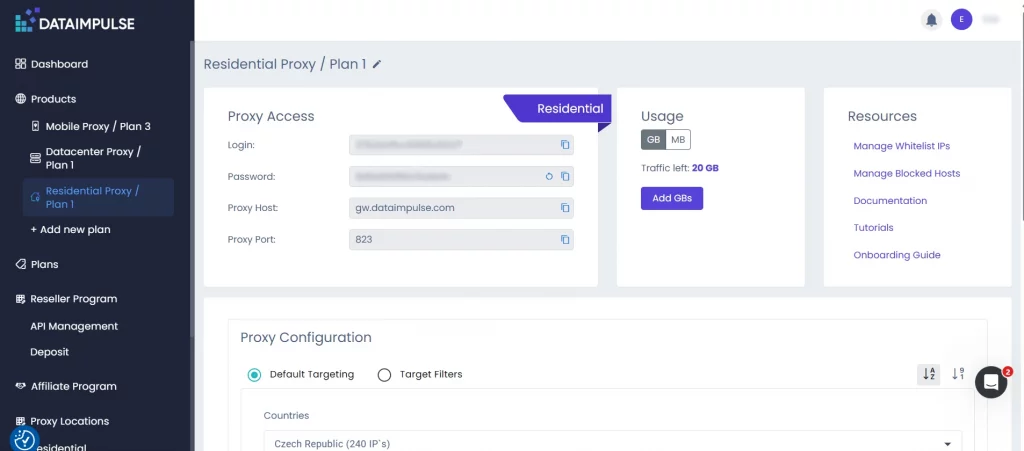
- Proxy credentials from the DataImpulse dashboard. Sign in to DataImpulse and copy your proxy details, such as host, port, login, and password.
- Built-in Python libraries. We’ll need asyncio and random, which are already preinstalled.
- Block detection and retry mechanism. Scraper detects blocking by Google’s anti-bot measures by tracking URLs for signals like /sorry/ redirects and scanning page content for “unusual traffic” messages. If the block has worked or the page has returned an empty result, the system does not stop. It withstands a random pause, starts a new browser session, and skips the next request through a fresh proxy server. This loop is repeated several times. It is enough to get through without tripping the same detection triggers twice.
Retry mechanism looks like this:
for attempt in range(1, MAX_ATTEMPTS + 1):
wait_time = RETRY_DELAY_SECONDS + random.randint(1, 7)
await asyncio.sleep(wait_time)
- DOM extraction logic. Analyzes and extracts organic results from Google’s Document Object Model by targeting result containers, parsing title or URL, and filtering out ads and duplicates.
Scraping Google search results
Here are the main reasons why you may need to scrape Google search data:
- SEO monitoring of site positions and real-time analysis of competitors’ output.
- Competitive intelligence to find out who dominates the niche and what advertising strategies competitors use.
- Market research of trends, popular requests, and changes in consumer demand.
- Lead generation through business directories and local distribution.
- Brand protection and monitoring what Google shows by brand queries and company mentions.
The code we prepared automates Google searches through the Playwright browser and the DataImpulse proxy. The script opens Google, enters a given search query, mimics the behavior of a normal user, checks if a CAPTCHA or lock has appeared, and then collects organic search results.
For each result, the script extracts the website link, a title, and a brief description. To work faster, the code blocks the uploading of images and media. If Google blocks the request or the results are not found, the script makes several retries with pauses. It is a so-called proxy rotation.
As a result, the program outputs the first 10 organic results for the particular keyword directly to the console. To put it shortly, there are three main steps.
Step 1. Build a controlled browsing environment.
First, we have to initialize and configure the browser session. Launch a Playwright-controlled Chromium instance, start routing traffic through proxies, and apply geo and fingerprint settings.
Step 2. Emulate human-like user behaviour and handle blocks.
To simulate real user interaction, include mouse movement and cookie handling. It looks like this:
await page.goto(google_home_url, wait_until="domcontentloaded", timeout=60000)
await page.wait_for_timeout(random.randint(1200, 2500))
await accept_google_cookies(page)
await check_google_block(page)
search_box = page.locator('textarea[name="q"], input[name="q"]').first
await search_box.click()
await page.mouse.move(
random.randint(250, 900),
random.randint(180, 650),
steps=8
)
for char in keyword:
await search_box.type(char, delay=random.randint(35, 110))
await search_box.press("Enter")
Check for CAPTCHA or blocks and apply retry logic with fresh sessions.
Step 3. Extract and verify final results.
During this step, we parse the DOM and extract structured SERP data. For this tutorial, we used ‘Ukraine locations’ as a keyword.
Here is the final piece of code:
*Don’t forget to replace the proxy configuration with your unique proxy credentials.
#!/usr/bin/env python3
import asyncio
import random
from playwright.async_api import async_playwright
# ====== EDIT THESE VALUES ======
PROXY_HOSTNAME = "gw.dataimpulse.com"
PROXY_PORT = "823"
PROXY_LOGIN = "LOGIN"
PROXY_PASSWORD = "PASS"
keyword = "Ukraine locations"
# ===============================
RESULTS_LIMIT = 10
GOOGLE_COUNTRY = "US"
GOOGLE_LANGUAGE = "en"
BLOCK_RESOURCE_TYPES = {"image", "media"}
MAX_ATTEMPTS = 5
RETRY_DELAY_SECONDS = 8
HEADLESS = True
async def block_slow_resources(route):
if route.request.resource_type in BLOCK_RESOURCE_TYPES:
await route.abort()
else:
await route.continue_()
async def accept_google_cookies(page):
buttons = [
'button:has-text("Accept all")',
'button:has-text("I agree")',
'button:has-text("Accept")',
'button:has-text("Reject all")',
"#L2AGLb",
]
for selector in buttons:
try:
button = page.locator(selector).first
if await button.is_visible(timeout=1500):
await button.click()
await page.wait_for_timeout(700)
return
except Exception:
pass
async def check_google_block(page):
current_url = page.url.lower()
if "/sorry/" in current_url or "captcha" in current_url:
raise RuntimeError("Google returned CAPTCHA / unusual traffic page.")
body_text = (await page.locator("body").inner_text(timeout=5000)).lower()
block_texts = [
"our systems have detected unusual traffic",
"unusual traffic from your computer network",
"detected suspicious traffic",
"captcha",
]
if any(text in body_text for text in block_texts):
raise RuntimeError("Google returned CAPTCHA / unusual traffic page.")
async def human_like_google_search(page):
google_home_url = (
"https://www.google.com/"
f"?hl={GOOGLE_LANGUAGE}"
f"&gl={GOOGLE_COUNTRY}"
"&pws=0"
)
await page.goto(google_home_url, wait_until="domcontentloaded", timeout=60000)
await page.wait_for_timeout(random.randint(1200, 2500))
await accept_google_cookies(page)
await check_google_block(page)
search_box = page.locator('textarea[name="q"], input[name="q"]').first
await search_box.wait_for(state="visible", timeout=30000)
await search_box.click()
await page.mouse.move(random.randint(250, 900), random.randint(180, 650), steps=8)
await page.wait_for_timeout(random.randint(400, 900))
for char in keyword:
await search_box.type(char, delay=random.randint(35, 110))
await page.wait_for_timeout(random.randint(500, 1100))
await search_box.press("Enter")
await page.wait_for_load_state("domcontentloaded", timeout=60000)
async def extract_results(page):
return await page.evaluate(
"""
() => {
const cleanText = (value) => (value || '').replace(/\\s+/g, ' ').trim();
const cleanUrl = (href) => {
if (!href) return '';
try {
const parsed = new URL(href, window.location.href);
if (parsed.hostname.includes('google.') && parsed.pathname === '/url') {
return parsed.searchParams.get('q') || parsed.searchParams.get('url') || '';
}
return parsed.href;
} catch {
return href;
}
};
const isNormalWebsite = (href) => {
if (!href || !/^https?:\\/\\//i.test(href)) return false;
try {
const host = new URL(href).hostname.replace(/^www\\./, '');
return !host.startsWith('google.') &&
!host.endsWith('.google.com') &&
host !== 'webcache.googleusercontent.com';
} catch {
return false;
}
};
const root = document.querySelector('#rso') || document.querySelector('#search') || document.body;
const blocks = [...root.querySelectorAll('div.tF2Cxc, div.MjjYud, div.g')];
const results = [];
const seenUrls = new Set();
for (const block of blocks) {
const titleElement = block.querySelector('h3');
if (!titleElement) continue;
const linkElement = titleElement.closest('a') || block.querySelector('a[href]');
const websiteUrl = cleanUrl(linkElement && linkElement.href);
if (!isNormalWebsite(websiteUrl) || seenUrls.has(websiteUrl)) continue;
const blockText = cleanText(block.innerText).toLowerCase();
if (blockText.startsWith('sponsored') || blockText.startsWith('ad ')) continue;
const descriptionElement =
block.querySelector('.VwiC3b, .IsZvec, .GI74Re, [data-sncf], .kb0PBd') ||
[...block.querySelectorAll('span, div')]
.find((node) => cleanText(node.innerText).length > 80);
results.push({
website_url: websiteUrl,
title: cleanText(titleElement.innerText),
description: cleanText(descriptionElement && descriptionElement.innerText),
});
seenUrls.add(websiteUrl);
}
return results;
}
"""
)
async def scrape_google_serp():
proxy_server = f"http://{PROXY_HOSTNAME}:{PROXY_PORT}"
async with async_playwright() as playwright:
browser = await playwright.chromium.launch(
headless=HEADLESS,
proxy={
"server": proxy_server,
"username": PROXY_LOGIN,
"password": PROXY_PASSWORD,
},
args=[
"--disable-blink-features=AutomationControlled",
"--disable-dev-shm-usage",
"--no-first-run",
],
)
context = await browser.new_context(
viewport={
"width": random.choice([1280, 1366, 1440]),
"height": random.choice([720, 768, 900]),
},
locale=f"{GOOGLE_LANGUAGE}-{GOOGLE_COUNTRY}",
timezone_id="America/New_York",
color_scheme="light",
user_agent=(
"Mozilla/5.0 (Windows NT 10.0; Win64; x64) "
"AppleWebKit/537.36 (KHTML, like Gecko) "
"Chrome/126.0.0.0 Safari/537.36"
),
)
await context.add_init_script(
"""
Object.defineProperty(navigator, 'webdriver', { get: () => undefined });
Object.defineProperty(navigator, 'languages', { get: () => ['en-US', 'en'] });
"""
)
await context.route("**/*", block_slow_resources)
page = await context.new_page()
try:
await human_like_google_search(page)
await check_google_block(page)
await page.wait_for_selector("#search, #rso", timeout=30000)
results = await extract_results(page)
return results[:RESULTS_LIMIT]
finally:
await browser.close()
async def main():
print(f"Query: {keyword}")
print("Searching Google through DataImpulse proxy...\n")
results = []
for attempt in range(1, MAX_ATTEMPTS + 1):
print(f"Attempt {attempt}/{MAX_ATTEMPTS}")
try:
results = await scrape_google_serp()
except Exception as error:
print(f"Attempt failed: {error}")
if attempt < MAX_ATTEMPTS:
wait_time = RETRY_DELAY_SECONDS + random.randint(1, 7)
print(f"Retrying with a fresh browser context in {wait_time}s...\n")
await asyncio.sleep(wait_time)
continue
print("\nFinished without crashing, but Google still returned a block page.")
print("Try again later, lower request volume, or use DataImpulse country targeting like login__cr.us.")
return
if results:
break
if attempt < MAX_ATTEMPTS:
wait_time = RETRY_DELAY_SECONDS + random.randint(1, 7)
print(f"No results found. Retrying in {wait_time}s...\n")
await asyncio.sleep(wait_time)
else:
print("No results found after all attempts.")
if not results:
print("Finished successfully, but no organic results were found.")
return
print("Success. Organic results extracted.\n")
for index, result in enumerate(results, start=1):
print(f"#{index}")
print(f"Query: {keyword}")
print(f"Website URL: {result['website_url']}")
print(f"Title: {result['title']}")
print(f"Description: {result['description']}")
print("-" * 80)
if __name__ == "__main__":
asyncio.run(main())
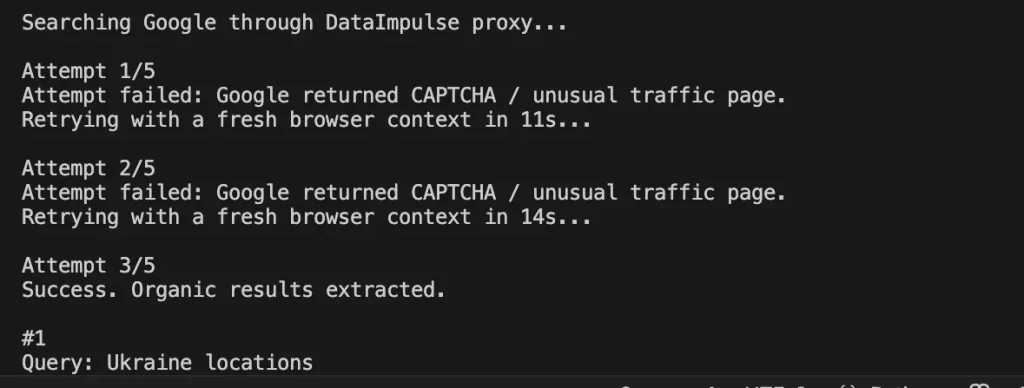
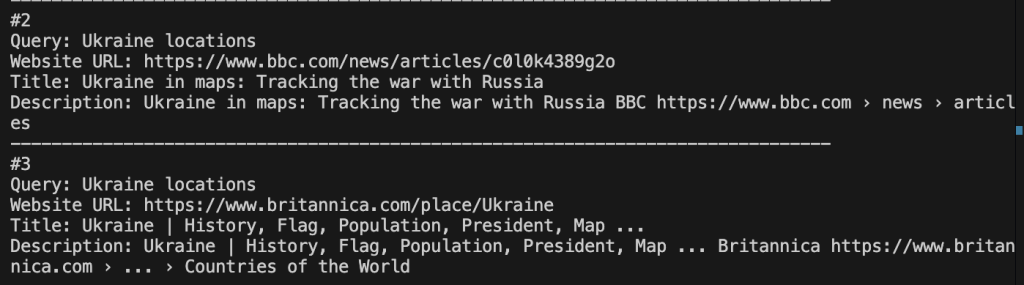
In our case, the first two attempts failed, but the third one finally worked:
Scraping Google Maps with Python
Location-based data has always been a valuable resource for many business projects, including analysis and monitoring aspects. The code below automates data collection from Google Maps via Playwright and the DataImpulse proxy. It opens Google Maps with a given query, such as “dentist in New York”, simulates a regular browser, accepts cookies, checks that Google has not shown CAPTCHA, and then scrolls through the list of results.
After that, the script collects links to the discovered locations, opens each business profile one by one, and extracts key information such as name, address, phone number, website, rating, and Google Maps URLs.
The script also blocks the loading of images and media files. It also uses stealth settings, user-agent, random screen size, and natural delays to make the browser look less automated.
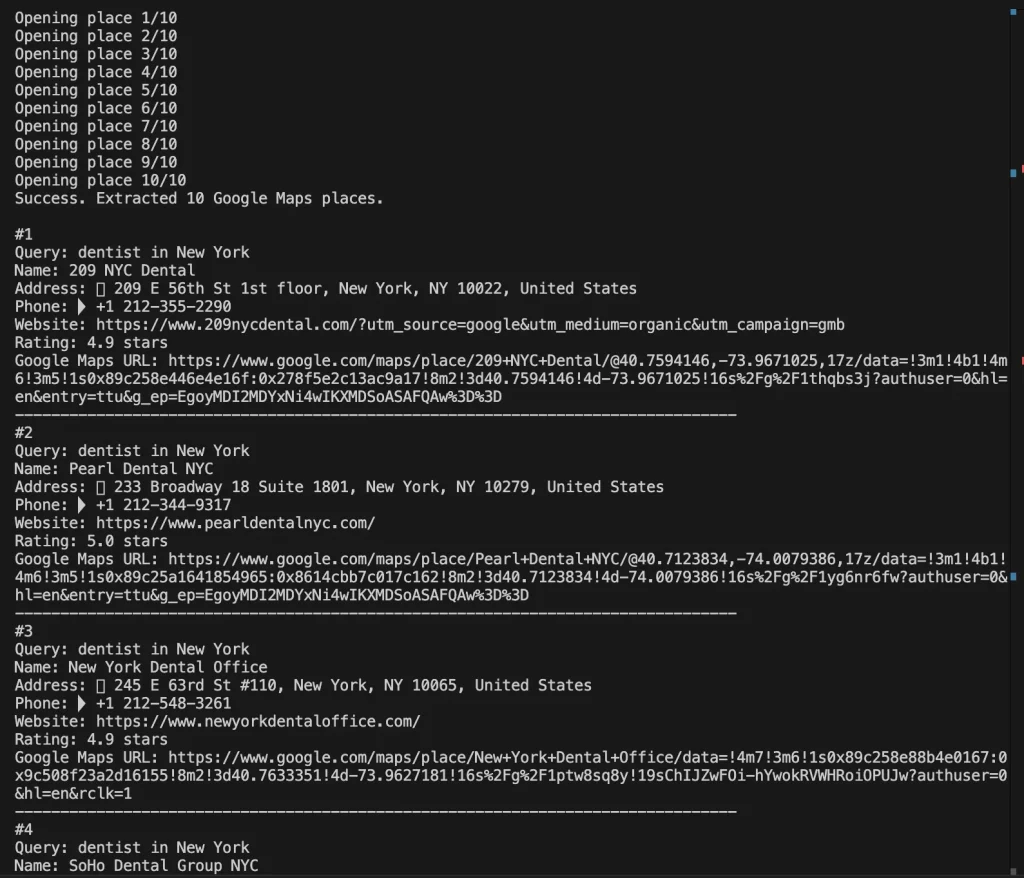
If Google Maps blocks the request or no data is found, the script retries several times with the new browser context. As a result, it outputs up to 10 matching locations to the console using a given keyword.
The scraping pipeline looks like this:
- 1. Initialize and configure the browser session.
- 2. Open Google Maps and load search results.
- 3. Extract and validate business data.
- 4. Detect blocks and recover.
Here is the final piece of code:
*Don’t forget to replace the proxy configuration with your unique proxy credentials.
#!/usr/bin/env python3
"""
Simple Google Maps address scraper through a DataImpulse proxy.
Before first run:
python3 -m pip install playwright playwright-stealth
python3 -m playwright install chromium
Then edit the values below and run:
python3 google_maps_address_scraper.py
"""
import asyncio
import random
from urllib.parse import quote_plus
from playwright.async_api import TimeoutError as PlaywrightTimeoutError
from playwright.async_api import async_playwright
# ====== EDIT THESE VALUES ======
PROXY_HOSTNAME = "gw.dataimpulse.com"
PROXY_PORT = "823"
PROXY_LOGIN = "LOGIN"
PROXY_PASSWORD = "PASS"
keyword = "dentist in New York"
# ===============================
RESULTS_LIMIT = 10
GOOGLE_COUNTRY = "US"
GOOGLE_LANGUAGE = "en"
HEADLESS = True
MAX_ATTEMPTS = 3
RETRY_DELAY_SECONDS = 8
BLOCK_RESOURCE_TYPES = {"image", "media"}
async def block_slow_resources(route):
if route.request.resource_type in BLOCK_RESOURCE_TYPES:
await route.abort()
else:
await route.continue_()
async def apply_stealth_if_available(page):
try:
from playwright_stealth import Stealth
except ImportError:
try:
from playwright_stealth import stealth_async
except ImportError:
print("playwright-stealth is not installed for this Python.")
print("Optional install: python3 -m pip install playwright-stealth\n")
return
await stealth_async(page)
print("playwright-stealth applied.\n")
return
await Stealth().apply_stealth_async(page)
print("playwright-stealth applied.\n")
async def accept_google_cookies(page):
buttons = [
'button:has-text("Accept all")',
'button:has-text("I agree")',
'button:has-text("Accept")',
'button:has-text("Reject all")',
"#L2AGLb",
]
for selector in buttons:
try:
button = page.locator(selector).first
if await button.is_visible(timeout=1500):
await button.click()
await page.wait_for_timeout(700)
return
except Exception:
pass
async def check_google_block(page):
current_url = page.url.lower()
if "/sorry/" in current_url or "captcha" in current_url:
raise RuntimeError("Google returned CAPTCHA / unusual traffic page.")
body_text = (await page.locator("body").inner_text(timeout=5000)).lower()
block_texts = [
"our systems have detected unusual traffic",
"unusual traffic from your computer network",
"detected suspicious traffic",
"captcha",
]
if any(text in body_text for text in block_texts):
raise RuntimeError("Google returned CAPTCHA / unusual traffic page.")
async def open_google_maps(page):
maps_url = (
"https://www.google.com/maps/search/"
f"{quote_plus(keyword)}"
f"?hl={GOOGLE_LANGUAGE}"
f"&gl={GOOGLE_COUNTRY}"
)
await page.goto(maps_url, wait_until="domcontentloaded", timeout=60000)
await page.wait_for_timeout(random.randint(2500, 4500))
await accept_google_cookies(page)
await check_google_block(page)
async def scroll_results_list(page):
feed = page.locator('[role="feed"]').first
try:
await feed.wait_for(state="visible", timeout=15000)
except PlaywrightTimeoutError:
return
previous_count = 0
stable_rounds = 0
for _ in range(12):
cards = page.locator('a[href*="/maps/place/"]')
current_count = await cards.count()
if current_count >= RESULTS_LIMIT:
return
if current_count == previous_count:
stable_rounds += 1
else:
stable_rounds = 0
if stable_rounds >= 3:
return
previous_count = current_count
await feed.evaluate("(element) => element.scrollBy(0, element.scrollHeight)")
await page.wait_for_timeout(random.randint(1200, 2200))
async def get_place_links(page):
return await page.evaluate(
"""
() => {
const links = [...document.querySelectorAll('a[href*="/maps/place/"]')]
.map((link) => link.href)
.filter(Boolean);
return [...new Set(links)];
}
"""
)
async def get_text(page, selector, timeout=2500):
try:
element = page.locator(selector).first
if await element.is_visible(timeout=timeout):
return " ".join((await element.inner_text()).split())
except Exception:
return ""
return ""
async def extract_place_data(page):
name = await get_text(page, "h1.DUwDvf, h1")
address = await get_text(page, '[data-item-id="address"]')
website = ""
phone = ""
if not address:
address = await page.evaluate(
"""
() => {
const item = document.querySelector('[aria-label^="Address:"]');
return item ? item.getAttribute('aria-label').replace(/^Address:\\s*/i, '').trim() : '';
}
"""
)
website = await page.evaluate(
"""
() => {
const selectors = [
'a[data-item-id="authority"]',
'a[aria-label^="Website:"]',
'a[href^="http"]:not([href*="google."])'
];
for (const selector of selectors) {
const element = document.querySelector(selector);
if (!element) continue;
const href = element.href || '';
if (href && !href.includes('/maps/')) return href;
}
return '';
}
"""
)
phone = await page.evaluate(
"""
() => {
const byItemId = document.querySelector('[data-item-id^="phone:"]');
if (byItemId) return (byItemId.innerText || '').replace(/\\s+/g, ' ').trim();
const byAria = document.querySelector('[aria-label^="Phone:"]');
if (byAria) {
return byAria.getAttribute('aria-label').replace(/^Phone:\\s*/i, '').trim();
}
return '';
}
"""
)
rating = await page.evaluate(
"""
() => {
const rating = document.querySelector('[role="img"][aria-label*="stars"]');
return rating ? rating.getAttribute('aria-label') : '';
}
"""
)
return {
"query": keyword,
"name": name,
"address": address,
"phone": phone,
"website": website,
"rating": rating,
"google_maps_url": page.url,
}
async def scrape_google_maps_once():
proxy_server = f"http://{PROXY_HOSTNAME}:{PROXY_PORT}"
async with async_playwright() as playwright:
browser = await playwright.chromium.launch(
headless=HEADLESS,
proxy={
"server": proxy_server,
"username": PROXY_LOGIN,
"password": PROXY_PASSWORD,
},
args=[
"--disable-blink-features=AutomationControlled",
"--disable-dev-shm-usage",
"--no-first-run",
],
)
context = await browser.new_context(
viewport={
"width": random.choice([1280, 1366, 1440]),
"height": random.choice([720, 768, 900]),
},
locale=f"{GOOGLE_LANGUAGE}-{GOOGLE_COUNTRY}",
timezone_id="America/New_York",
color_scheme="light",
user_agent=(
"Mozilla/5.0 (Windows NT 10.0; Win64; x64) "
"AppleWebKit/537.36 (KHTML, like Gecko) "
"Chrome/126.0.0.0 Safari/537.36"
),
)
await context.add_init_script(
"""
Object.defineProperty(navigator, 'webdriver', { get: () => undefined });
Object.defineProperty(navigator, 'languages', { get: () => ['en-US', 'en'] });
"""
)
await context.route("**/*", block_slow_resources)
page = await context.new_page()
try:
await apply_stealth_if_available(page)
await open_google_maps(page)
await scroll_results_list(page)
place_links = await get_place_links(page)
place_links = place_links[:RESULTS_LIMIT]
results = []
seen = set()
if not place_links:
print("No result list detected. Trying to extract the currently opened place.")
data = await extract_place_data(page)
if data["name"] or data["address"]:
return [data]
for index, place_url in enumerate(place_links, start=1):
print(f"Opening place {index}/{len(place_links)}")
await page.goto(place_url, wait_until="domcontentloaded", timeout=60000)
await page.wait_for_timeout(random.randint(2500, 4500))
await check_google_block(page)
data = await extract_place_data(page)
unique_key = data["name"] or data["google_maps_url"]
if unique_key in seen:
continue
if data["name"] or data["address"]:
results.append(data)
seen.add(unique_key)
return results
finally:
await browser.close()
async def main():
print(f"Google Maps query: {keyword}")
print("Searching Google Maps through DataImpulse proxy...\n")
results = []
for attempt in range(1, MAX_ATTEMPTS + 1):
print(f"Attempt {attempt}/{MAX_ATTEMPTS}")
try:
results = await scrape_google_maps_once()
except Exception as error:
print(f"Attempt failed: {error}")
if attempt < MAX_ATTEMPTS:
wait_time = RETRY_DELAY_SECONDS + random.randint(1, 7)
print(f"Retrying with a fresh browser context in {wait_time}s...\n")
await asyncio.sleep(wait_time)
continue
print("\nFinished without crashing, but Google Maps did not return usable data.")
print("Try DataImpulse country targeting like login__cr.us, lower volume, or run again later.")
return
if results:
break
if attempt < MAX_ATTEMPTS:
wait_time = RETRY_DELAY_SECONDS + random.randint(1, 7)
print(f"No places found. Retrying in {wait_time}s...\n")
await asyncio.sleep(wait_time)
else:
print("No places found after all attempts.")
if not results:
print("Finished successfully, but no Google Maps places were found.")
return
print(f"Success. Extracted {len(results)} Google Maps places.\n")
for index, item in enumerate(results, start=1):
print(f"#{index}")
print(f"Query: {item['query']}")
print(f"Name: {item['name']}")
print(f"Address: {item['address']}")
print(f"Phone: {item['phone']}")
print(f"Website: {item['website']}")
print(f"Rating: {item['rating']}")
print(f"Google Maps URL: {item['google_maps_url']}")
print("-" * 80)
if __name__ == "__main__":
asyncio.run(main())
Here is the result we got after using this code:
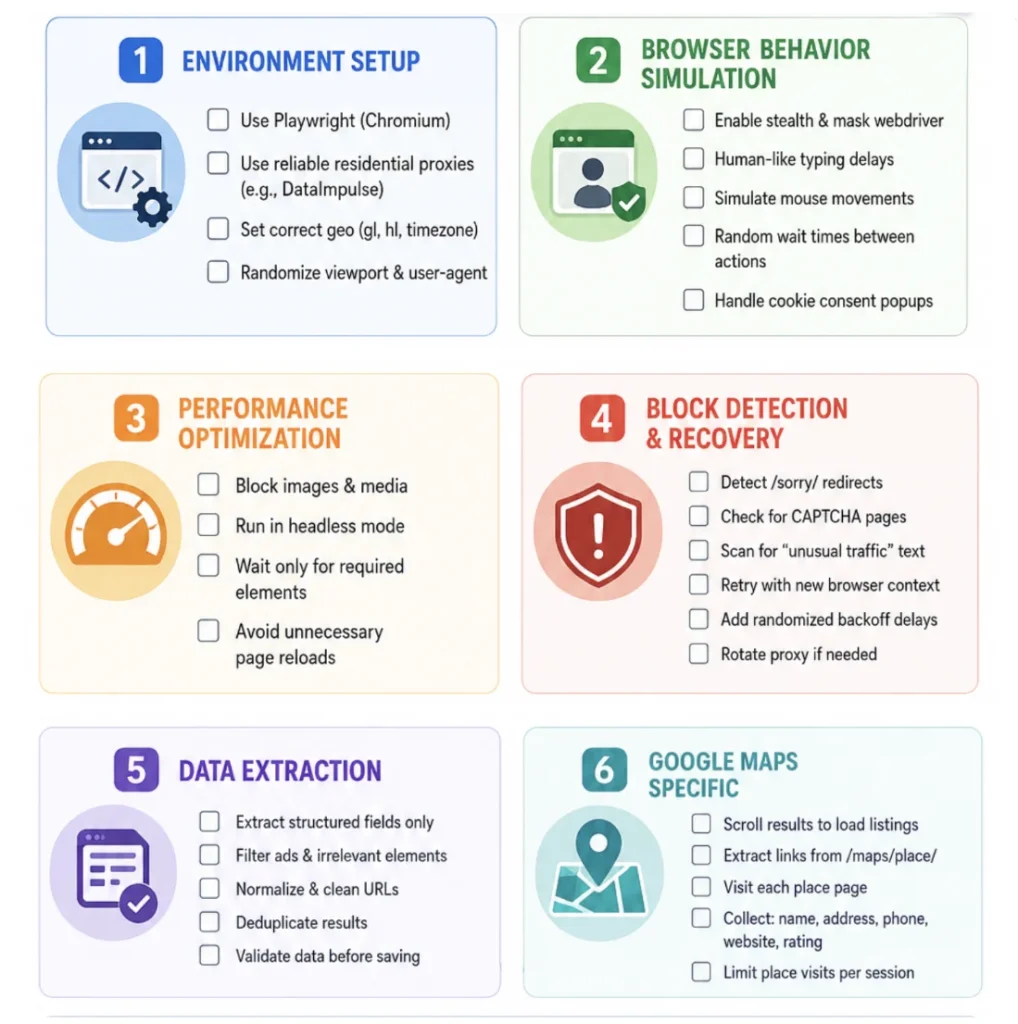
Checklist to use
Just take a look at this developer-friendly visual checklist. Our team encourages you to check every box before moving forward with the scraping process.
FAQ
Does Google allow scraping?
Google doesn’t allow automated scraping, but it provides official APIs for compliant data access. In general, it’s legal to scrape publicly available data.
What data can be extracted from Google SERP and Google Maps?
Users can extract titles, URLs, ads, and SERP features from Google SERP using Python with Playwright and reliable proxies from DataImpulse. From Google Maps common data includes business names, addresses, ratings, client reviews, phone numbers, and geolocation data.
How to extract data from Google Maps?
To collect data from Google Maps, make sure to install Python with Playwright, code editor like VS Code, and proxies. The scraping steps look like this: 1. Initialize session. 2. Load Google Maps results. 3. Extract business data. 4. Handle blocks. You can also use the code from our DataImpulse guide for educational purposes.
What proxies are the best for scraping Google?
DataImpulse residential and mobile proxies are commonly used for scraping as they use real ISPs or mobile IPs. They are more difficult to get detected and blocked. Datacenter proxies are fast and affordable, but not the best option when you need invisibility.
Conclusion
Scraping Google Search and Google Maps opens up wide opportunities for businesses and developers. If you need to monitor search results, analyze competitors or collect local data, then you have to know how to scrape data with no block challenges. For stable and efficient data collection, it is important to use the right set of tools, which includes high-quality proxies, IP rotation and mechanisms for simulating the behavior of real users. Depending on the scale of the tasks, the optimal choice can be residential or mobile proxies, which provide a higher level of anonymity and a lower risk of blocking.
Regardless of the chosen approach, it is worth considering the terms of use of Google services and following responsible data collection practices.
*This tutorial is purely for educational purposes and serves as a demonstration of technical capabilities. It’s important to recognize that scraping data from Amazon raises concerns regarding terms of use and legality. Unauthorized scraping can lead to serious consequences, including legal actions and account suspension. Always proceed with caution and follow ethical guidelines.

 State/City/Zip/ASN Targeting



