

In this Article
Mobile proxies often read as the highest-trust IPs in proxy buying. The reason isn’t marketing — it’s network architecture. Mobile carriers route many real users through a single public IP via carrier-grade NAT, so when an anti-bot or fraud system blocks one of those IPs it risks knocking out a few thousand legitimate customers. The result: protected platforms treat carrier IPs as higher-trust than datacenter or even ordinary residential addresses.
That trust is exactly what you need for mobile-first targets — Instagram and TikTok accounts, in-app ads, sneaker drops, carrier-specific campaign checks, and the most aggressive anti-bot stacks on the web. This guide ranks the 8 best mobile proxies in 2026 on the data that matters: carrier coverage, pool size, rotation control, geo and ASN targeting, current pricing, and what each one is actually best at. If you’re in a hurry, jump to the quick comparison for a thirty-second shortlist; the full reviews are below.
Key Facts
Mobile proxies are a separate category from residential, ISP, and datacenter. Get the differences clear before you buy:
- Mobile — IPs assigned by carriers (Verizon, AT&T, T-Mobile, Vodafone, Orange, etc.) on 3G/4G/5G/LTE networks. Highest trust. Highest price. Usually slower.
- Residential — real consumer ISP IPs from home broadband. Strong trust, mid-to-high price.
- ISP / static residential — ISP-assigned IPs hosted on datacenter infrastructure. Mid-trust, stable, fast.
- Datacenter — server IPs. Fastest, cheapest, easiest to detect — usually wrong for mobile-first work.
The pattern: pay for mobile when the target is mobile-first or carrier-sensitive — apps, social platforms, sneaker drops, and the most defended sites. For ordinary scraping or low-risk price monitoring, residential is usually cheaper enough to win.
How We Selected These Mobile Proxies
We didn’t rank by marketing copy. Each provider had to earn its spot on measurable factors:
- Real carrier IPs. Do the IPs resolve to genuine mobile ASNs (Verizon, AT&T, Vodafone, Orange…) and not generic residential or hosting networks?
- Pool size and freshness. Headline IP counts only matter if the pool is fresh and not already burned by abuse.
- Carrier and geo granularity. Country is the floor; city, ZIP, ASN, and named-carrier targeting separate strong providers from weak ones.
- Rotation and session control. Rotating for collection and ad checks; sticky or dedicated for account workflows.
- Protocol support. HTTP, HTTPS, and SOCKS5 are table stakes; some providers add UDP/QUIC.
- Price transparency. Current public starting prices from each vendor’s own pages, not invoices.
- Compliance. Consent-based sourcing, acceptable-use policy, KYC where appropriate, and a clear ToS.
The eight that made the list cover the full range — from $2/GB pay-as-you-go pools to private SIM-based 4G/5G infrastructure and full enterprise stacks at $8/GB.
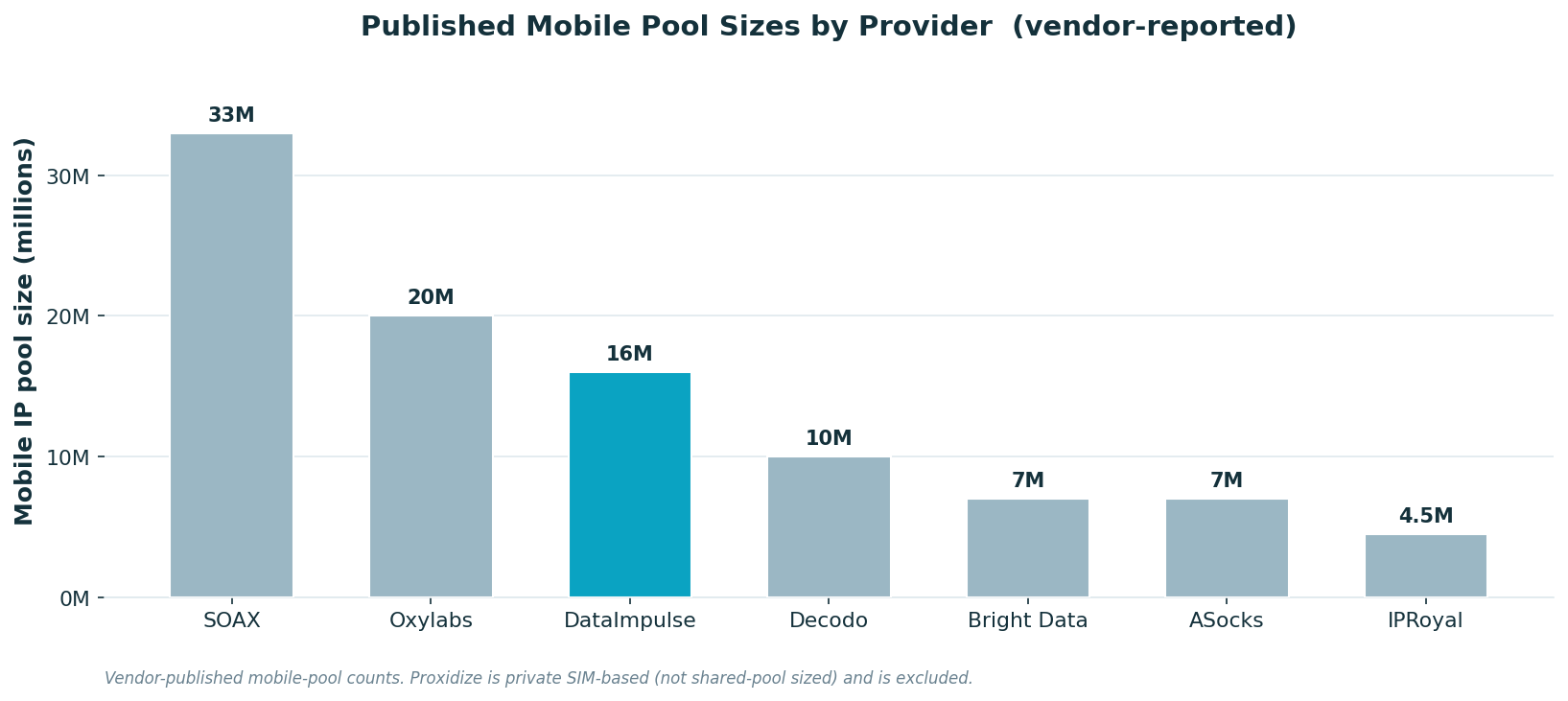
A quick word on what we did not weight: raw pool size. A few providers headline tens of millions of mobile IPs, but headline counts don’t translate cleanly to success rate on protected targets — pool freshness, carrier authenticity, and rotation discipline matter more. A smaller, fresh, well-managed mobile pool routinely beats a larger pool that’s been hammered into the platforms’ block lists. Where we mention pool size in the reviews below, treat it as one input alongside carrier coverage and pricing, not the headline number.
What Makes a Mobile Proxy Good?
The deciding factors are different from residential or datacenter proxies. Six things matter most:
- Mobile-IP authenticity — the IP actually resolves to a mobile carrier ASN, not a re-labeled residential or datacenter address. This is the whole reason you’re paying for mobile.
- Carrier targeting — for ad verification and campaign QA you often need to land on a specific carrier (Verizon vs T-Mobile vs Vodafone), not just any mobile IP in the country.
- Geo granularity — country, city, ZIP/state, and ASN. Local rank-tracking, geo-fenced ads, and city-specific QA all live here.
- Sticky session length — minutes-long sessions for ad checks, hours for account workflows. Shorter sessions break logins.
- Pool freshness — fewer reused or already-flagged IPs. A 7M fresh pool beats a 30M dirty one.
- Per-task economics — list price per GB matters less than success rate × cost per successful request. Mobile traffic is expensive, so a small block-rate cuts deep.
A useful sanity check: any provider can claim “millions of mobile IPs.” Ask which carriers, in which countries, and what the published rotation/sticky-session controls are. The answers separate real mobile infrastructure from a residential pool wearing a mobile label.
Quick Comparison: Best Mobile Proxies at a Glance
The table below compares all eight providers on the parameters that matter most, so you can narrow the field to one or two before reading the full reviews.
| Provider | Network | Pool Size | Rotation | Geo + Carrier | Starting Price | Best For |
|---|---|---|---|---|---|---|
| DataImpulse | 3G/4G/5G/LTE | 16M+ mobile IPs | Rotating + sticky | Country/city/state/ZIP/ASN | $2/GB | Best value mobile proxies |
| SOAX | 3G/4G/5G/LTE, named carriers | 33M+ mobile IPs | Rotating + sticky | Country/region/city/ISP/ASN | $3.60/GB | Large mobile pool |
| Bright Data | Mobile carrier IPs | 7M+ mobile IPs | Rotating + advanced controls | Country/city/ZIP/carrier/ASN | $8/GB | Enterprise targeting |
| Oxylabs | Real mobile device IPs | 20M+ mobile IPs | Auto-rotating | Country/state/city/coordinates/ASN | from $7.50/GB | Enterprise reliability |
| Decodo | 4G/5G carrier IPs | 10M+ mobile IPs | Rotating | 160+ locations; 700+ carriers cited | $4–8/GB PAYG | Carrier breadth |
| IPRoyal | 3G/4G/5G/LTE | 4.5M+ mobile IPs | Rotating or dedicated | Country/city/carrier/network type | $4/GB or $10.11/day | Social/account workflows |
| ASocks | Mobile network IPs | 7M+ mobile IPs | Rotating | Country/city/ASN | ~$15/proxy/mo | Simple mid-market mobile |
| Proxidize | Private SIM-based 4G/5G or hosted | Dedicated/private | Manual/API/per-proxy | Carrier selection in dashboard | $1–2/GB hosted, per-port SIM | Private mobile infrastructure |
Indicative starting rates from each provider’s own pricing pages (May 2026). Volume discounts apply and prices change, so check current numbers before you buy. Granular geo and carrier targeting may incur add-ons on some providers (e.g. DataImpulse charges extra for sub-country targeting).
When Mobile Proxies Win
Mobile proxies are worth the higher price when one of these jobs is on the table:
- Mobile-app ad verification. Check whether ads actually render inside apps, across countries, cities, and carriers, on traffic that looks like a real phone. Residential doesn’t fake mobile context — mobile does.
- In-app and mobile-campaign QA. Validate creative rotation, deep links, landing pages, and mobile-only offers from inside a real carrier network.
- Social-media account work. Instagram, TikTok, Facebook, Discord, and similar platforms scrutinize IP reputation hard. Mobile sticky sessions are what holds accounts together.
- Sneaker drops and limited releases. Datacenter ranges get filtered seconds after a drop opens. Mobile gets through far longer — though browser, device, and payment fingerprints still matter.
- Mobile-first SERP and SEO. Google’s mobile results differ from desktop in layout, ads, and local pack. Mobile IPs let you see them as a phone user would.
- Geo + carrier ad checks. Confirm campaigns hit the right carriers — Verizon vs AT&T vs T-Mobile in the US, Vodafone vs Orange vs Deutsche Telekom in Europe, plus local MNOs.
- Affiliate-fraud and cloaking detection. Cloaked landing pages, fake app installs, and carrier-specific scams show up only to mobile traffic from the right ASN.
If your work is none of the above — generic web scraping, price monitoring on open ecommerce, technical audits — residential or even datacenter will usually be cheaper enough to win.
Rotating vs Sticky vs Dedicated Mobile
Mobile proxies come in three rotation modes, and picking the wrong one is the most common waste-of-money mistake here.
Rotating Mobile
A fresh carrier IP per request, or on a short timer. Use rotating for high-volume collection, ad verification sweeps across many carriers, and any check where you don’t need to keep state. Rotating is the default for scraping and campaign QA.
Sticky Mobile
The same carrier IP for a configurable window (minutes up to a couple of hours). Use sticky for any workflow that has state to lose — logins, multi-step ad clicks with landing-page checks, cart sessions, multi-page social-platform navigation. Switching IPs mid-session is what gets accounts flagged.
Dedicated / Private Mobile
A specific mobile port, sometimes a specific SIM card, that only you use. Most expensive option, usually priced per day or per month per port. Use dedicated when you’re managing premium social-media accounts, running production sneaker setups, or need full control over rotation. Providers like Proxidize specialize in private SIM-based infrastructure for exactly this.
A simple rule: rotate for breadth, stick for depth, go dedicated for value accounts.
The most common mistake here is using rotating mobile for account work. A login session that flips through three carrier IPs in five minutes looks exactly like account hijacking to a platform’s risk model — and your account gets challenged or locked, even though the carrier IPs themselves are clean. The fix is almost always picking sticky or dedicated for anything with state, and reserving rotating for stateless collection like ad checks, SERP sweeps, and listing-page scraping.
Best Mobile Proxies for 2026 — Full Reviews
The picks below are ranked on value for mobile work — the balance of authentic carrier coverage, pool freshness, rotation and session control, transparent pricing, and how little it costs to get started.
1. DataImpulse
DataImpulse is the best-value mobile pick for most teams. Mobile starts at $2/GB, pay-as-you-go, with no expiry on the traffic you buy — about a quarter of what enterprise vendors charge. The mobile pool covers 3G/4G/5G/LTE carrier IPs across 195 countries, and targeting reaches country, city, state, ZIP, and ASN. It supports HTTP, HTTPS, and SOCKS5, both rotating and sticky sessions (mobile sticky up to two hours), and works with Scrapy, Selenium, Playwright, Puppeteer, and any custom script.
What makes it the default is the price-to-coverage ratio: $2/GB mobile is one of the lowest published rates from a real-carrier-pool provider, and the PAYG model means you don’t sit on a monthly plan you won’t fully burn. The published mobile pool is 16M+ IPs — smaller than SOAX or Oxylabs by headline count, but more than enough for most mobile-first work, and the price-per-task math is what actually matters. Support is staffed by humans 24/7, and DataImpulse holds a 4.8/5 on G2. In practice, this is the default mobile choice for teams that don’t have a procurement department: you start small on pay-as-you-go, scale only the targets that work, and never pay for traffic you don’t use.
DataImpulse — quick specs. Network: 3G/4G/5G/LTE carrier IPs · Pool: 16M+ mobile IPs, 195 countries · Rotation: rotating + sticky (mobile up to 2h) · Geo: country (city/state/ZIP/ASN as paid add-on) · Price: $2/GB, PAYG no expiry · Protocols: HTTP/HTTPS/SOCKS5 · Rating: G2 4.8 · Trial: $5 intro, 7-day refund language. Best for: most teams that need authentic carrier IPs without enterprise minimums or fixed monthly commitments.
2. SOAX
SOAX has the largest published mobile pool on this list — 33M+ mobile IPs across 195+ locations — and one of the most flexible targeting stacks: country, region, city, ISP, and ASN. Mobile sessions are rotating with sticky sessions configurable up to one hour. It supports HTTP, HTTPS, SOCKS5, plus UDP and QUIC. Pricing starts at $3.60/GB on the Starter plan with mobile credits sharing the same pool as residential, ISP, and datacenter — convenient if your stack mixes proxy types. The unified-credit model is the real selling point here: if your project bounces between mobile checks for in-app ads and residential collection for landing pages, SOAX lets you do both on a single bill without pre-allocating spend per proxy type.
SOAX — quick specs. Network: 3G/4G/5G/LTE, named carriers · Pool: 33M+ mobile IPs, 195+ locations · Rotation: rotating + sticky up to 1h · Geo: country/region/city/ISP/ASN · Price: from $3.60/GB · Protocols: HTTP(S)/SOCKS5/UDP/QUIC. Best for: teams that want a large mobile pool and unified credits across multiple proxy types.
3. Bright Data Mobile
Bright Data’s mobile network is enterprise-grade and priced like it. The published numbers — 7M+ mobile IPs across 195 countries — are smaller than several competitors, but the targeting is the deepest on this list: country, city, ZIP, carrier, and ASN, wrapped in a Proxy Manager with serious compliance and audit controls. Mobile pay-as-you-go runs $8/GB; volume tiers come down. If your buying decision is governed by procurement and you need named carriers in named cities, this is the safe pick.
Bright Data — quick specs. Network: mobile carrier IPs · Pool: 7M+ mobile IPs, 195 countries · Rotation: rotating + advanced controls · Geo: country/city/ZIP/carrier/ASN · Price: $8/GB PAYG (lower on volume) · Tooling: Proxy Manager, compliance workflows. Best for: enterprise buyers that need carrier-precise targeting, compliance tooling, and procurement-friendly contracts.
4. Oxylabs Mobile
Oxylabs sits next to Bright Data at the enterprise top. It publishes a 20M+ mobile pool across 140+ countries, advertises a 99.9% average uptime and a 1.1-second average response time, and supports targeting by continent, country, state, city, coordinates, and ASN. Mobile starts at $7.50/GB on the Starter plan, drops to $5/GB at Advanced and $3.50/GB at Corporate tiers. Pick Oxylabs when reliability, support depth, and a polished scraper-API stack matter more than entry price.
Oxylabs — quick specs. Network: real mobile device IPs · Pool: 20M+ mobile IPs, 140+ countries · Rotation: auto-rotating · Geo: country/state/city/coordinates/ASN · Price: from $7.50/GB ($3.50/GB at Corporate) · Reliability: 99.9% uptime, ~1.1s avg response. Best for: enterprise scraping, ad verification, and public-data pipelines that value reliability over entry price.
5. Decodo
Decodo (formerly Smartproxy) publishes 10M+ mobile IPs on 4G/5G carrier networks, with documentation referencing 700+ carriers and 160+ locations and PAYG mobile listed at $8/GB regular ($4/GB current promo), with plans from $2.25/GB at higher tiers. The dashboard is clean, the rotating-mobile setup is straightforward, and the wider Decodo stack — residential, ISP, datacenter, mobile, plus scraping APIs — fits teams that prefer a single mid-market vendor rather than splitting across enterprise and budget providers.
Decodo — quick specs. Network: 4G/5G carrier IPs · Pool: 10M+ mobile IPs, 160+ locations, 700+ carriers cited · Rotation: rotating · Geo: country/city · Price: $4–8/GB PAYG (promo); plans from $2.25/GB · Tooling: dashboard, scraping APIs across other proxy types. Best for: teams that want broad carrier coverage and a unified mid-market proxy stack.
6. IPRoyal Mobile
IPRoyal is the easiest entry point for social-media and account work. Rotating mobile runs from $4/GB, and dedicated mobile lines are priced per day ($10.11/day) or per month ($117) on longer terms, which is exactly the model account managers want. Pool is 4.5M+ mobile IPs with 3G/4G/5G/LTE support and named-carrier targeting (Vodafone, Orange, Verizon, T-Mobile and others). Small but practical, and the dedicated-mobile slots are good for teams running production social setups.
IPRoyal — quick specs. Network: 3G/4G/5G/LTE carrier IPs · Pool: 4.5M+ mobile IPs · Rotation: rotating or dedicated · Geo: country/city/carrier/network type · Price: from $4/GB rotating; from $10.11/day or $117/month dedicated. Best for: social-media and account workflows, and small teams testing dedicated mobile.
7. ASocks
ASocks publishes 7M+ mobile IPs across 150+ locations with country, city, and ASN targeting. Mobile is priced per proxy per month (around $15/proxy/month) rather than per-GB, which suits teams that want predictable per-port costs. Documentation and onboarding are simpler than the enterprise stacks, which is useful for teams that want rotating mobile without learning a Proxy Manager.
ASocks — quick specs. Network: mobile network IPs · Pool: 7M+ mobile IPs, 150+ locations · Rotation: rotating · Geo: country/city/ASN · Price: ~$15/proxy/month. Best for: mid-market teams that want simple rotating mobile without enterprise tooling.
8. Proxidize
Proxidize is the odd one in the best way: it’s not a shared per-GB mobile pool but a platform for private SIM-based 4G/5G mobile proxies and proxy-builder infrastructure. You can run your own SIM cards through Proxidize hardware (the dedicated SIM/per-port model), or use their hosted plans where per-GB pricing starts around $1–2/GB. Carrier selection lives in the dashboard. It’s the right answer when you need full control over rotation, carrier choice, and IP exclusivity — most often for premium account farms, regulated workflows, or production sneaker setups where shared-pool blocking is unacceptable.
Proxidize — quick specs. Network: private SIM-based 4G/5G or hosted mobile · Pool: dedicated/private (not shared-pool sized) · Rotation: manual / API / per-proxy · Geo: carrier selection in dashboard · Price: from $1–2/GB (hosted) or per-port (private SIM) · Differentiator: private SIM ownership and dedicated mobile ports. Best for: users who want private 4G/5G control, mobile-hardware ownership, or dedicated ports instead of a shared pool.
How Much Do Mobile Proxies Cost?
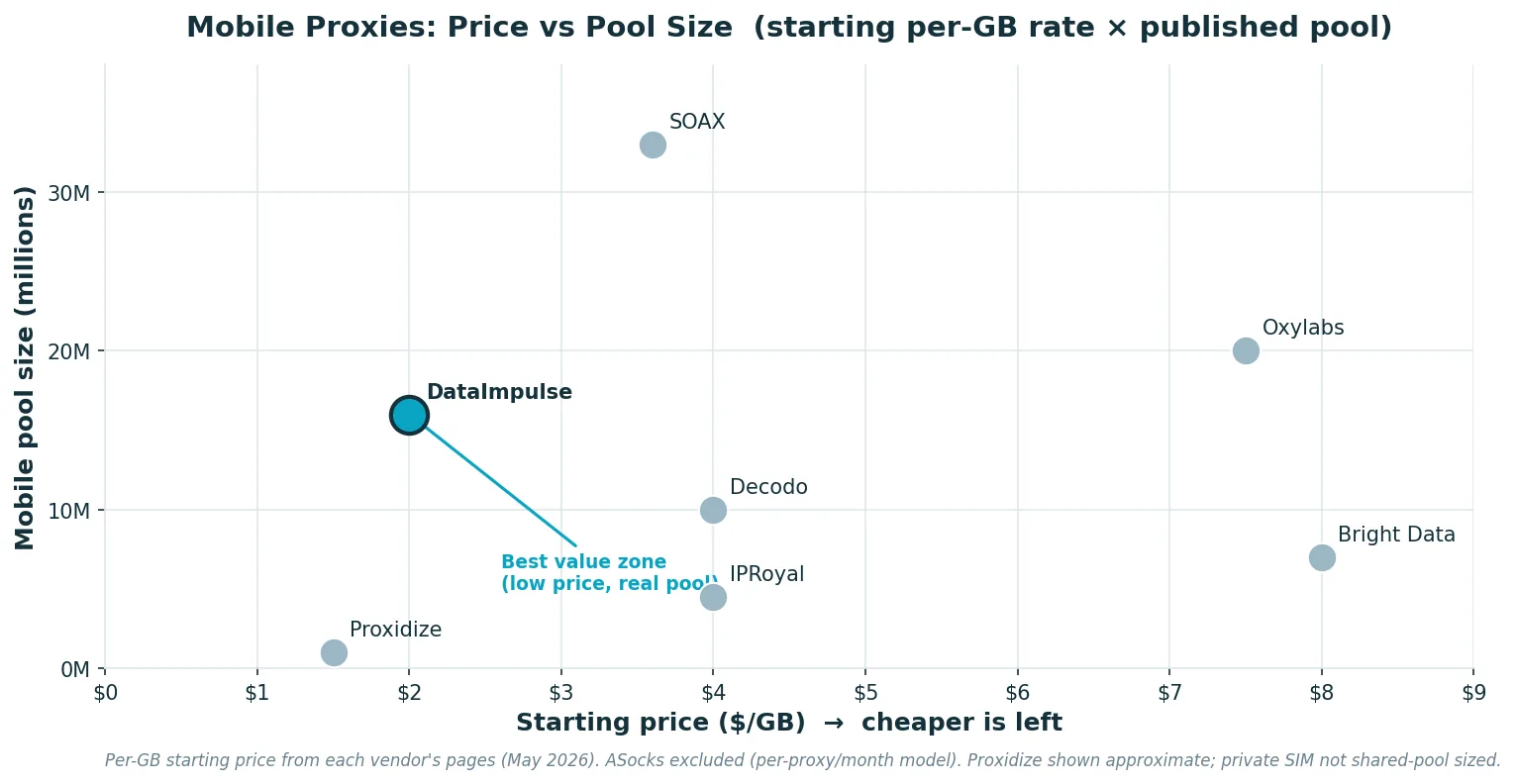
Listed mobile pay-as-you-go pricing in 2026 mostly clusters in two bands: budget/value at $1–$4/GB (DataImpulse, IPRoyal rotating, Proxidize hosted), and enterprise at $5–$8/GB (Bright Data, Oxylabs starter, Decodo regular), with SOAX in the middle (~$3.60/GB) and ASocks priced per-proxy ($15/proxy/month). Dedicated mobile ports — usually priced per day ($10/day on IPRoyal) or per month ($100+/port) — are a separate model that almost always beats per-GB pricing once your traffic exceeds a few hundred GB per month per port.
The math worth running before you buy: at $8/GB enterprise rates, 50 GB of mobile traffic costs $400; at $2/GB it costs $100. If your block rate on the budget option is within five percentage points of the enterprise option, you’re paying for nothing on the expensive plan. The way to know is to test on your actual targets — every reputable provider here either offers a free trial or a small intro purchase.
Are Mobile Proxies Legal?
Using mobile proxies is legal in most jurisdictions. The accountable parts are how you use them and which platforms’ terms you touch. Stay on the right side: scrape only publicly available data, don’t bypass logins or paywalls, respect ad-platform and social-platform terms, and don’t collect personal data without a lawful basis. Pick providers with consent-based sourcing of the mobile network and a clear acceptable-use policy. Mobile proxies reduce blocks; they don’t grant permission, and they don’t make prohibited activity allowed. This isn’t legal advice, and rules vary by country, so check what applies to your case before scaling up.
How to Start with DataImpulse Mobile
1. Create an account and pick mobile proxies on the product page.
2. Add funds. Mobile starts at $2/GB, pay-as-you-go, no subscription, and the traffic you buy never expires.
3. Target and rotate. Set country, and add city/state/ZIP/ASN if you need granular targeting (paid add-on). Pick rotating or sticky sessions depending on the workflow — rotating for collection and ad checks, sticky up to two hours for accounts and multi-step flows — point your scraper or browser at the proxy endpoint, and you’re live.
For more on related workflows, see our mobile proxies product page, the residential proxies and datacenter proxies overviews, and the wider best proxy providers of 2026.
FAQ
Are mobile proxies better than residential proxies?
For mobile-first apps, social platforms, in-app ads, carrier-targeted campaign QA, and the most defended sites — usually yes. The carrier-NAT trust advantage is real. For general web scraping, price monitoring on open ecommerce, or non-mobile work, residential is usually cheaper enough to win.
Are mobile proxies legal?
The technology is legal in most countries. Legality depends on how you use them, which platforms’ terms you touch, and your local data-protection rules. Stick to public data, respect platform ToS, and pick providers with consent-based sourcing.
How much do mobile proxies cost?
In 2026, common listed pay-as-you-go pricing ranges from about $2/GB (DataImpulse, Proxidize hosted) to $8/GB at enterprise vendors. Dedicated mobile ports are often priced per day or per month per port instead of per GB.
Best mobile proxies for Instagram?
Use sticky mobile sessions with a stable carrier geo, conservative behavior, and one session per account. Mobile proxies help, but proxies alone don’t protect bad account patterns — fingerprint, content, and behavior matter just as much.
Best mobile proxies for TikTok?
Prioritize real carrier IPs (not residential pretending), mobile geos that match your account’s history, and session consistency. TikTok is one of the most aggressive platforms about IP-reputation signals, so sticky mobile is almost always the right setup.
Best mobile proxies for sneaker bots?
Mobile beats datacenter against most footsite filters, and it can outlast residential pools during a drop. But payment, device, browser fingerprint, and request velocity decide the rest. Dedicated mobile (Proxidize, IPRoyal dedicated) is the production answer for serious sneaker setups.
Rotating or static mobile — which do I need?
Rotating for collection and ad-verification sweeps where you don’t need to keep state. Sticky (minutes-to-hours) for logins and multi-step flows. Dedicated mobile when you’re running premium accounts that can’t share IPs with anyone.
What carriers should I target?
Match your campaign or user base. US: Verizon, AT&T, T-Mobile. Europe: Vodafone, Orange, Deutsche Telekom, plus local MNOs. APAC and LATAM: regional carriers by market. For ad verification specifically, the carrier list comes from the campaign brief.
How do I set up mobile proxies?
Copy the host, port, username, and password from your provider dashboard (or whitelist your server IP), set country/carrier/session parameters via the username string or dashboard, and point your scraper or browser at the proxy endpoint. Most providers support HTTP, HTTPS, and SOCKS5 — pick the one your tool prefers.
Ready to run mobile-first work without the blocks? Start with DataImpulse — mobile from $2/GB, pay-as-you-go, with traffic that never expires and the carrier coverage local mobile work actually needs.

 State/City/Zip/ASN Targeting



