

In this Article
Choosing a datacenter proxy provider directly affects the speed, price, and success rate of the project, because different providers have different quality of IP addresses, infrastructure, and block levels. Fast and “clean” IPs provide more stable access to sites and fewer errors, which increases the success rate of requests. At the same time, higher-quality proxies can cost more, but help avoid bans, repeated requests, and save time, which often makes the entire project more efficient and cheaper in the long run.
In this article, we’ll provide the list of the best datacenter proxy providers of 2026, their main features, and characteristics.
Key Facts
- Datacenter proxies are the fastest and cheapest proxies on the market.
- Pool size, rotation type, geo coverage, and pricing model are the key differentiators between various proxy providers.
- Datacenter proxies work perfectly for SERP and price monitoring, scraping public datasets, ad verification, market research, and brand protection.
- For e-commerce and social media platforms, you’ll need residential or mobile IPs instead because they actively detect traffic from datacenter ASNs.
What are datacenter proxies?
A datacenter proxy is an intermediate server that routes the client’s HTTP/HTTPS or SOCKS traffic through an IP address that belongs to a commercial data center or cloud provider. The target server sees the IP proxy instead of the real client IP, and the return traffic is sent through the same proxy. This means that the IP address belongs to the Autonomous System Number. Each IP has a public WHOIS record that uniquely identifies it as a data center, and this record is the main signal for bot management systems. What are the steps of creating datacenter proxies?
- Buying or renting IP blocks/servers.
- ASN registration and announcement through BGP.
- Configuring proxy software.
- Exposing IP: port access.
- Authentication and testing.
- Delivering to users.
What separates a datacenter from a residential proxy is the network type, ASN, routing configuration, and IP ownership.
Shared vs dedicated datacenter proxies
Shared and dedicated proxies have the same origin – servers hosted in data centers. To understand the main difference, we have to answer who else uses that IP address.
Shared proxies are datacenter proxies used by several customers simultaneously. Since multiple users share the same IP, the overall cost is lower for everyone.
- Speed: depends on how many people are using the shared proxy
- Cost: lower than a dedicated proxy
- Risk of getting blocked: high
Dedicated proxies are datacenter proxies assigned to only one user. It is not shared with anyone else.
- Speed: fast and stable
- Cost: higher than a shared proxy
- Risk of getting blocked: low
Datacenter vs residential: honest comparison
A datacenter proxy is a good choice when you need many requests right away. Their speed is exceptional, and they don’t cost an arm and a leg. They are used mostly for standard web scraping tasks where occasional locks are not critical. Residential proxies use the IP addresses of real users, so they look more natural for websites. Because of this, they are more difficult to block, but they are more expensive, and their speed may be slower.
If the site is almost not protected, then datacenter is often enough, but if there is Cloudflare or aggressive anti-bot, opt for residential web scraping proxies.
Quick comparison: all 8 providers at a glance
Before we move into in-depth comparison reviews of each provider, it’s worth starting with the table below, as it gives a structured overview of the key parameters and highlights the differences between providers.
| Provider | DataImpulse | Bright Data |
Oxylabs | Decodo | Webshare | IPRoyal | Rayobyte | ProxyFish |
|---|---|---|---|---|---|---|---|---|
| Pool size | 20M | 1.3M+ | 2M+ | 500K+ | 500K+ | 400K+ | 300K+ | unknown |
| Geo | 195+ | 98 | 82 | 195+ | 50+ | 60+ | 29+ | 15 |
| Starting price | $0.50/GB | $0.90/IP | $0.59/GB | $0.6/GB | $2.99/month | $1.39/proxy | $1/IP | $3.50/HTTS proxy |
| Best for | accurate data collection, startups, multi-client agencies, freelancers | regional e-commerce, SERP tracking, ad verification | review monitoring, market research, price tracking | mid-market SaaS startup teams, affiliate marketers | developers, data science projects, SEO, tech auditors. | entry-level marketers, e-commerce specialists | SERP analysis, ad verification, brand protection, government data scraping | sneaker community, RuneScape players, SMM |
How we selected these providers
To avoid biased views based just on marketing materials of the best datacenter proxy providers, each assessment in this material was built on a cross-check of several independent sources. Here is what was specifically analyzed:
- Public independent benchmarks (specialized analytical platforms that regularly test providers on standardized workloads, Proxyway, ProxyLook)
- Independent reviews on B2B platforms (G2, Trustpilot)
- Community forums and reviews (Reddit, BlackHatWorld)
- Terms of service and documentation of providers (official pricing pages, technical specifications, limits, and restrictions)
The 8 best datacenter proxy providers of 2026
Datacenter proxies create a layer that impacts whether the web data collection project is going to be successful or not. The choice of a provider here determines not just the price tag but also the real cost of the project, because the difference between providers can reach 10x in the price per gigabyte and up to 80% in block levels on the same targets. We have compiled an analysis of eight key market players in 2026: DataImpulse, Bright Data, Oxylabs, Decodo, Webshare, IPRoyal, Rayobyte, and ProxyFish. Each of them occupies its niche – from enterprise standards with millions of pools to budget options with a pay-as-you-go model and free tariffs.
There is a short review of each provider, analyzing pool size and geo-coverage, pricing models, key specifications, unique capabilities, real advantages and disadvantages, as well as recommendations on which teams and tasks each solution is best suited for. Here is our list of the best datacenter proxy providers:
1. DataImpulse — best pay-as-you-go option
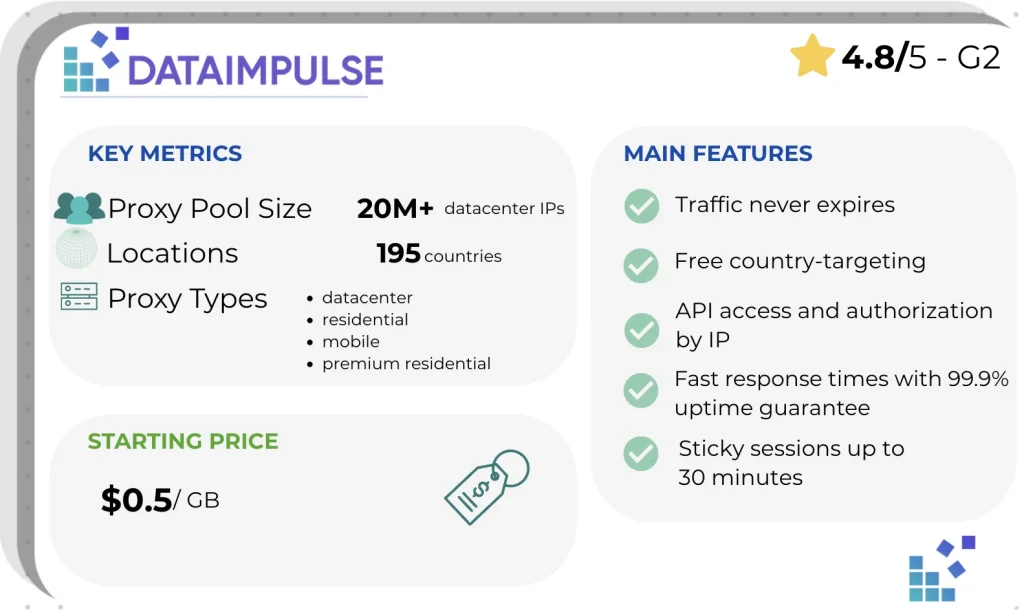
DataImpulse provides first-party ethical IPs. 20 million IPs from the datacenter pool can be used across 195 countries. Usage-based pricing means you’re billed only for the traffic used, and your credits never expire. Country targeting is already included, while advanced options like city, ZIP code, and ASN targeting are available for an additional cost.
One of the biggest advantages is that GBs are credited to your balance without an expiration date. You can spend 20 GB today, 0 GB the next two months, and 30 GB six months later.
Classic subscription model (Bright Data, Oxylabs, partly Decodo) implies that purchased 100 GB per month burn at the end of the billing cycle regardless of whether you used them. If you used 30 GB, then 70 GB just disappears. If you need more than, you have to pay the coverage rates, often 2x the base price. With the DataImpulse model, your remaining traffic is waiting for you on your account.
Starting price: $0.5/GB
Pros: first-party IP pool, the lowest price on the market, non-expiring traffic, transparent pricing, global coverage with detailed targeting, HTTP/HTTPS/SOCKS5 support, rotating and sticky sessions, 99.9% uptime, and sub-100ms response time.
Cons: smaller pool than BrightData or Oxylabs, proxies don’t work on government websites
Best for: research projects that require accurate data collection, startups, multi-client agencies, freelancers, seasonal workflows, etc.
2. Bright Data — best for enterprise scale
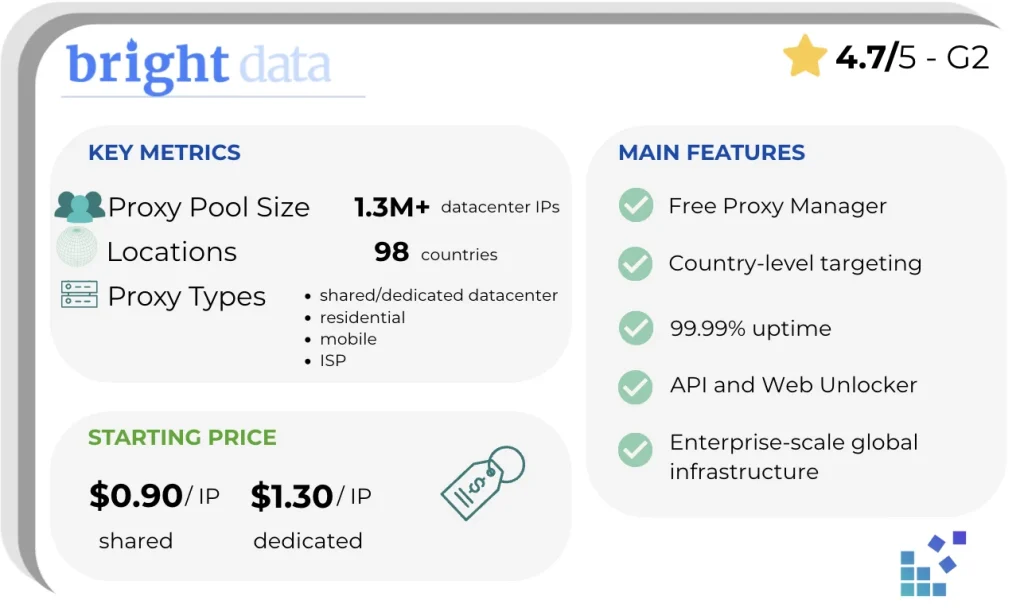
Bright Data, formerly Luminati, offers both shared and dedicated datacenter proxies. The network consists of more than 1.3 million dedicated and shared IPs across 98 countries. This provider has localized SEO and price monitoring, and users can filter traffic by country, state, city, ZIP code, and ASN. Another feature of Bright Data is a Proxy manager, a tool that lets you choose rotation, session continuity, routing logic, and usage limits depending on the zone.
- Starting price: $0.90/IP
- Pros: high success rates (99.9%), HTTP(S)/SOCKS5 protocols supported, live Network status page, country-level targeting, proxy management, AI integration.
- Cons: expensive, control panel may be complex for beginners, smaller accounts get slower responses from customer support, individual freelancers may have the feeling of not being the target customer.
- Best for: high-volume data scraping, regional e-commerce, tracking SERP positions, account management, and proxies for ad verification.
3. Oxylabs — best for large dedicated IP pools
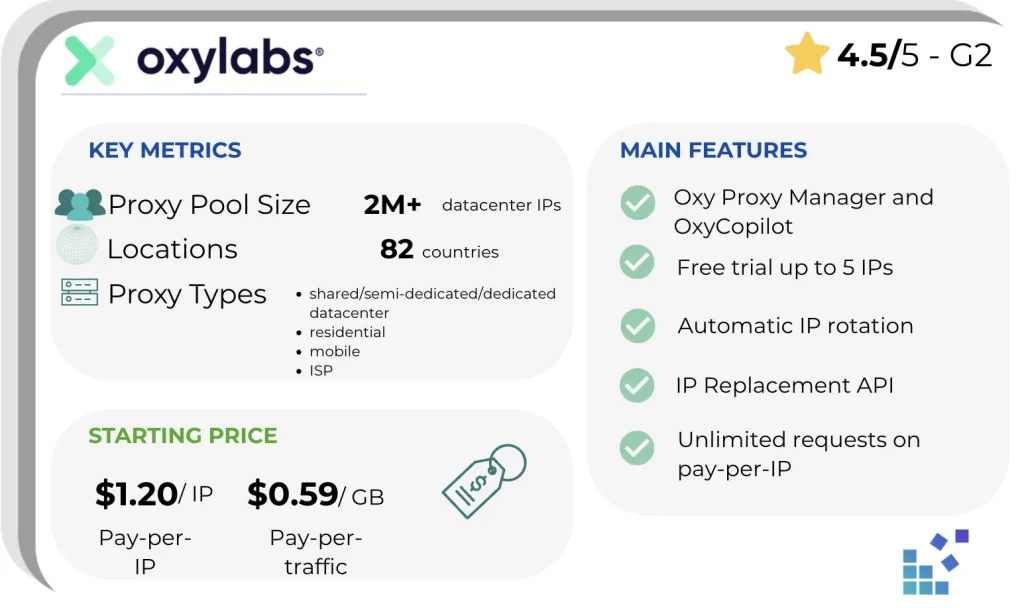
Oxylabs owns a large datacenter pool of 2M+ IPs in 8,000 subnets. This provider offers three levels of access: shared, semi-dedicated (1–3 clients per IP), and dedicated (fully your IP with unlimited bandwidth). The unique features, such as IP Replacement API for software replacement of burned IP, unlimited requests on the pay-per-IP model, and flexible rotation through the username parameters, make it the standard for highly loaded scraping operations, where pool quality and control automation weigh more than the starting price. The target customer is mostly mid-market and enterprises.
- Starting price: $1.20/IP, or $0.59/GB
- Pros: free trial available with up to 5 IPs, static sessions, automatic IP rotation, Oxy Proxy manager for Android users, easy setup, 2-3 seconds support response.
- Cons: costly pricing, limited customization, inflexible plans, and high minimums.
- Best for: review monitoring, market research, proxies for price comparison, and website change monitoring.
4. Decodo — best price-to-performance
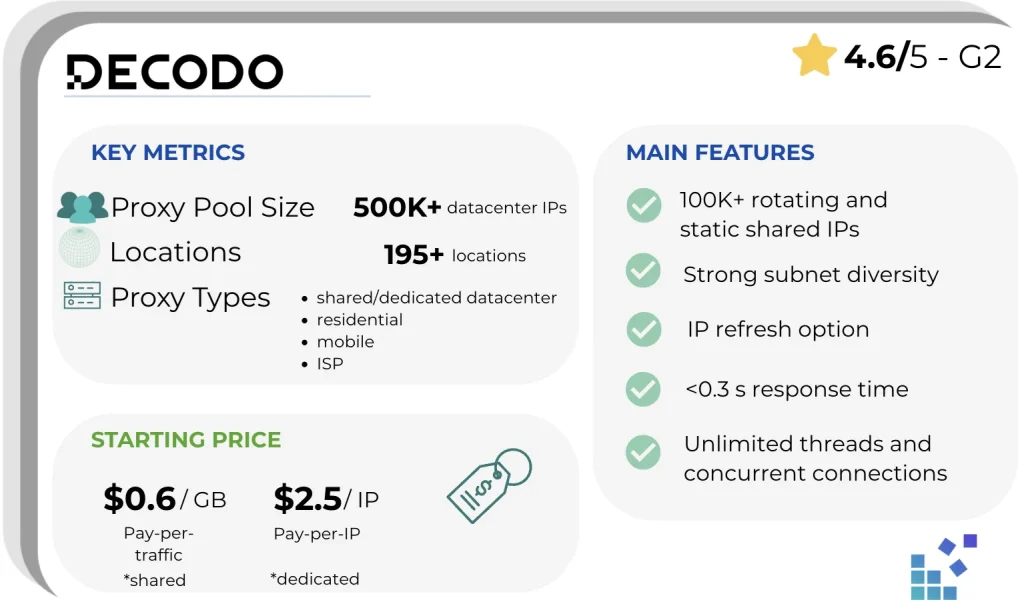
In 2025, Smartproxy started a rebrand and changed its brand name to Decodo. Specifically for the datacenter segment, Decodo has a pool with hundreds of subnets in the US and EU data centers. This isn’t comparable to DataImpulse or Bright Data, but it’s large enough for most commercial tasks and compensated by the price and quality of UX. Datacenter IPs are located exclusively in the US and EU data centers. This is a conscious choice as Decodo has positioned its datacenter infrastructure close to the most popular targets like Google, Amazon, and main ad networks.
Price is 2–3 times cheaper than Bright Data but more expensive than DataImpulse. Decodo offers a clean dashboard, port 10000 integration without additional settings, instant registration without mandatory KYC for basic tariffs.
- Starting price: $0.6/GB, or $2.5/IP
- Pros: beginner-friendly dashboard, detailed API documentation, plans include unlimited parallel sessions within a fixed bandwidth plan.
- Cons: limited geographical coverage for datacenter proxies, narrow city-level targeting, and most subscription plans come with bandwidth limits.
- Best for: mid-market SaaS and startup teams, affiliate marketers, individual developers and small teams, and agencies that resell web data.
5. Webshare — best free tier
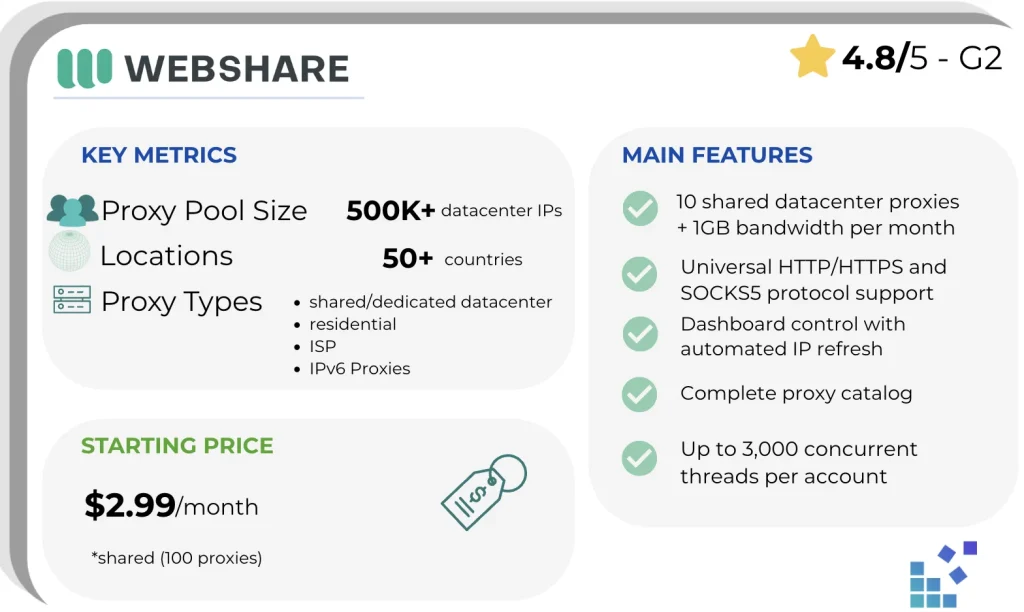
Webshare is an American proxy provider focused on accessibility and operational simplicity. It is a provider that grows customers from free side projects to production scale through a flexible pricing policy.
The free Webshare plan includes 10 shared datacenter proxies with 1 GB of traffic per month forever. Webshare fully supports HTTP/HTTPS/SOCKS5 and the same infrastructure (99.97% uptime) as on paid tariffs. However, free plans will not be enough for commercial production.
- Starting price: $2.99/month (100 shared datacenter proxies)
- Pros: free plan with up to 10 shared datacenter proxies plus 1 GB of traffic.
- Cons: no mobile proxies, no managed scraping APIs, only country-level targeting on the datacenter.
- Best for: developers, freelancers, startups in pre-revenue stages, data science projects, SEO specialists, and technical auditors.
6. IPRoyal — best for dedicated IPs on a budget
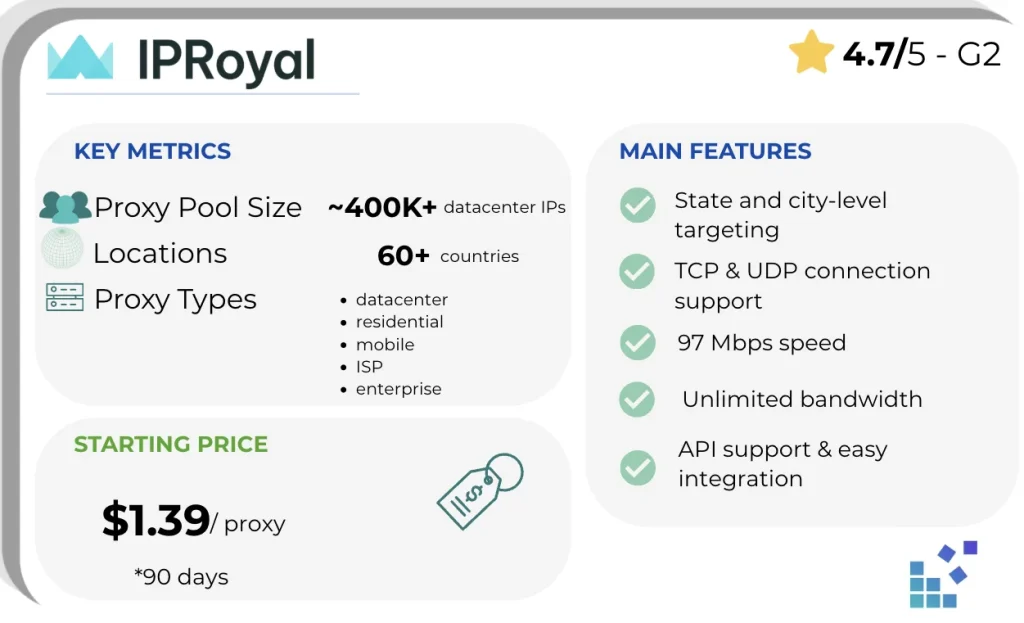
IPRoyal provides proxies that are easy to integrate with all kinds of tools and software. Their dashboard is client-friendly. The special feature is non-expiring traffic when the purchased traffic, for example, 50 GB, remains on the account forever, without monthly expiration or “use it or lose it” trap. It gives 30–60% real savings compared to subscription competitors in projects with irregular use of traffic.
- Starting price: $1.39 per proxy (if you choose 90 days)
- Pros: a full-service dashboard, no downtimes, 32ms latency, up to 10 000 concurrent sessions, pay-as-you-go model, unlimited bandwidth.
- Cons: smaller pool compared to competitors, US and EU locations are only covered, no free trial available, lack of configuration depth for engineering teams.
- Best for: entry-level marketers, SMM managers, e-commerce specialists.
7. Rayobyte — best for flexible purchasing
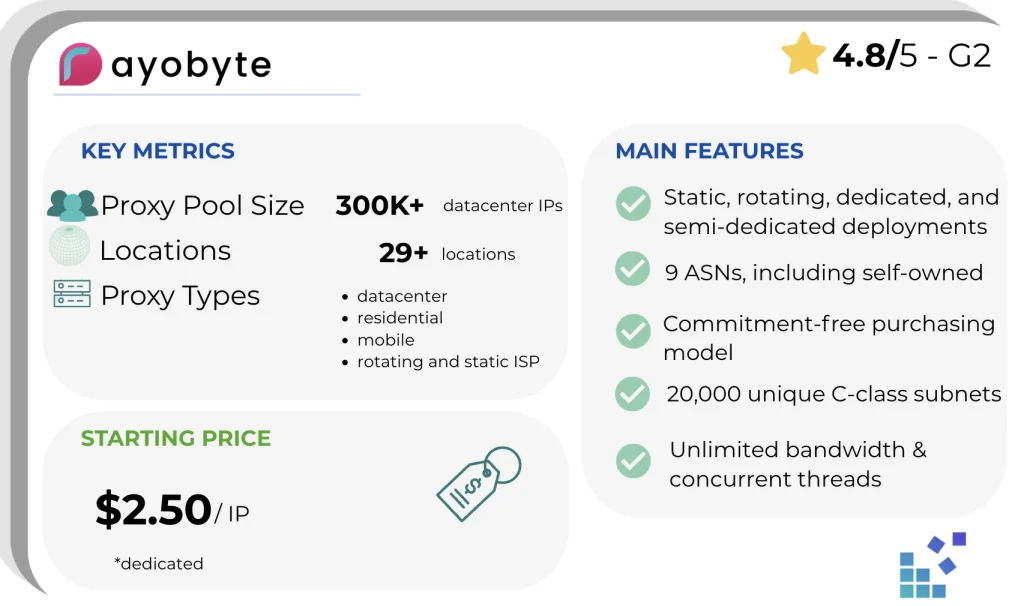
In 2022, the company changed its name from Blazing SEO to Rayobyte – a proxy and web data provider. Its datacenter proxy network is particularly popular among developers because of high speed and stable connections. Datacenter proxies are used where speed is the priority, for example, for tasks such as website scraping or running scripts. Rayobyte emphasizes flexibility and control. Users can choose between different proxy configurations, static for consistent sessions or rotating for data extraction. Rayobyte positions itself as a developer-friendly provider, so it’ll be perfectly relevant for teams that need integration into scraping pipelines, bots, or analytic systems.
- Starting price: $2.50/IP for dedicated datacenter proxies, $0.30 for rotating datacenter proxies.
- Pros: plans include unlimited bandwidth, shared/semi-dedicated, dedicated, and rotating datacenter proxies, no long-term contracts, strong network in the US, and ethical sourcing.
- Cons: limited datacenter IPs in EU, dashboard lacks features like IP Replacement API, and not all setups are documented.
- Best for: SERP analysis, SEO and price monitoring, US-centric ad verification, brand protection, and government data scraping.
8. ProxyFish — best rotating IPs on a budget
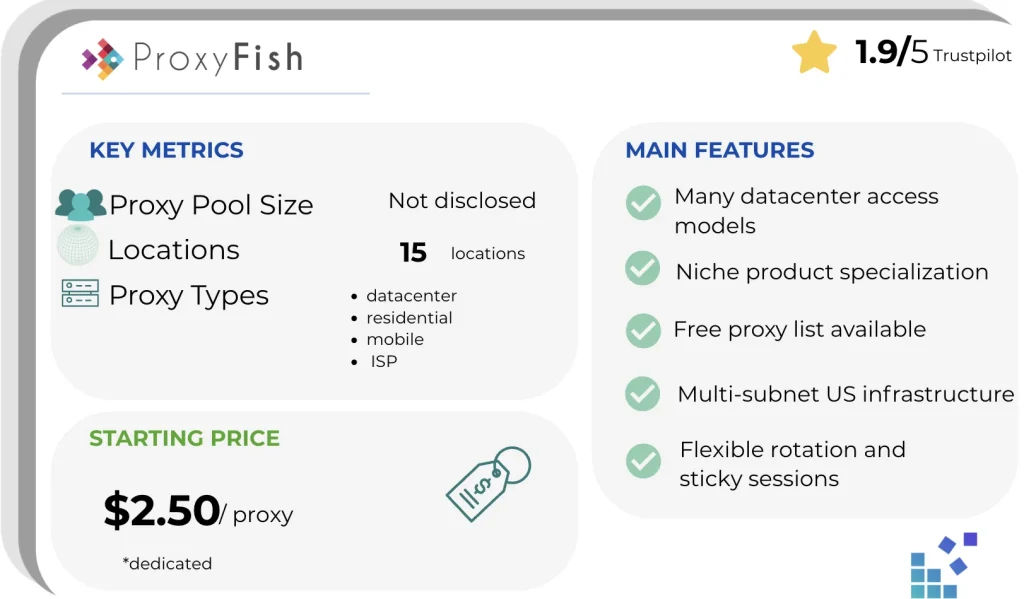
ProxyFish is a provider that focuses on proxy solutions for users who need access for scraping global data and automation. The platform is typically aimed at developers, marketing specialists, and teams who work with structured data extraction, SEO monitoring, and online research tasks. ProxyFish is often chosen for its simple setup and ability to support generic proxy-driven workflows without overly complex configuration, making it available for both smaller projects and more continuous scraping operations.
- Starting price: $2.50
- Pros: proxies for gaming, specialized SOCKS5 cases
- Cons: slow customer support responses, free Chrome/Firefox extensions included with paid private orders
- Best for: sneaker community, RuneScape players, SMM, bot automation operators.
How to choose the right datacenter proxy
Most failed purchases don’t mean that the provider is bad, but rather that buyers didn’t compare their real needs with the features of the product. Here is a structured checklist of what to specifically verify before clicking “Buy”.
- Pool size – The first thing to find out is how many IP addresses are actually in the pool. This is more important than marketing numbers. If the provider claims 100K IP and has 50K clients, there are 2 IPs per client. It doesn’t make sense for high-volume workloads.
- The pricing model – The most common mistake is to compare providers at the announced price instead of the cost per successful request. Check what is included in the base price. Is unlimited bandwidth included? Does the provider take sticky sessions separately? Find out about bulk discounts.
- Trial availability – Check the type of trial and if it requires a credit card and KYC. Free trial with a credit card requirement is often auto-converted into a paid subscription.
- Geographical coverage – It is important to know which countries you need and whether they are really available. Find out how detailed the targeting is.
Use case matrix: scraping, SEO tools, ad verification, sneakers
For enterprises, e-commerce, data, and financial platforms, or complex anti-bot systems, Bright Data and Oxylabs are recommended as they offer high stability, a large pool of IPs, and the best success rate on complex sites.
For universal production tasks with a good price-quality balance, such as web scraping, SEO monitoring, automation, and SMB projects, DataImpulse and Decodo will be great. They are more flexible solutions that close most typical cases well without overpayment.
For budget use, tests, simple scraping, and small projects, users can consider Webshare and IPRoyal. They offer cheap access to proxies, but with a more limited success rate on secure sites.
For very low-cost scraping and basic technical tasks without high requirements for anti-bot resistance, you can use Rayobyte, especially when price and speed are important.
ProxyFish works well for simple niche or “light usage” scenarios, testing, small queries, and experiments, where the key advantage is basic functionality without complexity and high costs.
To put it briefly: Bright Data and Oxylabs for enterprise, DataImpulse and Decodo for balanced production, Webshare, DataImpulse and IPRoyal for budget-friendly access, Rayobyte for basic tech tasks, ProxyFish for lightweight testing.
How to test a provider before committing
ISP marketing claims and even independent benchmarks may differ from how proxies will actually work on your specific targets. Self-testing in the trial period is 2-3 hours of work that can save you from larger expenses later. Here are some steps to test a provider.
Step 1 – IP reputation check. This is the fastest and cheapest way to detect burned IP before you pay for the pool. Scamalytics (scamalytics.com) shows a risk score from 0 to 100, based on fraud history and spam activity. To start, go to scamalytics.com, enter the trial IP proxy of the provider, and check the risk score or fraud history. If the result shows 0-25, it means a low risk and that the IP is clean. If it is 26-50, IP has some history but is acceptable. In the case of 51-75, IP is problematic, and many social networks and e-commerce platforms will block it. If you see 76-100, it is a very high risk.
If more than five randomly selected IPs from the pool show risk >50, this is a signal that the pool is compromised. This test is especially useful for residential, but it also works for datacenter.
Step 2 – Measurement of response rate. The speed critically depends on the geographic routing from the proxy server to the target, and on the overhead of the gateway provider itself. The simplest and most accurate method is using curl:
curl -x http://LOGIN:[email protected]:8080\
-w "Response Rate: %{time_connect}s\n" \
-o /dev/null -s \
https://example.com
Possible results:
time_connect <50ms means an excellent data center
time_connect 50-150ms means acceptable
time_connect >200ms means weak, common routing problems
Step 3 – Measuring block rate on your real targets. This is the most important test because success on your targets does not directly correlate with generic benchmarks. You can basically run 100-1000 requests through proxies on your real targets and measure response codes. Here is the code:
import requests
success_codes = [200]
soft_block_codes = [403, 429, 503] # blocked but accessible
hard_block_codes = [451, 444] # legal/network level blocks
captcha_indicators = ['captcha', 'verify you are human', 'cloudflare', 'datadome']
target_website = "https://www.google.com/"
proxies = {
"http": "http://LOGIN:[email protected]:8080",
"https": "https://LOGIN:[email protected]:8080"
}
results = {'success': 0, 'soft_block': 0, 'hard_block': 0, 'captcha': 0, 'error': 0}
for i in range(100):
try:
r = requests.get(target_website, proxies=proxies, timeout=10)
if r.status_code in success_codes:
if any(ind in r.text.lower() for ind in captcha_indicators):
results['captcha'] += 1
print(f"CAPTCHA detected!\n Results: {results}")
else:
results['success'] += 1
print(f"Successful Request\n Results: {results}")
print(f"\n {r.status_code}")
elif r.status_code in soft_block_codes:
results['soft_block'] += 1
print(f"Anti-bot system detected\n Results: {results}")
elif r.status_code in hard_block_codes:
print(f"Network level block\n Results: {results}")
results['hard_block'] += 1
except Exception as e:
results['error'] += 1
print(f"Error\n Results: {results}\n Error Text: {e}")
print(results)
Frequently asked questions
Are datacenter proxies legal?
Yes. Using a datacenter proxy is legal in most cases. The thing that really matters is what you do with it. Scraping publicly available data, checking ads, testing apps across regions - all standard use cases and all are legal.
Can websites detect datacenter proxies?
Datacenter proxies send requests through IP addresses from server networks. They are cheap and fast. Yet, because these IP addresses come from data center ranges, some target websites can detect and block them.
What’s the difference between static and rotating datacenter proxies?
Static and rotating datacenter proxies differ in how often your IP address changes. Static proxies give a fixed IP address for a long period of time. Rotating proxies automatically change IP addresses at set intervals. That is the main difference.
Datacenter proxy vs VPN: what’s the difference?
Datacenter proxies are fast and good for technical tasks. VPN is more focused on privacy and security. Proxy runs at the level of an individual application or tool, and a VPN runs at the level of the entire device. Also, proxies are usually more convenient for automation, and VPN provides better encryption and traffic protection.
Conclusion
The choice of a proxy provider always depends on the budget and the specific task of a client. It includes speed, anonymity requirements, and the complexity of the target sites. In the enterprise segment, the residential solutions usually win, as they provide the highest success rate and stability on complex platforms. In the mid-budget segment, the best decision is high-quality datacenter proxies combined with residential. If your budget is low, datacenter proxies almost always have the advantage due to the low price and high speed, although with a higher risk of blocking.
In general, the right choice is a compromise between cost and success rate for a specific task, so before the final decision, it is worth testing several providers on real target sites, where their real quality is best seen.

 State/City/Zip/ASN Targeting



