
In this Article
Run a scraper without proxies and you’ll get a few hundred requests before the target notices. Then come the rate limits, the CAPTCHAs, the 403s, and the empty pages. The proxy you pick decides whether a job finishes clean or bleeds budget on retries — it’s the single biggest lever on your success rate and your cost per record.
This guide ranks the 8 best proxies for web scraping in 2026. The picks are built on each provider’s real product data — proxy types, pool size, rotation, geo-targeting, current pricing, and published success rates — not vibes. If you’re in a hurry, jump to the quick comparison and you’ll have a shortlist in thirty seconds. If you want the reasoning, the full reviews and the proxy-type breakdown are below.
Key Facts
The proxy type you choose drives both your success rate and your bill. There are four kinds that matter for scraping, and they trade off anonymity, speed, and price differently:
- Residential — real consumer ISP IPs. Highest trust on protected sites, higher cost.
- Datacenter — server IPs. Fastest and cheapest, easiest to detect.
- ISP / static residential — ISP-assigned IPs hosted with datacenter stability. Trust of residential, speed of datacenter, good for long sessions.
- Mobile — carrier IPs (3G/4G/5G). Highest trust, highest price, slower.
Get the match right and your scraper sails through. Get it wrong and you’ll pay more in failed requests than you ever saved on a cheap plan. Most serious scraping stacks end up mixing two or three types by target — datacenter for the open pages, residential for the protected ones, ISP or mobile for the sessions and the hard cases.
One more thing worth saying up front: the provider matters less than people think once you’ve picked the right type. A good residential pool from any of the eight below will clear most protected sites. Where they really differ is price, geo-targeting depth, and how cleanly the rotation and session controls fit your workflow — which is what the reviews focus on.
How We Selected These Proxies
We didn’t rank by marketing copy. Each provider had to earn its spot on measurable factors:
- Proxy mix — does it cover residential, datacenter, ISP, and mobile, so you can match the IP type to the target?
- Pool and coverage — advertised IP count, country coverage, and whether geo-targeting goes below country level (city, ZIP, ASN).
- Rotation control — per-request rotation, sticky sessions, timed sessions, and static-IP options.
- Price transparency — the current public starting price from each vendor’s own pricing page.
- Reputation — G2 and Trustpilot ratings, treated as reputation signals, not proof of performance.
- Trial and entry risk — free trials, small pay-as-you-go minimums, or refunds, so you can test before you commit.
The eight that made the list cover the full range — from a $0.50/GB budget pool to enterprise networks with hundreds of millions of IPs and a fully managed scraping API. What they share is real scraping pedigree and transparent terms.
What Makes a Proxy Good for Web Scraping?
Six things separate a proxy that quietly works from one that wastes your time:
- Success rate — the share of requests that return real data instead of a block or CAPTCHA. On protected sites this is the number that actually decides cost.
- Speed — response time and concurrency. Matters most for high-volume crawls on lighter targets.
- Anonymity — how convincingly the IP reads as an ordinary user. Residential and mobile win here; datacenter is easiest to fingerprint.
- Pool size and freshness — a bigger, well-maintained pool means fewer reused or already-flagged IPs.
- Rotation — automatic per-request rotation for volume, sticky sessions for logins and multi-step flows.
- Price model — per-GB pay-as-you-go scales with the data you pull; fixed monthly plans punish uneven workloads.
A quick reality check on success rates: there is no universal “residential beats datacenter by X%.” The real gap depends on the target’s defenses, your headers, TLS and browser fingerprinting, rate limits, and retry logic. The practical rule — datacenter wins on cost and speed for unprotected pages; residential or ISP wins on cost-per-success for protected ones, because far fewer requests get blocked.
The metric that should drive your decision is cost per successful request, not headline price per GB. A $0.50/GB datacenter proxy looks cheap until a protected target blocks 80% of your requests — now you’re paying for five attempts to get one record, plus the engineering time to manage retries and CAPTCHAs. A $1/GB residential proxy that succeeds 95% of the time is far cheaper in practice on that same target. Always test a small batch against your actual targets and measure the success rate before you commit budget; the right answer is usually “cheap datacenter for the easy pages, residential for the hard ones,” not one type for everything.
Quick Comparison: Best Proxies for Web Scraping at a Glance
The table below compares all eight providers on the parameters that matter most, so you can narrow the field to one or two before reading the full reviews.
| Provider | Proxy Types | Pool Size | Rotation | Geo-targeting | Starting Price | Best For |
|---|---|---|---|---|---|---|
| DataImpulse | Residential, datacenter, mobile | 90M+ res / 20M DC | Rotating, sticky | 195 countries; city/ZIP/ASN add-on | $1/GB res; $0.50/GB DC | Best value PAYG scraping |
| Bright Data | Residential, DC, ISP, mobile | 400M+ res; 1.3M+ DC/ISP | Rotating, sticky, dedicated | Country/state/city/ZIP/ASN | $4/GB promo res; $0.60/GB DC | Enterprise controls |
| Oxylabs | Residential, DC, ISP, mobile | 175M+ residential | Flexible, sticky | Country/city/state/ZIP/ASN | $6/GB res starter | Enterprise-scale scraping |
| Decodo | Residential, DC, ISP, mobile | 115M+ residential | Per-request, sticky 30 min | Continent→city/ZIP/ASN | $3.75/GB starter | Mid-market usability |
| NetNut | Residential, DC, ISP, mobile | 85M+ residential | Rotating / static | 195+ countries; city/state | $3.53/GB res; $1/GB DC | Stable business workflows |
| ScraperAPI | Scraping API + proxy pools | 40M+ proxies | API-managed | Country (limited) | $49/month | Hands-off managed scraping |
| Rayobyte | Residential, DC, ISP, mobile | 40M+ residential | Rotating, sticky, static | Country; static city inventory | $3.50/GB res; $0.30/GB rot. DC | Mixed proxy stacks |
| GeoNode | Residential, ISP, rotating DC | Millions; 190+ countries | Automatic | 190+ countries | from $0.79/GB res; $0.40/GB DC | Low-cost bandwidth |
Indicative starting rates from each provider’s own pricing pages (May 2026). Volume discounts apply and prices change, so check current numbers before you buy.
Each provider gets a full review below, with the data behind these numbers and where it genuinely fits.
Best Proxy Types for Web Scraping — Which One Do You Need?
The type you pick changes your success rate and your budget more than the brand does. Here’s when each one earns its place.
Residential Proxies
Residential proxies route through real consumer ISP connections, so protected sites read them as ordinary households. They’re the default — and often the only thing that works — for e-commerce, search engines, travel, social platforms, and localized pages with serious anti-bot defenses. The trade-off is cost: you pay more per GB than datacenter, but on a protected target you pay less per successful request, because far fewer get blocked. Use residential whenever the target fingerprints IPs or serves localized content you need to see as a local user — Amazon and other large marketplaces, Google and other search engines, sneaker and ticketing sites, social platforms, and travel aggregators that vary prices by location. If your scraper suddenly started returning CAPTCHAs on a target that used to work, switching to residential is almost always the first fix.
Datacenter Proxies
Datacenter proxies come from servers, which makes them fast and cheap. They’re the right tool for open or lightly-defended sites, bulk crawling, internal QA, and high-volume monitoring where the target doesn’t aggressively classify IP ranges. The catch is detectability: datacenter ranges are easy to identify, and on protected sites you’ll see a high block rate. Good targets for datacenter include public APIs, documentation and news sites, smaller e-commerce stores without serious bot defenses, internal dashboards, and large-scale link or price crawls where the occasional block is cheaper than paying residential rates. The practical rule — reach for datacenter when speed and cost beat stealth, and switch to residential the moment a target starts challenging you.
ISP Proxies
ISP (static residential) proxies use ISP-assigned IPs hosted on datacenter-grade infrastructure. You get the legitimacy of a residential IP with the stability and speed of a datacenter one, on an address that doesn’t change under you. That combination is exactly what logins, account workflows, long sessions, ad verification, and “don’t punish me for switching IPs” tasks need. Most competitors gloss over ISP proxies, but for session-heavy scraping they’re often the sweet spot — and underrated for it. If you’re scraping behind a login, building up a cart, or running a workflow that breaks the moment your IP changes, ISP gives you a stable, trusted address that holds for as long as you need it.
Mobile Proxies
Mobile proxies use carrier IPs from 3G/4G/5G networks. Because many real users share a single carrier IP, anti-bot systems treat them as the highest-trust traffic there is. They’re slower and the most expensive per GB, so they’re not a default — but for mobile-first platforms, carrier-targeted data, and the most aggressively defended targets, they’re sometimes the only thing that gets through.
Rotating vs. Static — When Each Makes Sense
Rotating proxies change IP per request or on a timer; static (sticky) proxies hold one IP for minutes or hours. Use rotating for large-scale crawling, where a fresh IP per request keeps you under rate limits. Use static/sticky when you need to stay logged in, keep a cart, or finish a multi-step localized journey — anywhere a sudden IP change breaks state. A simple rule: rotate for breadth, stick for depth. In practice you’ll often use both in one project — rotating residential to harvest listing pages at scale, then a sticky session to drill into a specific account or checkout flow without tripping the site’s defenses.
Best Proxies for Web Scraping — Full Reviews
We ranked these on value for scraping — the balance of success rate, proxy coverage, pricing transparency, and how little it costs to get started. DataImpulse leads on value; the rest each win a specific lane.
1. DataImpulse
DataImpulse is the best-value pick for most scraping teams. It runs a 90M+ residential pool of ethically sourced IPs plus a 20M datacenter pool across 195+ countries, with mobile and premium residential on top — so you can match the IP type to the target without leaving one dashboard. Residential is $1/GB and datacenter $0.50/GB, both pay-as-you-go, and the traffic you buy never expires. It supports HTTP, HTTPS, and SOCKS5, rotating and sticky sessions (datacenter sticky up to 30 minutes), and country targeting is included, with city, ZIP, and ASN available as granular add-ons.
What makes it the default is the price-to-capability ratio: $1/GB residential is a fraction of enterprise rates, there’s no subscription, and support is staffed by humans 24/7 for when a target changes its defenses mid-run. DataImpulse publishes a 99.51% success rate, holds a 4.8/5 on G2, and works with Scrapy, Selenium, Playwright, Puppeteer, and any custom script.
DataImpulse — quick specs. Types: residential, datacenter, mobile · Pool: 90M+ res / 20M DC, 195+ countries · Rotation: rotating + sticky · Geo: country (city/ZIP/ASN add-on) · Price: $1/GB res, $0.50/GB DC, PAYG no expiry · Published success: 99.51% · Ratings: G2 4.8, Trustpilot 3.7 · Trial: $5 intro, 7-day refund. Best for: teams that want low pay-as-you-go pricing, no subscription lock-in, and broad geo coverage.
2. Bright Data
Bright Data is the enterprise heavyweight: residential, datacenter, ISP, and mobile, plus a Web Unlocker and ready-made scraping APIs, all wrapped in a Proxy Manager with deep controls. Its pricing page advertises a 400M+ residential network across 195 countries and granular city/state/ZIP/ASN targeting. Residential pay-as-you-go lists at $8/GB (currently $4/GB with a coupon), and datacenter starts around $0.60/GB PAYG. It’s powerful, compliance-focused, and priced like enterprise software, with a learning curve to match.
Bright Data — quick specs. Types: residential, DC, ISP, mobile · Pool: 400M+ monthly res; 1.3M+ DC/ISP · Rotation: rotating, sticky, dedicated · Geo: country/state/city/ZIP/ASN · Price: $4/GB promo res, $0.60/GB DC PAYG · Published success: up to 99.95%+ (vendor) · Ratings: G2 4.7, Trustpilot 4.5 · Trial: available. Best for: enterprises that need compliance, granular controls, and broad product coverage.
3. Oxylabs
Oxylabs sits next to Bright Data at the top. It offers residential, datacenter, ISP, and mobile proxies plus a Web Unblocker and scraper APIs, with one of the deepest targeting sets around — continent, country, city, state, ZIP, coordinates, and ASN. Residential starts at $6/GB on the entry plan and falls to $2.50/GB at terabyte volume. Oxylabs publishes a 99.95% residential success rate and backs it with strong support and compliance, which is why large, reliability-sensitive teams pick it despite the premium entry price.
Oxylabs — quick specs. Types: residential, DC, ISP, mobile · Pool: 175M+ residential, 195 locations · Rotation: flexible, sticky, unlimited concurrency · Geo: country/city/state/ZIP/coordinates/ASN · Price: from $6/GB res (to $2.50/GB at volume) · Published success: 99.95% · Ratings: G2 4.5, Trustpilot 3.8 · Trial: available. Best for: large-scale, compliance-sensitive scraping where performance and targeting depth beat entry price.
4. Decodo (formerly Smartproxy)
Decodo built its name on easy onboarding, and it’s grown into a full stack: residential, ISP, mobile, and datacenter proxies, a site unblocker, and scraping APIs, all on a clean dashboard. The residential pool spans 195+ locations with continent-to-ZIP and ASN targeting, per-request rotation, and sticky sessions up to 30 minutes. Residential plans start at $3.75/GB (pay-as-you-go around $4/GB, dropping toward $2/GB at high volume). Decodo publishes a 99.86% residential success rate and offers a short free trial, making it a strong middle ground for teams that want capability without enterprise friction.
Decodo — quick specs. Types: residential, DC, ISP, mobile · Pool: 115M+ res, 10M+ mobile, 500K+ DC · Rotation: per-request, sticky 30 min · Geo: continent/country/state/city/ZIP/ASN · Price: $3.75/GB starter, ~$4/GB PAYG · Published success: 99.86% · Ratings: G2 4.6, Trustpilot 4.2 · Trial: 3-day, 100MB. Best for: SMB and mid-market teams that want a balance of usability, pool size, and targeting.
5. NetNut
NetNut leans on a direct-ISP architecture for stable, fast residential connections, with static residential/ISP, datacenter, and mobile options alongside. The residential network covers 195+ countries with unlimited connections on residential plans, and static products allow city/state selection — useful for long-running, session-heavy jobs. Residential starts at $3.53/GB on a 28GB monthly plan, and datacenter at $1/GB on a 100GB plan. NetNut doesn’t headline a residential success-rate figure on its product page (third-party summaries cite roughly 98%), but its reputation for stable, business-grade infrastructure is strong, with a 4.3/5 on Trustpilot.
NetNut — quick specs. Types: residential, DC, ISP/static, mobile · Pool: 85M+ residential · Rotation: rotating + static, unlimited connections · Geo: 195+ countries; city/state on static · Price: $3.53/GB res, $1/GB DC · Published success: none headlined (~98% third-party) · Ratings: G2 4.9, Trustpilot 4.3 · Trial: 7-day mentioned. Best for: businesses that want direct-ISP stability and enterprise sales support for long-running tasks.
6. ScraperAPI
ScraperAPI is the odd one out in the best way: it’s not a raw proxy pool but a scraping API that manages proxy rotation, retries, CAPTCHAs, and JavaScript rendering behind a single endpoint, with premium residential and mobile pools available to paid users. You send a URL, it returns the data — no proxy plumbing. Plans start at $49/month (Startup $149, Business $299), with premium residential/mobile requests costing more API credits. Geo-targeting is limited on lower tiers (US/EU), with country-level on Business. It’s the right pick when you’d rather buy scraping outcomes than manage infrastructure.
ScraperAPI — quick specs. Type: scraping API + managed proxy pools · Pool: 40M+ proxies claimed, 50+ countries · Rotation: automatic, API-managed · Geo: country (limited; no city/state) · Price: from $49/month · Published success: “near-perfect” claimed, no public % · Ratings: G2 4.3, Trustpilot 4.5 · Trial: available. Best for: teams that want results without managing proxies, retries, and CAPTCHA handling.
7. Rayobyte
Rayobyte offers one of the widest menus here — rotating and static residential, rotating and static datacenter, rotating and static ISP, mobile, and a web unblocker — which makes it a flexible base for a mixed proxy stack. Its standout value is datacenter: rotating datacenter starts at just $0.30/GB, while rotating residential starts at $3.50/GB and static datacenter runs per-IP. Geo-targeting is country-level for residential, with city options on static inventory. Third-party benchmarks (Proxyway, via Decodo) put Rayobyte’s success rate around 99.47%; it carries a 4.2/5 on Trustpilot and offers a short risk-free trial.
Rayobyte — quick specs. Types: residential, DC, ISP, mobile · Pool: 40M+ residential (reported) · Rotation: rotating, sticky, static · Geo: country; static city inventory · Price: $3.50/GB res; $0.30/GB rotating DC · Published success: ~99.47% (third-party) · Ratings: Trustpilot 4.2 · Trial: short risk-free. Best for: budget-conscious teams that want to mix residential with strong datacenter/ISP options.
8. GeoNode
GeoNode is the low-cost, high-bandwidth option. It focuses on residential, ISP, and rotating datacenter proxies across 190+ countries, with automatic rotation and simple, bandwidth-first pricing. Residential starts at $0.79/GB (dropping to $0.50/GB at 1,000GB) and datacenter from $0.40/GB, with large plans (for example, 1,000GB for $500/month) and a $5 trial that includes a chunk of residential or datacenter traffic. GeoNode publishes a 99% success rate on its product pages and carries a strong 4.9/5 on Trustpilot. If your scraping is bandwidth-heavy and your targets aren’t the most defended, it’s hard to beat on price.
GeoNode — quick specs. Types: residential, ISP, rotating DC · Pool: millions of IPs, 190+ countries · Rotation: automatic/frequent · Geo: 190+ countries · Price: from $0.79/GB res; $0.40/GB DC · Published success: 99% · Ratings: Trustpilot 4.9 · Trial: $5 / 10GB. Best for: low-cost, high-bandwidth scraping where simple pricing and rollover matter.
How We Tested
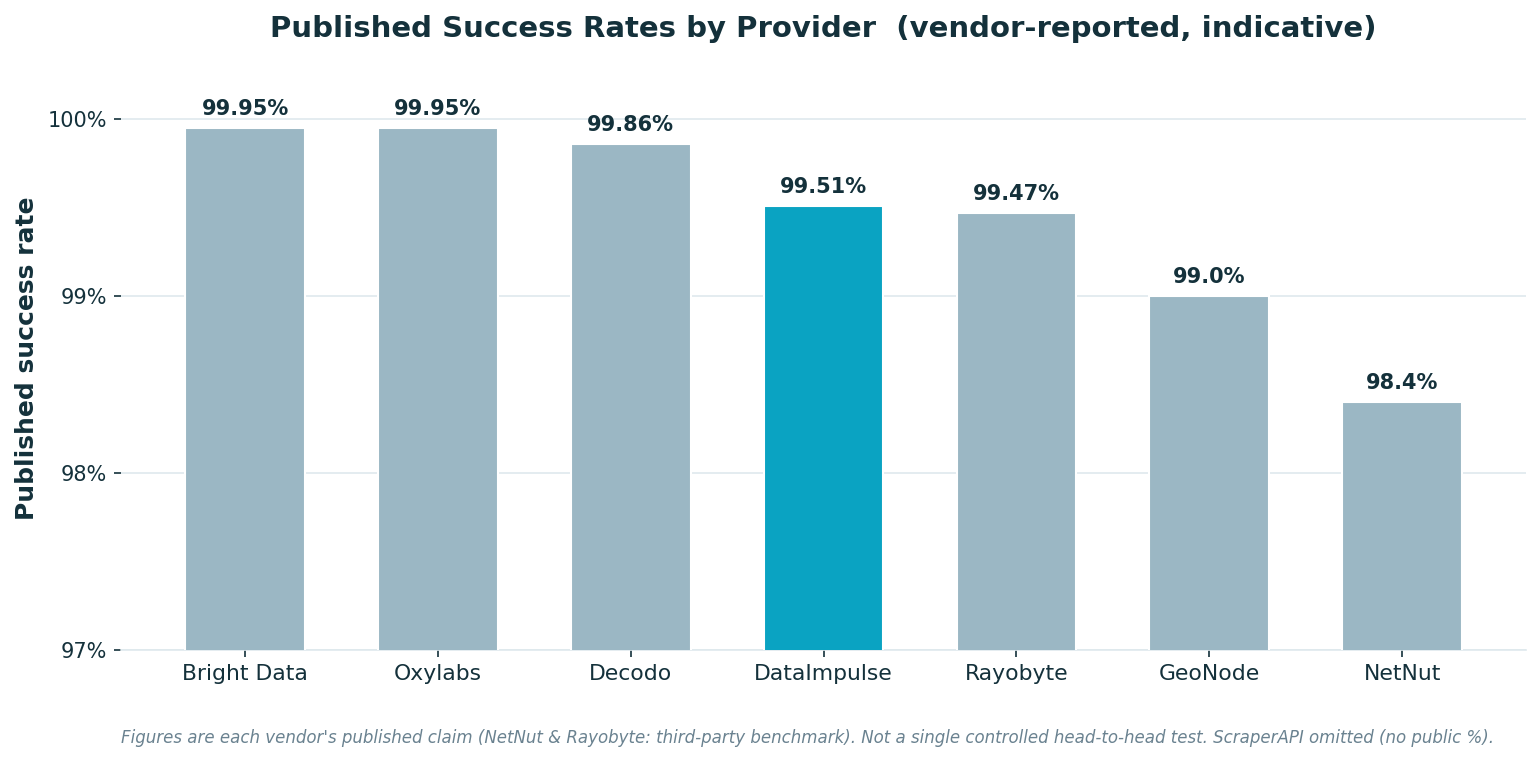
A word on the numbers, because honesty matters more than a tidy chart. The success rates below are each vendor’s published figures (or, where a vendor doesn’t publish one, a clearly-marked third-party benchmark) — not results from a single controlled DataImpulse test lab. Providers measure success differently (which targets, which retry logic, which time window), so treat these as directional, not head-to-head proof.
We compiled them from each provider’s own product and pricing pages and reputable third-party reviews, alongside the criteria in “How We Selected” — proxy mix, pool size, rotation, geo-targeting, transparent pricing, reputation, and trial access. The takeaway isn’t “the highest bar wins.” It’s that the top providers cluster at the top of the published range (≈99–99.95%), so for most teams the deciding factors become price, proxy-type coverage, and how much it costs to get started — which is exactly what the next section weighs.
Conclusion
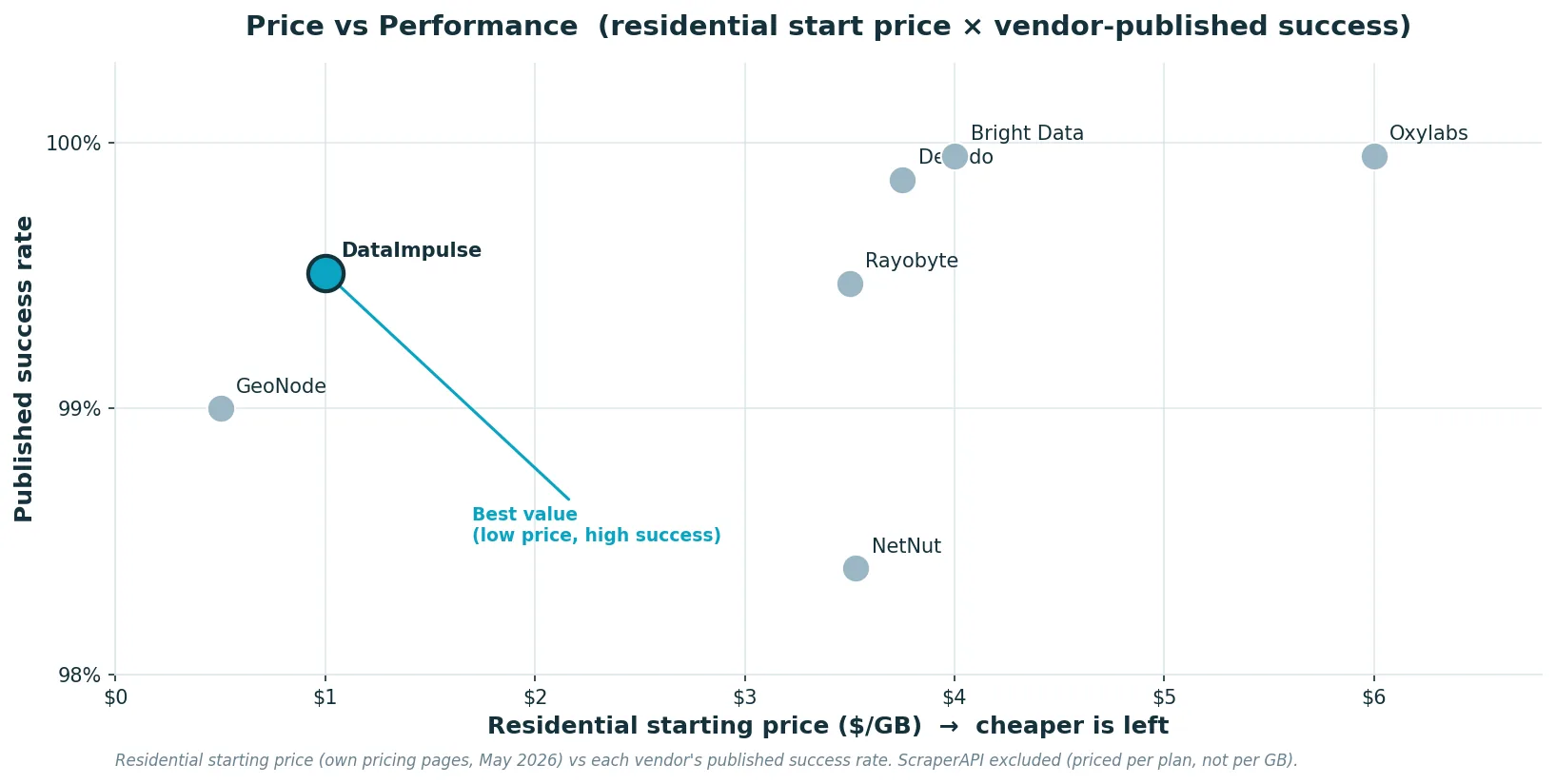
For most scraping teams in 2026, DataImpulse is the best-value choice: a published 99.51% success rate sits right in the top cluster, but at $1/GB residential and $0.50/GB datacenter, pay-as-you-go with no expiry, it costs a fraction of the enterprise options. That’s the pattern the price-vs-performance view below makes obvious — once several providers land in the same success-rate band, value comes down to what you pay to get there.
If you need a packaged SERP or scraping API and have enterprise budget, Bright Data and Oxylabs are the safe, deep, compliance-heavy picks. Decodo and NetNut are solid mid-market choices; ScraperAPI is the move when you want hands-off results; Rayobyte and GeoNode win on raw cost for datacenter-heavy and bandwidth-heavy jobs. Match the proxy type to your target, start small on a trial or pay-as-you-go, and scale the one that gives you the best cost-per-successful-request.
Ready to scrape without the blocks? Start with DataImpulse at $1/GB residential or $0.50/GB datacenter, pay-as-you-go, with traffic that never expires — and scale only what works.
FAQ
Which proxies are best for web scraping?
Residential proxies are the best default, because real ISP IPs get through on protected sites like Amazon and Google. Use datacenter for cheap, high-volume scraping of lighter sites, ISP for stable long sessions, and mobile for the most defended or mobile-first targets. DataImpulse covers residential ($1/GB), datacenter ($0.50/GB), and mobile in one place.
Do I need rotating or static proxies for scraping?
Rotating for high-volume crawling, where a fresh IP per request keeps you under rate limits. Static or sticky sessions when you need to stay logged in or finish a multi-step flow on one IP.
How much do web scraping proxies cost?
Residential ranges from about $0.50/GB (GeoNode, budget tiers) to $6–8/GB at enterprise vendors, with volume discounts. Datacenter is far cheaper, from $0.30–1/GB. Managed scraping APIs like ScraperAPI price by plan, from $49/month. Pay-as-you-go beats fixed plans for uneven workloads.
Are residential proxies better than datacenter for scraping?
On protected, anti-bot-heavy sites, yes — residential IPs read as real users and get blocked far less. Datacenter is better for speed and cost on sites that don’t aggressively fingerprint IPs. Many teams route each target to the cheaper type that still gets through.
Is web scraping with proxies legal?
Using proxies is generally legal. Scraping itself depends on what you collect and how: scrape public data, respect terms and robots rules, don’t bypass logins or access controls, and don’t collect personal data without a lawful basis. Proxies reduce blocks; they don’t make unlawful scraping lawful. This isn’t legal advice, and rules vary by country.
Can I use these proxies with Python, Scrapy, or Selenium?
Yes. DataImpulse and the other raw-proxy providers work with Scrapy, Selenium, Playwright, Puppeteer, and any custom script — you set the proxy endpoint and credentials and send requests as usual. ScraperAPI works through its API instead of a proxy endpoint.

 State/City/Zip/ASN Targeting



