

In this Article
Selenium has driven browser automation and scraping for over a decade, and it’s still everywhere in 2026 — Python and Java teams use it to render JavaScript, fill forms, and collect data behind logins. But run it from a single datacenter IP and you’ll be blocked or rate-limited fast. The fix is to route Selenium through proxies — ideally residential — so each session looks like an ordinary user. The wrinkle: Chrome won’t accept a proxy username and password through Selenium’s standard options, and the package most tutorials still recommend for it (selenium-wire) is now archived and breaks on current dependencies. This guide shows the setups that actually work in 2026, then ranks the 8 best proxies for Selenium by price, success rate, and integration.
I’m Andrii Byzov, an AI-Native Fractional CMO who runs Selenium-based data pipelines daily. Below: the proxy setup that won’t break on you, the authentication options that replaced selenium-wire, and the providers worth your budget — with DataImpulse residential at $1/GB as the value baseline.
Key Facts
- Set an unauthenticated proxy with a Chrome flag. Add
--proxy-server=http://host:porttoChromeOptions; it applies to the whole driver session. Simplest when your proxy supports IP whitelisting (no username/password needed). - Selenium can’t feed HTTP-proxy credentials to Chrome through its standard options. For username/password auth use IP whitelisting, a credentials Chrome extension (e.g. the
selenium-authenticated-proxyhelper), or SeleniumBase’sDriver(proxy="user:pass@host:port"). - Don’t reach for
selenium-wirein 2026. It was archived upstream and breaks at import on recentblinkerversions — use the options above instead. - SOCKS5 auth isn’t supported by Chromium, so keep authenticated residential proxies on the HTTP/HTTPS endpoint and reserve SOCKS5 for IP-whitelisted access.
- DataImpulse is the value pick — residential $1/GB pay-as-you-go, datacenter $0.50/GB, mobile $2/GB, 90M+ IPs across 195 countries, HTTP/HTTPS/SOCKS5, country/city/ASN targeting, and IP whitelisting so Selenium setup stays one line — a fraction of enterprise pricing.
How to Set Up a Proxy in Selenium (Python)
Three setups, depending on whether your proxy uses IP whitelisting or username/password auth.
1. Unauthenticated / IP-whitelisted (the simplest)
Whitelist your server’s IP in the DataImpulse dashboard, then no credentials are needed in code:
from selenium import webdriver

options = webdriver.ChromeOptions()
options.add_argument('--proxy-server=http://gw.dataimpulse.com:823')

driver = webdriver.Chrome(options=options)
driver.get('https://httpbin.org/ip')  # verify the egress IP
print(driver.find_element('tag name', 'body').text)
driver.quit()
2. Username/password auth with SeleniumBase
SeleniumBase handles authenticated proxies under the hood, so a single argument does it — the cleanest replacement for selenium-wire:
from seleniumbase import Driver

# __cr.us targets the US; append any country code
driver = Driver(proxy="YOUR_LOGIN__cr.us:[email protected]:823")
driver.get("https://httpbin.org/ip")
print(driver.find_element("tag name", "body").text)
driver.quit()
3. Username/password auth with a credentials extension
If you stay on vanilla Selenium, the selenium-authenticated-proxy helper generates a small Chrome extension that injects your credentials at runtime — the standard pattern since Chrome won’t read credentials from the proxy URL. For the maintained, current walkthrough see DataImpulse’s Selenium proxy tutorial. Note SOCKS5 (--proxy-server=socks5://gw.dataimpulse.com:824) works only without auth, so use the HTTP/HTTPS endpoint for credentialed residential proxies.
Best Proxies for Selenium at a Glance
| Provider | Best for Selenium | Residential price | Auth options | Notable |
|---|---|---|---|---|
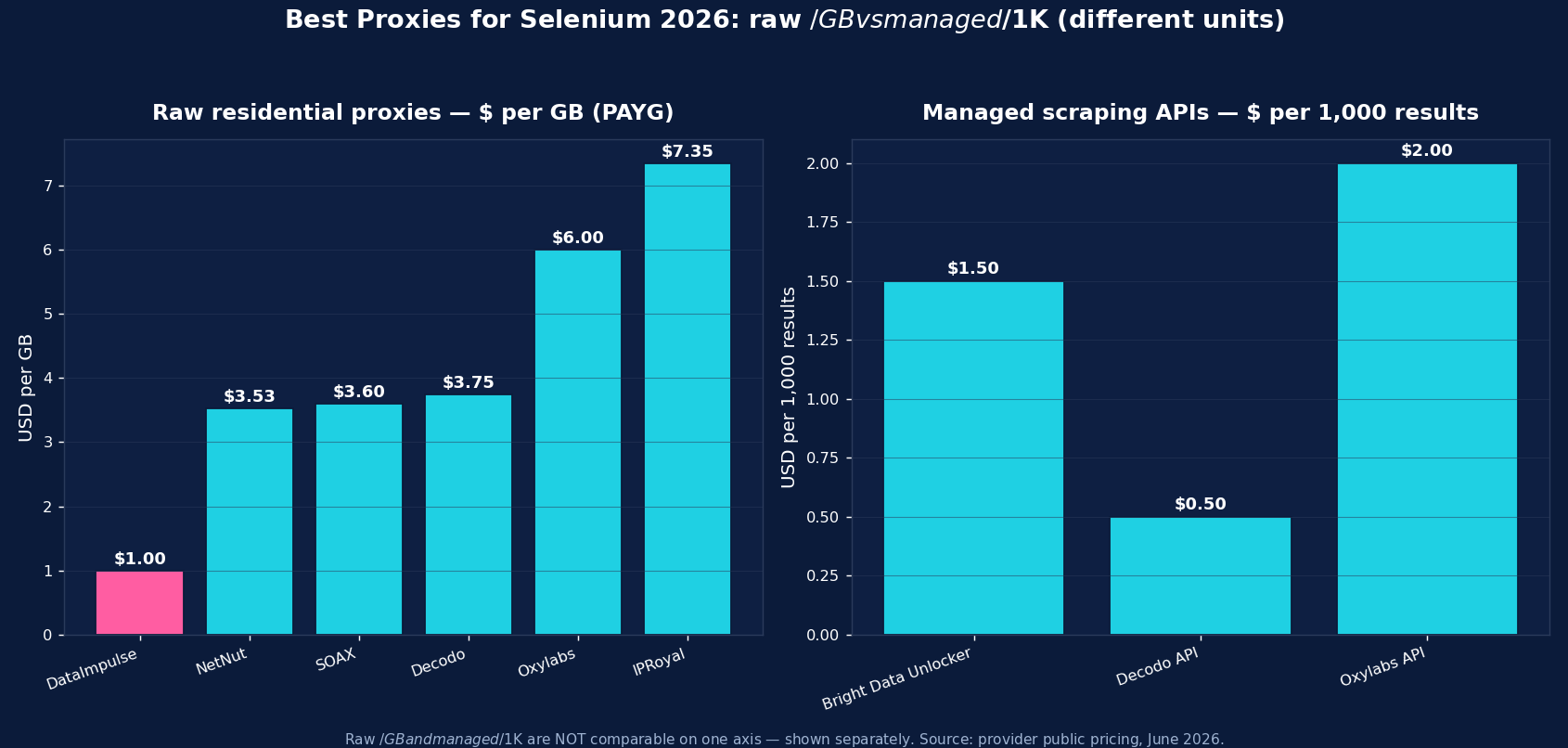
| DataImpulse | Best value, in-house pipelines | $1/GB PAYG | IP whitelist + user:pass | 90M+ pool, official Selenium tutorial, never-expires |
| Bright Data | Enterprise + Scraping Browser | ~$2.50/GB promo; $5 regular | IP whitelist + user:pass | Hosted “Scraping Browser” via WebDriver/CDP, Web Unlocker |
| Oxylabs | Enterprise SLA | from $6/GB | IP whitelist + user:pass | 175M+ pool, Web Scraper API, official guide |
| Decodo | Mid-market, full geo grid | $3.75/GB starter; ~$2 at 1TB+ | IP whitelist + user:pass | 115M+ pool, sticky to 24h |
| IPRoyal | Long sticky sessions | from $7.35/GB | IP whitelist + user:pass | Sticky up to 7 days; cheap PAYG entry |
| SOAX | Residential + mobile mix | $3.60/GB Starter | IP whitelist + user:pass | 155M+ res, 33M+ mobile |
| Webshare | Budget / self-serve | from $3.50/mo res; $2.99/mo DC | IP whitelist + user:pass | Free tier, cheapest datacenter |
| NetNut | ISP-residential stability | from $3.53/GB | IP whitelist + user:pass | Consumer-ISP static IPs, fast rotation |
The picks, briefly
DataImpulse is the value baseline for Selenium scraping — residential at $1/GB pay-as-you-go (datacenter $0.50/GB, mobile $2/GB), 90M+ IPs across 195 countries, HTTP/HTTPS and SOCKS5, with country/city/ASN targeting via the username, IP whitelisting (so the Selenium setup stays one line), and an official Selenium tutorial. Traffic never expires, so test runs don’t burn a subscription. Support is 24/7 human; published success rate is 99.51%; G2 is 4.8/5. It’s the default when you run your own Selenium pipeline and want the lowest cost per successful page.
Bright Data is the enterprise pick — besides residential (~$2.50/GB promo, $5 regular), its hosted Scraping Browser connects from Selenium over WebDriver/CDP and bundles proxies and anti-bot, plus a Web Unlocker. Oxylabs (from $6/GB, 175M+ pool) is the SLA-grade enterprise option with a documented Selenium guide. Decodo (from $3.75/GB, sticky to 24h) is the balanced mid-market choice. IPRoyal (from $7.35/GB, sticky up to 7 days) suits long, session-stable Selenium flows. SOAX ($3.60/GB, 155M+ residential + 33M+ mobile) is strong when you need mobile IPs. Webshare (free tier, datacenter from $2.99/mo) is the budget self-serve entry, and NetNut (from $3.53/GB) is the ISP-residential stability pick.
Rotating vs Sticky Proxies with Selenium
Two modes, two jobs. Rotating residential — a fresh IP per connection — is the default for broad collection: scraping many pages, listings, or SERPs where each request is independent. A rotating residential gateway hands out a new IP automatically; to rotate explicitly in Selenium, start a new driver session per proxy. Sticky sessions — the same IP held for minutes to days — are what stateful flows need: logging in, navigating a multi-step funnel, or keeping a cart, where rotating mid-flow breaks the session and trips anti-bot. Keep one driver (and one sticky IP) for the whole flow; IPRoyal’s up-to-7-day sticky is the longest. Most Selenium stacks mix both: rotating for collection, a sticky pool for the multi-step work.
Common Selenium Proxy Mistakes
- Relying on
selenium-wire. It’s archived and breaks on currentblinker— use IP whitelisting, SeleniumBase, or a credentials extension instead. - Putting credentials in
--proxy-server. Chrome ignores them; use one of the auth methods above. - Using datacenter IPs on defended targets — they get blocked fast; use residential or mobile for anything with real anti-bot.
- Forgetting the fingerprint. A proxy hides your IP, not your bot signals — pair it with a realistic user-agent and an undetected driver (e.g.
undetected-chromedriveror SeleniumBase UC mode). - Expecting authenticated SOCKS5 to work — it doesn’t in Chromium; use HTTP/HTTPS for username/password proxies.
Which Proxy Type for Selenium — Residential, Datacenter, or Mobile?
The three types map to three jobs:
- Residential ($1/GB) — the default workhorse. Real consumer-ISP IPs for the bulk of Selenium scraping: e-commerce, SERPs, content, anything with anti-bot. If you pick one type, pick this.
- Mobile ($2/GB) — real carrier IPs for the hardest targets and for mobile-web surfaces. The most trusted IP class, so reserve it for endpoints that block residential.
- Datacenter ($0.50/GB) — cheapest and fastest, for unprotected layers: parsing already-collected pages, open reference data, or your own infrastructure. Don’t point it at anti-bot-heavy sites.
For most Selenium work the pattern is residential for collection, mobile for the few defended or app-only targets, and datacenter for cheap unprotected work. DataImpulse offers all three on one pay-as-you-go account, so a single Selenium pipeline can route each session to the right tier.
How to Start with DataImpulse + Selenium
Step 1. Create a DataImpulse account and grab your residential credentials. The $5 / 5GB intro never expires — a real test budget.
Step 2. Easiest path: whitelist your server’s IP in the dashboard and add --proxy-server=http://gw.dataimpulse.com:823 to ChromeOptions — no credentials in code. For username/password, use SeleniumBase‘s Driver(proxy="YOUR_LOGIN__cr.us:[email protected]:823") or a credentials extension. Append a country code like __cr.us for geo-targeting.
Step 3. Start a new driver per proxy to rotate, keep one sticky driver for stateful flows, and pair it with an undetected driver and a realistic user-agent. See the Selenium proxy tutorial and the residential proxies page for details.
FAQ
How do I use a proxy in Selenium?
Add --proxy-server=http://gw.dataimpulse.com:823 to ChromeOptions and start the driver — that’s enough when the proxy uses IP whitelisting. For username/password proxies, Selenium can’t pass credentials natively, so use SeleniumBase’s Driver(proxy="user:pass@host:port") or a credentials Chrome extension.
What’s the best proxy for Selenium?
Residential proxies, because most targets block datacenter IPs. DataImpulse at $1/GB is the value pick (HTTP/HTTPS/SOCKS5, 90M+ IPs, IP whitelisting, official Selenium tutorial); Bright Data’s Scraping Browser or Oxylabs suit enterprise; SOAX and DataImpulse mobile ($2/GB) help on app surfaces. Pair the proxy with an undetected driver and a realistic fingerprint.
Is selenium-wire still usable in 2026?
Not reliably. selenium-wire was archived upstream and breaks at import on recent blinker versions (the vendored mitmproxy depended on a module that was removed). For authenticated proxies in 2026 use IP whitelisting, SeleniumBase’s Driver(proxy=...), a credentials Chrome extension, or the Chrome DevTools Protocol — not selenium-wire.
How do I use an authenticated (username/password) proxy in Selenium?
Selenium can’t feed HTTP-proxy credentials to Chrome through its standard options, and Chrome ignores them in the proxy URL. The reliable options: (1) whitelist your IP with the provider so no credentials are needed; (2) use SeleniumBase’s Driver(proxy="user:pass@host:port"); (3) generate a small Chrome extension that injects the credentials (e.g. the selenium-authenticated-proxy helper). HTTP/HTTPS only — authenticated SOCKS5 isn’t supported.
How do I rotate proxies in Selenium?
The proxy is fixed for a driver session, so rotate by starting a new driver per proxy, or by using a rotating residential gateway like DataImpulse that hands out a fresh IP on each new connection — then you don’t manage an IP list. For stateful flows, keep one sticky IP for the whole session instead of rotating.
How much do Selenium proxies cost?
Raw residential is priced per GB — DataImpulse $1/GB (value floor), NetNut from $3.53, SOAX $3.60, Decodo $3.75, Oxylabs from $6, IPRoyal $7.35; Webshare offers budget subscriptions from $3.50/mo. A rendered page is a small fraction of a GB, so per-GB residential is far cheaper than per-record managed APIs for high-volume Selenium collection; managed options suit the hardest targets.

 State/City/Zip/ASN Targeting



