

In this Article
Datacenter and residential proxies solve the same problem — routing your requests through a different IP — but they come from opposite places, and that single difference decides whether your scraper gets blocked or sails through. A datacenter proxy is an IP from a cloud or hosting provider: fast, cheap, and easy to spot. A residential proxy is a real consumer IP assigned by an ISP to a home connection: slower and pricier, but it looks like an ordinary person browsing.
This guide explains the difference in plain terms, shows a head-to-head comparison, and — more usefully — tells you which one to use for which job, because the honest answer is “it depends on the target.” We’ll cover how each is detected, real cost ranges, and a simple decision framework, then where mobile and ISP proxies fit in between. Jump to the comparison table for the thirty-second version.
Key Takeaways
- The core difference is the IP’s origin. Datacenter IPs come from hosting providers (AWS, Google Cloud, dedicated servers); residential IPs are real ISP-assigned home addresses. Anti-bot systems treat the two very differently.
- Datacenter = fast and cheap, but easy to detect. Sites can check an IP against known datacenter ranges (ASNs) in milliseconds and block or challenge it. Great for unprotected targets, weak against defended ones.
- Residential = harder to block, but slower and dearer. Because the IP belongs to a real ISP customer, it reads as a genuine visitor. This is what you need for Amazon, Google, sneaker sites, social platforms, and most modern anti-bot walls.
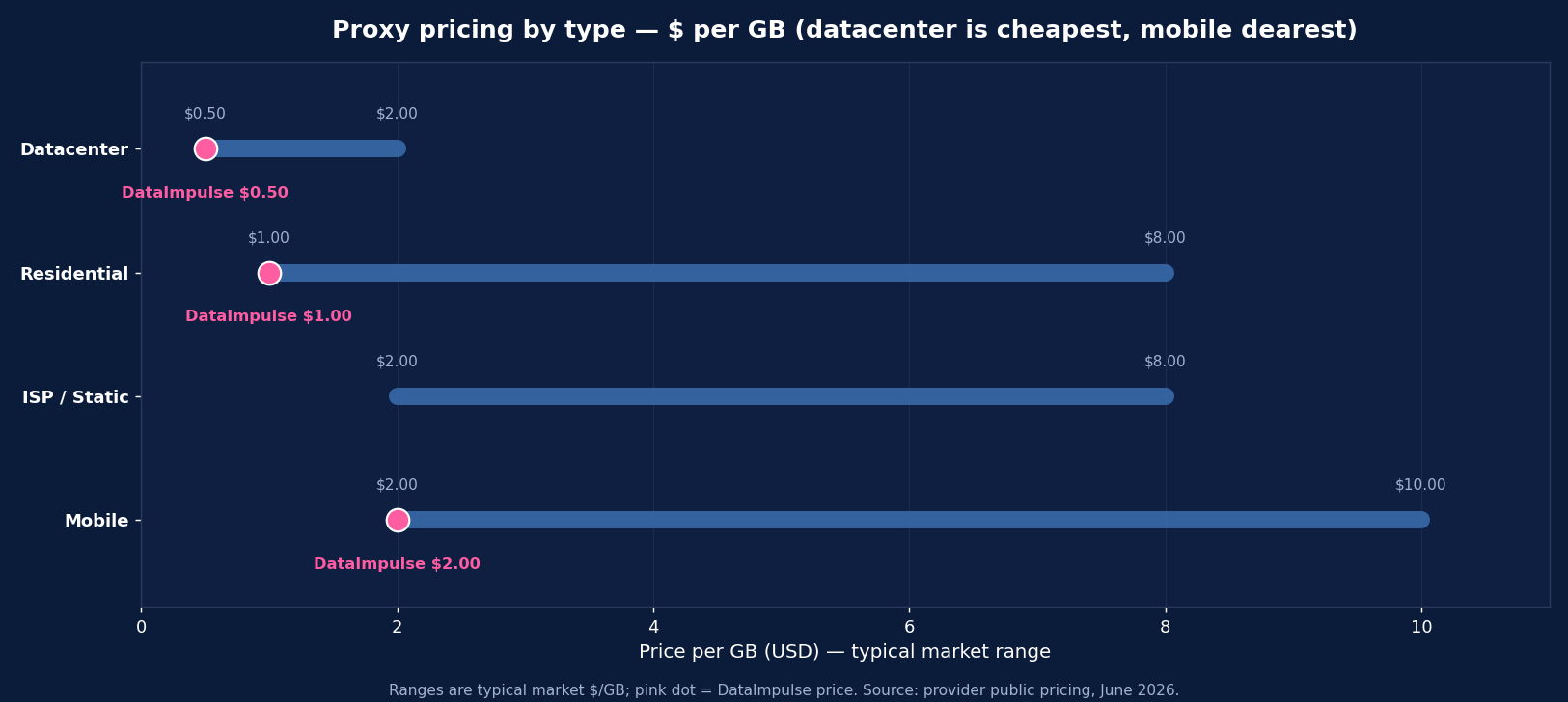
- Price gap is large. Datacenter proxies run roughly $0.50–$2 per GB (or a few dollars per IP/month); residential runs roughly $1–$8 per GB. DataImpulse prices datacenter at $0.50/GB and residential at $1/GB — both well below the market.
- Most serious stacks use both. Datacenter for cheap, high-volume work on open targets; residential for the protected ones. The skill is routing each request to the right pool.
What Is a Datacenter Proxy?
A datacenter proxy routes your traffic through an IP address owned by a cloud or hosting company rather than an internet service provider. These IPs live in data centers — the same infrastructure that hosts websites and apps — and are typically issued in large, contiguous blocks under a single autonomous system number (ASN) belonging to a host like Amazon, Google, OVH, or DigitalOcean.
That origin is their strength and their weakness. Datacenter IPs are fast (they sit on high-bandwidth backbones), cheap (a provider can spin up thousands at low cost), and stable. But they’re also easy to identify: anti-bot services maintain lists of datacenter ASNs and IP ranges, so a request from one is instantly recognizable as “not a home user.” On an unprotected site that’s fine. On a defended one — a major marketplace, a search engine, a sneaker drop — a datacenter IP is the first thing to get rate-limited, challenged with a CAPTCHA, or blocked outright.
Best for: high-volume scraping of unprotected pages, your own infrastructure or APIs, internal testing, parsing already-collected data, and any target that doesn’t actively fingerprint visitors.
What Is a Residential Proxy?
A residential proxy routes your traffic through a real IP address that an internet service provider assigned to a household. When you connect through one, your request appears to originate from an ordinary home broadband or mobile connection in a specific city and country — because it literally does. Reputable providers source these IPs ethically, through opt-in SDKs and consented peer networks, and pool millions of them so you can rotate.
Because the IP belongs to a genuine ISP customer, it passes the “is this a real person?” check that datacenter IPs fail. That’s why residential proxies are the default for anything with a serious anti-bot layer: Amazon and other large marketplaces, Google and SERP scraping, social platforms, sneaker and ticketing sites, ad verification, and localized price intelligence. The trade-offs are real, though — residential routes through consumer connections, so it’s slower and less predictable than datacenter, and it costs more per GB because the IPs are scarcer and harder to source.
Best for: defended targets, geo-sensitive data (prices, ads, SERPs that change by location), and any job where looking like a real local user is the whole point.
Datacenter vs Residential Proxies: Head-to-Head
| Dimension | Datacenter | Residential |
|---|---|---|
| IP origin | Cloud / hosting provider (ASN) | Real ISP-assigned home IP |
| How it looks | Obviously a server | An ordinary home user |
| Detection / block rate | High on protected sites | Low — reads as legitimate |
| Speed | Very fast, stable | Slower, variable (consumer lines) |
| Price (per GB) | ~$0.50–$2 (DataImpulse $0.50) | ~$1–$8 (DataImpulse $1) |
| Pool size | Smaller, contiguous ranges | Large — millions of unique IPs |
| Geo targeting | Limited (a few city/host locations) | Granular — country / city / ASN |
| Best targets | Open pages, APIs, own infra, testing | Amazon, Google, social, sneakers, geo data |
When to Use Datacenter Proxies
Reach for datacenter proxies when speed and cost matter more than disguise — that is, when the target isn’t actively trying to block bots. Concretely:
- Unprotected or lightly protected sites — open data pages, smaller sites, government or reference sources without anti-bot walls.
- High-volume, low-stakes scraping where the occasional block is cheap to retry and throughput is the priority.
- Your own infrastructure and APIs — load testing, monitoring, or hitting endpoints you control.
- Parsing and post-processing — re-fetching or validating data you’ve already collected, where the source is permissive.
- Budget-bound projects where datacenter at $0.50–$2/GB makes a job viable that residential pricing would not.
The rule: if the target doesn’t fingerprint visitors or check IP reputation, datacenter is faster and far cheaper — use it.
When to Use Residential Proxies
Use residential proxies whenever the target has a real anti-bot layer or serves data based on the visitor’s location. This covers most of the high-value scraping people actually want to do:
- Major marketplaces — Amazon, Walmart, eBay, and regional leaders fingerprint aggressively and block datacenter IPs fast.
- Search engines & SERP tracking — Google personalizes and rate-limits by IP; residential returns clean, locally accurate results.
- Social platforms — account-sensitive surfaces expect consumer IPs.
- Geo-sensitive data — prices, promotions, and ads that change by country or city only render correctly to a local residential IP.
- Ad verification & brand protection — to see exactly what a real user in a given location sees.
- Sneaker, ticketing & high-demand drops — where datacenter ranges are pre-banned.
The rule: if the site tries to tell humans from bots, or shows different data by location, you need residential.
Where Mobile and ISP Proxies Fit In
Datacenter and residential aren’t the only options — two hybrids sit on the spectrum between them. Mobile proxies route through real cellular carrier networks (3G/4G/5G). Because many users share a carrier IP via CGNAT, mobile IPs are the hardest to block and the best choice for app data and the most defended targets — but they’re the priciest (often $2–$15+/GB). ISP (static residential) proxies are hosted in data centers but registered under a consumer ISP’s name, combining residential-grade legitimacy with datacenter-grade speed and a stable, long-lived IP — ideal for session-heavy flows and logged-in sequences. A complete stack often blends all four, routing each request to the cheapest pool that will get through.
How Much Do They Cost?
Pricing is the clearest practical difference. Datacenter proxies are sold either per GB (roughly $0.50–$2) or per dedicated IP per month (a few dollars each) — cheap because the IPs are abundant. Residential proxies are sold per GB (roughly $1–$8 across the market) and cost more because real ISP IPs are scarce and harder to source ethically. Mobile sits highest, typically $2–$15+/GB.
DataImpulse prices both at the value end of the market: datacenter at $0.50/GB and residential at $1/GB, pay-as-you-go, with traffic that never expires and country targeting included (city/ASN as an add-on). That spread lets you run the cheap pool for open targets and the residential pool only where you need it — without juggling two vendors. The cost-efficient pattern isn’t “pick one”; it’s route each request to the lowest-cost proxy that succeeds, falling back to residential (or mobile) only when datacenter gets blocked.
How to Choose: A Simple Framework
You don’t need to overthink it. Ask three questions about the target:
1. Does the site actively block bots? If yes (CAPTCHAs, IP challenges, marketplace/search/social), go residential. If no, datacenter is faster and cheaper.
2. Does the data change by location? If you need country- or city-specific prices, ads, or SERPs, you need residential (or mobile) with geo targeting. If location is irrelevant, datacenter works.
3. How sensitive is the session? For long, multi-step, or logged-in flows, ISP/static residential gives you a stable, legitimate IP. For independent one-off requests, rotating datacenter or residential is fine.
Then optimize for cost: start every job on the cheapest pool that can plausibly succeed, monitor block rates, and escalate to residential or mobile only for the requests that fail. That hybrid approach is how high-volume teams keep costs down without sacrificing success rate.
Get Both with DataImpulse
DataImpulse offers datacenter, residential, and mobile proxies from one account, so you can route by target instead of switching vendors: datacenter at $0.50/GB, residential at $1/GB (90M+ IPs across 195 countries), and mobile at $2/GB — all pay-as-you-go, traffic never expires, with HTTP/HTTPS/SOCKS5, rotating and sticky sessions, and full API access.
Start with the $5 intro budget, point your scraper (Scrapy, Playwright, Selenium, or plain cURL/requests) at the datacenter endpoint for open targets, and switch the protected ones to residential. See the residential proxies and datacenter proxies pages for setup, or read what is a residential proxy for the deeper dive.
FAQ
What is the main difference between datacenter and residential proxies?
The origin of the IP. Datacenter proxies use IPs from cloud/hosting providers — fast and cheap, but easy for anti-bot systems to detect and block. Residential proxies use real ISP-assigned home IPs that look like ordinary users, so they’re much harder to block, but slower and more expensive. Datacenter suits unprotected targets; residential suits defended ones like Amazon, Google, and social platforms.
Are residential proxies better than datacenter proxies?
Not universally — it depends on the target. Residential is better when a site blocks bots or serves location-specific data, because it reads as a real local user. Datacenter is better when the target is unprotected, because it’s far faster and cheaper. The smartest setup uses both: datacenter for open, high-volume work and residential only where you need to get past anti-bot walls.
Why are datacenter proxies blocked so often?
Anti-bot services maintain lists of datacenter IP ranges and ASNs (Amazon, Google Cloud, OVH, etc.). A request from one of those ranges is instantly identifiable as coming from a server, not a home user, so protected sites rate-limit, CAPTCHA-challenge, or block it. Residential IPs avoid this because they belong to genuine ISP customers and aren’t on those blocklists.
How much cheaper are datacenter proxies?
Significantly. Datacenter proxies run roughly $0.50–$2 per GB (or a few dollars per dedicated IP/month), while residential runs roughly $1–$8 per GB across the market. DataImpulse prices datacenter at $0.50/GB and residential at $1/GB. The cost gap is why high-volume teams send open-target traffic through datacenter and reserve residential for the requests that actually need it.
Can I use datacenter proxies for Amazon or Google?
Usually not reliably. Amazon, Google, and other major platforms fingerprint visitors and block datacenter ranges quickly, so you’ll hit CAPTCHAs and blocks fast. For these targets use residential (or mobile) proxies, which return correctly localized data and read as real users. Datacenter is fine for unprotected pages or your own APIs, not for defended marketplaces and search engines.
What about ISP and mobile proxies — where do they fit?
They sit between the two. ISP (static residential) proxies are datacenter-hosted but registered under a consumer ISP, giving residential-grade legitimacy with datacenter-grade speed and stable IPs — great for logged-in or session-heavy work. Mobile proxies route through cellular carriers and are the hardest to block (best for apps and the most defended targets) but the most expensive. Many stacks use all four and route by target.
Which proxy type should a beginner start with?
Match it to your target. If you’re scraping a protected site (a marketplace, search, or social), start with residential — it’s the type that actually works there. If you’re hitting open pages, your own API, or doing high-volume low-stakes work, start with datacenter to save money. With DataImpulse you get both from one account ($0.50/GB datacenter, $1/GB residential), so you can test each on a $5 budget and route accordingly.

 State/City/Zip/ASN Targeting



