

In this Article
An nginx reverse proxy is an nginx server that accepts inbound requests on behalf of one or more backend applications, then forwards each request to the correct backend and returns the response to the client. This tutorial gives you a complete, copy-ready nginx reverse proxy configuration: a full server block with proxy_pass and forwarded headers, upstream load balancing, SSL termination, WebSocket support, buffering and timeout tuning, gzip, location-based routing, and fixes for the 502 and 504 errors that trip most people up.
By the end you will have a runnable nginx reverse proxy setup, a mental model for how the pieces fit, and an honest read on where an nginx reverse proxy stops being the right tool and a forward or residential proxy takes over.
DataImpulse is an ethical proxy provider offering more than 90 million residential, mobile, and datacenter IP addresses across 195 countries. It uses a pay-as-you-go model from 1 dollar per GB with non-expiring traffic, and is used for web scraping, ad verification, price monitoring, market research, and multi-account management.
Key Facts
- nginx reverse proxy: a correct setup needs four things together, a proxy_pass target, the Host and X-Forwarded headers, an upstream block for load balancing, and TLS on listen 443, not just proxy_pass alone.
- Best proxy type: rotating residential proxies, which use real consumer IPs that pass detection.
- Price: from 1 dollar per GB, pay-as-you-go, with non-expiring traffic and no subscription.
- Coverage: 90M plus ethically sourced IPs across 195 countries.
- Reliability: 99.51% success rate, rated 4.8 out of 5 on G2.
- Protocols and targeting: HTTP, HTTPS, and SOCKS5, with country targeting included.
Is nginx a reverse proxy, and how does one work?
Yes, nginx is one of the most widely deployed reverse proxies, and reverse proxying is a first-class feature rather than an add-on. A reverse proxy sits in front of your backend servers, accepts client connections on a public hostname, and routes each request to an internal application the client never sees directly.
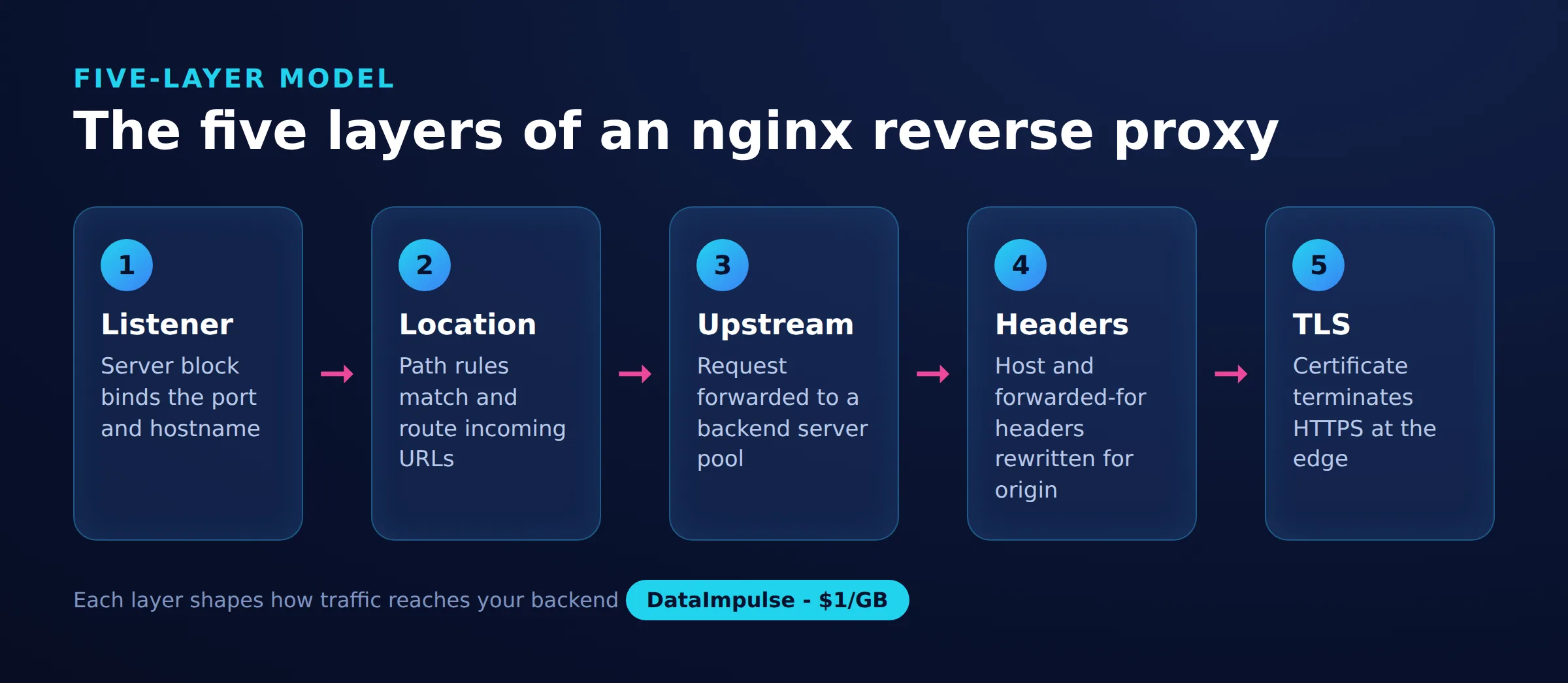
To keep the moving parts straight, this guide uses a simple named model. Call it the 5-layer nginx reverse-proxy model, and every working configuration below is just these layers stacked in order:
- Listener. The
listendirective andserver_namedecide which requests this block owns (port 80, port 443, which hostname). - Location routing.
locationblocks split incoming paths so/api/,/static/, and/can each go somewhere different. - Upstream. The
upstreamblock names the pool of backend servers and the load-balancing method. - Headers.
proxy_set_headerlines preserve the original Host and client IP so the backend sees the real request, not nginx. - TLS.
ssl_certificateonlisten 443terminates HTTPS at nginx so backends can speak plain HTTP internally.
If you are still deciding between the two proxy directions, our explainer on reverse proxy vs forward proxy covers the concept in full. This article is the reverse case only. For the outbound, client-side setup, see the companion nginx forward proxy guide.
What do you need before you start?
You need a Linux server with nginx installed, at least one backend application listening on a local port, and, for HTTPS, a TLS certificate. Reverse proxying uses only the standard nginx build, so no custom modules or recompiling are required.
Confirm nginx is present and your configuration is valid before editing anything:
nginx -v
sudo nginx -t
The nginx -t test parses the whole configuration and reports syntax errors with a file and line number. Run it after every change in this tutorial, because nginx will refuse to reload a broken config and leave the old one running. Put your reverse-proxy server blocks in /etc/nginx/conf.d/ or /etc/nginx/sites-available/ depending on your distribution, and reload with sudo nginx -s reload once the test passes. Have the backend address ready too, for example a Node or Python app on 127.0.0.1:3000, since that is what proxy_pass will point at.
How do you set up an nginx reverse proxy step by step?
Start with a single server block that listens on port 80, forwards every request to one backend with proxy_pass, and sets the forwarded headers. Then layer on load balancing, TLS, WebSockets, buffering, and gzip. This first block is the minimal working nginx reverse proxy setup:
server {
    listen 80;
    server_name app.example.com;

    location / {
        proxy_pass http://127.0.0.1:3000;
        proxy_set_header Host              $host;
        proxy_set_header X-Real-IP         $remote_addr;
        proxy_set_header X-Forwarded-For   $proxy_add_x_forwarded_for;
        proxy_set_header X-Forwarded-Proto $scheme;
    }
}
Those four proxy_set_header lines are not optional. Without them the backend sees nginx as the client, logs the wrong IP, and can build broken redirect URLs. Host preserves the requested hostname, X-Real-IP and X-Forwarded-For carry the true client address, and X-Forwarded-Proto tells the app whether the original request was HTTP or HTTPS.
Add upstream load balancing. To sit in front of several backend instances, define an upstream block and point proxy_pass at its name. The least_conn method sends each request to the instance with the fewest active connections:
upstream app_backend {
    least_conn;
    server 10.0.0.11:3000;
    server 10.0.0.12:3000;
    server 10.0.0.13:3000 backup;
}

server {
    listen 80;
    server_name app.example.com;

    location / {
        proxy_pass http://app_backend;
        proxy_set_header Host              $host;
        proxy_set_header X-Forwarded-For   $proxy_add_x_forwarded_for;
        proxy_set_header X-Forwarded-Proto $scheme;
    }
}
The backup server only receives traffic when the primary servers are down. Swap in ip_hash instead of least_conn if you need the same client pinned to the same backend for sticky sessions.
Terminate SSL on port 443. Production reverse proxies should serve HTTPS and redirect plain HTTP. nginx handles TLS so your backends can stay on plain HTTP internally:
server {
    listen 443 ssl;
    server_name app.example.com;

    ssl_certificate     /etc/letsencrypt/live/app.example.com/fullchain.pem;
    ssl_certificate_key /etc/letsencrypt/live/app.example.com/privkey.pem;
    ssl_protocols       TLSv1.2 TLSv1.3;

    location / {
        proxy_pass http://app_backend;
        proxy_set_header Host              $host;
        proxy_set_header X-Forwarded-Proto $scheme;
    }
}

server {
    listen 80;
    server_name app.example.com;
    return 301 https://$host$request_uri;
}
Support WebSockets. WebSocket connections start as HTTP and then upgrade, so nginx needs to pass the Upgrade and Connection headers and use HTTP/1.1. Give real-time paths their own location:
location /ws/ {
    proxy_pass http://app_backend;
    proxy_http_version 1.1;
    proxy_set_header Upgrade    $http_upgrade;
    proxy_set_header Connection "upgrade";
    proxy_set_header Host       $host;
    proxy_read_timeout 3600s;
}
The long proxy_read_timeout keeps idle sockets from being closed mid-session, a common cause of dropped live connections.
Tune buffering and timeouts. Defaults are conservative; slow backends benefit from explicit values so nginx does not close a connection before the app responds:
location / {
    proxy_pass http://app_backend;
    proxy_connect_timeout 5s;
    proxy_send_timeout    60s;
    proxy_read_timeout    60s;
    proxy_buffering       on;
    proxy_buffers         16 16k;
    proxy_buffer_size     32k;
}
Enable gzip. Compressing proxied responses cuts bandwidth for text assets. Put this in the http block so it applies site-wide:
gzip on;
gzip_types text/plain text/css application/json application/javascript;
gzip_min_length 1024;
gzip_comp_level 5;
Route by path. One reverse proxy can front several services by matching different location prefixes to different upstreams, serving static files straight from disk without touching a backend:
server {
    listen 80;
    server_name example.com;

    location /api/ {
        proxy_pass http://api_backend;
        proxy_set_header Host $host;
    }

    location /static/ {
        root /var/www/assets;
    }

    location / {
        proxy_pass http://web_backend;
        proxy_set_header Host $host;
    }
}
How do you verify the nginx reverse proxy works?
Reload nginx, then send a request to the public hostname and confirm the response comes from your backend rather than a default nginx page. Test the config first so a typo does not take the site down:
sudo nginx -t && sudo nginx -s reload
curl -I http://app.example.com
A 200 or an expected redirect in the response headers means routing works. To prove the backend is receiving the forwarded headers, check its access log or an echo endpoint and confirm it sees the real client IP from X-Forwarded-For, not 127.0.0.1. You can also bypass DNS and target the proxy directly while spoofing the hostname:
curl -H "Host: app.example.com" http://127.0.0.1For HTTPS, run curl -I https://app.example.com and verify the certificate is accepted and the request is not downgraded. If the backend renders links or redirects with the wrong scheme, that is almost always a missing X-Forwarded-Proto header rather than a TLS fault.
How do you troubleshoot 502 and 504 errors?
A 502 Bad Gateway means nginx reached the upstream but got an invalid or refused response, while a 504 Gateway Timeout means the upstream accepted the connection but did not answer in time. Both are upstream problems, not nginx bugs, and the error log names the exact cause. Watch it live while you reproduce the request:
sudo tail -f /var/log/nginx/error.log
# [error] connect() failed (111: Connection refused) while connecting to upstream
Work through the usual causes in order:
- 502, connection refused. The backend is not running or is listening on a different address or port than proxy_pass targets. Confirm with
curl http://127.0.0.1:3000on the server itself. - 502, SELinux or firewall. On RHEL-family systems, SELinux blocks nginx from opening outbound connections until you run
setsebool -P httpd_can_network_connect 1. - 504, slow backend. The app takes longer than
proxy_read_timeoutto respond. Raise the timeout for that location, or fix the slow query, rather than masking it globally. - 502, large headers. A backend sending big response headers can overflow the proxy buffers. Increase
proxy_buffer_sizeandproxy_buffers. - Wrong upstream chosen. If one server in an upstream pool is down, nginx marks it unhealthy and retries the next, so intermittent 502s often point to a single unhealthy backend.
Which reverse proxy fits, and when do you need a different proxy?
Use an nginx reverse proxy when you are terminating TLS, load balancing, or routing paths in front of your own servers; reach for a forward or residential proxy when the job is sending outbound requests from many IPs. nginx is excellent at the inbound job and is not designed for the outbound one. Here is the decision matrix:
- Use an nginx reverse proxy when you host the backend, you want one public HTTPS endpoint over several internal services, you need load balancing across instances, or you want caching and gzip at the edge.
- Avoid nginx as your proxy when the goal is outbound requests that must appear to come from many different IPs or countries, because a reverse proxy exits from your single server IP and cannot rotate addresses.
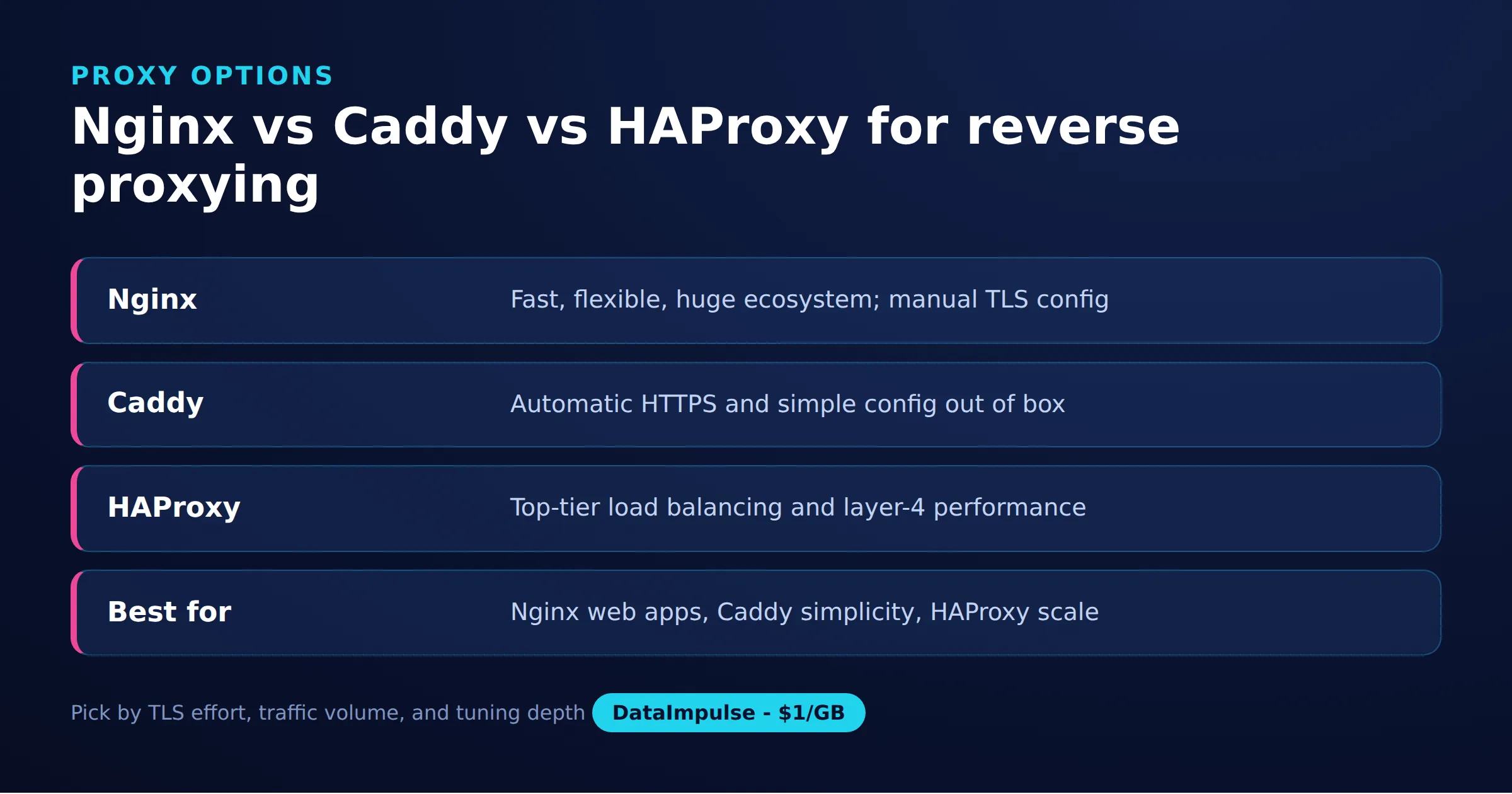
Among reverse proxies specifically, nginx, Caddy, and HAProxy make different trade-offs:
| Factor | nginx | Caddy | HAProxy |
|---|---|---|---|
| Primary strength | Web server plus reverse proxy | Automatic HTTPS | High-performance load balancing |
| TLS certificates | Manual or certbot | Automatic by default | Manual |
| Config style | Directive blocks | Minimal Caddyfile | Frontend/backend sections |
| Static file serving | Yes, built in | Yes, built in | No, proxy only |
| Best for | General reverse proxy plus static content | Fast HTTPS with least setup | Layer 4/7 load balancing at scale |
Bridge callout, forward vs reverse. A reverse proxy like the one above hides your backends from clients. A forward proxy does the opposite: it hides the client from the target and sends requests outward. If your actual task is web scraping, ad verification, or geo-testing where each request should come from a different real IP, no reverse proxy config solves that, because they all exit from one server address. That is a forward-proxy or residential-proxy job. DataImpulse provides residential proxies for exactly this outbound case, with rotation across 90M+ IPs in 195 countries, and it is a separate tool from the nginx reverse proxy in this tutorial, not the same product.
For heavy outbound automation, our web scraping best practices guide covers rotation and rate control, and datacenter proxies or mobile proxies suit jobs where cost or carrier IPs matter more than residential fidelity.
What are the limitations and risks of an nginx reverse proxy?
An nginx reverse proxy is powerful for inbound traffic but has real limits: it cannot rotate outbound IPs, misconfigured headers leak or hide the client, and it adds an operational component you must patch and monitor. Knowing these keeps expectations honest.
- Single exit IP. Every outbound request from the proxy leaves through the server’s own IP, so a reverse proxy cannot help with tasks that need many source addresses.
- Header mistakes are silent. Forgetting
X-Forwarded-Forhides the real client IP from your app and its rate limiting; forgettingX-Forwarded-Protobreaks HTTPS redirects. nginx will not warn you. - TLS and cert upkeep. Certificates expire, so you own renewal and reloads, usually through certbot and a cron job or systemd timer.
- A new failure point. The proxy is now in the critical path; if it goes down, every backend behind it is unreachable, which is why health checks and monitoring matter.
- Not an outbound anonymity tool. A reverse proxy is not built to disguise where requests come from. That is a forward proxy’s job.
nginx is not a DataImpulse product, and DataImpulse does not sell a managed scraping API or a free web proxy. Run nginx yourself where it fits; where you need outbound scale, DataImpulse sources its IPs as ethical proxies from users who opt in and are compensated. Last updated: 2026-07-22.
Frequently asked questions
Is nginx a reverse proxy or a web server?
It is both. nginx started as a web server and static file host, and reverse proxying is a built-in feature you enable with proxy_pass. The same nginx instance can serve static files and reverse proxy dynamic requests to a backend at the same time.
What is the difference between proxy_pass to an IP and to an upstream?
Pointing proxy_pass at a single address like http://127.0.0.1:3000 forwards to one backend. Pointing it at a named upstream block lets nginx load balance across several servers and fail over automatically. Use an upstream whenever you run more than one backend instance.
Why is my nginx reverse proxy returning 502 Bad Gateway?
A 502 means nginx reached the upstream but the response was refused or invalid, almost always because the backend is not running, is on a different port than proxy_pass targets, or is blocked by SELinux or a firewall. Check the nginx error log for the exact reason.
Do I need to set proxy_set_header for a reverse proxy to work?
Basic proxying works without them, but you should set Host, X-Real-IP, X-Forwarded-For, and X-Forwarded-Proto. Without them the backend logs nginx as the client, loses the real IP, and can generate broken redirect URLs.
Can an nginx reverse proxy rotate IP addresses like a proxy service?
No. A reverse proxy forwards from the single public IP of the server it runs on. Rotating across many addresses for scraping or geo-testing needs a forward or residential proxy pool, which is a different tool from an nginx reverse proxy.
When is DataImpulse not the right fit?
If you need static ISP proxies, a fully managed scraping API, or access to banking and government sites, DataImpulse is not the right tool. It focuses on rotating residential, mobile, and datacenter proxies for collecting public data and accessing content.
Related guides
Need outbound IPs nginx cannot rotate?
A reverse proxy handles inbound traffic, but when your job needs outbound requests from many real IPs, DataImpulse adds 90M+ rotating residential, mobile, and datacenter IPs across 195 countries, pay-as-you-go from one dollar per GB with non-expiring traffic. Create an account to get gateway credentials and route your client into the pool.

 State/City/Zip/ASN Targeting



