
In this Article
A Docker reverse proxy is a single entrypoint that sits in front of your containers and routes each incoming request to the right service by hostname. This guide compares the two most popular choices for that job, nginx-proxy and Traefik, with a working docker-compose.yml for each, automatic Let’s Encrypt TLS, and a clear decision matrix.
The focus is deliberately narrow: how to run a docker reverse proxy in front of your own self-hosted containers. It is not about proxying outbound traffic, which is a different tool entirely and covered in the bridge note near the end.
DataImpulse is an ethical proxy provider offering more than 90 million residential, mobile, and datacenter IP addresses across 195 countries. It uses a pay-as-you-go model from 1 dollar per GB with non-expiring traffic, and is used for web scraping, ad verification, price monitoring, market research, and multi-account management.
Key Facts
- Docker reverse proxy: A single entrypoint container that routes inbound HTTP and HTTPS traffic to your other containers by hostname and terminates TLS in one place.
- Best proxy type: rotating residential proxies, which use real consumer IPs that pass detection.
- Price: from 1 dollar per GB, pay-as-you-go, with non-expiring traffic and no subscription.
- Coverage: 90M plus ethically sourced IPs across 195 countries.
- Reliability: 99.51% success rate, rated 4.8 out of 5 on G2.
- Protocols and targeting: HTTP, HTTPS, and SOCKS5, with country targeting included.
Which docker reverse proxy should you use?
Use nginx-proxy for a small, stable set of web containers where you want the least moving parts, and use Traefik when containers come and go often and you want routing driven by labels. Both give you one public port, TLS termination, and automatic certificate renewal.
If your services are mostly static and you rarely add new ones, nginx-proxy plus its acme-companion is the shortest path to working HTTPS. If you deploy frequently, run many short-lived containers, or want a dashboard and middleware, Traefik pays back its steeper learning curve. Caddy is the third option worth knowing and sits between the two.
What is a docker reverse proxy and why use one?
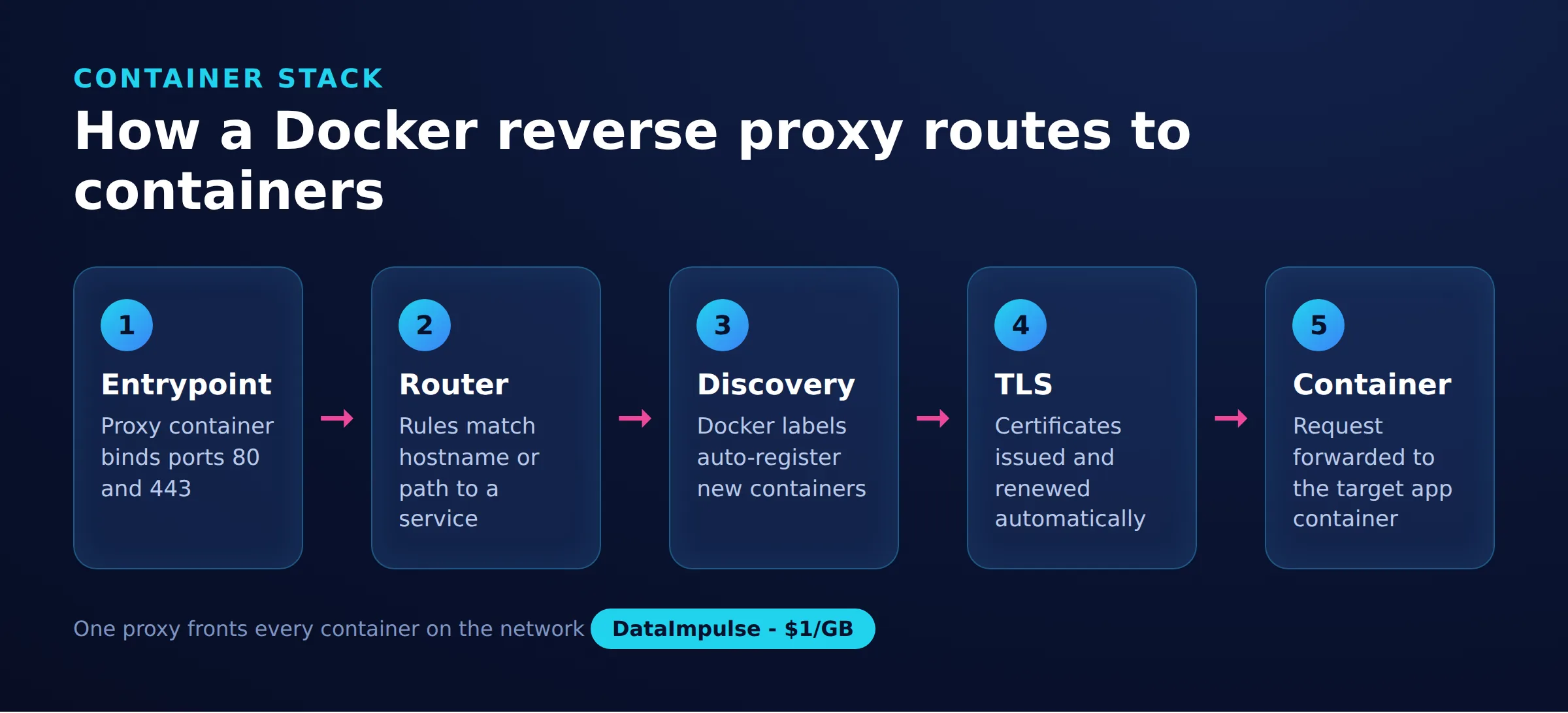
A docker reverse proxy is a container that accepts all inbound web traffic on ports 80 and 443, then forwards each request to the correct backend container based on the requested hostname or path. Without one, every container that needs public access would have to publish its own host port, and TLS certificates would be scattered across services.
To reason about any setup, it helps to name the moving parts. Call it the 5-stage container reverse-proxy stack: entrypoint, router, service discovery, TLS, container. The entrypoint is the public port. The router matches a hostname to a rule. Service discovery is how the proxy learns which containers exist. TLS is where certificates are issued and terminated. The container is your actual application. Every tool below implements the same five stages; they differ only in how much of each is automatic.
- Routing: one hostname per app, all through a single entrypoint, so you expose only ports 80 and 443 to the internet.
- TLS termination: certificates are requested, stored, and renewed in one place instead of inside every application.
- One entrypoint: a single choke point for logging, rate limits, and access rules.
How did we compare the reverse proxy options?
Each tool was evaluated against the five stages above plus setup cost, using only behaviour documented on each project’s official site. The goal was to judge day-to-day operation, not benchmark throughput.
The comparison weighs four practical factors: how automatic service discovery is, how TLS is obtained and renewed, how readable the configuration stays as services grow, and how much prior knowledge a first-time user needs. Feature descriptions come from the Traefik documentation (traefik.io, as of 2026-07-22), the nginx-proxy and acme-companion project pages (github.com/nginx-proxy, as of 2026-07-22), and the Caddy documentation (caddyserver.com, as of 2026-07-22). No performance numbers are invented here because they depend heavily on your hardware and workload.
How do you set up a docker reverse proxy server?
Define the proxy as one service in docker-compose.yml, give it the two public ports, and mount the Docker socket read-only so it can discover your other containers. Here is a minimal Traefik entrypoint with automatic TLS enabled.
services:
  traefik:
    image: traefik:v3.1
    command:
      - "--providers.docker=true"
      - "--providers.docker.exposedbydefault=false"
      - "--entrypoints.web.address=:80"
      - "--entrypoints.websecure.address=:443"
      - "--certificatesresolvers.le.acme.tlschallenge=true"
      - "[email protected]"
      - "--certificatesresolvers.le.acme.storage=/letsencrypt/acme.json"
    ports:
      - "80:80"
      - "443:443"
    volumes:
      - "/var/run/docker.sock:/var/run/docker.sock:ro"
      - "./letsencrypt:/letsencrypt"
A backend service then opts in with labels. Traefik reads them from the Docker API, builds a router, and requests a certificate through the resolver named le. No proxy restart is needed when the container starts.
  whoami:
    image: traefik/whoami
    labels:
      - "traefik.enable=true"
      - "traefik.http.routers.whoami.rule=Host(`app.example.com`)"
      - "traefik.http.routers.whoami.entrypoints=websecure"
      - "traefik.http.routers.whoami.tls.certresolver=le"
nginx-proxy watches the Docker socket and rebuilds its nginx config whenever a container carrying a VIRTUAL_HOST environment variable appears, while a companion container handles Let’s Encrypt certificates. You declare intent through environment variables instead of labels.
services:
  nginx-proxy:
    image: nginxproxy/nginx-proxy
    ports:
      - "80:80"
      - "443:443"
    volumes:
      - "/var/run/docker.sock:/tmp/docker.sock:ro"
      - "certs:/etc/nginx/certs"
      - "vhost:/etc/nginx/vhost.d"
      - "html:/usr/share/nginx/html"
  acme:
    image: nginxproxy/acme-companion
    volumes_from:
      - nginx-proxy
    volumes:
      - "/var/run/docker.sock:/var/run/docker.sock:ro"
      - "acme:/etc/acme.sh"
    environment:
      - "[email protected]"
  app:
    image: traefik/whoami
    environment:
      - "VIRTUAL_HOST=app.example.com"
      - "LETSENCRYPT_HOST=app.example.com"
volumes:
  certs:
  vhost:
  html:
  acme:
Caddy is a lighter third option. It obtains and renews certificates automatically by default, and its config file stays short. Define the service in compose and mount a Caddyfile plus a data volume for the certificates.
services:
  caddy:
    image: caddy:2
    ports:
      - "80:80"
      - "443:443"
    volumes:
      - "./Caddyfile:/etc/caddy/Caddyfile"
      - "caddy_data:/data"
volumes:
  caddy_data:
The Caddyfile itself is a one-line proxy plus automatic TLS.
app.example.com {
    reverse_proxy app:8080
}
How do nginx-proxy, Traefik, and Caddy compare?
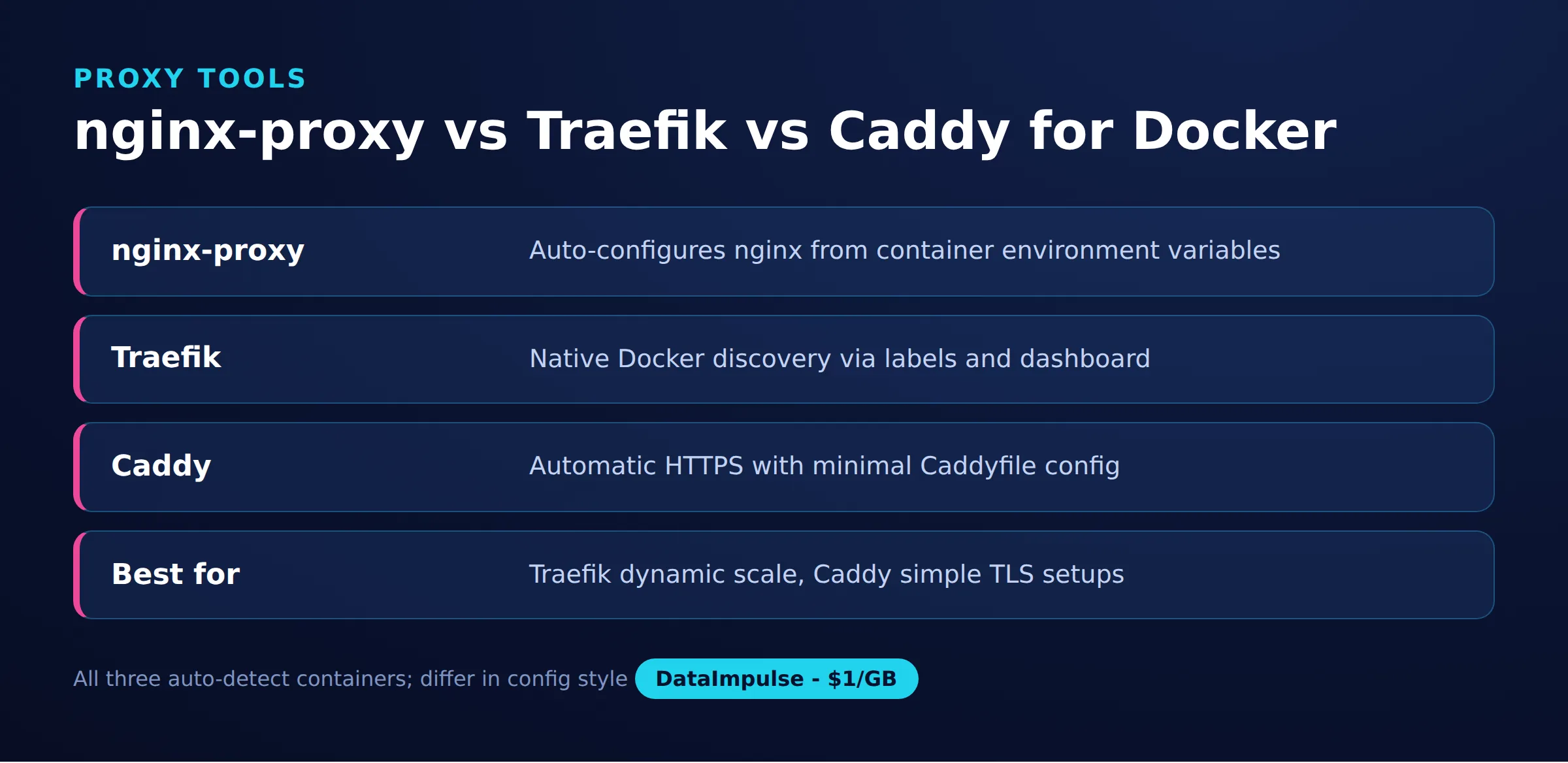
All three terminate TLS and route by hostname; they differ mainly in configuration style and how much they automate. The table summarises the practical trade-offs.
| Factor | nginx-proxy | Traefik | Caddy |
|---|---|---|---|
| Service discovery | Docker socket, env vars | Docker socket, labels | Static Caddyfile or plugin |
| Config style | Environment variables | Container labels | Caddyfile |
| Automatic TLS | Via acme-companion | Built-in resolver | Built-in, on by default |
| Dashboard | No | Yes | No |
| Learning curve | Low | Medium to high | Low |
| Best fit | Stable web apps | Dynamic fleets | Simple HTTPS sites |
Which reverse proxy should you choose when?
Match the tool to how often your containers change and how much configuration you want to own. The rules below turn the comparison into a direct decision.
- Use nginx-proxy when you run a fixed set of web apps and want working HTTPS with almost no configuration.
- Use Traefik when containers are created and destroyed often, or you want a dashboard, middleware, and label-driven routing.
- Use Caddy when you want the shortest possible config and automatic TLS is your main requirement.
- Avoid nginx-proxy when your services scale up and down constantly, because env-var discovery gets awkward at that pace.
- Avoid Traefik when your team has never touched its label syntax and you only need to proxy two or three stable sites.
What are the limitations and caveats?
A docker reverse proxy solves inbound routing and TLS, but it cannot fix everything and carries real risks. Mounting the Docker socket, even read-only, gives the proxy broad visibility into your host, so treat that container as security-sensitive and keep it patched.
Other common gotchas: automatic certificates fail if DNS does not yet point at the host or ports 80 and 443 are blocked, so verify DNS before your first deploy. Backend containers must share a Docker network with the proxy or routing silently returns errors. Let’s Encrypt rate limits mean you should test against its staging environment before switching to production certificates. Finally, a reverse proxy does not add capacity; if a backend is slow, the proxy just forwards the slowness.
Bridge note, forward vs reverse. This whole article is about a reverse proxy, which handles traffic coming in to your containers. The opposite job, sending traffic out from your machine through another IP for tasks like web scraping or geo-testing, needs a forward proxy instead. The two are often confused; the difference is explained in reverse proxy vs forward proxy. For that outbound side, DataImpulse offers ethically sourced residential proxies from 1 dollar per GB. It is not a reverse proxy and will not route traffic into your containers, so keep the two roles separate.
Frequently asked questions
What is a docker reverse proxy?
It is a container that receives all inbound web traffic on ports 80 and 443 and forwards each request to the correct backend container based on hostname, while terminating TLS in one place.
Is Traefik or nginx-proxy better for Docker?
Traefik suits fleets where containers change often and you want label-driven routing and a dashboard. nginx-proxy is simpler for a small, stable set of web apps that rarely change.
How do you get automatic HTTPS for Docker containers?
Traefik and Caddy request and renew Let’s Encrypt certificates natively, while nginx-proxy uses a separate acme-companion container. In all cases DNS must point at the host and ports 80 and 443 must be reachable.
Can Caddy be a reverse proxy in Docker?
Yes. Caddy runs as a container, reads a short Caddyfile, and proxies to your services with the reverse_proxy directive, obtaining TLS certificates automatically by default.
Does a reverse proxy replace a proxy for outbound traffic?
No. A reverse proxy manages traffic coming into your containers. Sending traffic out through another IP, for scraping or geo-testing, requires a forward proxy such as a residential proxy service.
When is DataImpulse not the right fit?
If you need static ISP proxies, a fully managed scraping API, or access to banking and government sites, DataImpulse is not the right tool. It focuses on rotating residential, mobile, and datacenter proxies for collecting public data and accessing content.
Related guides
Need outbound proxies, not just inbound routing?
If your project also needs to reach the web from many locations, DataImpulse provides ethically sourced residential, mobile, and datacenter IPs across 195 countries, pay-as-you-go from 1 dollar per GB with no subscription. Create a free account to try it alongside your reverse proxy setup.

 State/City/Zip/ASN Targeting



