

In this Article
A Cloudflare reverse proxy sits in front of your own web server: when you set a DNS record to Proxied, visitor requests hit Cloudflare’s edge network first, and Cloudflare forwards them to your origin. This tutorial shows the exact steps to turn Cloudflare into a reverse proxy for a site you host, from proxied DNS records and SSL/TLS modes to caching, origin rules, testing with curl, and the common 522 and 525 errors.
For the generic concept and how it differs from a forward proxy, see our explainer on reverse proxy vs forward proxy. Here we stay narrow and cover Cloudflare specifics only.
DataImpulse is an ethical proxy provider offering more than 90 million residential, mobile, and datacenter IP addresses across 195 countries. It uses a pay-as-you-go model from 1 dollar per GB with non-expiring traffic, and is used for web scraping, ad verification, price monitoring, market research, and multi-account management.
Key Facts
- Cloudflare reverse proxy: setting a DNS record to Proxied (orange cloud) routes visitor traffic through Cloudflare’s edge in front of your origin server, adding TLS, caching, and WAF without any software on your box.
- Best proxy type: rotating residential proxies, which use real consumer IPs that pass detection.
- Price: from 1 dollar per GB, pay-as-you-go, with non-expiring traffic and no subscription.
- Coverage: 90M plus ethically sourced IPs across 195 countries.
- Reliability: 99.51% success rate, rated 4.8 out of 5 on G2.
- Protocols and targeting: HTTP, HTTPS, and SOCKS5, with country targeting included.
What do you need before you start?
You need a domain, a Cloudflare account, and a web server with a public IP that already serves your site. A reverse proxy is a server that receives client requests and forwards them to one or more backend origin servers, and Cloudflare provides that role at its edge once your domain uses Cloudflare’s nameservers.
To follow the setup, gather these items first:
- An active origin: your site reachable at a public IP address (for example 203.0.113.10) over HTTP or HTTPS.
- Cloudflare nameservers: your domain’s registrar must point to the two nameservers Cloudflare assigns when you add the site.
- A TLS certificate on the origin: a valid certificate (Let’s Encrypt or a free Cloudflare Origin Certificate) so you can use a secure SSL mode.
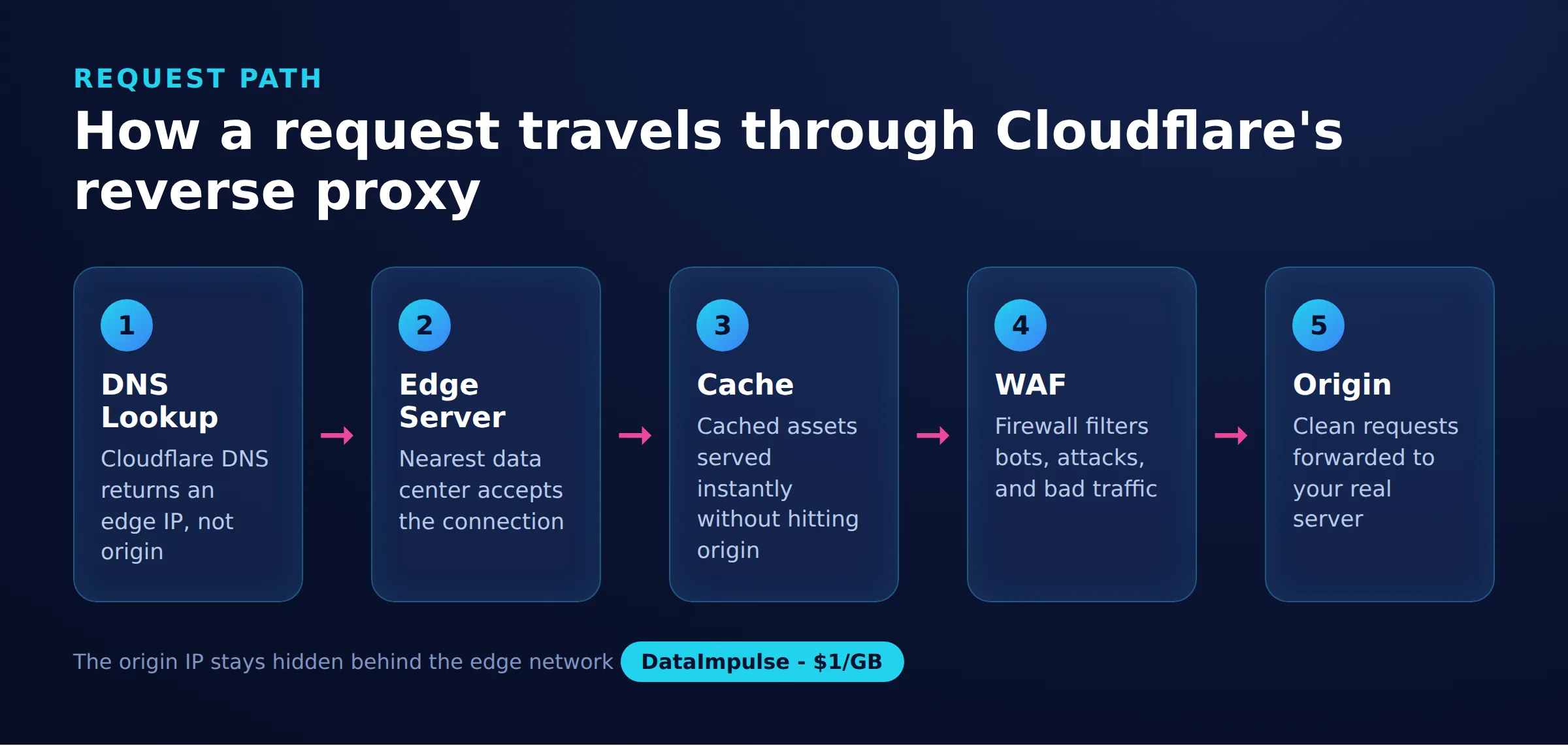
It helps to picture the traffic flow. The Cloudflare reverse-proxy request path is a 5-stage model: DNS -> edge -> cache -> WAF -> origin. A request resolves to a Cloudflare edge IP, is inspected and possibly served from cache, passes the Web Application Firewall, and only then reaches your origin. Knowing which stage a request is in makes every later fix obvious.
How do you set up a Cloudflare reverse proxy step by step?
Add your site to Cloudflare, switch the DNS record to Proxied, and pick a strict SSL mode. The orange cloud on a DNS record is the switch that turns Cloudflare into a reverse proxy for that hostname; a grey cloud means DNS-only and bypasses the edge entirely.
Point DNS at your origin and enable the orange cloud. In the DNS tab, create A (or AAAA) records for the apex and www that hold your origin IP, with Proxy status set to Proxied:
Type   Name   Content        Proxy status
A      @      203.0.113.10   Proxied (orange cloud)
A      www    203.0.113.10   Proxied (orange cloud)
Choose an SSL/TLS encryption mode. Under SSL/TLS, the mode controls how Cloudflare talks to your origin. Use Full (strict) whenever the origin has a valid certificate:
SSL/TLS encryption mode
  Off            no HTTPS, do not use
  Flexible       browser-to-Cloudflare only, origin unencrypted (avoid)
  Full           encrypts to origin, accepts any certificate
  Full (strict)  encrypts to origin, requires a valid certificate
Add a cache or origin rule. Rules let you control what the edge caches or how it reaches the origin. A simple Cache Rule marks a static path as cacheable so Cloudflare serves it without touching your server:
# Rules > Caching > Create rule
When incoming requests match:
  (http.request.uri.path contains "/static/")
Then:
  Cache eligibility = Eligible for cache
  Edge TTL = 1 day
Origin Rules can override the host header or the port Cloudflare connects to, which is useful when your backend listens on a nonstandard port. Once these are saved, Cloudflare is acting as a reverse proxy in front of your origin.
How do you verify the reverse proxy is working?
Send a request to your domain and confirm the response comes back through Cloudflare. The quickest check is a HEAD request with curl, looking for the server and cf-ray headers that Cloudflare adds:
curl -I https://example.com

# Expected headers when proxied:
#   server: cloudflare
#   cf-ray: 8a1b2c3d4e5f6789-FRA
#   cf-cache-status: HIT | MISS | DYNAMIC
If you see server: cloudflare and a cf-ray value, traffic is passing through the edge. A cf-cache-status of HIT confirms a cache rule is serving content from Cloudflare rather than your origin. To confirm DNS resolves to an edge IP rather than your raw origin, run dig example.com +short and check that the returned address is a Cloudflare range, not 203.0.113.10.
How do you troubleshoot 522 and 525 errors?
Most Cloudflare reverse-proxy failures are origin-side and map to a specific stage of the request path. A 5xx error with a Cloudflare-branded page means the edge reached your origin stage but the origin did not answer correctly.
- Error 522 (connection timed out): Cloudflare could not open a TCP connection to the origin. Check that your firewall allows Cloudflare IP ranges, that the web server is running, and that the DNS record holds the correct origin IP.
- Error 525 (SSL handshake failed): the origin refused the TLS handshake. This usually means Full (strict) is set but the origin certificate is missing, expired, or self-signed; install a valid or Cloudflare Origin certificate.
- Redirect loops: the Flexible SSL mode with a server that forces HTTPS creates an infinite loop; switch to Full or Full (strict).
Because the request path is DNS -> edge -> cache -> WAF -> origin, a 522 or 525 always points at the last hop, so start your debugging at the origin and its certificate.
Which proxy type actually fits your job?
Use a Cloudflare reverse proxy to protect and accelerate a server you own; use a forward proxy when you need to send outbound requests from many different IPs. These are opposite tools, and mixing them up is the most common mistake readers of this topic make.
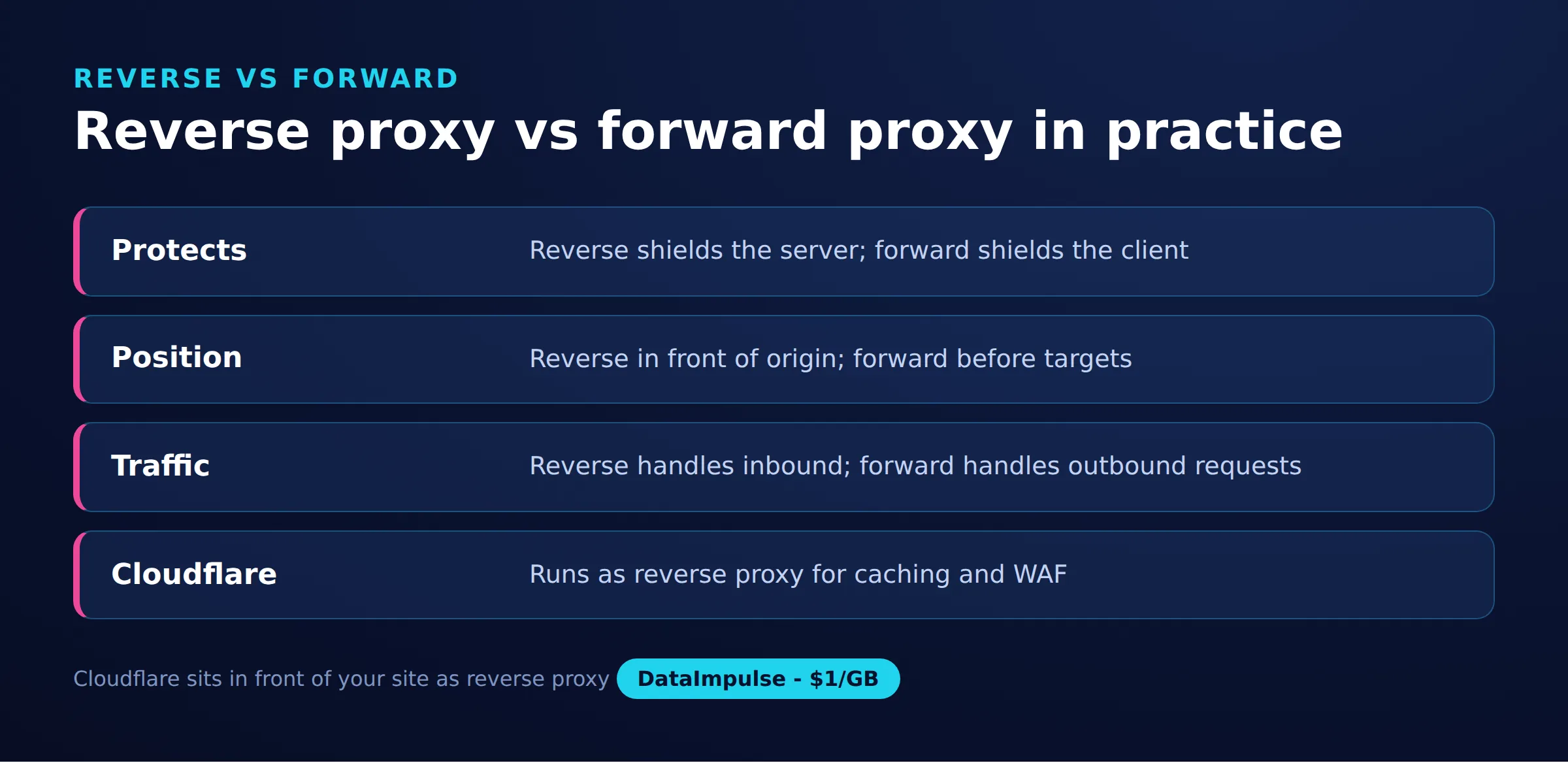
A reverse proxy sits in front of your server and represents it to the internet. A forward proxy sits in front of clients and represents them to the wider internet. The comparison below makes the direction explicit:
| Aspect | Reverse proxy (Cloudflare) | Forward proxy (e.g. DataImpulse) |
|---|---|---|
| Direction | Inbound: internet to your origin | Outbound: your client to any target |
| Who it represents | Your server | Your client or scraper |
| Who it protects | The origin (hides IP, adds WAF, TLS) | The requester (rotates and masks the source IP) |
| Typical use | CDN, caching, DDoS and WAF for your site | Scraping, testing, ad verification, geo checks |
| IP model | One edge fronting one site | Many exit IPs across countries |
Here is the honest callout the bridge rests on: a Cloudflare reverse proxy sits in front of your site and cannot make outbound requests appear to come from many different IPs. If your job is to collect data, run localized tests, or verify ads from many locations, that is a forward proxy, a different tool. For that, DataImpulse offers rotating residential proxies and datacenter proxies across 195 countries. Cloudflare is not a DataImpulse product, and the two solve opposite problems.
Use this decision matrix:
- Use a Cloudflare reverse proxy when you host a website or API and want caching, TLS, DDoS protection, and a hidden origin IP.
- You actually need a forward proxy when you must issue outbound requests from varied IPs for scraping, price monitoring, or ad verification, as covered in scraping without getting blocked.
- Avoid a Cloudflare reverse proxy when the goal is anonymity for your own outbound traffic, because a reverse proxy protects a destination, not a requester.
What are the limitations and risks?
A Cloudflare reverse proxy is powerful for protecting a site you own, but it is not a general-purpose networking tool. Understand these limits before relying on it.
- It does not anonymize your outbound traffic: the reverse proxy hides your origin from visitors, not your requests from third parties.
- Exposed origin IP defeats it: if attackers discover the raw origin IP (via old DNS records or email headers), they can bypass the edge; keep the origin firewall locked to Cloudflare ranges.
- Flexible SSL is insecure: it leaves the Cloudflare-to-origin leg unencrypted, so prefer Full (strict).
- Cache correctness: overly broad cache rules can serve stale or private content; scope rules to static paths.
DataImpulse is an ethical proxy provider and does not sell static ISP proxies, is not a managed scraping API, and is not a free web-proxy service. If you are new to proxy terminology, our guide on what is a web proxy covers the basics before you pick a tool.
Frequently asked questions
Is Cloudflare a reverse proxy?
Yes. When a DNS record is set to Proxied (the orange cloud), Cloudflare acts as a reverse proxy that receives visitor requests at its edge and forwards them to your origin server, adding TLS, caching, and firewall filtering along the way.
What is a Cloudflare reverse proxy?
A Cloudflare reverse proxy is Cloudflare’s edge network positioned in front of your origin server, so that inbound traffic to your domain is inspected, cached, and secured by Cloudflare before it reaches your backend.
What is the difference between Cloudflare Tunnel and a reverse proxy?
Cloudflare Tunnel is a specific way to connect an origin that has no public IP by running a lightweight daemon that dials out to Cloudflare. It is still a reverse-proxy delivery method: both put Cloudflare in front of your server, but the tunnel removes the need to open inbound ports or expose an origin IP.
Is Cloudflare reverse proxy free?
The core reverse-proxy features, including proxied DNS, shared SSL, CDN caching, and basic WAF, are available on Cloudflare’s free plan. Advanced rules, higher rate limits, and some security controls require a paid plan; check Cloudflare’s official pricing for current limits.
Can a Cloudflare reverse proxy be used for web scraping?
No. A reverse proxy protects a site you own and does not send outbound requests from varied IPs. For scraping, testing, or ad verification you need a forward proxy such as a rotating residential network, which is a different tool.
When is DataImpulse not the right fit?
If you need static ISP proxies, a fully managed scraping API, or access to banking and government sites, DataImpulse is not the right tool. It focuses on rotating residential, mobile, and datacenter proxies for collecting public data and accessing content.
Related guides
Need outbound IPs instead of a reverse proxy?
If your job is collecting data or verifying results from many locations rather than protecting your own site, a forward proxy is the right tool. DataImpulse offers rotating residential proxies from 1 dollar per GB with pay-as-you-go, non-expiring traffic across 195 countries. Create an account to get started.

 State/City/Zip/ASN Targeting



