
Bu makalede
Java; platformdan bağımsız yapısı, güçlü kütüphaneleri, çoklu iş parçacığı yetenekleri ve etkili hata işleme mekanizmaları sayesinde web scraping için iyi bir tercihtir. Bu ayrıntılı eğitimde, Java ile veri kazımayı kolaylaştırmak için hangi araçlara ihtiyacınız olduğunu ve hangi adımları izlemeniz gerektiğini anlatıyoruz.
Java ile web scraping: önemli noktalar
Python gibi daha basit diller web scraping için daha popüler olsa da Java’nın da güçlü yönleri vardır. Örneğin:
- JSoup veya HtmlUnit gibi kütüphaneler HTML ayrıştırmayı kolaylaştırır
- Performans, hız ve verimli bellek yönetimi Java’yı büyük ölçekli projeler için uygun kılar
- Güçlü tür sistemine sahip bir dil olan Java, derleme sırasında hata yakalamayı sağlar
Ayrıca altyapınız Java’ya dayanıyorsa veya uzun vadeli projeler hedefliyorsanız Java da bir seçenektir. Bununla birlikte web scraping, IP engelleri, coğrafi kısıtlamalar ve güvenlik endişeleri gibi zorlukları sıkça beraberinde getirir. Java projenizi proxy’lerle desteklemek, bu engelleri aşmanıza ve gerekli verileri elde etmenize yardımcı olur.
Kodlamaya geçmeden önce ihtiyacınız olacak araçlara bakalım:
- Visual Studio Code (aslında Visual Studio 2022 veya Java’yı destekleyen başka herhangi bir IDE de uygundur)
- Java için Kodlama Paketi
- Java için Eklenti Paketi
- Apache Maven
Visual Studio Code veya Java konusunda yeniyseniz, burada Kodlama Paketi ve Eklenti Paketi’nin nasıl kurulacağını ayrıntılı biçimde açıklayan dokümanları bulabilirsiniz. Ayrıca bu eğitim Apache Maven kurulumu konusunda faydalı olabilir.
Not: Yalnızca “hostname:port” formatı desteklenir; bu nedenle kodu çalıştırmadan önce IP adresinizi beyaz listeye eklemeniz gerekir. Bunu DataImpulse hesabınızdan yapabilirsiniz. İlgili proxy planına gidin, sağ üst menüden “Beyaz Liste IP’lerini Yönet” seçeneğini belirleyin ve adresinizi beyaz listeye ekleyin. Yardıma ihtiyacınız olursa veya sorun yaşarsanız lütfen DataImpulse hesabınızı yönetmeye ilişkin ayrıntılı rehberimize.
HttpClientApp ile başlangıç
Trafiği bir proxy sunucusu üzerinden yönlendirmek için bir HTTP istemcisi oluşturmalısınız. Bu uygulama, belirtilen URL’ye istek gönderir ve yanıtları alır. Aşağıdaki kodu kullanabilirsiniz:
import java.io.BufferedReader;
import java.io.IOException;
import java.io.InputStreamReader;
import java.net.*;
public class HttpClientApp {
public static final String proxyHost = "gw.dataimpulse.com";
public static final int proxyPort = 823;
public static void main(String[] args) {
System.out.println("Performing request through proxy...");
try {
String response = request("https://api.ipify.org");
System.out.println("Your IP address: " + response);
} catch (IOException e) {
System.err.println("Request error: " + e.getMessage());
}
}
public static String request(String url) throws IOException {
// Configure the proxy without authentication
Proxy proxy = new Proxy(Proxy.Type.HTTP, new InetSocketAddress(proxyHost, proxyPort));
// Create and configure the connection
HttpURLConnection connection = (HttpURLConnection) new URL(url).openConnection(proxy);
connection.setRequestMethod("GET");
connection.setRequestProperty("User-Agent", "JavaHttpURLConnection");
// Handle the response
int responseCode = connection.getResponseCode();
String responseMessage = connection.getResponseMessage();
if (responseCode == 200) {
// Successful response
try (BufferedReader reader = new BufferedReader(
new InputStreamReader(connection.getInputStream()))) {
StringBuilder response = new StringBuilder();
String line;
while ((line = reader.readLine()) != null) {
response.append(line);
}
return response.toString();
}
} else {
// Error response with detailed output
StringBuilder errorResponse = new StringBuilder();
if (connection.getErrorStream() != null) {
try (BufferedReader reader = new BufferedReader(
new InputStreamReader(connection.getErrorStream()))) {
String line;
while ((line = reader.readLine()) != null) {
errorResponse.append(line);
}
}
}
throw new IOException("HTTP error: " + responseCode + " " + responseMessage +
(errorResponse.length() > 0 ? "\nError details: " + errorResponse : ""));
}
}
}
Çıktı şöyle görünmelidir:

Proxy rotator oluşturma
Trafiği proxy sunucusu üzerinden yönlendirmek yeterli değildir. Gizliliği artırmak için her istekte yeni bir IP kullanmalısınız. Bu nedenle bir proxy rotator’a ihtiyacınız vardır. Kullanabileceğiniz örnek kod şöyledir:
import java.io.BufferedReader;
import java.io.IOException;
import java.io.InputStreamReader;
import java.net.*;
import java.util.Arrays;
import java.util.List;
public class ProxyRotator {
// List of proxies to rotate through
private static final List proxies = Arrays.asList(
new Proxy(Proxy.Type.HTTP, new InetSocketAddress("gw.dataimpulse.com", 10000)),
new Proxy(Proxy.Type.HTTP, new InetSocketAddress("gw.dataimpulse.com", 10001)),
new Proxy(Proxy.Type.HTTP, new InetSocketAddress("gw.dataimpulse.com", 10002))
);
public static void main(String[] args) {
// URL to request
String url = "https://api.ipify.org";
for (Proxy proxy : proxies) {
System.out.println("Using proxy: " + proxy.address());
try {
String response = sendRequestWithProxy(url, proxy);
System.out.println("Request succeeded with proxy " + proxy.address());
System.out.println("IP address from API website: " + response);
} catch (IOException e) {
System.err.println("Request failed with proxy " + proxy.address() + ": " + e.getMessage());
}
System.out.println("------------------------------------------------");
}
}
// Function to send request using a specific proxy
private static String sendRequestWithProxy(String url, Proxy proxy) throws IOException {
HttpURLConnection connection = (HttpURLConnection) new URL(url).openConnection(proxy);
connection.setRequestMethod("GET");
connection.setRequestProperty("User-Agent", "JavaHttpURLConnection");
int responseCode = connection.getResponseCode();
if (responseCode == 200) {
try (BufferedReader reader = new BufferedReader(new InputStreamReader(connection.getInputStream()))) {
StringBuilder response = new StringBuilder();
String line;
while ((line = reader.readLine()) != null) {
response.append(line);
}
return response.toString();
}
} else {
throw new IOException("HTTP error code: " + responseCode + " " + connection.getResponseMessage());
}
}
}
Bunun sonucunda şöyle bir çıktı almalısınız:

Proxy checker derleme
Proxy’lerimizin belirli bir web sitesiyle çalıştığından emin olma zamanı. Bunun için bir proxy checker uygulaması oluşturmalı ve kontrol edilecek bir URL belirtmelisiniz:

Deneyebileceğiniz bir kod var:
import java.io.BufferedReader;
import java.io.IOException;
import java.io.InputStreamReader;
import java.net.*;
import java.util.Arrays;
import java.util.List;
public class ProxyChecker {
// List of proxies to rotate through
private static final List proxies = Arrays.asList(
new Proxy(Proxy.Type.HTTP, new InetSocketAddress("gw.dataimpulse.com", 10000)),
new Proxy(Proxy.Type.HTTP, new InetSocketAddress("gw.dataimpulse.com", 10001)),
new Proxy(Proxy.Type.HTTP, new InetSocketAddress("gw.dataimpulse.com", 10002))
);
// Website to check through proxies
private static final String websiteUrl = "https://api.ipify.org";
public static void main(String[] args) {
System.out.println("Starting Proxy Checker...");
for (Proxy proxy : proxies) {
System.out.println("\nChecking proxy: " + proxy.address());
try {
boolean isWorking = checkProxy(proxy, websiteUrl);
if (isWorking) {
System.out.println("✅ Proxy " + proxy.address() + " works with " + websiteUrl);
} else {
System.out.println("❌ Proxy " + proxy.address() + " does not work with " + websiteUrl);
}
} catch (IOException e) {
System.out.println("❌ Proxy " + proxy.address() + " failed: " + e.getMessage());
}
System.out.println("------------------------------------------------");
}
}
// Function to check if proxy works with the given website
private static boolean checkProxy(Proxy proxy, String url) throws IOException {
HttpURLConnection connection = (HttpURLConnection) new URL(url).openConnection(proxy);
connection.setRequestMethod("GET");
connection.setRequestProperty("User-Agent", "JavaHttpURLConnection");
connection.setConnectTimeout(5000); // 5 seconds timeout
connection.setReadTimeout(5000); // 5 seconds timeout
int responseCode = connection.getResponseCode();
String responseMessage = connection.getResponseMessage();
System.out.println("Response: " + responseCode + " " + responseMessage);
if (responseCode == 200) {
try (BufferedReader reader = new BufferedReader(
new InputStreamReader(connection.getInputStream()))) {
StringBuilder response = new StringBuilder();
String line;
while ((line = reader.readLine()) != null) {
response.append(line);
}
System.out.println("IP Returned: " + response);
}
return true;
} else {
try (BufferedReader reader = new BufferedReader(
new InputStreamReader(connection.getErrorStream()))) {
StringBuilder errorResponse = new StringBuilder();
String line;
while ((line = reader.readLine()) != null) {
errorResponse.append(line);
}
System.out.println("Error details: " + errorResponse);
}
return false;
}
}
}
Gördüğünüz sonuçlar şöyle görünmelidir:

Web scraping aşamasına geçiş
Son olarak bir web scraping uygulaması oluşturma zamanı. Uygulama gerekli tüm verileri çıkaracağından, kazınacak hedef URL’yi belirtmeli ve programın hangi verileri almasını istediğinizi tanımlamalısınız. Bizim örneğimizde ana sayfamızdaki bağlantıları kazıyacağız. Bu kodu referans olarak kullanabilirsiniz:
package com.dataimpulse;
import org.jsoup.Jsoup;
import org.jsoup.nodes.Document;
import org.jsoup.nodes.Element;
import org.jsoup.select.Elements;
import java.io.BufferedReader;
import java.io.IOException;
import java.io.InputStreamReader;
import java.net.*;
import java.nio.charset.StandardCharsets;
public class ProxyWebScraper {
// Proxy configuration
private static final String PROXY_HOST = "gw.dataimpulse.com";
private static final int PROXY_PORT = 823;
// Target website to scrape
private static final String TARGET_URL = "https://dataimpulse.com/";
public static void main(String[] args) {
System.out.println("Starting Proxy Web Scraper...");
try {
// Perform the web scraping through the proxy
String htmlContent = getHtmlContent(TARGET_URL);
if (htmlContent != null) {
// Parse and extract links from the HTML content
parseHtml(htmlContent);
} else {
System.out.println("Failed to retrieve HTML content.");
}
} catch (IOException e) {
System.err.println("Error during scraping: " + e.getMessage());
}
}
// Method to get HTML content through the proxy
private static String getHtmlContent(String url) throws IOException {
// Configure proxy
Proxy proxy = new Proxy(Proxy.Type.HTTP, new InetSocketAddress(PROXY_HOST, PROXY_PORT));
// Create and configure the connection
HttpURLConnection connection = (HttpURLConnection) new URL(url).openConnection(proxy);
connection.setRequestMethod("GET");
connection.setRequestProperty("User-Agent", "JavaWebScraper/1.0");
connection.setConnectTimeout(10000);
connection.setReadTimeout(10000);
int responseCode = connection.getResponseCode();
if (responseCode == 200) {
// Read and return the HTML content
try (BufferedReader reader = new BufferedReader(
new InputStreamReader(connection.getInputStream(), StandardCharsets.UTF_8))) {
StringBuilder content = new StringBuilder();
String line;
while ((line = reader.readLine()) != null) {
content.append(line);
}
return content.toString();
}
} else {
System.err.println("Failed to fetch HTML. HTTP error code: " + responseCode);
return null;
}
}
// Method to parse HTML and extract links using jsoup
private static void parseHtml(String htmlContent) {
Document doc = Jsoup.parse(htmlContent);
Elements links = doc.select("a[href]");
if (links.isEmpty()) {
System.out.println("No links found on the page.");
} else {
System.out.println("Links found:");
for (Element link : links) {
String href = link.attr("abs:href");
String title = link.text();
System.out.println("Title: " + title + ", Link: " + href);
}
}
}
}
Ancak yapmanız gereken bir şey daha var. Süreci tamamlamak ve scraping uygulamanızın doğru çalışmasını sağlamak için JSoup kütüphanesini Maven kullanarak yüklemeniz gerekir. Bunun nasıl yapılacağını adım adım açıklayalım:
- İlgili düğmeyi kullanarak bir Java projesi oluşturun.

- Seçin Maven proje türü olarak.

- Görüntülenen listeden “maven-archetype-quickstart” seçeneğini seçin:

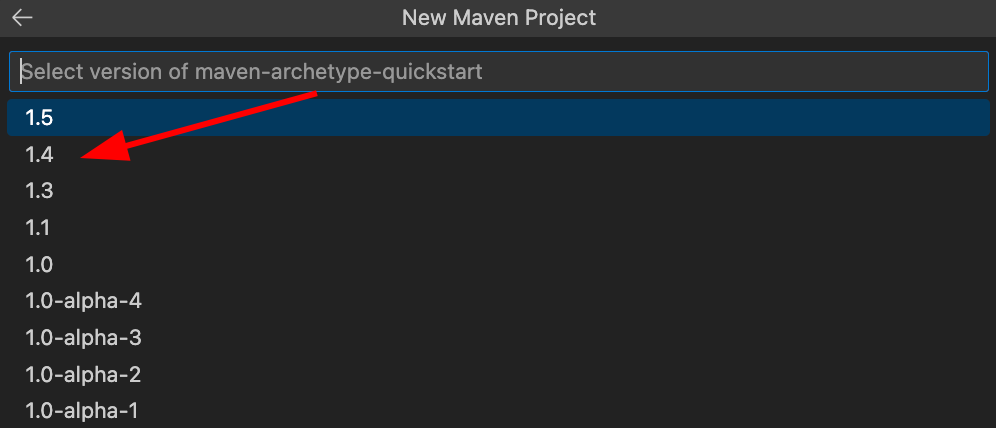
- maven-archetype-quickstart’ın “1.4” sürümünü seçin.
- Grup kimliği olarak “com.dataimpulse” girin.

- “artifact Id” alanına “proxy-scraper” girin.

- Kütüphaneyi ve ProxyWebScraper uygulamasını saklamak için bir klasör seçin. Ardından proxy-scraper klasörü görünmelidir. Şimdi kodu şuraya taşıyın: proxy-scraper/src/main/java/com/dataimpulse:

- Aşağıdaki ekran görüntüsünde gösterildiği gibi JSoup kütüphanesini Apache Maven aracılığıyla ekleyin. Doğru yaparsanız kütüphane “pom.xml” dosyasında görünür.

- “pom.xml” dosyasında “maven.compiler.source” ve “maven.compiler.target” parametrelerini 1.8 olarak değiştirin. Windows için CTRL+S, Mac için CMD+S kullanarak dosyayı kaydedin.

- Artık kodunuz sorunsuz çalışmalıdır. Çalıştırmak için ekranın sağ üst köşesindeki düğmeyi kullanın.

Scraping projemizin nihai sonucu şöyledir:

Gördüğünüz gibi artık istediğimiz tüm verilere sahibiz. Ancak kodu değiştirerek ihtiyacınız olan herhangi bir HTML verisini elde edebilirsiniz. Ayrıca proxy’leri dikkatle seçmelisiniz; çünkü bu tür sonuçlar yasal yollarla tedarik edilmiş IP’ler olmadan mümkün değildir. DataImpulse’ta, kötü amaçlı yazılım yayma gibi yasa dışı faaliyetlerle ilişkilendirilmeyen, etik yollarla elde edilmiş 15 milyon adres bulabilirsiniz. Herhangi bir zorluk yaşarsanız insan destek ekibimiz 7/24 hizmetinizdedir. Hedeflemeyi bölgesel erişim politikalarıyla uyumlu olacak şekilde de ayarlayabilirsiniz. Bununla birlikte kullandıkça öde fiyatlandırma modeliyle çalıştığımız ve 1 GB başına $1 gibi uygun bir fiyat sunduğumuz için proxy’lerimiz bütçenizi tüketmez. Bizimle iletişime geçmek için [email protected] adresini kullanın veya ekranın sağ üst köşesindeki “Şimdi deneyin” düğmesini kullanın.