

In this Article
httpx is the modern Python HTTP client — a requests-style API with first-class async, HTTP/2, and connection pooling. It’s a great fit for scraping, but hit a real target at volume from one datacenter IP and you’ll be blocked fast. The fix is to route httpx through proxies — ideally residential — so requests look like real users. httpx has clean proxy support via the proxy= argument, with one version gotcha (it replaced the old proxies=) and a one-line install for SOCKS5. This guide shows exactly how to use a proxy with httpx (sync, async, authenticated, SOCKS5, per-domain mounts, and rotation), then ranks the 8 best proxies for httpx in 2026. DataImpulse at $1/GB is the value baseline.
I’m Andrii Byzov, an AI-Native Fractional CMO who writes httpx scrapers daily. Below: the copy-paste snippets, the proxy=-vs-proxies= gotcha, and the providers worth your budget.
Key Facts
- Set the proxy on the client —
httpx.Client(proxy="http://user:pass@host:port"). Credentials in the URL are used automatically. - Use
proxy=, notproxies=. Recent httpx (0.28+) renamed the argument; the oldproxies=is removed, so use the singularproxy=. - Async is identical —
httpx.AsyncClient(proxy=...)withawait client.get(...). - SOCKS5 needs one install:
pip install "httpx[socks]", then asocks5://proxy URL. - DataImpulse is the value pick — residential $1/GB pay-as-you-go, datacenter $0.50/GB, mobile $2/GB, 90M+ IPs across 195 countries, HTTP/HTTPS/SOCKS5, country/city/ASN targeting.
How to Use a Proxy with httpx
1. Sync client with authentication
import httpx

proxy = "http://YOUR_LOGIN__cr.us:[email protected]:823"  # __cr.us = US
with httpx.Client(proxy=proxy) as client:
    r = client.get("https://httpbin.org/ip")
    print(r.json())  # confirm the egress IP
Credentials in the proxy URL are applied automatically. Note the argument is proxy= (singular) — older code used proxies=, which recent httpx removed.
2. Async client
import httpx, asyncio

async def main():
    proxy = "http://YOUR_LOGIN__cr.us:[email protected]:823"
    async with httpx.AsyncClient(proxy=proxy) as client:
        r = await client.get("https://httpbin.org/ip")
        print(r.json())

asyncio.run(main())
3. SOCKS5 (install the extra)
# pip install "httpx[socks]"
proxy = "socks5://YOUR_LOGIN__cr.us:[email protected]:824"
with httpx.Client(proxy=proxy) as client:
    print(client.get("https://httpbin.org/ip").json())
httpx routes SOCKS through the optional socks extra; without it a socks5:// URL raises an import error. DataImpulse exposes SOCKS5 on port 824.
4. Per-domain mounts & rotation
# route specific domains through the proxy, others direct:
mounts = {
    "all://httpbin.org": httpx.HTTPTransport(
        proxy="http://YOUR_LOGIN__cr.us:[email protected]:823"),
    "all://": None,  # everything else goes direct
}
with httpx.Client(mounts=mounts) as client:
    print(client.get("https://httpbin.org/ip").json())
With DataImpulse’s rotating residential gateway, each request egresses from a fresh IP — no proxy list to manage. A mounts key like all://httpbin.org routes that domain through the proxy while all:// (the wildcard) handles everything else — so you can send some domains direct, route others through a proxy, or assign a different proxy per domain. httpx also reads HTTP_PROXY/HTTPS_PROXY env vars by default (trust_env=True).
Best Proxies for httpx at a Glance
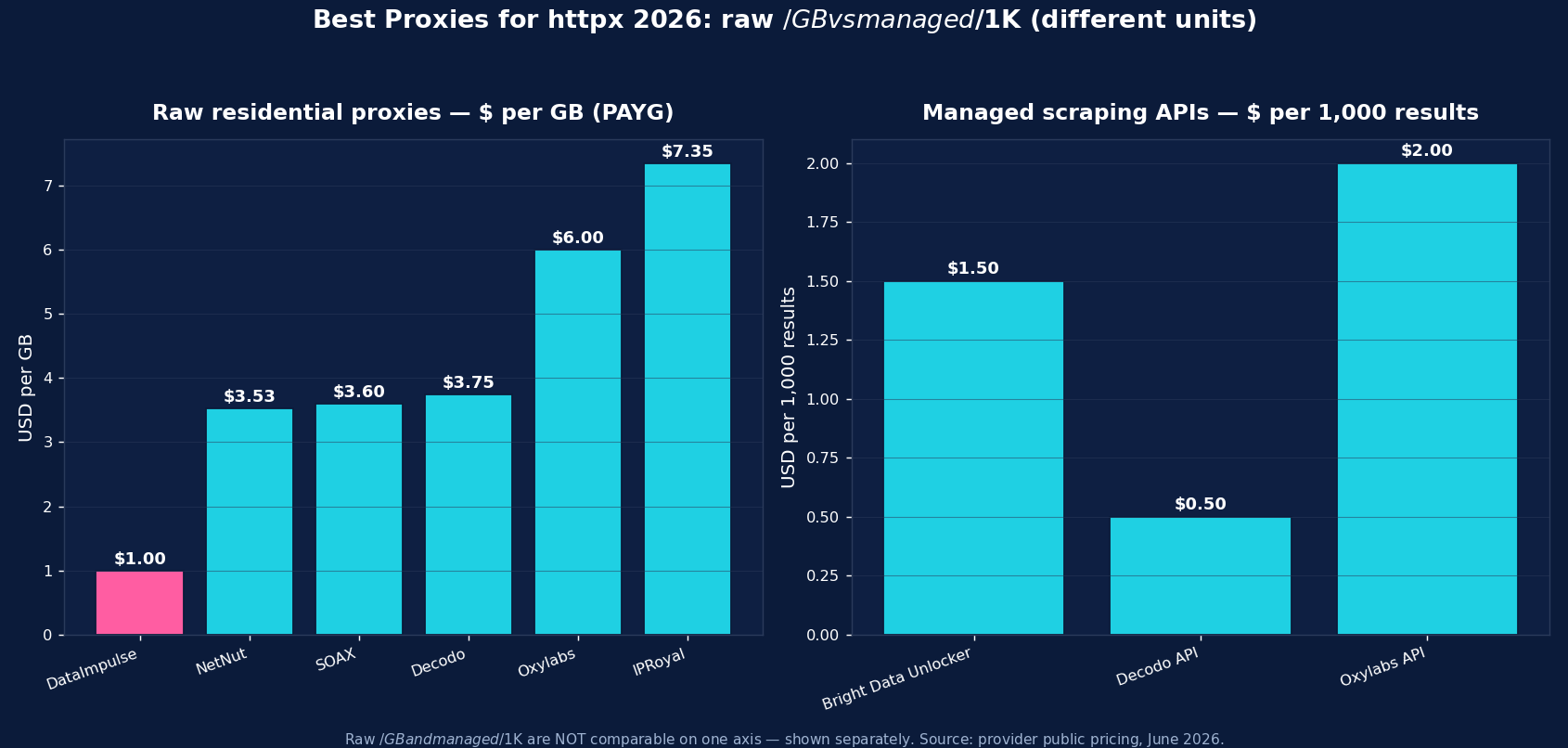
| Provider | Best for httpx | Residential price | Protocols | Notable |
|---|---|---|---|---|
| DataImpulse | Best value, sync & async scraping | $1/GB PAYG | HTTP/HTTPS/SOCKS5 | 90M+ pool, never-expires |
| Bright Data | Enterprise + managed | ~$4/GB promo; $8 regular | HTTP/HTTPS/SOCKS5 | Web Unlocker, SERP API, datasets |
| Oxylabs | Enterprise SLA | from $6/GB | HTTP/HTTPS/SOCKS5 | 175M+ pool, scraper APIs |
| Decodo | Mid-market, full geo grid | $3.75/GB (~$2 at 1TB+) | HTTP/HTTPS/SOCKS5 | 115M+ pool, sticky to 24h |
| IPRoyal | Long sticky sessions | from $7.35/GB | HTTP/HTTPS/SOCKS5 | Sticky up to 7 days; cheap PAYG |
| SOAX | Residential + mobile mix | $3.60/GB Starter | HTTP/HTTPS/SOCKS5 | 155M+ res, 33M+ mobile |
| Webshare | Budget / self-serve | from $3.50/mo res; $2.99/mo DC | HTTP/SOCKS5 | Free tier, cheapest datacenter |
| NetNut | ISP-residential stability | from $3.53/GB | HTTP/HTTPS | Consumer-ISP static IPs |
The picks, briefly
DataImpulse is the value baseline for httpx work — residential at $1/GB pay-as-you-go (datacenter $0.50/GB, mobile $2/GB), 90M+ IPs across 195 countries, HTTP/HTTPS and SOCKS5, with country/city/ASN targeting in the username. Traffic never expires, so dev runs don’t burn a subscription. Published success rate 99.51%; G2 4.8/5; 24/7 human support. For high-volume sync or async scraping with httpx, it’s the lowest cost per successful request.
Bright Data is the enterprise pick (residential ~$8/GB regular, ~$4 promo) with Web Unlocker, SERP API, and datasets. Oxylabs (from $6/GB, 175M+ pool) is the SLA-grade option. Decodo (from $3.75/GB, sticky to 24h) is the balanced mid-market choice. IPRoyal (from $7.35/GB, sticky up to 7 days) suits long, session-stable scripts. SOAX ($3.60/GB, 155M+ residential + 33M+ mobile) adds a strong mobile pool. Webshare (free tier, datacenter from $2.99/mo) is the budget self-serve entry, and NetNut (from $3.53/GB) is the ISP-residential stability pick.
Common httpx Proxy Mistakes
- Using
proxies=. Recent httpx removed it — useproxy=(singular). Code copied from old tutorials will raise aTypeError. - Forgetting
pip install "httpx[socks]"— asocks5://URL without the extra raises an import error. - Setting the proxy per request. httpx sets the proxy on the
Client, not per call — use one client per proxy, ormountsfor per-domain routing. - No timeout override. httpx defaults to a 5s timeout; raise it for slow proxies with
httpx.Timeout. - Datacenter IPs on defended targets — they get blocked fast; use residential and realistic headers.
Rotating vs Sticky Proxies with httpx
For broad scraping, a rotating residential gateway is ideal — each request gets a fresh IP, which suits httpx’s pooled sync or async clients. For stateful flows (login then follow-up calls), keep one Client with a sticky proxy so the same IP and cookies persist. Most httpx scraping is stateless, so rotating is the common default.
Which Proxy Type for httpx — Residential, Datacenter, or Mobile?
- Residential ($1/GB) — the default for defended targets (e-commerce, SERPs, social). If you pick one, pick this.
- Mobile ($2/GB) — real carrier IPs for the hardest targets and mobile-web surfaces.
- Datacenter ($0.50/GB) — cheapest and fastest for unprotected work, APIs, and your own infrastructure; don’t point it at anti-bot-heavy sites.
DataImpulse offers all three on one pay-as-you-go account, so a single httpx client can route each request to the right tier via the username and endpoint.
How to Start with DataImpulse + httpx
Step 1. Create a DataImpulse account and grab residential credentials. The $5 / 5GB intro never expires — a real test budget.
Step 2. Pass proxy="http://YOUR_LOGIN__cr.us:[email protected]:823" to httpx.Client() or httpx.AsyncClient(), append a country code for geo-targeting, and use pip install "httpx[socks]" + a socks5://...:824 URL for SOCKS5.
Step 3. Reuse one client, set a sane httpx.Timeout, send realistic headers, and let the rotating gateway give a fresh IP per request. See the DataImpulse tutorials and the residential proxies page.
FAQ
How do I use a proxy with httpx?
Set it on the client: httpx.Client(proxy="http://user:pass@host:port") (or httpx.AsyncClient(proxy=...) for async). Credentials in the URL are used automatically. For DataImpulse: http://YOUR_LOGIN__cr.us:[email protected]:823. Note the argument is the singular proxy=.
What happened to proxies= in httpx?
Recent httpx (0.28+) removed the proxies= argument in favour of the singular proxy= (for a single proxy) and mounts= (for per-domain routing). Code copied from older tutorials that uses proxies= will raise a TypeError — switch to proxy=.
Does httpx support SOCKS5 proxies?
Yes, with the optional extra: pip install "httpx[socks]". Then pass a socks5://user:pass@host:port URL to the client. Without the extra, a SOCKS URL raises an import error. DataImpulse exposes SOCKS5 on port 824.
What’s the best proxy for httpx?
Residential proxies for defended targets — DataImpulse at $1/GB is the value pick (HTTP/HTTPS/SOCKS5, 90M+ IPs, never-expiring traffic). Bright Data and Oxylabs are the enterprise options; Webshare is cheapest to start. All work with httpx’s proxy= argument; pair with realistic headers and a sane timeout.
How do I rotate proxies in httpx?
Point proxy= at a rotating residential gateway (DataImpulse) — each request gets a fresh IP automatically. To rotate a static list, create a client per proxy or swap the transport in mounts. For stateful flows, keep one sticky proxy on a single client so the IP and cookies persist.
How much do httpx proxies cost?
Raw residential is priced per GB — DataImpulse $1/GB (value floor), NetNut from $3.53, SOAX $3.60, Decodo $3.75, Oxylabs from $6, IPRoyal $7.35; Webshare offers budget subscriptions from $3.50/mo. A fetched page is a small fraction of a GB, so per-GB residential is far cheaper than per-record managed APIs for high-volume scraping; managed options suit the hardest targets.

 State/City/Zip/ASN Targeting



