

In this Article
Rotating and static proxies aren’t different kinds of IP — they’re different ways of assigning IPs to your traffic. A rotating proxy gives you a new IP on every request (or every few minutes), drawing from a large pool. A static proxy hands you one fixed IP that stays yours for hours, days, or longer. That single choice — change the IP constantly, or hold it steady — decides whether a job succeeds or trips an anti-bot wall.
This guide explains the difference in plain terms, shows a head-to-head comparison, and tells you which one to use for which job: rotating for large-scale scraping and SERP sweeps, static for account management and logged-in flows. We’ll also cover sticky sessions (the middle ground), how rotation relates to residential vs datacenter proxies, cost, and a simple decision framework. Jump to the comparison table for the short version.
Key Takeaways
- Rotating = a new IP per request (or interval). The proxy pulls fresh IPs from a large pool, so each request looks like a different visitor. Built for spreading load and dodging rate limits.
- Static = one fixed IP you keep. The same address stays assigned to you for a long session — hours to weeks — so the target sees a consistent, recognizable visitor.
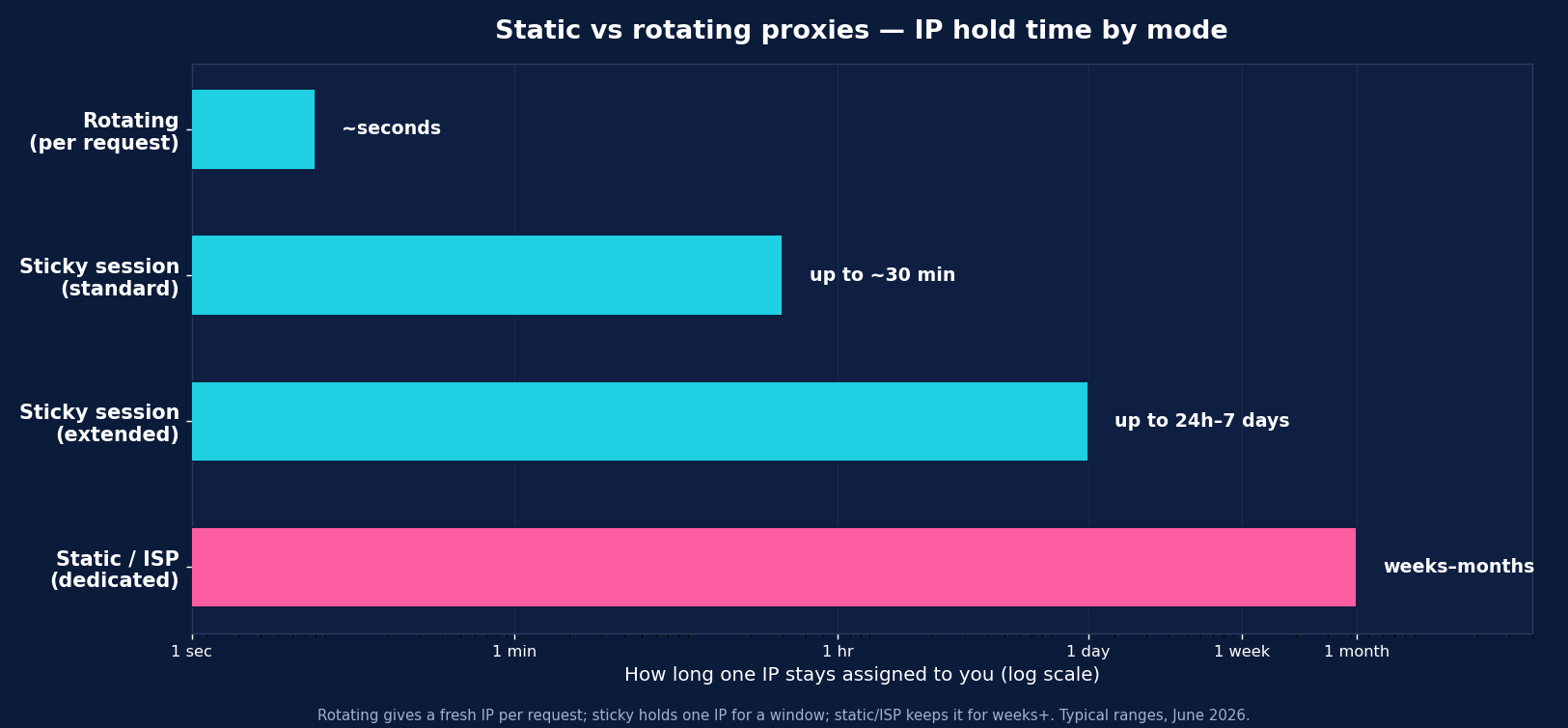
- Sticky sessions are the middle ground. Hold one rotating IP for a set window (commonly 1–30 minutes, up to 24 hours or even 7 days with some providers) — enough to finish a multi-step flow before rotating.
- The use cases barely overlap. Rotating wins for high-volume scraping, price monitoring, and SERP tracking. Static wins for logins, account management, checkouts, and anything that must keep the same identity.
- Rotation and proxy type are separate choices. Rotating pools are usually residential or datacenter; static IPs are usually ISP (static residential) or dedicated datacenter. You pick the rotation model and the IP type to fit the target.
What Is a Rotating Proxy?
A rotating proxy automatically changes the IP address your requests come from — either on every request or on a fixed time interval — by drawing from a large pool of IPs. To the target site, a thousand requests through a rotating proxy look like a thousand different visitors rather than one client hammering the server. That’s exactly what you want when you’re collecting data at scale: it spreads requests across many IPs, so no single address triggers the rate limits and block thresholds that watch for too many hits from one place.
Rotating proxies are typically backed by residential or datacenter pools with millions of IPs across many locations. They’re the default for breadth — wide, independent requests where each page or query stands alone and you don’t need continuity between them.
Best for: large-scale web scraping, e-commerce price and stock monitoring, SERP and rank tracking, ad verification, and any job where each request is independent and volume is high.
What Is a Static Proxy?
A static proxy gives you a single, fixed IP address that stays assigned to you for the whole session — and that session can last hours, days, or much longer. The target site sees the same consistent IP every time, the way it would see a regular returning user on a home or office connection. Static proxies are usually ISP (static residential) — residential-grade IPs hosted for stability — or dedicated datacenter IPs.
That consistency is the whole point. Some tasks break if your IP keeps changing: logging into an account and then having the next request come from a different country looks like a hijack and gets you challenged or locked out. Static proxies keep one identity, so you can hold a session, stay logged in, complete a checkout, or operate an account without raising flags. They’re also what you use when a service whitelists specific IPs for access.
Best for: account creation and management, logged-in sessions, social media and marketplace seller accounts, checkout and purchase flows, and any service that whitelists IPs or expects a stable address.
Static vs Rotating Proxies: Head-to-Head
| Dimension | Rotating | Static |
|---|---|---|
| IP behavior | New IP per request / interval | One fixed IP, long-lived |
| What the target sees | Many different visitors | One consistent visitor |
| Best for | High-volume scraping, SERP, prices | Logins, accounts, checkouts |
| Rate-limit resistance | High — load is spread | Lower — all traffic from one IP |
| Session continuity | None (unless sticky) | Full — same IP throughout |
| Usual IP type | Residential / datacenter pool | ISP (static residential) / dedicated DC |
| Pricing model | Usually per GB | Often per IP / month (or per GB) |
| Whitelisting | Impractical (IP changes) | Easy — fixed IP |
Sticky Sessions: The Middle Ground
Most real workflows aren’t purely “new IP every time” or “one IP forever” — they need one IP for a little while. That’s what sticky sessions provide: you hold a single rotating IP for a set window, then it rotates. Typical sticky windows run 1 to 30 minutes, and some providers extend them much further — up to 24 hours, or even 7 days. Because these are real consumer IPs, the hold is best-effort — an IP can occasionally drop early if the underlying device goes offline — so build retries into long sessions.
Sticky sessions are the right tool for multi-step flows that don’t need a permanent IP: a search → results → product-detail sequence, paginated results you want to read in order, or a short login-and-collect task. You get continuity for the duration of the job, then a fresh IP for the next one — combining rotation’s scale with just enough stability. A well-built scraping stack usually runs mostly rotating, a sticky pool for multi-step work, and a few static IPs for true account-level tasks.
When to Use Rotating Proxies
Use rotating proxies when you’re collecting a lot of independent data and need to avoid rate limits:
- Large-scale web scraping — thousands or millions of pages where each request stands alone.
- E-commerce price & stock monitoring — sweeping many listings or categories across marketplaces.
- SERP & rank tracking — running many keyword queries without one IP getting throttled by the search engine.
- Ad verification — checking how ads render across many locations and sessions.
- Any high-volume job where spreading requests across many IPs is the whole defense against blocks.
The rule: if requests are independent and volume is high, rotate — it’s what keeps you under the rate limits.
When to Use Static Proxies
Use static proxies when the task requires keeping the same identity across requests:
- Account creation & management — registering or running accounts that expect a stable IP; a changing IP looks like a compromise.
- Logged-in sessions — anything behind a login where switching IPs mid-session triggers security challenges.
- Social media & marketplace seller accounts — where consistency builds and protects account trust.
- Checkout & purchase flows — multi-step transactions that must complete from one address.
- Whitelisted services — APIs or dashboards that grant access only to specific, fixed IPs.
The rule: if changing the IP would break the session or trip a security check, go static.
How Rotation Relates to Proxy Type
Rotation and IP type are two separate dials, and you set both. Rotating pools are usually residential (to look like real users at scale) or datacenter (for cheap, fast volume on unprotected targets). Static IPs are usually ISP / static residential (residential legitimacy with a fixed, long-lived address — ideal for accounts) or dedicated datacenter (a fixed IP for whitelisting or your own infrastructure). So “rotating residential” and “static ISP” are common, sensible combinations — you choose the rotation model for the workflow and the IP type for how defended the target is. (For the IP-type side of the decision, see our datacenter vs residential proxies guide.)
How Much Do They Cost?
The pricing models differ because the products do. Rotating proxies are almost always billed per GB of traffic — you pay for data, not IPs, which suits high-volume scraping where you touch many addresses. Residential rotating runs roughly $1–$8/GB across the market (DataImpulse $1/GB); datacenter rotating is cheaper. Static proxies are often billed per IP per month (a few dollars per IP for datacenter; more for ISP/static residential), since you’re renting a dedicated address — though some providers also offer static traffic on a per-GB basis.
For most data-collection work, per-GB rotating is the cost-efficient default: you’re not paying to reserve IPs you don’t keep. Reserve static IPs for the specific account- or whitelist-level tasks that genuinely need a fixed address, and you keep spend down without sacrificing what each job requires.
How to Choose: A Simple Framework
Two questions settle it:
1. Are your requests independent, or part of one session? If each request stands alone (scraping pages, prices, SERPs), rotate. If they belong to one continuous identity (a login, an account, a checkout), go static.
2. If it’s a multi-step flow, how long does it run? A short multi-step sequence (search → results → detail) fits a sticky session — one IP held for a few minutes. A long-lived identity (an account you run for weeks) needs a static IP.
Then layer on the IP type: defended target → residential/ISP; open target → datacenter. The mature pattern is mostly-rotating for scale, sticky for multi-step jobs, and a handful of static IPs for account work — all routed by what each task needs.
Rotating, Sticky & Static with DataImpulse
DataImpulse supports all three models from one account: rotating residential (a new IP per request from a 90M+ pool across 195 countries), sticky sessions (hold one IP for your chosen window for multi-step flows), and stable IPs for session-bound work — all at $1/GB residential, pay-as-you-go, traffic that never expires, with HTTP/HTTPS/SOCKS5, country targeting (city/ASN as an add-on), and full API access.
Start with the $5 intro budget, use rotating for your scraping and SERP sweeps, switch to a sticky session for any multi-step or login flow, and point your stack (Scrapy, Playwright, Selenium, or cURL/requests) at the right endpoint. See the residential proxies page for rotation and session setup.
FAQ
What is the difference between rotating and static proxies?
A rotating proxy changes your IP on every request or at a set interval, pulling from a large pool so each request looks like a different visitor — ideal for high-volume scraping. A static proxy gives you one fixed IP that stays assigned to you for hours or days, so the target sees a consistent visitor — ideal for logins, accounts, and checkouts. The choice is about whether your traffic should look like many visitors or one.
When should I use a rotating proxy?
Use rotating proxies for large-scale, independent requests: web scraping, e-commerce price and stock monitoring, SERP and rank tracking, and ad verification. Rotating spreads your requests across many IPs so no single address hits the target’s rate limits, which is what keeps high-volume jobs from getting blocked. If each request stands alone and volume is high, rotate.
When should I use a static proxy?
Use a static proxy when a task must keep the same identity: account creation and management, logged-in sessions, social media or marketplace seller accounts, checkout flows, and services that whitelist specific IPs. With these, a changing IP looks like a security risk and gets you challenged or locked out, so a fixed, long-lived IP is essential.
What is a sticky session?
A sticky session holds one rotating IP for a set window — commonly 1–30 minutes, and up to 24 hours or even 7 days with some providers — before it rotates. It’s the middle ground between rotating and static: enough continuity to finish a multi-step flow (search → results → product page, or a short login-and-collect task) without renting a permanent IP. Most scraping stacks use sticky sessions for their multi-step work.
Are rotating proxies residential or datacenter?
They can be either — rotation and IP type are separate choices. Rotating pools are usually residential (to look like real users at scale on defended targets) or datacenter (cheap, fast volume on unprotected targets). Static IPs are usually ISP/static residential or dedicated datacenter. You pick the rotation model for the workflow and the IP type for how heavily the target is defended.
Do rotating proxies cost more than static?
They’re priced differently. Rotating proxies are billed per GB of traffic (residential ~$1–$8/GB across the market; DataImpulse $1/GB), so you pay for data, not IPs. Static proxies are often billed per IP per month, since you’re renting a dedicated address. For high-volume scraping, per-GB rotating is usually the cost-efficient default; reserve static IPs only for account- or whitelist-level tasks that need a fixed address.
Can I keep the same IP with a rotating proxy?
Yes — that’s what sticky sessions are for. With a rotating proxy you can request that one IP be held for a set duration (a few minutes up to several hours depending on the provider) so a multi-step flow completes from the same address, after which it rotates. If you need the same IP for days or weeks (running an account, for example), use a static/ISP proxy instead.

 State/City/Zip/ASN Targeting



