

In this Article
Puppeteer drives headless Chrome for scraping and automation — it renders JavaScript, handles logins and clicks, and powers a huge share of Node.js scraping stacks in 2026. But point it at a real target from one datacenter IP and you’ll be blocked or rate-limited fast. The fix is to route Puppeteer through proxies — ideally residential — so each session looks like an ordinary user. The catch unique to Puppeteer: Chrome won’t accept a username and password in the proxy URL, so authentication needs one extra step. This guide shows exactly how to set up a proxy in Puppeteer (with working code), then ranks the 8 best proxies for Puppeteer in 2026 by price, success rate, and integration.
I’m Andrii Byzov, an AI-Native Fractional CMO who runs Puppeteer-based data pipelines daily. Below: the copy-paste setup including the authentication step everyone trips on, the rotation pattern that scales, and the providers worth your budget — with DataImpulse residential at $1/GB as the value baseline.
Key Facts
- Set the proxy with the
--proxy-serverlaunch flag. Pass it inargstopuppeteer.launch(); it applies to every page in that browser. - Chrome ignores credentials in the proxy URL. For an authenticated proxy you must call
page.authenticate({ username, password })beforepage.goto()— or wrap the proxy with theproxy-chainlibrary, which handles auth for you. - SOCKS5 auth isn’t supported. Chromium (and so Puppeteer) doesn’t do username/password over SOCKS5 — use the HTTP/HTTPS endpoint for authenticated residential proxies.
- Rotate by relaunching or with proxy-chain. The
--proxy-serverflag is fixed per browser, so rotation means a new browser per proxy, or a localproxy-chainwrapper pointed at a rotating upstream — a rotating residential gateway gives a fresh IP per connection automatically. - DataImpulse is the value pick — residential $1/GB pay-as-you-go, datacenter $0.50/GB, mobile $2/GB, 90M+ IPs across 195 countries, HTTP/HTTPS/SOCKS5, country/city/ASN targeting — a fraction of enterprise per-GB pricing.
How to Set Up a Proxy in Puppeteer
There are two reliable patterns: the built-in flag plus page.authenticate(), or the proxy-chain library for cleaner auth and rotation.
1. The --proxy-server flag + page.authenticate()
const puppeteer = require('puppeteer');

(async () => {
  const browser = await puppeteer.launch({
    args: ['--proxy-server=http://gw.dataimpulse.com:823'], // DataImpulse gateway
  });
  const page = await browser.newPage();

  // Chrome won't take credentials in the URL — authenticate separately,
  // BEFORE the first navigation:
  await page.authenticate({
    username: 'YOUR_LOGIN__cr.us', // __cr.us = target the US
    password: 'YOUR_PASSWORD',
  });

  await page.goto('https://httpbin.org/ip'); // verify the egress IP
  console.log(await page.evaluate(() => document.body.innerText));
  await browser.close();
})();
2. The proxy-chain library (cleaner auth + rotation)
Apify’s proxy-chain spins up a local proxy that holds your credentials and forwards to the upstream gateway, so you skip page.authenticate() and can swap upstreams to rotate:
const puppeteer = require('puppeteer');
const proxyChain = require('proxy-chain');

(async () => {
  const upstream = 'http://YOUR_LOGIN__cr.us:[email protected]:823';
  const newProxyUrl = await proxyChain.anonymizeProxy(upstream); // local, auth handled

  const browser = await puppeteer.launch({ args: [`--proxy-server=${newProxyUrl}`] });
  const page = await browser.newPage();
  await page.goto('https://httpbin.org/ip');
  console.log(await page.evaluate(() => document.body.innerText));
  await browser.close();
  await proxyChain.closeAnonymizedProxy(newProxyUrl, true);
})();
3. SOCKS5 and a note on rotation
Puppeteer can use SOCKS5 (--proxy-server=socks5://gw.dataimpulse.com:824), but Chromium does not support username/password authentication over SOCKS5 — so reserve SOCKS5 for IP-whitelisted access and keep authenticated residential proxies on the HTTP/HTTPS endpoint. Because --proxy-server is fixed for the browser’s lifetime, you rotate by launching a new browser per proxy or by pointing proxy-chain at a rotating gateway, which hands out a fresh IP on each new connection. DataImpulse maintains a Puppeteer proxy tutorial with the current setup.
Best Proxies for Puppeteer at a Glance
| Provider | Best for Puppeteer | Residential price | Protocols | Notable |
|---|---|---|---|---|
| DataImpulse | Best value, in-house pipelines | $1/GB PAYG | HTTP/HTTPS/SOCKS5 | 90M+ pool, official Puppeteer tutorial, never-expires |
| Bright Data | Enterprise + Scraping Browser | ~$2.50/GB promo; $5 regular | HTTP/HTTPS/SOCKS5 | Hosted “Scraping Browser” connects via CDP, Web Unlocker |
| Oxylabs | Enterprise SLA | from $6/GB | HTTP/HTTPS/SOCKS5 | 175M+ pool, Web Scraper API, official guide |
| Decodo | Mid-market, full geo grid | $3.75/GB starter; ~$2 at 1TB+ | HTTP/HTTPS/SOCKS5 | 115M+ pool, sticky to 24h |
| IPRoyal | Long sticky sessions | from $7.35/GB | HTTP/HTTPS/SOCKS5 | Sticky up to 7 days; cheap PAYG entry |
| SOAX | Residential + mobile mix | $3.60/GB Starter | HTTP/HTTPS/SOCKS5 | 155M+ res, 33M+ mobile |
| Webshare | Budget / self-serve | from $3.50/mo res; $2.99/mo DC | HTTP/SOCKS5 | Free tier, cheapest datacenter |
| NetNut | ISP-residential stability | from $3.53/GB | HTTP/HTTPS | Consumer-ISP static IPs, fast rotation |
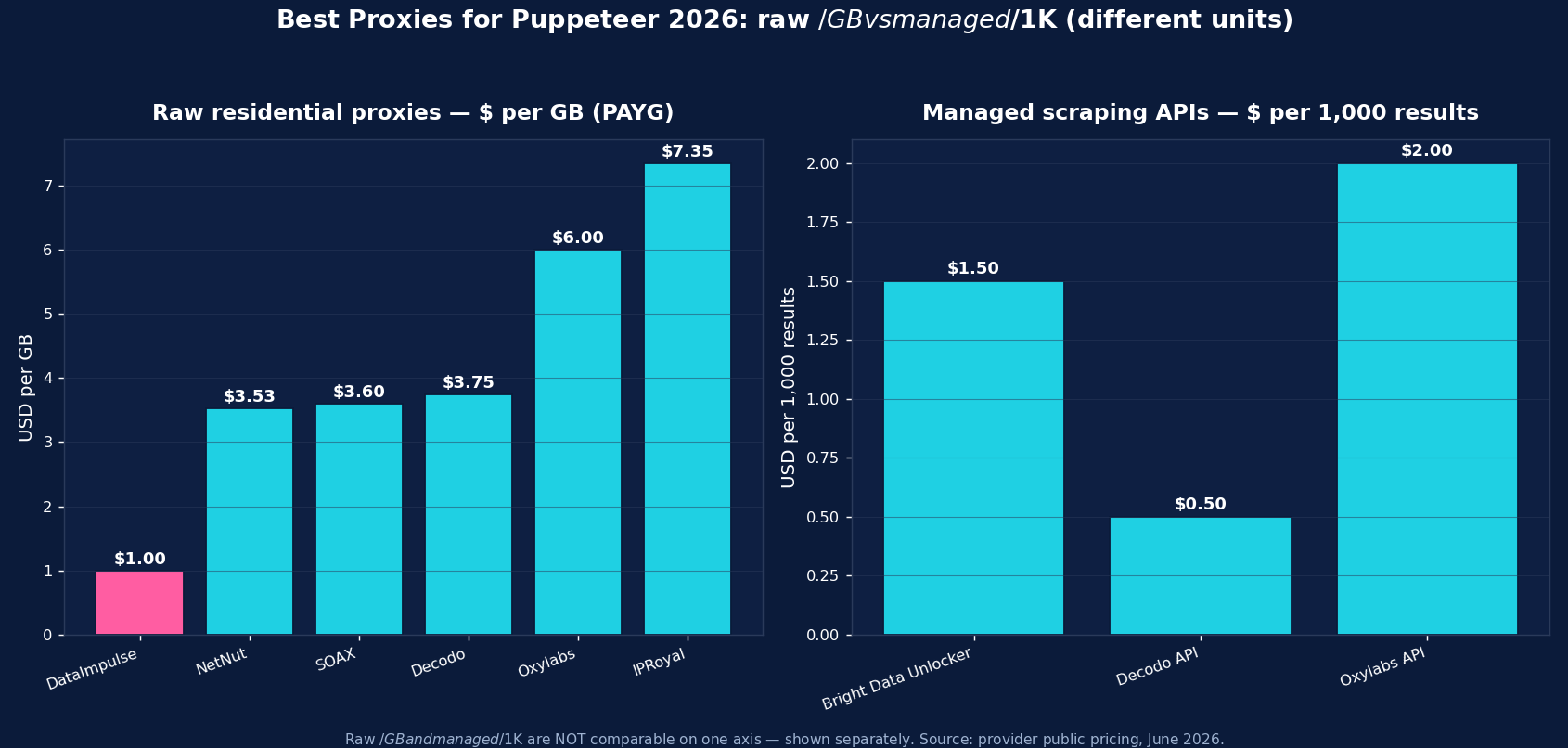
The picks, briefly
DataImpulse is the value baseline for Puppeteer scraping — residential at $1/GB pay-as-you-go (datacenter $0.50/GB, mobile $2/GB), 90M+ IPs across 195 countries, HTTP/HTTPS and SOCKS5, with country/city/ASN targeting via the username and an official Puppeteer tutorial. Traffic never expires, so test runs don’t burn a subscription. Support is 24/7 human; published success rate is 99.51%; G2 is 4.8/5. It’s the default when you run your own Puppeteer pipeline and want the lowest cost per successful page.
Bright Data is the enterprise pick — besides residential (~$2.50/GB promo, $5 regular), it offers a hosted Scraping Browser you connect to over CDP (puppeteer.connect({ browserWSEndpoint })) that bundles proxies and anti-bot, plus a Web Unlocker. Oxylabs (from $6/GB, 175M+ pool) is the SLA-grade enterprise option with a documented Puppeteer guide. Decodo (from $3.75/GB, sticky to 24h) is the balanced mid-market choice. IPRoyal (from $7.35/GB, sticky up to 7 days) suits long, session-stable Puppeteer flows. SOAX ($3.60/GB, 155M+ residential + 33M+ mobile) is strong when you need mobile IPs. Webshare (free tier, datacenter from $2.99/mo) is the budget self-serve entry, and NetNut (from $3.53/GB) is the ISP-residential stability pick.
Rotating vs Sticky Proxies with Puppeteer
Two modes, two jobs. Rotating residential — a fresh IP per connection — is the default for broad collection: scraping many pages, listings, or SERPs where each request is independent. With a rotating gateway you get a new IP automatically; to rotate explicitly in Puppeteer, launch a new browser per proxy or point proxy-chain at the rotating endpoint. Sticky sessions — the same IP held for minutes to days — are what stateful flows need: logging in, navigating a multi-step funnel, or keeping a cart, where rotating mid-flow breaks the session and trips anti-bot. Keep one browser (and one sticky IP) for the whole flow; IPRoyal’s up-to-7-day sticky is the longest. Most Puppeteer stacks mix both: rotating for collection, a sticky pool for the multi-step work.
Common Puppeteer Proxy Mistakes
- Putting credentials in the proxy URL. Chrome ignores them — use
page.authenticate()(beforepage.goto()) orproxy-chain. - Calling
page.authenticate()after navigation. It must run before the firstgoto, or the request fails with a 407. - Using datacenter IPs on defended targets — they get blocked fast; use residential or mobile for anything with real anti-bot.
- Forgetting the fingerprint. A proxy hides your IP, not your bot signals — combine it with realistic user-agents and
puppeteer-extra-plugin-stealthso headless Chrome doesn’t give itself away. - Expecting authenticated SOCKS5 to work — it doesn’t in Chromium; use HTTP/HTTPS for username/password proxies.
Which Proxy Type for Puppeteer — Residential, Datacenter, or Mobile?
The three types map to three jobs:
- Residential ($1/GB) — the default workhorse. Real consumer-ISP IPs for the bulk of Puppeteer scraping: e-commerce, SERPs, content, anything with anti-bot. If you pick one type, pick this.
- Mobile ($2/GB) — real carrier IPs for the hardest targets and for mobile-web or in-app surfaces. The most trusted IP class, so reserve it for endpoints that block residential.
- Datacenter ($0.50/GB) — cheapest and fastest, for unprotected layers: parsing already-collected pages, open reference data, or your own infrastructure. Don’t point it at anti-bot-heavy sites.
For most Puppeteer work the pattern is residential for collection, mobile for the few defended or app-only targets, and datacenter for cheap unprotected work. DataImpulse offers all three on one pay-as-you-go account, so a single Puppeteer pipeline can route each browser to the right tier.
How to Start with DataImpulse + Puppeteer
Step 1. Create a DataImpulse account and grab your residential credentials. The $5 / 5GB intro never expires — a real test budget.
Step 2. Add --proxy-server=http://gw.dataimpulse.com:823 to your launch args, then either call page.authenticate({ username: 'YOUR_LOGIN__cr.us', password: '...' }) before navigating, or wrap the credentialed URL with proxy-chain. Append a country code like __cr.us to the username for geo-targeting. Keep authenticated proxies on HTTP/HTTPS — Puppeteer doesn’t do auth over SOCKS5.
Step 3. Relaunch (or use proxy-chain) to rotate, and keep one sticky browser for stateful flows. Pair it with puppeteer-extra-plugin-stealth and a realistic user-agent. See the Puppeteer proxy tutorial and the residential proxies page for details.
FAQ
How do I use a proxy in Puppeteer?
Pass --proxy-server=http://gw.dataimpulse.com:823 in the args array of puppeteer.launch(). For an authenticated proxy, call page.authenticate({ username, password }) before page.goto() — Chrome won’t read credentials from the proxy URL. Alternatively, use the proxy-chain library, which holds the credentials in a local proxy and forwards to the gateway.
What’s the best proxy for Puppeteer?
Residential proxies, because most targets block datacenter IPs. DataImpulse at $1/GB is the value pick (HTTP/HTTPS/SOCKS5, 90M+ IPs, official Puppeteer tutorial); Bright Data’s hosted Scraping Browser or Oxylabs suit enterprise; SOAX and DataImpulse mobile ($2/GB) help on app surfaces. Always pair the proxy with a stealth plugin and a realistic fingerprint.
Why does my Puppeteer proxy return a 407 error?
A 407 (Proxy Authentication Required) means the proxy needs credentials and Puppeteer didn’t supply them — usually because they were put in the URL (Chrome ignores that) or page.authenticate() was called after the first navigation. Call page.authenticate({ username, password }) right after newPage() and before page.goto(), or use proxy-chain to handle auth.
How do I rotate proxies in Puppeteer?
The --proxy-server flag is fixed per browser, so rotate by launching a new browser per proxy, or by pointing the proxy-chain library at a rotating gateway. With a rotating residential gateway like DataImpulse, each new connection already gets a fresh IP, so you often don’t need to manage an IP list. For stateful flows, keep one sticky IP for the whole session instead of rotating.
Does Puppeteer support SOCKS5 and authenticated proxies?
Puppeteer supports authenticated HTTP/HTTPS proxies via page.authenticate() or proxy-chain. It can use SOCKS5 (--proxy-server=socks5://...) but Chromium does not support username/password authentication over SOCKS5 — so use the HTTP/HTTPS endpoint for authenticated residential proxies and reserve SOCKS5 for IP-whitelisted access.
How much do Puppeteer proxies cost?
Raw residential is priced per GB — DataImpulse $1/GB (value floor), NetNut from $3.53, SOAX $3.60, Decodo $3.75, Oxylabs from $6, IPRoyal $7.35; Webshare offers budget subscriptions from $3.50/mo. A rendered page is a small fraction of a GB, so per-GB residential is far cheaper than per-record managed APIs for high-volume Puppeteer collection; managed options suit the hardest targets.

 State/City/Zip/ASN Targeting



