
In this Article
Try to pull a thousand Google Maps listings from one IP and watch what happens. First a CAPTCHA, then a “Sorry, you can’t access this resource right now,” then your requests start coming back empty or stuck on the loading state. Google Maps is one of the most heavily geo-localized, JavaScript-heavy, and anti-bot-protected surfaces on the open web — and the data behind it (business names, addresses, hours, reviews, categories, ratings, photos, rankings) is exactly what local SEO, lead-gen, market-research, and competitive-intel teams need.
Proxies are how serious Maps collection actually runs. The right pool spreads your requests across enough clean IPs that requests stay under per-source rate thresholds, and the right proxy type gets you past the geo-localization that decides which listings you see. This guide ranks the 8 best proxies for Google Maps scraping in 2026, sorts out residential vs datacenter vs mobile for this specific job, and walks through full reviews. Jump to the quick comparison for a thirty-second shortlist; deeper coverage follows.
Key Facts
Google Maps scraping has its own rulebook because Google defends Maps data harder than ordinary SERP and most of the data is geo-conditional. Five things to know up front:
- Maps content is heavily geo-localized. A search for “dentist near me” in Phoenix and the same search in Scottsdale are not the same dataset, and two ZIP codes in the same metro can surface different map packs, rankings, hours, and competitor sets. Your proxy geo decides which data you actually see.
- Google Maps Platform Terms restrict scraping. The official terms prohibit bulk downloading, caching, and copying business names, addresses, reviews, and Maps Content outside permitted API use. Proxies don’t grant permission; they reduce IP-side blocks.
- The “$200/month free credit” is gone. Google retired the legacy Maps Platform $200 monthly credit on March 1, 2025, replacing it with per-SKU monthly thresholds across Essentials, Pro, and Enterprise tiers. Heavy Places, Details, Reviews, and Photos calls can get expensive fast on the official API.
- There are three legitimate paths to Maps data. Official Google Maps Platform APIs for compliant app features; managed Maps/SERP scraper APIs (Bright Data, Oxylabs, ScraperAPI, Apify, SerpApi, Outscraper) for structured extraction; and raw proxy infrastructure for teams running their own collectors.
- Public Maps data isn’t a free-for-all. Reviews can include personal data; addresses and contact info trigger outreach laws like CAN-SPAM, TCPA, GDPR, and CCPA when used for lead generation. Compliance review matters before you scale.

How We Selected These Google Maps Proxies
We didn’t rank on marketing claims. Each provider had to earn its spot on the factors that matter specifically for Maps work:
- Geo precision. Country-level isn’t enough. City, ZIP, and ASN targeting let you simulate searchers inside the markets you care about — decisive for local SEO, franchise audits, multi-city lead gen, and market-entry research.
- Maps-specific tooling. Managed Maps/SERP APIs (Bright Data’s SERP API with Maps support, Oxylabs’ SERP Scraper API, ScraperAPI’s dedicated Maps endpoint, Apify’s Google Maps Scraper actor) shift the parser-maintenance burden from your team to the vendor.
- Residential quality. Ethically sourced, well-maintained residential pools survive Maps anti-bot better than datacenter ranges.
- Rotation and session control. Rotating residential for broad search-results collection; sticky sessions for place-detail crawls, multi-page reviews, and scrolling flows.
- Pricing model. Raw $/GB for teams running their own scrapers; per-record or per-request pricing for managed APIs. The right band depends on whether you have an in-house scraping team.
- Compliance posture. Consent-based sourcing for residential/mobile, acceptable-use policy, and a clear position on prohibited targets (Maps is a higher-scrutiny category given Google’s terms).
The eight that made the list cover the full range — from $1/GB pay-as-you-go residential for in-house teams to dedicated Google Maps APIs that return structured place data from a URL.
What Makes a Good Google Maps Proxy?
Maps work magnifies a specific set of proxy characteristics. Six things matter most:
- Sub-country geo targeting. This is the deciding feature. Country-level proxies miss the entire point of Maps scraping — local data lives at the ZIP and city level, not the country.
- Block-rate management on Google specifically. Google’s reputation system tracks IPs across SERP, Maps, Shopping, and other surfaces. A pool burned on SERP shows up flagged on Maps later. Fresh residential beats large-but-dirty pools.
- Sticky session length. Place-detail crawls (reviews, hours, photos, owner responses) and multi-page scrolling flows need stable IPs for minutes to hours. Sticky sessions configurable to the right length matter.
- Mobile coverage when relevant. Mobile Maps app surfaces, mobile-only carousel ads, and mobile-app-specific local listings sometimes need carrier IPs to render correctly.
- Scraper-API option for teams that want it. Dedicated Google Maps scraper APIs (Apify, ScraperAPI, Bright Data SERP, Outscraper) handle the JavaScript rendering, retries, request retry, and field extraction that an in-house scraper would otherwise need to maintain.
- Per-success economics. A $0.50/GB pool that’s blocked 60% of the time on Maps is more expensive than a $1/GB pool that succeeds 90%. The metric to optimize is cost per successful place record, not headline $/GB.
Useful sanity check: every proxy vendor claims they “work with Google.” Ask specifically about Google Maps results pages, Place details, review pagination, and mobile-app endpoints. Vague answers mean the vendor’s success on Maps is anyone’s guess.
Quick Comparison: Best Proxies for Google Maps at a Glance
The table compares all eight providers on the parameters that matter most for Maps scraping work.
| Provider | Type Coverage | Maps Tooling | Geo Granularity | Rotation | Starting Price | Best For |
|---|---|---|---|---|---|---|
| DataImpulse | Residential, mobile, datacenter | Raw proxies | Country; city/state/ZIP/ASN add-on | Rotating + sticky | $1/GB residential | Low-cost geo-precise Maps scraping |
| Bright Data | Residential, DC, ISP, mobile | SERP API with Maps support | 195 countries; city-level | Managed + proxy rotation | $4/GB res (promo); SERP $1.50/1K successful requests | Enterprise SERP/Maps pipelines |
| Oxylabs | Residential, mobile, DC, ISP | Web Scraper API, Web Unblocker | Country/city/state/ZIP/coordinates | Rotating, sticky | $6/GB residential; API from $49/mo | High-volume reliable extraction |
| Decodo | Residential, mobile, ISP, DC | Web Scraping API | City, ZIP, ASN included | Rotating, sticky up to 24h | from $3.75/GB (3 GB starter), $8.50/GB PAYG, $2/GB at 1TB+ | Precise geo at mid-market price |
| IPRoyal | Residential, DC, ISP, mobile | Raw proxies | Country, region, city, ISP, ZIP | Rotating, sticky up to 7 days | from $1.75/GB residential | Budget intermittent scraping |
| SOAX | Residential, mobile, ISP, DC | Web Data API | Country/region/city/ISP/ASN | Rotating, sticky | $3.60/GB Starter | Testing proxy types by location |
| ScraperAPI | Managed API (premium IPs included) | Dedicated Google Maps Scraper API | Lat/lng + country-level plans | Managed | $49/month (100K credits) | Structured Maps data without proxy ops |
| Apify | Managed actors + proxy | Google Maps Scraper actor | Coordinates, location, URLs | Managed | $2.10 per 1K places | No-code Maps datasets and scheduling |
Indicative starting rates from each provider’s own pricing pages (May 2026). Volume discounts apply and prices change, so check current numbers before you buy. Granular targeting (city/ZIP/ASN) may incur add-ons on some providers.
Which Proxy Type Should You Use for Google Maps?
Maps work behaves differently from generic SERP scraping because the data is geo-conditional and the anti-bot stack is one of Google’s most aggressive. The proxy type decides your success rate more than the brand does.
Residential Proxies
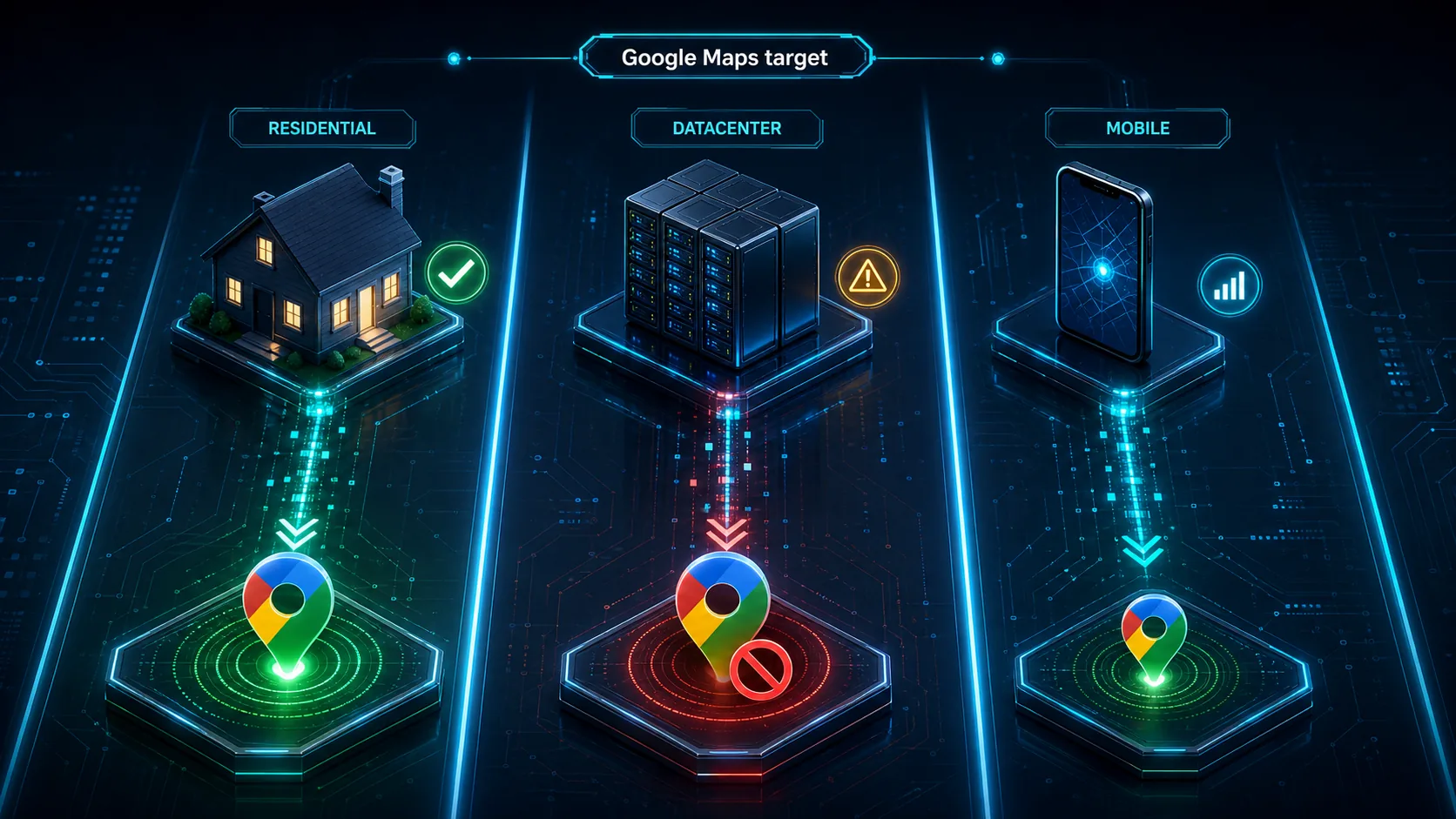
Residential proxies are the right default for nearly all Maps work — place search, business listings, review crawls, hours/categories, and rank checks. Real ISP-assigned home IPs look like ordinary local searchers to Google’s reputation system, and a fresh residential pool routinely clears the protected surfaces where datacenter ranges get challenged. The trade-off is price: residential costs more per GB than datacenter, but on Maps you pay less per successful place record because far fewer get blocked. If your scraper hits Google’s “unusual traffic from your computer network” page on a target that used to work, switching to residential is the first fix.
Mobile Proxies
Mobile proxies route through real carrier networks and are the right tool when your work specifically targets mobile Maps app surfaces, mobile-only local features, or carrier-segmented data. Mobile IPs see the content that targeted mobile users see — which is sometimes different from the desktop view (different carousels, different local pack composition, different ad placements). They cost more per GB, so reserve them for the jobs where mobile context genuinely changes the dataset.
Datacenter Proxies
Datacenter proxies are cheap and fast — useful for the low-protection layer of a Maps program: fetching business websites after Maps extraction, validating URLs, checking public pages, lightweight enrichment, and any task that doesn’t hit Maps endpoints directly. Don’t lean on datacenter for Maps search results, place details, or review pages; Google flags datacenter ranges quickly on Maps, and your success rate drops to single digits inside a few hundred requests.
Rotating vs Sticky for Maps
The rule for Maps: rotate for breadth, stick for depth. Rotating residential handles broad search-result collection — “dentists in 77002,” “Thai restaurants near 30303,” “pediatric clinics within 5 miles of [coordinates].” Sticky sessions handle place-detail crawls (multi-page reviews, photos, hours, owner responses), scrolling sequences inside a single listing, and any flow where Google would flag a sudden mid-session IP change as suspicious. Most production Maps pipelines mix both — rotating for the discovery pass, sticky for the depth pass.
Best Proxies for Google Maps Scraping — Full Reviews
The picks below are ranked on value for Maps work — the balance of geo precision, Google Maps anti-block success, Maps-specific tooling, scraper-API options, and price per successful record. DataImpulse leads on value; the rest each win a specific lane.
1. DataImpulse
DataImpulse is the best-value pick for in-house teams running their own Google Maps scrapers. Residential starts at $1/GB, pay-as-you-go, with traffic that never expires — a fraction of what enterprise Maps APIs charge. The pool is 90M+ ethically sourced IPs across 195 countries with country targeting included and city/state/ZIP/ASN available as a paid add-on, which is the exact granularity Maps work demands (Maps data shifts by ZIP, and country-only proxies miss the whole point of local scraping). It supports HTTP, HTTPS, and SOCKS5, rotating and sticky sessions, full API access, and standard scraping stacks (Scrapy, Selenium, Playwright). Mobile is available at $2/GB for mobile-Maps work; datacenter at $0.50/GB for enrichment.
What makes it the default for serious Maps collection is the price-to-granularity ratio. At $1/GB you can sustain continuous Maps work across multiple ZIPs and metros without the per-record charges that managed APIs add up to at scale, and the PAYG model means experimenting with new geos doesn’t lock you into a subscription. Support is 24/7 human; published success rate is 99.51%; G2 is 4.8/5. There’s no dedicated Google Maps endpoint here — DataImpulse sells the proxy infrastructure cleanly and lets the team build the Maps parser on top.
Quick specs — Types: residential, mobile, datacenter · Pool: 90M+ residential, 195 countries · Rotation: rotating + sticky · Geo: country (city/state/ZIP/ASN as paid add-on) · Price: $1/GB res, $0.50/GB DC, $2/GB mobile · Published success: 99.51% · Rating: G2 4.8. Best for: in-house Maps scraping teams that want low pay-as-you-go pricing and precise ZIP/city geo targeting without enterprise commitments.
2. Bright Data
Bright Data is the enterprise pick if you want Maps data as a managed product. Beyond raw residential at $8/GB pay-as-you-go (currently discounted to $4/GB with a 50% promo) with a 400M+ monthly IP pool and free city/ZIP/ASN targeting, Bright Data’s SERP API supports Google Maps and search across 195 countries with city-level targeting, returning structured results from $1.50 per 1,000 successful requests. It’s the right call when you’d rather hit a managed Maps endpoint than maintain a Maps parser yourself — at enterprise pricing and with procurement-style buying.
Quick specs — Types: residential, DC, ISP, mobile + SERP API with Maps support · Pool: 400M+ monthly residential · Rotation: rotating, sticky, dedicated · Geo: country/city/ZIP/ASN · Price: ~$4/GB res (promo); $8/GB regular; SERP API from $1.50/1K successful requests. Best for: enterprise teams that want a managed Google Maps/SERP layer with compliance and audit controls.
3. Oxylabs
Oxylabs sits next to Bright Data at the enterprise top, with a strong focus on managed scraping APIs. Residential starts around $6/GB on the entry plan with a 175M+ pool across 195 countries, and the Web Scraper API ($49/month entry) handles JavaScript rendering, anti-bot bypass, and structured data extraction across Google surfaces including Maps. Sessions are flexible with unlimited concurrent connections, and Oxylabs publishes a 99.95% residential success rate. Pick Oxylabs when reliability, support depth, and SLA-grade managed scraping matter more than entry price.
Quick specs — Types: residential, DC, ISP, mobile + Web Scraper API · Pool: 175M+ residential, 195 countries · Rotation: flexible, sticky, unlimited concurrency · Geo: country/city/state/ZIP/coordinates/ASN · Price: from $6/GB residential; Web Scraper API from $49/month · Published success: 99.95%. Best for: enterprise Maps programs that want SLA-grade managed scraping with deep geo targeting.
4. Decodo
Decodo (formerly Smartproxy) is the mid-market sweet spot for Google Maps work. Residential proxies start at $3.75/GB on the 3 GB starter plan, with PAYG at $8.50/GB on the public pricing page, dropping to about $2/GB at the 1,000 GB subscription tier, with 115M+ IPs across 195+ locations. The Web Scraping API includes templates for SERP and Google-adjacent targets, and sticky sessions are configurable from 1 minute up to 24 hours — long enough for serious place-detail and review crawls. Country, city, ZIP, and ASN targeting are included, which is the geo grid Maps work needs.
Quick specs — Types: residential, DC, ISP, mobile + Web Scraping API · Pool: 115M+ residential · Rotation: per-request, sticky up to 24h · Geo: country/city/ZIP/ASN · Price: $3.75/GB (3 GB starter), $8.50/GB PAYG, $2/GB at 1 TB+ subscription · Published success: 99.86%. Best for: mid-market Maps teams that want precise geo targeting and a scraper API without enterprise contracts.
5. IPRoyal
IPRoyal is the budget pick with two real advantages for Maps work: residential from $1.75/GB at volume and sticky sessions up to 7 days (the longest on this list). The pool is 32M+ residential across 195 countries with country, region, city, ISP, and ZIP targeting. There’s also a Web Unblocker product from $1 per 1,000 requests for handling defended Maps endpoints. For Maps teams running production place-detail crawls where long stable sessions matter (extended review collection, multi-page photo crawls, hours-history tracking), IPRoyal’s 7-day sticky is unique.
Quick specs — Types: residential, ISP, mobile, DC + Web Unblocker · Pool: 32M+ residential · Rotation: rotating, sticky up to 7 days · Geo: country/region/city/ISP/ZIP · Price: from $1.75/GB residential. Best for: Maps teams that need long sticky sessions for place-detail work on a budget.
6. SOAX
SOAX is the pick when geo-precise Maps work and mixed proxy types matter together. Residential starts at $3.60/GB on the Starter plan (25GB included), and the unified credit model means you can spend the same budget on residential, mobile, ISP, datacenter, or the Web Data API. The pool is one of the larger in the mid-tier — 155M+ residential, 33M+ mobile, 2.6M+ ISP — with country, region, city, ISP, and ASN targeting. Sticky sessions are supported across all proxy types. Convenient if your Maps program mixes mobile checks for app data with residential for desktop place results.
Quick specs — Types: residential, mobile, ISP, DC + Web Data API · Pool: 155M+ residential, 33M+ mobile, 2.6M+ ISP · Rotation: per request or interval, sticky supported · Geo: country/region/city/ISP/ASN · Price: $3.60/GB Starter. Best for: Maps teams running geo-heavy collection across multiple proxy types under one subscription.
7. ScraperAPI
ScraperAPI is the right answer when you want Maps data as outcomes instead of managed proxies. It sells a dedicated Google Maps Scraper API that handles rotation, retries, CAPTCHA bypassing, JavaScript rendering, and Maps-specific extraction (business names, addresses, phones, websites, categories, ratings, review counts, hours, coordinates). Plans start at $49/month for 100,000 API credits on the Hobby tier. Geo support uses latitude/longitude-based local collection; country-level geo targeting is US+EU on Hobby/Startup and global on Business+, per the current pricing page. Use it when you’d rather get structured Maps data back from a URL than build the scraping stack yourself.
Quick specs — Type: dedicated Google Maps Scraper API · Pool: 40M+ proxies, 50+ countries · Rotation: automatic, API-managed · Geo: lat/lng + country (US/EU on Hobby/Startup; global on Business+) · Price: from $49/month (100K credits). Best for: teams that want managed structured Maps data without managing proxies.
8. Apify
Apify is the right pick for no-code or low-code Maps teams. Compass’s Google Maps Scraper actor (apify.com/compass/google-maps-scraper) is the most-installed Maps actor on the platform (430K+ users, 29K monthly active, 4.8 rating) and extracts business names, addresses, websites, phones, categories, ratings, review counts, hours, coordinates, images, and optional enrichment fields. Pricing starts at $2.10 per 1,000 scraped places. Apify Proxy residential is available from $8/GB if you also want raw infrastructure. The combination — actor marketplace, scheduling, exports, API access, and maintained scraping logic — makes Apify the fastest route from “we need Maps data” to “we have a CSV” for teams that don’t want to build.
Quick specs — Type: actor marketplace + managed proxies · Maps actor: 430K+ users, 4.8 rating · Geo: location, coordinates, URLs · Pricing: $2.10/1K places · Proxy: residential from $8/GB. Best for: no-code Maps datasets, scheduled extraction, and teams that want delivered data without building scrapers.
A note on SerpApi and Outscraper
Two other managed Maps APIs are worth evaluating alongside ScraperAPI and Apify. SerpApi offers Google Maps API support with plans from $25/month for 1,000 searches and a free tier. Outscraper prices its Google Maps Scraper from a free first 500 businesses, then $3 per 1,000 records up to 100K and $1 per 1,000 above. Both are real options if you want a managed Maps endpoint but want to comparison-shop on per-record pricing.
How Much Do Google Maps Proxies Cost?
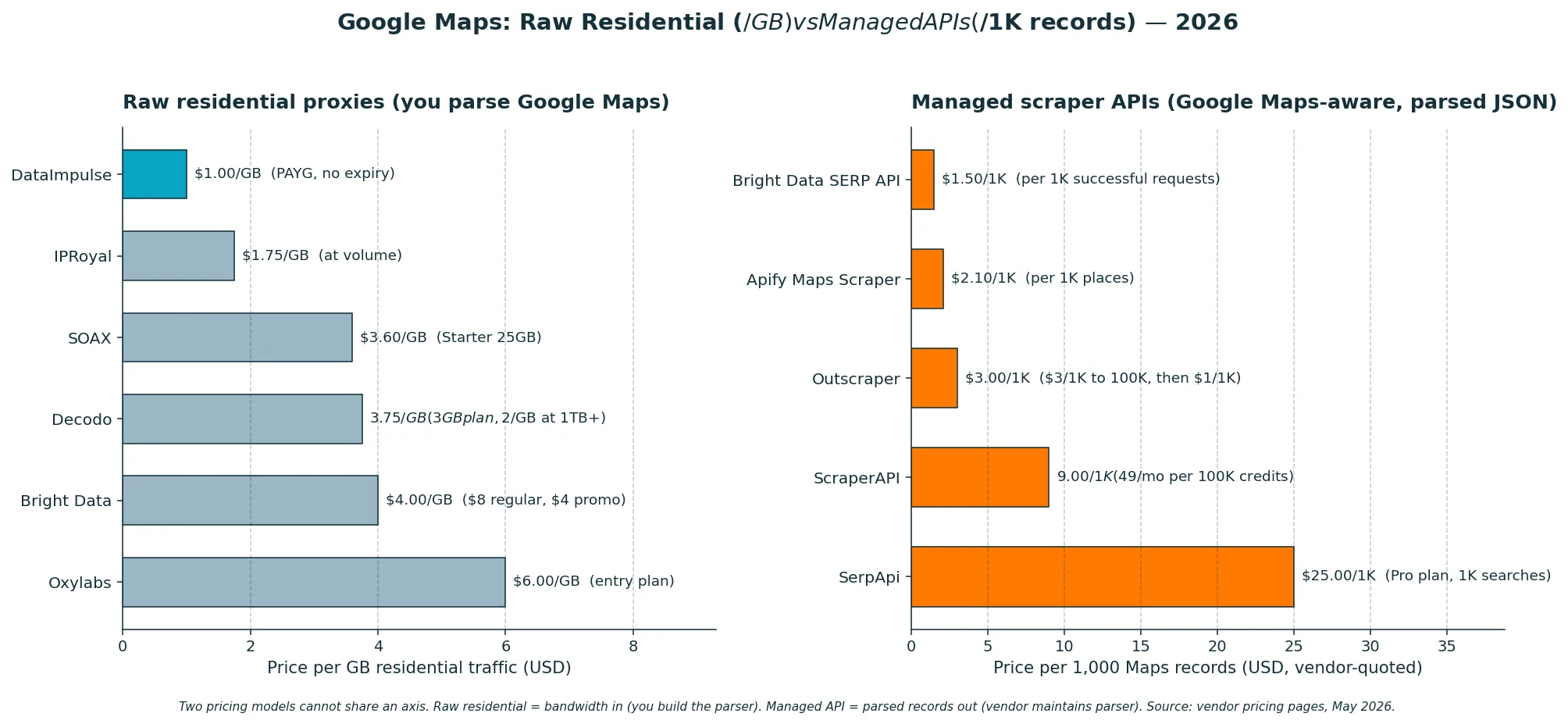
Listed pricing in 2026 falls into three bands. Budget/value at $1–$3.60/GB — DataImpulse, IPRoyal, SOAX Starter (Decodo’s volume tiers reach this band; entry is $3.75/GB) — covers most in-house Maps work, including multi-city ZIP-level collection. Mid/premium at $4–$8/GB — Bright Data, Oxylabs, Apify Proxy — adds enterprise tooling and SLA-grade reliability. API-priced — Bright Data SERP API from $1.50/1K successful requests, ScraperAPI from $49/month, Apify Maps actor from $2.10/1K places, SerpApi from $25/month, Outscraper from $3/1K records — sells structured Maps outcomes per record or per plan instead of per GB.
The real cost question for Maps isn’t “what’s the lowest $/GB” but “what’s the lowest cost per successful, defensible place record”. A managed Maps API at $2.10/1K places can beat $1/GB residential if your in-house scraper hits a 40% block rate; conversely, $1/GB residential routinely beats per-record APIs at scale once your in-house parser is mature and your block rate is under 10%. Test both on your actual targets before committing.
Is Scraping Google Maps Legal?
Google Maps scraping lives in a legal gray zone shaped by Google’s terms, the data you collect, and the use you put it to. The basics:
- Google Maps Platform Terms explicitly restrict scraping. Bulk downloading, caching, or copying Maps Content (business names, addresses, reviews, photos) outside permitted API use is prohibited by the terms. Proxies don’t grant permission; they reduce IP-side friction.
- The hiQ v. LinkedIn precedent applies narrowly. The Ninth Circuit found that scraping publicly available data was unlikely to violate the Computer Fraud and Abuse Act, but it doesn’t override Google’s contract terms, and trespass, copyright, privacy, and anti-circumvention claims can still apply.
- Maps data triggers outreach laws. Using scraped business contact info for outbound sales activates CAN-SPAM (US email), TCPA (US calls/SMS), GDPR (EU personal data), CCPA (California), and equivalent rules elsewhere. Permission, consent, and disclosure rules vary.
- Reviews include personal data. Public reviews are public-facing but derived from individual reviewers, so privacy and personal-data rules can apply depending on jurisdiction. Minimize what you collect, secure what you keep, and don’t infer beyond what’s already public.
- Compliance is gating, not optional. Commercial Maps scraping operates openly in the industry, but your specific use case — what you collect, how you process, where you operate, who you contact — deserves legal review before scale.
The honest reading: large-scale commercial Maps scraping is widespread industry practice, but the terms and outreach laws are real. Get legal counsel before scaling a production Maps pipeline, especially for lead generation and data-resale use cases.
How to Start Google Maps Scraping with DataImpulse
- Create an account and pick your proxy mix. Residential ($1/GB) for Maps search results, place details, and review crawls; datacenter ($0.50/GB) for enrichment (fetching business websites, validating URLs, public pages); mobile ($2/GB) for mobile-Maps work.
- Add funds. Pay-as-you-go, no subscription, no expiry — handy because Maps collection volume varies with reporting cycles, audits, and lead-gen campaigns.
- Target by ZIP and rotate. Set country plus city/ZIP for the metros you’re collecting (city/ZIP/ASN are a paid add-on but essential for Maps work), pick rotating for broad search-result collection and sticky sessions for place-detail crawls, point your scraper at the proxy endpoint and run.
For more on related workflows, see our residential proxies product page, the SERP tracking use case, and the wider best proxies for SEO & rank tracking roundup.
FAQ
Is scraping Google Maps legal?
Google Maps Platform Terms restrict scraping, and Maps data triggers outreach laws like CAN-SPAM, TCPA, GDPR, and CCPA when used commercially. The hiQ precedent narrows CFAA risk for public-data scraping but doesn’t override Google’s contract terms or local law. Get counsel before scaling a production Maps pipeline. This isn’t legal advice.
What are the best proxies for Google Maps scraping?
Residential proxies with city and ZIP targeting are the safest default. DataImpulse residential at $1/GB is the budget pick; Bright Data SERP API with Maps support, Oxylabs Web Scraper API, ScraperAPI’s Google Maps endpoint, and Apify’s Google Maps Scraper actor are the stronger managed-API options.
Google Maps API vs scraping: which is better?
Use the official Google Maps Platform API for compliant app features — predictable, supported, but capped by per-SKU monthly thresholds since the $200 free credit retired in March 2025. Use scraping APIs or proxies for research workflows where official API cost, coverage, or field access is limiting.
Is scraping Google reviews legal?
Reviews are public-facing but include personal data; privacy rules vary by jurisdiction and the platform’s terms restrict bulk collection. Minimize what you collect, secure what you keep, and consult counsel for production use.
Residential vs datacenter proxies for Maps?
Residential for Maps endpoints — search results, place details, reviews. Datacenter for enrichment tasks after extraction (business websites, public pages, URL validation). On Maps itself, datacenter blocks fast.
Rotating or sticky proxies for Maps?
Rotating for broad search-result collection (broad discovery sweeps); sticky for place-detail crawls (multi-page reviews, photos, hours, scrolling sequences). Most production Maps stacks mix both.
Best mobile proxies for mobile Maps?
SOAX, Oxylabs, and DataImpulse all offer mobile coverage suitable for mobile-Maps work. Use mobile when your target is specifically Maps mobile app surfaces or mobile-only carousel ads; otherwise residential is enough.
Can I use Maps data for lead generation?
Technically yes, legally with care. Outreach laws (CAN-SPAM, TCPA, GDPR, CCPA) and Google’s terms apply. Consent, disclosure, and processing rules vary by jurisdiction. Get counsel before scaling.
Can I scrape business hours, categories, and ratings?
Technically yes; the terms still restrict bulk collection. If you do, refresh frequently — hours, temporary closures, ratings, and categories change often. Maps data freshness is part of the value.
Ready to run Google Maps scraping with the geo precision Maps work actually needs? Start with DataImpulse — residential from $1/GB, datacenter from $0.50/GB, mobile from $2/GB, pay-as-you-go with city/ZIP/ASN targeting and traffic that never expires.

 State/City/Zip/ASN Targeting



