

In this Article
Octoparse is a popular no-code web scraper — you build extraction tasks visually, no Python required. But scrape a real target at volume and you’ll hit IP bans, so Octoparse relies on proxies. You have two routes: Octoparse’s built-in IP proxies (residential, auto-rotating, ~$3/GB) or your own proxies on local runs (cheaper, but with one important limitation). This guide shows exactly how to set up a proxy in Octoparse, the built-in-vs-bring-your-own trade-off, and the best proxies for Octoparse in 2026 — with DataImpulse at $1/GB as the value pick for custom proxies.
I’m Andrii Byzov, an AI-Native Fractional CMO who runs no-code and code scrapers side by side. Below: the exact UI steps, the no-authentication gotcha (and the IP-whitelist workaround), and the providers worth your budget.
Key Facts
- Two options: Octoparse’s built-in IP proxies (work on cloud + local, auto-rotate, ~$3/GB) or your own custom proxies (local runs only).
- Custom proxies are added under Task → Anti-blocking settings → “Use IP proxies”, entered as
host:port(HTTP only). - Octoparse doesn’t support username/password proxy auth. So to bring your own, use IP whitelisting — authorize your machine’s IP with the provider, then add the gateway as
host:portwith no credentials. - Cloud runs use Octoparse’s built-in proxies only — your custom proxies work on local extraction. Plan around that.
- DataImpulse is the value pick for custom proxies — $1/GB (vs Octoparse’s ~$3/GB built-in), with IP whitelisting so it works in Octoparse, plus datacenter $0.50/GB and mobile $2/GB.
How to Set Up a Proxy in Octoparse
Option 1 — Octoparse’s built-in IP proxies (easiest)
On premium plans, enable Octoparse’s own residential IP proxies in the task’s anti-blocking settings. They rotate automatically and work on both local and cloud runs — the simplest path, at about $3/GB with a minimum credit balance. Set a rotation interval that suits the target.
Option 2 — Bring your own proxies (local runs)
To use a cheaper provider like DataImpulse, add your own proxies to a local task:
- Open your task and go to Task settings → Anti-blocking settings.
- Tick “Use IP proxies”.
- Enter each proxy as
host:port— e.g.gw.dataimpulse.com:823(HTTP only; separate host and port with a colon). - Set the rotation interval (match it to your provider’s rotation where applicable).
- Run the task locally — custom proxies don’t apply to Cloud runs.
The catch: Octoparse doesn’t accept proxies that need a username and password. Since most residential gateways authenticate with credentials, the fix is IP whitelisting: in your provider dashboard, authorize the public IP of the machine running Octoparse; then the gateway accepts the connection with no credentials, and you can enter it as plain host:port. DataImpulse supports IP whitelisting, so you whitelist your IP once and add gw.dataimpulse.com:823. See the DataImpulse tutorials for whitelisting steps.
Best Proxies for Octoparse at a Glance
| Provider | Best for Octoparse | Residential price | IP whitelist? | Notable |
|---|---|---|---|---|
| DataImpulse | Best value custom proxy | $1/GB PAYG | Yes | 90M+ pool, ~3× cheaper than built-in |
| Octoparse built-in | Easiest (cloud + local) | ~$3/GB | n/a | Auto-rotate, no setup, premium plans |
| Bright Data | Enterprise pool | ~$4/GB promo; $8 regular | Yes | Large pool; premium pricing |
| Oxylabs | Enterprise SLA | from $6/GB | Yes | 175M+ pool, documented Octoparse guide |
| Decodo | Mid-market value | $3.75/GB (~$2 at 1TB+) | Yes | 115M+ pool, full geo grid |
| IPRoyal | Cheap PAYG entry | from $7.35/GB | Yes | Sticky up to 7 days |
| SOAX | Residential + mobile | $3.60/GB Starter | Yes | 155M+ res, 33M+ mobile |
| Webshare | Budget / free tier | from $3.50/mo res; $2.99/mo DC | Yes | Free tier, cheapest datacenter |
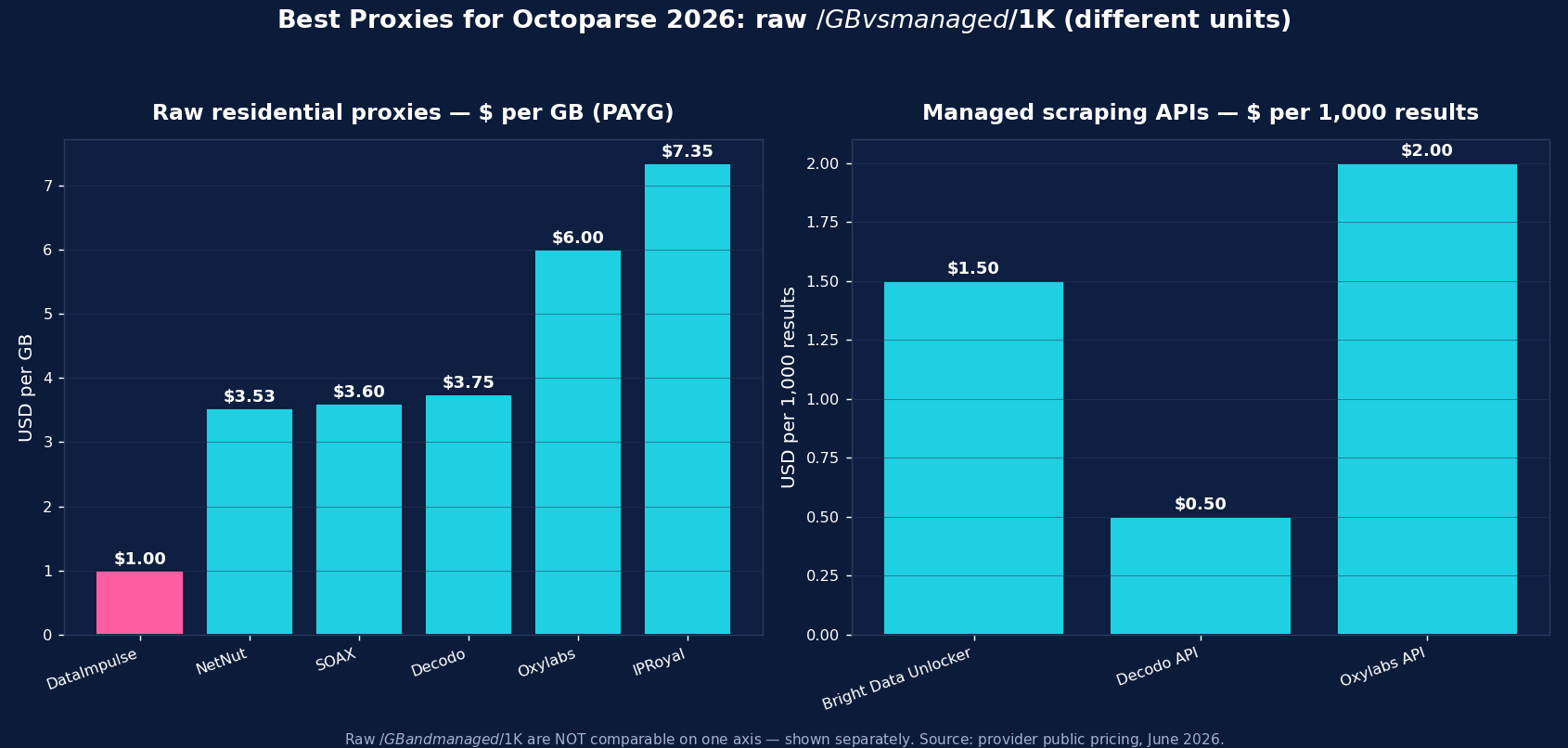
The picks, briefly
DataImpulse is the value pick for custom proxies in Octoparse — residential at $1/GB pay-as-you-go, roughly a third of Octoparse’s ~$3/GB built-in rate, on a 90M+ pool across 195 countries, with IP whitelisting so it works around Octoparse’s no-credentials limitation. Datacenter is $0.50/GB and mobile $2/GB. Traffic never expires; published success rate 99.51%; G2 4.8/5. For local runs at volume, bringing DataImpulse beats paying the built-in premium.
Octoparse’s built-in proxies (~$3/GB) are the easiest path — auto-rotating residential that work on cloud runs too, with zero setup. Bright Data (~$8/GB regular, ~$4 promo) and Oxylabs (from $6/GB, documented Octoparse guide) are the enterprise pools. Decodo (from $3.75/GB) is the mid-market value option, IPRoyal (from $7.35/GB) the cheap PAYG entry, SOAX ($3.60/GB) adds mobile, and Webshare (free tier, datacenter from $2.99/mo) is the budget self-serve start. All support IP whitelisting, which is what makes them usable in Octoparse.
Built-in vs Bring-Your-Own Proxies in Octoparse
The trade-off is convenience versus cost and control. Built-in IP proxies (~$3/GB) need no setup, rotate automatically, and are the only option for Cloud extraction — ideal if you run in the cloud or want zero configuration. Your own proxies (e.g. DataImpulse at $1/GB) are cheaper and let you pick geos and providers, but work only on local runs and require IP whitelisting because Octoparse won’t pass credentials. A common pattern: built-in proxies for cloud tasks, your own cheaper residential for high-volume local runs.
Common Octoparse Proxy Mistakes
- Trying to use a username/password proxy. Octoparse won’t accept credentials — use IP whitelisting and enter the gateway as
host:port. - Expecting custom proxies on Cloud runs. Cloud extraction uses Octoparse’s built-in proxies only; your own work on local runs.
- Adding an HTTPS/SOCKS URL. Octoparse custom proxies are HTTP
IP:port— no scheme, no SOCKS. - Datacenter IPs on defended targets — they get blocked fast; use residential.
- Forgetting to re-whitelist. If your machine’s public IP changes, re-authorize it in the provider dashboard or the gateway will reject the connection.
Which Proxy Type for Octoparse — Residential, Datacenter, or Mobile?
- Residential ($1/GB) — the default for defended targets (e-commerce, SERPs, social). If you pick one, pick this.
- Mobile ($2/GB) — real carrier IPs for the hardest targets and mobile-web surfaces.
- Datacenter ($0.50/GB) — cheapest for unprotected sites and your own infrastructure; don’t point it at anti-bot-heavy targets.
DataImpulse offers all three with IP whitelisting on one account, so an Octoparse task can use the right tier for its target.
How to Start with DataImpulse + Octoparse
Step 1. Create a DataImpulse account ($5 / 5GB intro, never expires) and, in the dashboard, whitelist the public IP of the machine running Octoparse so no credentials are needed.
Step 2. In Octoparse, open Task settings → Anti-blocking settings → Use IP proxies, and add gw.dataimpulse.com:823 as host:port. Set a rotation interval.
Step 3. Run the task locally (custom proxies don’t apply to Cloud). See the DataImpulse tutorials for whitelisting and the residential proxies page.
FAQ
How do I add a proxy in Octoparse?
Open your task, go to Task settings → Anti-blocking settings, tick “Use IP proxies”, and enter each proxy as host:port (HTTP only) — e.g. gw.dataimpulse.com:823. Set a rotation interval and run the task locally. Octoparse’s own built-in IP proxies are an alternative that also works on cloud runs.
Does Octoparse support authenticated (username/password) proxies?
No — Octoparse custom proxies don’t accept credentials. The workaround is IP whitelisting: authorize the public IP of the machine running Octoparse in your provider’s dashboard (DataImpulse supports this), then add the gateway as plain host:port with no username or password.
What’s the best proxy for Octoparse?
For custom proxies, DataImpulse at $1/GB is the value pick — about a third of Octoparse’s ~$3/GB built-in rate, with IP whitelisting so it works in Octoparse. Octoparse’s built-in residential proxies are easiest (and the only option for cloud runs). Bright Data and Oxylabs are the enterprise pools; Webshare is cheapest to start.
Can I use my own proxies with Octoparse Cloud?
No — Cloud extraction uses Octoparse’s built-in IP proxies only. Your own custom proxies work on local runs. A common setup is built-in proxies for cloud tasks and cheaper residential (like DataImpulse $1/GB) for high-volume local runs.
How much do Octoparse proxies cost?
Octoparse’s built-in IP proxies are about $3/GB (with a minimum credit balance). Bringing your own is cheaper: DataImpulse $1/GB, SOAX $3.60, Decodo $3.75, Oxylabs from $6, IPRoyal $7.35; Webshare offers budget subscriptions from $3.50/mo. For high-volume local runs, a $1/GB residential provider via IP whitelisting is the most cost-effective.
Why are my Octoparse proxies not working?
Most often: you entered a proxy that needs credentials (Octoparse can’t authenticate — use IP whitelisting and host:port), added an HTTPS/SOCKS URL (only HTTP host:port works), tried custom proxies on a Cloud run (they’re local-only), or your machine’s public IP changed and is no longer whitelisted. Re-whitelist and re-enter as host:port.

 State/City/Zip/ASN Targeting



