

In this Article
Scrapy is the production Python framework for serious web scraping — fast, asynchronous, and built for crawling at scale. But crawl a real target from one datacenter IP and you’ll be rate-limited or blocked within minutes. The fix is to route Scrapy through proxies — ideally residential — so requests look like real users. The good news: Scrapy’s proxy support is built in via request.meta['proxy'], and with a rotating gateway you don’t even manage an IP list. This guide shows exactly how to use a proxy with Scrapy (per-request, a middleware for all requests, and rotation), then ranks the 8 best proxies for Scrapy in 2026. DataImpulse at $1/GB is the value baseline.
I’m Andrii Byzov, an AI-Native Fractional CMO who runs Scrapy crawlers daily. Below: the copy-paste setup, the middleware-order gotcha, and the providers worth your budget.
Key Facts
- Set the proxy with
request.meta['proxy']— Scrapy’s built-inHttpProxyMiddlewarereads it and handles authentication from the proxy URL (http://user:pass@host:port). - Apply it to every request with a tiny DownloaderMiddleware, or set it per-request in
start_requests. - A rotating gateway means no IP list. Point
meta['proxy']at a rotating residential endpoint (like DataImpulse) and each request egresses from a fresh IP automatically. - For a static IP list, use
scrapy-rotating-proxies(ROTATING_PROXY_LIST) — it rotates, ban-detects, and sits beforeHttpProxyMiddlewarein the order (its default priorities already do this). - Scrapy supports HTTP/HTTPS proxies natively (not SOCKS5) — use the HTTP endpoint (DataImpulse port 823). Pair with residential at $1/GB, datacenter $0.50/GB, mobile $2/GB across a 90M+ pool, 195 countries.
How to Use a Proxy with Scrapy
1. Per-request via meta['proxy']
import scrapy

class IpSpider(scrapy.Spider):
    name = "ip"
    def start_requests(self):
        proxy = "http://YOUR_LOGIN__cr.us:[email protected]:823"  # __cr.us = US
        yield scrapy.Request("https://httpbin.org/ip", meta={"proxy": proxy})

    def parse(self, response):
        self.log(response.text)  # confirm the egress IP
Scrapy’s HttpProxyMiddleware (enabled by default) picks up meta['proxy'] and sets the Proxy-Authorization header from the credentials in the URL — no extra code needed.
2. A middleware to proxy every request
Cleaner for a whole project — set the proxy once and it applies to all requests:
# middlewares.py
class DataImpulseProxyMiddleware:
    PROXY = "http://YOUR_LOGIN__cr.us:[email protected]:823"
    def process_request(self, request, spider):
        request.meta["proxy"] = self.PROXY

# settings.py — run BEFORE the built-in HttpProxyMiddleware (750)
DOWNLOADER_MIDDLEWARES = {
    "myproject.middlewares.DataImpulseProxyMiddleware": 350,
}
3. Rotating a static IP list with scrapy-rotating-proxies
If you have a list of proxies (rather than one rotating gateway), scrapy-rotating-proxies rotates them and detects bans:
# pip install scrapy-rotating-proxies
# settings.py
ROTATING_PROXY_LIST = [
    "http://YOUR_LOGIN__cr.us:[email protected]:823",
    # ...more endpoints/sessions...
]
DOWNLOADER_MIDDLEWARES = {
    "rotating_proxies.middlewares.RotatingProxyMiddleware": 610,
    "rotating_proxies.middlewares.BanDetectionMiddleware": 620,
}
With DataImpulse’s rotating residential gateway you usually don’t need this — one endpoint already returns a fresh IP per request. Reach for scrapy-rotating-proxies when you manage many discrete sessions or want built-in ban detection. Note: Scrapy’s proxy support is HTTP/HTTPS only, so use the HTTP endpoint (port 823), not SOCKS5; see the DataImpulse tutorials for session parameters.
Best Proxies for Scrapy at a Glance
| Provider | Best for Scrapy | Residential price | Protocols | Notable |
|---|---|---|---|---|
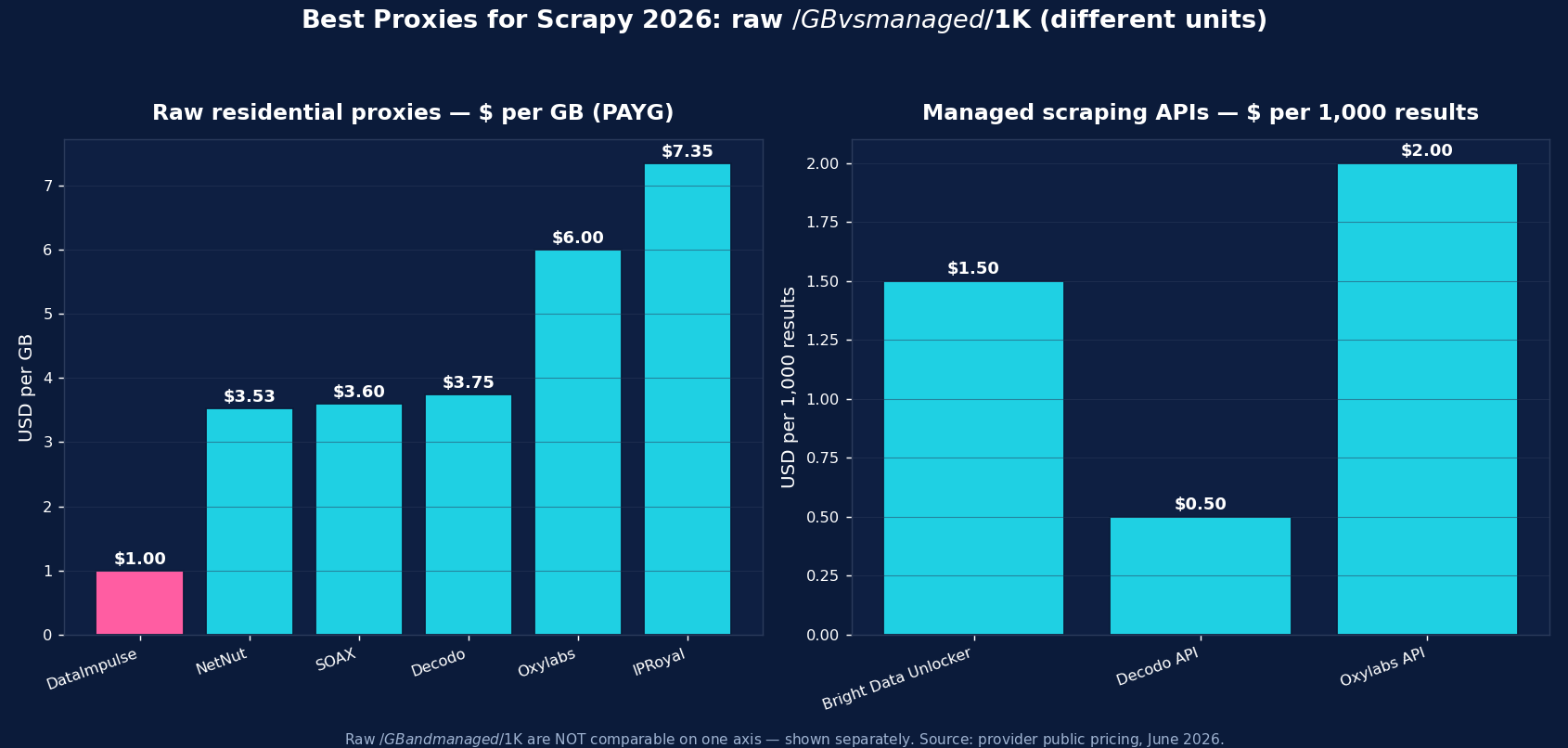
| DataImpulse | Best value, in-house crawlers | $1/GB PAYG | HTTP/HTTPS | 90M+ pool, rotating gateway, never-expires |
| Bright Data | Enterprise + managed | ~$4/GB promo; $8 regular | HTTP/HTTPS/SOCKS5 | Web Unlocker, SERP API, datasets |
| Oxylabs | Enterprise SLA | from $6/GB | HTTP/HTTPS/SOCKS5 | 175M+ pool, scraper APIs |
| Decodo | Mid-market, full geo grid | $3.75/GB (~$2 at 1TB+) | HTTP/HTTPS | 115M+ pool, sticky to 24h |
| IPRoyal | Long sticky sessions | from $7.35/GB | HTTP/HTTPS/SOCKS5 | Sticky up to 7 days; cheap PAYG |
| SOAX | Residential + mobile mix | $3.60/GB Starter | HTTP/HTTPS | 155M+ res, 33M+ mobile |
| Webshare | Budget / self-serve | from $3.50/mo res; $2.99/mo DC | HTTP/SOCKS5 | Free tier, cheapest datacenter |
| NetNut | ISP-residential stability | from $3.53/GB | HTTP/HTTPS | Consumer-ISP static IPs |
The picks, briefly
DataImpulse is the value baseline for Scrapy crawlers — residential at $1/GB pay-as-you-go (datacenter $0.50/GB, mobile $2/GB), 90M+ IPs across 195 countries, a rotating HTTP/HTTPS gateway that hands out a fresh IP per request, and country/city/ASN targeting in the username. Traffic never expires, so dev runs don’t burn a subscription. Published success rate 99.51%; G2 4.8/5; 24/7 human support. For high-volume in-house crawling, it’s the lowest cost per successful request.
Bright Data is the enterprise pick (residential ~$8/GB regular, ~$4 promo) with Web Unlocker, SERP API, and datasets. Oxylabs (from $6/GB, 175M+ pool) is the SLA-grade option with scraper APIs. Decodo (from $3.75/GB, sticky to 24h) is the balanced mid-market choice. IPRoyal (from $7.35/GB, sticky up to 7 days) suits long, session-stable crawls. SOAX ($3.60/GB, 155M+ residential + 33M+ mobile) adds a strong mobile pool. Webshare (free tier, datacenter from $2.99/mo) is the budget self-serve entry, and NetNut (from $3.53/GB) is the ISP-residential stability pick.
Rotating vs Sticky Proxies with Scrapy
For broad crawling, a rotating residential gateway is ideal — each Scrapy request gets a fresh IP, which spreads load and dodges rate limits with zero IP management. For stateful flows (login then follow-up requests), use a sticky session so the same IP persists across the sequence, and keep cookies on (Scrapy’s cookies middleware is on by default). Most Scrapy crawls are broad and stateless, so rotating is the common default; reserve sticky for authenticated or multi-step targets.
Common Scrapy Proxy Mistakes
- Middleware order. A custom proxy middleware or
scrapy-rotating-proxiesmust run before the built-inHttpProxyMiddleware(lower priority number) or your proxy won’t be applied. - Expecting SOCKS5 to work. Scrapy’s proxy support is HTTP/HTTPS only — use the HTTP endpoint, not a SOCKS URL.
- Crawling too aggressively. Enable
AUTOTHROTTLE_ENABLEDand a saneCONCURRENT_REQUESTS/DOWNLOAD_DELAYso even rotating IPs aren’t hammered. - Datacenter IPs on defended targets — they get blocked fast; use residential for anti-bot-heavy sites.
- No ban handling. Add retry/ban detection (
scrapy-rotating-proxies‘ BanDetectionMiddleware or customRETRY_HTTP_CODES) so blocked responses get retried on a new IP, not parsed as data.
Which Proxy Type for Scrapy — Residential, Datacenter, or Mobile?
- Residential ($1/GB) — the default for defended targets (e-commerce, SERPs, social). If you pick one, pick this.
- Mobile ($2/GB) — real carrier IPs for the hardest targets and mobile-web surfaces.
- Datacenter ($0.50/GB) — cheapest and fastest for unprotected crawling, APIs, and your own infrastructure; don’t point it at anti-bot-heavy sites.
DataImpulse offers all three on one pay-as-you-go account, so a single Scrapy project can route each request to the right tier via the username and endpoint.
How to Start with DataImpulse + Scrapy
Step 1. Create a DataImpulse account and grab residential credentials. The $5 / 5GB intro never expires — a real test budget.
Step 2. Set request.meta["proxy"] = "http://YOUR_LOGIN__cr.us:[email protected]:823" per request, or add the one-line proxy middleware to apply it everywhere. Append a country code to the username for geo-targeting.
Step 3. Enable AUTOTHROTTLE, add retry/ban handling, and let the rotating gateway give a fresh IP per request. See the DataImpulse tutorials and the residential proxies page.
FAQ
How do I use a proxy in Scrapy?
Set request.meta['proxy'] = 'http://user:pass@host:port' on your requests — Scrapy’s built-in HttpProxyMiddleware reads it and handles authentication from the URL. For a whole project, add a small DownloaderMiddleware that sets request.meta['proxy'] on every request. For DataImpulse: http://YOUR_LOGIN__cr.us:[email protected]:823.
What’s the best proxy for Scrapy?
Residential proxies for defended targets — DataImpulse at $1/GB is the value pick (90M+ IPs, rotating HTTP/HTTPS gateway, never-expiring traffic). Bright Data and Oxylabs are the enterprise options; Webshare is cheapest to start. All work with Scrapy’s meta['proxy']; the choice comes down to price, pool quality, and whether you need managed APIs.
How do I rotate proxies in Scrapy?
Easiest: point meta['proxy'] at a rotating residential gateway (DataImpulse) — each request gets a fresh IP automatically, no list to manage. For a static list of proxies, install scrapy-rotating-proxies, set ROTATING_PROXY_LIST, and place its middleware before the built-in HttpProxyMiddleware. It also detects bans and retries on a new IP.
Does Scrapy support SOCKS5 proxies?
Not natively — Scrapy’s HttpProxyMiddleware supports HTTP and HTTPS proxies only. Use the HTTP endpoint (DataImpulse port 823) for residential proxies. SOCKS5 would require a custom download handler, which is rarely needed since the HTTP gateway covers Scrapy crawling.
Why isn’t my Scrapy proxy working?
Most often it’s middleware order — a custom proxy or scrapy-rotating-proxies middleware must run before the built-in HttpProxyMiddleware (a lower priority number). Other causes: using a SOCKS URL (use HTTP), missing credentials in the proxy URL, or a blocked datacenter IP on a defended site (switch to residential). Check the egress IP against https://httpbin.org/ip.
How much do Scrapy proxies cost?
Raw residential is priced per GB — DataImpulse $1/GB (value floor), NetNut from $3.53, SOAX $3.60, Decodo $3.75, Oxylabs from $6, IPRoyal $7.35; Webshare offers budget subscriptions from $3.50/mo. A crawled page is a small fraction of a GB, so per-GB residential is far cheaper than per-record managed APIs for high-volume Scrapy crawling; managed options suit the hardest targets.

 State/City/Zip/ASN Targeting



