
In this Article
Pydoll is a Python browser automation library that controls Chromium browsers through the Chrome DevTools Protocol without WebDriver. Its official documentation describes both synchronous and asynchronous APIs, so you can choose a programming style that fits your application.
This tutorial uses our quick run on October 18, 2026: three public quote pages, visited once through datacenter egress and once through a residential proxy. You will find the tested extraction script, CSV fields, proxy setup, measured traffic and the limits that matter before expanding the job. This is a small snapshot, not a benchmark.
Key Facts
- Our quick run covered three public pages through each of two routes.
- Every page returned HTTP 200 and ten quote records.
- Neither route was blocked, and no challenge was observed.
- The tested environment used pydoll-python 3.0.0 and Python 3.12.
- The residential run received 81,635 network bytes across three pages.
- At $1/GB, the residential snapshot implies about $0.027 per 1,000 pages for measured download bandwidth.
What is pydoll, and when should you use it?
Use pydoll when an authorized Python workflow needs a real Chromium browser and direct control over navigation and extraction. Removing WebDriver does not remove the browser dependency or make automation invisible.
CDP is the connection between your Python process and the browser. Our Chrome DevTools Protocol guide explains that relationship; the official Pydoll repository is the starting point for source code and issue reports.
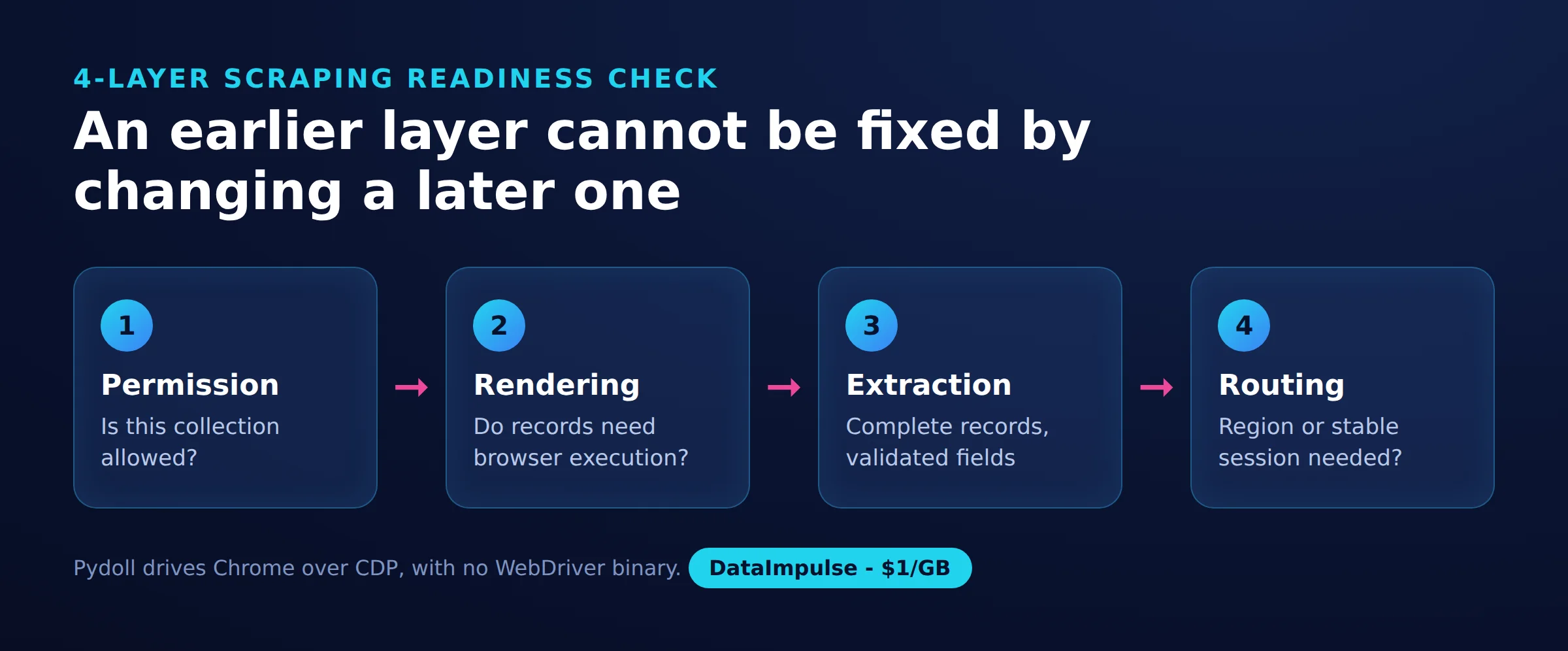
Apply the 4-layer scraping readiness check before choosing infrastructure. Each layer answers a different question, and a failure in an earlier layer cannot be repaired by changing the last one.
- Permission: Is this collection allowed, and what boundaries apply?
- Rendering: Do the required records need browser execution or interaction?
- Extraction: Can you identify complete records and validate their fields?
- Routing: Does the task need a particular region or stable egress session?
For this exercise, the operator’s scraping sandbox identifies Quotes to Scrape as a practice target. That supports this narrow public-page exercise, not unrestricted collection from unrelated sites. The rendering layer is deliberately conservative: the browser lets us demonstrate integration even though a browser is not necessarily the simplest way to retrieve these quotes.
Choose success criteria before running: expected fields, page boundaries, acceptable missing values and a maximum workload. An HTTP 200 response alone is insufficient evidence that extraction succeeded.
How do you install pydoll on Linux?
Install the tested package version in an isolated Python environment, then point the script at a working Chrome executable. Our Linux run used Python 3.12, pydoll-python 3.0.0 and Chrome for Testing 147.0.7727.15.
PyPI lists version 3.0.0 and a Python requirement of at least 3.10 and below 4.0 (as of October 2026). To reproduce the package pin, run python3 -m pip install pydoll-python==3.0.0 inside your environment. Pinning identifies the tested dependency; it does not freeze the target website.
Follow the installation guide and obtain a browser from the official Chrome for Testing distribution. Our server had no system Chrome, so we set CHROME_PATH to the downloaded executable. Confirm that executable launches before diagnosing Python-level failures.
Save the following tested script as pydoll_quotes.py. Leave PROXY_URL unset for the direct run, set CHROME_PATH when needed, and execute python3 pydoll_quotes.py. The credential-shaped text in the comment is an example placeholder, not an account.
import asyncio, csv, glob, os, time
from pydoll import Chrome, ChromiumOptions, NetworkEvent

PROXY = os.environ.get("PROXY_URL")  # e.g. http://USER__cr.us:[email protected]:823
CHROME = os.environ.get("CHROME_PATH")  # leave empty if Chrome is installed normally
START = "https://quotes.toscrape.com/page/{}/"


def build_options():
    options = ChromiumOptions()
    if CHROME:
        options.binary_location = CHROME
    options.headless = True
    options.add_argument("--no-sandbox")            # needed when running as root / in Docker
    options.add_argument("--window-size=1366,900")
    if PROXY:
        # pydoll strips user:pass from this flag and answers the proxy auth itself
        options.add_argument(f"--proxy-server={PROXY}")
    return options


async def scrape_page(tab, url):
    await tab.go_to(url)
    rows = []
    for quote in await tab.query(".quote", find_all=True, timeout=10):
        text = await (await quote.query(".text")).text()
        author = await (await quote.query(".author")).text()
        tags = [await t.text() for t in await quote.query(".tag", find_all=True, raise_exc=False) or []]
        rows.append({"text": text, "author": author, "tags": ", ".join(tags), "url": url})
    return rows


async def main(pages=3):
    received, web_ids = {"bytes": 0}, set()

    def remember(event):  # skip chrome:// internals of the new-tab page
        if event["params"]["request"]["url"].startswith("http"):
            web_ids.add(event["params"]["requestId"])

    def count_bytes(event):  # Network.loadingFinished: bytes received incl. headers
        if event["params"]["requestId"] in web_ids:
            received["bytes"] += event["params"].get("encodedDataLength", 0)

    rows = []
    async with Chrome(options=build_options()) as browser:
        tab = await browser.start()
        await tab.enable_network_events()
        await tab.on(NetworkEvent.REQUEST_WILL_BE_SENT, remember)
        await tab.on(NetworkEvent.LOADING_FINISHED, count_bytes)
        for n in range(1, pages + 1):
            t0 = time.time()
            page_rows = await scrape_page(tab, START.format(n))
            html = await tab.page_source()
            print(f"page {n}: {len(page_rows)} quotes, {int((time.time() - t0) * 1000)} ms, "
                  f"HTML {len(html.encode())} B, received so far {received['bytes']} B")
            rows += page_rows
            await asyncio.sleep(5)  # be polite
    with open("quotes_pydoll.csv", "w", newline="", encoding="utf-8") as f:
        w = csv.DictWriter(f, fieldnames=["text", "author", "tags", "url"])
        w.writeheader()
        w.writerows(rows)
    print(f"saved {len(rows)} quotes, network received {received['bytes']} B")


if __name__ == "__main__":
    asyncio.run(main())
The headless setting and window dimensions describe this run. The --no-sandbox flag is also part of the tested configuration, not a general deployment recommendation. Review browser isolation before reusing this setup with other targets.
How do you extract public-page data and export CSV?
The script locates each quote container, reads its text, author and tags, then writes one CSV row per quote. Scoping field selectors to each container keeps neighboring records from being mixed together.
The element-finding guide documents attribute-based find() and selector-based query(). Here, .quote identifies records, while .text, .author and .tag identify their fields. The ten-second query timeout is a choice in this script, not a site-wide readiness guarantee.
The output columns are text, author, tags and url. Tags become a comma-separated string inside one CSV cell. Keep the source URL because it helps trace malformed records and distinguish repeated text on different pages.
The tested implementation uses ordinary dictionaries. For typed extraction, the official structured-extraction guide documents Pydantic-based models and selector fields. That is an optional next step, not a feature exercised by this script. Define whether empty tags are valid before enforcing a schema.
The Tab reference documents page_source(), which the script uses to measure HTML size. Retrieved markup and extracted records serve different purposes: markup helps investigation, while the CSV is the structured result.
Expect thirty records per run on these three pages. Preserve or rename quotes_pydoll.csv before switching routes because another successful execution overwrites it. The file is written only after the browser block finishes; an earlier exception can prevent export.
How do pagination, infinite scroll and retries work?
The tested pagination is deliberately bounded: visit pages one through three sequentially, with five-second pauses. Infinite scroll, concurrent workers and retries need additional stopping rules before they belong in a larger collector.
For numbered pagination, stop at the agreed page cap, an absent next-page control or a repeated page identity. Record both the requested URL and the resulting record count. An empty extraction should trigger investigation rather than silently declaring the dataset complete.
For infinite scroll, compare stable record identifiers after each action. Stop after a defined number of unchanged results, an elapsed-time ceiling or a record cap. A changing page height alone is weak evidence because advertisements and placeholders can change without adding useful records.
To extend the async design, place a bounded worker queue around independent page jobs. Give each active navigation its own tab and coordinate per-site pacing across workers. More concurrent tasks should not multiply the permitted request rate.
Retry transient failures with a small attempt cap and increasing delays. Do not repeatedly retry access denials or challenges. Keep retry records separate from successful rows, deduplicate completed work, and retain enough error context to distinguish navigation failures from selector failures.
Keep cleanup around every browser lifetime, as the context manager does here. If rotation is necessary, coordinate it with job boundaries rather than changing the route midway through a multi-page session. These are extension guidelines; the measured script performs no concurrent navigation or retry loop.
How do you configure proxies securely?
Set the proxy URL through the environment and let the tested script pass it into the browser options. Verify egress separately before interpreting any difference in page results.
The official proxy guide documents authenticated HTTP proxy URLs and automatic handling of proxy authentication challenges. In our run, Pydoll removed authentication details from the browser proxy flag and answered authentication over CDP. Keep the complete URL out of logs, screenshots, shell history and committed configuration.
Our egress check through ipinfo.io identified the server route as datacenter egress and the proxy route as a US residential ISP. This check establishes the observed route; it is not proof of anonymity or future acceptance by another website.
Prefer a stable session for a workflow whose successive pages belong together. Use rotation between independent jobs when your authorized collection requires it. Changing the IP while retaining unrelated session state can complicate debugging, so record route identifiers without recording secrets.
Chrome lacks native SOCKS5 username/password authentication (as of October 2026), according to the same proxy guide. Do not assume an authenticated HTTP configuration can be converted by changing only its scheme. This tutorial tests HTTP proxy authentication.
On Linux, diagnose in order: browser executable, direct navigation, proxy reachability, authentication, then target behavior. Check executable permissions and browser startup errors before changing selectors. A working direct request and a failed proxied request narrow the investigation, but do not identify its cause automatically.
For an existing Selenium project, our Python proxy configuration guide offers a separate integration path. DataImpulse supplies routing infrastructure, not a scraping API, managed unblocker or VPN.
Can Pydoll handle Cloudflare and CAPTCHA challenges?
Pydoll cannot be treated as a reliable universal Cloudflare bypass. Its documented Turnstile interaction has a narrower scope than guaranteed access.
The CAPTCHA documentation describes clicking a Turnstile checkbox, but excludes solving image or puzzle challenges (as of October 2026). It also explains that acceptance depends on factors outside the click itself. Our quote-page run encountered no challenge, so it says nothing about challenge-solving success.
A separate headless diagnostic in our quick run showed navigator.webdriver as false. However, the User-Agent contained HeadlessChrome, the WebGL renderer was SwiftShader, and the HEADCHR_UA and CHR_MEMORY checks failed while 27 rows passed. These are observations from one environment, not a detection score for arbitrary sites.
Changing a User-Agent would address only that reported string. It would not establish consistency across the browser or erase server-side observations. Similarly, changing egress cannot repair missing permission or guarantee that a session will be accepted.
If a permitted task encounters a challenge, preserve diagnostics and seek an approved route, such as an API, export or allowlisting. Our Cloudflare access troubleshooting article adds context. Do not turn repeated challenges into an unlimited retry-and-rotation loop.
Should you choose Pydoll, Playwright or Selenium?
Choose according to browser requirements, debugging needs and existing infrastructure. This run supports evaluating Pydoll’s integration, but cannot rank competing frameworks by speed or resource use.
| Workflow | Use X when… | Avoid X when… |
|---|---|---|
| Pydoll | Use Pydoll when your authorized workflow centers on Chromium and Python extraction. | Avoid Pydoll when your acceptance criteria require a different browser engine. |
| Playwright | Use Playwright when browser-engine coverage and test diagnostics drive the decision. | Avoid Playwright when launching browsers adds no value to the collection. |
| Selenium | Use Selenium when an existing WebDriver suite or remote browser infrastructure is valuable. | Avoid Selenium when maintaining that infrastructure outweighs a small task’s needs. |
| HTTP client and parser | Use an HTTP-client/parser workflow when authorized responses already contain the records. | Avoid an HTTP-client/parser workflow when required browser interactions create the data. |
Playwright’s browser documentation covers Chromium, Firefox and WebKit. Its WebKit support does not automate branded Safari (as of October 2026). Its actionability checks and pytest plugin with tracing options are relevant when diagnosing interaction failures. Our Playwright scraping guide explores that workflow.
Selenium Manager automates missing-driver discovery and installation, so manual driver matching is not a fair blanket criticism. Selenium documents explicit and implicit waits, while Grid addresses remote execution across machines and browser configurations.
Undetected Chromedriver is a separate Selenium/ChromeDriver patching project. Its official repository warns that it does not hide the IP address (as of October 2026). We have no comparative Cloudflare or DataDome success rates to publish.
Measure full browser-process memory, completed records and failure recovery on your own workload. A protocol choice alone does not establish which system uses fewer resources.
What legal and access restrictions should you consider?
Check authorization, collection purpose and reuse restrictions before scaling. Public visibility alone does not settle every legal question.
The Ninth Circuit’s 2022 hiQ v. LinkedIn opinion addressed a preliminary injunction and access to public profiles under the US Computer Fraud and Abuse Act. Its reasoning is jurisdiction-specific and does not grant universal permission or resolve every contractual, privacy or intellectual-property claim.
In the EU, Database Directive Article 7 can restrict extraction or reuse of substantial database contents, including certain repeated extraction of smaller parts. When records contain personal data, GDPR Articles 5 and 6 require attention to processing principles and a lawful basis.
Review applicable terms and robots instructions without treating either as a complete legal assessment. Restrict login automation to owned or expressly authorized workflows. Document retention, access controls and permitted redistribution before storing a dataset. For this tutorial, stay within the public practice pages and avoid account access.
the reader decides, check local law
What did our quick public-page run show?
Neither route was blocked: all six page visits returned HTTP 200 and ten quotes each. Our quick run on October 18, 2026 is a small snapshot, not a benchmark or evidence that residential routing was necessary.
The method used one sequential pass through three pages per route, with five-second pauses and no login. Source artifacts are pydoll_quotes.py and its quotes_pydoll.csv output. Every row below used pydoll-python 3.0.0, Python 3.12 and headless Chrome for Testing 147.0.7727.15 on Linux.
| URL | Route | Status | Challenge/block | Elapsed ms | Records | Returned fields | Missing fields | HTML UTF-8 bytes | Received network bytes |
|---|---|---|---|---|---|---|---|---|---|
| https://quotes.toscrape.com/page/1/ | Datacenter | 200 | None observed | 631 | 10 | text, author, tags | None | 10,998 | Per-page value unavailable |
| https://quotes.toscrape.com/page/2/ | Datacenter | 200 | None observed | 573 | 10 | text, author, tags | None | 13,580 | Per-page value unavailable |
| https://quotes.toscrape.com/page/3/ | Datacenter | 200 | None observed | 499 | 10 | text, author, tags | None | 9,976 | Per-page value unavailable |
| https://quotes.toscrape.com/page/1/ | Residential | 200 | None observed | 1,171 | 10 | text, author, tags | None | 10,998 | Per-page value unavailable |
| https://quotes.toscrape.com/page/2/ | Residential | 200 | None observed | 679 | 10 | text, author, tags | None | 13,580 | Per-page value unavailable |
| https://quotes.toscrape.com/page/3/ | Residential | 200 | None observed | 641 | 10 | text, author, tags | None | 9,976 | Per-page value unavailable |
Elapsed values describe navigation through extraction; the script’s timer also includes HTML retrieval. Network totals were 81,073 bytes direct and 81,635 bytes residential. The retained summary supports route totals, not exact per-page network allocations. It also lacks a complete request-count audit, so six navigations cannot certify fewer than 100 requests including assets.
Whole-script durations were 17.7 seconds direct and 18.8 seconds residential, including startup and three pauses. Peak Python-process RAM was about 205 MB, excluding Chrome. These durations are below thirty minutes, but there were no repeated trials, confidence intervals or controlled competitor runs.
Traffic accounting summed CDP Network.loadingFinished values for HTTP(S) request IDs. Without that filter, browser-internal new-tab resources added roughly 1.3 MB. The first page fetched CSS and a roughly 48 KB web font; subsequent pages used about 2.5 KB each with cached assets.
The $1/GB bandwidth estimate is mean_received_bytes * 1000 / 1e9 * 1. For residential traffic, (81635 / 3) * 1000 / 1e9 * 1 gives about $0.027 per 1,000 pages. Later warm-cache pages suggest roughly $0.003 per 1,000, not a separate thousand-page test. Both exclude compute, uploads and uncounted protocol overhead. HTML size alone understates this browser traffic.
What alternatives should you try?
Start with an official API or export when it covers the authorized task. Otherwise, check whether fetching and parsing the response is enough before adding browser automation.
Compare a saved response with the records you need. If the fields are already present, evaluate an HTTP client and parser against the same completeness checks. If interaction creates the records, keep a browser in the workflow and measure the additional cost.
For other implementation approaches, explore our Botasaurus guide and Lightpanda article. Evaluate them against the same permission, rendering, extraction and routing questions rather than assuming a different tool fixes access restrictions.
Finally, Pydoll is unrelated to Pillow, the Python imaging library. If your task is resizing or processing image files, browser automation is a different concern.
Frequently Asked Questions
What is Pydoll, and does it require WebDriver?
Pydoll controls Chromium browsers from Python through CDP without WebDriver. You still need a working browser executable, as our Linux setup demonstrates.
How do you install Pydoll and scrape a public page?
For this tested setup, install pydoll-python==3.0.0 and configure the Chrome executable when it is outside the normal installation location. Save and run pydoll_quotes.py against the practice pages. Inspect the thirty CSV records before expanding the workload.
Can Pydoll reliably bypass Cloudflare?
Our measurements establish no Cloudflare bypass reliability because neither route encountered a challenge. Treat a successful visit to a practice page as evidence of working extraction, not access to protected sites.
How do authenticated proxies work with Pydoll?
In our tested HTTP configuration, the script read the proxy URL from an environment variable and Pydoll handled authentication over CDP. Verify the resulting egress before collecting pages, and keep the complete URL out of diagnostics.
When should you choose Pydoll over Playwright or Selenium?
Consider it when your Chromium extraction task fits the tested programming model and you do not need to preserve another framework’s infrastructure. Compare maintenance and diagnostics on a representative workflow before migrating an existing project.
Does this scraper need a residential proxy?
The direct route succeeded on all three pages, so this snapshot demonstrates no requirement for residential routing. Add a proxy only when an authorized routing or regional requirement justifies it.
Is the bandwidth estimate a total scraping cost?
No, it prices only the measured received bytes at $1 per GB. Browser compute, uploads, protocol overhead, failures and different cache behavior can change the total.
Add routing when your workflow needs it
First confirm permission and reliable extraction on a small sample. If the job then needs residential egress, DataImpulse offers residential proxies from $1 per GB with rotating or sticky sessions. Repeat the same checks through your chosen route and budget from measured traffic.
Last updated: October 18, 2026.

 State/City/Zip/ASN Targeting



