

In this Article
web scraping pagination means repeatedly fetching the next portion of a collection, extracting its records and stopping when a validated ending signal appears. In Python, the practical choice is an HTML request loop, a JSON pagination loop or browser interaction, depending on how the site exposes its next batch.
The difficult part is proving that the loop finished. An empty error page, a repeated cursor or a temporarily unchanged screen can all look like the end. This guide combines our quick run on October 18, 2026 with a completion framework and explicit limits for the tested script.
Key Facts
- Pagination completion requires a validated ending signal, not just a successful HTTP response.
- Our numbered-page loop reached an empty HTTP 200 response on page 11.
- Our JSON loop collected 100 quotes and stopped at has_next=false on page 10.
- Our browser loop collected 100 quotes with seven wheel scrolls.
- The Books Next-link loop stopped at a five-page safety cap, leaving the collection incomplete.
- Deduplication in the tested script applies separately to each pagination pattern.
- Our two route runs are a small snapshot, not a reliability benchmark.
How does web scraping pagination work?
Pagination divides a collection into batches and exposes a way to request the next batch. Your scraper must track both navigation progress and the records already collected.
Numbered pages advance an index. Offsets skip a specified number of records. Cursors carry a continuation position whose meaning belongs to the server. Lazy loading describes when another batch appears, usually after scrolling or clicking; it does not identify the underlying pagination protocol.
Use the 5-step pagination completion check for every loop:
- Identify: Find the next link, page parameter, cursor or interaction that advances the collection.
- Fetch: Request that batch while preserving necessary filters and session state.
- Extract: Validate the response and parse the expected fields.
- Deduplicate: Store unseen identifiers and count repeated records.
- Terminate: Record whether the result is complete, failed, stalled or capped.
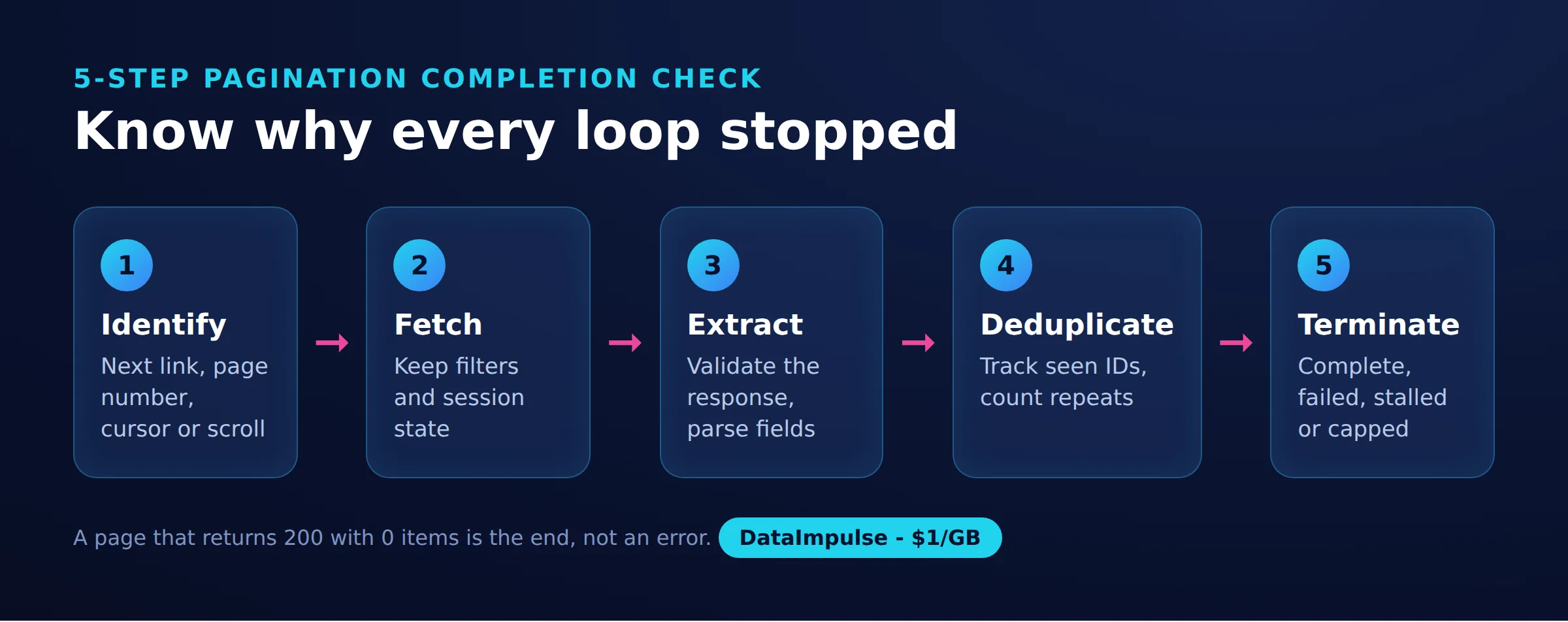
Keep those outcomes separate. A request limit protects your infrastructure, but reaching it does not establish that every item was collected. Likewise, successful extraction proves that a page was usable, not that later pages do not exist.
Which web scraping pagination method should you use?
Use Requests and BeautifulSoup for the static HTML patterns demonstrated here, a JSON request loop for an authorized endpoint, and Playwright when interaction is necessary. Choose from the actual response contents, rather than the visual appearance of the page.
Inspect the initial HTML, then watch Fetch/XHR traffic while advancing once. Compare the URL, query parameters, request body, response records and continuation field. A page that looks like infinite scroll may expose a simple numbered JSON request.
| Method | Use when | Avoid when |
|---|---|---|
| HTML requests | Use HTML requests when data and navigation appear in HTML. | Avoid HTML requests when required data needs JavaScript. |
| Public JSON endpoint | Use a public JSON endpoint when access is permitted and pagination is understood. | Avoid a public JSON endpoint when authentication or restrictions prohibit access. |
| Browser | Use a browser when rendering or interaction is required. | Avoid a browser when HTML or JSON already suffices. |
| Sticky proxy session | Use a sticky proxy session when pagination depends on a consistent session or IP. | Avoid a sticky proxy session when no continuity requirement justifies it. |
Changing libraries cannot repair an incorrect continuation rule. For broader architecture choices, see our Scrapy versus BeautifulSoup comparison.
How do you scrape numbered pages and Next links with Python?
Follow the actual Next URL when one exists; increment a page number only after confirming that URL contract. Resolve relative links against the current page, extract records and preserve the reason the loop stopped.
Our quick run on October 18, 2026 used one Linux server, Python 3.12, requests 2.31.0, beautifulsoup4 4.14.3 and Playwright 1.58.0 with headless Chromium. We ran four patterns once directly and once through a DataImpulse US residential proxy. This is a small snapshot, not a benchmark.
The measurement source is pagination_scraper.py, its printed statistics and pagination_items.csv. Each route produced 400 rows across four separately deduplicated patterns. The three quote patterns revisit the same collection, so those rows are not 400 distinct underlying records.
| Pattern and URL | Route | Requests or responses | Items | Duplicates | Stop |
|---|---|---|---|---|---|
| books.toscrape.com/catalogue/page-N.html | Direct | 5 requests | 100 | 0 | Five-page cap |
| books.toscrape.com/catalogue/page-N.html | Residential | 5 requests | 100 | 0 | Five-page cap |
| quotes.toscrape.com/page/N/ | Direct | 11 requests | 100 | 0 | Empty page 11 |
| quotes.toscrape.com/page/N/ | Residential | 11 requests | 100 | 0 | Empty page 11 |
| quotes.toscrape.com/api/quotes?page=N | Direct | 10 requests | 100 | 0 | has_next=false |
| quotes.toscrape.com/api/quotes?page=N | Residential | 10 requests | 100 | 0 | has_next=false |
| quotes.toscrape.com/scroll | Direct | 14 responses | 100 | 0 | Unchanged item count |
| quotes.toscrape.com/scroll | Residential | 14 responses | 100 | 0 | Unchanged item count |
All observed requests returned HTTP 200, with no observed blocks or challenges. These are aggregate observations, not a per-request audit. Quotes yielded text, author and tags; books yielded titles with empty author and tag fields.
The helper pauses three seconds after each of its 26 requests. Browser requests are separate: the browser loop waits 2.5 seconds after each wheel action. Total elapsed time was 110 seconds direct and 120 seconds residential, including 78 seconds of explicit request pauses. That difference cannot establish a route performance advantage.
Install the dependencies with pip install requests beautifulsoup4 lxml playwright, then run playwright install chromium. Assemble the following tested excerpts in order as pagination_scraper.py, placing the configuration assignment PROXY = os.environ.get("PROXY_URL") between the two blocks. Leave that environment variable unset for direct access, then run python3 pagination_scraper.py.
import csv, json, os, time
from urllib.parse import urljoin, urlparse
import requests
from bs4 import BeautifulSoup
session = requests.Session()
session.headers["User-Agent"] = "Mozilla/5.0 (X11; Linux x86_64) Chrome/141.0 Safari/537.36"
if PROXY:
    session.proxies = {"http": PROXY, "https": PROXY}
stats = {}  # pattern -> pages, items, duplicates, wire bytes, stop reason


def get(url, pattern):
    r = session.get(url, timeout=30)
    s = stats.setdefault(pattern, {"pages": 0, "items": 0, "dupes": 0, "bytes": 0, "stop": ""})
    s["pages"] += 1
    s["bytes"] += len(r.content)  # decoded body size; the wire size is smaller if compressed
    time.sleep(3)  # be polite
    return r


def add(rows, seen, pattern, new_rows):
    for row in new_rows:
        if row["text"] in seen:
            stats[pattern]["dupes"] += 1
            continue
        seen.add(row["text"])
        rows.append(dict(row, pattern=pattern))
        stats[pattern]["items"] += 1


def parse_quotes(html):
    soup = BeautifulSoup(html, "lxml")
    return [{"text": q.select_one(".text").get_text(strip=True),
             "author": q.select_one(".author").get_text(strip=True),
             "tags": ",".join(t.get_text() for t in q.select(".tag"))}
            for q in soup.select("div.quote")]


def next_link(rows, start="https://books.toscrape.com/catalogue/page-1.html", max_pages=5):
    """Pattern 1: follow the 'next' link until it disappears (or a safety cap)."""
    seen, url = set(), start
    while url:
        soup = BeautifulSoup(get(url, "next_link").text, "lxml")
        add(rows, seen, "next_link", [{"text": a["title"], "author": "", "tags": ""}
                                       for a in soup.select("article.product_pod h3 a")])
        nxt = soup.select_one("li.next a")
        url = urljoin(url, nxt["href"]) if nxt else None
        if stats["next_link"]["pages"] >= max_pages:
            stats["next_link"]["stop"] = f"safety cap {max_pages} pages"
            return
    stats["next_link"]["stop"] = "no next link"


def page_numbers(rows, base="https://quotes.toscrape.com/page/{}/"):
    """Pattern 2: count page numbers in the URL until a page comes back empty."""
    seen, page = set(), 1
    while True:
        r = get(base.format(page), "page_numbers")
        quotes = parse_quotes(r.text) if r.status_code == 200 else []
        if not quotes:
            stats["page_numbers"]["stop"] = f"page {page}: HTTP {r.status_code}, 0 items"
            return
        add(rows, seen, "page_numbers", quotes)
        page += 1


def json_api(rows, base="https://quotes.toscrape.com/api/quotes?page={}"):
    """Pattern 3: infinite scroll pages are often a JSON API with a has_next flag."""
    seen, page = set(), 1
    while True:
        data = get(base.format(page), "json_api").json()
        add(rows, seen, "json_api", [{"text": q["text"], "author": q["author"]["name"],
                                       "tags": ",".join(q["tags"])} for q in data["quotes"]])
        if not data["has_next"]:
            stats["json_api"]["stop"] = f"has_next=false on page {page}"
            return
        page += 1


def scroll_browser(rows, url="https://quotes.toscrape.com/scroll", max_scrolls=15):
    """Pattern 4: let a real browser scroll until no new items appear."""
    from playwright.sync_api import sync_playwright
    s = stats.setdefault("browser_scroll", {"pages": 0, "items": 0, "dupes": 0, "bytes": 0, "stop": ""})
    proxy = None
    if PROXY:
        p = urlparse(PROXY)
        proxy = {"server": f"http://{p.hostname}:{p.port}", "username": p.username, "password": p.password}
    with sync_playwright() as pw:
        browser = pw.chromium.launch(args=["--no-sandbox"], proxy=proxy)
        page = browser.new_page()
        page.on("response", lambda resp: s.__setitem__("pages", s["pages"] + 1)
                if "toscrape.com" in resp.url else None)
        page.goto(url, wait_until="networkidle")
        count = 0
        for _ in range(max_scrolls):
            page.mouse.wheel(0, 20000)
            page.wait_for_timeout(2500)
            new_count = page.locator("div.quote").count()
            if new_count == count:
                s["stop"] = f"no new items after scroll ({count} on page)"
                break
            count = new_count
        add(rows, set(), "browser_scroll", parse_quotes(page.content()))
        browser.close()


if __name__ == "__main__":
    rows, t0 = [], time.time()
    for fn in (next_link, page_numbers, json_api, scroll_browser):
        fn(rows)
    with open("pagination_items.csv", "w", newline="", encoding="utf-8") as f:
        w = csv.DictWriter(f, fieldnames=["pattern", "text", "author", "tags"])
        w.writeheader()
        w.writerows(rows)
    print(json.dumps(stats, indent=1))
    print(f"saved {len(rows)} rows in {time.time() - t0:.0f} s")
Read the limits before reuse. The numbered loop treats a non-200 response as empty, so its stop message must not automatically become a completion verdict. The numbered and JSON loops lack request caps, and the script has no retry policy. An exception before the final write can prevent CSV creation. The browser launch also disables its sandbox; keep this reproduction confined to the practice environment.
In our run, page 11 returned HTTP 200 with zero quotes and the message “No quotes found!” Checking status alone would miss that ending. Conversely, Books stopped after five of its observed 50 pages: that output is deliberately partial.
How do you scrape Load More and infinite scroll?
Trigger the interaction, wait for the relevant response and validate the new records before repeating. Prefer an authorized underlying endpoint when it exposes the same collection without browser rendering.
Our scroll loop reached 100 quotes with seven wheel scrolls and observed 14 responses, including HTML and JavaScript. The page fetched the same JSON endpoint used by our request loop. Those 14 responses are not 14 pages of quote records.
For Load More, use a locator targeting the actual button so its normal interaction can run. Register page.expect_response() before clicking, then validate the matching response. See the official locator guidance and network response waits.
For scrolling, page.mouse.wheel() triggers wheel input; it is not evidence that loading finished. Use a bounded item-state predicate with page.wait_for_function(), or the relevant response wait, before extracting. The official scrolling guide and predicate wait reference explain those mechanisms.
The tested example uses a fixed pause and one unchanged count. That worked here, but a slow response could produce a false ending. Virtualized lists can also replace visible items without increasing their count, so collect identifiers batch by batch.
Selenium explicit waits offer condition-based synchronization for an existing Selenium crawler. Avoid mixing implicit and explicit waits, as its documentation warns of unpredictable timing.
Puppeteer’s waitForResponse serves the response-wait role in a JavaScript implementation. Neither library choice establishes collection completeness; that still depends on the endpoint or page state. Our Playwright scraping guide covers browser setup separately.
How do cursor and API pagination work?
Cursor pagination carries a server-defined continuation value into the next request. Keep it unchanged and preserve the filters, ordering and session context associated with it.
The tested Quotes endpoint is numbered JSON pagination, not a cursor API. It advances page and ends with has_next=false. Do not generalize that contract to another API.
- REST links: GitHub REST pagination exposes continuation URLs through the Link header. Follow
rel="next"; other relations are not always present. - GraphQL cursors: GitHub GraphQL pagination uses connection information such as
endCursorandhasNextPage, withafterfor forward traversal. - Object cursors: Stripe’s v1 list pagination uses fields including
starting_afterandhas_more. Confirm the endpoint family before adopting that pattern.
A Python cursor helper must preserve the endpoint’s contract; no universal iterator can infer it. Treat an expired or rejected token as an error requiring a documented recovery path. Never silently skip to a guessed position.
Before a larger run, test local fixtures for an empty terminal batch, a repeated cursor, duplicate records across batches, malformed JSON and a transient failure followed by success. Assert that failure leaves the checkpoint unchanged. These are recommended tests, not measurements from our public-site run.
How does Scrapy follow pagination?
Scrapy schedules another request from a callback, then processes its response through the selected callback. A Next-link spider repeats that process until its validated page has no continuation.
The official Scrapy tutorial extracts the Next link and uses response.follow() with a callback. That method accepts relative URLs, avoiding manual URL concatenation.
For broader navigation, CrawlSpider rules can use LinkExtractor to select links. Restrict those rules to intended listing pages; a broad rule can drift into unrelated navigation. For JSON responses, extract the continuation token and construct the next request explicitly.
RetryMiddleware handles configured retryable failures, but exhausted retries must still mark a gap. Track scheduled, successful and failed batches separately, then reconcile them before declaring completion. For routing setup, see proxies for Scrapy.
How do you know when pagination is finished?
Declare completion only after a successful, validated response supplies the expected terminal signal and your progress checks agree. Treat repeated pages, exhausted budgets and failed requests as separate outcomes.
Prefer source IDs or canonical URLs for deduplication. Our script uses quote text, or book title, because those fields were convenient for this snapshot. Distinct records can share text, and deduplication cannot recover records skipped while a live collection changes.
| Observation | Interpretation |
|---|---|
| Validated page has no Next link | Completion candidate for that listing contract |
| Documented terminal flag is false | Completion candidate after saving the batch |
| Expected empty page with valid structure | Completion candidate for a confirmed empty-page contract |
| Repeated cursor or repeated page contents | Stalled traversal requiring investigation |
| 403, 429, timeout or unexpected empty DOM | Failure or uncertainty, never completion |
| Request, time or item budget reached | Partial collection |
For production web scraping pagination, log the requested position, final URL, status, parsed count, new unique count and next position. Save records before committing the checkpoint, so a restart can safely revisit the last batch.
A displayed total or last-page number is useful corroboration, but it may change during traversal. Repeated no-new-items observations can trigger a bounded stall stop; they do not prove exhaustion. For large collections, preserve the query and sorting parameters with every checkpoint.
How should you handle rate limits and proxy sessions?
Diagnose the response before changing routes, and keep retries bounded. Preserve a session when pagination depends on it; rotate only where authorized requests are independent of previous session state.
A failed request alone does not prove blocking. Compare status, response type, expected selectors or JSON fields, and visible challenge evidence. The HTTP Retry-After field can express a delay or date; honor it where applicable.
For a retry policy, choose a small attempt budget, capped exponential backoff with jitter and an overall deadline. Retry the same batch, then validate it before advancing. On exhaustion, save a failure checkpoint. See our guides to API rate limiting and Python request retries.
Sticky routing can help preserve continuity when the target associates progress with an IP or session. Rotating between batches can invalidate that assumption. Neither choice fixes selectors, grants permission or justifies quota evasion. Keep general access troubleshooting separate from pagination logic, as discussed in our blocking diagnosis guide.
Our separate curl measurements recorded these approximate body sizes and estimates at $1 per GB:
| Response | Decoded body | Compressed body | Estimated cost per 1,000, decoded / compressed |
|---|---|---|---|
| Books HTML | 51.4 KB | 5.2 KB | $0.0514 / $0.0052 |
| Quotes HTML | 10.2 KB | 2.0 KB | $0.0102 / $0.0020 |
| Quotes JSON | 3.1 KB | 1.1 KB | $0.0031 / $0.0011 |
The calculation is body bytes multiplied by 1,000, divided by 1,000,000,000, multiplied by $1. It excludes retries, headers, TLS overhead and browser assets. These are body-only estimates, not measured billing. JSON used less body data here, but the saving depends on the comparison and compression.
The script counts decoded bytes. Its browser byte counter remains zero because it never accumulates response bodies; zero is not a measured browser transfer size.
What legal checks and alternatives should you consider?
Check the target’s current terms, access rules and the intended use of the records before collecting them. Public visibility alone does not resolve permission or downstream obligations.
Legal checks before collection
Review the target’s terms of service and robots.txt for the routes you intend to request. Record the applicable rules and access date. The Robots Exclusion Protocol describes crawler instructions; it is not access authorization.
If records contain personal data, assess whether the GDPR applies under its material and territorial scope. Where it does, consider lawful basis, transparency, minimization and retention. Public availability does not remove those questions.
The EU Database Directive can restrict substantial extraction or reutilization and certain repeated, systematic extraction of insubstantial parts. Small individual pages do not automatically make a large collection permissible.
The 2022 hiQ v. LinkedIn opinion addressed a preliminary injunction and limited CFAA questions concerning publicly accessible profiles. It did not settle every contractual, privacy or intellectual-property claim or authorize scraping generally. Evaluate the target, jurisdiction and use together; the reader decides, check local law
Alternatives to page traversal
An authorized API, downloadable export or licensed dataset may offer clearer coverage and fewer requests. Check update frequency, field coverage and reuse terms before replacing the scraper.
Frequently Asked Questions
What is pagination in web scraping?
It is the process of collecting successive batches from a larger collection. Navigation may use links, numeric parameters, continuation tokens or browser interactions, but each method needs a defensible stopping rule.
Which Python approach should I start with?
Start with the least complex approach that exposes the required records and continuation state. In our run, HTML requests handled links and page numbers, while a JSON loop collected the quotes without rendering the scrolling interface.
Can I scrape infinite scroll without a browser?
Our scrolling practice page used a JSON endpoint that we also requested directly. Inspect the network traffic and confirm that direct access is permitted before adopting the same approach elsewhere.
Does HTTP 200 mean another page exists?
No. Our eleventh numbered Quotes page returned HTTP 200 with no quotes, so the response body carried the useful ending evidence.
Should I stop when a page contains only duplicates?
Treat that as a possible stall, not automatic proof of completion. Check the continuation value and repeated response contents, then stop within a bounded investigation budget if progress remains uncertain.
When should pagination use sticky rather than rotating proxies?
Use continuity when the target associates pagination state with a session or IP. For independent requests, rotation may be compatible, but it should never substitute for pacing or permission.
Is the tested script ready for unattended production runs?
It is a reproduction of a small successful practice-site run. Add response validation, request budgets, bounded retries and durable checkpoints before relying on it for unattended collection.
Match proxy routing to your pagination requirements
If an authorized collection needs proxy routing, DataImpulse offers proxy infrastructure with rotating or sticky sessions. It is not a scraping API, managed unblocker or VPN. Start with a small validation run and confirm your completion logic before increasing volume.
Last updated: October 18, 2026.

 State/City/Zip/ASN Targeting



