
In this Article
Puppeteer Real Browser is a Node.js automation package that launches Chrome and connects a patched Puppeteer client to it. The upstream README says the repository will receive no further updates, a maintenance limitation (as of October 2026).
In our quick run on October 18, 2026, it extracted three public practice pages through both datacenter and residential routes. It also remained blocked on a separate challenge page. This small snapshot, not a benchmark, helps separate working extraction from unsupported expectations about automatic access.
Key Facts
- Our fixture snapshot extracted all four requested fields on six page visits.
- No challenge was observed on either fixture route.
- Every measured browser run used headless mode.
- The webdriver flag remained visible in our headless fingerprint checks.
- All four challenge-page attempts remained blocked after 15 seconds.
- Cached fixture traffic averaged about 79 KB per page.
What is Puppeteer Real Browser, and is it maintained?
Consider it for reproducing an existing pinned workflow, with maintenance ownership assigned to your team. Do not choose it on the assumption that upstream will repair future browser incompatibilities.
The project documentation describes Chrome Launcher starting the browser and a Rebrowser-patched Puppeteer core connecting afterward. Its connect() entry point returns a browser and page. This is a separate project, not an official Google package or a downloadable consumer browser.
The underlying control connection is worth understanding before debugging launch flags; our Chrome DevTools Protocol overview explains that layer. Keep browser startup, page automation, network routing, and extraction correctness as separate responsibilities.
Our tested package version was 1.4.4. Treat that as a reproduction pin, not a claim about the latest npm release. The release history is useful background, but deployment decisions should follow a working installation and repeatable acceptance checks.
How do you install Puppeteer Real Browser on Linux?
Reproduce the measured environment first: install [email protected], make Chrome available, and explicitly select headless mode. Our server had no Xvfb, so headed operation was not tested.
The installation command is npm i [email protected]. We used Node.js 22.22.2 and Chrome for Testing 147.0.7727.15; the installed package used rebrowser-puppeteer-core 23.10.3. Separate comparison runs used Puppeteer 25.14.0 and puppeteer-cluster 0.25.0.
Save the script below as prb_books.mjs. For the direct route, leave PROXY_URL unset and run HEADLESS=1 node prb_books.mjs. Set CHROME_PATH if Chrome discovery fails. For the residential route, inject the proxy URL through your secret-management environment and repeat the same command.
The README recommends headed mode, describes Xvfb for Linux, and includes a Docker example. Treat a container as a separate environment to validate: check browser libraries, executable permissions, display configuration, and shutdown behavior before adding workers.
Retain the dependency lockfile, its hash, script commit, exact UTC timestamps, and browser version with future runs. This snapshot has version pins and a calendar date, but no lockfile hash, script commit identifier, or precise UTC timestamp, which limits exact reconstruction.
How do you extract public-page data with working code?
The tested script connects, navigates, waits for a product heading, extracts four fields, and saves JSON. Its navigation loop closes the browser in finally.
Our measurement artifacts are prb_books.mjs and its output, books_prb.json. We visited three Books to Scrape pages once per route, without login, using a fresh profile for each route run and browser cache enabled. The script pauses five seconds between iterations, after a separate 1.5-second allowance for late requests.
// npm i [email protected]
import { connect } from "puppeteer-real-browser";
import { writeFileSync } from "node:fs";

const PROXY_URL = process.env.PROXY_URL; // e.g. http://USER__cr.us:[email protected]:823
const CHROME_PATH = process.env.CHROME_PATH; // optional: path to Chrome if it is not auto-detected
const URLS = [
  "https://books.toscrape.com/catalogue/a-light-in-the-attic_1000/index.html",
  "https://books.toscrape.com/catalogue/tipping-the-velvet_999/index.html",
  "https://books.toscrape.com/catalogue/soumission_998/index.html",
];
const sleep = (ms) => new Promise((r) => setTimeout(r, ms));

function proxyOption() {
  if (!PROXY_URL) return {};
  const u = new URL(PROXY_URL);
  return { host: u.hostname, port: Number(u.port),
           username: decodeURIComponent(u.username), password: decodeURIComponent(u.password) };
}

const HEADLESS = process.env.HEADLESS === "1"; // headed mode needs a display (Xvfb on Linux)
const { browser, page } = await connect({
  headless: HEADLESS ? "new" : false,
  disableXvfb: HEADLESS,
  turnstile: false,              // the built-in Turnstile clicker; not needed here
  proxy: proxyOption(),
  customConfig: CHROME_PATH ? { chromePath: CHROME_PATH } : {},
  connectOption: { defaultViewport: null },
});

// count bytes received from the network (compressed size, as billed by a proxy)
let received = 0;
const cdp = await page.createCDPSession();
await cdp.send("Network.enable");
cdp.on("Network.loadingFinished", (e) => { received += e.encodedDataLength; });

const results = [];
try {
  for (const url of URLS) {
    const before = received;
    const t0 = Date.now();
    let row = { url };
    try {
      const resp = await page.goto(url, { waitUntil: "domcontentloaded", timeout: 45000 });
      await page.waitForSelector(".product_main h1", { timeout: 15000 });
      const data = await page.evaluate(() => {
        const cell = (name) => [...document.querySelectorAll("table.table tr")]
          .find((tr) => tr.querySelector("th")?.textContent === name)?.querySelector("td")?.textContent;
        return {
          title: document.querySelector(".product_main h1")?.textContent.trim(),
          sku: cell("UPC"),
          price: document.querySelector(".product_main .price_color")?.textContent,
          availability: cell("Availability"),
        };
      });
      const html = await page.content();
      row = { ...row, status: resp?.status(), ...data, nav_ms: Date.now() - t0,
              html_bytes: Buffer.byteLength(html), challenge: /Just a moment|cf-chl/i.test(html) };
    } catch (err) {
      row.error = err.message.split("\n")[0];
    }
    await sleep(1500); // let late requests (fonts, images) finish before counting
    row.received_bytes = received - before;
    console.log(row);
    results.push(row);
    await sleep(5000); // be polite
  }
} finally {
  await browser.close();
}

writeFileSync("books_prb.json", JSON.stringify(results, null, 2));
console.log(`saved ${results.filter((r) => r.title).length}/${URLS.length} pages to books_prb.json`);
The credential-shaped text in the comment is an example placeholder. Keep actual authentication values out of scripts, command history, and logs.
| URL | Route | HTTP status | Extraction | Returned fields | Navigation ms | HTML bytes | Transferred page bytes | Challenge/block/error |
|---|---|---|---|---|---|---|---|---|
| https://books.toscrape.com/catalogue/a-light-in-the-attic_1000/index.html | Datacenter | 200 | Success | title, sku, price, availability | 862 | 9308 | 184833 | None observed |
| https://books.toscrape.com/catalogue/tipping-the-velvet_999/index.html | Datacenter | 200 | Success | title, sku, price, availability | 209 | 10963 | 31785 | None observed |
| https://books.toscrape.com/catalogue/soumission_998/index.html | Datacenter | 200 | Success | title, sku, price, availability | 192 | 12484 | 20015 | None observed |
| https://books.toscrape.com/catalogue/a-light-in-the-attic_1000/index.html | Residential | 200 | Success | title, sku, price, availability | 2212 | 9308 | 184811 | None observed |
| https://books.toscrape.com/catalogue/tipping-the-velvet_999/index.html | Residential | 200 | Success | title, sku, price, availability | 454 | 10963 | 31760 | None observed |
| https://books.toscrape.com/catalogue/soumission_998/index.html | Residential | 200 | Success | title, sku, price, availability | 540 | 12484 | 20015 | None observed |
SKU means the page’s UPC. Navigation milliseconds include selector waiting, extraction, and HTML serialization, not just network navigation. HTML bytes measure serialized markup; transferred bytes sum CDP Network.loadingFinished values across completed page requests, including assets. They are an approximation of traffic, not an invoice measurement.
The script has no retries or hard request-count guard. Consequently, these records cannot establish an under-100-request total per site. Its challenge regex and title-based success counter are also limited: validate all required fields before accepting production output.
The Puppeteer Page API documents selector waiting and page evaluation. Its interception guide explains request handling; leave interception out of the initial reproduction, then test any resource filtering separately. Current documentation does not establish compatibility with this older package.
How do headed mode, headless mode, and browser settings differ?
Headless describes how the browser runs, not whether a site will accept it. Our measurements cannot rank headed and headless performance because every run used headless mode.
With Chrome 147 on our server, plain Puppeteer and puppeteer-real-browser produced the same fingerprint-page result: navigator.webdriver was true, the user agent contained HeadlessChrome, and the WebGL renderer was SwiftShader. HEADCHR_UA and CHR_MEMORY failed; 26 rows passed. Those observations describe this environment, not every installation.
Keep viewport, browser version, headers, locale, and profile handling stable while testing. Change one setting at a time and compare screenshots, extracted values, memory use, and elapsed time. Randomizing settings makes failures harder to reproduce.
The README places persistent profiles under customConfig.userDataDir and recommends connectOption.defaultViewport for viewport configuration. Use a separate profile for each independent session. For extension or MCP integration, require a small compatibility test covering startup, navigation, extraction, and shutdown before adopting the combination.
Why do Cloudflare and Turnstile checks still fail?
A working browser and a different IP do not guarantee acceptance. Cloudflare lists browser automation frameworks among unsupported challenge environments, an explicit limitation (as of October 2026), in its supported-browser guidance.
Its detection-engine documentation describes multiple inputs, including browser signals, headers, and session characteristics. The practical implication is that changing one input cannot establish that every other check will pass.
Our separate challenge-page check returned HTTP 403 and remained on the challenge after 15 seconds in all four combinations: plain Puppeteer or real-browser, each direct or residential. Real-browser used turnstile: true. On its residential attempt, the text changed to “Verifying you are human”, but access still failed.
For a fullscreen Turnstile issue, collect the viewport dimensions, screenshot, final URL, and exact browser settings. Compare normal and maximized windows on an authorized test target. We established no fullscreen fix, and a changed widget appearance is not evidence of successful validation.
For context, see our Cloudflare troubleshooting discussion and WebGL fingerprinting guide. Keep the acceptance criterion concrete: the intended content must load and yield the expected fields.
How do you diagnose timeouts, blocks, and broken sessions?
Use the 4-layer failure check to identify where the workflow stops. Fix the earliest failing layer before changing downstream settings.
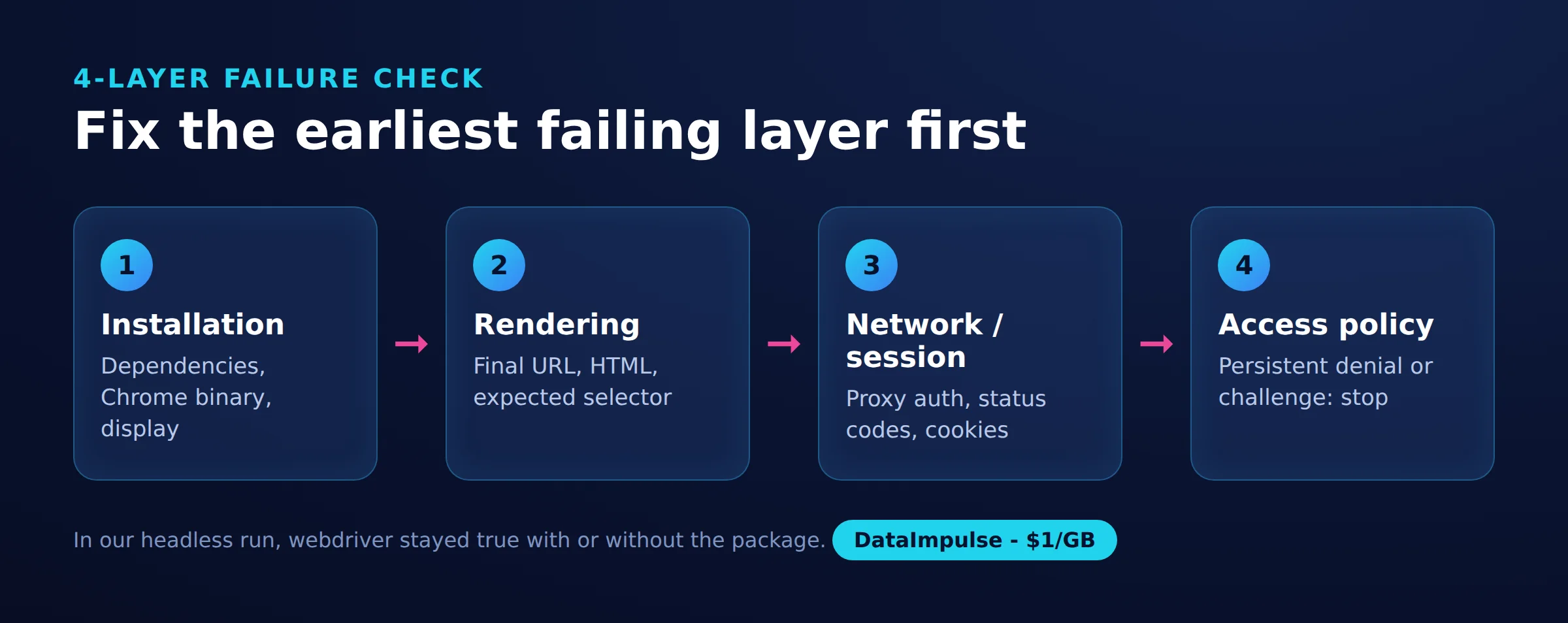
- Installation: Confirm the pinned dependency tree, Chrome executable, permissions, and display requirements. A browser that never starts has not reached a website detection check.
- Rendering: Inspect the final URL, screenshot, HTML, and expected selector. A selector timeout can mean changed markup, incomplete loading, or an entirely different page.
- Network/session: Inspect proxy authentication, connection errors, status codes, cookies, and session continuity. Compare direct and proxied runs while holding browser settings constant.
- Access policy: Recognize persistent denial or challenge responses. Stop repeated attempts and seek authorized access instead of treating every refusal as a tuning problem.
Record a structured outcome for each requested URL: successful extraction, missing fields, navigation error, or denied access. Count submitted jobs against terminal outcomes so silent omissions remain visible.
Preserve enough evidence to reproduce a failure, but redact authentication data and unnecessary personal information. A useful incident record contains the version pins, route label, timestamps, response status, and expected versus actual field count.
How should proxies, retries, and concurrency work together?
Keep a session’s route stable, bound retries, and scale only after verifying complete results. Increasing workers multiplies both useful work and mistakes.
Our proxy-option test authenticated successfully, and an IP check distinguished the residential route from the datacenter route. Inject secrets through environment configuration. Normalize endpoint lists before use and refresh them according to your supplier’s documented process; there is no universal refresh interval. Our Puppeteer proxy selection guide covers selection considerations.
For an initial policy, allow at most two retries for transient connection failures, with increasing delays and jitter. Treat this as an operating choice. HTTP 429 means too many requests and can include Retry-After under RFC 6585; respect that signal and reduce pressure across workers.
The cluster documentation distinguishes queued tasks from execute(): automatic retry settings do not apply to execute, a limitation (as of October 2026). Choose the error-handling path deliberately.
Our cluster_quotes.mjs run used standard Puppeteer, context concurrency, ten practice pages, and two-second pauses inside workers. One, two, and three workers took 22.9, 14.5, and 12.0 seconds, respectively, returning 100 quotes each time.
The real-browser launcher experiment was less predictable. Three pages across three workers initially returned 20/30 quotes with context concurrency and 10/30 with page concurrency, without task errors. A second attempt returned 30/30 for both. Count results; silence does not prove compatibility.
At DataImpulse’s residential entry rate of $1 per GB, approximately 78,870 mean transferred bytes x 1,000 / 1,000,000,000 x $1 gives about $0.08 per 1,000 pages. Using the observed cold-page size of roughly 185 KB gives an illustrative $0.19. These estimates exclude compute, protocol overhead, and billing differences; later pages benefited from cache.
Which alternatives should you consider?
Start with the simplest option that meets your authorized workflow and maintenance requirements. Add patches only when a repeatable test demonstrates a specific benefit.
| Option | Use X when… | Avoid X when… |
|---|---|---|
| Real-browser package | Use real-browser when reproducing a pinned existing workflow. | Avoid real-browser when ongoing upstream support is required. |
| Standard Puppeteer | Use standard Puppeteer when supported automation meets requirements. | Avoid standard Puppeteer when assuming it guarantees access. |
| Stealth/Rebrowser | Use Stealth/Rebrowser when a tested patch addresses a specific issue. | Avoid Stealth/Rebrowser when assuming universal invisibility. |
| Official API/export | Use an official API/export when authorized structured access meets needs. | Avoid an official API/export when required fields are unavailable. |
The Stealth README describes a puppeteer-extra plugin and acknowledges remaining detection possibilities. Rebrowser’s documentation describes source patches and warns that upstream changes can break them. Neither substitutes for acceptance testing.
Evaluate Playwright through its official installation documentation and our Playwright extraction tutorial. Compare maintenance effort, required browser behavior, and extraction completeness using the same fixtures. Prefer an authorized API or export when it removes unnecessary browser work.
What legal and access rules should you check?
Check authorization, contractual restrictions, data rights, and privacy obligations before collecting data. Technical access alone does not settle those questions.
Read the target’s terms and robots.txt, document the intended purpose, and seek permission where access conditions are unclear. Treat an explicit refusal as a reason to stop and reassess. Agree on request volume, retention, and permitted reuse with the relevant owner when possible.
The Ninth Circuit’s 2022 hiQ v. LinkedIn opinion addressed a preliminary injunction and CFAA questions involving publicly accessible profiles. It is not blanket permission to scrape or a resolution of every contractual claim.
In the EU, Directive 96/9/EC addresses database rights, including certain extraction and reutilization. Where personal data is involved, assess lawful processing, minimization, and retention under the GDPR. Public visibility does not remove those obligations.
Keep the collection proportionate to the actual purpose and obtain qualified advice for uncertain commercial use; the reader decides, check local law.
Frequently Asked Questions
What is puppeteer-real-browser, and is it still maintained?
It is the Chrome automation package used in this tutorial’s pinned Node.js workflow. Upstream has announced that updates have stopped, so adopting it requires a maintenance and migration plan.
Is Puppeteer undetectable?
Our results do not support that claim. Both tested clients exposed the webdriver flag in headless mode, and passing an individual fingerprint check would not establish acceptance elsewhere.
Does puppeteer-real-browser reliably solve Cloudflare Turnstile?
Our attempts did not demonstrate reliable completion. Both real-browser challenge attempts remained blocked after 15 seconds despite enabling the Turnstile option.
How does real-browser differ from stealth and headless mode?
Real-browser names the package, stealth describes a patching approach, and headless describes a browser execution mode. Our successful extraction and unsuccessful challenge attempts both used headless execution.
Can residential proxies fix browser fingerprinting failures?
Do not treat a route change as a browser repair. Our residential route worked for extraction but did not resolve the challenge-page failure.
Should I combine real-browser with puppeteer-cluster?
Only after checking completeness across repeated runs. Our initial integration attempts silently missed records, so validate expected totals as well as task errors.
Test routing separately from browser behavior
If an authorized workflow needs a residential route, DataImpulse can supply that proxy layer. It is not a scraping API, managed unblocker, VPN, or data vendor. Start with a small comparison and measure complete records, transferred bytes, and failures before scaling.
Last updated: October 18, 2026.

 State/City/Zip/ASN Targeting



