
In this Article
The Chrome DevTools Protocol, usually called CDP, is a JSON protocol for inspecting and controlling browser targets through commands and events. Its official protocol documentation organizes browser instrumentation into domains such as Network, Runtime, and Target.
This guide follows a working Linux capture from browser startup through response inspection, then separates browser automation from proxy routing. Our quick run on October 16, 2026 is a small snapshot, not a benchmark: it shows what happened in one environment, including a successful public-page capture and a blocked browser request.
Key Facts
- CDP is the JSON-over-WebSocket protocol that DevTools, Puppeteer and Playwright use to control Chrome.
- Our raw Python client captured 30 network responses before load on Books to Scrape.
- Chrome’s –proxy-server flag takes no credentials; answer the 407 over CDP with Fetch.authRequired.
- Awaiting Page.navigate while Fetch interception is on deadlocks; start it as a task.
- On Ubuntu 23.10+ Chrome may refuse to start without –no-sandbox (use only in a container).
- CDP control alone did not avoid a 403 on a protected retail page, direct or via a residential proxy.
How do you start using Chrome DevTools Protocol?
Start with a Linux Chrome executable, Python, and the websockets package, then launch an isolated browser profile with remote debugging enabled. The tested script below performs startup, target discovery, navigation, and response capture.
Our environment used Chrome for Testing 147.0.7727.15, Python 3.12, and websockets 15.0.1. Install the Python dependency with pip install websockets, save the script as cdp_raw.py, and run python3 cdp_raw.py. Set the CHROME environment variable to your executable if it is not available as google-chrome.
The launch arguments are visible in start_chrome: headless mode, port 9222, and a temporary user-data directory. Chrome’s default-profile debugging restriction applies from Chrome 136 (as of October 2026); use a separate directory, as explained in Chrome’s remote debugging changes.
Inspect http://127.0.0.1:9222/json for page targets and http://127.0.0.1:9222/json/version for browser metadata and its browser WebSocket endpoint. Keep this interface private. The example selects a page WebSocket, prints response fields, and conditionally reads a JSON body; it does not extract book titles.
"""Raw Chrome DevTools Protocol from Python: start Chrome with a debugging port, talk JSON over a WebSocket,
record every network response and read one JSON body. No Selenium, no Playwright."""
import asyncio, itertools, json, os, subprocess, sys, tempfile, time, urllib.request
import websockets

CHROME = os.environ.get("CHROME", "google-chrome")
PROXY = os.environ.get("PROXY_SERVER")          # e.g. http://gw.dataimpulse.com:823
PROXY_USER, PROXY_PASS = os.environ.get("PROXY_USER"), os.environ.get("PROXY_PASS")
PORT = 9222
EXTRA = os.environ.get("CHROME_FLAGS", "").split()  # e.g. --no-sandbox on Ubuntu 23.10+ servers (see article)


def start_chrome():
    args = [CHROME, "--headless=new", f"--remote-debugging-port={PORT}", "--no-first-run",
            f"--user-data-dir={tempfile.mkdtemp()}", *EXTRA, "about:blank"]
    if PROXY:
        args.insert(1, f"--proxy-server={PROXY}")
    proc = subprocess.Popen(args, stdout=subprocess.DEVNULL, stderr=subprocess.DEVNULL)
    for _ in range(50):
        try:
            tabs = json.load(urllib.request.urlopen(f"http://127.0.0.1:{PORT}/json"))
            return proc, next(t["webSocketDebuggerUrl"] for t in tabs if t["type"] == "page")
        except Exception:
            time.sleep(0.2)
    raise RuntimeError("Chrome did not open the debugging port")


class CDP:
    def __init__(self, ws):
        self.ws, self.ids, self.pending, self.events = ws, itertools.count(1), {}, asyncio.Queue()

    async def reader(self):
        async for raw in self.ws:
            msg = json.loads(raw)
            if "id" in msg:
                self.pending.pop(msg["id"]).set_result(msg)
            else:
                await self.events.put(msg)

    async def send(self, method, **params):
        i = next(self.ids)
        fut = self.pending[i] = asyncio.get_running_loop().create_future()
        await self.ws.send(json.dumps({"id": i, "method": method, "params": params}))
        msg = await fut
        if "error" in msg:
            raise RuntimeError(msg["error"])
        return msg["result"]


async def main(url):
    proc, ws_url = start_chrome()
    try:
        async with websockets.connect(ws_url, max_size=50_000_000) as ws:
            cdp = CDP(ws)
            reader = asyncio.create_task(cdp.reader())
            if PROXY_USER:   # Chrome has no flag for proxy credentials; answer the 407 challenge over CDP
                await cdp.send("Fetch.enable", handleAuthRequests=True, patterns=[{"urlPattern": "*"}])
            await cdp.send("Network.enable")
            await cdp.send("Page.enable")
            nav = asyncio.create_task(cdp.send("Page.navigate", url=url))  # do not block: paused requests need our replies
            responses, finished = {}, set()
            while True:                                   # collect until the page load event
                ev = await asyncio.wait_for(cdp.events.get(), timeout=60)
                if ev["method"] == "Fetch.requestPaused":
                    asyncio.create_task(cdp.send("Fetch.continueRequest", requestId=ev["params"]["requestId"]))
                elif ev["method"] == "Fetch.authRequired":
                    asyncio.create_task(cdp.send("Fetch.continueWithAuth", requestId=ev["params"]["requestId"],
                        authChallengeResponse={"response": "ProvideCredentials", "username": PROXY_USER, "password": PROXY_PASS}))
                elif ev["method"] == "Network.responseReceived":
                    r = ev["params"]["response"]
                    responses[ev["params"]["requestId"]] = (r["status"], r["mimeType"], r["url"])
                elif ev["method"] == "Network.loadingFinished":
                    finished.add(ev["params"]["requestId"])
                elif ev["method"] == "Page.loadEventFired":
                    break
            print(f"{len(responses)} responses before load")
            for rid, (status, mime, u) in list(responses.items())[:8]:
                print(f"  {status} {mime:25} {u[:80]}")
            api = next((rid for rid, (s, m, u) in responses.items() if "json" in m and rid in finished), None)
            if api:
                body = await cdp.send("Network.getResponseBody", requestId=api)
                print("first JSON body:", body["body"][:200])
            cookies = await cdp.send("Network.getCookies")
            print(len(cookies["cookies"]), "cookies")
            reader.cancel()
    finally:
        proc.terminate()


if __name__ == "__main__":
    asyncio.run(main(sys.argv[1] if len(sys.argv) > 1 else "https://books.toscrape.com/"))
How does Chrome DevTools Protocol work?
CDP exchanges JSON commands, replies, and events over the debugging connection. A command ID lets the client match a reply while unrelated events arrive between replies.
In this script, send assigns an ID and stores a future. The reader resolves messages containing IDs and queues other messages for the event loop. That separation matters: navigation and authentication can require event handling before a pending command finishes.
A domain groups related operations. Page.navigate starts navigation; Network.enable turns on network reporting. Runtime.evaluate and Runtime events cover JavaScript evaluation and console activity. For field extraction, evaluate only a fixed expression you control, wait for the required elements, and return just the fields your application needs.
A target identifies the object being inspected, such as a page. An attached session identifies a connection to that target; the Target domain describes attachment and session routing. This single-page example avoids that extra routing machinery. A multi-tab client should track target lifetimes, session ownership, and pending commands separately instead of treating every event as belonging to the active tab.
How do Puppeteer and Playwright connect to existing Chrome?
Both libraries expose attachment APIs for an existing browser. Choose the connection method explicitly, then select the intended context and page before reading or changing anything.
For Node, install puppeteer-core with npm install puppeteer-core for an existing-browser workflow. Puppeteer’s installation guide distinguishes this package from the browser-downloading package. Its connection options accept browserURL or browserWSEndpoint: pass the HTTP discovery base or the browser-level WebSocket URL to puppeteer.connect.
In Node Playwright, chromium.connectOverCDP accepts the debugging endpoint. In our Python attachment, the executed call was browser = await p.chromium.connect_over_cdp("http://127.0.0.1:9222"). After selecting page, we used cdp = await browser.contexts[0].new_cdp_session(page) for protocol access beside browser automation.
Playwright documents two attachment limits (as of October 2026): CDP attachment is Chromium-only and lower fidelity than its native connection. Test the operations you need before treating an attached browser as equivalent to one launched by your automation suite.
For Puppeteer extraction, waitForSelector can wait for the required element. Avoid substituting an arbitrary sleep for a readiness condition. Reuse only a dedicated test profile, and coordinate ownership if another client controls it. For experimental connection options, verify the exact installed version before adoption. Our Playwright extraction guide covers the broader scraping workflow.
How can Python capture and intercept network traffic?
Enable network reporting before navigation, correlate responses with request IDs, and retrieve a response body after its request finishes. Interception additionally requires a handler that releases paused requests.
The raw script records status, MIME type, and URL from Network.responseReceived. It tracks Network.loadingFinished and selects a completed JSON response for Network.getResponseBody. The Network reference defines these operations and the base64Encoded result flag. The example prints a preview without decoding that flag, so it is not a general binary-body exporter.
For a longer capture, filter to approved hosts, resource types, and relevant endpoints before retaining bodies. Define completion around the required data: this script stops at the load event and can miss later requests. Its response dictionary also is not a complete redirect history.
For timings, ResourceTiming uses a seconds-based requestTime baseline with millisecond offsets. Preserve units when calculating durations. Console diagnostics use Runtime.enable and Runtime.consoleAPICalled; neither timing aggregation nor console collection is implemented in this script.
With Playwright Python, use response events and routing, response.body(), and request.timing. Keep observation separate from routing: a routing handler must continue, fulfill, or abort its request. For raw interception, the Fetch domain defines paused requests and authentication replies.
When should you choose raw CDP, Puppeteer, or Playwright?
Choose based on the control you need and the connection behavior you can maintain. Our snapshot does not establish a performance ranking between these approaches.
| Approach | Use X when | Avoid X when |
|---|---|---|
| Raw CDP | Use raw CDP when exact protocol control matters. | Avoid raw CDP when maintaining sessions and events adds unnecessary complexity. |
| Puppeteer | Use Puppeteer when its browser APIs fit the task. | Avoid Puppeteer when required capabilities remain unverified. |
| Playwright | Use Playwright when its automation abstractions fit. | Avoid Playwright when assuming CDP attachment equals native connection fidelity. |
Raw CDP makes message handling visible, but your application owns command correlation, tab selection, event queues, and disconnect recovery. Libraries can reduce application-level bookkeeping; that is not evidence of lower protocol traffic. Measure message volume in your own workflow before claiming an overhead advantage.
For interception, decide who owns each paused request. Mixing independent handlers complicates diagnosis. For existing browser sessions, prioritize predictable context selection and shutdown behavior.
WebDriver is another standardized browser-control interface to consider when interoperability drives the project. For related routing choices, see our Puppeteer proxy guide.
How do proxies work with CDP-controlled browsers?
A browser proxy routes the browser’s outbound website traffic. Proxying the controller’s connection to the debugging endpoint is a separate transport decision and cannot, by itself, change the browser’s website-facing route.
In our script, PROXY_SERVER becomes a Chrome launch argument. The Python controller still connects to loopback. A local forwarding proxy would likewise need a reachable listener from the browser’s environment; in a container, confirm what localhost actually refers to before debugging authentication.
Chrome has an authentication limitation (as of October 2026): it ignores credentials embedded in manual proxy settings. The official proxy documentation describes this behavior. Our run handled the proxy challenge through Fetch.enable, Fetch.authRequired, and Fetch.continueWithAuth, with credentials read from environment variables.
The minimal example answers every authentication challenge with those variables. Restrict its use to controlled tests; a reusable client should verify that a challenge comes from the intended proxy before sending credentials. Never print authentication values.
DataImpulse supplies proxy routing, not a scraping API, managed unblocker, or VPN. A different exit address does not promise a different browser fingerprint. Verify behavior for the exact Chrome or Chromium build and launch configuration you deploy. Our Playwright proxy guide covers adjacent configuration choices.
Why does a CDP connection fail or get detected?
Use the 4-layer CDP connection check to separate browser startup, discovery, session routing, and website traffic. A working control connection and an accepted website request are different outcomes.
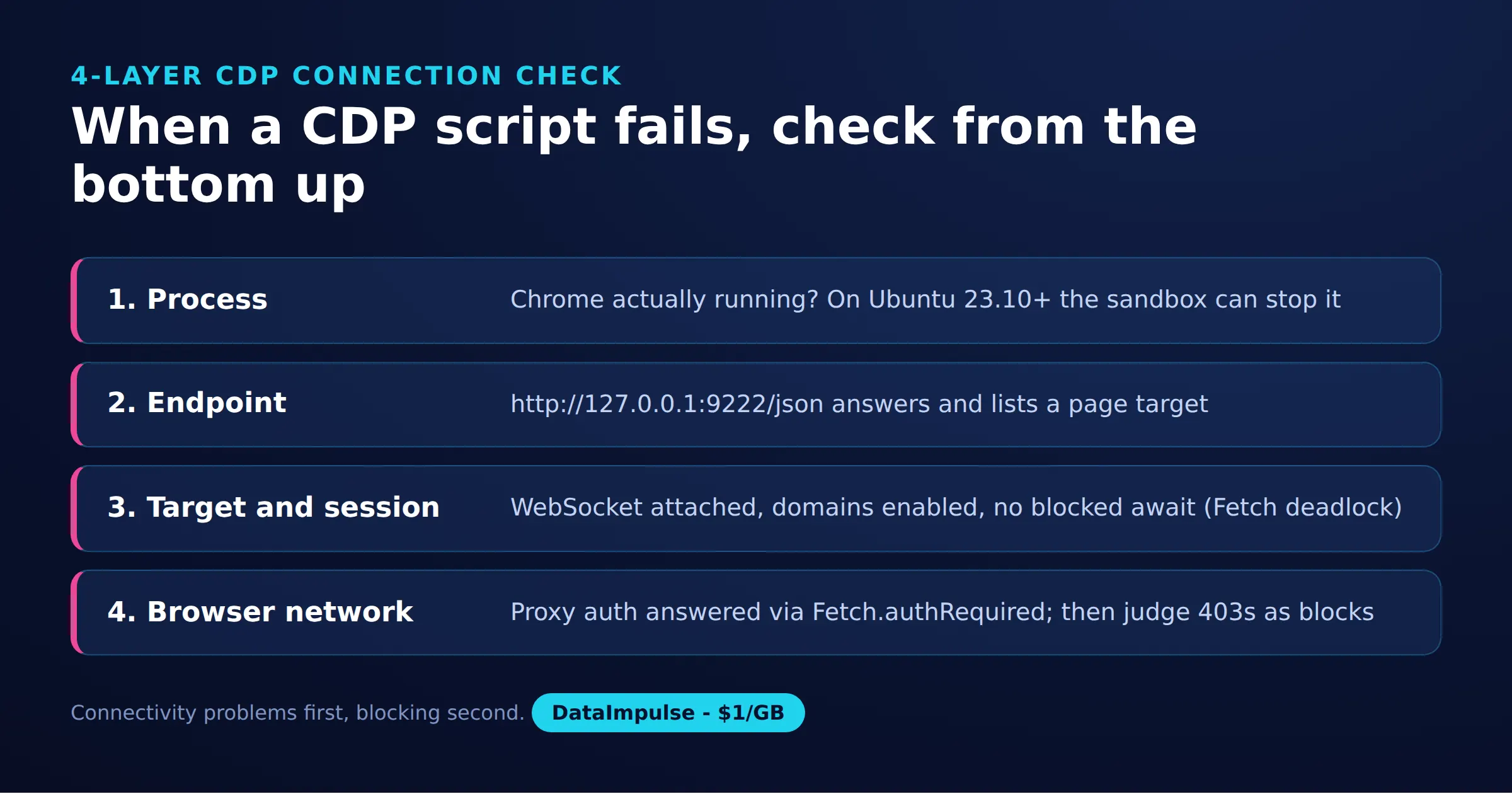
- Layer 1, process: Confirm the executable starts with the intended profile. Our Linux setup encountered No usable sandbox! under an AppArmor user-namespace restriction. Diagnose startup stderr before changing ports. Use an appropriate AppArmor profile; reserve the script’s CHROME_FLAGS=–no-sandbox escape hatch for a disposable container, because it disables a browser protection.
- Layer 2, endpoint: Confirm the local discovery URL responds and returns the expected browser. A refused connection points toward startup, addressing, or port ownership. Rediscover the WebSocket URL after restarting the browser.
- Layer 3, target/session: Confirm the selected target is still open and that commands reach the intended session. Check pending commands and event handlers. In our proxy test, awaiting navigation before servicing Fetch events stalled progress; starting navigation as a task let the handler release paused requests.
- Layer 4, browser network: Inspect destination status, proxy challenges, and request failures. A website’s HTTP 403 is different from failing to open the debugging socket. Test a simple permitted destination before investigating a complex page.
Our headless browser received HTTP 403 on the tested Sephora search page both directly and through the residential proxy. That does not identify which signal caused the refusal. Avoid universal claims about one JavaScript getter or one detection technique; our headless browser overview adds context for choosing a browser workflow.
Where are the official docs, cookie updates, and MCP guidance?
Use the protocol viewer for domain references and your running browser’s schema for implementation checks. Treat online tip-of-tree documentation as a reference to compare against your installed build.
The official GitHub repository contains generated definitions. Inspect http://127.0.0.1:9222/json/protocol alongside browser version metadata. The official documentation states a compatibility limit (as of October 2026): backwards compatibility is not guaranteed. Verify experimental fields against the actual browser before depending on them.
For the Chrome DevTools Protocol Network.getAllCookies query, the official Network definition marks that method deprecated (as of October 2026) and directs callers to Storage.getCookies. The example instead uses Network.getCookies and prints only the count. Keep cookie inspection confined to your own isolated test context.
MCP is adjacent to CDP, not another name for it. The Model Context Protocol documentation describes connecting AI applications to tools and external systems. A browser tool can sit behind an MCP interface while using CDP underneath. Decide which actions an agent may invoke, which profile it controls, and which results it may retain.
What did our quick Linux run return?
Our quick run on October 16, 2026 captured a public catalog page and checked proxy routing and one blocked destination. These observations are a small snapshot, not a benchmark or a success-rate estimate.
Method and sample: The raw capture used the cdp_raw.py script above with Chrome for Testing 147.0.7727.15, Python 3.12, and websockets 15.0.1. The catalog sample was one page captured through raw CDP and one Playwright 1.58.0 attachment observation. Raw collection ended at Page.loadEventFired; the separate attachment also extracted titles.
| Observation | Result |
|---|---|
| Raw Books to Scrape capture | 30 responses, including 20 cover images |
| Playwright attachment | 30 responses and 20 titles |
| Attached performance metrics | Nodes: 1776; JSHeapUsedSize: about 2.66 MB |
| HTTPBin exit check | 75.218.106.136 through our US residential proxy |
| Sephora browser search check | HTTP 403 directly and through the proxy |
The site’s search JSON answered HTTP 200 to plain requests in the same quick run. Different endpoints and clients are confounding variables; this is not proof of a bypass or a diagnosis of blocking.
Bandwidth arithmetic: 20 cover-image responses out of 30 responses is about 67% by count, not by bytes. The snapshot has no byte total, so it cannot support a dollar-per-page estimate. Estimate cost as billed GB multiplied by price per GB, then reconcile against actual usage. Blocking optional images or fonts is a hypothesis to test, not a measured saving here.
Network.setBlockedURLs is experimental in the official schema. Verify its accepted parameters against your browser before trying resource blocking, and check that the page still produces the required fields.
What permissions and alternatives should you consider?
Use browser automation within the scope of your permission, and collect only the fields required for the task. Public visibility alone does not resolve access terms or privacy obligations.
Before a collection job, review the site’s terms, document the intended fields and retention period, and set a request budget. Avoid account data and unrelated personal information. If a destination refuses access, investigate authorization and supported access routes instead of treating repeated retries as a solution.
Prefer an official API, export, or licensed dataset when it meets the requirement. A browser is useful when rendering or interaction is essential, but it adds lifecycle and failure handling. Compare completeness, freshness, and maintenance effort before choosing it. Keep debugging profiles separate from everyday browsing, restrict endpoint access, and remove temporary profiles after the process exits; this example terminates Chrome but leaves its temporary directory behind.
Frequently Asked Questions
What is CDP, and how does it work?
CDP connects a controller to browser instrumentation using structured commands and events. In this example, a background reader matches command replies by ID while a separate loop processes network and navigation events.
How do you connect to Chrome over CDP?
Launch a dedicated browser with remote debugging enabled and discover its target URL through the local HTTP endpoint. The example selects a page target; a browser-level client should use the browser WebSocket URL and manage target attachment explicitly.
How do you capture network responses in Python?
The tested script enables Network before navigation and stores response metadata by request ID. It waits for a matching completion event before selecting a JSON body. Its load-event cutoff makes it a bounded capture, not a record of all future page activity.
How does browser proxying differ from proxying CDP commands?
The website request originates in the browser, while control messages originate in the automation client. Configure and verify the browser’s route separately. Reaching a debugging endpoint through another network path does not establish the website-facing exit address.
How do CDP, Playwright, Puppeteer, and MCP differ?
CDP is the browser instrumentation protocol, while Playwright and Puppeteer offer automation APIs above browser connections. MCP connects AI applications to tools and systems. A browser automation tool may combine these layers, so name the connection layer when describing a failure.
Does a residential proxy prevent browser detection?
Our small snapshot supports no such guarantee: the tested browser search returned 403 with and without the proxy. That result does not reveal the blocking rule. Treat routing, browser behavior, and access permission as separate concerns.
Need a proxy route for your browser workflow?
If your authorized workflow needs country-specific routing, explore DataImpulse residential proxies, starting at $1 per GB with country targeting included. Begin with a small capture, verify the exit route, and measure billed traffic before scaling. Proxy routing does not guarantee that a destination will accept a browser request.
Last updated: October 16, 2026.

 State/City/Zip/ASN Targeting



