
In this Article
For Scrapy vs BeautifulSoup, choose Requests plus BeautifulSoup for a straightforward extraction workflow and Scrapy when crawl coordination becomes substantial. BeautifulSoup parses documents; Scrapy coordinates crawling and extraction, as the official Scrapy comparison explains.
Below, equivalent scripts extract the same fields from five public pages. Our quick run on October 17, 2026 adds a small snapshot of timing, completeness and proxy behavior, followed by practical migration criteria.
Key Facts
- Our quick run covered five public pages per stack and route.
- Each run extracted 50 quotes.
- All 20 content-page requests returned HTTP 200.
- Every extracted record contained text, author and tags fields.
- The CSV outputs were identical after sorting.
- This small snapshot does not establish a general performance ranking.
Scrapy vs BeautifulSoup: What is the actual difference?
The difference is responsibility: BeautifulSoup handles parsing, while Scrapy handles a broader crawling workflow. Separate downloading, extraction and orchestration before choosing.
- Downloading: obtain a response from a URL.
- Parsing: turn its contents into fields.
- Orchestration: decide what to fetch next and how to process results.
BeautifulSoup is not restricted to single-page projects. Our script follows pagination; the surrounding Python code owns that loop. Scrapy places navigation and extraction in spider callbacks, illustrated in its official tutorial.
The practical Scrapy vs BeautifulSoup question is how much surrounding infrastructure you want to maintain. Page count alone cannot answer it: a predictable list of URLs may be simpler than a smaller crawl with several branching paths.
Scrapy vs BeautifulSoup: Which should you choose?
Use the 4-factor stack selection model: rendering, crawl complexity, operating requirements and team familiarity. Choose the smallest architecture that meets all four.
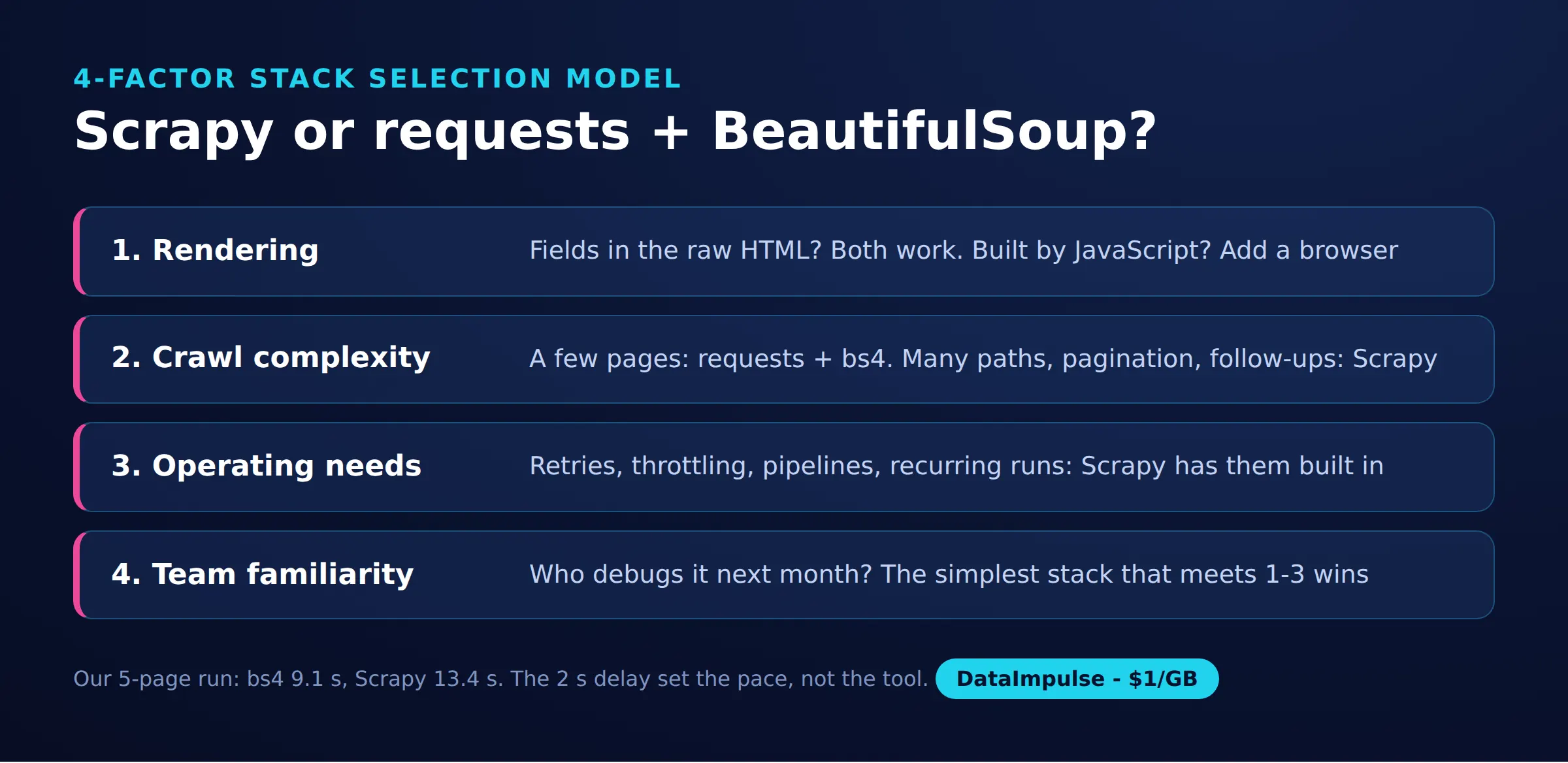
- Rendering: inspect whether the returned response contains the fields.
- Crawl complexity: count navigation paths, dependencies and pagination patterns.
- Operating requirements: decide how failures, validation and recurring runs will be handled.
- Team familiarity: consider who must debug and maintain the extraction.
| Approach | Use X when… | Avoid X when… |
|---|---|---|
| Requests + BeautifulSoup | A small extraction workflow stays understandable. | Crawl orchestration becomes substantial custom code. |
| Scrapy | Repeatable crawling needs scheduling and processing. | A tiny parsing task gains unnecessary structure. |
| Browser automation | Required content needs browser execution. | Returned HTML already contains the fields. |
For an analyst exploring a dataset, start with a small, inspectable workflow. For a recurring collection owned by a team, prioritize explicit failure handling and stable outputs over saving a few initial lines.
How do you scrape the same public pages with both?
Run both scripts against the same five pages and compare text, author and tags. Installation and execution commands appear in each script’s opening documentation.
Our environment was Linux, Python 3.12.3, requests 2.31.0, beautifulsoup4 4.14.3, lxml 6.0.4 and Scrapy 2.19.0. These are the measured versions, not a claim about the newest releases; unpinned installation commands can resolve differently.
bs4_quotes.py
"""Scrape quotes.toscrape.com with Requests + BeautifulSoup, following "Next".

pip install requests beautifulsoup4 lxml
Run:  python bs4_quotes.py            (direct)
      PROXY_URL=... python bs4_quotes.py  (through a proxy)
"""
import csv
import os
import time
from urllib.parse import urljoin

import requests
from bs4 import BeautifulSoup

START_URL = "https://quotes.toscrape.com/"
MAX_PAGES = 5
DELAY = 2  # seconds between requests, be polite

PROXY = os.environ.get("PROXY_URL")
PROXIES = {"http": PROXY, "https": PROXY} if PROXY else None

session = requests.Session()
session.headers["User-Agent"] = "Mozilla/5.0 (tutorial scraper; contact: [email protected])"


def fetch(url, retries=3):
    for attempt in range(1, retries + 1):
        try:
            r = session.get(url, proxies=PROXIES, timeout=30)
            r.raise_for_status()
            return r.text
        except requests.RequestException as exc:
            print(f"{url} -> {exc}, retry {attempt}")
            time.sleep(DELAY * attempt)
    return None


def parse(html):
    soup = BeautifulSoup(html, "lxml")  # or "html.parser" (no extra install)
    rows = []
    for q in soup.select("div.quote"):
        rows.append({
            "text": q.select_one("span.text").get_text(strip=True),
            "author": q.select_one("small.author").get_text(strip=True),
            "tags": ",".join(t.get_text(strip=True) for t in q.select("a.tag")),
        })
    next_link = soup.select_one("li.next > a")
    return rows, next_link["href"] if next_link else None


def main():
    url, page, items = START_URL, 0, []
    started = time.perf_counter()
    while url and page < MAX_PAGES:
        html = fetch(url)
        if html is None:
            break
        rows, next_href = parse(html)
        page += 1
        items.extend(rows)
        print(f"page {page}: {len(rows)} quotes")
        url = urljoin(url, next_href) if next_href else None
        if url and page < MAX_PAGES:
            time.sleep(DELAY)

    with open("quotes_bs4.csv", "w", newline="", encoding="utf-8") as f:
        writer = csv.DictWriter(f, fieldnames=["text", "author", "tags"])
        writer.writeheader()
        writer.writerows(items)
    elapsed = time.perf_counter() - started
    print(f"{page} pages, {len(items)} quotes, {elapsed:.1f} s -> quotes_bs4.csv")


if __name__ == "__main__":
    main()
quotes_spider.py
"""Single-file Scrapy spider for quotes.toscrape.com.

pip install scrapy
Run:  scrapy runspider quotes_spider.py -O quotes_scrapy.csv
      PROXY_URL=... scrapy runspider quotes_spider.py -O quotes_scrapy.csv
Alternative without code: export HTTPS_PROXY=... (HttpProxyMiddleware reads it).
"""
import os

import scrapy

PROXY = os.environ.get("PROXY_URL")


class QuotesSpider(scrapy.Spider):
    name = "quotes"
    start_urls = ["https://quotes.toscrape.com/"]
    max_pages = 5

    custom_settings = {
        "DOWNLOAD_DELAY": 2,             # polite: one request every ~2 s
        "CONCURRENT_REQUESTS_PER_DOMAIN": 1,
        "RETRY_TIMES": 2,
        "ROBOTSTXT_OBEY": True,
        "USER_AGENT": "Mozilla/5.0 (tutorial scraper; contact: [email protected])",
        "LOG_LEVEL": "INFO",
    }

    async def start(self):  # Scrapy 2.13+; older versions use start_requests()
        for url in self.start_urls:
            yield self.make_request(url, page=1)

    def make_request(self, url, page):
        meta = {"page": page}
        if PROXY:
            meta["proxy"] = PROXY  # per-request proxy, used by HttpProxyMiddleware
        return scrapy.Request(url, callback=self.parse, meta=meta)

    def parse(self, response):
        page = response.meta["page"]
        quotes = response.css("div.quote")
        self.logger.info("page %s: %s quotes", page, len(quotes))
        for q in quotes:
            yield {
                "text": q.css("span.text::text").get(default="").strip(),
                "author": q.css("small.author::text").get(default="").strip(),
                "tags": ",".join(q.css("a.tag::text").getall()),
            }
        next_href = response.css("li.next > a::attr(href)").get()
        if next_href and page < self.max_pages:
            yield self.make_request(response.urljoin(next_href), page=page + 1)
The scripts use a three-attempt ceiling: three total attempts in the Requests function and two retries after the initial Scrapy request. Only credential-example comments are omitted.
Compare sorted records in quotes_bs4.csv and quotes_scrapy.csv, the extraction artifacts from our measurement. Tags are comma-joined strings; an empty tags value can be valid. Our data parsing guide explains the extraction stage.
Is Scrapy faster than BeautifulSoup?
Our small run cannot establish which architecture is faster generally. Network concurrency, parser execution and process startup need separate measurements.
In our quick run on October 17, 2026, each stack visited five public Quotes to Scrape pages once directly from our datacenter IP and once through a DataImpulse US residential proxy. No login was used. Concurrency was one, with a two-second delay setting and capped retries.
| Stack / route | Pages attempted / successful | Page status | Complete records | Shell wall time | Challenge evidence |
|---|---|---|---|---|---|
| Requests + BeautifulSoup / direct | 5 / 5 | All 200 | 50 / 50 | 9.1 s | None |
| Requests + BeautifulSoup / residential | 5 / 5 | All 200 | 50 / 50 | 10.7 s | None |
| Scrapy / direct | 5 / 5 | All 200 | 50 / 50 | 13.4 s | None |
| Scrapy / residential | 5 / 5 | All 200 | 50 / 50 | 13.8 s | None |
All records contained text, author and tags; sorted CSVs matched. Scrapy additionally fetched robots.txt once per run, receiving 404: six requests per Scrapy run versus five for Requests, or 22 requests overall. No content blocking or transport failures occurred.
Scrapy’s internal elapsed times were 12.0 and 12.4 seconds. Shell timings include roughly 1.3 seconds of startup; delay randomization also affected the result. Its settings documentation explains delay jitter and concurrency controls.
This is a snapshot, not a benchmark: one run per combination, one sandbox, no concurrent crawl, no isolated parser timing and no precise UTC timestamp. Most elapsed time came from deliberate waiting.
Approximate HTML body size was 11 KB decoded and 1.9-2.0 KB compressed with Brotli. Scrapy recorded 11.7 KB downloaded across six responses and 55 KB after decompression; these are aggregate figures, not precise per-route means.
At the $1 per GB residential starting rate, the bandwidth estimate is mean bytes x 1,000 / 1,000,000,000 x $1: about $0.002 per 1,000 compressed pages or $0.011 uncompressed. This excludes retries and TLS overhead; billing measurements can differ.
Can you combine BeautifulSoup, Scrapy and lxml?
Yes. A Scrapy callback can parse response.text with BeautifulSoup while Scrapy continues to coordinate requests.
The official combination example uses BeautifulSoup(response.text, "lxml") inside parse(self, response). This can preserve existing extraction logic during migration.
BeautifulSoup is the navigation interface; lxml can be its parser backend. Scrapy’s selectors offer another extraction interface. The BeautifulSoup documentation explains backend differences, including how malformed markup can produce different trees.
Choose an explicit backend and compare expected records before switching. If parsing becomes expensive, measure it against saved responses so network delays do not hide the result.
When do Selenium or Playwright belong in the stack?
Use browser automation when obtaining the required content depends on browser execution or interaction. Neither BeautifulSoup nor an ordinary Scrapy download renders JavaScript.
First inspect the original response and public data requests. Scrapy’s dynamic content guidance recommends reproducing relevant requests where practical; visible content may already exist in embedded data.
Playwright’s Python library and Selenium WebDriver automate browsers. Add that layer only where needed, with explicit waits and validation. Our Playwright scraping guide covers the browser workflow.
A proxy changes network routing. It does not execute page scripts or guarantee access.
How do you migrate from 5 to 5,000 pages?
Migrate when coordination becomes difficult to inspect, not when a page counter reaches a magic threshold. Preserve extraction expectations while moving responsibilities.
- Navigation functions: move into spider callbacks that emit follow-up requests.
- Extracted dictionaries: keep a stable record schema.
- Validation and storage: move into processing stages.
- Transport policy: centralize proxy assignment and failure handling.
Scrapy documents these boundaries through spiders, item pipelines and downloader middleware.
Increase concurrency gradually against an agreed request budget. Track missing fields, duplicate records and failures alongside throughput. Avoid stacking independent retry loops, which can multiply traffic; our Requests retry guide discusses bounded recovery.
How do proxies, authentication and sessions work?
Configure the network client, not the parser. The scripts read PROXY_URL at runtime and assign it through a Requests proxy dictionary or Scrapy request metadata.
Requests proxy documentation covers explicit dictionaries and environment settings. Scrapy’s HttpProxyMiddleware documentation covers per-request assignment and environment discovery. For a direct comparison run, also check inherited proxy environment settings.
Keep secrets out of source control and logs. Proxy authentication and website authentication are separate: preserve authorized cookies and headers consistently. For corporate proxies, use approved certificate configuration and keep TLS verification enabled.
Rotation: keep a stable route when a session needs continuity. Assign routes centrally; see our Scrapy rotation guide.
Failures: distinguish connection errors, proxy authentication failures, HTTP refusals and unexpected page content. Quarantine persistently failing endpoints, cap retries and reduce traffic rather than repeatedly retrying every response.
DataImpulse fits here as proxy infrastructure, not a scraping API, managed unblocker or VPN. Our Requests proxy selection guide covers integration considerations.
How should beginners learn and build their first project?
Start with a small public-page project whose output you can verify manually. Learn the boundary between downloading HTML and extracting records before adding concurrency.
Work through the official BeautifulSoup documentation and Scrapy tutorial linked above. Extract three fields, follow one pagination path, save a CSV and inspect every row.
Choose books or practical courses that include missing fields, malformed HTML, pagination, bounded failures and reproducible environments. Favor exercises with expected outputs over unsupported popularity rankings. Your first milestone is explaining why each record is correct.
What permissions and alternatives should you check?
Check access conditions and collection purpose before scaling. Consider a documented API, downloadable export or permission-based feed first.
Review site terms, robots directives, account restrictions and personal-data handling. The Robots Exclusion Protocol standard distinguishes crawler instructions from access authorization; a missing robots.txt is not permission.
Define a collection limit, retention period and stopping condition. If requirements remain unclear, resolve them before expanding the crawl or changing routes.
Frequently Asked Questions
What is the difference between Scrapy and BeautifulSoup?
They address different responsibilities in an extraction system. The official Scrapy FAQ describes BeautifulSoup as a parsing library and Scrapy as a framework for building crawlers.
Which should a beginner or data scientist choose?
Start with the approach you can inspect and validate end to end. A short exploratory workflow often favors Requests plus BeautifulSoup, while recurring collection can justify learning Scrapy earlier.
Is Scrapy faster than Requests plus BeautifulSoup?
Our five-page snapshot does not answer that generally. Requests plus BeautifulSoup finished sooner in these runs, but startup and deliberate waiting dominated the comparison.
Can BeautifulSoup run inside a Scrapy spider?
Yes, as shown in Scrapy’s official FAQ. This is a practical migration option when existing parsing logic already produces reliable records.
Do either render JavaScript, and where do proxies fit?
Neither approach shown here includes browser execution. Evaluate browser automation when required content depends on it, and treat proxy routing as a separate network decision.
When should I move an existing script to Scrapy?
Consider moving when navigation, recovery and output handling become harder to reason about than extraction itself. Keep representative pages and expected records so you can detect behavior changes.
Test proxy routing only when your workflow needs it
If your authorized collection needs a different network route, evaluate DataImpulse with a small sample. Compare complete records, failures and transferred bytes before increasing traffic or committing to a larger crawl.
Last updated: October 17, 2026.

 State/City/Zip/ASN Targeting



