

In this Article
For DIY serp scraping, shortlist DataImpulse and eligible Decodo proxy plans. For managed search collection, compare Decodo, Bright Data, Oxylabs, SerpApi, DataForSEO, Serper, and ScraperAPI.
Start by deciding who will own collection, rendering, parsing, and failures. Then compare equivalent outputs: the same keyword, search engine, location, language, device, depth, and collection window. An inexpensive request that returns a challenge or the wrong location is not a usable rank-tracking result.
Key Facts
- A SERP proxy changes the IP address through which a search request reaches the search engine.
- Proxy access alone does not guarantee successful collection or eliminate CAPTCHAs.
- Compare total collection cost per 1,000 usable results with matching location, depth, device, and freshness.
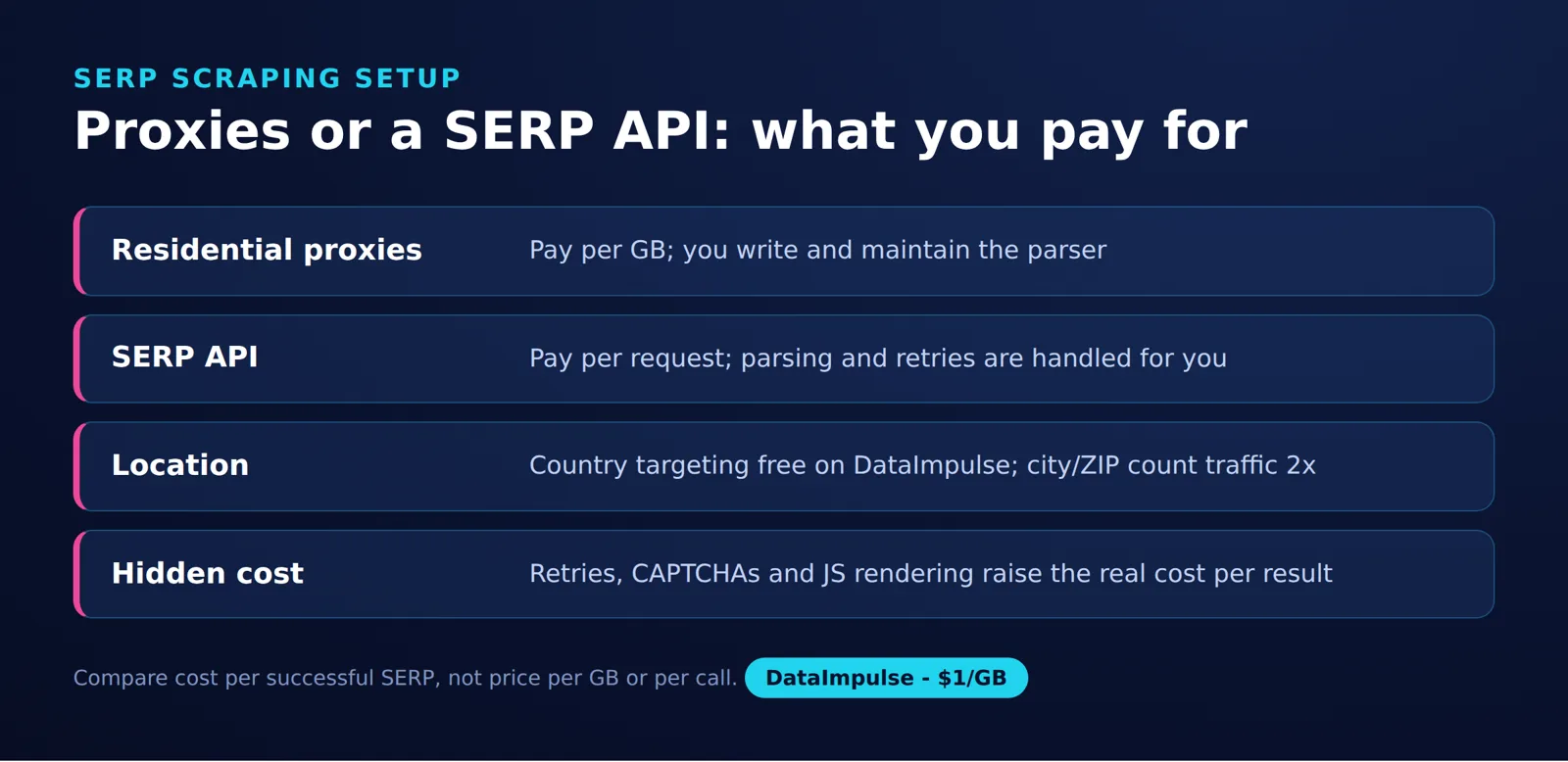
- Country targeting is included with our residential proxies.
- State, city, ZIP, and ASN targeting on our regular residential service counts traffic at 2x.
- A localized IP cannot reproduce every individual user’s search results.
Best proxies for serp scraping: eight picks compared
Choose a raw proxy service when you already operate the collection pipeline, and a managed API when you want the vendor to handle search-result retrieval and parsing. The eight picks below cover both approaches; their order is not a measured ranking.
Google support below applies to the named product; raw-proxy access is listed separately where documented.
| Pick | Route considered | When to shortlist it | Google access distinction |
|---|---|---|---|
| DataImpulse | Raw proxies, our product | You maintain the scraper and want bandwidth billing | No managed Google endpoint; validate your intended workflow |
| Decodo | Web Data API or eligible raw proxies | You want to compare managed and DIY routes | Selected residential and mobile plans, plus Datacenter and ISP products |
| Bright Data | SERP API | You want documented structured search output | Google collection with parsed JSON |
| Oxylabs | Web API Google Search scraping | You need HTML or structured search data | Separate Google pricing with and without JavaScript rendering |
| SerpApi | Google Search API | You want search-specific parameters and parsed output | Google search parameters and structured responses |
| DataForSEO | Google Organic SERP API | You want queued and live collection options | Standard, Priority, and Live Google collection |
| Serper | Google Search API | You prefer prepaid query credits | Google queries billed through prepaid credits |
| ScraperAPI | Structured Google collection | You want Google data within a scraping API workflow | Use the documented Google route and its billing rules |
Competitor data: taken from each provider’s official pricing and documentation pages linked in this article, collected on November 10, 2026. Prices and limits change; check the provider’s page before buying.
Official product pages and documentation were checked on November 10, 2026. Sources and specific restrictions appear below. API documentation confirms the advertised collection route, not permission from the search engine.
The eight picks: capabilities, restrictions and tradeoffs
1. Our raw-proxy option
This is our product, not an independent award. Residential proxies start at $1/GB, with a pool of 90M+ IPs across 195+ countries. HTTP, HTTPS, and SOCKS5 are supported, with rotating and sticky sessions.
We sell residential, datacenter, and mobile proxies, but no ISP/static residential proxies. You own request handling, rendering when necessary, parsing, and validation. Proxy availability alone does not establish successful Google collection.
2. Decodo
Decodo’s Web Data API includes a managed search route. Its blocked-sites FAQ lists Google access for residential plans of 3, 10, 25, 50, and 100 GB and Pay As You Go, and mobile plans of 2, 8, 25, 50, and 100 GB and Pay As You Go. It also lists Google access through Web Data API, Site Unblocker, Datacenter, and ISP products.
Shortlist it when comparing managed collection with an eligible raw-proxy plan. Confirm the precise plan before buying and consult its residential proxy restrictions documentation for additional target restrictions.
3. Bright Data
The Bright Data SERP API documentation describes Google collection and parsed JSON output. This makes it a candidate when your integration needs structured search data without maintaining proxy routing.
Evaluate the output schema against your required fields.
4. Oxylabs
Oxylabs offers Google Search scraping through its Web API. Its Scrape endpoint supports raw HTML and structured JSON, with separate pricing for Google requests with and without JavaScript rendering. Shortlist it when you need to evaluate both representations against the same search task.
Check the selected plan’s Google-specific billing and rendering conditions. General scraping prices and result allowances may describe a different target or request type.
5. SerpApi
The SerpApi Google Search API documentation describes search parameters and structured responses. It is a candidate for integrations that need explicit search configuration rather than a generic HTML fetch.
Check how location, pagination, device settings, and caching interact with your tracking requirements. The API’s successful-search billing definition and your definition of a usable observation should be reconciled before budgeting.
6. DataForSEO
DataForSEO documents queued and live routes for its Google Organic SERP API. Consider it when scheduled tracking and interactive lookups have different turnaround requirements.
Price the requested depth and optional features explicitly. A base SERP unit is not interchangeable with an arbitrarily deep keyword report.
7. Serper
Serper’s official product and pricing page describes a Google Search API using prepaid credits. Consider it when your workload fits query-based billing and you can estimate credit consumption.
Validate the required result fields and location controls before treating its output as equivalent to another API. Budget against credits actually consumed before expiry, rather than assuming the entire purchased allowance becomes useful data.
8. ScraperAPI
ScraperAPI’s SERP product page describes Google collection and structured data output. Consider it when search collection needs to fit a broader scraping API integration.
ScraperAPI’s synchronous Google endpoint is GET https://api.scraperapi.com/structured/google/search, using api_key and query. It returns parsed JSON by default. Check the target and options in the dashboard’s Domain Multiplier and API Playground before estimating search capacity, as described in its credit-cost documentation.
What are SERP proxies, and how do you choose a setup?
A SERP proxy routes search requests through another IP address. It does not guarantee successful collection or eliminate CAPTCHAs.
In proxy-based collection, your client sends the search request through the proxy and processes the response. A managed SERP API moves more of that collection work to the vendor, but your application still needs to validate and store useful results.
The 4-question SERP setup model
- Access: Does the selected product permit the target and support the intended collection route?
- Output: Do you need HTML, organic rankings, local results, ads, or another specific result type?
- Operations: Who will maintain rendering, parsing, retries, and monitoring?
- Economics: What is the total cost of accepted results at your required location and depth?
| Setup | Use it when | Avoid it when |
|---|---|---|
| Raw proxies | Use raw proxies when you maintain a scraper and need control over requests and parsing. | Avoid raw proxies when nobody owns collection failures or parser maintenance. |
| Managed SERP API | Use a managed SERP API when its documented output matches your application. | Avoid a managed SERP API when required fields or location controls are absent. |
| Mixed setup | Use queued API tasks for scheduled keyword checks and a separately validated proxy scraper for tasks requiring custom HTML extraction. Store both outputs in a shared schema with timestamps and collection settings. | Avoid a mixed setup when you cannot normalize schemas, freshness, and costs. |
Record these decisions before selecting an IP type. Our guide to choosing proxies for SERP tracking offers additional planning context.
Proxy vs SERP API: what costs less per 1,000 usable results?
Neither proxies nor API credits are automatically cheaper. DIY SERP scraping cost includes bandwidth, retries, rendering, parsing, and maintenance; compare APIs and proxies per 1,000 usable results with matching location and depth.
The 4-cost SERP scraping model: account for collection traffic or API charges, retries, rendering, and parsing upkeep before dividing by accepted query responses.
Definition: One usable result here means one accepted query response that meets the location, freshness, depth, and field requirements. It does not mean one individual organic link.
Formula: Cost per 1,000 usable results = total attributable collection cost / accepted query responses x 1,000.
Official billing examples
| API | Price and purchase requirement | Billing and timing considerations |
|---|---|---|
| DataForSEO | $0.60 per 1,000 Standard SERPs, $1.20 Priority, or $2 Live; $50 minimum payment (as of November 2026) | The base unit covers up to 10 organic results. Standard averages about five minutes, with a stated target turnaround of 45 minutes and possible extended processing; Priority averages up to one minute and Live up to six seconds. Deeper requests and optional parameters can add charges. |
| SerpApi | Starter: $25/month for 1,000 searches (as of November 2026) | SerpApi counts successful searches, including responses with empty result sets; cached, errored, and failed searches are excluded. Your application may therefore accept fewer observations than the number of billed searches. Full utilization implies $25 per 1,000 billable searches before your application costs. |
| Serper | Starter: $50 for 50,000 credits, equivalent to $1 per 1,000 at full use; credits last six months (as of November 2026) | The page describes real-time queries and deductions for successful responses. Unused expiring credits increase the effective cost of collected data. |
Competitor data: taken from each provider’s official pricing and documentation pages linked in this article, collected on November 10, 2026. Prices and limits change; check the provider’s page before buying.
Sources: DataForSEO’s depth and execution pricing, minimum payment policy, SerpApi’s billing definitions, and Serper’s credit terms. These are billing examples, not equivalent-output performance measurements. Advertised turnaround is not a measured latency guarantee.
Illustrative cost comparison: assumptions, not measurements
Assume 10,000 accepted query responses and 20 GB of transferred traffic, including retries, measured before any targeting multiplier. At $1 per billed GB, country targeting costs $20; regular residential city targeting bills 40 GB and costs $40. Also assume $10 of rendering compute and two maintenance hours valued at $30/hour. These are hypothetical inputs, not observed SERP traffic or success rates.
| Scenario | Assumed collection cost | Cost per 1,000 usable results |
|---|---|---|
| Country-targeted DIY | $20 bandwidth + $10 compute + $60 maintenance = $90 | $9 |
| Regular residential with city targeting | $40 bandwidth for 40 billed GB after the 2x multiplier + $10 compute + $60 maintenance = $110 | $11 |
| Hypothetical managed API | Assume $20 in API charges + $15 in integration and validation costs = $35 | $3.50 |
The API scenario is an assumed workload cost, not a vendor quote. Change the bandwidth, accepted-result count, labor allocation, or minimum commitment and the conclusion can change. Do not apply a targeting multiplier again if the dashboard’s traffic figure already includes it.
For your own comparison, log billed traffic, API charges, rendering compute, maintenance time, accepted responses, challenge rate, and latency over the same collection window. Report the date, method, sample size, and configuration as a snapshot. Static-file infrastructure measurements cannot establish Google SERP performance.
Datacenter vs residential vs mobile for Google SERPs
Select the IP type through an authorized, target-specific evaluation, not a general claim that one network always works. Residential, datacenter, and mobile exits describe routing choices, not complete scraping systems.
| Type | Reason to evaluate it | Important limit |
|---|---|---|
| Datacenter | A bandwidth-priced route for a workflow that passes your acceptance checks | Low traffic prices do not prove Google compatibility or low cost per valid response |
| Residential | A consumer-network route for testing geographic collection requirements | A residential IP does not remove challenges or establish exact local rankings |
| Mobile | A mobile-network route when network type matters to the experiment | A mobile exit alone does not create a mobile browser context |
Our datacenter proxies start at $0.50/GB and mobile proxies at $2/GB. Compare their actual accepted outputs before choosing based on bandwidth price. For mobile rank tracking, also control the device configuration and viewport used by the collection client.
What are US country and city-level SERP scraping best practices?
For US geo-targeted tracking, align the requested country, language, device, and collection time, then validate the returned location context. City-level monitoring requires a narrower location specification and cannot be inferred from a US exit alone.
Google’s personalization documentation explains that location, language, and device can affect results even when personalization is off. A localized proxy therefore represents a controlled observation, not every resident’s rankings.
- Country: Select a US exit and consistent US search settings.
- City: For SerpApi, resolve the city through /locations.json, pass its supported
locationvalue, and setgl=usandhl=enfor a US English comparison using its Google Search API parameters. Record requested location separately from any returned location evidence; an echoed request parameter is not independent confirmation. - Language and device: Hold both constant across comparisons.
- Depth: Separate organic positions from ads, maps, and other result types.
- Timing: Collect comparable observations within a defined window and retain timestamps.
Our regular residential service includes country targeting. State, city, ZIP, and ASN targeting counts traffic at 2x; Premium residential costs $5/GB with all targeting included.
For city comparisons, repeat the same keyword set in each location and retain the requested and observed context. Treat a location mismatch as a failed observation rather than silently assigning it to the intended city.
Rotating vs sticky sessions: which scraping mistakes should you avoid?
Use rotating sessions for independent requests and sticky sessions when a connected sequence needs a consistent exit. Neither session mode removes the need for pacing, bounded retries, and response validation.
Google’s unusual-traffic documentation confirms that automated traffic can trigger challenges. There is no defensible universal threshold of requests after which every IP will be challenged.
- Counting HTTP 200 as success: Validate result fields and page type; a response may be a consent screen, challenge, or incomplete document.
- Rendering everything automatically: Inspect representative responses first. Enable browser rendering when necessary content depends on it; JavaScript is not a universal requirement for every collection route.
- Retrying without a limit: Set an attempt cap, use backoff with jitter, and stop repeated challenge loops.
- Mixing session context: Keep cookies, device settings, and location consistent for connected requests.
- Caching across locations: Include query, location, language, device, depth, and freshness requirements in the cache key.
- Ignoring parser changes: Monitor missing fields and sudden result-count changes separately from network errors.
Store a useful failure category with each rejected response. Authentication errors, rate limits, rendering failures, and parser failures need different fixes. More IP rotation cannot repair an incorrect selector.
What legal and contractual considerations apply to serp scraping?
Public visibility does not settle every legal or contractual question about collecting and redistributing search results. Assess the access method, applicable terms, content rights, personal data, jurisdiction, and intended downstream use.
Google’s Terms of Service address automated access that violates machine-readable instructions and prohibit bypassing protective measures. A proxy subscription or managed API contract does not itself establish permission from the search engine.
Separate three questions: whether the collection method is permitted, whether the collected content can be stored or redistributed, and whether personal-data obligations apply. A ruling about another website or a different access method is not blanket authorization for your workflow.
For a commercial deployment, have counsel review the actual collection route and intended use. Document retention rules, access controls, and a process for stopping collection when authorization or contractual conditions change.
How do you start SERP scraping with DataImpulse?
Start with a limited evaluation of your intended search workflow and define success before increasing volume. New customers can buy a one-time $5 Intro plan; subsequent top-ups start at $50.
Step 1: Define the output. Write down the engine, keywords, locations, language, device, depth, and required fields. Confirm the intended target and use case before collection.
Step 2: Configure the client. Use your account’s connection settings, supported protocol, targeting, and session mode. Keep authentication details out of logs and exported results.
Step 3: Validate complete observations. Reject challenges, wrong-location responses, and incomplete parses. Record rendering requirements and failure categories.
Step 4: Review cost and maintenance. Reconcile billed usage with accepted responses and include compute and engineering time. Expand only when the collection quality and operational workload fit your requirements.
For implementation context, see the Python and proxies guide for Google collection. Recheck current target behavior and applicable terms before adapting any example.
Frequently Asked Questions
What is SERP scraping with proxies?
It is the collection of search-result pages through an intermediary IP address. Your scraper still needs to recognize valid responses, extract the required fields, and handle failures.
What is the best proxy for SERP scraping and rank tracking?
Choose based on permitted target access, location requirements, accepted-result quality, and total operating cost. Residential proxies are worth evaluating for a maintained DIY pipeline, while a managed API may fit a team that wants structured output.
Are SERP API credits cheaper than running residential proxies?
They can be, particularly when rendering and maintenance are substantial. Use the 4-cost SERP scraping model to compare actual spending against accepted query responses, including unused allowances, retry traffic, compute, and engineering time.
Can I use datacenter proxies for Google SERP scraping?
Treat datacenter proxies as a candidate that needs target-specific validation. A low bandwidth rate is useful only if the resulting responses satisfy your collection requirements at an acceptable total cost.
What are US geo-targeted SERP scraping best practices?
Keep the US location setting, language, device configuration, result depth, and collection window consistent. Check the returned context and preserve timestamps so that location mismatches do not enter the ranking dataset.
How should I handle US city-level SERP scraping?
Specify the city through supported location controls and inspect the response for evidence that the intended context was used. A country-level IP is insufficient to establish a particular city’s results, and even a city-targeted observation does not reproduce every user’s experience.
Does Google SERP scraping always require JavaScript?
Do not assume a universal requirement. Inspect the selected collection route and representative responses, then use rendering when the required content depends on it.
Does using a SERP API make collection legally authorized?
An API contract does not automatically resolve search-engine terms, content rights, or privacy obligations. Review both the access method and intended use of the collected material.
Evaluate a proxy setup for your SERP workflow
If you already maintain a scraper, consider DataImpulse for a limited evaluation using your actual keywords, locations, and acceptance rules. Measure usable output and total cost before choosing the configuration or increasing volume.
Last updated: November 10, 2026.
 State/City/Zip/ASN Targeting