
In this Article
This guide shows how to scrape Glassdoor with Python — company reviews and aggregated salary data — and, just as important, where the legal and technical lines are. Glassdoor is a hard target: it renders content with JavaScript, defends aggressively against bots, and gates much of its data behind a registration wall. So a Glassdoor scraper needs a real browser (Playwright), residential proxies, and a clear rule to stay on the right side of the line: keep to public pages, minimize what you store, and never bypass the login — and know that Glassdoor’s terms restrict automated access in the first place.
I’m Andrii Byzov, an AI-Native Fractional CMO who builds web-data pipelines. Below: what you can and can’t scrape on Glassdoor, the legal caveats up front, and working code patterns for the public reviews and salary pages.
Key Facts
- Glassdoor is JavaScript-rendered and heavily defended — plain
requestsis often insufficient; you typically need a headless browser like Playwright. - Glassdoor’s terms restrict automated access without written permission — so even public, logged-out scraping may breach its ToS. The login wall is an added risk, not the only line.
- Reviews are user-generated, semi-personal content — Glassdoor itself says anonymity isn’t guaranteed. Minimize what you keep, don’t store identities, and don’t republish review text.
- Residential proxies help at scale — Glassdoor rate-limits and flags datacenter IPs fast — but no tool guarantees access or makes scraping compliant.
- Treat this as educational. For anything commercial or at scale, get Glassdoor’s permission and legal advice.
What You Can and Can’t Scrape on Glassdoor
Drawing this line first is what keeps a Glassdoor scraping project as defensible as possible — and it’s the single most important decision in any Glassdoor scraping workflow.
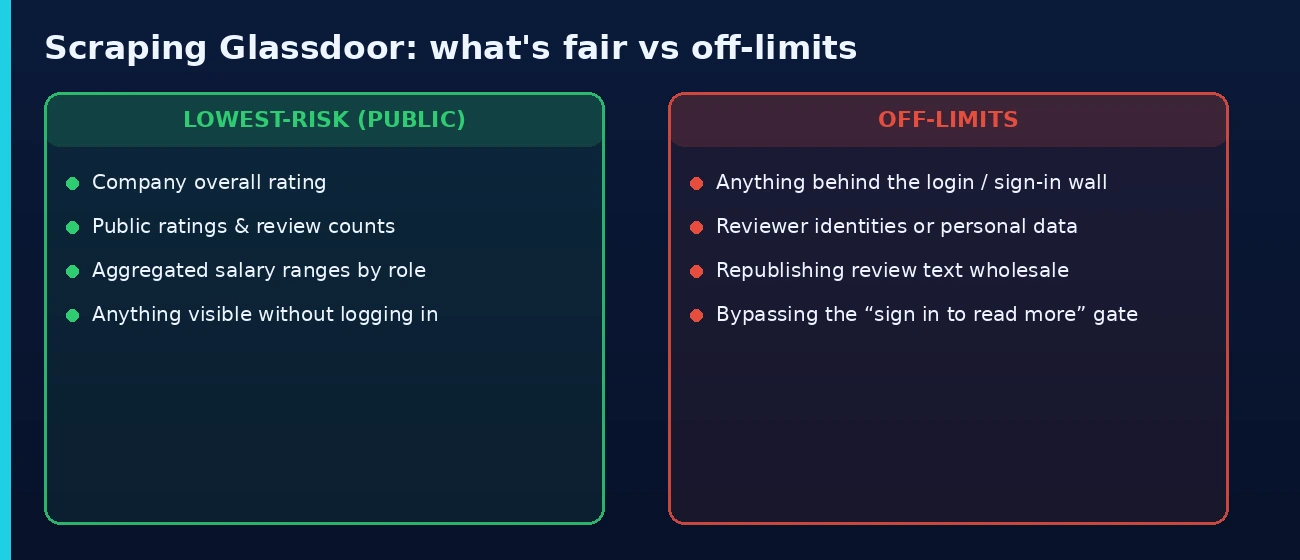
- Lowest-risk (public, non-personal): a company’s overall rating and aggregated salary ranges by role — the headline figures Glassdoor shows without an account.
- Use with caution (public but sensitive): review snippets (rating, pros/cons text) are public but user-generated and semi-personal. If you collect them, minimize — keep aggregate signal, drop identities, never republish the text.
- Off-limits: anything behind the login/registration wall, reviewer identities or any personal data, and republishing review content. Don’t bypass the “sign in to read more” gate.
Is It Legal to Scrape Glassdoor?
It depends, and the caveats matter more here than on most sites. Glassdoor’s terms of service restrict automated access without written permission, so even scraping public, logged-out pages may breach its ToS — the login wall is an added risk, not the only one. On top of that, much content is login-gated and reviews are user-generated content that carries copyright and privacy weight. The lowest-risk approach: stay logged out, prefer public aggregate data (ratings, salary ranges), minimize and don’t store personal data, respect robots.txt and rate limits, don’t republish review text — and get Glassdoor’s permission for anything commercial. For the full framework, see our guide on whether web scraping is legal. This is general information, not legal advice — get counsel before any commercial Glassdoor data project.
Step 1 — Set Up Your Environment
Because Glassdoor is JavaScript-heavy, the scraper drives a real browser via Playwright rather than sending raw HTTP requests.
# Glassdoor renders content with JavaScript and defends hard, so use a
# real browser (Playwright) rather than plain requests.
pip install playwright beautifulsoup4
playwright install chromium
Step 2 — Load a Public Glassdoor Page
Launch a headless Chromium through a residential proxy and load a public company reviews URL — no login. The browser executes the page’s JavaScript so the reviews render before you read the HTML.
from playwright.sync_api import sync_playwright
# Route the browser through a residential proxy (see Step 4)
PROXY = {"server": "http://gw.dataimpulse.com:823",
"username": "YOUR_DI_LOGIN", "password": "YOUR_DI_PASSWORD"}
def get_html(url):
with sync_playwright() as p:
browser = p.chromium.launch(proxy=PROXY, headless=True)
page = browser.new_page(locale="en-US")
page.goto(url, wait_until="networkidle", timeout=60000)
html = page.content()
browser.close()
return html
# A PUBLIC company reviews page (do not log in)
html = get_html("https://www.glassdoor.com/Reviews/Example-Company-Reviews-E12345.htm")
Step 3 — Scrape Public Glassdoor Reviews
To scrape Glassdoor reviews, parse the publicly visible review cards into structured fields — rating, title, pros, cons, date. Glassdoor’s class names are obfuscated and change often, so confirm the current selectors in DevTools; the data-test attributes below are illustrative.
from bs4 import BeautifulSoup
def parse_reviews(html):
"""Parse the publicly visible reviews. Selectors change often —
confirm the current ones in DevTools before relying on them."""
soup = BeautifulSoup(html, "html.parser")
reviews = []
for card in soup.select('[data-test="review-details"]'):
def t(sel):
el = card.select_one(sel)
return el.get_text(strip=True) if el else None
reviews.append({
"rating": t('[data-test="review-rating"]'),
"title": t('[data-test="review-title"]'),
"pros": t('[data-test="pros"]'),
"cons": t('[data-test="cons"]'),
"date": t('[data-test="review-date"]'),
})
return reviews
print(parse_reviews(html)[:3])
Step 4 — Scrape Aggregated Salary Data
Glassdoor’s salary pages show aggregated figures by role — median base pay and ranges, not individuals. That aggregate, public view is the right thing to collect; pull it the same way.
def parse_salaries(html):
"""Parse aggregated, public salary ranges (role-level, not individuals)."""
soup = BeautifulSoup(html, "html.parser")
rows = []
for row in soup.select('[data-test="salary-row"]'):
def t(sel):
el = row.select_one(sel)
return el.get_text(strip=True) if el else None
rows.append({
"job_title": t('[data-test="job-title"]'),
"base_pay": t('[data-test="median-base"]'),
"range": t('[data-test="pay-range"]'),
})
return rows
salary_html = get_html("https://www.glassdoor.com/Salaries/example-company-salaries-E12345.htm")
print(parse_salaries(salary_html)[:3])
Step 5 — Get Past Glassdoor’s Anti-Bot Defenses
Glassdoor uses an aggressive anti-bot stack — IP-reputation scoring, rate limiting, and bot-detection challenges. There’s no guaranteed bypass, and a browser plus proxies doesn’t make scraping compliant — but two things reduce blocks on public pages: a real browser context with realistic headers, and rotating residential proxies so no single IP burns out. Datacenter IPs get flagged fast here; DataImpulse residential proxies ($1/GB, rotating, 195 countries) read as real users. Pace your requests — hammering Glassdoor gets you blocked and raises the server-load issues that weaken your legal footing.
# Rotate residential IPs and look like a real browser.
# Use a fresh session id per run so each crawl gets a clean IP.
PROXY = {"server": "http://gw.dataimpulse.com:823",
"username": "YOUR_DI_LOGIN__cr.us;sid.run1",
"password": "YOUR_DI_PASSWORD"}
def fetch(url):
with sync_playwright() as p:
browser = p.chromium.launch(proxy=PROXY, headless=True)
ctx = browser.new_context(
locale="en-US",
user_agent=("Mozilla/5.0 (Windows NT 10.0; Win64; x64) AppleWebKit/537.36 "
"(KHTML, like Gecko) Chrome/126.0.0.0 Safari/537.36"),
viewport={"width": 1366, "height": 900},
)
page = ctx.new_page()
page.goto(url, wait_until="networkidle") # pace requests; Glassdoor rate-limits
html = page.content()
browser.close() # always clean up the browser
return html
Step 6 — Export Your Data
Save the public, aggregated data you collected to JSON and CSV. Keep personal data out — store ratings and aggregate text, not reviewer identities.
import json, csv
reviews = parse_reviews(html)
with open("glassdoor_reviews.json", "w", encoding="utf-8") as f:
json.dump(reviews, f, indent=2, ensure_ascii=False)
if reviews:
with open("glassdoor_reviews.csv", "w", newline="", encoding="utf-8") as f:
w = csv.DictWriter(f, fieldnames=reviews[0].keys())
w.writeheader(); w.writerows(reviews)
Frequently Asked Questions
Is it legal to scrape Glassdoor?
It depends, and the caveats are real: Glassdoor’s terms restrict automated access without written permission, so even scraping public pages may breach its ToS, much of the site is login-gated, and reviews are copyrighted, semi-personal user content. If you proceed, the lowest-risk approach is public aggregate data only (ratings, salary ranges), logged out, minimized, with no republishing — and get permission/counsel for commercial use. This is general information, not legal advice — see our web scraping legality guide.
Can I scrape Glassdoor without logging in?
Yes — and you should stay logged out. Glassdoor shows some company ratings, review snippets, and aggregated salary data publicly. Scraping behind the login means breaching the terms you accept on sign-in, which is the risky zone. Collect only what’s visible without an account.
Why doesn’t a simple requests script work on Glassdoor?
Glassdoor renders content with JavaScript and runs bot-detection, so a plain HTTP request returns little usable data or a challenge page. You need a headless browser (Playwright or similar) that executes the page’s JS, plus residential proxies to avoid being flagged.
Do I need proxies to scrape Glassdoor?
For more than a handful of pages, yes. Glassdoor rate-limits and flags datacenter IPs quickly, so a single IP gets blocked fast. Rotating residential proxies spread requests across many real-user IPs and let you collect at scale without tripping the defenses.
Can I scrape individual salaries or reviewer names?
No — and you shouldn’t. Glassdoor salary data is meant to be read in aggregate (medians and ranges by role), and reviewer identities are personal data that sits in the regulated zone. Collect aggregate, non-personal signal only.
Conclusion
Scraping Glassdoor is doable but constrained: it’s a JavaScript-rendered, well-defended site where most of the value is gated, so a working Glassdoor scraper needs a headless browser and rotating residential proxies — and a firm rule to collect only public, non-personal, aggregate data without bypassing the login. Get the technical layer right with Playwright plus residential proxies, keep it inside the defensible lane, and see our best proxies for web scraping guide for the broader setup.
Last updated: June 25, 2026.

 State/City/Zip/ASN Targeting



