
In this Article
Amazon is the most-scraped site on the internet — and the hardest. Prices change by the minute, the same product shows different prices to different IPs and regions, the catalog is enormous, and Amazon runs aggressive anti-bot defenses that block datacenter IPs and naive crawlers fast. So “the best Amazon scraper” isn’t one thing: it depends on whether you want a ready-made API that returns structured JSON, a no-code tool you point and click, or your own scraper running on solid proxies. This guide ranks the best Amazon scrapers in 2026 across all three categories, with real pricing, and shows where each one fits.
One distinction up front that decides everything else: a scraper API bundles access and parsing — send an ASIN or search term, get clean JSON back. Proxies give you the access layer, and you write the parser. APIs are faster to ship; proxies are far cheaper at scale and put you in full control. We cover both, and where DataImpulse fits if you build your own.
Key Facts
- Three categories of Amazon scraper. Dedicated scraper APIs (send ASIN/keyword → structured JSON), no-code tools (visual point-and-click), and DIY scrapers on proxies (your code, your rules, lowest cost). Pick by team skills and scale.
- Amazon is IP-geo-gated. Prices, availability, Buy Box, and delivery estimates render per the visitor’s IP country and currency — scrape Amazon.de from a US IP and you get the wrong data or a block. Local residential IPs are mandatory for accurate marketplace data.
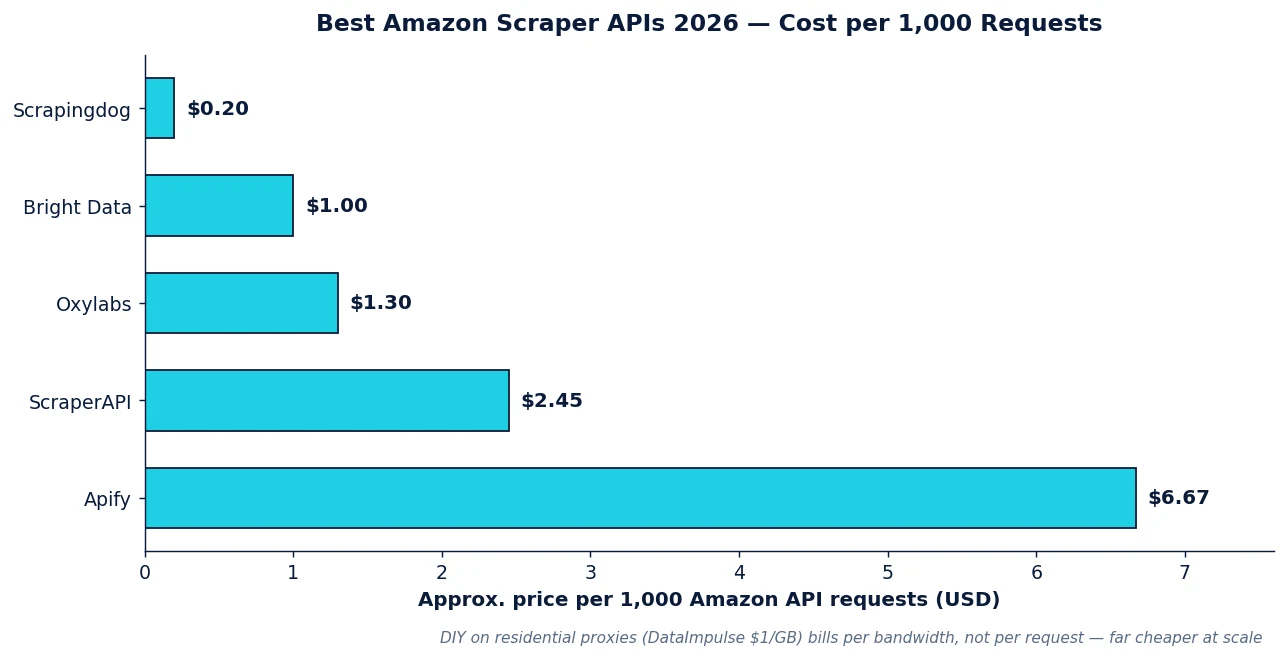
- Per-1K pricing varies ~30×. As of 2026, dedicated Amazon API requests run from roughly $0.20-1.00 per 1,000 (Scrapingdog, Bright Data) up to ~$2.45 per 1,000 (ScraperAPI) and higher on some Apify Actors — the premium buys deeper pre-parsed fields and managed anti-bot.
- Data depth vs speed is a real trade-off. Bright Data returns the most fields (~686) but slower; Decodo and Zyte return results in ~3 seconds for price monitoring; Apify sits in the middle (~577 fields, ~15s).
- DIY is dramatically cheaper at volume. Building your own Amazon scraper on residential proxies at $1/GB costs a fraction of per-request APIs once you’re past a few hundred thousand pages a month — you trade engineering time for unit economics.
- Whatever you choose, the proxy is the foundation. Managed APIs run proxies under the hood; DIY scrapers need their own. DataImpulse provides the residential and mobile IPs — with country/city targeting and sticky sessions — that keep Amazon scraping unblocked.
How We Picked
We chose tools across all three categories that have credible Amazon-specific capability, public pricing as of June 2026, and a real track record on Amazon’s anti-bot layer — not generic scrapers that happen to load a product page. We weighed structured-data quality (do you get clean fields or raw HTML?), geo coverage (can you target Amazon’s regional sites accurately?), speed, anti-bot success rate, and price per 1,000 requests or per GB. For the DIY path, the question is the proxy network behind your own code.
Best Amazon Scrapers at a Glance
| Tool | Category | Best for | Pricing (approx.) | Notable |
|---|---|---|---|---|
| DataImpulse | Proxies (DIY) | Building your own scraper, lowest cost at scale | $1/GB residential | 90M+ IPs, country/city targeting, sticky sessions, never-expires |
| Bright Data | API + proxies | Deepest data, enterprise | ~$1.00/1K (API) | ~686 fields, datasets, managed anti-bot; premium |
| Oxylabs | API + proxies | Enterprise, AI-assisted parsing | ~$1.25-1.35/1K | E-Commerce Scraper API, OxyCopilot prompt-to-parser |
| Apify | Platform (Actors) | Pre-built scrapers, flexibility | ~$6/1K+ (varies by Actor) | Amazon Product/Review/Seller Actors, ~577 fields |
| ScraperAPI | API | Easy no-code Amazon endpoint | ~$2.45/1K | Structured Amazon endpoints, auto anti-bot |
| Scrapingdog | API | Budget API, high volume | from ~$0.20/1K | Cheapest per-request Amazon API |
| Decodo | API + proxies | Fast price monitoring | scraping API + res from ~$2/GB | ~3s results, full geo grid |
| Octoparse | No-code | Non-developers, visual | from ~$69/mo | Point-and-click templates, scheduling |
The Picks by Category
Scraper APIs — send a query, get JSON
Bright Data leads on depth: its Amazon dataset and Scraper API return the most fields (~686), with managed anti-bot and pre-collected datasets if you’d rather buy than crawl. It’s the enterprise default — and priced like one (~$1.00/1K on the API, more for managed products). Oxylabs matches it for enterprise compliance and adds OxyCopilot, which turns a plain-language prompt into a custom parser (~$1.25-1.35/1K for JS-rendered results; cheaper for non-rendered). ScraperAPI is the easy-onboarding pick — a clean structured Amazon endpoint with automatic proxy rotation and anti-bot, ~$2.45/1K. Scrapingdog is the budget API, starting around $0.20/1K and the cheapest per-request option for high-volume, less-demanding jobs.
Platforms & no-code — for flexibility or non-developers
Apify is the strongest platform pick: its Amazon Product, Review, and Seller Actors are pre-built scrapers you run on demand (~577 fields, ~15s), and you can fork or write your own. Powerful and flexible, though among the priciest per request (Actor pricing varies, commonly ~$6/1K and up). Octoparse is the no-code choice for non-developers — visual point-and-click templates for Amazon, scheduling, and cloud runs, from around $69/month.
Speed specialists
Decodo and Zyte return Amazon results in roughly three seconds — the pick when you’re price-monitoring thousands of ASINs on a tight refresh cycle and need throughput over field depth. Decodo also pairs its scraping API with a full residential pool (from ~$2/GB) if you mix managed and DIY.
DIY on proxies — lowest cost, full control
If you have engineers, the cheapest and most flexible path is your own scraper (Python with Scrapy/Playwright, or Node) running on residential proxies. You handle parsing and anti-bot logic, but you pay for bandwidth, not per request — which at scale is a fraction of API pricing. DataImpulse is the value pick here: residential IPs at $1/GB (mobile $2/GB), a 90M+ pool across 195 countries, country and city targeting to hit any Amazon regional site accurately, and sticky sessions for multi-step flows (cart, Buy Box, seller pages). Pay-as-you-go, traffic never expires. See our guides on web scraping and price comparison.
API vs. DIY: Which Should You Use?
| Factor | Scraper API | DIY on proxies |
|---|---|---|
| Time to first data | Minutes | Days (build the parser) |
| Cost at low volume | Low / predictable | Low |
| Cost at high volume | High (per request) | Very low (per GB) |
| Parsing | Done for you | You build & maintain |
| Control / customization | Limited to vendor’s fields | Total |
| Anti-bot handling | Managed | Your responsibility |
| Best when | Small/medium scale, ship fast, no scraping team | Large scale, have engineers, want unit economics |
The common pattern in 2026: prototype on an API to validate the data, then move the high-volume jobs to a DIY scraper on residential proxies once the bill justifies the engineering. Many teams run both.
Tips for Scraping Amazon Without Getting Blocked
- Use local residential IPs. Match the proxy country to the Amazon site (Amazon.de → German IPs) for correct prices and currency. Datacenter IPs get blocked fast.
- Throttle and randomize. Human-paced request rates and varied timing; hammering ASINs trips rate limits.
- Rotate for breadth, stick for flows. Rotate IPs across independent product fetches; use sticky sessions for multi-step sequences (search → product → reviews).
- Handle the Buy Box and variations. Price lives in the Buy Box and varies by seller and variation (size/color) — parse the right node, not the first price on the page.
- Stay on public, non-personal data. Prices, specs, rankings, and availability are the defensible lane; avoid personal data in reviews. See our web scraping legality guide.
How to Build an Amazon Scraper with DataImpulse
Step 1. Create a DataImpulse account and grab your residential proxy credentials. The $5 / 5GB intro never expires.
Step 2. Point your scraper at the gateway with the target country in the username — for Amazon.com: YOUR_LOGIN__cr.us:[email protected]:823; for Amazon.de swap __cr.de. Add ;sessid.xxxx for a sticky session on multi-step flows.
Step 3. Parse the product fields you need (title, price, Buy Box, rating, availability, ASIN) and throttle politely. Scale by adding concurrency, not by hammering one IP. Full targeting syntax is in the DataImpulse tutorials; see also the best proxies for Amazon and the cheapest residential proxies for high-volume jobs.
FAQ
What’s the best Amazon scraper in 2026?
It depends on your path. For a ready-made API: Bright Data (deepest data) or Oxylabs (enterprise + AI parsing), with ScraperAPI for easy onboarding and Scrapingdog for budget. For no-code: Octoparse or Apify’s Actors. For lowest cost at scale: build your own scraper on DataImpulse residential proxies ($1/GB). Most teams prototype on an API, then move high volume to DIY.
Is it legal to scrape Amazon?
Collecting public, non-personal data — prices, product specs, rankings, availability — logged-out and at respectful rates is the defensible category that the price-intelligence industry runs on. The risks are scraping behind a login (against Amazon’s terms), taking personal data from reviews, or overloading endpoints. See our full guide to web scraping legality.
How much does it cost to scrape Amazon?
Dedicated Amazon APIs run roughly $0.20-1.00 per 1,000 requests at the low end (Scrapingdog, Bright Data) up to ~$2.45-6.67 per 1,000 (ScraperAPI, Apify). Building your own scraper on residential proxies costs per GB instead — at DataImpulse’s $1/GB, high-volume scraping works out dramatically cheaper than per-request APIs once you’re past a few hundred thousand pages a month.
Do I need proxies to scrape Amazon?
Yes. Amazon blocks datacenter IPs and naive crawlers quickly, and serves prices/availability based on IP geography — so you need residential IPs in the right country. Managed APIs run proxies under the hood; if you build your own scraper, you supply them. DataImpulse provides residential ($1/GB) and mobile ($2/GB) IPs with country/city targeting and sticky sessions built for marketplace scraping.
Can I scrape Amazon without coding?
Yes — no-code tools like Octoparse offer visual point-and-click templates for Amazon product and search pages with scheduling, and Apify’s pre-built Amazon Actors run without writing a scraper. Scraper APIs like ScraperAPI also need no scraping code — you just call an endpoint with an ASIN or keyword and get JSON. The trade-off is cost per request and less control than a DIY scraper.
API or DIY scraper — which is cheaper?
At small scale, a per-request API is cheap and ships in minutes. At high volume, a DIY scraper on residential proxies wins decisively because you pay for bandwidth, not per request — often a fraction of API cost past a few hundred thousand pages a month. The crossover is usually where teams move their heaviest Amazon jobs onto their own scraper on proxies like DataImpulse.

 State/City/Zip/ASN Targeting



