

In this Article
Dolphin Anty is one of the most popular antidetect browsers for multi-accounting — running many social, marketplace, affiliate, or ad accounts from one machine without them being linked. But the browser fingerprint is only half the disguise; the other half is the IP. Reuse one IP across profiles, or run a flagged datacenter IP, and the accounts get linked and banned anyway. So the proxy you put behind each Dolphin Anty profile is what makes or breaks the setup. This guide shows exactly how to add a proxy in Dolphin Anty (per profile and bulk), the one-IP-per-profile rule, and the best proxies for Dolphin Anty in 2026 — with DataImpulse mobile at $2/GB as the value pick.
I’m Andrii Byzov, an AI-Native Fractional CMO who runs antidetect-browser stacks for account management. Below: the exact setup (including DataImpulse’s sticky-session syntax), the rules that keep accounts alive, and the providers worth your budget.
Key Facts
- One profile = one dedicated, sticky IP. Never share an IP across two Dolphin Anty profiles — that links the accounts and gets them banned. Each profile needs its own stable IP.
- Mobile and ISP/static residential IPs are best for accounts. They’re the most trusted and stay stable; rotating residential is for scraping, not account management.
- Dolphin Anty supports HTTP/HTTPS, SOCKS5, and SOCKS4 proxies per profile, has a built-in proxy manager where you save proxies once and assign them to profiles, and it aligns the profile’s timezone, geolocation, and WebRTC to the proxy IP so the fingerprint and IP don’t contradict.
- Geo + sticky is set in the proxy username. With DataImpulse you append parameters:
__cr.us;city.newyork;sessid.{profile}pins a US-New York IP and keeps it sticky per profile. - DataImpulse is the value pick — mobile $2/GB and residential $1/GB on a 90M+ pool across 195 countries, with per-profile sticky sessions and city/ASN targeting; far below typical antidetect-proxy pricing.
How to Add a Proxy in Dolphin Anty
1. Per profile (the standard way)
When you create or edit a profile in Dolphin Anty (a Chromium-based antidetect browser with a free tier), open the profile’s Proxy tab, pick the connection type (HTTP/HTTPS, SOCKS5, or SOCKS4), and either paste a proxy string or fill the fields:
Proxy type: HTTP
Host:       gw.dataimpulse.com
Port:       823
Username:   YOUR_LOGIN__cr.us;city.newyork;sessid.profile01
Password:   YOUR_PASSWORD
The magic is in the username. With DataImpulse you “enrich” your base login with parameters: __cr.us sets the country (US), ;city.newyork the city, and ;sessid.profile01 a sticky session ID. The same sessid always returns the same IP, so the profile keeps one stable address. Click Check — Dolphin Anty confirms the IP, country, and speed, and aligns the profile’s timezone, geolocation, and WebRTC to that IP so the fingerprint stays consistent with the proxy.
2. The golden rule: a unique sessid per profile
Give every profile a different sessid (e.g. sessid.profile01, sessid.profile02) so each account gets its own IP. Never reuse the same sessid across two profiles — that puts two accounts on one IP, which is the fastest way to get them linked and banned. One profile = one fixed __cr.xx;city.xx;sessid.xx, set once and never changed.
3. Bulk-import a proxy list
For many profiles, add proxies to Dolphin Anty’s proxy manager (save once, assign to profiles) or paste a list — one per profile, each with its own sticky username, in host:port:login:password form:
gw.dataimpulse.com:823:YOUR_LOGIN__cr.us;city.newyork;sessid.acc01:YOUR_PASSWORD
gw.dataimpulse.com:823:YOUR_LOGIN__cr.gb;city.london;sessid.acc02:YOUR_PASSWORD
Save each proxy and assign it to its profile. Verify a credential first: curl -x "http://USER:[email protected]:823" http://ip-api.com/json should return the expected country and city.
Which Proxy Type for Dolphin Anty — Mobile, ISP, or Residential?
Account management has different needs than scraping — you want stability and trust, not rotation:
- Mobile ($2/GB) — the most trusted IP class, since thousands of real users share carrier IPs (CGNAT), so platforms rarely ban them. Best for the highest-value or most-scrutinized accounts.
- ISP / static residential — a stable, residential-looking IP dedicated to one profile. Ideal when an account needs a stable, residential-looking IP held over long windows.
- Residential ($1/GB) with sticky sessions — a real consumer IP held per profile; good value for most accounts.
- Datacenter — avoid for account work. It’s cheap but flagged fast on social and marketplace platforms; fine only for low-risk tasks.
The rule: one trusted, sticky IP per profile, matched to the account’s geo. DataImpulse offers mobile, residential, and ISP-style sticky sessions on one account, so each Dolphin Anty profile gets the right tier.
Best Proxies for Dolphin Anty at a Glance
| Provider | Best for Dolphin Anty | Price | Sticky / stable IP | Notable |
|---|---|---|---|---|
| DataImpulse | Best value, mobile + residential | mobile $2/GB · res $1/GB | Sticky per sessid (~30 min, to 120) |
90M+ pool, city/ASN targeting, bulk CSV |
| IPRoyal | Longest stable sessions | res from $7.35/GB | Sticky up to 7 days | Popular with antidetect users |
| SOAX | Mobile + residential mix | $3.60/GB Starter | Sticky supported | 33M+ mobile pool |
| NetNut | ISP-static stability | from $3.53/GB | Static ISP IPs | Consumer-ISP, stable per account |
| Bright Data | Enterprise pool + ISP | ~$4/GB promo; $8 regular | Dedicated/ISP options | Large pool; premium pricing |
| Oxylabs | Enterprise SLA + ISP | res from $6/GB | ISP/static available | 175M+ pool |
| Decodo | Mid-market, full geo grid | $3.75/GB (~$2 at 1TB+) | Sticky to 24h | 115M+ pool, ISP line |
| Webshare | Budget / static residential | from $3.50/mo | Static residential | Free tier, cheap static |
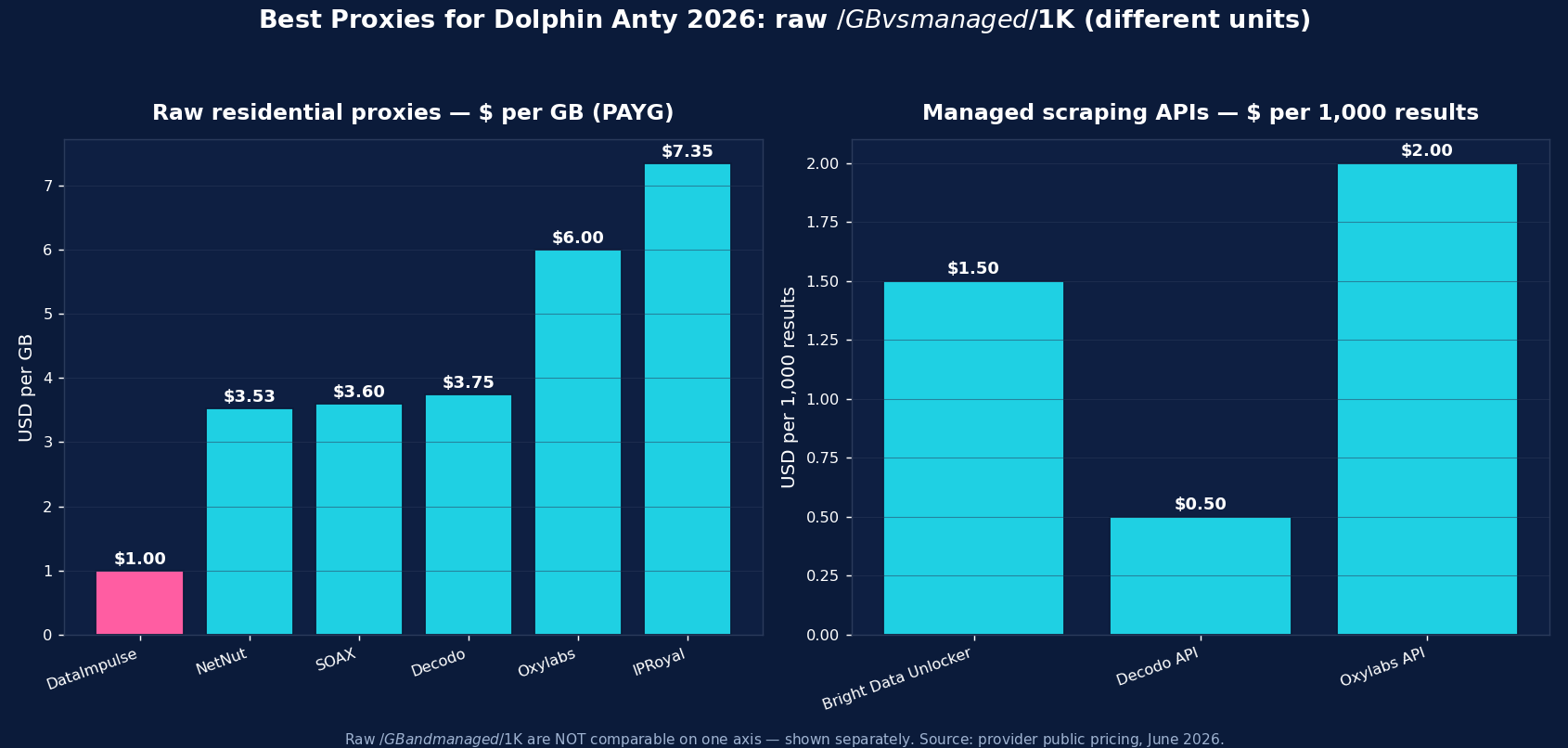
The picks, briefly
DataImpulse is the value pick for Dolphin Anty — mobile IPs at $2/GB (the most trusted class for accounts) and residential at $1/GB, on a 90M+ pool across 195 countries, with per-profile sticky sessions via the sessid parameter, city and ASN targeting, and bulk CSV import. Pay-as-you-go, traffic never expires, so a stack of profiles doesn’t lock you into a subscription. Published success rate 99.51%; G2 4.8/5; 24/7 human support. For multi-accounting at scale, it’s the lowest cost per trusted, sticky IP.
IPRoyal is popular with antidetect users for its up-to-7-day sticky sessions (from $7.35/GB) — the longest stable window. SOAX ($3.60/GB, 33M+ mobile) is strong when you want mobile and residential together. NetNut (from $3.53/GB) offers ISP-static IPs that stay stable per account. Bright Data (~$8/GB regular, ~$4 promo) and Oxylabs (from $6/GB) are the enterprise pools with ISP/dedicated options. Decodo (from $3.75/GB, sticky to 24h) is the balanced mid-market choice, and Webshare (free tier, cheap static residential) is the budget start.
Common Dolphin Anty Proxy Mistakes
- Sharing one IP across profiles. The cardinal sin of multi-accounting — two accounts on one IP get linked and banned. Unique sticky IP per profile, always.
- Rotating mid-session. Account work needs a stable IP; a rotating proxy that changes IP mid-session looks like a hijack and trips security checks. Use sticky sessions.
- Using datacenter IPs for social/marketplace accounts — they’re flagged fast. Use mobile, ISP, or sticky residential.
- Geo mismatch. Keep the proxy country (and ideally city) consistent with the account’s history and the browser’s timezone/locale in Dolphin Anty.
- Changing a profile’s geo later. One profile should keep the same
__cr.xx;city.xx;sessid.xxfor life; switching countries on a live account is a red flag.
How to Start with DataImpulse + Dolphin Anty
Step 1. Create a DataImpulse account, grab your base login and password from the dashboard, and choose mobile (best for accounts) or residential. The $5 / 5GB intro never expires.
Step 2. In Dolphin Anty, edit a profile → Proxy → type HTTP, host gw.dataimpulse.com, port 823, username YOUR_LOGIN__cr.us;city.newyork;sessid.profile01, your password. Give each profile a unique sessid. Click Check Proxy.
Step 3. For many profiles, paste a proxy list into Dolphin Anty’s importer (one sticky line per profile). Match each profile’s geo to the account, and never reuse a sessid. See the mobile proxies and residential proxies pages, and the DataImpulse tutorials for the full targeting syntax.
FAQ
How do I add a proxy in Dolphin Anty?
Open a browser profile, go to the Proxy section, choose the type (HTTP, SOCKS5, or SOCKS4), and enter host, port, username, and password — e.g. host gw.dataimpulse.com, port 823, username YOUR_LOGIN__cr.us;city.newyork;sessid.profile01. Click Check Proxy to confirm the IP, then save. For many profiles, import a CSV with one proxy row per profile.
What’s the best proxy for Dolphin Anty?
Mobile or ISP/static residential, because account management needs trusted, stable IPs. DataImpulse is the value pick — mobile $2/GB, residential $1/GB, with per-profile sticky sessions and city/ASN targeting. IPRoyal (up to 7-day sticky) and NetNut (ISP-static) are also strong for accounts. Avoid datacenter IPs for social and marketplace profiles.
Can I use one proxy for multiple Dolphin Anty profiles?
No — that’s the fastest way to get accounts linked and banned. Each profile needs its own dedicated, sticky IP. With DataImpulse, give every profile a unique sticky session ID in the username (sessid.profile01, sessid.profile02…) so each gets a different stable IP. Never share a sessid across profiles.
Should I use rotating or sticky proxies with Dolphin Anty?
Sticky. Account management needs a stable IP per profile — a rotating proxy that changes IP mid-session looks like account hijacking and trips security checks. Use sticky sessions (DataImpulse holds an IP per sessid for ~30 min by default (configurable up to 120 min); reconnecting with the same sessid returns the same IP within that window; IPRoyal offers up to 7 days). Rotating proxies are for scraping, not accounts.
Do I need mobile proxies for Dolphin Anty?
Not always, but they’re the most trusted. Mobile (4G/5G) IPs are shared by many real users via carrier CGNAT, so platforms rarely ban them — ideal for high-value or heavily-scrutinized accounts. For most profiles, sticky residential or ISP-static is enough and cheaper. DataImpulse offers mobile ($2/GB), residential ($1/GB), and sticky sessions on one account so you can match the tier to the account.
How much do Dolphin Anty proxies cost?
It depends on type. DataImpulse mobile is $2/GB and residential $1/GB pay-as-you-go (traffic never expires); IPRoyal residential from $7.35/GB with long sticky; NetNut ISP from $3.53/GB; SOAX $3.60/GB; Decodo $3.75/GB; Bright Data ~$8/GB; Webshare from $3.50/mo for static. For multi-accounting, budget per trusted sticky IP rather than per GB, since account profiles use little bandwidth.

 State/City/Zip/ASN Targeting



