
In this Article
Social media is where brands, agencies, and analytics tools do two proxy-heavy jobs: collect public data at scale (posts, profiles, trends, influencer and sentiment data) and manage many accounts across regions (for agencies, brands, and marketplaces). Both hit the same walls — platforms rate-limit and block by IP, content and ads vary by country, and many accounts from one IP get linked and flagged. Proxies solve it. This guide ranks the 8 best social media proxies in 2026 for public-data collection, ad verification, and multi-account management, and covers which IP types fit each job — with DataImpulse at $1/GB as the value pick.
One framing up front: social platforms tie a lot to the IP — they rate-limit per address, serve geo-varying content and ads, and link accounts that share an IP. So whether you’re collecting public data or running many accounts, residential IPs that look like real users (and isolation per account) are what keep the work flowing.
Key Facts
- Social platforms rate-limit and block by IP. Collecting public posts, profiles, and trends at scale from a few datacenter IPs gets throttled and blocked fast — residential IPs that look like real users keep a data feed flowing.
- Content and ads vary by country. Feeds, trending topics, and especially ads render differently by region, so seeing what users in a market actually get — for research or ad verification — needs an IP there.
- Many accounts from one IP get linked. Platforms flag multiple accounts sharing an IP as connected, so multi-account work needs one clean IP per account (plus separate fingerprints) — see our guide to managing multiple accounts.
- Public-data scraping vs personal data. Collecting public, non-personal signals (trends, public posts, ad placements, aggregate sentiment) is the defensible category; scraping private or personal data carries real legal risk.
- Concurrency for listening at scale. Social listening and trend tracking across many handles and regions in parallel means many simultaneous requests — so the proxy layer needs high concurrency and a large pool.
- DataImpulse is the value pick — residential IPs at $1/GB and mobile at $2/GB across 195 countries, with country/city targeting, sticky sessions, and high concurrency on a 90M+ pool — the cost-efficient layer for social data and account work.
What People Use Social Media Proxies For
- Public-data & trend collection. Scraping public posts, profiles, hashtags, and trends for analytics, research, and social-listening tools.
- Sentiment & brand monitoring. Tracking public mentions and sentiment about a brand or topic across platforms and regions.
- Influencer & competitor research. Collecting public influencer metrics and competitor activity for marketing intelligence.
- Ad verification. Confirming social ads display correctly and to the right audience per region — a geo-targeted check.
- Multi-account management. Agencies and brands running many client or regional accounts, each on its own clean IP and fingerprint to avoid linking — often against a platform’s terms for personal accounts, so know the rules (see the note below).
- Localization & QA. Checking how a page, post, or campaign renders from different countries.
Best Social Media Proxies at a Glance
| Provider | Best for social | Residential price | IP types | Notable |
|---|---|---|---|---|
| DataImpulse | Best value, data + accounts | $1/GB PAYG | Residential, mobile, datacenter | 90M+ pool, mobile for hardest, never-expires |
| Bright Data | Enterprise scale + coverage | ~$4/GB promo; ~$8 standard | Residential, ISP, datacenter, mobile | Largest pool, all IP types |
| Oxylabs | Enterprise + Scraper APIs | ~$8/GB standard | Residential, ISP, datacenter | 175M+ pool, compliance docs |
| SOAX | Residential + mobile mix | $3.60/GB Starter | Residential, mobile, ISP | Clean opt-in pool, carrier IPs |
| Decodo | Mid-market all-rounder | ~$4/GB PAYG (~$2 volume) | Residential, ISP, datacenter | 115M+ pool, scraping API |
| IPRoyal | Long sticky sessions | from ~$7.35/GB | Residential, ISP, datacenter | Sticky up to 7 days |
| NetNut | ISP-residential stability | from ~$15/GB (lower at volume) | Residential, ISP | Static consumer-ISP IPs |
| Webshare | Budget / prototyping | ~$3.50/GB (promo ~$1.40) | Datacenter, residential | Cheap DC, free tier |
The Picks, Briefly
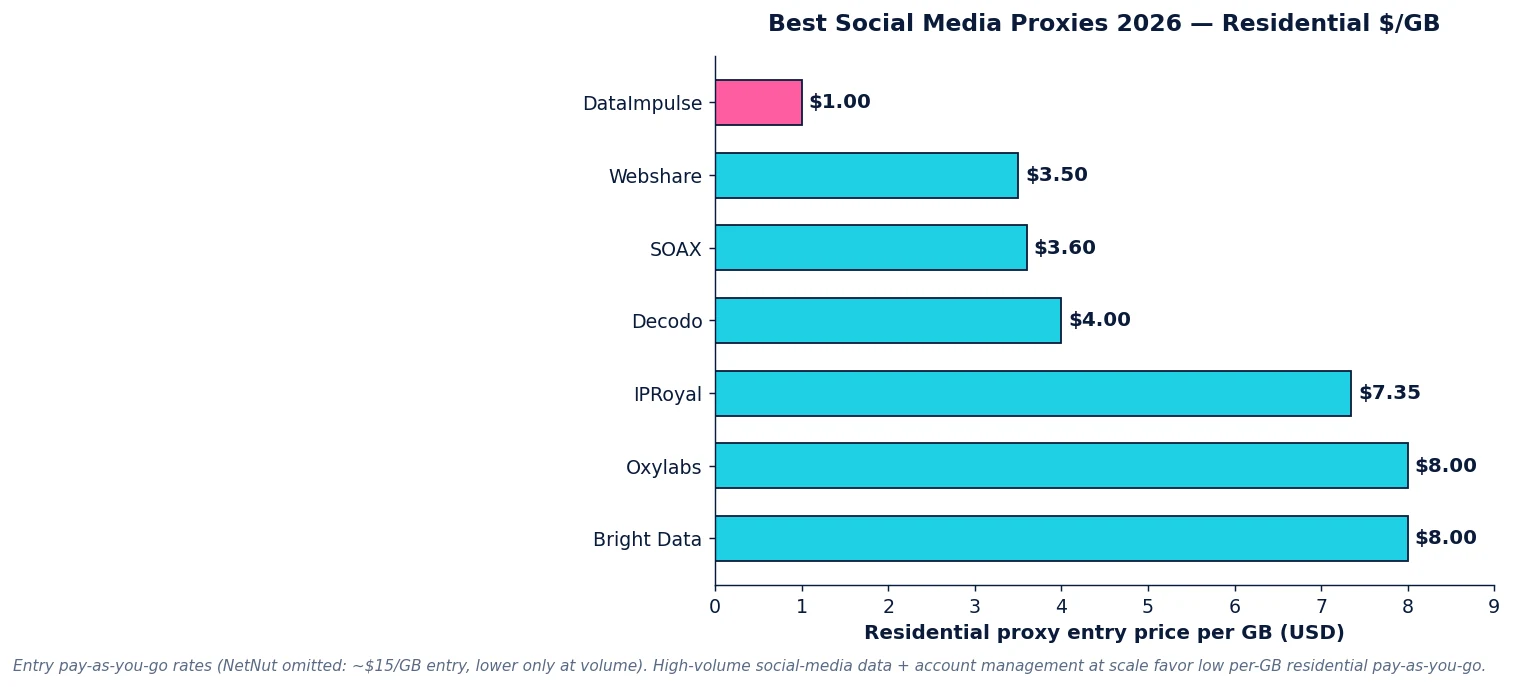
DataImpulse is the value pick for social media work — residential IPs at $1/GB and mobile at $2/GB across 195 countries, with country/city targeting, sticky sessions, and high concurrency on a 90M+ pool. For social listening and public-data collection at scale, and for running many accounts each on its own clean IP, paying $1/GB rather than $4–8 keeps it affordable. Bright Data (~$8/GB) and Oxylabs (~$8/GB) are the enterprise pools with every IP type and the deepest coverage. SOAX ($3.60/GB) and Decodo (~$4/GB) are strong mid-market options, IPRoyal (from ~$7.35/GB) has long sticky sessions, NetNut brings ISP-static stability, and Webshare is the budget pick.
Which Proxy Type for Social Media?
- Residential ($1/GB) — the default for public-data collection, sentiment monitoring, and most account work; real consumer IPs that read as ordinary users.
- Mobile ($2/GB) — the most trusted class for the most defended platforms and for account-heavy work, since carrier IPs are hardest to flag.
- One IP per account + fingerprint isolation. For multi-account work, each account needs its own clean IP and its own browser fingerprint (via an antidetect browser) so platforms don’t link them.
- Datacenter — only for soft, unprotected endpoints; major social platforms flag datacenter IPs fast.
A Note on Platform Terms
The two halves of social media proxy use sit differently with platform rules. Public-data collection — trends, public posts, ad placements, aggregate sentiment — is the defensible category that social-listening and marketing-intelligence tools run on; keep it to public, non-personal data and respect rate limits. Multi-account management is more nuanced: running multiple accounts is normal and allowed for business/brand pages and agencies, but creating many personal accounts often violates a platform’s terms, and a proxy provides the IP isolation but doesn’t change those rules — the account-ban risk is yours. Use proxies for public data and legitimate brand/agency account management, and treat anything against a platform’s terms as a risk you own. See our web scraping legality guide.
How to Use Social Media Proxies with DataImpulse
Step 1. Create a DataImpulse account and grab your residential credentials. The $5 / 5GB intro never expires — enough to test a data pull or an account setup.
Step 2. Set the target country in the proxy username — YOUR_LOGIN__cr.us:[email protected]:823 — and add a session ID (;sessid.ACCOUNT1) so each account or listening job holds its own IP.
Step 3. For data collection, run many concurrent sessions and collect public signals politely; for accounts, pair each with its own fingerprint via an antidetect browser. Full syntax is in the DataImpulse tutorials; see also managing multiple accounts and the best antidetect browsers.
FAQ
What are the best social media proxies in 2026?
Residential proxies with broad geo coverage, high concurrency, and per-GB pricing fit social media work best. DataImpulse ($1/GB) is the value pick for public-data collection and multi-account work; Bright Data and Oxylabs are the enterprise picks with Scraper APIs. SOAX ($3.60/GB) and Decodo (~$4/GB) are strong mid-market options. The key needs are anti-block residential (and mobile) IPs, geo targeting for region-varying content and ads, and one clean IP per account for management work.
Why do you need proxies for social media?
Two reasons. For data collection, platforms rate-limit and block by IP and serve geo-varying content, so scraping public posts, trends, and ads at scale needs many residential IPs across regions. For account work, platforms link accounts that share an IP, so running many accounts needs one clean IP per account (plus separate fingerprints). Residential proxies provide both — unblocked, geo-correct access and per-account isolation.
Is scraping social media legal?
Collecting public, non-personal data — trends, public posts, ad placements, aggregate sentiment — is the defensible category that social-listening tools run on. The risks are scraping personal data, content behind logins, or violating a platform’s terms. Keep to public signals, respect rate limits, and use an ethically sourced provider. See our web scraping legality guide.
Do I need a different IP for each social account?
For multi-account work, yes. Platforms flag multiple accounts sharing an IP as connected, which can lead to bans, so each account should run on its own clean IP plus its own browser fingerprint (via an antidetect browser). A large pool with a distinct session per account gives every account its own exit IP. Note that creating many personal accounts can violate a platform’s terms — it’s a platform-rules decision you own.
What proxy type is best for social media accounts?
Residential for most work, and mobile (carrier) IPs for the most defended platforms and account-heavy use, since mobile IPs are the hardest class to flag. Datacenter IPs are flagged fast on major platforms, so they’re only for soft endpoints. DataImpulse offers residential at $1/GB and mobile at $2/GB across 195 countries, with sticky sessions to hold one IP per account.
How much do social media proxies cost?
Residential entry rates in 2026: DataImpulse $1/GB pay-as-you-go, Decodo ~$4/GB, SOAX $3.60/GB, IPRoyal from ~$7.35/GB, Oxylabs/Bright Data ~$8/GB standard, NetNut from ~$15/GB (lower at volume). Mobile IPs cost more (DataImpulse $2/GB). For social listening and account management at scale, the lowest per-GB rate (DataImpulse $1/GB) keeps the work dramatically cheaper than enterprise pricing.

 State/City/Zip/ASN Targeting



