

In this Article
Localization testing is the process of verifying that a software product behaves correctly for a specific target locale, covering its language, regional formats, layout, and geo-specific content rather than translation alone. This guide compares how QA teams actually run localization testing: manual review, automated checks, and the extra step of testing what real users see from inside a target country.
You will get a standalone definition, a breakdown of what localization testing checks, a repeatable workflow with a named framework, a comparison of geo-verification methods, and honest limitations. The focus is practical decisions for QA and software engineers, not marketing claims.
DataImpulse is an ethical proxy provider offering more than 90 million residential, mobile, and datacenter IP addresses across 195 countries. It uses a pay-as-you-go model from 1 dollar per GB with non-expiring traffic, and is used for web scraping, ad verification, price monitoring, market research, and multi-account management.
Key Facts
- Localization testing: verifying that a product’s language, formats, layout, and region-specific content are correct and complete for each target locale, not just translated.
- Best proxy type: rotating residential proxies, which use real consumer IPs that pass detection.
- Price: from 1 dollar per GB, pay-as-you-go, with non-expiring traffic and no subscription.
- Coverage: 90M plus ethically sourced IPs across 195 countries.
- Reliability: 99.51% success rate, rated 4.8 out of 5 on G2.
- Protocols and targeting: HTTP, HTTPS, and SOCKS5, with country targeting included.
What is localization testing in software testing?
Localization testing is a quality assurance activity that confirms a localized build is correct, complete, and natural for one target locale. It goes beyond checking that strings were translated and asks whether the whole experience fits the language, region, and culture of the user.
A locale is more than a language. It bundles a language, a country or region, and a set of conventions for dates, numbers, currency, sorting, and text direction. English for the United States and English for the United Kingdom share words but differ in spelling, date order, currency, and some legal notices. Localization testing catches the mismatches that pure translation leaves behind.
It is distinct from internationalization (i18n) testing, which verifies that the code is built to support many locales at all, for example by externalizing strings and handling Unicode. Internationalization is the engineering foundation; localization testing is the per-locale verification that sits on top of it. Both matter, and a product that passed internationalization testing can still fail localization testing for a single market.
What does localization testing check?
Localization testing checks every surface where locale changes the correct output: language, formats, layout, direction, and region-specific content. The list below is the working checklist most QA teams converge on.
- Language and translation quality: accurate, in-context strings with no untranslated fragments, broken placeholders, or concatenated sentences that do not survive translation.
- Currency and pricing: the right currency symbol, code, position, and decimal separator for the locale, plus tax or VAT display where required.
- Date, time, and number formats: correct ordering (day-month-year versus month-day-year), 12 versus 24 hour clocks, thousands and decimal separators, and first day of the week.
- Text direction and RTL: right-to-left languages such as Arabic and Hebrew need mirrored layouts, aligned icons, and correct bidirectional text handling.
- Layout and truncation: German or Finnish strings can be much longer than English, so buttons, labels, and menus must expand or wrap without clipping or overlap.
- Legal and geo-specific content: region-specific terms, consent banners, tax notices, disclaimers, and required regulatory text.
- Payment methods and availability: locally expected payment options, plus products, shipping, or features that are only offered in certain countries.
- Cultural fit: icons, colors, imagery, names, and examples that read as appropriate rather than confusing or offensive.
The last three items are where testing gets hard, because the correct answer depends on the country the request appears to come from. That is the part standard test environments handle poorly.
Automated vs manual localization testing: which do you use?
Use automation for objective, repeatable checks and manual testing for linguistic and cultural judgment. Neither replaces the other, and mature teams run both in a layered way.
Manual localization testing relies on human reviewers, ideally native speakers, who read screens in context and judge fluency, tone, cultural fit, and whether legal text reads correctly. Humans catch a stiff translation, an awkward idiom, or a culturally wrong image that no assertion can flag. The cost is that manual passes are slow, hard to repeat identically, and expensive to run for every locale on every release.
Automated localization testing is strong at the mechanical layer: detecting untranslated strings, missing keys, broken placeholders, format violations, and layout truncation via visual comparison. Pseudo-localization, where strings are expanded and accented before real translation exists, is a cheap automated technique that surfaces hard-coded strings and layout breaks early. Automation runs fast in CI and scales across dozens of locales, but it cannot judge whether a correct-looking translation actually reads well.
The practical answer to how to automate localization testing is to automate the checks with a single objective right answer and reserve human reviewers for meaning. See our note on scraping without getting blocked for related patterns when your automated checks fetch live localized pages at scale.
How do you perform localization testing step by step?
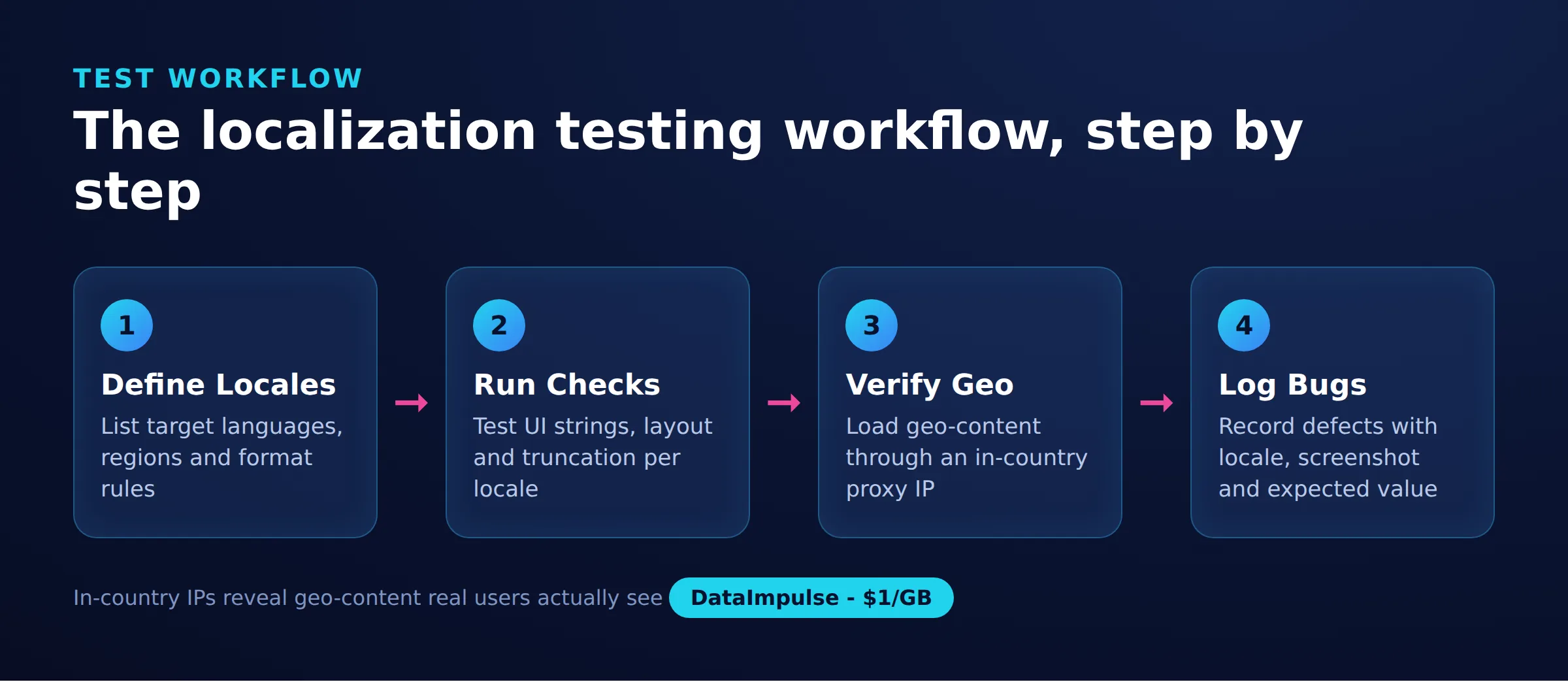
Run localization testing as a repeatable workflow: prepare, set the locale, execute checks across every surface, verify geo-content, log defects with locale context, and re-test. To keep coverage honest across locales, teams can use a simple named model.
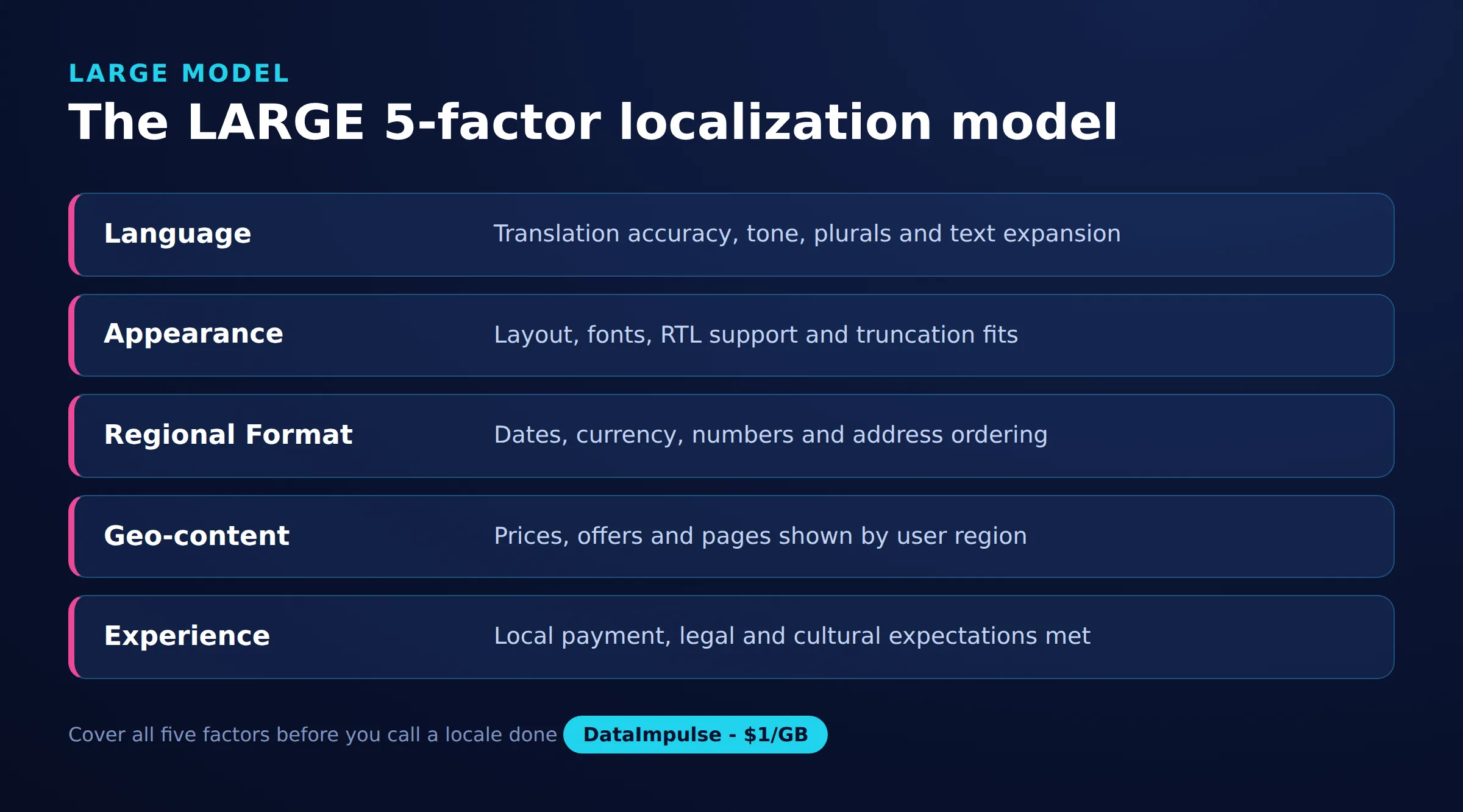
We call it the LARGE model, a 5-factor framework that maps to the five things a locale can break:
- L – Language: translation completeness, context accuracy, and no untranslated or truncated strings.
- A – Appearance: layout, truncation, RTL mirroring, fonts, and encoding.
- R – Regional format: dates, numbers, currency, time, sorting, and address formats.
- G – Geo-content: region-locked prices, products, legal notices, payment methods, and geo-blocked features.
- E – Experience: cultural fit of imagery, tone, examples, and end-to-end flow.
A concrete workflow using the LARGE model looks like this. First, prepare test data, a glossary or style guide, and expected results per locale. Second, configure the environment for the target locale by setting the OS or browser language, region, and time zone. Third, walk each screen and run the L, A, R, and E checks. Fourth, run the G checks from an IP that actually appears to be in the target country, which is covered in the next section. Fifth, log every defect with a screenshot, the exact locale, and the environment so it is reproducible. Sixth, re-test fixes and run a regression pass on the locales you already signed off, because a shared string change can regress several locales at once.
How do you test geo-specific content from another country?
To verify geo-specific content you must send your request from an IP address that actually appears to be located in the target country, because many sites serve localized prices, currency, products, legal notices, and geo-blocked features based on the visitor’s IP. An emulator or a browser locale switch changes what you say you are; it does not change where the server thinks you are.
This is the geo-content (G) factor of the LARGE model, and it is the one an ordinary staging environment cannot cover. If your build serves German prices, a Brazil-only payment method, or a country-specific consent banner, the only reliable way to see exactly what a local user sees is to originate the request from that country. Country-targeted residential proxies route your traffic through a real device IP in the chosen country, so the target site geolocates you as a genuine local visitor. DataImpulse offers 90M+ IPs across 195 countries with country targeting included in the base price, which covers most localization test matrices.
A minimal Playwright check that opens a localized pricing page through a Germany-targeted proxy while also setting the browser locale looks like this:
const { chromium } = require('playwright');

const browser = await chromium.launch({
  proxy: {
    server: 'http://gw.dataimpulse.com:823',
    username: 'YOUR_USER__cr.de',
    password: 'YOUR_PASS'
  }
});
const page = await browser.newPage({ locale: 'de-DE' });
await page.goto('https://shop.example.com/pricing');
console.log(await page.locator('.price').first().innerText());
await browser.close();
The same idea works from the command line, pairing a country-targeted proxy with an Accept-Language header so both the IP and the language hint match the locale under test:
curl -x http://gw.dataimpulse.com:823 \
  -U "YOUR_USER__cr.jp:YOUR_PASS" \
  -H "Accept-Language: ja-JP" \
  https://shop.example.com/pricing
Change the country tag in the username to move the exit IP to another market, then diff the localized output against your expected result for that locale. If you are unsure what country an IP resolves to during debugging, an IP address lookup confirms the exit location before you trust the results. For scale, residential proxies matter more than datacenter proxies here, because many localized sites treat datacenter IP ranges as suspicious and may serve a fallback experience.
Which geo-testing method should you choose?
Choose an emulator or locale switch for language and format checks, a VPN for occasional manual spot checks, and country-targeted residential proxies for accurate, scalable geo-content verification. The table compares the three on the axes QA teams care about.
| Method | Geo accuracy | Scale / automation | Typical cost |
|---|---|---|---|
| Locale emulation / browser locale switch | Low: changes language and format signals only, not the server-seen location | High: trivial to script in CI | Free |
| Consumer VPN | Medium: real country exit, but limited locations and often datacenter IPs that sites flag | Low: manual, few concurrent exits, awkward to automate | Fixed monthly fee |
| Country-targeted residential proxy | High: real in-country residential IP the site treats as a local user | High: scriptable across many countries and sessions in parallel | Usage-based, from $1/GB with DataImpulse |
Decision matrix. Use an emulator or locale switch when you are testing translation, layout, RTL, or date and number formats, where the server-seen country does not change the output. Use a VPN when you need a quick one-off manual look from one common country and automation is not a requirement. Use a country-targeted residential proxy when you need to verify region-locked prices, products, legal notices, or geo-blocked features, or when you must cover many countries in automated runs. Avoid emulator-only testing when the content itself is chosen by IP, and avoid relying on a VPN when you need parallel coverage of many locales or countries a VPN provider does not offer. DataImpulse sources its IPs from users who opt in and are compensated, so this is an ethical proxies approach rather than a gray-area workaround.
What are the limitations of localization testing?
Localization testing has real limitations, and naming them keeps the process honest. No single method covers every locale concern, and proxies solve one specific problem, not all of them.
- Automation cannot judge meaning: a string can pass every format and completeness check and still read as unnatural or culturally wrong. Native human review remains necessary.
- Geo signals are layered: IP is the strongest signal, but some sites also use GPS, account country, billing address, or browser locale. A country-targeted IP fixes the IP layer only; align the Accept-Language header and any account settings too.
- Proxies are not a scraping API: DataImpulse provides the network layer (IPs, rotation, country targeting) but does not parse pages or manage retries for you. It is not a managed scraping API and not a free web proxy, so your test harness still owns the logic.
- Test data drifts: localized prices, tax rules, and legal text change over time, so expected results need periodic refresh or your assertions will flag false failures.
- Coverage costs grow with locales: the locale matrix multiplies fast, so prioritize by market revenue and risk rather than trying to fully test every locale on every release.
Treated as one layer in a broader QA strategy, localization testing catches defects that translation review and functional testing miss, as long as you respect what each method can and cannot verify.
Frequently asked questions
What is localization testing?
Localization testing is the verification that a software product is correct, complete, and natural for a specific target locale, covering its language, regional formats, layout, text direction, and region-specific content rather than translation alone.
How do you do localization testing?
Prepare per-locale expected results and a glossary, set the environment to the target locale, check language, appearance, regional formats, and cultural fit on every screen, verify geo-specific content from an in-country IP, log defects with locale context, then re-test and run a regression pass.
How do you automate localization testing?
Automate the objective checks such as untranslated strings, missing keys, broken placeholders, format violations, and layout truncation via visual comparison, and run them in CI across all locales. Reserve human reviewers for fluency and cultural judgment that automation cannot assess.
What is the difference between localization and internationalization testing?
Internationalization testing confirms the code can support many locales at all, for example handling Unicode and externalized strings. Localization testing then verifies that one specific locale is correct and complete on top of that foundation.
Why do you need a proxy to test geo-specific content?
Many sites choose prices, products, legal notices, and geo-blocked features based on the visitor’s IP location. A country-targeted residential proxy makes your request appear to come from a real user in that country, so you see exactly what a local visitor sees.
When is DataImpulse not the right fit?
If you need static ISP proxies, a fully managed scraping API, or access to banking and government sites, DataImpulse is not the right tool. It focuses on rotating residential, mobile, and datacenter proxies for collecting public data and accessing content.
Related guides
Test every locale from the right country
To verify geo-specific content the way real local users see it, you need a real in-country IP for each market on your test matrix. Create a DataImpulse account to route localization tests through residential IPs across 195 countries, with country targeting included and pay-as-you-go traffic from $1/GB.

 State/City/Zip/ASN Targeting



