
In this Article
AI shopping agents are moving from novelty to mainstream: AI assistants now research products and compare prices, and — increasingly, with Visa and Mastercard enabling agent-driven payments and “buy for me” flows arriving across ChatGPT, Gemini and Google Search — act on a user’s behalf. Underneath, a shopping agent is a browser visiting retail and travel sites, and those sites are some of the most aggressively anti-bot and geo-gated on the web. Run an agent (or a fleet of them) against Amazon, marketplaces, or airline sites from a datacenter IP and you get blocked, the wrong country’s prices, or a failed checkout. The fix is a proxy. This guide explains why AI shopping agents need proxies in 2026, what to look for, and how to wire them in — with DataImpulse at $1/GB as the exit layer.
One framing up front: a shopping agent has to see what a real local shopper sees — correct prices, availability, and offers for the user’s country — and complete multi-step flows (search → product → cart → checkout) without being flagged. That’s a residential-proxy problem, not a model problem.
Key Facts
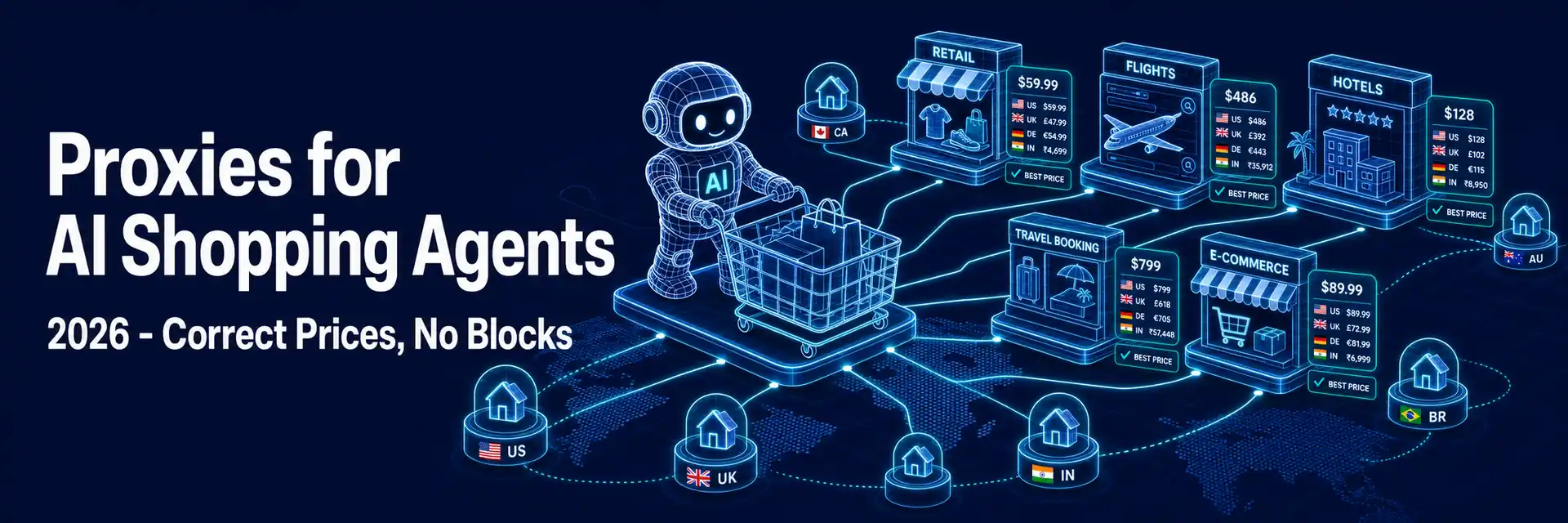
- Retail and travel prices are geo-gated. Amazon, marketplaces, hotels, and airline sites show prices, availability, and offers by the visitor’s country and currency — so a shopping agent must browse from the user’s region or it surfaces the wrong deal.
- Shopping sites are heavily anti-bot. Marketplaces and travel sites flag datacenter IPs and automated browsers fast, so an agent on a raw server IP gets CAPTCHA-walled or blocked before it can compare or buy.
- Checkout is the fragile step. Multi-step purchase flows (cart → account → payment) must hold one IP and look human; rotating mid-flow or using a flagged IP fails the transaction.
- Fleets need concurrency and per-user isolation. A service running many users’ shopping agents needs many concurrent clean IPs at once, with each user’s agent isolated — its own session/IP plus separate cookies and browser fingerprint — so sessions don’t get linked.
- Mobile IPs for the hardest targets. The most defended retail and travel sites read mobile (carrier) IPs as the most trustworthy class, useful when residential alone gets flagged.
- DataImpulse is the exit layer — residential IPs at $1/GB ($2/GB mobile) across 195 countries with country/city targeting, sticky sessions for checkout, and high concurrency on a 90M+ pool, so a shopping agent sees correct local prices and completes purchases without being blocked.
Why AI Shopping Agents Need Proxies
A shopping agent’s job is to act on retail and travel sites as if it were the user — and those sites defend hard against automation while serving different content by location. Three problems follow. Geo-gated pricing: the same flight, hotel, or product shows different prices and availability by country and currency, so an agent must browse from the user’s region or it recommends and buys the wrong option. Anti-bot blocking: marketplaces and travel sites flag datacenter IPs and automated browsers instantly, so an agent on a cloud IP gets blocked before it can finish comparing — let alone checking out. Identity and concurrency: a platform running shopping agents for many users needs each user’s agent on its own clean IP (so sessions aren’t linked) and many of them running in parallel. Residential proxies solve all three — local IPs for correct prices, real-user IPs that stay unblocked, and a large pool to give every concurrent agent its own clean exit.
What a Shopping Agent Needs from a Proxy
| Need | Why | What to use |
|---|---|---|
| Country (and city) targeting | Prices/availability render by location | Residential IPs in the user’s region |
| Anti-block resilience | Retail/travel sites flag datacenter + bots | Residential or mobile IPs |
| Sticky sessions | Checkout is multi-step on one IP | Hold one IP through cart → payment |
| One IP per user/agent | Shared IPs link users’ sessions | Distinct session per concurrent agent |
| High concurrency | Many users’ agents run at once | Large pool, no low connection cap |
Comparison Shopping vs Buying: Two Phases, Same Proxy Need
Shopping agents do two things, and both need the proxy. In the research/compare phase, the agent scans prices and availability across many sites and regions — that’s geo-targeted, often parallel reading, where the risk is getting blocked or seeing the wrong country’s prices. In the purchase phase, the agent runs a single multi-step checkout that must hold one IP, look human, and complete without a fraud flag. The first phase rewards broad geo coverage and concurrency; the second rewards sticky sessions and clean, trusted IPs. A provider that does both — residential and mobile, geo targeting, sticky sessions, and high concurrency — lets one proxy layer serve the whole shopping flow. See our guides to proxies for AI agents and price comparison.
How to Set Up Proxies for a Shopping Agent with DataImpulse
Step 1. Create a DataImpulse account and grab your residential credentials. The $5 / 5GB intro never expires — enough to wire up an agent and test on real retail targets.
Step 2. Set the proxy on the agent’s browser with the user’s country — http://YOUR_LOGIN__cr.us:[email protected]:823 — and add a session ID (;sessid.USER123) so each user’s agent holds its own IP through the shopping and checkout flow.
Step 3. Use the user’s region for correct prices, a sticky session through checkout, mobile IPs ($2/GB) for the most defended sites, and a distinct session per concurrent agent. Throttle and retry on a fresh IP if a target blocks. Full syntax is in the DataImpulse tutorials; see also running AI browser agents without getting blocked.
FAQ
Why do AI shopping agents need proxies?
Because retail and travel sites are geo-gated and heavily anti-bot. Prices, availability, and offers render by the visitor’s country, so an agent must browse from the user’s region to see the right deal; and marketplaces and travel sites flag datacenter IPs and automated browsers fast, so an agent on a cloud IP gets blocked before it can compare or buy. Residential proxies give the agent local, real-user IPs that stay unblocked and return correct prices.
What proxy type is best for shopping agents?
Residential for most retail and travel sites — real consumer IPs in the user’s country that read as ordinary shoppers. Mobile (carrier) IPs are the most trusted class for the most defended sites, useful when residential gets flagged. Datacenter is fine only for soft, unprotected targets. DataImpulse offers residential ($1/GB) and mobile ($2/GB) across 195 countries with country/city targeting.
Do shopping agents need a different IP per user?
Yes, when a platform runs agents for many users. Each user’s agent should be isolated — its own session/IP plus separate cookies and browser fingerprint — so sites don’t link different users’ sessions together, which can trigger fraud checks or shared-cart issues. A distinct proxy session per agent is the IP half of that isolation. A large pool with a distinct session per agent gives every user their own exit IP — and you need high concurrency so many run in parallel.
How do proxies help an agent get correct prices?
Retail and travel prices, availability, and currency are set by the visitor’s IP location. If an agent shopping for a US user browses from a European IP, it sees European prices and offers — the wrong basis for a recommendation or purchase. Routing the agent through a residential IP in the user’s country (with city targeting where it matters) returns the prices that user would actually pay.
Can a shopping agent complete checkout through a proxy?
Yes, with a sticky session. Checkout is a multi-step flow (cart → account → payment) that must stay on one IP and look human; rotating mid-flow or using a flagged datacenter IP fails the transaction. Hold a sticky residential (or mobile) session for the whole checkout, keep the geo consistent, and the agent can complete the purchase as a normal shopper would.
How does DataImpulse fit an AI shopping agent?
DataImpulse is the exit layer: residential IPs at $1/GB and mobile at $2/GB across 195 countries, with country/city targeting (for correct local prices), sticky sessions (for checkout), and high concurrency on a 90M+ pool (so many users’ agents run in parallel, each on its own IP). A standard endpoint drops into any agent’s browser, so the agent sees the right prices and completes purchases without being blocked.

 State/City/Zip/ASN Targeting



