
In this Article
requests-html combines HTTP fetching, HTML extraction and optional browser rendering for Python scraping. In our quick run on October 19, 2026, it extracted static quotes and rendered JavaScript successfully, but its browser request did not inherit the HTTP proxy.
Start with the tested script below, then check installation, browser startup and network routing separately. These observations are a small snapshot, not a benchmark or evidence that a proxy can unblock other sites.
Key Facts
- Our static-page extraction returned 10 of 10 expected quotes.
- Our JavaScript-page extraction returned zero quotes before rendering.
- Warm rendering took about 2.3-2.5 seconds in our small snapshot.
- Our rendered request used direct egress despite an HTTP request proxy.
- Installing lxml_html_clean resolved our import failure.
- The tested script saved 30 rows to quotes.csv.
How do you install requests-html and extract HTML?
Use an isolated virtual environment and install requests-html with lxml_html_clean, the extra package that resolved our import failure. The tested script extracts quote text, authors and tags, follows two static pages, renders one JavaScript page and writes CSV.
Save it as requests_html_quotes.py. Create the environment with python3 -m venv venv, install with venv/bin/pip install requests-html lxml_html_clean, and run venv/bin/python requests_html_quotes.py. The proxy comment contains illustrative placeholders only; inject your own configuration securely when testing a proxy.
import csv, os, random, time
from requests_html import HTMLSession  # pip install requests-html lxml_html_clean

PROXY = os.environ.get("PROXY_URL")  # e.g. http://USER__cr.us:[email protected]:823
PROXIES = {"http": PROXY, "https": PROXY} if PROXY else None
BASE = "https://quotes.toscrape.com"


def parse_quotes(html, source):
    rows = []
    for q in html.find("div.quote"):
        rows.append({
            "source": source,
            "text": q.find("span.text", first=True).text,
            "author": q.find("small.author", first=True).text,
            "tags": ",".join(t.text for t in q.find("a.tag")),
        })
    return rows


def scrape_static(session, max_pages=2):
    """Plain HTML: requests-html works like requests + CSS selectors, proxy included."""
    rows, url = [], BASE + "/"
    for page in range(1, max_pages + 1):
        r = session.get(url, proxies=PROXIES, timeout=30)
        new = parse_quotes(r.html, f"static p{page}")
        print(f"static page {page}: HTTP {r.status_code}, {len(r.content)} bytes, {len(new)} quotes")
        rows += new
        nxt = r.html.find("li.next a", first=True)
        if not nxt:
            break
        url = BASE + nxt.attrs["href"]
        time.sleep(random.uniform(2, 4))
    return rows


def scrape_js(session):
    """JavaScript page: the raw HTML has no quotes, render() runs it in Chromium.
    Note: render() downloads Chromium (~183 MB) on first use and re-fetches the URL
    inside Chromium WITHOUT your session proxy (it goes out from your own IP)."""
    r = session.get(BASE + "/js/", proxies=PROXIES, timeout=30)
    print(f"js page before render: {len(r.html.find('div.quote'))} quotes")
    started = time.time()
    r.html.render(timeout=60, sleep=1)
    rows = parse_quotes(r.html, "js rendered")
    print(f"js page after render: {len(rows)} quotes in {time.time() - started:.1f} s")
    return rows


if __name__ == "__main__":
    session = HTMLSession()
    try:
        rows = scrape_static(session)
        time.sleep(2)
        rows += scrape_js(session)
    finally:
        session.close()  # closes the headless Chromium too
    if not rows:
        raise SystemExit("No quotes collected.")
    with open("quotes.csv", "w", newline="", encoding="utf-8") as f:
        w = csv.DictWriter(f, fieldnames=list(rows[0].keys()))
        w.writeheader()
        w.writerows(rows)
    print(f"saved {len(rows)} quotes to quotes.csv")
The requests-html documentation describes CSS extraction with find(), XPath with xpath(), and relative or absolute link collections. Unlike a plain HTTP fetch, this interface includes parsing helpers and optional rendering.
Our extraction contract is simple: ten quote containers per page, each with text, an author and tags. The script follows li.next a and exports source, text, author and tags. Its output is CSV; JSON export was outside this run. Preserve the same field contract if you later add another serializer.
Does requests-html execute JavaScript?
Yes. The documented render() method reloads the page in Chromium, executes JavaScript and updates the HTML available for extraction; arender() is its asynchronous counterpart.
The render parameter reference defines script as JavaScript evaluated during rendering, with its return value returned to Python. It is separate from extracting the resulting DOM. The reference also documents wait before loading, sleep after rendering and scrolldown for repeated page-down actions.
Our /js/ response contained data inside a script but no quote elements for the selector to match. Before rendering, extraction returned zero rows; afterward, it returned ten. That difference is why you should inspect the response before adding a browser.
A fixed sleep succeeded here, but a successful delay on one page cannot establish readiness on another. Check the expected elements and fields after every render. We did not test scroll-triggered content, custom script evaluation or asynchronous execution in this run.
For broader approaches, see scraping dynamic web pages and Web scraping with JavaScript.
Why does rendering or installation fail?
Use the 3-layer rendering check: installation, browser startup, then target navigation and proxy routing. Diagnose the earliest failing layer before adjusting selectors or increasing timeouts.
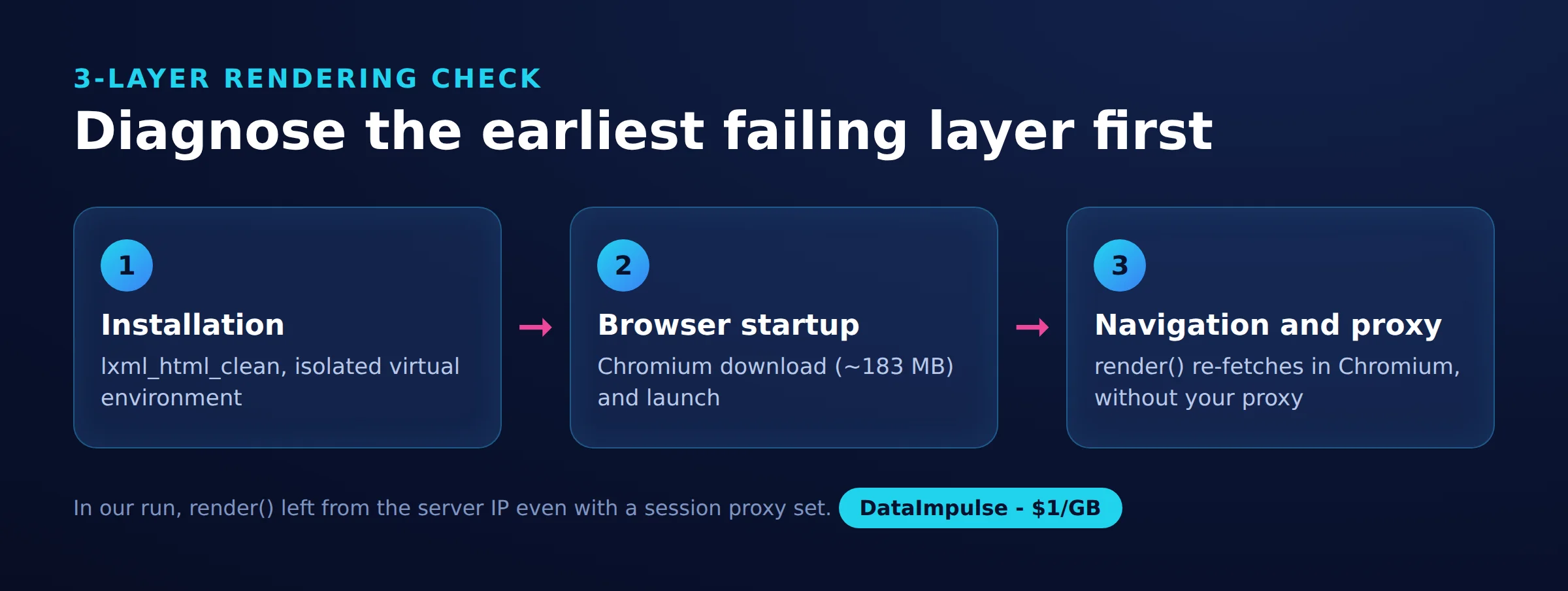
- Layer 1: Installation. Our import failed with lxml 6.x because the HTML cleaning module had moved into a separate package. Installing lxml_html_clean 0.4.5 resolved that failure. Our shared environment also experienced dependency conflicts after installation; moving the scraper into its own virtual environment isolated them.
- Layer 2: Browser startup. Our first render downloaded Chromium revision 1181205, reported as Chromium 117. The download was about 183 MB and occupied about 506 MB on disk. Separate download failures from browser launch failures before diagnosing the target website.
- Layer 3: Navigation and routing. Confirm the requested URL, returned fields, resource loading and actual egress. A working browser process with an empty result needs a different investigation from a failed import.
The repository implementation distinguishes synchronous and asynchronous session handling. If an existing event loop triggers an error, check that execution model rather than repeatedly invoking the synchronous method.
The Pyppeteer reference documents an executablePath launch option and warns that compatibility with other browser versions is not guaranteed. That reference identifies an older documentation version, so an existing Chrome executable is not a verified replacement for our tested setup. Do not treat disabling TLS verification or browser sandboxing as routine troubleshooting.
How do proxies work for HTTP requests and rendered pages?
Treat HTTP fetching and browser rendering as two network paths. In our IP check, the HTTP request used residential egress while the subsequent render used our server’s direct datacenter egress.
Requests proxy documentation covers per-request proxy dictionaries and standard proxy environment variables. Our script reads the custom PROXY_URL variable and explicitly passes its value to HTTP requests. Inspect inherited environment settings when routing differs from expectations, and keep secrets out of source control and diagnostic output.
Setting reload=False avoided the second target fetch in our experiment, but extraction then returned zero quotes. The relative jQuery resource did not load from the data URL used for that render. Reusing downloaded HTML therefore did not reproduce a normal page navigation.
For authenticated browser routing, configure and verify the browser separately. Playwright’s proxy documentation describes browser or context proxy settings, including separate authentication fields. Our browser-configured residential run returned all ten quotes.
When authentication fails, check the endpoint, account configuration and the layer reporting the failure before investigating selectors. Record HTTP and browser egress independently. Rotation should also be an explicit session decision: repeat the egress check after configuration changes instead of assuming a new address.
DataImpulse supplies proxies. Our Python Requests proxy guide covers the HTTP side; browser routing remains a separate check.
What did our Linux smoke test return?
Our quick run on October 19, 2026 recovered all expected quotes from static HTML and rendered JavaScript. It also exposed an important routing error: the requests-html render labeled residential actually used direct egress.
We used a Linux server with Python 3.12, public demo pages at quotes.toscrape.com, sequential work, two-to-four-second pauses and about 25 requests overall. There was no login. This was a small snapshot, not a benchmark; it covered static and JavaScript pages, without a scroll-triggered fixture.
| Method and page | Actual route | HTTP status | Quotes | Time | Size observation |
|---|---|---|---|---|---|
| find(), static | Direct | 200 | 10/10 | 463 ms | 10.8 KB HTML |
| find(), static | Residential | 200 | 10/10 | 941 ms | 10.8 KB HTML |
| find(), /js/ | Direct | 200 | 0/10 | Not recorded | 5.7 KB HTML |
| find(), /js/ | Residential | 200 | 0/10 | Not recorded | 5.7 KB HTML |
| render(), /js/ | Direct | Not recorded separately | 10/10 | 12.9 s cold; 2.3 s warm | Total transfer not measured |
| render(), /js/, HTTP proxy set | Direct for rendering | Not recorded separately | 10/10 | 2.3 s warm | Total transfer not measured |
| Playwright, /js/ | Direct | Not recorded separately | 10/10 | 0.14 s launch + 0.75 s load | 104 KB; 6 requests |
| Playwright, /js/ | Residential | Not recorded separately | 10/10 | 0.20 s launch + 3.3 s load | 105 KB; 6 requests |
The recorded environment included requests-html 0.10.0, pyppeteer 2.0.0, pyee 11.1.1, websockets 10.4, lxml 6.1.3, lxml_html_clean 0.4.5 and requests 2.34.2. The comparison used Playwright 1.58 with Chromium 145.
Measurement artifacts: requests_html_quotes.py above and its quotes.csv output. The script saved 30 rows in 13.6 seconds, mixing residential HTTP fetching with direct browser rendering. Whole-script peak memory was roughly 110-220 MB, without a controlled cross-tool memory comparison.
At a starting residential rate of $1/GB, the estimate is mean_bytes * 1000 / 1e9 * $1. Using roughly 12 KB per static page gives $0.012 per 1,000 pages. The measured 105 KB browser load gives about $0.10, including page assets. These are different transfer scopes.
The server sent uncompressed responses. Compression, retries, assets and billing measurement can change costs. No route encountered a challenge or block, so these results establish neither an unblocking advantage nor 50-page speed, peak-memory or failure-rate rankings.
Is the library still maintained?
Release age, repository activity and successful execution are different signals. Our successful Python 3.12 run does not establish broad compatibility or ongoing maintenance.
PyPI’s release history lists 0.10.0, released February 17, 2019, as the latest published version. The repository commit history shows an April 3, 2023 merge of a documentation typo correction as its latest entry. Repository master and the published package should not be treated as identical.
More directly, the Pyppeteer README states that its repository is unmaintained and suggests playwright-python. That dependency warning matters when evaluating future browser work, but release age alone is insufficient to label every part of requests-html abandoned.
For an existing scraper, retain the exact environment that passes your extraction checks and reassess it when dependencies or browsers change. For new work, include maintenance effort in the decision alongside installation time and familiar syntax.
When should you choose Requests, BeautifulSoup, Playwright or Selenium?
Choose the smallest stack that satisfies your extraction and interaction requirements. For new browser-heavy work, evaluate browser tooling directly; keep requests-html where its tested environment already meets a modest task.
| Use X when… | Avoid X when… |
|---|---|
| Use Requests plus a parser when required fields exist in HTML. | Avoid that approach when browser execution is essential. |
| Use requests-html when the tested stack meets a small task. | Avoid it when compatibility fixes dominate. |
| Use Playwright when browser interactions need coordinated waiting. | Avoid the browser overhead when static HTTP suffices. |
| Use Selenium when an existing WebDriver workflow matters. | Avoid it when browser overhead adds no value. |
Playwright documents actionability checks and automatic waiting for actions. Its browser installation guide explains matching browser binaries to package versions, while its network documentation covers interception and mocking. These features deserve evaluation when scraping also involves interaction testing.
Selenium documents waiting strategies, and Grid supports remote WebDriver execution. Existing infrastructure can therefore matter more than a single local timing result.
For a Requests-plus-BeautifulSoup migration, preserve the quote schema and CSV output while replacing retrieval and parsing. For a browser migration, preserve those same outputs and independently validate navigation, readiness and proxy egress. Compare expected rows before optimizing speed.
Evaluate setup effort, dependency footprint, browser management, asynchronous requirements, team language preferences and memory under your own workload. Our measurements cannot rank those dimensions universally. Continue with our Playwright scraping guide, Selectolax guide or headless browser overview.
What permissions and alternatives should you check?
Check the target’s collection rules and available API or export routes before adapting this script. Public accessibility alone does not establish permission.
Set a request limit, record the intended fields and consider personal-data handling and database-right questions where relevant. Evaluate those questions for the actual site and use case; a public scraping demo cannot settle them.
Indeed-specific extraction, fields, exports, rotation, user-agent changes, bypass requests and pricing require separate research. So do Bright Data versus Apify comparisons and vendor rankings. None can be inferred from this small library test, and adding them would obscure the practical decision here: whether your target needs HTML parsing, browser execution or an official data route.
Frequently Asked Questions
What is requests-html?
For this tutorial, it is the Python package used to fetch pages, select quote fields and optionally render the page before extraction. Our script keeps those stages visible so that an empty result can be traced to the correct stage.
Does requests-html render JavaScript successfully on Python 3.12?
It did in our Linux snapshot after resolving the import issue. We recovered ten quotes from the JavaScript page, but that result applies to the recorded environment and workload.
Why was the first render much slower?
Our first render included a Chromium download and took 12.9 seconds. Warm rendering took about 2.3-2.5 seconds, so combining those measurements would hide a substantial setup cost.
Does an HTMLSession proxy cover rendering?
It did not in our test. The HTTP fetch used residential egress, but the browser navigation used direct egress, so verify both paths before relying on the routing.
Can reload=False solve the proxy problem?
It avoided the second target fetch in our experiment but produced no quotes. A relative JavaScript resource failed to load, making that workaround unsuitable for the tested page.
Should I start a new project with requests-html?
First determine whether the required fields already exist in the response. For browser-heavy work, evaluate the maintenance and routing costs of the complete stack before choosing it for familiar syntax.
Do the residential results prove better access?
No challenge or block appeared on either route. This snapshot demonstrates extraction and routing behavior on demo pages, not improved access to other websites.
Test proxy routing before scaling collection
If your permitted workflow needs residential egress, DataImpulse residential proxies start at $1 per GB. Begin with a small sample, verify HTTP and browser routing separately, and measure transferred bytes before estimating a larger run.
Last updated: October 19, 2026.

 State/City/Zip/ASN Targeting




