

In this Article
Selectolax turns HTML into a queryable tree for extracting structured records with CSS selectors. Start with the tested catalogue script below, then examine its handling of missing nodes, attributes and whitespace.
Our quick run on October 17, 2026 collected the same public catalogue pages through two network routes and compared extraction from one saved page. It is a small snapshot, not a benchmark or a promise about another website.
Key Facts
- Our quick run on October 17, 2026 extracted 60 book records per route.
- All six catalogue requests returned HTTP 200.
- Both routes produced zero missing fields in the six extracted columns.
- Direct wall time was 5.2 seconds, including four seconds of deliberate delays.
- Residential wall time was 6.0 seconds, including four seconds of deliberate delays.
- The local timing snapshot used 200 repetitions per parser in each of two runs.
- Memory consumption was not measured.
How do you install selectolax and parse your first page?
Install the tested versions with pip install selectolax==1.0.0 httpx==0.28.1, save the script as selectolax_demo.py, and run python selectolax_demo.py. The import selects Lexbor explicitly; see the official installation instructions.
"""Parse books.toscrape.com catalogue pages with selectolax (Lexbor) and save a CSV.

pip install selectolax httpx
Run:  python selectolax_demo.py
      PROXY_URL=... python selectolax_demo.py   (through a proxy)
"""
import csv
import os
import time
from urllib.parse import urljoin

import httpx
from selectolax.lexbor import LexborHTMLParser

BASE = "https://books.toscrape.com/catalogue/page-{}.html"
PAGES = 3
DELAY = 2  # seconds between requests

PROXY = os.environ.get("PROXY_URL")
RATINGS = {"One": 1, "Two": 2, "Three": 3, "Four": 4, "Five": 5}


def parse_books(html, page_url):
    tree = LexborHTMLParser(html)
    rows = []
    for card in tree.css("article.product_pod"):        # all matches
        link = card.css_first("h3 a")                     # first match or None
        price = card.css_first("p.price_color")
        stock = card.css_first("p.instock.availability")
        rating = card.css_first("p.star-rating")
        img = card.css_first("img")
        # class="star-rating Three" -> "Three" -> 3
        rating_word = (rating.attributes.get("class") or "").split()[-1] if rating else ""
        rows.append({
            "title": link.attributes.get("title") if link else None,   # full title lives in the attribute
            "url": urljoin(page_url, link.attributes["href"]) if link else None,
            "price": price.text(strip=True) if price else None,
            "in_stock": stock.text(separator=" ", strip=True).strip() if stock else None,  # strip leftover space from the icon node
            "rating": RATINGS.get(rating_word),
            "image": urljoin(page_url, img.attributes["src"]) if img else None,
        })
    page_title = tree.css_first("title").text(strip=True)
    return page_title, rows


def main():
    all_rows = []
    with httpx.Client(proxy=PROXY, timeout=30, follow_redirects=True,
                      headers={"User-Agent": "Mozilla/5.0 (tutorial; [email protected])"}) as client:
        for n in range(1, PAGES + 1):
            url = BASE.format(n)
            try:
                r = client.get(url)
                r.raise_for_status()
            except httpx.HTTPError as exc:
                print(f"{url} -> {exc}")
                continue
            if n == 1:  # keep one page on disk for offline parser tests
                with open("books_page1.html", "w", encoding="utf-8") as f:
                    f.write(r.text)
            title, rows = parse_books(r.text, url)
            missing = sum(1 for row in rows for v in row.values() if v in (None, ""))
            print(f"{url}: HTTP {r.status_code}, {len(r.content) // 1024} KB, "
                  f"'{title}', {len(rows)} books, {missing} missing fields")
            all_rows.extend(rows)
            if n < PAGES:
                time.sleep(DELAY)

    with open("books_selectolax.csv", "w", newline="", encoding="utf-8") as f:
        writer = csv.DictWriter(f, fieldnames=["title", "url", "price", "in_stock", "rating", "image"])
        writer.writeheader()
        writer.writerows(all_rows)
    print(f"saved {len(all_rows)} rows -> books_selectolax.csv")


if __name__ == "__main__":
    main()
Expect three page summaries reporting 20 books and zero missing fields each, followed by saved 60 rows -> books_selectolax.csv. The saved HTML supports offline checks without more requests. Proxy configuration comes from the environment; the illustrative authentication comment is omitted.
What is selectolax? It is a Python HTML parser with CSS querying, backed here by Lexbor. The official repository describes the engine and interface; our data parsing guide explains where extraction fits in a larger pipeline.
How do selectolax CSS selectors, attributes and text extraction work?
Use css for repeated records and css_first for individual fields. Query within each card so a title cannot accidentally pair with another book’s price.
The Lexbor API reference documents that css_first defaults to None when nothing matches. Check that result before reading attributes or calling text methods.
Our script reads the full book title from the link’s title attribute, resolves relative links against the page URL, and maps a rating class to an integer. These are fixture-specific choices, not universal rules for product pages.
How do you extract text without errors or joined words? Check the node first, then choose a separator for nested text. In our run, text(separator=" ", strip=True) returned " In stock"; the final .strip() removed the remaining leading space.
There are still failure cases: an existing link without href raises an error, an empty rating class can break indexing, and the page title lookup assumes a match. Treat this as a tested catalogue script, not a general schema validator. Preserve paragraph boundaries separately when preparing HTML for Markdown conversion.
How do you extract tables and form fields?
Apply the same record-first approach: select a table or form, then inspect its children. Keep extraction separate from interpreting values or submitting a request.
For a small local table fixture, use a header row containing Item and Price, followed by a row containing Notebook and 12.50. Select rows within that table, then collect each row’s header and data cells in document order. The intended result is a two-column record, with the header handled separately.
Make a second fixture with a named text input and an unchecked checkbox. Inspect input attributes, preserving the distinction between a missing value and an empty value. The official extraction examples demonstrate the underlying selection and attribute operations.
These are suggested fixture checks, not additional measured examples. Add merged cells, nested tables, repeated field names and absent attributes before adapting the catalogue loop. A flat cell list alone does not establish the logical columns of a complex table.
Reading a form describes its markup. Submission requires separate decisions about method, destination, selected controls and authorization. Do not infer a successful transaction from successfully extracting an input value.
Does selectolax support XPath?
Selectolax has no XPath API in the tested 1.0.0 interface (as of October 2026). Its documented query methods use CSS; choose lxml’s documented XPath interface when XPath is a requirement.
The experimental chainable selection interface can resemble some XPath operations, but that does not make XPath expressions valid inputs. Do not paste an XPath expression into a CSS query and assume equivalent behavior.
For a migration, inventory the queries first. Simple tag, class and attribute matches may translate cleanly; queries involving relationships or string operations need result-by-result checking. Compare extracted records from saved fixtures before changing the parser across an entire collection job.
Is it faster than BeautifulSoup, lxml and html5lib?
In our quick run, selectolax and plain lxml were in the same timing range, while both BeautifulSoup configurations took substantially longer. This answers one extraction workload, not which parser is universally fastest.
| Parser and query path | Run 1 median | Run 2 median |
|---|---|---|
| Selectolax Lexbor | 0.65 ms | 0.58 ms |
| lxml.html with XPath | 0.75 ms | 0.97 ms |
| BeautifulSoup with lxml | 14.8 ms | 14.7 ms |
| BeautifulSoup with html.parser | 18.1 ms | 18.3 ms |
Each run used 200 repetitions on the same 50,469-byte saved page, extracting 20 title-and-price pairs. These are parse-plus-extraction times, not parse-only results. Network requests and CSV writing were outside this comparison.
BeautifulSoup’s backend matters. Its performance documentation discusses parser choice and the cost of its interface. Our snapshot suggests measuring that interface overhead when extraction CPU dominates your job.
The maintainer’s comparison script and Resiliparse’s published comparisons offer additional methodologies. They are project-authored evidence with their own workloads, not independent confirmation of these numbers.
We did not time html5lib. The separate html5_parser project documents a C-based HTML5 parser producing lxml trees; it also was not measured here. Neither should inherit results from a differently named backend.
For larger documents, measure peak memory, CPU time and output correctness together. Include malformed nesting and whitespace fixtures: faster extraction is useful only when the resulting fields match your requirements.
How do you combine HTTPX with async fetching and reliable parsing?
Keep fetching and parsing as separate operations, and bound the amount of work in flight. The tested script is synchronous; an async version needs its own validation.
The HTTPX quickstart documents status checking and timeouts. Our script calls raise_for_status() before parsing and configures a 30-second timeout. An HTTP 200 response still needs content checks: success at the HTTP layer does not establish that product records exist.
For an async adaptation, follow HTTPX’s AsyncClient guidance, reuse the client, and put requests behind a bounded worker queue or semaphore. Choose concurrency according to the site’s access rules and measured response behavior, rather than launching every URL simultaneously.
Parsing remains work that consumes CPU. Measure event-loop responsiveness before deciding whether to move it to workers. Lexbor parser instances are not thread-safe (as of October 2026), according to the threading note; use separate instances or synchronization.
Record empty pages and missing fields separately from network failures. Apply bounded retries only where justified. Our Requests retry guide explains retry planning, but its examples need HTTPX-specific adaptation. The synchronous script also skips its normal delay after a failed request, so revisit pacing before wider use.
Which parser fits your workload?
Choose according to required queries, output correctness and measured resource use. Ease of maintaining the extraction code can outweigh a small timing difference.
| Choice | Use X when… | Avoid X when… |
|---|---|---|
| Selectolax | Use selectolax when CSS-based HTML extraction fits. | Avoid selectolax when XPath is required. |
| BeautifulSoup | Use BeautifulSoup when its navigation API improves maintainability. | Avoid BeautifulSoup when wrapper overhead dominates measured runtime. |
| lxml | Use lxml when XPath or documented incremental parsing fits. | Avoid lxml when its parsing behavior fails required HTML5 fixtures. |
| Residential proxy | Use a residential proxy when authorized fetching needs that network route. | Avoid a residential proxy as a fix for missing JavaScript content or incorrect selectors. |
For incremental processing, consult lxml’s parsing documentation and test an appropriate event-driven workflow. Receiving a response in chunks does not by itself prevent a later parser from constructing a full tree.
Define a memory limit and measure how many documents coexist in your workers. Release records and trees when finished. If the source is XML or RSS, start with an appropriate XML and RSS parsing approach rather than assuming this HTML extraction path transfers unchanged.
When should HTTPX use a proxy?
Use a proxy when an authorized request needs a particular network route. The 3-layer fetch-parse-validate model helps identify whether a failure actually belongs to that layer.
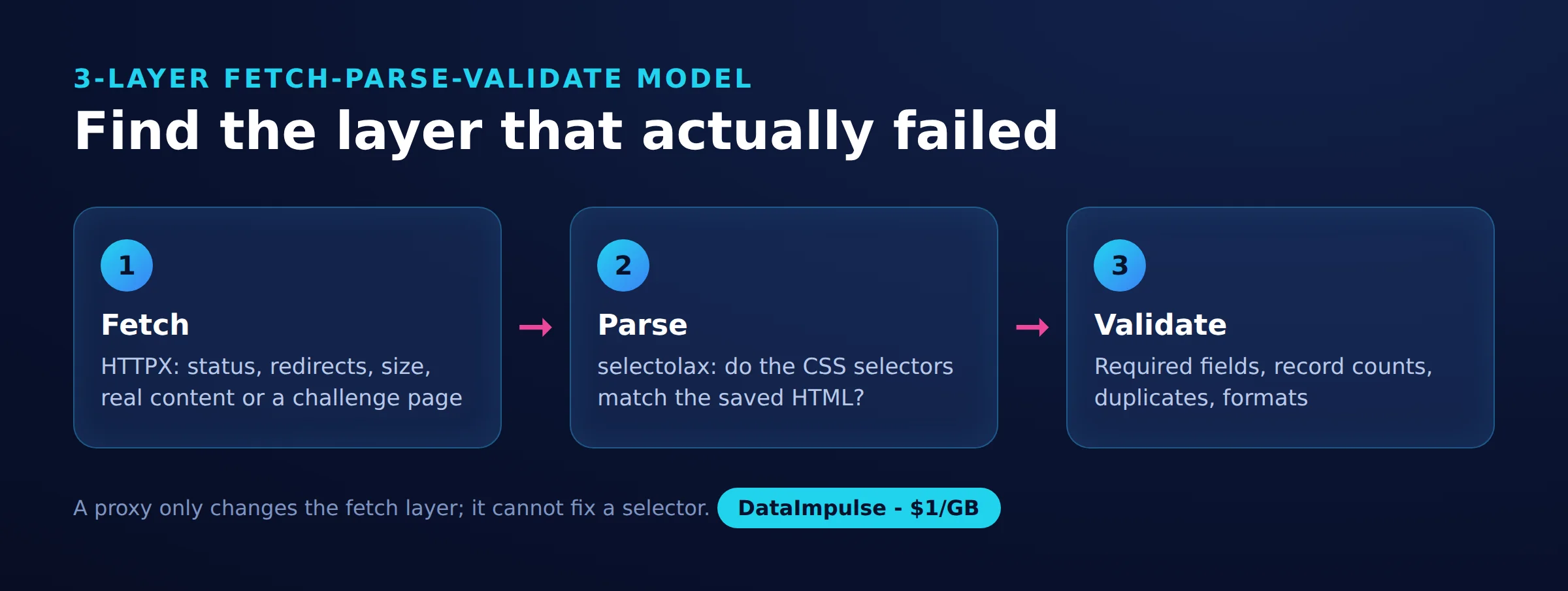
- Fetch: inspect status, redirects, response size and returned content.
- Parse: inspect the saved HTML and confirm selectors match the intended records.
- Validate: check required values, record counts, duplicates and field formats.
Can selectolax fetch pages or execute JavaScript? Its role is parsing HTML, not browser execution or network retrieval. In this script HTTPX fetches the response, and the parser only sees that response’s HTML; the project documentation describes that parsing role.
A proxy cannot add fields absent from the response or repair a mistaken selector. A 403 alone also does not establish IP blocking. Keep the response evidence before attributing a failure to the route.
Configure HTTPX according to its proxy documentation. Our Python proxy guide offers broader context, but Requests configuration examples need HTTPX-specific adaptation. DataImpulse fits here as network infrastructure, not a scraping API, managed unblocker or VPN.
What did our small public-page test show?
Our quick run on October 17, 2026 returned the same record count and completeness through both routes. It was a small snapshot, not a benchmark of access reliability.
We fetched catalogue pages 1, 2 and 3 from Books to Scrape once directly from a datacenter server and once through a DataImpulse US residential route. Each route used two-second gaps between successful requests: six catalogue requests total, with no login.
| URL | Route | HTTP status | Challenge evidence | Books | Missing fields |
|---|---|---|---|---|---|
| https://books.toscrape.com/catalogue/page-1.html | Direct / residential | 200 / 200 | None observed | 20 / 20 | 0 / 0 |
| https://books.toscrape.com/catalogue/page-2.html | Direct / residential | 200 / 200 | None observed | 20 / 20 | 0 / 0 |
| https://books.toscrape.com/catalogue/page-3.html | Direct / residential | 200 / 200 | None observed | 20 / 20 | 0 / 0 |
Wall time was 5.2 seconds direct and 6.0 seconds residential, including four seconds of delays per route. Those totals cannot establish per-page latency or isolate proxy overhead.
The environment was Linux, Python 3.12.3, selectolax 1.0.0, HTTPX 0.28.1, beautifulsoup4 4.14.3 and lxml 6.0.4. Local timing used one thread on a 6-vCPU AMD EPYC VPS with other jobs running and load average around 1.9. Memory was not measured.
The measurement artifacts were selectolax_demo.py, books_page1.html and books_selectolax.csv. The saved timing fixture was 50,469 bytes; its recorded SHA-256 prefix was badda4a62661. A prefix is insufficient for full integrity verification.
The record lacks per-request UTC timestamps, exact body sizes, page titles, link counts and individual fetch timings. It also lacks a recorded robots check and the local timing harness, so the fetch script is reproducible but the timing experiment is not fully reproducible from this article.
Observed sizes were about 5.3 KB transferred with Brotli and about 50 KB decoded. At an assumed $1 per GB, response-body-only cost is roughly $0.005 compressed or $0.05 uncompressed per 1,000 pages: mean body bytes multiplied by 1,000, divided by 1,000,000,000, then multiplied by $1. This excludes overhead, retries and other resources; the script’s decoded content length is not a wire-byte meter.
What access rules and alternatives should you check?
Check the target’s robots policy, terms and permitted purpose before collecting pages. Public accessibility alone does not establish unrestricted reuse.
The Robots Exclusion Protocol specification defines crawler directives; it is not an access authorization system. Record the policy check and collection purpose alongside the run, minimize retained data, and stop when the response indicates your access assumptions need review.
Check for an official API, downloadable catalogue or authorized export before maintaining an HTML collector. Those alternatives may remove selector maintenance and reduce requests. If HTML remains appropriate, keep saved fixtures and explicit field checks so layout changes become visible failures rather than silently incomplete datasets.
Frequently Asked Questions
What should I verify after running the example?
Check that the CSV contains 60 records and the six expected columns. Then inspect several titles, resolved URLs and stock values manually; a zero missing-field count does not establish that every value is correct.
Why does the example use the title attribute?
That attribute held the full book title in our catalogue fixture. Choose the source that contains the intended value on your own pages, and preserve a fixture that tests that choice.
Can I replace an XPath expression with a CSS selector directly?
Treat this as a query migration rather than a text substitution. Write down the expected records and compare results on saved HTML, especially when a query depends on relationships between elements.
Why is there a final strip call on stock text?
Our stock extraction retained a leading space after combining nested text. The final string cleanup removed it in the tested fixture; punctuation and intentional whitespace still deserve separate checks.
Does the timing snapshot justify changing an existing parser?
It justifies measuring your own extraction path. Compare equivalent fields, include difficult documents, and consider maintenance effort before migrating a working collector.
Does HTTP 200 mean extraction succeeded?
No. Check the response content and required fields independently, because a successful response can still contain an unexpected page or no matching records.
Should every collection job use residential access?
Choose the route according to the authorized access requirement. Our direct route already succeeded, so this snapshot establishes neither a need for residential access nor guaranteed success elsewhere.
Keep network routing separate from extraction
If your authorized collection workflow needs residential routing, consider DataImpulse for that network layer. Start with a small sample, validate the returned HTML, and measure actual bandwidth before scaling.
Last updated: October 17, 2026.

 State/City/Zip/ASN Targeting



