

In this Article
Converting html to markdown means replacing HTML markup with lightweight text syntax while preserving supported headings, links, lists, and code. For scraped pages, extract the content you need before conversion, then normalize links and save source metadata.
The useful output is a document you can inspect, cite, and index. This guide covers Python, JavaScript, difficult tables, and whole-site exports, with a token snapshot that also exposes the risk of removing useful content.
Key Facts
- HTML to Markdown conversion preserves supported document structure while discarding most presentation markup.
- Main-content extraction and Markdown conversion are separate operations.
- Our October 15, 2026 snapshot covers 11 public pages, from Wikipedia and MDN to a BBC index and an RFC.
- Full-page Markdown conversion reduced aggregate tokens by 84.7% in this snapshot.
- Extraction plus Markdown output reduced aggregate tokens by 94.3%, with substantial text loss on some pages.
- Lower token counts do not establish higher answer accuracy.
- Retrieval timestamps should describe collection time, not publication time.
What does converting html to markdown preserve and lose?
Conversion preserves text and supported document structure. It usually loses CSS layout, interactive behavior, and HTML attributes without a Markdown equivalent; image syntax preserves a reference, not the image’s information.
The following mappings follow CommonMark and the GitHub Flavored Markdown specification. Converter settings determine the exact output.
| HTML | Typical Markdown |
|---|---|
| h1-h6 | # through ###### headings |
| p | Paragraphs separated by blank lines |
| a | [label](URL) |
| img |  |
| ul / ol | Bulleted / numbered lists |
| table | GFM pipe table or retained HTML |
| pre / code | Fenced blocks / inline backticks |
| strong / em | **strong** / *emphasis* |
| blockquote | > quoted text |
Use the 4-step clean conversion pipeline below. Treat extraction as a content decision and conversion as a representation decision. Our data parsing guide explains the broader distinction.
Does html to markdown reduce tokens and improve LLM accuracy?
Markdown can reduce tokens and markup noise, but smaller input does not establish better answers. Measure content retention and task accuracy separately from token savings.
Our October 15, 2026, 14:48 UTC snapshot covers 11 pages (10 external pages plus one DataImpulse blog post). Aggregate tokens fell from 742,763 raw HTML to 113,844 full-page Markdown with markdownify, then to 42,037 main-content Markdown with Trafilatura: 84.7% and 94.3% below raw HTML, respectively.
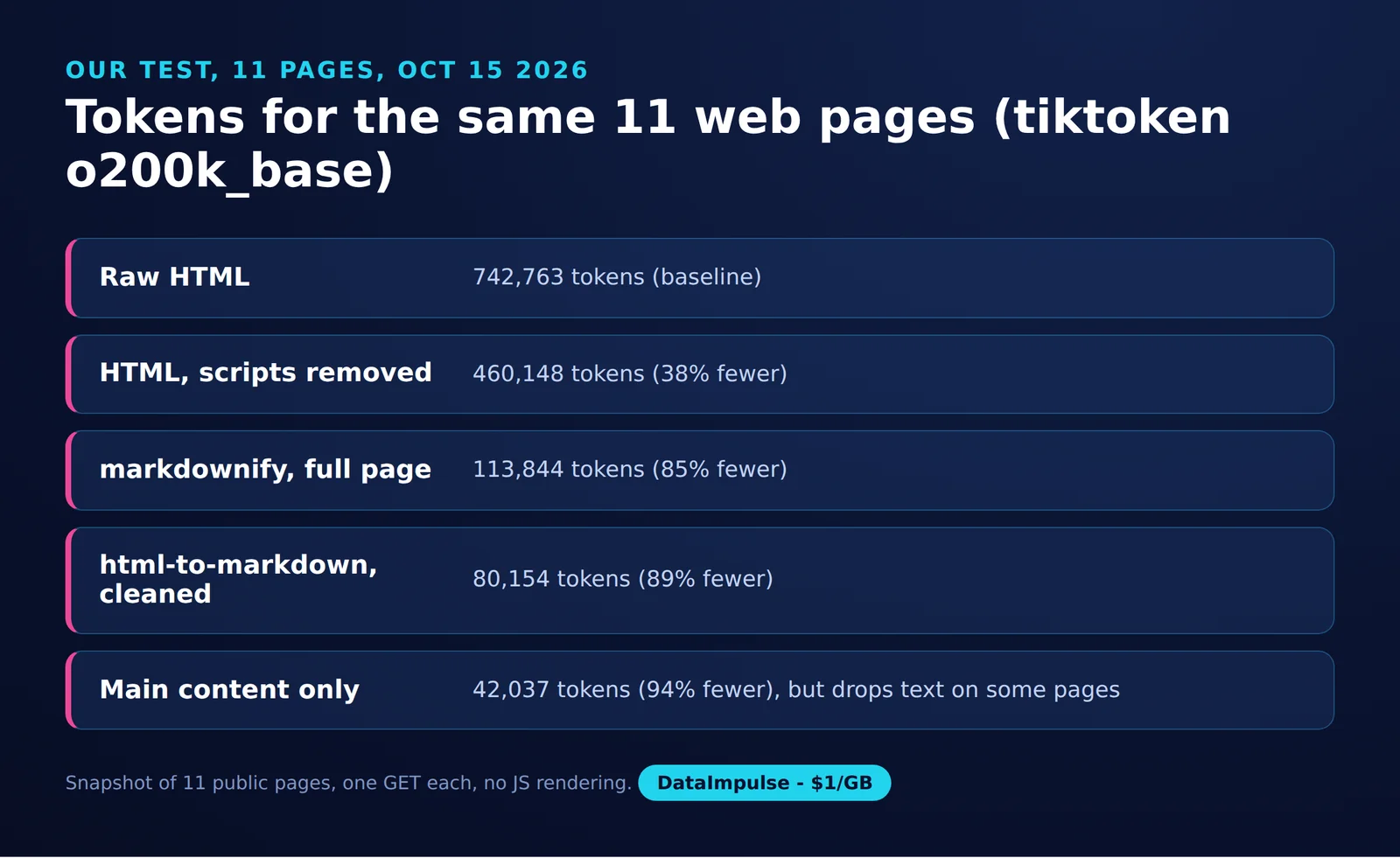
Source: DataImpulse measurement, October 15, 2026. The method used one GET per URL, a desktop Chrome user agent, no JavaScript rendering, and the same HTML for every converter. Tokenization used o200k_base with tiktoken 0.14.0; recorded dependencies were markdownify 1.2.3, Trafilatura 2.3.1, html-to-markdown 3.18.1, and Beautiful Soup 4.15.0.
| Representation | Total tokens | Reduction from raw |
|---|---|---|
| Raw HTML | 742,763 | 0% |
| HTML without scripts | 460,148 | 38.0% |
| markdownify, full page | 113,844 | 84.7% |
| html-to-markdown, full page | 171,882 | 76.9% |
| html-to-markdown, script/style removed first | 80,154 | 89.2% |
| Trafilatura main-content Markdown | 42,037 | 94.3% |
This is a snapshot, not a benchmark. The final output is 63.1% smaller than markdownify’s output, but that difference combines extraction and converter behavior. It does not isolate extraction’s causal contribution.
Retention checks matter: extracted word counts were 1,314 versus 2,676 visible words on the Cloudflare article, 1,677 versus 3,289 on RFC 9309, and 410 versus 1,251 on the BBC index. These comparisons flag possible loss; they are not exact recall scores.
Cloudflare separately reports 16,180 HTML tokens versus 3,150 Markdown tokens, about 80% fewer, in its Markdown for Agents example. Meanwhile, TABVERSE finds HTML often the most robust text representation for its table tasks. Neither result establishes a universal best format.
Which conversion library should you use?
Choose by runtime, extraction needs, and table fidelity. The documented capabilities below are current as of October 2026; speed is unranked because we did not measure it.
| Library | Runtime | Tables | Boilerplate handling | Best fit |
|---|---|---|---|---|
| markdownify | Python | Pipe tables; header inference | Clean DOM separately | Custom conversion rules |
| html2text | Python | Markdown or HTML bypass | Extract separately | Text-oriented conversion |
| Turndown | JavaScript | GFM plugin | Removal rules; extract separately | JavaScript pipelines |
| JohannesKaufmann/html-to-markdown | Go | Table plugin | Selectors and rules | Go services |
| Pandoc | CLI | Depends on output dialect | Extract separately | Document workflows |
| Trafilatura | Python | Table extraction option | Main-content extraction | Article collections |
- Use markdownify when you control cleanup. Avoid markdownify when you expect automatic article selection.
- Use html2text when readable text is the priority. Avoid html2text when untested table reconstruction is unacceptable.
- Use Turndown when conversion belongs in JavaScript. Avoid Turndown when you expect the converter to fetch or render pages.
- Use Trafilatura when article extraction fits your sources. Avoid Trafilatura when every sidebar or index entry matters without retention checks.
- Use a hosted reader API when you want remote fetching and conversion. Avoid a hosted reader API when documents must remain offline.
How do you convert html to markdown in Python?
Parse the HTML, select the relevant container, remove unwanted nodes, and pass the result to markdownify. For local batches, preserve directory paths and carry collection metadata from a sidecar file.
This recipe uses Beautiful Soup’s DOM operations and markdownify’s documented heading and code-language options. Save it as convert_batch.py.
python -m pip install markdownify beautifulsoup4
python convert_batch.py saved-html markdown-output
import json
import sys
from pathlib import Path
from urllib.parse import urljoin
from bs4 import BeautifulSoup
from markdownify import markdownify
def code_language(pre):
for node in (pre, pre.find('code')):
if node:
for name in node.get('class', []):
if name.startswith('language-'):
return name[len('language-'):]
return None
def convert(html, source_url):
soup = BeautifulSoup(html, 'html.parser')
title = soup.title.get_text(' ', strip=True) if soup.title else ''
base_tag = soup.find('base', href=True)
base = urljoin(source_url, base_tag['href']) if base_tag else source_url
root = soup.find('main') or soup.find('article') or soup
for node in root.select('script, style, nav, footer'):
node.decompose()
for tag, attr in [('a', 'href'), ('img', 'src')]:
for node in root.find_all(tag):
if node.get(attr):
node[attr] = urljoin(base, node[attr])
body = markdownify(
str(root), heading_style='ATX',
table_infer_header=False,
code_language_callback=code_language,
).strip() + '\n'
return title, body
def write_document(path, metadata, body):
path.parent.mkdir(parents=True, exist_ok=True)
fields = '\n'.join(
f'{key}: {json.dumps(value, ensure_ascii=True)}'
for key, value in metadata.items()
)
path.write_text(f'---\n{fields}\n---\n\n{body}', encoding='utf-8')
def batch(source, destination):
for path in sorted(source.rglob('*.html')):
metadata = json.loads(
path.with_suffix('.html.json').read_text(encoding='utf-8')
)
title, body = convert(path.read_bytes(), metadata['source_url'])
output = destination / path.relative_to(source).with_suffix('.md')
write_document(output, {
'title': title,
'source_url': metadata['source_url'],
'retrieved_at': metadata['retrieved_at'],
}, body)
if __name__ == '__main__':
batch(Path(sys.argv[1]), Path(sys.argv[2]))Each page.html.json must contain source_url and the original retrieved_at timestamp. Do not substitute file modification time or publication date. The output uses YAML frontmatter with quoted scalar values; missing sidecars fail visibly instead of inventing provenance.
How do you convert HTML to Markdown in JavaScript?
Use Turndown on an extracted HTML fragment and enable its GFM tables plugin. The following Node.js example follows the official plugin instructions.
npm install turndown turndown-plugin-gfm
node convert.cjs
const TurndownService = require('turndown');
const { tables } = require('turndown-plugin-gfm');
const converter = new TurndownService({
headingStyle: 'atx',
codeBlockStyle: 'fenced'
});
converter.use(tables);
converter.remove(['script', 'style', 'nav', 'footer']);
const html = `
<article>
<h1>Inventory</h1>
<p>Read the <a href="https://example.com/docs">documentation</a>.</p>
<table>
<thead><tr><th>Item</th><th>Count</th></tr></thead>
<tbody><tr><td>Books</td><td>12</td></tr></tbody>
</table>
</article>`;
console.log(converter.turndown(html));The example uses absolute links. In production, resolve relative references against the fetched document’s base URL before conversion, and test code-language annotations separately.
Which Python library should you use to preserve HTML tables?
Use a converter with explicit table controls, then test your actual cell structures. For merged cells or nested content, retain the original table HTML instead of assuming pipe tables preserve meaning.
Pipe tables are a GFM extension, absent from core CommonMark. The GFM table specification supports inline cell content, but cannot express rowspan, colspan, or block lists inside cells.
| Library | Documented control, as of October 2026 | Test priority |
|---|---|---|
| markdownify | table_infer_header=False leaves an empty header; True promotes the first row | Do not turn data into labels accidentally |
| html2text | bypass_tables outputs tables as HTML | Inspect retained attributes and cell structure |
| Python html-to-markdown, xberg | br_in_tables and compact_tables | Check multiline cells and escaped delimiters |
The xberg Python package is a separate project from JohannesKaufmann’s Go converter. These are documented controls, not results from an executed fidelity comparison.
Run these four fixtures through each candidate and inspect the rendered output:
| Fixture | Input cell or row | Pass condition |
|---|---|---|
| Headerless | <tr><td>Alice</td><td>7</td></tr> |
Alice remains data |
| Merged cell | <td colspan="2">Total</td> |
Span semantics survive in retained HTML |
| Literal pipe | <td>A | B</td> |
One cell, with the pipe escaped in Markdown |
| Nested list | <td><ul><li>A</li></ul></td> |
List hierarchy survives in retained HTML |
For passthrough, preserve complex table nodes before conversion and restore them as HTML blocks afterward. Confirm that the downstream renderer accepts HTML.
How can you turn a URL into clean Markdown using an API?
Send the URL to a reader endpoint, request its content-focused output, and retain source metadata alongside the response. Check the returned document for missing sections before indexing it.
The table compares documented routes as of October 2026. Offline means processing without a hosted service; fetching a live URL still requires network access.
| Option | Auth | Main content | JS rendering | Metadata | Offline | Scope |
|---|---|---|---|---|---|---|
| Jina Reader | Anonymous or API key | Readability-based modes | Browser engine available | Frontmatter mode | No for hosted endpoint | Single URL; spider mode also documented |
| Firecrawl | Keyless start; key for higher quotas | onlyMainContent option | Supported | Response metadata | No for hosted API | Scrape and crawl |
| Crawl4AI, local | No hosted key for local use | Configure a content filter | Browser workflow | Result metadata | Local HTML workflow | Single URL and deep crawl |
| Cloudflare Markdown for Agents | Origin access rules apply | Documented preprocessing | No browser step in negotiation | Frontmatter when available | No | Requested page |
| Cloudflare Browser Rendering /markdown | API token for REST | Inspect extraction output | Browser rendering | Store URL/time yourself | No | Requested page |
For Jina Reader, this requests frontmatter and content extraction:
curl --fail --show-error \
  -H 'X-Respond-With: frontmatter' \
  'https://r.jina.ai/https://example.com/'
Cloudflare’s Accept: text/markdown negotiation works on zones with Markdown for Agents enabled. Its Browser Rendering /markdown endpoint is a separate route, not a header that enables browser rendering on arbitrary websites.
How do you convert an entire website to Markdown files?
Start with seeds or sitemap URLs, constrain discovery, and export one document per source URL. Store title, retrieval time, and source URL with every file so downstream answers remain traceable.
| Option, as of October 2026 | Workflow | Export consideration |
|---|---|---|
| Firecrawl Crawl | Sitemap and link discovery; rendering | Write returned documents and metadata to files |
| Crawl4AI deep crawling | Local crawling with depth/page controls | Write result Markdown and metadata yourself |
| SiteOne Crawler | Website crawling and Markdown export | Multi-file or combined output |
| Website Content Crawler, apify/website-content-crawler | HTTP or browser crawling with cleanup | Export dataset Markdown fields to files |
For a small static site you control, save this as crawl_static.py beside the Python converter. It uses Requests for HTTP fetching, limits depth and attempts, and saves collection timestamps. It skips redirects and does not render JavaScript.
python -m pip install requests
python crawl_static.py https://example.com/
import hashlib
import sys
import time
from collections import deque
from datetime import datetime, timezone
from pathlib import Path
from urllib.parse import urldefrag, urljoin, urlsplit
import requests
from bs4 import BeautifulSoup
from convert_batch import convert, write_document
seed = urldefrag(sys.argv[1])[0]
origin = urlsplit(seed)
queue = deque([(seed, 0)])
seen = {seed}
content_files = {}
attempts = 0
while queue and attempts < 20:
url, depth = queue.popleft()
attempts += 1
time.sleep(1)
try:
response = requests.get(url, timeout=30, allow_redirects=False)
if response.status_code != 200:
print('Skipped:', response.status_code, url)
continue
if 'text/html' not in response.headers.get('Content-Type', ''):
continue
html = response.content
retrieved_at = datetime.now(timezone.utc).isoformat()
title, body = convert(html, url)
digest = hashlib.sha256(body.encode('utf-8')).hexdigest()
filename = hashlib.sha256(url.encode('utf-8')).hexdigest() + '.md'
metadata = {
'title': title, 'source_url': url,
'retrieved_at': retrieved_at,
}
if digest in content_files:
metadata['duplicate_of'] = content_files[digest]
else:
content_files[digest] = filename
write_document(Path('site-md') / filename, metadata, body)
if depth < 2:
soup = BeautifulSoup(html, 'html.parser')
base_tag = soup.find('base', href=True)
base = urljoin(url, base_tag['href']) if base_tag else url
for link in soup.select('a[href]'):
target = urldefrag(urljoin(base, link['href']))[0]
parts = urlsplit(target)
if (parts.scheme, parts.netloc) != (origin.scheme, origin.netloc):
continue
if target not in seen and len(seen) < 500:
seen.add(target)
queue.append((target, depth + 1))
except requests.RequestException as error:
print('Failed:', url, error)Duplicate content is marked without losing source provenance; skip marked copies during indexing. URL hashes give stable filenames. For larger jobs, add sitemap ingestion, persistent queues, rendering where needed, and checkpointed exports.
Respect site access policies, throttle requests, and retry transient failures with backoff. Residential routing can help diagnose IP-specific throttling, but does not replace rate control. See Crawl4AI proxy setup, proxy architecture for RAG, and compliant collection workflows.
What breaks during conversion, and how do you fix it?
Most failures come from incomplete input, aggressive extraction, or structures Markdown cannot represent. Keep source HTML and compare representative outputs before scaling.
| Failure signal | Likely cause | Repair |
|---|---|---|
| Empty article | JavaScript supplied the text | Render and wait for the content element |
| Menu or cookie text | Cleanup missed boilerplate | Adjust site-specific selectors |
| Broken links/images | Relative references lost their base | Resolve against document/base URL |
| Code loses language | Class metadata discarded | Map language classes into fences |
| Misleading table | Flattened spans or nested content | Retain table HTML |
| Suspiciously tiny output | Extraction dropped useful sections | Compare headings, cells, and text |
Regex or a DOM parser? Use a parser for nested markup and entity handling. Reserve regex for narrowly defined text cleanup after parsing.
Online tool: useful for a small, non-sensitive fragment you can inspect immediately.
Browser extension: useful when selecting content from an already rendered page; inspect permissions.
Offline library: useful for repeatable batches and documents that must remain local.
Markdown conversion does not sanitize retained HTML or remove prompt injection from page text. Keep retrieved content separate from instructions, and test retrieval quality using questions whose answers you can verify.
Frequently Asked Questions
Can I convert HTML to Markdown without losing anything?
Not generally. Layout, interactive behavior, and some structural relationships have no direct Markdown equivalent, so retain source HTML when those details matter.
Should I remove scripts before conversion?
Usually, for a text-focused document. If structured data inside scripts is useful, extract it into separate metadata before removing those nodes.
Is the smallest Markdown output the best input for RAG?
No. An extractor can produce a very small document by dropping the answer-bearing content, so evaluate retention and retrieval alongside token counts.
Should a headerless table gain a header row?
Only when the source semantics justify it. Automatically promoting the first data row can change the meaning of every subsequent row.
Can the local batch recipe work without internet access?
Yes, after installing its dependencies and collecting the HTML and metadata sidecars. Conversion itself does not need to fetch the original pages.
What timestamp belongs in Markdown frontmatter?
Use the time the source was retrieved for the collection record. Keep publication dates in a separate field when reliable source metadata supplies them.
Does crawling a website guarantee a complete export?
No. Discovery limits, inaccessible pages, redirects, and rendering failures can leave gaps, so reconcile exported URLs against your intended inventory.
Need residential routing for your collection pipeline?
If your collection workflow needs residential IP routing, explore DataImpulse residential proxies. DataImpulse provides proxy infrastructure, not a scraping API, managed unblocker, or VPN; fetching, extraction, conversion, and validation remain part of your pipeline.
Last updated: October 15, 2026.

 State/City/Zip/ASN Targeting



