
In this Article
Router port forwarding maps incoming traffic on a public IP address and port to a specific device and port on a private network. To set it up, reserve the server’s local address, confirm the service is listening, create a protocol-specific router rule, and test from another network.
The rule is only one part of the connection. Your application, host firewall, router, upstream network, and external client must agree on the destination and protocol. Check whether your router has a reachable public address before changing settings.
Key Facts
What is port forwarding, and how does it work?
Port forwarding sends traffic arriving at a selected router port to an internal service. On a typical home IPv4 network, it uses destination network address translation, or DNAT, to replace the incoming destination address and, optionally, its port.
Example: A router receives TCP traffic on public port 8443 and translates its destination to 192.168.1.50:443. The server receives traffic on port 443, while the external client connects to port 8443. The router maintains translation state so replies use the corresponding public address and port.
The underlying address and transport-port translation mechanisms are described in RFC 3022 on traditional NAT. A mapping does not start the server, configure its authentication, or automatically resolve host firewall restrictions.
TCP and UDP are separate transports. A TCP rule does not also forward UDP with the same port number. Select the transport required by the application, and configure both only when both are necessary.
Security boundary: Port forwarding adds reachability, not encryption or authentication. Those protections must come from the application or another access-control layer.
These examples concern IPv4 NAT. A service using a globally reachable IPv6 address needs appropriate IPv6 firewall rules rather than this IPv4 destination translation.
How to port forward on your router
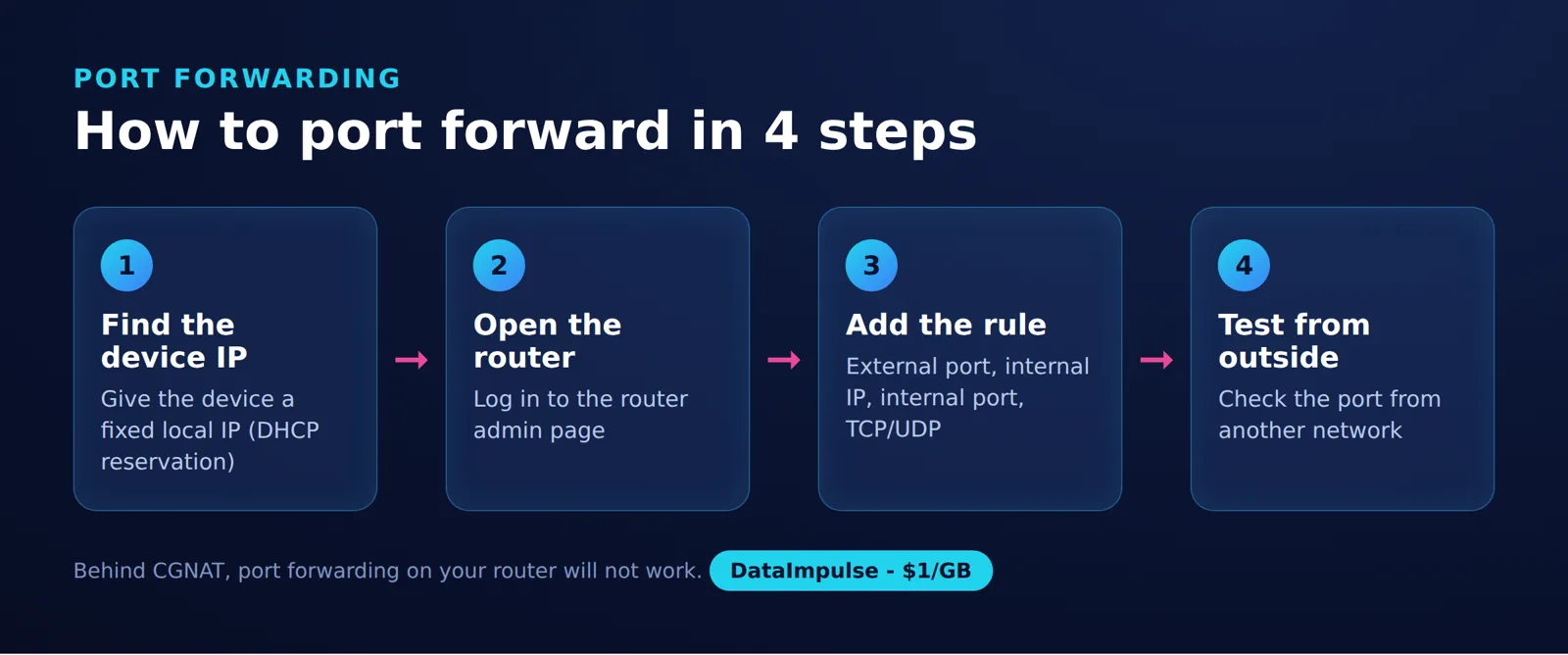
To forward ports, first make the service reachable on your LAN, then map one external port to its internal address, port, and protocol. Keep the rule narrow and record enough information to remove it later.
Step 1: Identify the router and server. Find the default gateway in your active network connection’s details and open its local administration interface. Record the server’s LAN IPv4 address separately from the router’s WAN address. Our guide to looking up an IP address explains the address checks.
Step 2: Stabilize the destination. Create a DHCP reservation for the server, or use a correctly configured static LAN address outside the dynamic allocation pool. A reservation helps prevent the rule from pointing to a different device after a lease change. If the reservation screen asks for a MAC address, see MAC addresses versus IP addresses.
Step 3: Confirm local access. Start the service and connect to its LAN address from another device. A service bound only to 127.0.0.1 is not listening on the server’s LAN address. Configure the application to listen on the intended interface and allow its specific port through the host firewall.
Step 4: Check the WAN address. Follow the decision tree below before creating the mapping. A correct local rule cannot compensate for an upstream NAT device that does not pass the traffic onward.
Step 5: Open the forwarding menu. In the ASUS interface covered by its official forwarding guide, go to WAN > Virtual Server/Port Forwarding, enable forwarding, and select Add profile. The guide is qualified for supported models after firmware 3.0.0.4.384.40000 and lists excluded models; it also requires a public WAN address for direct internet access (as of November 2026). Check your exact model before following that menu path.
Example: For an intentionally public HTTPS service listening at 192.168.1.50:443, the completed rule is:
| Rule field | Example value | Meaning |
|---|---|---|
| Service name | Home HTTPS | A descriptive label |
| External port | 8443 | The port clients contact |
| Internal IP address | 192.168.1.50 | The reserved server address |
| Internal port | 443 | The application’s listening port |
| Protocol | TCP | The transport for this example |
| Source IP | Blank | No source restriction for this public-service example |
| Rule state | Enabled | The mapping is active |
Use your actual server address. For restricted access, enter the authorized external source address instead of leaving the source unrestricted.
Step 6: Save and test externally. Confirm the saved rule matches the intended values. Connect from a separate network to the public address on port 8443, then verify the HTTPS application and certificate. Remove the mapping when the service is retired.
Check your WAN IP: CGNAT and double NAT
Compare your router’s WAN IPv4 address with the public IPv4 address observed from the same internet connection. A private or shared WAN address indicates that another routing or translation layer needs investigation.
Answer: A router rule cannot configure an ISP’s CGNAT. Inbound access needs a reachable public address, an upstream mapping, or a suitable tunnel.
Read the router’s internet-status page, then check the public IPv4 address from a device using that router. Temporarily disconnect any VPN or outbound proxy during the comparison, and compare IPv4 with IPv4. Different address families or different exit connections can produce misleading results.
- WAN IPv4 matches the observed public IPv4: Proceed with the local mapping and firewall checks. Matching addresses do not prove that inbound traffic is permitted.
- WAN IPv4 is private: Addresses in
10.0.0.0/8,172.16.0.0/12, or192.168.0.0/16are private ranges defined by RFC 1918. Inspect the upstream modem or router. - WAN IPv4 is shared address space:
100.64.0.0/10, covering 100.64.0.0 through 100.127.255.255, is reserved for shared address space by RFC 6598. This is a strong clue of carrier-side NAT; confirm the topology with your ISP. - WAN IPv4 differs but is neither private nor shared: Recheck the active WAN connection, VPN settings, and address family. Ask the ISP about upstream translation or routing before assuming CGNAT.
If you control both routers: With double NAT, map the outer router’s external port to the inner router’s WAN address, then map the inner router’s port to the server. Reserve both downstream destination addresses. Alternatively, use a supported bridge configuration to remove the extra routing layer, after checking which device will perform routing and firewall duties.
If the ISP controls the upstream NAT: Ask whether a reachable public IPv4 address or an inbound mapping is available and whether inbound connections are filtered. A static address is convenient but is not essential to port forwarding. Dynamic DNS can track a changing public address; it cannot remove CGNAT.
See our CGNAT explanation for the distinction between carrier translation and your own router’s settings.
How do you test a forwarded port externally?
Test from another network using the application’s actual protocol, then complete an application-level request. A successful TCP connection does not validate UDP or prove the application works.
Use a phone with Wi-Fi disabled, a hotspot, or an authorized remote computer. Testing your public address from inside the LAN can depend on NAT loopback, so a same-network result is not a substitute for an external check.
Example: From an external network, run curl --ipv4 --verbose --connect-timeout 10 https://YOUR_HOSTNAME:8443/, replacing YOUR_HOSTNAME with your service’s hostname. Confirm that its IPv4 address matches the router’s public IPv4 address. Check the TLS certificate and expected application response, then test authentication separately. The official curl documentation explains that --ipv4 requests only IPv4 addresses when resolving hostnames.
- Connection check: Did the TCP connection establish?
- Application check: Did the expected service respond correctly?
- Security check: Did certificate validation and authentication behave as intended?
- Protocol check: For UDP, did a valid application exchange receive the expected response?
Record the time, client network, public destination, external port, protocol, and result. A generic TCP port checker can help assess a TCP listener, but it cannot establish whether a game session or UDP service works.
A UDP service may ignore an invalid probe. Silence alone does not distinguish a closed port from filtering or an application that has nothing to return.
Why does the port still appear closed?
Use the 5-layer reachability check to locate the failure between the application and the external client. Change one condition at a time and repeat the same application-level test.
- Layer 1: Listener. Confirm that the process is running on the expected address, port, and transport. A localhost-only listener cannot receive traffic addressed to the machine’s LAN interface. Check whether a restart changed the configuration. On Windows, check the example HTTPS listener in PowerShell:
Get-NetTCPConnection -State Listen -LocalPort 443 | Select-Object LocalAddress,LocalPort,OwningProcess. A LocalAddress of127.0.0.1means loopback-only;0.0.0.0means all local IPv4 interfaces. A listening socket does not prove that the firewall permits access. See Microsoft’s Get-NetTCPConnection documentation for the command’s parameters. - Layer 2: Host firewall. Verify that the allow rule applies to the correct interface, network profile, protocol, port, and source. Keep the firewall enabled and adjust only the relevant rule.
- Layer 3: Router mapping. Check the destination address against the server’s current address. Confirm the external and internal ports, protocol, enabled state, and source restriction. Look for another rule or router service using the same external endpoint.
- Layer 4: Upstream network. Recheck the WAN address, double NAT, CGNAT, and ISP filtering. A correct rule on the inner router does not create a matching rule upstream.
- Layer 5: External client. Confirm that the client uses the current public address or hostname, the external port, and the correct protocol. Repeat from a second authorized network if the client network might restrict outbound traffic.
Interpret errors carefully. A timeout can indicate silent filtering, routing trouble, an incorrect destination, or an unavailable host. A refusal can come from a closed listener or an actively rejecting firewall. Neither message identifies the failing device by itself.
Use application and firewall logs to connect each attempt with an observation. Where available, packet observations at the router and server can show whether traffic arrived and whether replies left.
If transport connectivity succeeds but login or TLS fails, investigate the application next. Opening more ports is not a general remedy for an application error. Our explanation of why ports are blocked covers related filtering distinctions.
Is port forwarding safe? UPnP and DMZ explained
Port forwarding increases the exposure of the selected service, so its risk depends on patching, authentication, access restrictions, and the service itself. An unusual external port is not a substitute for these controls.
Keep router administration, storage management, and other sensitive control interfaces private. For example, use authenticated private network access to administer a home computer rather than opening its desktop interface to every internet source. Microsoft’s remote-access guidance recommends a VPN over exposing the PC directly.
UPnP: Automatic mapping can allow applications to request inbound access without a manually entered rule. Disable it when unnecessary and review mappings when it is enabled. The Canadian Centre for Cyber Security’s UPnP guidance explains the associated exposure and recommends disabling unused functionality.
DMZ host: A consumer router’s DMZ-host setting is a broad inbound exposure mechanism, not a shortcut for safely opening one service. Do not use it as a permanent fix for an unexplained forwarding failure. This setting should not be confused with a separately segmented perimeter network.
- Expose only the service and transport that external clients actually need.
- Install supported router and application updates.
- Use strong authentication and encrypted application protocols.
- Restrict source addresses when the audience is known.
- Keep the host firewall enabled and review access logs.
- Remove stale mappings and disable unnecessary remote management.
These precautions align with the Singapore Cyber Security Agency’s router security advisory, which recommends limiting forwarding to necessary services and restricting connecting IP addresses.
When should you forward ports for gaming, Plex, and homelabs?
Forward ports when external clients need to reach a service you intentionally host. Merely using an online game, media application, or homelab computer does not establish that you need an inbound rule.
Gaming: Distinguish joining another server from hosting one. For a hosted server, check the exact game edition, server configuration, and required transport in its official documentation. Avoid universal gaming port lists and unnecessary port ranges. Port forwarding changes reachability; it does not guarantee lower latency.
Plex: The documented manual mapping uses the chosen external TCP port and internal TCP port 32400 (as of November 2026). In Settings > Server > Remote Access, enable Manually specify public port and enter the external port that matches the router rule. Follow the official Plex remote-access troubleshooting guide, including its double-NAT checks.
Port forwarding provides network connectivity; remote video playback has separate subscription requirements. On affected Plex apps, the viewer needs an active Plex Pass or Remote Watch Pass, unless the server administrator has an active Plex Pass. These restrictions do not apply to music in Plexamp or photos in Plex Photos. See Plex’s Requirements for Remote Playback of Personal Media.
Homelabs: Separate public applications from administration. A public website may justify a narrow inbound mapping, while a hypervisor console, database administration screen, or backup dashboard usually calls for private access. Record the owner and purpose of each rule so temporary experiments do not become forgotten exposure.
For multiple internal services, decide which clients need each one. A single external address, port, and protocol normally identifies one forwarding destination; application-aware routing requires an additional service such as a reverse proxy.
Port forwarding vs proxy vs VPN and SSH tunnels
Choose by connection direction and audience: router forwarding creates an inbound mapping, a forward proxy handles client egress, and a private-access VPN connects authorized clients to a network. SSH tunnels carry selected connections through an authenticated encrypted session.
A reverse proxy accepts requests on behalf of backend services, but it still needs a reachable entry point. HTTP intermediary roles are defined in RFC 9110. A proxy connection does not imply that every network hop is encrypted.
A private-access VPN needs an established path between its participants. A commercial VPN used for internet egress should not be assumed to offer inbound mappings; check the chosen service’s official documentation for that specific requirement. The distinction between personal internet access and organizational network access is explained in Cloudflare’s VPN overview.
| Approach | Use when | Avoid when |
|---|---|---|
| Router forwarding | Public clients need access to a hosted service. | Access must remain private, or upstream NAT blocks ingress. |
| Forward proxy | An application needs outbound requests through an intermediary. | Clients need inbound access to a home service. |
| Private-access VPN | Authorized users need private network access. | Public visitors must connect without joining the VPN. |
| SSH tunnel | Selected TCP connections need an encrypted tunnel. | General UDP transport is required, or no SSH server is reachable. |
Competitor data: taken from each provider’s official pricing and documentation pages linked in this article, collected on November 10, 2026.
Technical sources: NAT translation, HTTP intermediaries, VPN access models, and SSH connection forwarding. Sources checked on November 10, 2026.
SSH local forwarding accepts a connection at the client side and carries it through the SSH session. Remote forwarding requests a listener at the server side, subject to server policy. An outbound SSH session can therefore form part of an ingress design through a reachable remote server, but listener binding and access controls still determine who can connect.
For outbound access decisions, see our proxy versus VPN comparison.
How can you verify router forwarding with a controlled test?
To check whether the manual rule controls access, keep the application and host firewall unchanged. From the same external client, repeat the IPv4 HTTPS request with the rule disabled and enabled, using a new connection each time. If access works with the rule disabled, inspect UPnP mappings, DMZ-host settings, and other ingress paths. Remove temporary mappings afterward.
Use the external destination for this check: RFC 1122 defines loopback addresses as internal to the host.
Frequently Asked Questions
What is port forwarding?
It directs traffic arriving at a selected router endpoint to an internal service. On a home IPv4 network, the router typically translates the public destination address and port into the server’s private address and listening port.
Should I forward TCP or UDP?
Use the transport specified by the application’s server documentation and configuration. If it needs both, create the necessary mappings deliberately and test each transport separately.
How can I test a forwarded port from outside my network?
Disconnect a phone from Wi-Fi or use another authorized internet connection, then contact the public destination and external port. Complete a normal application operation as well as checking connectivity. A TCP-only check says nothing about UDP reachability.
Why does forwarding fail behind CGNAT or double NAT?
Traffic must pass through an upstream translation layer before reaching your router. If you control that device, configure the corresponding mapping or remove the extra routing layer through a supported setup. If the ISP controls it, ask about reachable public addressing or use a suitable tunnel.
Is port forwarding safe?
It can be appropriate for a maintained service intended for external access, but it increases exposure. Limit the mapping, secure the application, and remove the rule when it is no longer needed. Keep administrative interfaces behind private access controls.
Does a timeout prove that my firewall blocked the port?
No. An incorrect address, unavailable host, routing problem, or silent filter can produce a similar outcome. Compare listener settings, rules, and logs across the connection path before attributing the failure to one device.
Do I need a static public IP to forward ports?
No, a reachable dynamic public address can work. External clients need its current address, which dynamic DNS can help track. Neither a hostname nor a static LAN reservation removes upstream CGNAT.
Why does 127.0.0.1:8765 work locally but not from another computer?
The address 127.0.0.1 always refers to the computer making the connection. A service listening only there is local to that host. Remote access requires the service to listen on an appropriate network interface and the intervening access rules to permit the connection.
Need outbound proxy traffic instead?
DataImpulse’s outbound proxies do not forward inbound ports or expose a home server through CGNAT. If your application instead needs outbound proxy requests, explore our residential proxies.
Last updated: November 10, 2026.

 State/City/Zip/ASN Targeting




